ShellFolderFix - Manage folder window positions/size

I hope this works. I joined this forum just to thank Tweaker for his program that saves folder settings. I've never posted before.
Thank you, Tweaker. That was such a generous thing for you to do. You have make Win7 useable now. Well done!!:D
 

My Computer

OS
Windows 7 Ultimate
CPU
AMD Athlon 64 X2 4200
Motherboard
Asus A8N SLI Deluxe
Memory
2GB
Graphics Card(s)
2 Nvidia GeForce 6600 GT's
Sound Card
MoBo
Monitor(s) Displays
Hp W2408 LCD
Hard Drives
WD 320GB
WD 1TB
PSU
Antec 500W
Cooling
Fans only
The difference between them is that window size/position will be saved or not. For example with the Use as is option, if you open Q:\ first and then navigate to q:\aaa\bbb\ccc\ddd, then ddd will have the window size/position of Q:\, so next time you click your ddd desktop shortcut it will open like that.

I think that this is exactly what I want. As English is not my first language I don't understand computer terminology that good... I had set it to Update window, no wonder it was jumpy....

Thanks for your help and kudos to you writing a program like this!!

Lena

I take it back... When I use the setting for Use as is and first open my shortcut for q:\aaa\bbb\ccc\ddd and position it where I want it, all folders also under q:\ ends up in the same position and with the same size. If I change one of them, it will go back to the first size and position the next time I open the short-cut.

I usually work with 3-4 folders open at the same time. One of the folders should be wide and not high at all at the top of my screen. The other 2-3 should be positioned at the bottom side by side. With the setting Use as is all 4 folders end up on top of each other at the bottom, where I opened the first folder.

I would like to be able to set properties for each shortcut, and if I wander away in my folder and "accidentaly" end up in a folder that also has a shortcut on my desk-top, the position and size should be as the folder I started with. But I still want the folders to end up in the right size, side by side (or at the top) when I click on each shortcut.

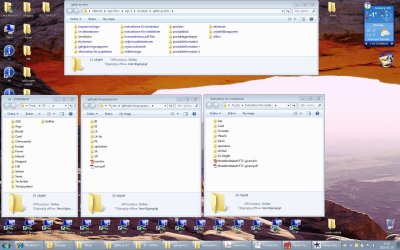
It's hard to explain how I work... I am enclosing a screenshot of 4 open folders, all shortcuts opened directly from the row on the bottom of my screen, all originating in the drive q:

With the setting Use as is all folders (size and position) are as the one on the bottom left, the one I opened first.

Lena

Lena

 

Attachments

  • clipboard.JPG
    clipboard.JPG
    280.1 KB · Views: 139

My Computer

OS
Windows 7
I would like to be able to set properties for each shortcut, and if I wander away in my folder and "accidentaly" end up in a folder that also has a shortcut on my desk-top, the position and size should be as the folder I started with. But I still want the folders to end up in the right size, side by side (or at the top) when I click on each shortcut.

Have you tried "Temporarily use window as is"? What that will do is that it will not update the associated window settings for folders you subsequentially navigate too. That does sound more like what you want.

So if you use a shortcut for "ddd" for example, the window will open with the window size/pos assigned to "ddd". Should you however navigate to "ddd" by first opening Q:\, "ddd"'s window settings will remain unaffected, so next time you open the shortcut it will open correctly. (If ddd is already open in a "temp" window, clicking the shortcut will only bring that window to front, there's no way to change that, but if a new window is opened it will be the original size/pos)
 

My Computer

OS
w7-64, w2k
Just wanted to say thanks again for this software, Tweaker.

I've just installed the software on a second system - my new x64 Windows 7 Dell workstation - and it works like a champ. Even though the effect is just a small change to the default behavior it really makes computing with Windows 7 a more pleasant experience.

Even though it's a fast workstation I do sometimes very briefly see the Explorer window outline in the default position before it moves to the proper position (especially in an RDP session), but as before I can start it minimized to avoid that.

You da man!

-Noel
 

My Computer

Computer Manufacturer/Model Number
Dell Precision Workstation 490
OS
Windows 7 x64
CPU
2 x Dual Core Xeon 3.2 GHz
Motherboard
Dell
Memory
12 GB
Graphics Card(s)
ATI Radeon HD 4670
Sound Card
Onboard
Monitor(s) Displays
Dual Dell 20.1" LCD
Hard Drives
Dual 500 GB, Raid 0
PSU
Dell
Case
Dell
Cooling
Dell
Thanks, Tweaker. There are three executables here. 'Fix32 and 'Fix64 seem pretty obvious, but what is the 3d one: ShellFolderFixSetup.exe ?
 

My Computer

Computer Manufacturer/Model Number
HP Pavilion DV8408
OS
Windows 7
CPU
AMD Tuion II Ultra Mobile M600 dual core 2.4 GHz
The 32 and 64 ones are installer-less distributions, the "setup" one is a installer based distribution (for both 32 and 64-bit)
 

My Computer

OS
w7-64, w2k
When working with multiple monitors, if you disable or disconnect the monitor the folder was last opened in the folder will still open in it's last location (which is no longer accessible unless the monitor is reconnected).
 

My Computer

OS
Windows 7
When working with multiple monitors, if you disable or disconnect the monitor the folder was last opened in the folder will still open in it's last location (which is no longer accessible unless the monitor is reconnected).

Maybe something I can look into in future versions but probably not anytime too soon as I don't have a multi-monitor setup. I went out of my way to specifically use a windows function that MS claims following about:

MS said:
would result in a window that is completely off the screen, the system will automatically adjust the coordinates so that the window is visible, taking into account changes in screen resolution and multiple monitor configuration.

go figure nothing ever works as they advertise ;)
 

My Computer

OS
w7-64, w2k
Workaround for Off-Screen Window

Tweaker, perhaps that function moves one column of pixels onto the screen. Why they wouldn't make all 4 corners of the rectangle visible is anyone's guess.

You could use the GetSystemMetrics(SM_CXVIRTUALSCREEN) and GetSystemMetrics(SM_CYVIRTUALSCREEN) calls to make sure you don't try to move something off-screen.

For now, here's a workaround to bring back a window that ends up off screen.

1. Make the window current (e.g., with the Taskbar or Alt-Tab).
2. Hold down the Alt key and press the Spacebar once.
3. Press the M key once (stands for Move).
4. Press an arrow key (any of the four will work) once.
5. Without clicking anything, move the mouse to bring the window onto the screen

Hope this helps!

-Noel
 

My Computer

Computer Manufacturer/Model Number
Dell Precision Workstation 490
OS
Windows 7 x64
CPU
2 x Dual Core Xeon 3.2 GHz
Motherboard
Dell
Memory
12 GB
Graphics Card(s)
ATI Radeon HD 4670
Sound Card
Onboard
Monitor(s) Displays
Dual Dell 20.1" LCD
Hard Drives
Dual 500 GB, Raid 0
PSU
Dell
Case
Dell
Cooling
Dell
You could use the GetSystemMetrics(SM_CXVIRTUALSCREEN) and GetSystemMetrics(SM_CYVIRTUALSCREEN) calls to make sure you don't try to move something off-screen.

The trouble, I think, is that the screen space isn't necessarily rectangular. If you have two screens with different resolution for example, or an extreme case 4 monitors in a T shape. So a simple rectangular check to see if a window is visible isn't enough, you'd have to iterate through all displays and then check against each. Something which by the sound of the description should've been taken care of by that function.

For now, here's a workaround to bring back a window that ends up off screen.
....
I think you can also bring up the window menu by shift + right-click on the window in the taskbar, and select move there. To avoid the "blind navigation" :)
 

My Computer

OS
w7-64, w2k
Ok I just manually forced a databse entry to be outside the screen, and then opened that folder. This emulates what would happen if a folder was placed on another screen in a previous session.

As it turns out the windows function works just fine, it makes sure the entire windows is on the (available) screen, so something else must be happening. Is the folder you have problems with in some special state, like maximized or minimized? (just tried maximized and it seems to be handling that correctly too)
 

My Computer

OS
w7-64, w2k
I'm wondering if the removal of a monitor isn't quite the same as never having one configured.

I have some recent experience with that, as I was configuring a new computer and was moving a monitor cable around while the new and old systems were on... Windows makes some effort to remember how the system was set up when it had two monitors, because it specifically returns to that setup when you plug the monitor back in.

There may be no easy workaround to that issue.

For what it's worth, other people are reporting windows opening off-screen with Windows 7. Could be a shortcoming with that kind of functionality in general with the new OS.

-Noel
 

My Computer

Computer Manufacturer/Model Number
Dell Precision Workstation 490
OS
Windows 7 x64
CPU
2 x Dual Core Xeon 3.2 GHz
Motherboard
Dell
Memory
12 GB
Graphics Card(s)
ATI Radeon HD 4670
Sound Card
Onboard
Monitor(s) Displays
Dual Dell 20.1" LCD
Hard Drives
Dual 500 GB, Raid 0
PSU
Dell
Case
Dell
Cooling
Dell
A new version is available. Aside from a couple of smaller fixes (see readme), there's now a workspace management dialog, that gives access to all workspaces (if there's more than 16) and also allows deletion of workspaces.

Also new is the ability to check online if a new version is available, the button is found in the options/main dialog. There's however no option to let it do this automatically, as I wanted to avoid systematic requests to the server and it would also complicate the implementation and introduce potential issues I'd rather not waste any time on.
 

My Computer

OS
w7-64, w2k
Thanks for your ongoing work on this.Should we uninstall/reinstall or is that taken care of automatically?

Thanks again!

-Noel
 

My Computer

Computer Manufacturer/Model Number
Dell Precision Workstation 490
OS
Windows 7 x64
CPU
2 x Dual Core Xeon 3.2 GHz
Motherboard
Dell
Memory
12 GB
Graphics Card(s)
ATI Radeon HD 4670
Sound Card
Onboard
Monitor(s) Displays
Dual Dell 20.1" LCD
Hard Drives
Dual 500 GB, Raid 0
PSU
Dell
Case
Dell
Cooling
Dell
Just over-installing should work, at least it did when I tried it during my early installer tests. However exit the application before running the installer, increases your chances to avoid having to reboot :)
 
Last edited:

My Computer

OS
w7-64, w2k
Thanks

Tweaker -
Just a note of thanks: Once I found your ShellFolderFix, I began moving from XP to 7 for real. Otherwise, it was just too painful!

PaulJayD
 

My Computer

OS
windows xp, 7
Back
Top