
You are using an out of date browser. It may not display this or other websites correctly.
You should upgrade or use an alternative browser.
You should upgrade or use an alternative browser.
Shift-Right click in File explorer is disabled
- Thread starter Abdu
- Start date

Works fine here:
Right click:

Shift Right click:

Right click:
Shift Right click:
My Computer
- Computer Manufacturer/Model Number
- Samsung NP530U4B-S02IN
- OS
- Windows® 8 Pro (64-bit)
- CPU
- Intel® Core™ i5 Processor 2467M (1.60GHz, 3MB L3 Cache)
- Motherboard
- Samsung Electronics
- Memory
- 6GB DDR3 System Memory at 1,333MHz (on BD 4GB + 2GB x 1)
- Graphics Card(s)
- AMD Radeon™ HD7550M 1GB DDR3 (Ext. Graphic)
- Sound Card
- Realtek High Definition Audio
- Monitor(s) Displays
- 35.56cm (14.0) SuperBright 300nit HD LED Display
- Screen Resolution
- 1366x768
- Hard Drives
- 1TB S-ATA II Hard Drive (5400RPM) with ExpressCache 16GB SSD
- Internet Speed
- sucks
- Antivirus
- Microsoft Security Essentials
- Browser
- Google Chrome (Sync enabled)

Check this out.
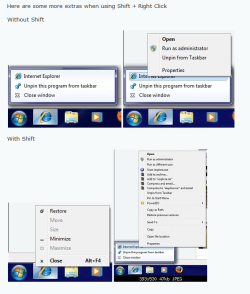
My Computer
- Computer Manufacturer/Model Number
- HP M9077c
- OS
- Windows 7 Home Premium 64bit
- CPU
- Intel(R)Core(TM)2 quad [email protected] 2.39GHz
- Motherboard
- ASUSeK
- Memory
- 6GB DDR2 6400
- Graphics Card(s)
- GeForce 8500/512MB
- Sound Card
- Realtek High Def Audio
- Monitor(s) Displays
- HP w2408 LCD 24" widescreen
- Screen Resolution
- 1920x1200
- Cooling
- 6 pack of Bud
- Keyboard
- MS wireless Inteli
- Mouse
- MS wireless Inteli
Do you remember when it stopped working?
My Computer
- Computer Manufacturer/Model Number
- Samsung NP530U4B-S02IN
- OS
- Windows® 8 Pro (64-bit)
- CPU
- Intel® Core™ i5 Processor 2467M (1.60GHz, 3MB L3 Cache)
- Motherboard
- Samsung Electronics
- Memory
- 6GB DDR3 System Memory at 1,333MHz (on BD 4GB + 2GB x 1)
- Graphics Card(s)
- AMD Radeon™ HD7550M 1GB DDR3 (Ext. Graphic)
- Sound Card
- Realtek High Definition Audio
- Monitor(s) Displays
- 35.56cm (14.0) SuperBright 300nit HD LED Display
- Screen Resolution
- 1366x768
- Hard Drives
- 1TB S-ATA II Hard Drive (5400RPM) with ExpressCache 16GB SSD
- Internet Speed
- sucks
- Antivirus
- Microsoft Security Essentials
- Browser
- Google Chrome (Sync enabled)
Why don't you just pin the dos command prompt to the startup window?
My Computer
- Computer Manufacturer/Model Number
- HP M9077c
- OS
- Windows 7 Home Premium 64bit
- CPU
- Intel(R)Core(TM)2 quad [email protected] 2.39GHz
- Motherboard
- ASUSeK
- Memory
- 6GB DDR2 6400
- Graphics Card(s)
- GeForce 8500/512MB
- Sound Card
- Realtek High Def Audio
- Monitor(s) Displays
- HP w2408 LCD 24" widescreen
- Screen Resolution
- 1920x1200
- Cooling
- 6 pack of Bud
- Keyboard
- MS wireless Inteli
- Mouse
- MS wireless Inteli
In search box left corner, type in CMD, right click and select pin to taskbar.
Let me know if you need more help.
Let me know if you need more help.
My Computer
- Computer Manufacturer/Model Number
- HP M9077c
- OS
- Windows 7 Home Premium 64bit
- CPU
- Intel(R)Core(TM)2 quad [email protected] 2.39GHz
- Motherboard
- ASUSeK
- Memory
- 6GB DDR2 6400
- Graphics Card(s)
- GeForce 8500/512MB
- Sound Card
- Realtek High Def Audio
- Monitor(s) Displays
- HP w2408 LCD 24" widescreen
- Screen Resolution
- 1920x1200
- Cooling
- 6 pack of Bud
- Keyboard
- MS wireless Inteli
- Mouse
- MS wireless Inteli

Welcome to SevenForums. If you have not already tried this then it may help you. Good luck to you with your problem.I don't understand the point of telling me it works on your computer. It doesn't work on mine and I am looking for a fix. Not proof it works on other computers!
http://www.sevenforums.com/tutorials/1538-sfc-scannow-command-system-file-checker.html
My Computer
- Computer Manufacturer/Model Number
- Gateway GT5692
- OS
- Windows 7 Ulti. x64
- CPU
- AMD Phenom 8450 triple-core 2.10 ghz
- Memory
- 4GB
- Graphics Card(s)
- ATI Radion HD 3200
- Monitor(s) Displays
- Gateway FPD1775W
- Screen Resolution
- 1280x720
- Hard Drives
- 465.6613 Gibibytes
skitchbeatz
New member
- Local time
- 4:43 AM
- Messages
- 5
did you ever find a fix for this? mine was working two days ago and has stopped now.
Actually, it works on the desktop but not in folders
Actually, it works on the desktop but not in folders
My Computer
- OS
- Windows 7 RC1
Similar threads
- Replies
- 4
- Views
- 2K
- Replies
- 7
- Views
- 15K
- Replies
- 3
- Views
- 2K
- Replies
- 12
- Views
- 5K