Shockwave flash ridiculous memory usage.

Zephandrypus

New member
Local time
7:24 PM
Messages
8
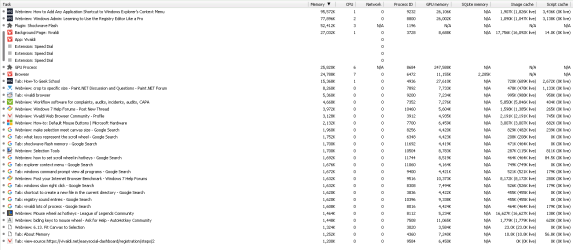
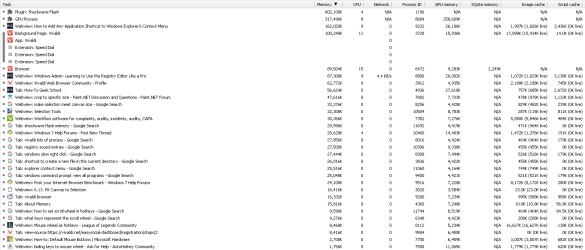
In every single browser, flash has always been the biggest problem. I often had one or two GB of memory used up by Firefox or Chrome, even after getting a TabUnloader and having no YouTube videos open. I recently switched to Vivaldi, a power user browser, and it has a task manager that lets me see the usage of all the plugins and tabs. I took a couple screenshots of the task manager and attached them below. I'll give a few events and noticed changes in RAM usage.

1. Shockwave flash using 612 MB, GPU process using 300 MB, computer RAM usage is at 84%.
2. Ran a quick RAM clean with Advanced SystemCare; flash dropped to 50 MB and computer dropped to 72%.
3. Idled a bit while making post and shockwave rose to 300 MB, GPU dropped to 50 MB, and computer dropped to 64%.
4. Ran another RAM clean; flash dropped to 50 MB again, GPU about the same, and computer dropped to 56%.
5. Shockwave rose to 200 MB and GPU rose to 70 MB after a few more minutes of idle.
6. Ran one last RAM clean; flash dropped to 50 MB for the third time, GPU dropped to 40 MB, and computer dropped to 52%.

I think you get the point. Throughout all this, I have not changed anything in the other tabs and have not had any YouTube videos playing. Whenever I have looked online for this kind of issue, all I have found is "problems with Chrome memory leak", and some stuff about flash having a bug that's going to be "fixed" in the next update (same thing in posts 6 months or so apart).

Is there any alternative to Flash? As far as I have seen, Flash is installed, you update it occasionally, and it silently hogs your memory. No options, no configuration, no stats for nerds, etc. It doesn't seem very power-user friendly.
 

Attachments
  • VivaldiTaskManager.png
    VivaldiTaskManager.png
    63.9 KB · Views: 4
  • PostRAMClean.png
    PostRAMClean.png
    63.7 KB · Views: 3

My Computer

Computer type
Laptop
Computer Manufacturer/Model Number
Toshiba
OS
Windows 7 Professional 64-bit SP1
CPU
Intel Core i5 2520M @ 2.50 GHz
Motherboard
Toshiba Portable PC
Memory
4.00GB Single-Channel DDR3 @ 664MHz
Graphics Card(s)
Intel HD Graphics 3000
Sound Card
Realtek High Definition Audio
Monitor(s) Displays
Internal LCD
Screen Resolution
1600x900@60Hz
Hard Drives
298 GB HDD Toshiba ATA
Mouse
Anker 8200 DPI
Internet Speed
120 mbps
Antivirus
MalwareBytes, Microsoft Security Essentials
Browser
Vivaldi

My Computer

Computer Manufacturer/Model Number
HP, Dell, Gateway, Toshiba - 4 laptops and 2 desktops
OS
Vista, Windows7, Mint Mate, Zorin, Windows 8
CPU
from 1.6GHz Duo to i7
Monitor(s) Displays
2x HP w2207
Hard Drives
5x HDD, 7x SSD, 12x Externals
Keyboard
with trackball - no mices
Mouse
Trackball mice
Internet Speed
DSL 6000
Honestly, GPU process needs a certain amount of RAM to work, more VRAM than RAM but you get the idea. If you watch videos that need tha fash plugin, it's almost guaranteed it will take good amounts of memory depending of the content (HD, HD@60FPS, Full HD...).

Some problems with flash in Frefox, however, can be mitigated if you disable protected mode (honestly, that thing does nothing but messing with flash performance, plugin proceses are isolated anyways from main browser)
https://support.mozilla.org/en-US/kb/adobe-flash-protected-mode-firefox

For chrome, I dunno if this cold help mitigate the RAM usage, but you can access about:flags, and look for "Automatic tab discarding" setting, so you ca enable it and restart. See if Chrome uses less memory, seems to work for me using the portable version from time to time...
 

My Computer

Computer type
PC/Desktop
Computer Manufacturer/Model Number
Assembled Desktop PC
OS
Microsoft Windows 7 Home Premium SP1 64-bit Build 7600
CPU
AMD Athlon 64 X2 5200+ Dual Core CPU @ 2.7 Ghz (Brisbane)
Motherboard
PCChips A13G+ v3.0
Memory
2x2 GB DDR2 PC-5300 (667 Mhz) Kingston ValueRAM
Graphics Card(s)
XFX ATI Radeon HD 4350 GPU (512 MB + 512 MB HM)
Sound Card
Realtek High Definition Audio Driver ALC660 @ MCP61S
Monitor(s) Displays
HP S2031 20" LED HD Widescreen Display Monitor
Screen Resolution
1600 x 900 px
Hard Drives
Maxtor Diamond Max 10 (160 GB, 7200 RPM, SATA-II Hard Disk)
Western Digital Scorpion Blue (250 GB, 5400 RPM, SATA-II External Hard Disk - Personal Data)
Toshiba MQ01ABD050 (500 GB, 5400 RPM, SATA-II External Hard Disk - Software & ISOs)
PSU
Pixxo Transformer 850W 80+ Certification PSU
Case
Compaq 5BW353 Case
Cooling
Many solutions, see other info...
Keyboard
Green Leaf (Mitzu) Standard Keyboard
Mouse
Microsoft USB Lasser Pointing Device
Internet Speed
10 MB
Antivirus
Avast Antivirus Free
Browser
Firefox, Chrome, Internet Explorer
Other Info
Windows Experience Index Result: 3.8 of 7.9.

Cooling solutions:
- AVC @ 2000/5000 RPM Copper Heatpipes (For Athlon 64 X2 6000+ CPU used in an Athlon 64 X2 5200+)
- Rear Fan 80 mm @ 2700 RPM for heat extraction
- Manhatan Chipset Cooler @ 4700/7200 RPM (For nVidia Chipset in MoBo)
- Foxconn @ 2500 RPM (Old Pentium III heatsink fan) in XFX ATI Radeon HD 4350
~~~
2. Ran a quick RAM clean with Advanced SystemCare; flash dropped to 50 MB and computer dropped to 72%.
~~~
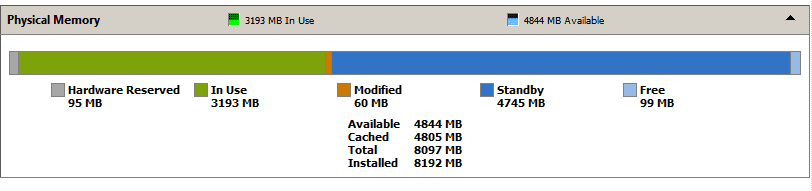
If you look at RAM usage with a tool like RAMMap, you will probably find that Flash only had 50MB of RAM locked. The other ~560MB was free for other apps to use. Advanced SystemCare asked for RAM and then release it. There is rarely a good reason to free up RAM like that. Let Windows Memory management do its job.

It is best to have a small amount of free RAM:

ram.PNG
^^^ Resource Monitor ^^^
 

My Computer

Computer type
Laptop
Computer Manufacturer/Model Number
Employer provided Dell Latitude
OS
W7 Pro SP1 64bit
CPU
i7
Memory
8GB
Graphics Card(s)
Intel HD Graphics
Hard Drives
crappy SSD
Antivirus
Employer mandated Symantec Endpoint Protection
Browser
Pale Moon 64bit, IE11 64bit & Chrome 64bit

My Computer

Computer type
PC/Desktop
Computer Manufacturer/Model Number
Custom assembled by me :}
OS
Win-7-Pro64bit 7-H-Prem-64bit
CPU
i7-5930K 2nd i9-9940x both water blocked VRM's too
Motherboard
ASUS SABERTOOTH X99 2nd ASUS x299 Apex
Memory
Trident-z 3200C14 2nd Trident-z 3600C16
Graphics Card(s)
EVGA 1080ti ftw3 2nd Titan Xp both water blocked
Sound Card
Built-in Realtek
Monitor(s) Displays
1-AOC G2460PG 24"G-Sync 144Hz/ 2nd 1-ASUS VG248QE 24" 144Hz
Screen Resolution
1920 x 1080 144Hz
Hard Drives
2-Samsung M.2 Evo & Evo Plus
2-Samsung 850 EVO 500GB SSD's/ 3-2.5 W.D. Black 1tb-&3-1tb/3-3.5 WD Black 1tb hdd's
PSU
EVGA SuperNOVA 1000-P2 2nd 1200-P2
Case
2-Corsair Obsidian Series 450D Black ATX Mid Tower
Cooling
Custom water loops
Keyboard
Logitech G710+/ 2nd Logitech G910
Mouse
2-RedDragon M901 Perdition 16400 dpi Gaming mouse = wired
Internet Speed
Comcast Ping 19ms 89.31mbps download speed 6.12mbps upload
Antivirus
Malwarebytes Pro/ Superantispyware Pro
Browser
FireFox & Pale moon
Other Info
2nd ASUS X299 Apex/Intel i9-9940x with Custom water loop/7H-Prem-x64/Corsair 450D case/Ram Trident-z 3600C16 4x8gb / Samsung970Evo plus 500gb SSD/Dual ssd EZ swap evo/PSU EVGA SuperNova 1200w-P2 80+Platinum/GPU Titan Xp /8-ML-140 on push-pull on 2-280GTX rads
Hi,
I haven't had flash installed in quite a long time html5 is fine to me
YouTube

I did find this pretty in tune tutorial, I wouldn't click on anything though,
How to configure your Flash Player settings for maximum privacy and security

Probably he uses Flash because of hardware acceleration issues... pretty more common that I would think...

@Zephandrypus : Could you please open Firefox, type about:support in adress bar, copy data to clipboard and post here. Also, close FF, open Chrome or Vivaldi, type about:gpu, copy that to clipboard and post that one too. Just to see if your system is capable of hardware acceleration.

If it does, you could get rid of flash for Youtube, even my system, that is pretty much 5 or 6 years old can play HTML5 fairly decent, I bet yours can. But post both pages from both browsers to see...
 

My Computer

Computer type
PC/Desktop
Computer Manufacturer/Model Number
Assembled Desktop PC
OS
Microsoft Windows 7 Home Premium SP1 64-bit Build 7600
CPU
AMD Athlon 64 X2 5200+ Dual Core CPU @ 2.7 Ghz (Brisbane)
Motherboard
PCChips A13G+ v3.0
Memory
2x2 GB DDR2 PC-5300 (667 Mhz) Kingston ValueRAM
Graphics Card(s)
XFX ATI Radeon HD 4350 GPU (512 MB + 512 MB HM)
Sound Card
Realtek High Definition Audio Driver ALC660 @ MCP61S
Monitor(s) Displays
HP S2031 20" LED HD Widescreen Display Monitor
Screen Resolution
1600 x 900 px
Hard Drives
Maxtor Diamond Max 10 (160 GB, 7200 RPM, SATA-II Hard Disk)
Western Digital Scorpion Blue (250 GB, 5400 RPM, SATA-II External Hard Disk - Personal Data)
Toshiba MQ01ABD050 (500 GB, 5400 RPM, SATA-II External Hard Disk - Software & ISOs)
PSU
Pixxo Transformer 850W 80+ Certification PSU
Case
Compaq 5BW353 Case
Cooling
Many solutions, see other info...
Keyboard
Green Leaf (Mitzu) Standard Keyboard
Mouse
Microsoft USB Lasser Pointing Device
Internet Speed
10 MB
Antivirus
Avast Antivirus Free
Browser
Firefox, Chrome, Internet Explorer
Other Info
Windows Experience Index Result: 3.8 of 7.9.

Cooling solutions:
- AVC @ 2000/5000 RPM Copper Heatpipes (For Athlon 64 X2 6000+ CPU used in an Athlon 64 X2 5200+)
- Rear Fan 80 mm @ 2700 RPM for heat extraction
- Manhatan Chipset Cooler @ 4700/7200 RPM (For nVidia Chipset in MoBo)
- Foxconn @ 2500 RPM (Old Pentium III heatsink fan) in XFX ATI Radeon HD 4350
Back
Top