Shortcut Arrow - Change, Remove, or Restore

How to Change, Remove, or Restore the Shortcut Arrow Overlay Icon in Windows


   Information
This tutorial will show you how to change, remove, or restore the default shortcut arrow overlay on all shortcut icons in Vista, Windows 7, and Windows 8.

You must be logged in as an administrator to be able to do the steps in this tutorial.

   Warning
Removing the shortcut arrow will make it harder to tell which files are shortcuts or not.

You can still tell by right clicking or press and hold on the file, and click/tap on Properties to see if you have a Shortcut tab or not.


OPTION ONE

Change Shortcut Arrow using "Vista Shortcut Overlay Remover"


1. If you have not already, click/tap on the Download button below to download the Vista Shortcut Overlay Remover (Vista Shortcut Overlay Manager) program below for the 32-bit or 64-bit Windows you have installed. Save the .msi file to your desktop, and install it.
32-bit (x86) Windows

Download


64-bit (x64) Windows

Download


2. Double click/tap on the program's shortcut to run the program.

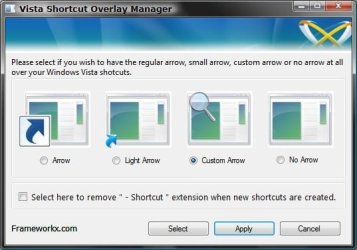
3. To Change, Restore, or Remove the Arrow for All Shortcuts
A) Select (dot) the arrow option you want for the shortcut arrow. (See screenshot below)
NOTE: If you selected Custom Arrow to change the shortcut arrow, then click on Select and navigate to and choose a ICO (icon) file you have downloaded to use as the shortcut arrow.
4. To Remove the "Shortcut" Name from All Shortcuts
NOTE: See also: http://www.sevenforums.com/tutorials/804-shortcut-extension-remove-restore.html
A) Check the box to also remove the - Shortcut name extension for new shortcuts that are created.
5. Click/tap on Apply.
Frameworkx.jpg
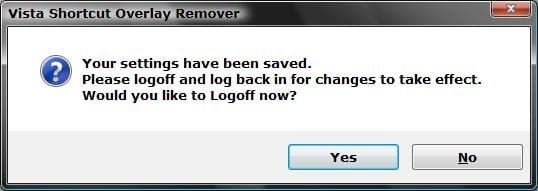
6. Click/tap on Yes to log off to apply the changes. (See screenshot below)
NOTE: If you like, you could also just restart explorer instead to apply your changes.
Logoff_Confirmation.jpg
7. Log back on and your done.


   Warning
If you used the Light Arrow or No Arrow option and uninstall "Vista Shortcut Overlay Remover", then they will be undone the next time you log off/on or restart the computer/explorer.

The Arrow (default) and Custom Arrow options will not be undone if you uninstall "Vista Shortcut Overlay Remover".


OPTION TWO

To Change Shortcut Arrow Overlay Icon in Registry Editor


1. Press the Windows + R keys to open the Run dialog, type regedit, and press Enter.

2. In regedit, navigate to the location below:
NOTE: If Shell Icons it is not in the left pane under Explorer, right click on Explorer, and click on New and Key. Type Shell Icons for the new keys's name, and press Enter.

Code:
HKEY_LOCAL_MACHINE\SOFTWARE\Microsoft\Windows\CurrentVersion\Explorer\Shell Icons

3. In the right pane of Shell Icons, right click on an empty area, and click/tap on New and String Value, and name it 29.

4. Double click/tap on the 29 sting value to modify it.

5. Type in the full path of your custom .ico file within quotes, OR copy and paste the path below for what overlay icon you would like to use, and click/tap on OK.
   Tip
If you like, you can download a transparent.ico file here to use instead.


(No arrow - Transparent) %windir%\System32\shell32.dll,-50

XP_Arrow.png (Classic) %windir%\System32\shell32.dll,-30

Arrow.png (Default) %windir%\System32\shell32.dll,-16769
6. Log off and on, or restart the computer to apply.


OPTION THREE

To Change Shortcut Arrow Overlay Icon using a REG File


NOTE: This option does the same thing as OPTION TWO above, but automatically for you using a .reg file.
1. Do step 2, 3, or 4 below for what you would like to do.

2. To Restore Default Shortcut Arrow Overlay Icon
NOTE: This is the default setting.
A) Click/tap on the Download button below to download the .reg file below, and go to step 5 below.

Arrow.png Default_Shortcut_Arrow.reg


Download


3. To Use Classic Shortcut Arrow Overlay Icon
A) Click/tap on the Download button below to download the .reg file below, and go to step 5 below.

XP_Arrow.png Classic_Shortcut_Arrow.reg


Download


4. To Have No Shortcut Arrow Overlay Icon
A) Click/tap on the Download button below to download the .reg file below, and go to step 5 below.

No_Shortcut_Arrow.reg


Download


5. Log off and log on, or restart the computer to apply.

6. You can now delete the downloaded .reg file if you like.
That's it,
Shawn


Attachments

Last edited:
I looked at that, but it seems spamy. I don't see the actual download I need, just get redirected to a "file downloader" and bunch of other junk.
 

My Computer

Computer type
PC/Desktop
OS
Windows 7
Chad,

It sounds like you didn't click on the gray download button at WinAero for the correct download. It's a standalone .exe file that doesn't install anything.
 

My Computer

Computer type
PC/Desktop
Computer Manufacturer/Model Number
Self built custom
OS
64-bit Windows 11 Pro for Workstations
CPU
Intel i7-8700K OC'd to 5 GHz
Motherboard
ASUS ROG Maximus XI Formula Z390
Memory
64 GB (4x16GB) G.SKILL TridentZ RGB DDR4 3600 MHz
Graphics Card(s)
ASUS ROG-STRIX-GTX1080TI-O11G-GAMING
Sound Card
Integrated
Monitor(s) Displays
2 x Samsung Odyssey G7 27"
Screen Resolution
2560x1440
Hard Drives
1TB Samsung 990 PRO M.2,
4TB Samsung 990 PRO PRO M.2,
TerraMaster F8 SSD Plus NAS
PSU
Seasonic Prime Titanium 850W
Case
Thermaltake Core P3
Cooling
Corsair Hydro H115i
Keyboard
Logitech wireless K800
Mouse
Logitech MX Master 4
Internet Speed
2 Gb/s Download and 100 Mb/s Upload
Antivirus
Malwarebyte Anti-Malware Premium
Browser
Google Chrome
Other Info
Logitech Z625 speaker system,
Logitech BRIO 4K Pro webcam,
HP Color LaserJet Pro MFP M477fdn,
APC SMART-UPS RT 1000 XL - SURT1000XLI,
Galaxy S23 Plus phone
Option Three: step five

5. Type in the full path of the custom .ico file within quotes, OR copy and paste the path below for what overlay icon you would like to use, and click/tap on OK.

You've replaced using the blank.ico file with a reference to
(No arrow - Transparent) %windir%\System32\shell32.dll,-50

Using an icon in shell32.dll -> there is no longer a path to the .ICO file

Side issue: I've had some trouble using the shell32.dll icon reference. If I recall, on Win7 it seems to work, but a hover over the shortcut brings the arrow back and it sticks. I just applied the shortcut arrow and shortcut text registry 'fixes' on Win10. The arrow comes back.

Any chance you could add the .ICO method back in the tutorial? More is better.

Thanks,

Bill
.
 

My Computer

Computer type
Laptop
Computer Manufacturer/Model Number
HP Pavilion dv6-6c10us
OS
x64 (6.3.9600) Win8.1 Pro & soon dual boot x64 (6.1.7601) Win7_SP1 HomePrem
CPU
AMD A6-3420M APU with Radeon(tm) HD Graphics
Motherboard
Hewlett-Packard 1805
Memory
6.00 GB
Graphics Card(s)
AMD Radeon(TM) HD 6520G
Sound Card
(1) AMD High Definition Audio Device (2) IDT High Definiti
Monitor(s) Displays
HP W2072a 20" LCD (1600 x 900) @ 60 Hz
Screen Resolution
1366 x 768 x 32 bits (4294967296 colors) @ 60 Hz
Hard Drives
ST640LM0 00 HM641JI SATA Disk Device
Keyboard
Logitech k520 wireless KB
Mouse
Logitech m320 wireless mouse (bundled with KB)
Internet Speed
15/5 | 54 MB Wireless 'n'
Antivirus
Realtime: Defender or Avast | On-demand: Malwarebytes, ESET
Browser
IE 11 on Win8, IE 10 on win 7
Other Info
Media: [Gimp, Audacity, VLC] || Comm: [WEmail 2012, Skype] || Productivity: [OpenOffice,| Textpad] || Utils: [Sysinternals, cCleaner, Speccy, Defraggler]
Hey Bill,

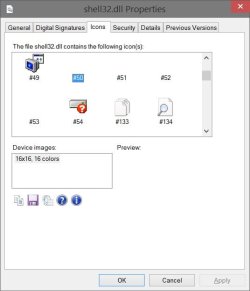
The shell32.dll,-50 path is to use the transparent icon #50 in the shell32.dll file. If that one doesn't work for you, then you might try one of the other transparent icons in shell32.dll to see how it works. The icon I had before is for the same.

shell32.jpg
 

My Computer

Computer type
PC/Desktop
Computer Manufacturer/Model Number
Self built custom
OS
64-bit Windows 11 Pro for Workstations
CPU
Intel i7-8700K OC'd to 5 GHz
Motherboard
ASUS ROG Maximus XI Formula Z390
Memory
64 GB (4x16GB) G.SKILL TridentZ RGB DDR4 3600 MHz
Graphics Card(s)
ASUS ROG-STRIX-GTX1080TI-O11G-GAMING
Sound Card
Integrated
Monitor(s) Displays
2 x Samsung Odyssey G7 27"
Screen Resolution
2560x1440
Hard Drives
1TB Samsung 990 PRO M.2,
4TB Samsung 990 PRO PRO M.2,
TerraMaster F8 SSD Plus NAS
PSU
Seasonic Prime Titanium 850W
Case
Thermaltake Core P3
Cooling
Corsair Hydro H115i
Keyboard
Logitech wireless K800
Mouse
Logitech MX Master 4
Internet Speed
2 Gb/s Download and 100 Mb/s Upload
Antivirus
Malwarebyte Anti-Malware Premium
Browser
Google Chrome
Other Info
Logitech Z625 speaker system,
Logitech BRIO 4K Pro webcam,
HP Color LaserJet Pro MFP M477fdn,
APC SMART-UPS RT 1000 XL - SURT1000XLI,
Galaxy S23 Plus phone
hanks, I'll try one of the other shell32 icons or create a 1x1 transparent icon and put the path to the icon in the reg string.

But, I humbly beg to differ. The original shortcut arrow tut had a file blank.ico which is what step 5 referenced.
5. Type in the full path of the custom .ico file within quotes ...

Where's the custom .ICO file? That's the part of the step I think needs changing. Of course, my eyes aren't that good ... I could be reading it completely wrong.

Side note: Where can I get the properties patch to display icons - I had it once (being lazy asking you, I know).

Bill
.
 

My Computer

Computer type
Laptop
Computer Manufacturer/Model Number
HP Pavilion dv6-6c10us
OS
x64 (6.3.9600) Win8.1 Pro & soon dual boot x64 (6.1.7601) Win7_SP1 HomePrem
CPU
AMD A6-3420M APU with Radeon(tm) HD Graphics
Motherboard
Hewlett-Packard 1805
Memory
6.00 GB
Graphics Card(s)
AMD Radeon(TM) HD 6520G
Sound Card
(1) AMD High Definition Audio Device (2) IDT High Definiti
Monitor(s) Displays
HP W2072a 20" LCD (1600 x 900) @ 60 Hz
Screen Resolution
1366 x 768 x 32 bits (4294967296 colors) @ 60 Hz
Hard Drives
ST640LM0 00 HM641JI SATA Disk Device
Keyboard
Logitech k520 wireless KB
Mouse
Logitech m320 wireless mouse (bundled with KB)
Internet Speed
15/5 | 54 MB Wireless 'n'
Antivirus
Realtime: Defender or Avast | On-demand: Malwarebytes, ESET
Browser
IE 11 on Win8, IE 10 on win 7
Other Info
Media: [Gimp, Audacity, VLC] || Comm: [WEmail 2012, Skype] || Productivity: [OpenOffice,| Textpad] || Utils: [Sysinternals, cCleaner, Speccy, Defraggler]
I had removed the .ico download since some folks were having issues with it, and it was just easier to reference it in the shell32.dll file.

I like using IconViewer below to add an Icons tab to files that contain icons. :)

Download IconViewer
 

My Computer

Computer type
PC/Desktop
Computer Manufacturer/Model Number
Self built custom
OS
64-bit Windows 11 Pro for Workstations
CPU
Intel i7-8700K OC'd to 5 GHz
Motherboard
ASUS ROG Maximus XI Formula Z390
Memory
64 GB (4x16GB) G.SKILL TridentZ RGB DDR4 3600 MHz
Graphics Card(s)
ASUS ROG-STRIX-GTX1080TI-O11G-GAMING
Sound Card
Integrated
Monitor(s) Displays
2 x Samsung Odyssey G7 27"
Screen Resolution
2560x1440
Hard Drives
1TB Samsung 990 PRO M.2,
4TB Samsung 990 PRO PRO M.2,
TerraMaster F8 SSD Plus NAS
PSU
Seasonic Prime Titanium 850W
Case
Thermaltake Core P3
Cooling
Corsair Hydro H115i
Keyboard
Logitech wireless K800
Mouse
Logitech MX Master 4
Internet Speed
2 Gb/s Download and 100 Mb/s Upload
Antivirus
Malwarebyte Anti-Malware Premium
Browser
Google Chrome
Other Info
Logitech Z625 speaker system,
Logitech BRIO 4K Pro webcam,
HP Color LaserJet Pro MFP M477fdn,
APC SMART-UPS RT 1000 XL - SURT1000XLI,
Galaxy S23 Plus phone
I had removed the .ico download since some folks were having issues with it, and it was just easier to reference it in the shell32.dll file.

I like using IconViewer below to add an Icons tab to files that contain icons. :)

Download IconViewer

Thanks, I figured that's why the shell32.dll icon is used now. I'm not sure why I've had issues using the DLL icon, but each machine is different. I thought it might be a timing thing - windows crawler, but even after taking that into consideration, the arrows (default overlay) are still there. I tried other icons in the DLL - nada. The registry entry is as it should be, so there's something else going on with my machine. Not overly worried about it and if I figure it out, you'll be the first to know :)

My original post on this subject wasn't really about the blank.ico file, even though I did ask about it.

"What we have heah is a failure to communicate" :p

The intent was to bring attention to a remnant of that process.OPTION THREE, step 5

5. Type in the full path of the custom .ico file within quotes, OR copy and paste the path below for what overlay icon you would like to use, and click/tap on OK.

--- should be ---

5. Copy and paste the path below for what overlay icon you would like to use, and click/tap on OK.

If the tut still has a reference to the full path of a custom .ico file the next time I look, I give up.
It's a minor thing, but I know you're very detailed and accurate. :cool:

Thanks for the link to IconViewer, I really liked having that function before I 'lost' it in some restore.

Bill
.
 

My Computer

Computer type
Laptop
Computer Manufacturer/Model Number
HP Pavilion dv6-6c10us
OS
x64 (6.3.9600) Win8.1 Pro & soon dual boot x64 (6.1.7601) Win7_SP1 HomePrem
CPU
AMD A6-3420M APU with Radeon(tm) HD Graphics
Motherboard
Hewlett-Packard 1805
Memory
6.00 GB
Graphics Card(s)
AMD Radeon(TM) HD 6520G
Sound Card
(1) AMD High Definition Audio Device (2) IDT High Definiti
Monitor(s) Displays
HP W2072a 20" LCD (1600 x 900) @ 60 Hz
Screen Resolution
1366 x 768 x 32 bits (4294967296 colors) @ 60 Hz
Hard Drives
ST640LM0 00 HM641JI SATA Disk Device
Keyboard
Logitech k520 wireless KB
Mouse
Logitech m320 wireless mouse (bundled with KB)
Internet Speed
15/5 | 54 MB Wireless 'n'
Antivirus
Realtime: Defender or Avast | On-demand: Malwarebytes, ESET
Browser
IE 11 on Win8, IE 10 on win 7
Other Info
Media: [Gimp, Audacity, VLC] || Comm: [WEmail 2012, Skype] || Productivity: [OpenOffice,| Textpad] || Utils: [Sysinternals, cCleaner, Speccy, Defraggler]
Sorry Bill, I've been running on fumes after the move and getting things sorted, so I misunderstood.

Step 5 in Option Three is for using either a custom .ico file of your own, or to use one of the provided paths below that step.
 

My Computer

Computer type
PC/Desktop
Computer Manufacturer/Model Number
Self built custom
OS
64-bit Windows 11 Pro for Workstations
CPU
Intel i7-8700K OC'd to 5 GHz
Motherboard
ASUS ROG Maximus XI Formula Z390
Memory
64 GB (4x16GB) G.SKILL TridentZ RGB DDR4 3600 MHz
Graphics Card(s)
ASUS ROG-STRIX-GTX1080TI-O11G-GAMING
Sound Card
Integrated
Monitor(s) Displays
2 x Samsung Odyssey G7 27"
Screen Resolution
2560x1440
Hard Drives
1TB Samsung 990 PRO M.2,
4TB Samsung 990 PRO PRO M.2,
TerraMaster F8 SSD Plus NAS
PSU
Seasonic Prime Titanium 850W
Case
Thermaltake Core P3
Cooling
Corsair Hydro H115i
Keyboard
Logitech wireless K800
Mouse
Logitech MX Master 4
Internet Speed
2 Gb/s Download and 100 Mb/s Upload
Antivirus
Malwarebyte Anti-Malware Premium
Browser
Google Chrome
Other Info
Logitech Z625 speaker system,
Logitech BRIO 4K Pro webcam,
HP Color LaserJet Pro MFP M477fdn,
APC SMART-UPS RT 1000 XL - SURT1000XLI,
Galaxy S23 Plus phone
Sorry Bill, I've been running on fumes after the move and getting things sorted, so I misunderstood.

Step 5 in Option Three is for using either a custom .ico file of your own, or to use one of the provided paths below that step.

No problem, my friend, you're a busy guy. I see you're in a different state. Hope things go well in your new location. You're doin' fine OK!
Oklahoma! - YouTube
 

My Computer

Computer type
Laptop
Computer Manufacturer/Model Number
HP Pavilion dv6-6c10us
OS
x64 (6.3.9600) Win8.1 Pro & soon dual boot x64 (6.1.7601) Win7_SP1 HomePrem
CPU
AMD A6-3420M APU with Radeon(tm) HD Graphics
Motherboard
Hewlett-Packard 1805
Memory
6.00 GB
Graphics Card(s)
AMD Radeon(TM) HD 6520G
Sound Card
(1) AMD High Definition Audio Device (2) IDT High Definiti
Monitor(s) Displays
HP W2072a 20" LCD (1600 x 900) @ 60 Hz
Screen Resolution
1366 x 768 x 32 bits (4294967296 colors) @ 60 Hz
Hard Drives
ST640LM0 00 HM641JI SATA Disk Device
Keyboard
Logitech k520 wireless KB
Mouse
Logitech m320 wireless mouse (bundled with KB)
Internet Speed
15/5 | 54 MB Wireless 'n'
Antivirus
Realtime: Defender or Avast | On-demand: Malwarebytes, ESET
Browser
IE 11 on Win8, IE 10 on win 7
Other Info
Media: [Gimp, Audacity, VLC] || Comm: [WEmail 2012, Skype] || Productivity: [OpenOffice,| Textpad] || Utils: [Sysinternals, cCleaner, Speccy, Defraggler]
Hey! Awesome tutorial here. I did Option Four, tried to implement the Classic Shortcut Arrow, and ended up with this...

MT573ZC.png


See the little outline around the arrow? It disappears when the icons are resized to small sizes, but I downloaded those custom icons specifically because I wanted that folder to have huge (largest possible size) icons. When I resize the icons again to the size I want them in (as I said, max size), the outline reappears. When I go back to the Default Shortcut Arrow the outline disappears...

Is this solvable? Thanks in advance!
 

My Computer

Computer type
PC/Desktop
Computer Manufacturer/Model Number
Custom build
OS
Windows 7 Ultimate x64
CPU
AMD FX-8120 @ 3.10 GHz
Graphics Card(s)
Zotac GTX650Ti Amp! Edition 2GB 128bit DDR5
Hello DeMatador, and welcome to Eight Forums.

Unfortunately, the classis arrow is only up to 32x32 16 colors. When you use an extra large icon for the file, the arrow will have an outline like that. :(

If you like, you could use the transparent arrow to avoid using the default arrow.
 

My Computer

Computer type
PC/Desktop
Computer Manufacturer/Model Number
Self built custom
OS
64-bit Windows 11 Pro for Workstations
CPU
Intel i7-8700K OC'd to 5 GHz
Motherboard
ASUS ROG Maximus XI Formula Z390
Memory
64 GB (4x16GB) G.SKILL TridentZ RGB DDR4 3600 MHz
Graphics Card(s)
ASUS ROG-STRIX-GTX1080TI-O11G-GAMING
Sound Card
Integrated
Monitor(s) Displays
2 x Samsung Odyssey G7 27"
Screen Resolution
2560x1440
Hard Drives
1TB Samsung 990 PRO M.2,
4TB Samsung 990 PRO PRO M.2,
TerraMaster F8 SSD Plus NAS
PSU
Seasonic Prime Titanium 850W
Case
Thermaltake Core P3
Cooling
Corsair Hydro H115i
Keyboard
Logitech wireless K800
Mouse
Logitech MX Master 4
Internet Speed
2 Gb/s Download and 100 Mb/s Upload
Antivirus
Malwarebyte Anti-Malware Premium
Browser
Google Chrome
Other Info
Logitech Z625 speaker system,
Logitech BRIO 4K Pro webcam,
HP Color LaserJet Pro MFP M477fdn,
APC SMART-UPS RT 1000 XL - SURT1000XLI,
Galaxy S23 Plus phone
Hello DeMatador, and welcome to Eight Forums.

Unfortunately, the classis arrow is only up to 32x32 16 colors. When you use an extra large icon for the file, the arrow will have an outline like that. :(

If you like, you could use the transparent arrow to avoid using the default arrow.

That's too bad. Would it be possible, then, to use one of the other methods to replace the default arrow without outright removing all arrows? See, I'm kinda afraid I'll end up relying on shortcuts thinking they're the real deal, and, say, move them to a drive (I move my files a lot between drives) only to find out the file was a .lnk file in disguise. I know it sounds silly, but I don't wanna risk it, so I thought, maybe I can use a smaller arrow. Since apparently I can't, would it be possible to take the default arrow, edit it in Photoshop and take its opacity down to ~25% so that it's barely noticeable, and then make that new semi-transparent arrow the shortcut arrow?

I did try to use Option One (through the "Custom Arrow" option) but the outline kept appearing, even though the image for the semi-transparent arrow is supposedly the same size as the default arrow... I'm thinking the .png to .ico converter I'm using might be compressing the resulting .ico file into a 32x32 file. What size and color depth would the new arrow need to be in order to avoid the outline?

Sorry if the post is kinda unintelligible, it's way too early to be typing this, haha.
 

My Computer

Computer type
PC/Desktop
Computer Manufacturer/Model Number
Custom build
OS
Windows 7 Ultimate x64
CPU
AMD FX-8120 @ 3.10 GHz
Graphics Card(s)
Zotac GTX650Ti Amp! Edition 2GB 128bit DDR5
DeMatador,

I hear you about being early, but your post is fine. :)

You might see how the "Light Arrow" in OPTION TWO may work for you. It's smaller, and shouldn't give the outline on extra large icon view.
 

My Computer

Computer type
PC/Desktop
Computer Manufacturer/Model Number
Self built custom
OS
64-bit Windows 11 Pro for Workstations
CPU
Intel i7-8700K OC'd to 5 GHz
Motherboard
ASUS ROG Maximus XI Formula Z390
Memory
64 GB (4x16GB) G.SKILL TridentZ RGB DDR4 3600 MHz
Graphics Card(s)
ASUS ROG-STRIX-GTX1080TI-O11G-GAMING
Sound Card
Integrated
Monitor(s) Displays
2 x Samsung Odyssey G7 27"
Screen Resolution
2560x1440
Hard Drives
1TB Samsung 990 PRO M.2,
4TB Samsung 990 PRO PRO M.2,
TerraMaster F8 SSD Plus NAS
PSU
Seasonic Prime Titanium 850W
Case
Thermaltake Core P3
Cooling
Corsair Hydro H115i
Keyboard
Logitech wireless K800
Mouse
Logitech MX Master 4
Internet Speed
2 Gb/s Download and 100 Mb/s Upload
Antivirus
Malwarebyte Anti-Malware Premium
Browser
Google Chrome
Other Info
Logitech Z625 speaker system,
Logitech BRIO 4K Pro webcam,
HP Color LaserJet Pro MFP M477fdn,
APC SMART-UPS RT 1000 XL - SURT1000XLI,
Galaxy S23 Plus phone
Would it be possible, then, to use one of the other methods to replace the default arrow without outright removing all arrows?

I agree with Shawn on this with using the ''Light Arrow'' is a really good one.

I've tried in the past to create my own icon too, I ended up using the one that I posted in this thread back on this Post

After many different variations realized that the Light Arrow or the one I posted turned out to be the best looking of all. It's the icon itself is what I use now irregardless of which option chosen to install it, and I think either of these two icons is what you would also appreciate too.
 

My Computer

Computer type
PC/Desktop
Computer Manufacturer/Model Number
..all towers built from scratch
OS
Vista/Win7/8/10/11 (x86/x64)
CPU
i7
Hi Brink,

Anak sent me here from this thread. My question is this: Is it possible to remove the shortcut arrow from Junction Points... but only the JPs and not all shortcuts? Any ideas would be much appreciated :)
 

My Computer

Computer type
PC/Desktop
Computer Manufacturer/Model Number
Custom Build
OS
Windows 7 Home Premium x64
CPU
i5-4670 @ 3.40GHz, Turbo 3.80GHz
Motherboard
ASRock Z87M Extreme4
Memory
4x4GB Corsair Vengeance Red 1600MHz
Graphics Card(s)
EVGA GeForce GTX 970 Superclocked ACX 2.0 4GB
Sound Card
Realtek HD Audio Integrated
Monitor(s) Displays
BenQ RL2455HM Gaming
Screen Resolution
1920x1080
Hard Drives
1 x 250GB Samsung 840 Evo SSD
1 x 1TB Seagate 7200.14 HDD
PSU
Thermaltake Litepower 600W
Case
Thermaltake WingRS 101 Mid Tower
Cooling
Stock Fan
Keyboard
Corsair Vengeance K70/Gunmetal Grey/MX Brown/Blue Backlight
Mouse
Logitech G700
Internet Speed
Broadband satellite (laggy but fast)
Antivirus
None
Browser
Chrome
Hello Clonkex,

I'm not aware of a way to do so for JPs. :(
 

My Computer

Computer type
PC/Desktop
Computer Manufacturer/Model Number
Self built custom
OS
64-bit Windows 11 Pro for Workstations
CPU
Intel i7-8700K OC'd to 5 GHz
Motherboard
ASUS ROG Maximus XI Formula Z390
Memory
64 GB (4x16GB) G.SKILL TridentZ RGB DDR4 3600 MHz
Graphics Card(s)
ASUS ROG-STRIX-GTX1080TI-O11G-GAMING
Sound Card
Integrated
Monitor(s) Displays
2 x Samsung Odyssey G7 27"
Screen Resolution
2560x1440
Hard Drives
1TB Samsung 990 PRO M.2,
4TB Samsung 990 PRO PRO M.2,
TerraMaster F8 SSD Plus NAS
PSU
Seasonic Prime Titanium 850W
Case
Thermaltake Core P3
Cooling
Corsair Hydro H115i
Keyboard
Logitech wireless K800
Mouse
Logitech MX Master 4
Internet Speed
2 Gb/s Download and 100 Mb/s Upload
Antivirus
Malwarebyte Anti-Malware Premium
Browser
Google Chrome
Other Info
Logitech Z625 speaker system,
Logitech BRIO 4K Pro webcam,
HP Color LaserJet Pro MFP M477fdn,
APC SMART-UPS RT 1000 XL - SURT1000XLI,
Galaxy S23 Plus phone
I'm not aware of a way to do so for JPs.

No problem, just thought I'd ask :)
 

My Computer

Computer type
PC/Desktop
Computer Manufacturer/Model Number
Custom Build
OS
Windows 7 Home Premium x64
CPU
i5-4670 @ 3.40GHz, Turbo 3.80GHz
Motherboard
ASRock Z87M Extreme4
Memory
4x4GB Corsair Vengeance Red 1600MHz
Graphics Card(s)
EVGA GeForce GTX 970 Superclocked ACX 2.0 4GB
Sound Card
Realtek HD Audio Integrated
Monitor(s) Displays
BenQ RL2455HM Gaming
Screen Resolution
1920x1080
Hard Drives
1 x 250GB Samsung 840 Evo SSD
1 x 1TB Seagate 7200.14 HDD
PSU
Thermaltake Litepower 600W
Case
Thermaltake WingRS 101 Mid Tower
Cooling
Stock Fan
Keyboard
Corsair Vengeance K70/Gunmetal Grey/MX Brown/Blue Backlight
Mouse
Logitech G700
Internet Speed
Broadband satellite (laggy but fast)
Antivirus
None
Browser
Chrome
Anak just suggested a solution. Link Shell Extension does exactly what I need! I just created a 256x256 blank, transparent icon with Gimp and used that in LSEConfig :D
 

My Computer

Computer type
PC/Desktop
Computer Manufacturer/Model Number
Custom Build
OS
Windows 7 Home Premium x64
CPU
i5-4670 @ 3.40GHz, Turbo 3.80GHz
Motherboard
ASRock Z87M Extreme4
Memory
4x4GB Corsair Vengeance Red 1600MHz
Graphics Card(s)
EVGA GeForce GTX 970 Superclocked ACX 2.0 4GB
Sound Card
Realtek HD Audio Integrated
Monitor(s) Displays
BenQ RL2455HM Gaming
Screen Resolution
1920x1080
Hard Drives
1 x 250GB Samsung 840 Evo SSD
1 x 1TB Seagate 7200.14 HDD
PSU
Thermaltake Litepower 600W
Case
Thermaltake WingRS 101 Mid Tower
Cooling
Stock Fan
Keyboard
Corsair Vengeance K70/Gunmetal Grey/MX Brown/Blue Backlight
Mouse
Logitech G700
Internet Speed
Broadband satellite (laggy but fast)
Antivirus
None
Browser
Chrome
I'm having a small problem. I downloaded the 'No_Shortcut_Arrow.reg' file and ran it. Everything works great, no problem.

Here's the problem, though:
When I restart/start up my computer the shortcut icons look like this:

dSMQRbP.jpg


The black square goes away (on all the icons) when I double-click on any of the shortcuts. (Meaning after I double-click on any shortcut it works as intended. But before that it's covered by that black square.)
 

My Computer

Computer type
PC/Desktop
Computer Manufacturer/Model Number
Myself
OS
Windows 7 Professional x64
CPU
AMD FX 8320
Motherboard
ASUS M5A97
Memory
8GB
Graphics Card(s)
Nvidia Geforce GTX 770
Monitor(s) Displays
Acer P223w
Screen Resolution
1680x1050
Hard Drives
Samsung SpinPoint 1TB @ 7200rpm
PSU
Corsair 620HX - 620W
Case
Lian-Li Scandinavian Edition
Keyboard
Razer Lycosa
Mouse
Razer DeathAdder
Hello Phrosen,

Does refreshing (F5) the desktop clear them?
 

My Computer

Computer type
PC/Desktop
Computer Manufacturer/Model Number
Self built custom
OS
64-bit Windows 11 Pro for Workstations
CPU
Intel i7-8700K OC'd to 5 GHz
Motherboard
ASUS ROG Maximus XI Formula Z390
Memory
64 GB (4x16GB) G.SKILL TridentZ RGB DDR4 3600 MHz
Graphics Card(s)
ASUS ROG-STRIX-GTX1080TI-O11G-GAMING
Sound Card
Integrated
Monitor(s) Displays
2 x Samsung Odyssey G7 27"
Screen Resolution
2560x1440
Hard Drives
1TB Samsung 990 PRO M.2,
4TB Samsung 990 PRO PRO M.2,
TerraMaster F8 SSD Plus NAS
PSU
Seasonic Prime Titanium 850W
Case
Thermaltake Core P3
Cooling
Corsair Hydro H115i
Keyboard
Logitech wireless K800
Mouse
Logitech MX Master 4
Internet Speed
2 Gb/s Download and 100 Mb/s Upload
Antivirus
Malwarebyte Anti-Malware Premium
Browser
Google Chrome
Other Info
Logitech Z625 speaker system,
Logitech BRIO 4K Pro webcam,
HP Color LaserJet Pro MFP M477fdn,
APC SMART-UPS RT 1000 XL - SURT1000XLI,
Galaxy S23 Plus phone
Back
Top