- Local time
- 1:03 AM
- Messages
- 7,146
hi all, not been about for a few weeks, but now i need your help: 
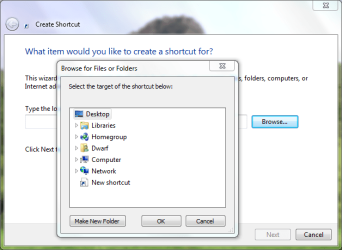
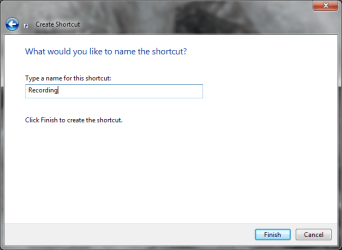
how do i open up a certain tab of the control panel with a shortcut?
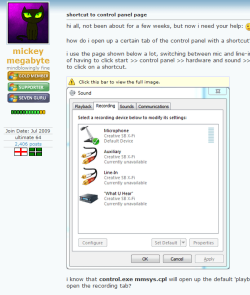
i use the page shown below a lot, switching between mic and line-in inputs whilst recording, and i'm tired of having to click start >> control panel >> hardware and sound >> sound >> recording tab - i just want to click on a shortcut.
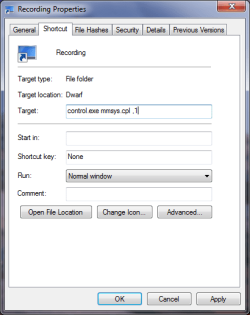
i know that control.exe mmsys.cpl will open up the default 'playback' tab, but how do i get to auto-open the recording tab?
as far as i remember, ever since windows 3, you could simply add ,2 to open the second tab, thusly: control.exe mmsys.cpl, 2
but that doesn't seem to work any more with windows 7. i did think about running the shortcut in xp compatibility mode, but no go...
i know it's just one extra mouse-click to get to where i want to go, but this problem is making my geek-bone itch.
anyone know how to do it?
how do i open up a certain tab of the control panel with a shortcut?
i use the page shown below a lot, switching between mic and line-in inputs whilst recording, and i'm tired of having to click start >> control panel >> hardware and sound >> sound >> recording tab - i just want to click on a shortcut.
i know that control.exe mmsys.cpl will open up the default 'playback' tab, but how do i get to auto-open the recording tab?
as far as i remember, ever since windows 3, you could simply add ,2 to open the second tab, thusly: control.exe mmsys.cpl, 2
but that doesn't seem to work any more with windows 7. i did think about running the shortcut in xp compatibility mode, but no go...
i know it's just one extra mouse-click to get to where i want to go, but this problem is making my geek-bone itch.
anyone know how to do it?
Last edited by a moderator:
My Computer
- Computer Manufacturer/Model Number
- mickey megabyte 1234
- OS
- ultimate 64 sp1
- CPU
- i5 2500K [email protected]
- Motherboard
- MSI P67A-GD53
- Memory
- 8 gigs GSkill Ripjaws 1600
- Graphics Card(s)
- amd hd6950
- Sound Card
- creative x-fi gamer
- Monitor(s) Displays
- samsung 24"
- Screen Resolution
- 1920x1080
- Hard Drives
- ocz vertex 2e 60 gig, samsung f3 1tb, buffalo 2tb ext
- PSU
- antec 550
- Case
- antec three hundred
- Cooling
- i'm a cooling fan
- Keyboard
- saitek eclipse ii
- Mouse
- logitech g3
- Internet Speed
- about 4 Mbps
- Other Info
- i love win7




 . Thanks for the rep too.

 - but if you don't ask, you won't find out...