
Solved Shortcuts and "Run as Administrator"

bawldiggle

GrayGhost2 ret.
Pro User
VIP
Local time
12:14 AM
Messages
895
Location
Australia
I have several portable EXE tools that I need to "Run as Administrator".

For convenience I have desktop shortcuts to the EXE files.
If I Right-Click the shortcut > Run as Administrator ... am I running the exe as-admin or just the shortcut, as-admin.

Would appreciate any guidance :)
 

My Computer My Computer

Computer type
PC/Desktop
Computer Manufacturer/Model Number
Toshiba, Lenovo (laptops) + 4 rigs
OS
XP Pro (x86) | 7 HP (x86) & (x64) | 7 Pro (x64)

My Computer My Computer

Computer type
Laptop
Computer Manufacturer/Model Number
Employer provided Dell Latitude
OS
W7 Pro SP1 64bit
CPU
i7
Memory
8GB
Graphics Card(s)
Intel HD Graphics
Hard Drives
crappy SSD
Antivirus
Employer mandated Symantec Endpoint Protection
Browser
Pale Moon 64bit, IE11 64bit & Chrome 64bit
I have several portable EXE tools that I need to "Run as Administrator".

For convenience I have desktop shortcuts to the EXE files.
If I Right-Click the shortcut > Run as Administrator ... am I running the exe as-admin or just the shortcut, as-admin.

Would appreciate any guidance :)

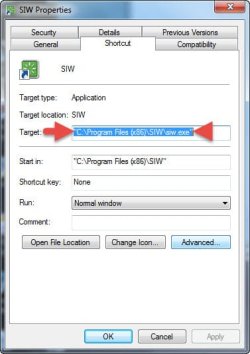
Shortcuts point to a "Target" and that's what runs;

shortcut.jpg
 

My Computer My Computer

Computer type
PC/Desktop
Computer Manufacturer/Model Number
Custom Built
OS
Windows 7 Professional x64
CPU
Intel i5 quad processor
Motherboard
DP67BG
Memory
16 GB
Graphics Card(s)
Radeon HD 5770
Sound Card
Realtek High Definition Audio
Monitor(s) Displays
Samsung SyncMaster
Screen Resolution
1920X1080
Hard Drives
WD 2TB (SATA Internal)
WD 1TB (USB External)
PSU
Corsair GS800
Case
Tower (Generic)
Cooling
3 Internal Fans
Keyboard
MS Wireless
Mouse
MS Optical Wired
Internet Speed
54 mbps
Antivirus
Emsisoft
Browser
IE-Version 9, Palemoon-Version 24.2.0
UsernameIssues :)
Thank you for the succinct answer

Elsewhere in this forum I have received help with my first use of the command prompt.
Your suggestion to Brinks Elevated Command Prompt Shortcut tutorial, is extremely timely.

----------------
SirGeorge :)
Thank you for your help
 

My Computer My Computer

Computer type
PC/Desktop
Computer Manufacturer/Model Number
Toshiba, Lenovo (laptops) + 4 rigs
OS
XP Pro (x86) | 7 HP (x86) & (x64) | 7 Pro (x64)
My Computer My Computer

Computer type
Laptop
Computer Manufacturer/Model Number
Employer provided Dell Latitude
OS
W7 Pro SP1 64bit
CPU
i7
Memory
8GB
Graphics Card(s)
Intel HD Graphics
Hard Drives
crappy SSD
Antivirus
Employer mandated Symantec Endpoint Protection
Browser
Pale Moon 64bit, IE11 64bit & Chrome 64bit
UsernameIssues said:

Don't tell anyone !
That thread was my first cmd-prompt activity.

I would rather be well informed than to be half-cocked and get things wrong, or worse cause damage through my own ignorance.
I just wish I had more free time to follow up on my threads, like finalize the thread with "what I did" solutions.
Nothing more disappointing for newbies (me included in that) than a topic that fits my problem only to find no follow up by the OP.

Today started at 4:50am, its now 11:42am and I havent started $$$ work yet.

Regards
"the-bald-one"
 

My Computer My Computer

Computer type
PC/Desktop
Computer Manufacturer/Model Number
Toshiba, Lenovo (laptops) + 4 rigs
OS
XP Pro (x86) | 7 HP (x86) & (x64) | 7 Pro (x64)
$illy real life keeps getting in your way :-)
 

My Computer My Computer

Computer type
Laptop
Computer Manufacturer/Model Number
Employer provided Dell Latitude
OS
W7 Pro SP1 64bit
CPU
i7
Memory
8GB
Graphics Card(s)
Intel HD Graphics
Hard Drives
crappy SSD
Antivirus
Employer mandated Symantec Endpoint Protection
Browser
Pale Moon 64bit, IE11 64bit & Chrome 64bit
Back
Top