Solved Run As Administrator - Lost Rights?

ARD

New member
Local time
1:28 PM
Messages
26
Hello

I've had a search but can't find an answer, so thought I would post to see if anyone can help.

My Win 7 64 has run well for a long time, no issues at all. But about a month ago it refused to download updates. Told me there was updates available, but never downloaded them. So I ran the fixit and it seems to be working again.

BUT, I now have an issue when trying to run my copy of Adobe Photoshop. If I click the shortcut or the actual exe from within the install folder, the program loads but then crashes with the following info

Code:
Problem signature:
  Problem Event Name:    APPCRASH
  Application Name:    Photoshop.exe
  Application Version:    12.0.0.0
  Application Timestamp:    4bbc5b10
  Fault Module Name:    amtservices.dll
  Fault Module Version:    3.0.0.64
  Fault Module Timestamp:    4b6004a6
  Exception Code:    c0000005
  Exception Offset:    0000000000088dba
  OS Version:    6.1.7601.2.1.0.256.48
  Locale ID:    2057
  Additional Information 1:    7050
  Additional Information 2:    7050c92840ba1374d147c8e700c414f4
  Additional Information 3:    4609
  Additional Information 4:    46091076fdb81f9c4a8290f02c3c5292

However, if I run it as an administrator it works fine. I only have one account which is Administrator. I tried the hidden Administrator account and the program runs fine then as well.

I uninstalled the program and re-installed it, but no difference. Everything else seems fine at the moment. Problem is, I do a lot of photo editing, and have just bought a plugin for the program, but this will again only install if I run that exe as an Administrator, it's almost as though the Photoshop has additional rights my account does not have, but the Administrator account does have. I've checked the policies on the exe and my account and the Administrator account appear to both have the same rights.

Thanks to anyone who might know whats going on
 

My Computer My Computer

Computer type
PC/Desktop
Computer Manufacturer/Model Number
N/A
OS
Windows 7 64 Pro
CPU
Intel Core i7-3770k @ 3.50GHz
Motherboard
Gigabyte Z77x-D3H
Memory
16GB DDR3 SDRAM PC3-12800
Graphics Card(s)
AMD Radeon HD 6750
Sound Card
On Board MB
Monitor(s) Displays
Iiyama ProLite B2280HS-W1 22" LED HDMI Monitor
Screen Resolution
1920x1080
Hard Drives
Crucial MX500 250GB
Samsung SSD 250GB
Hitachi 500GB
PSU
Blue Storm
Case
Thermaltake Soprano
Cooling
Fan
Keyboard
Microsoft
Mouse
Microsoft
Internet Speed
100mb
Antivirus
Eset
Browser
Waterfox
As I understood, if you right click the shortcut an run as administrator it works.
Try this. Right click the shortcut - Properties - and on the Compatibility tab, at the bottom you have a option: Run this program as administrator.
 

My Computers My Computers

System One System Two

  • Computer type
    PC/Desktop
    Computer Manufacturer/Model Number
    custom build
    OS
    Windows 7 HP 64
    CPU
    i5 6600K - 800MHz to 4200MHz
    Motherboard
    GA-Z170-HD3P
    Memory
    4+4G GSkill DDR4 3000
    Graphics Card(s)
    IG - Intel 530
    Monitor(s) Displays
    Samsung 226BW
    Screen Resolution
    1680x1050
    Hard Drives
    (1) -1 SM951 – 128GB M.2 AHCI PCIe SSD drive for Windows 7 and Lubuntu
    (2) -1 WD SATA 3 - 1T for Data
    (3) -1 WD SATA 3 - 1T for backup
    PSU
    Thermaltake 450W TR2 gold
    Keyboard
    Old and good Chicony mechanical keyboard
    Mouse
    Logitech mX performance - 9 buttons (had to disable some)
    Internet Speed
    500Mb/s
    Browser
    Firefox 64
    Other Info
    TinyWall firewall
  • Computer type
    Laptop
    System Manufacturer/Model Number
    Asus Q550LF
    OS
    Windows 7 Pro
    CPU
    i7-4500U 800MHz to 3.0GHz
    Motherboard
    Asus Q550LF
    Memory
    (4+4)G DDR3 1600
    Graphics Card(s)
    IG intel 4400 + NVIDIA GeForce GT 745M
    Sound Card
    Realtek
    Monitor(s) Displays
    LG Display LP156WF4-SPH1
    Screen Resolution
    1920 x 1080
    Hard Drives
    BX500 120G SSD for Windows and programs +
    1T HDD for data
    Internet Speed
    500 Mb/s
    Browser
    Firefox
    Other Info
    TinyWall firewall
Thanks for the reply. That enables me to launch the program without having to right click/run as administrator. I do still though get the pop up asking me if I want it to make changes to the computer. Before it happened the program would launch the same as any other on the PC, can't figure out why Photoshop has decided to run as administrator and not as a user
 

My Computer My Computer

Computer type
PC/Desktop
Computer Manufacturer/Model Number
N/A
OS
Windows 7 64 Pro
CPU
Intel Core i7-3770k @ 3.50GHz
Motherboard
Gigabyte Z77x-D3H
Memory
16GB DDR3 SDRAM PC3-12800
Graphics Card(s)
AMD Radeon HD 6750
Sound Card
On Board MB
Monitor(s) Displays
Iiyama ProLite B2280HS-W1 22" LED HDMI Monitor
Screen Resolution
1920x1080
Hard Drives
Crucial MX500 250GB
Samsung SSD 250GB
Hitachi 500GB
PSU
Blue Storm
Case
Thermaltake Soprano
Cooling
Fan
Keyboard
Microsoft
Mouse
Microsoft
Internet Speed
100mb
Antivirus
Eset
Browser
Waterfox
You can set User Account Control to disabled
Control Panel\All Control Panel Items\Action Center - Change User Account Control Settings - Slide it down
 

My Computers My Computers

System One System Two

  • Computer type
    PC/Desktop
    Computer Manufacturer/Model Number
    custom build
    OS
    Windows 7 HP 64
    CPU
    i5 6600K - 800MHz to 4200MHz
    Motherboard
    GA-Z170-HD3P
    Memory
    4+4G GSkill DDR4 3000
    Graphics Card(s)
    IG - Intel 530
    Monitor(s) Displays
    Samsung 226BW
    Screen Resolution
    1680x1050
    Hard Drives
    (1) -1 SM951 – 128GB M.2 AHCI PCIe SSD drive for Windows 7 and Lubuntu
    (2) -1 WD SATA 3 - 1T for Data
    (3) -1 WD SATA 3 - 1T for backup
    PSU
    Thermaltake 450W TR2 gold
    Keyboard
    Old and good Chicony mechanical keyboard
    Mouse
    Logitech mX performance - 9 buttons (had to disable some)
    Internet Speed
    500Mb/s
    Browser
    Firefox 64
    Other Info
    TinyWall firewall
  • Computer type
    Laptop
    System Manufacturer/Model Number
    Asus Q550LF
    OS
    Windows 7 Pro
    CPU
    i7-4500U 800MHz to 3.0GHz
    Motherboard
    Asus Q550LF
    Memory
    (4+4)G DDR3 1600
    Graphics Card(s)
    IG intel 4400 + NVIDIA GeForce GT 745M
    Sound Card
    Realtek
    Monitor(s) Displays
    LG Display LP156WF4-SPH1
    Screen Resolution
    1920 x 1080
    Hard Drives
    BX500 120G SSD for Windows and programs +
    1T HDD for data
    Internet Speed
    500 Mb/s
    Browser
    Firefox
    Other Info
    TinyWall firewall
Code:
  Fault Module Name:    amtservices.dll
Hm, potentially a hint.

Are you able to track down the location of this file? I suspect it could be experiencing some access issue.
 

My Computer My Computer

Computer type
PC/Desktop
OS
Windows 10, Windows 8.1 Pro, Windows 7 Professional, OS X El Capitan
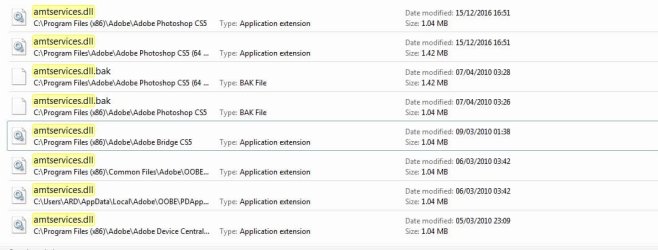
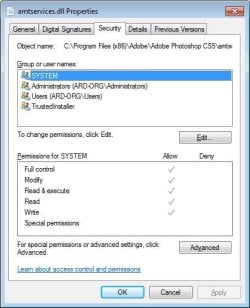
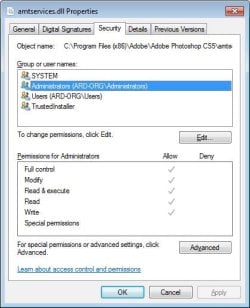
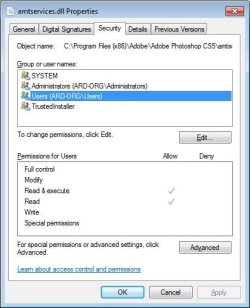
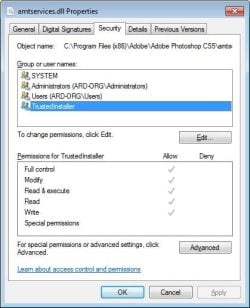
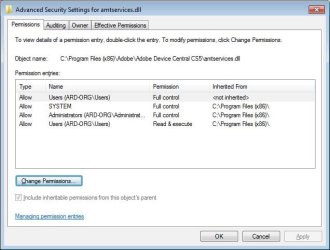
Thanks for the replies. I have tracked down the file, it appears multiple times. I've checked the access on each and all have the same for each.
 

Attachments

  • dll locations.jpg
    dll locations.jpg
    69.5 KB · Views: 0
  • System.jpg
    System.jpg
    54.2 KB · Views: 44
  • ARD ORG.jpg
    ARD ORG.jpg
    53.9 KB · Views: 49
  • ARD USER.jpg
    ARD USER.jpg
    53.8 KB · Views: 44
  • Trusted Installer.jpg
    Trusted Installer.jpg
    54.9 KB · Views: 49

My Computer My Computer

Computer type
PC/Desktop
Computer Manufacturer/Model Number
N/A
OS
Windows 7 64 Pro
CPU
Intel Core i7-3770k @ 3.50GHz
Motherboard
Gigabyte Z77x-D3H
Memory
16GB DDR3 SDRAM PC3-12800
Graphics Card(s)
AMD Radeon HD 6750
Sound Card
On Board MB
Monitor(s) Displays
Iiyama ProLite B2280HS-W1 22" LED HDMI Monitor
Screen Resolution
1920x1080
Hard Drives
Crucial MX500 250GB
Samsung SSD 250GB
Hitachi 500GB
PSU
Blue Storm
Case
Thermaltake Soprano
Cooling
Fan
Keyboard
Microsoft
Mouse
Microsoft
Internet Speed
100mb
Antivirus
Eset
Browser
Waterfox
You’re a step ahead of me because those were the exact images I’d have asked for at this point.

I think I see the problem, perhaps you might see it too, but I’ll have to get back to you later as I must test my solutions and also formulate the best methodical approach to this such that you may understand and deal with this issue should it arise anytime. I’m not in a position to do either right now.

Please stay tuned.
 

My Computer My Computer

Computer type
PC/Desktop
OS
Windows 10, Windows 8.1 Pro, Windows 7 Professional, OS X El Capitan
You’re a step ahead of me because those were the exact images I’d have asked for at this point.

I think I see the problem, perhaps you might see it too, but I’ll have to get back to you later as I must test my solutions and also formulate the best methodical approach to this such that you may understand and deal with this issue should it arise anytime. I’m not in a position to do either right now.

Please stay tuned.

Thank you, I will stay tuned and appreciate yours and everyones help :D
 

My Computer My Computer

Computer type
PC/Desktop
Computer Manufacturer/Model Number
N/A
OS
Windows 7 64 Pro
CPU
Intel Core i7-3770k @ 3.50GHz
Motherboard
Gigabyte Z77x-D3H
Memory
16GB DDR3 SDRAM PC3-12800
Graphics Card(s)
AMD Radeon HD 6750
Sound Card
On Board MB
Monitor(s) Displays
Iiyama ProLite B2280HS-W1 22" LED HDMI Monitor
Screen Resolution
1920x1080
Hard Drives
Crucial MX500 250GB
Samsung SSD 250GB
Hitachi 500GB
PSU
Blue Storm
Case
Thermaltake Soprano
Cooling
Fan
Keyboard
Microsoft
Mouse
Microsoft
Internet Speed
100mb
Antivirus
Eset
Browser
Waterfox
I’m not as certain as you probably think I am on this, especially after a second glance.

As you may notice, your user account has read and execute access to the dll, while your administrative self has full control. I’m not sure why Photoshop would require any more access than read. Are you certain that those amtservices.dll files have the exact same permission set? There are quite a few of them as your image reveals.

Is it alright if I may view all the permission settings of where those amtservices.dll are located? Upload to me the file this PowerShell command generates.
Code:
gci -r "C:\Program Files\Adobe", "C:\Program Files (x86)\Adobe", "C:\Users\$env:Username\AppData\Local\Adobe" | Get-Acl | Export-Clixml "C:\Users\$env:Username\Desktop\aclfile_Photoshop.txt"


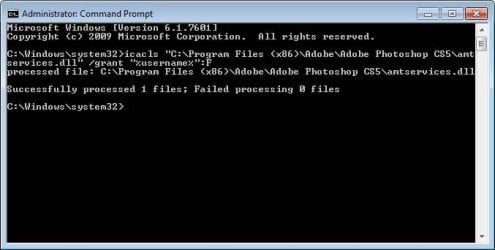
Meanwhile, to make sure the difference I mentioned earlier isn’t the culprit causing the issues, if there aren’t too many amtservices.dll files I want you to give yourself full access to each of these (we don’t know which exact one is causing the problems) and see if the issue persists. For each instance of amtservices.dll, run the following command, preferably in an elevated Command Prompt.
Code:
icacls "C:\path\to\a\amtservices.dll" /grant "%username%":F
Now try Photoshop.
 

My Computer My Computer

Computer type
PC/Desktop
OS
Windows 10, Windows 8.1 Pro, Windows 7 Professional, OS X El Capitan
Thanks for the reply. I tried to run the powershell in cmd but I got. I will now grant my user account full permission to each
 

Attachments

  • CMD.jpg
    CMD.jpg
    41.4 KB · Views: 33

My Computer My Computer

Computer type
PC/Desktop
Computer Manufacturer/Model Number
N/A
OS
Windows 7 64 Pro
CPU
Intel Core i7-3770k @ 3.50GHz
Motherboard
Gigabyte Z77x-D3H
Memory
16GB DDR3 SDRAM PC3-12800
Graphics Card(s)
AMD Radeon HD 6750
Sound Card
On Board MB
Monitor(s) Displays
Iiyama ProLite B2280HS-W1 22" LED HDMI Monitor
Screen Resolution
1920x1080
Hard Drives
Crucial MX500 250GB
Samsung SSD 250GB
Hitachi 500GB
PSU
Blue Storm
Case
Thermaltake Soprano
Cooling
Fan
Keyboard
Microsoft
Mouse
Microsoft
Internet Speed
100mb
Antivirus
Eset
Browser
Waterfox
Whoops, sorry, here are the results

I have changed rights for all and am just running the icals for each
 

Attachments

My Computer My Computer

Computer type
PC/Desktop
Computer Manufacturer/Model Number
N/A
OS
Windows 7 64 Pro
CPU
Intel Core i7-3770k @ 3.50GHz
Motherboard
Gigabyte Z77x-D3H
Memory
16GB DDR3 SDRAM PC3-12800
Graphics Card(s)
AMD Radeon HD 6750
Sound Card
On Board MB
Monitor(s) Displays
Iiyama ProLite B2280HS-W1 22" LED HDMI Monitor
Screen Resolution
1920x1080
Hard Drives
Crucial MX500 250GB
Samsung SSD 250GB
Hitachi 500GB
PSU
Blue Storm
Case
Thermaltake Soprano
Cooling
Fan
Keyboard
Microsoft
Mouse
Microsoft
Internet Speed
100mb
Antivirus
Eset
Browser
Waterfox
I drilled down into permissions and see there are two user accounts with the same name, but only one has full control after I changed it
 

Attachments

  • 2 User.jpg
    2 User.jpg
    57.5 KB · Views: 26

My Computer My Computer

Computer type
PC/Desktop
Computer Manufacturer/Model Number
N/A
OS
Windows 7 64 Pro
CPU
Intel Core i7-3770k @ 3.50GHz
Motherboard
Gigabyte Z77x-D3H
Memory
16GB DDR3 SDRAM PC3-12800
Graphics Card(s)
AMD Radeon HD 6750
Sound Card
On Board MB
Monitor(s) Displays
Iiyama ProLite B2280HS-W1 22" LED HDMI Monitor
Screen Resolution
1920x1080
Hard Drives
Crucial MX500 250GB
Samsung SSD 250GB
Hitachi 500GB
PSU
Blue Storm
Case
Thermaltake Soprano
Cooling
Fan
Keyboard
Microsoft
Mouse
Microsoft
Internet Speed
100mb
Antivirus
Eset
Browser
Waterfox
Its showing all the permission types and the User rights
ITS NOT 2 user accounts, but by sub-catagory and then user.

Roy
 

My Computer My Computer

Computer type
PC/Desktop
Computer Manufacturer/Model Number
medionl/Aspire 6930G/acer x55a
OS
W7 home premium 32bit/W7HP 64bit/w10 tp insider ring
CPU
E5300 dual core
Motherboard
medion MS7366
Memory
3gb
Graphics Card(s)
Nvidia Geforce 7100 Nforce 630i
Monitor(s) Displays
avixc
Internet Speed
n (isp resticted to 72)
Antivirus
mse/pands
Browser
palemoon
Other Info
Belkin Fd7050 n USB using Railink RT2870 drivers, more upto date
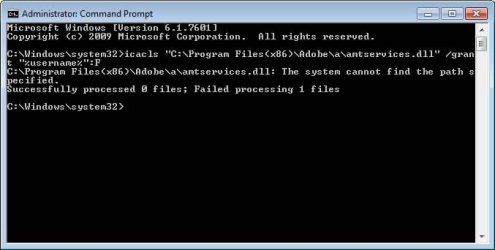
For Icals I get this, which is strange as the file is in the location
 

Attachments

  • Cant find.jpg
    Cant find.jpg
    38.9 KB · Views: 26

My Computer My Computer

Computer type
PC/Desktop
Computer Manufacturer/Model Number
N/A
OS
Windows 7 64 Pro
CPU
Intel Core i7-3770k @ 3.50GHz
Motherboard
Gigabyte Z77x-D3H
Memory
16GB DDR3 SDRAM PC3-12800
Graphics Card(s)
AMD Radeon HD 6750
Sound Card
On Board MB
Monitor(s) Displays
Iiyama ProLite B2280HS-W1 22" LED HDMI Monitor
Screen Resolution
1920x1080
Hard Drives
Crucial MX500 250GB
Samsung SSD 250GB
Hitachi 500GB
PSU
Blue Storm
Case
Thermaltake Soprano
Cooling
Fan
Keyboard
Microsoft
Mouse
Microsoft
Internet Speed
100mb
Antivirus
Eset
Browser
Waterfox
The path you typed is not correct. Specifically, "Program Files (x86)" has two spaces in it.
 

My Computer My Computer

Computer type
PC/Desktop
OS
Windows 10, Windows 8.1 Pro, Windows 7 Professional, OS X El Capitan
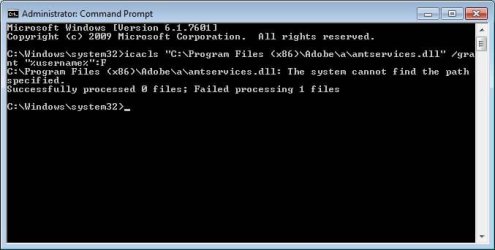
Tried the extra space, still no joy
 

Attachments

  • Cant find1.jpg
    Cant find1.jpg
    39 KB · Views: 24

My Computer My Computer

Computer type
PC/Desktop
Computer Manufacturer/Model Number
N/A
OS
Windows 7 64 Pro
CPU
Intel Core i7-3770k @ 3.50GHz
Motherboard
Gigabyte Z77x-D3H
Memory
16GB DDR3 SDRAM PC3-12800
Graphics Card(s)
AMD Radeon HD 6750
Sound Card
On Board MB
Monitor(s) Displays
Iiyama ProLite B2280HS-W1 22" LED HDMI Monitor
Screen Resolution
1920x1080
Hard Drives
Crucial MX500 250GB
Samsung SSD 250GB
Hitachi 500GB
PSU
Blue Storm
Case
Thermaltake Soprano
Cooling
Fan
Keyboard
Microsoft
Mouse
Microsoft
Internet Speed
100mb
Antivirus
Eset
Browser
Waterfox
Forgive me I am stupid lol, forgot the subfolder, so will now make sure I include the full path
 

Attachments

  • Processed.jpg
    Processed.jpg
    39.7 KB · Views: 24

My Computer My Computer

Computer type
PC/Desktop
Computer Manufacturer/Model Number
N/A
OS
Windows 7 64 Pro
CPU
Intel Core i7-3770k @ 3.50GHz
Motherboard
Gigabyte Z77x-D3H
Memory
16GB DDR3 SDRAM PC3-12800
Graphics Card(s)
AMD Radeon HD 6750
Sound Card
On Board MB
Monitor(s) Displays
Iiyama ProLite B2280HS-W1 22" LED HDMI Monitor
Screen Resolution
1920x1080
Hard Drives
Crucial MX500 250GB
Samsung SSD 250GB
Hitachi 500GB
PSU
Blue Storm
Case
Thermaltake Soprano
Cooling
Fan
Keyboard
Microsoft
Mouse
Microsoft
Internet Speed
100mb
Antivirus
Eset
Browser
Waterfox
Done icacls on all files and still no joy
 

My Computer My Computer

Computer type
PC/Desktop
Computer Manufacturer/Model Number
N/A
OS
Windows 7 64 Pro
CPU
Intel Core i7-3770k @ 3.50GHz
Motherboard
Gigabyte Z77x-D3H
Memory
16GB DDR3 SDRAM PC3-12800
Graphics Card(s)
AMD Radeon HD 6750
Sound Card
On Board MB
Monitor(s) Displays
Iiyama ProLite B2280HS-W1 22" LED HDMI Monitor
Screen Resolution
1920x1080
Hard Drives
Crucial MX500 250GB
Samsung SSD 250GB
Hitachi 500GB
PSU
Blue Storm
Case
Thermaltake Soprano
Cooling
Fan
Keyboard
Microsoft
Mouse
Microsoft
Internet Speed
100mb
Antivirus
Eset
Browser
Waterfox
The file uploaded appears to be having problems. It’s seems that the file got truncated. Without the information this file provides I can’t send you commands to revert the changes I asked you to try previously, had they have no effect.


I’ve thought about the problem for a bit and I’ve come to reason that we’ve interpreted the crash message incorrectly... assuming that the permission settings for all the amtservices.dll files are, as you say, identical, then the problem must not have to do with the permission settings of the dll, but rather there’s a permission problem with some file or folder in which a function in the amtservices.dll tries to access, fails and crashes.

I’ve consulted Google and have tracked down one other Photoshop user reporting the exact same issue: Photoshop CS5 crashing due to amtservices.dll. The OP had the problem resolved, but using brute force tactics. Specifically, he was instructed to grant himself read and write access to all the folders relating to Adobe. Although this may have had solved the issue, there was no intention to identify where the exact fault lied.

ARD, if you’re just interested in a fast solution then you can do what the OP did in that linked thread and grant your user read and write to all the Adobe folders. As I don’t know the path names I can’t provide a copy-paste solution and again you’ll have to go through and manually edit the permissions for each folder.

If you wish to determine exactly what Photoshop was crashing on, you’d have to go through the process of elimination with the permissions.
 

My Computer My Computer

Computer type
PC/Desktop
OS
Windows 10, Windows 8.1 Pro, Windows 7 Professional, OS X El Capitan
Back
Top