
I have the most bizarre and ridiculous problem.
My computer has 2x 320gb hdd. the first is split into c: and e: where e is for storage (films, music etc)
2nd hdd is d: and has my games on it
on my desktop , i have some shortcuts to various games and programs.
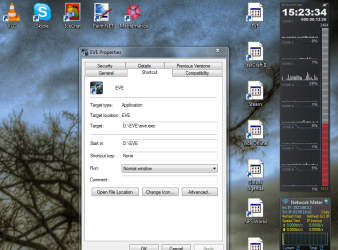
recently after a reboot (no changes to anything, no crash just a standard reboot) my shortcuts to d: won't show their icons.
see attached screenshot
doing rightclick > properties, shows the correct icon in the properties window. changing to an icon from c: and it works. changing to any other icon from d: and it doesn't show up, as you can see.
also opening the desktop as a folder in any other program but windows explorer, all the icons render correctly, just not in explorer or the *actual* desktop.
edit: ok so also, it seems that changing my icon size when looking at desktop in explorer renders them correctly at all sizes but medium. has to be a caching issue. any ideas how to fix?
rebooting didn't help.
i am totally perplexed by this, can anyone help? edit: did some more digging. found the solution. deleted iconcache and rebooted, it's fine now. this thread can be closed...
My computer has 2x 320gb hdd. the first is split into c: and e: where e is for storage (films, music etc)
2nd hdd is d: and has my games on it
on my desktop , i have some shortcuts to various games and programs.
recently after a reboot (no changes to anything, no crash just a standard reboot) my shortcuts to d: won't show their icons.
see attached screenshot
doing rightclick > properties, shows the correct icon in the properties window. changing to an icon from c: and it works. changing to any other icon from d: and it doesn't show up, as you can see.
also opening the desktop as a folder in any other program but windows explorer, all the icons render correctly, just not in explorer or the *actual* desktop.
edit: ok so also, it seems that changing my icon size when looking at desktop in explorer renders them correctly at all sizes but medium. has to be a caching issue. any ideas how to fix?
rebooting didn't help.
i am totally perplexed by this, can anyone help? edit: did some more digging. found the solution. deleted iconcache and rebooted, it's fine now. this thread can be closed...
Attachments
Last edited:
My Computer
- Computer Manufacturer/Model Number
- Asus
- OS
- WIn7 64
- CPU
- Core i7
- Memory
- 4GB DDR3
- Graphics Card(s)
- Nvidia GTX260M 1GB
- Monitor(s) Displays
- 15.6" 1920x1080
- Hard Drives
- 2x 320GB
- Case
- Laptop

