Solved Should 'Google Chrome" being using this much memory?

ROiDIIoJIPo

New member
Local time
9:47 AM
Messages
9
When i have multiple taps open, chrome seems to run very slow and often doesn't load pages.

I am using the stable version of chrome,

my question is why is it using so much memory and is it normal?
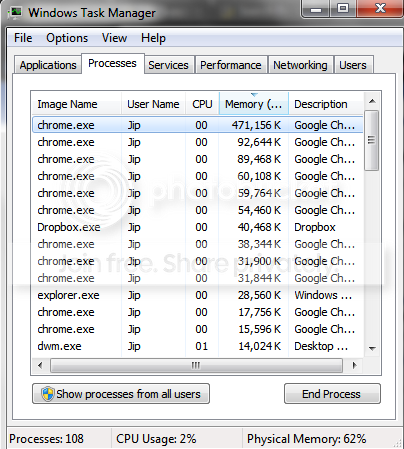
Untitled-1.png


I don't think it is my computer as here are the specs:
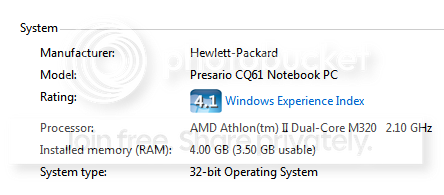
sd.png
 

My Computer

Computer Manufacturer/Model Number
Compaq
OS
Windows 7 Home Premium 32bit
CPU
AMD
Motherboard
?
Memory
4GB
Graphics Card(s)
512MB
Sound Card
?
Monitor(s) Displays
15.6 "
Hard Drives
320GB
PSU
?
Case
?
Cooling
?
Yes it looks fine. It depends on how many tabs you have open and which extensions you have. This is mine.
2011-07-15_094553.png
 

My Computer

Computer type
Laptop
Computer Manufacturer/Model Number
Hewlett-Packard/G62-107SA Notebook
OS
Microsoft Windows 7 Home Premium 64-bit Service Pack 1
CPU
Intel(R) Core(TM) i3 CPU M 330 @ 2.13GHz
Motherboard
Hewlett-Packard 1425
Memory
8 GB DDR3
Graphics Card(s)
Intel(R) HD Graphics
Sound Card
Realtek High Definition Audio
Monitor(s) Displays
Builtin
Screen Resolution
1366 x 768 x 32 bits (4294967296 colors) @ 60 Hz
Hard Drives
250 GB SATA Hard Disk Drive 7200 rpm
2TB Seagate GoFlex USB 2 Drive
1TB Iomega Prestige USB 2 Drive
1.5TB Iomega Prestige USB 2 Drive (Samsung)
2TB WD MyBook Live NAS.
Mouse
Logitech Anywhere MX
Internet Speed
152 Mbs download 10 Mbs upload
Antivirus
Norton 360
Browser
Chrome
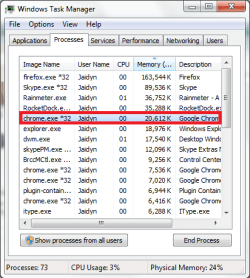
Don't worry, that's quite normal for any browser. I use Firefox and I've seen it get up to 600,000k (though it's normally at around 150,000k). I've posted a screenie of mine too. Anyway, it's alright. Don't stress. :)

Untitled.png

Oh, by the way, if you want to use all of 4GB of your RAM, you might want to consider upgrading to a 64bit operating system. ;)
 

My Computer

Computer Manufacturer/Model Number
Custom Build
OS
Windows 7 Ultimate x64/Windows 8 Consumer Preview x64/Ubuntu 11.04
CPU
Intel Pentium Dual Core E6700 3.2GHz
Motherboard
ASUS P5G41T-M LX
Memory
Strontium 8192MB DDR3 1333Mhz
Graphics Card(s)
msi GeForce N560GTX-M2D1GD5 1GB
Sound Card
Realtek HD Audio
Monitor(s) Displays
CHIMEI CMV 221D 22"
Screen Resolution
1680x1050
Hard Drives
Seagate Barracuda LP Green 3.5'' 2TB Internal HDD 5900RPM + WD Elements Desktop 1TB External HDD 7200RPM
PSU
SHAW Viper-1500w Gaming PSU
Case
Black eMaxx ATX Mini Tower Case
Keyboard
Microsoft Wireless Keyboard 1000
Mouse
Microsoft Wireless Optical Mouse 2000
Internet Speed
100GB @ 4.76Mbps
How do i upgrade to a 64bit system?
 

My Computer

Computer Manufacturer/Model Number
Compaq
OS
Windows 7 Home Premium 32bit
CPU
AMD
Motherboard
?
Memory
4GB
Graphics Card(s)
512MB
Sound Card
?
Monitor(s) Displays
15.6 "
Hard Drives
320GB
PSU
?
Case
?
Cooling
?
Your processor is capable of supporting it, unfortunately though you'll need a complete re-install of Windows 7.

Does that mean ill have to buy a windows upgrade for like $150?
 

My Computer

Computer Manufacturer/Model Number
Compaq
OS
Windows 7 Home Premium 32bit
CPU
AMD
Motherboard
?
Memory
4GB
Graphics Card(s)
512MB
Sound Card
?
Monitor(s) Displays
15.6 "
Hard Drives
320GB
PSU
?
Case
?
Cooling
?
Does that mean ill have to buy a windows upgrade for like $150?

Not necessarily, do you have a Windows installation disc? Or is your machine bought straight from a retailer?
 

My Computer

OS
Windows 7 Ultimate 64-Bit
CPU
AMD Athlon II X2 215
Memory
3GB DDR3

My Computer

Computer Manufacturer/Model Number
Compaq
OS
Windows 7 Home Premium 32bit
CPU
AMD
Motherboard
?
Memory
4GB
Graphics Card(s)
512MB
Sound Card
?
Monitor(s) Displays
15.6 "
Hard Drives
320GB
PSU
?
Case
?
Cooling
?
Oh, by the way, if you want to use all of 4GB of your RAM, you might want to consider upgrading to a 64bit operating system. ;)

Not worth the trouble for only 0.5GB ram as 64bit os uses more RAM than 32bit OS.
and there is no way to upgrade only clean reinstall.
IMHO 64bit is only worth it if you have 6GB or more ram, or use softwware that is 64bit only. (for now internet browsers is 32bit there is IE9 64bit but its very slow and i recommend to use 32bit.)
i use 32bit on my 4GB RAM pc and don't plan to use 64bit. tested 64bit on same pc not worth it, it feels even more slow..
 

My Computer

Computer type
PC/Desktop
Computer Manufacturer/Model Number
Self Built PC
OS
Windows 7 pro 64bit. (SP1)
CPU
Intel core I5 2400
Motherboard
Gigabyte H61
Memory
8GB DDR3 Kingston
Graphics Card(s)
Gigabyte GF GTX650OC
Sound Card
Realtek HD audio
Monitor(s) Displays
LCD 20"
Screen Resolution
1600x900
Hard Drives
INTEL SSD 320 80GB +Seagate 7200.12 1TBx3
PSU
Coolermaster RX450W
Case
Coolermaster atx case
Cooling
stock cooler
Keyboard
logitech
Mouse
logitech
Internet Speed
FTTD 100mbps
vaidas3 has a fair point. Unless you use a lot of memory consuming programs, you should be fine, but if you do want to use all 4GB of your RAM you should go with 64bit.

As you have a retailer version, you wouldn't be able to upgrade to 64bit. I'm willing to bet you've been given an OEM license (which is tied to the first computer it's installed on), so you would have to download a 64bit version of Windows and use that. If you can manage to find your license key, you can try and use that on the downloaded version.

You will have to clean install though as there is no direct upgrade from 32bit systems to 64bit systems. But as vaidas3 said above, unless you have over, let's say, 6GB RAM, there's not much of a point. On top of this, a few programs are not compatible with 64bit systems (all mine are fine though). Anyway, if you want the full comparison, take a look at the thread linked below. It should cover just about everything.

http://www.sevenforums.com/general-discussion/86886-32-bit-vs-64-bit-comparison.html

We're also going a bit off topic so I would mark this thread Solved and then start a new thread if you want to continue this discussion. Or just have a read of the thread I linked.
 

My Computer

Computer Manufacturer/Model Number
Custom Build
OS
Windows 7 Ultimate x64/Windows 8 Consumer Preview x64/Ubuntu 11.04
CPU
Intel Pentium Dual Core E6700 3.2GHz
Motherboard
ASUS P5G41T-M LX
Memory
Strontium 8192MB DDR3 1333Mhz
Graphics Card(s)
msi GeForce N560GTX-M2D1GD5 1GB
Sound Card
Realtek HD Audio
Monitor(s) Displays
CHIMEI CMV 221D 22"
Screen Resolution
1680x1050
Hard Drives
Seagate Barracuda LP Green 3.5'' 2TB Internal HDD 5900RPM + WD Elements Desktop 1TB External HDD 7200RPM
PSU
SHAW Viper-1500w Gaming PSU
Case
Black eMaxx ATX Mini Tower Case
Keyboard
Microsoft Wireless Keyboard 1000
Mouse
Microsoft Wireless Optical Mouse 2000
Internet Speed
100GB @ 4.76Mbps
Back
Top