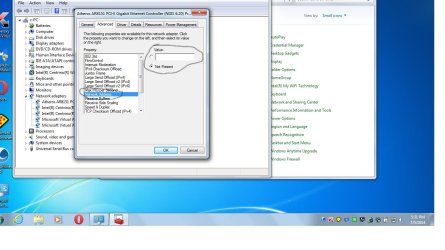
Should i check box for enabled for network address?

jonnyhillow

Banned
Local time
12:39 PM
Messages
637
Location
NJ native & NC
I keep getting error messages for not being able to pin down a network address and i saw there is no value set for it.

Any ideas
 

Attachments

  • Untitled.jpg
    Untitled.jpg
    107.3 KB · Views: 6

My Computer My Computer

Computer type
Laptop
Computer Manufacturer/Model Number
Asus laptop U56E
OS
Microsoft Windows 7 Home Premium 64-bit 7601 Multiprocessor Free Service Pack 1
CPU
Intel(R) Core(TM) i5-2430M CPU @ 2.40GHz
Motherboard
ASUSTeK Computer Inc. U56E
Memory
6.00 GB
Graphics Card(s)
Intel(R) HD Graphics 3000
Sound Card
(1) High Definition Audio Device (2) High Definition Audio
Screen Resolution
1366 x 768 x 32 bits (4294967296 colors) @ 60 Hz
Hard Drives
WDC WD6400BPVT-80HXZT3
Can you post the actual error messages you are getting so we can see what is happening?
 

My Computer My Computer

Computer type
PC/Desktop
Computer Manufacturer/Model Number
custom built
OS
Windows 7 ultimate 64-bit
CPU
Intel I7 2600K 3.4ghz
Motherboard
Asus Evo P8P67
Memory
Corsair 16gb ddr3 1600mhz
Graphics Card(s)
Nvidia Geforce gt 430
Sound Card
Sound Blaster Titanium x-fi pci express
Monitor(s) Displays
Dell E198WFP
Hard Drives
1 western digital 2TB drive.
PSU
Antec 1200 watt
Case
Inwin Dragon Rider
Cooling
6 case supplied cooling fans
Keyboard
logitech mk700
Mouse
logitech m705
Internet Speed
25-50mbps download; 10mbps upload(i think)
Antivirus
avg free 2014
Browser
mozilla firefox
Other Info
Also have a pretty bad speaker setup which is a klipsch promedia 5.1 surround speaker setup with huge subwoofer and lg blu ray player/writer. Also a hp officejet pro 8600 plus wireless all in one and a logitech s7500 webcam.
It's always the your computer is unable to find it's ip address error. I have tried ipconfig release/renew , i tried the following commands that i found from googling as well to no avail.

I checked and stopped and restarted Dhcp client in services to no avail either.

Code:
: netsh winsock reset catalog

Reset IPv4 TCP/IP stack to installation defaults: netsh int ipv4 reset reset.log

Reset IPv6 TCP/IP stack to installation defaults: netsh int ipv6 reset reset.log

Reboot the computer.


- <Event xmlns="http://schemas.microsoft.com/win/2004/08/events/event">
- <System>
<Provider Name="Microsoft-Windows-Dhcp-Client" Guid="{15A7A4F8-0072-4EAB-ABAD-F98A4D666AED}" />
<EventID>1001</EventID>
<Version>0</Version>
<Level>2</Level>
<Task>3</Task>
<Opcode>75</Opcode>
<Keywords>0x4000000000000000</Keywords>
<TimeCreated SystemTime="2014-07-06T03:25:07.961056400Z" />
<EventRecordID>232</EventRecordID>
<Correlation />
<Execution ProcessID="996" ThreadID="2132" />
<Channel>Microsoft-Windows-Dhcp-Client/Admin</Channel>
<Computer>c-PC</Computer>
<Security UserID="S-1-5-19" />
</System>
- <EventData>
<Data Name="HWLength">6</Data>
<Data Name="HWAddress">4025C26523B9</Data>
<Data Name="StatusCode">121</Data>
</EventData>
</Event>

 

My Computer My Computer

Computer type
Laptop
Computer Manufacturer/Model Number
Asus laptop U56E
OS
Microsoft Windows 7 Home Premium 64-bit 7601 Multiprocessor Free Service Pack 1
CPU
Intel(R) Core(TM) i5-2430M CPU @ 2.40GHz
Motherboard
ASUSTeK Computer Inc. U56E
Memory
6.00 GB
Graphics Card(s)
Intel(R) HD Graphics 3000
Sound Card
(1) High Definition Audio Device (2) High Definition Audio
Screen Resolution
1366 x 768 x 32 bits (4294967296 colors) @ 60 Hz
Hard Drives
WDC WD6400BPVT-80HXZT3
Ok , i now see a message that network address lease was denied by the server whatever that means.
 

My Computer My Computer

Computer type
Laptop
Computer Manufacturer/Model Number
Asus laptop U56E
OS
Microsoft Windows 7 Home Premium 64-bit 7601 Multiprocessor Free Service Pack 1
CPU
Intel(R) Core(TM) i5-2430M CPU @ 2.40GHz
Motherboard
ASUSTeK Computer Inc. U56E
Memory
6.00 GB
Graphics Card(s)
Intel(R) HD Graphics 3000
Sound Card
(1) High Definition Audio Device (2) High Definition Audio
Screen Resolution
1366 x 768 x 32 bits (4294967296 colors) @ 60 Hz
Hard Drives
WDC WD6400BPVT-80HXZT3
Should i check box for enabled for network address?
I keep getting error messages for not being able to pin down a network address and i saw there is no value set for it.
jonnyhillow said:
Ok , i now see a message that network address lease was denied by the server whatever that means.

No, the address Not Present is the default and most likely has no bearing on the issue.

The lease was denied is coming form your router or ISP.

How often does this occur and does it prevent you from ever connecting (or can you connect on a subsequent try)?
 

My Computer My Computer

Computer type
Laptop
Computer Manufacturer/Model Number
HP Pavilion dv6-6c10us
OS
x64 (6.3.9600) Win8.1 Pro & soon dual boot x64 (6.1.7601) Win7_SP1 HomePrem
CPU
AMD A6-3420M APU with Radeon(tm) HD Graphics
Motherboard
Hewlett-Packard 1805
Memory
6.00 GB
Graphics Card(s)
AMD Radeon(TM) HD 6520G
Sound Card
(1) AMD High Definition Audio Device (2) IDT High Definiti
Monitor(s) Displays
HP W2072a 20" LCD (1600 x 900) @ 60 Hz
Screen Resolution
1366 x 768 x 32 bits (4294967296 colors) @ 60 Hz
Hard Drives
ST640LM0 00 HM641JI SATA Disk Device
Keyboard
Logitech k520 wireless KB
Mouse
Logitech m320 wireless mouse (bundled with KB)
Internet Speed
15/5 | 54 MB Wireless 'n'
Antivirus
Realtime: Defender or Avast | On-demand: Malwarebytes, ESET
Browser
IE 11 on Win8, IE 10 on win 7
Other Info
Media: [Gimp, Audacity, VLC] || Comm: [WEmail 2012, Skype] || Productivity: [OpenOffice,| Textpad] || Utils: [Sysinternals, cCleaner, Speccy, Defraggler]
Try the Network and Internet Trouble Shooters in Control Panel

If they fail to correct the issue, there are other ways to reset TCI/IP and network related settings to their defaults.
 

My Computer My Computer

Computer type
Laptop
Computer Manufacturer/Model Number
HP Pavilion dv6-6c10us
OS
x64 (6.3.9600) Win8.1 Pro & soon dual boot x64 (6.1.7601) Win7_SP1 HomePrem
CPU
AMD A6-3420M APU with Radeon(tm) HD Graphics
Motherboard
Hewlett-Packard 1805
Memory
6.00 GB
Graphics Card(s)
AMD Radeon(TM) HD 6520G
Sound Card
(1) AMD High Definition Audio Device (2) IDT High Definiti
Monitor(s) Displays
HP W2072a 20" LCD (1600 x 900) @ 60 Hz
Screen Resolution
1366 x 768 x 32 bits (4294967296 colors) @ 60 Hz
Hard Drives
ST640LM0 00 HM641JI SATA Disk Device
Keyboard
Logitech k520 wireless KB
Mouse
Logitech m320 wireless mouse (bundled with KB)
Internet Speed
15/5 | 54 MB Wireless 'n'
Antivirus
Realtime: Defender or Avast | On-demand: Malwarebytes, ESET
Browser
IE 11 on Win8, IE 10 on win 7
Other Info
Media: [Gimp, Audacity, VLC] || Comm: [WEmail 2012, Skype] || Productivity: [OpenOffice,| Textpad] || Utils: [Sysinternals, cCleaner, Speccy, Defraggler]
Open an http://www.sevenforums.com/tutorials/783-elevated-command-prompt.html
   Tip
Standard keyboard shortcuts for Copy (Ctrl-C) and Paste (Ctrl-V) shortcuts do not work in Command Prompt.

Enabling the Quick Edit Mode in Command Prompt makes Copy and Paste operations easier.
See step 4 in http://www.sevenforums.com/tutorials/21874-command-prompt-copy-clipboard.html to enable it.

Copy in Command Prompt: hightlight the text you want to copy, then press ENTER.
Paste in Command Prompt: right click with your mouse.


In the Command Prompt window, type the following commands:

ipconfig /all
ipconfig /release
ipconfig /renew
ipconfig /flushdns
netsh winsock reset all
netsh int ip reset all
ipconfig /all


   Note
Scroll to the top of the windows and highlight all of the test in the Command Prompt window (left click, hold, drag pointer).
Press enter to copy the selected / highlighted text
Open your text editor and past the text into the window.

Save the file as IPreset_output.txt in your documents folder
Attach IPreset_output.txt to a new post on your thread.


In the Command Prompt window type

exit

and press enter to close the window.
 

My Computer My Computer

Computer type
Laptop
Computer Manufacturer/Model Number
HP Pavilion dv6-6c10us
OS
x64 (6.3.9600) Win8.1 Pro & soon dual boot x64 (6.1.7601) Win7_SP1 HomePrem
CPU
AMD A6-3420M APU with Radeon(tm) HD Graphics
Motherboard
Hewlett-Packard 1805
Memory
6.00 GB
Graphics Card(s)
AMD Radeon(TM) HD 6520G
Sound Card
(1) AMD High Definition Audio Device (2) IDT High Definiti
Monitor(s) Displays
HP W2072a 20" LCD (1600 x 900) @ 60 Hz
Screen Resolution
1366 x 768 x 32 bits (4294967296 colors) @ 60 Hz
Hard Drives
ST640LM0 00 HM641JI SATA Disk Device
Keyboard
Logitech k520 wireless KB
Mouse
Logitech m320 wireless mouse (bundled with KB)
Internet Speed
15/5 | 54 MB Wireless 'n'
Antivirus
Realtime: Defender or Avast | On-demand: Malwarebytes, ESET
Browser
IE 11 on Win8, IE 10 on win 7
Other Info
Media: [Gimp, Audacity, VLC] || Comm: [WEmail 2012, Skype] || Productivity: [OpenOffice,| Textpad] || Utils: [Sysinternals, cCleaner, Speccy, Defraggler]
Thank you , i will try your suggestions. I will get back and post the results when i get home

I very much appreciate your assistance
 

My Computer My Computer

Computer type
Laptop
Computer Manufacturer/Model Number
Asus laptop U56E
OS
Microsoft Windows 7 Home Premium 64-bit 7601 Multiprocessor Free Service Pack 1
CPU
Intel(R) Core(TM) i5-2430M CPU @ 2.40GHz
Motherboard
ASUSTeK Computer Inc. U56E
Memory
6.00 GB
Graphics Card(s)
Intel(R) HD Graphics 3000
Sound Card
(1) High Definition Audio Device (2) High Definition Audio
Screen Resolution
1366 x 768 x 32 bits (4294967296 colors) @ 60 Hz
Hard Drives
WDC WD6400BPVT-80HXZT3
I hope i did this right , let me know and i will try again . I only use ethernet and no one else uses my laptop , my laptop does have wi fi and wimax but i never use them as i only have a modem supplied by ISP.

Thank you very much for your assistance


Microsoft Windows [Version 6.1.7601]
Copyright (c) 2009 Microsoft Corporation. All rights reserved.

C:\Users\c>ipconfig /all

Windows IP Configuration

Host Name . . . . . . . . . . . . : c-PC
Primary Dns Suffix . . . . . . . :
Node Type . . . . . . . . . . . . : Hybrid
IP Routing Enabled. . . . . . . . : No
WINS Proxy Enabled. . . . . . . . : No
DNS Suffix Search List. . . . . . : Home

Wireless LAN adapter Wireless Network Connection 3:

Media State . . . . . . . . . . . : Media disconnected
Connection-specific DNS Suffix . :
Description . . . . . . . . . . . : Microsoft Virtual WiFi Miniport Adapter #
2
Physical Address. . . . . . . . . : 40-25-C2-65-23-B9
DHCP Enabled. . . . . . . . . . . : Yes
Autoconfiguration Enabled . . . . : Yes

Wireless LAN adapter Wireless Network Connection 2:

Media State . . . . . . . . . . . : Media disconnected
Connection-specific DNS Suffix . :
Description . . . . . . . . . . . : Microsoft Virtual WiFi Miniport Adapter
Physical Address. . . . . . . . . : 40-25-C2-65-23-B9
DHCP Enabled. . . . . . . . . . . : Yes
Autoconfiguration Enabled . . . . : Yes

Ethernet adapter C:

Connection-specific DNS Suffix . : Home
Description . . . . . . . . . . . : Atheros AR8151 PCI-E Gigabit Ethernet Con
troller (NDIS 6.20)
Physical Address. . . . . . . . . : 14-DA-E9-CB-A4-38
DHCP Enabled. . . . . . . . . . . : Yes
Autoconfiguration Enabled . . . . : Yes
Link-local IPv6 Address . . . . . : fe80::8d20:a88e:c0fb:4e0e%16(Preferred)
IPv4 Address. . . . . . . . . . . : 192.168.50.10(Preferred)
Subnet Mask . . . . . . . . . . . : 255.255.255.0
Lease Obtained. . . . . . . . . . : Monday, July 07, 2014 12:30:45 AM
Lease Expires . . . . . . . . . . : Tuesday, July 08, 2014 12:30:45 AM
Default Gateway . . . . . . . . . : 192.168.50.1
DHCP Server . . . . . . . . . . . : 192.168.50.1
DHCPv6 IAID . . . . . . . . . . . : 320133865
DHCPv6 Client DUID. . . . . . . . : 00-01-00-01-1B-04-E8-A6-40-25-C2-65-23-B8

DNS Servers . . . . . . . . . . . : 192.168.50.1
NetBIOS over Tcpip. . . . . . . . : Enabled

Ethernet adapter Local Area Connection:

Media State . . . . . . . . . . . : Media disconnected
Connection-specific DNS Suffix . :
Description . . . . . . . . . . . : Intel(R) Centrino(R) WiMAX 6150
Physical Address. . . . . . . . . : 64-D4-DA-60-33-19
DHCP Enabled. . . . . . . . . . . : Yes
Autoconfiguration Enabled . . . . : Yes

Wireless LAN adapter Wireless Network Connection:

Media State . . . . . . . . . . . : Media disconnected
Connection-specific DNS Suffix . :
Description . . . . . . . . . . . : Intel(R) Centrino(R) Wireless-N 6150
Physical Address. . . . . . . . . : 40-25-C2-65-23-B8
DHCP Enabled. . . . . . . . . . . : Yes
Autoconfiguration Enabled . . . . : Yes

Tunnel adapter isatap.{BFEBB8FA-9EA8-47A8-B7A6-623265DA4B8D}:

Media State . . . . . . . . . . . : Media disconnected
Connection-specific DNS Suffix . :
Description . . . . . . . . . . . : Microsoft ISATAP Adapter
Physical Address. . . . . . . . . : 00-00-00-00-00-00-00-E0
DHCP Enabled. . . . . . . . . . . : No
Autoconfiguration Enabled . . . . : Yes

Tunnel adapter Teredo Tunneling Pseudo-Interface:

Connection-specific DNS Suffix . :
Description . . . . . . . . . . . : Teredo Tunneling Pseudo-Interface
Physical Address. . . . . . . . . : 00-00-00-00-00-00-00-E0
DHCP Enabled. . . . . . . . . . . : No
Autoconfiguration Enabled . . . . : Yes
IPv6 Address. . . . . . . . . . . : 2001:0:5ef5:79fd:2c15:2fc3:3f57:cdf5(Pref
erred)
Link-local IPv6 Address . . . . . : fe80::2c15:2fc3:3f57:cdf5%13(Preferred)
Default Gateway . . . . . . . . . : ::
NetBIOS over Tcpip. . . . . . . . : Disabled

Tunnel adapter isatap.{D1B40672-96A4-4F6B-AF8D-87BA51D89674}:

Media State . . . . . . . . . . . : Media disconnected
Connection-specific DNS Suffix . :
Description . . . . . . . . . . . : Microsoft ISATAP Adapter #2
Physical Address. . . . . . . . . : 00-00-00-00-00-00-00-E0
DHCP Enabled. . . . . . . . . . . : No
Autoconfiguration Enabled . . . . : Yes

Tunnel adapter isatap.{3469B98D-1D73-4DE9-9BEA-D0F76BDFF728}:

Media State . . . . . . . . . . . : Media disconnected
Connection-specific DNS Suffix . :
Description . . . . . . . . . . . : Microsoft ISATAP Adapter #3
Physical Address. . . . . . . . . : 00-00-00-00-00-00-00-E0
DHCP Enabled. . . . . . . . . . . : No
Autoconfiguration Enabled . . . . : Yes

Tunnel adapter isatap.{D7CC4C0D-3EA4-446A-AE03-68DA50547661}:

Media State . . . . . . . . . . . : Media disconnected
Connection-specific DNS Suffix . :
Description . . . . . . . . . . . : Microsoft ISATAP Adapter #5
Physical Address. . . . . . . . . : 00-00-00-00-00-00-00-E0
DHCP Enabled. . . . . . . . . . . : No
Autoconfiguration Enabled . . . . : Yes

Tunnel adapter isatap.Home:

Media State . . . . . . . . . . . : Media disconnected
Connection-specific DNS Suffix . : Home
Description . . . . . . . . . . . : Microsoft ISATAP Adapter #6
Physical Address. . . . . . . . . : 00-00-00-00-00-00-00-E0
DHCP Enabled. . . . . . . . . . . : No
Autoconfiguration Enabled . . . . : Yes

C:\Users\c>ipconfig /release

Windows IP Configuration

No operation can be performed on Wireless Network Connection 3 while it has its
media disconnected.
No operation can be performed on Wireless Network Connection 2 while it has its
media disconnected.
No operation can be performed on Local Area Connection while it has its media di
sconnected.
No operation can be performed on Wireless Network Connection while it has its me
dia disconnected.
An error occurred while releasing interface Loopback Pseudo-Interface 1 : The sy
stem cannot find the file specified.


Wireless LAN adapter Wireless Network Connection 3:

Media State . . . . . . . . . . . : Media disconnected
Connection-specific DNS Suffix . :

Wireless LAN adapter Wireless Network Connection 2:

Media State . . . . . . . . . . . : Media disconnected
Connection-specific DNS Suffix . :

Ethernet adapter C:

Connection-specific DNS Suffix . :
Link-local IPv6 Address . . . . . : fe80::8d20:a88e:c0fb:4e0e%16
Default Gateway . . . . . . . . . :

Ethernet adapter Local Area Connection:

Media State . . . . . . . . . . . : Media disconnected
Connection-specific DNS Suffix . :

Wireless LAN adapter Wireless Network Connection:

Media State . . . . . . . . . . . : Media disconnected
Connection-specific DNS Suffix . :

Tunnel adapter isatap.{BFEBB8FA-9EA8-47A8-B7A6-623265DA4B8D}:

Media State . . . . . . . . . . . : Media disconnected
Connection-specific DNS Suffix . :

Tunnel adapter Teredo Tunneling Pseudo-Interface:

Media State . . . . . . . . . . . : Media disconnected
Connection-specific DNS Suffix . :

Tunnel adapter isatap.{D1B40672-96A4-4F6B-AF8D-87BA51D89674}:

Media State . . . . . . . . . . . : Media disconnected
Connection-specific DNS Suffix . :

Tunnel adapter isatap.{3469B98D-1D73-4DE9-9BEA-D0F76BDFF728}:

Media State . . . . . . . . . . . : Media disconnected
Connection-specific DNS Suffix . :

Tunnel adapter isatap.{D7CC4C0D-3EA4-446A-AE03-68DA50547661}:

Media State . . . . . . . . . . . : Media disconnected
Connection-specific DNS Suffix . :

Tunnel adapter isatap.Home:

Media State . . . . . . . . . . . : Media disconnected
Connection-specific DNS Suffix . :

C:\Users\c>ipconfig /renew

Windows IP Configuration

No operation can be performed on Wireless Network Connection 3 while it has its
media disconnected.
No operation can be performed on Wireless Network Connection 2 while it has its
media disconnected.
No operation can be performed on Local Area Connection while it has its media di
sconnected.
No operation can be performed on Wireless Network Connection while it has its me
dia disconnected.
An error occurred while releasing interface Loopback Pseudo-Interface 1 : The sy
stem cannot find the file specified.


Wireless LAN adapter Wireless Network Connection 3:

Media State . . . . . . . . . . . : Media disconnected
Connection-specific DNS Suffix . :

Wireless LAN adapter Wireless Network Connection 2:

Media State . . . . . . . . . . . : Media disconnected
Connection-specific DNS Suffix . :

Ethernet adapter C:

Connection-specific DNS Suffix . : Home
Link-local IPv6 Address . . . . . : fe80::8d20:a88e:c0fb:4e0e%16
IPv4 Address. . . . . . . . . . . : 192.168.50.10
Subnet Mask . . . . . . . . . . . : 255.255.255.0
Default Gateway . . . . . . . . . : 192.168.50.1

Ethernet adapter Local Area Connection:

Media State . . . . . . . . . . . : Media disconnected
Connection-specific DNS Suffix . :

Wireless LAN adapter Wireless Network Connection:

Media State . . . . . . . . . . . : Media disconnected
Connection-specific DNS Suffix . :

Tunnel adapter isatap.{BFEBB8FA-9EA8-47A8-B7A6-623265DA4B8D}:

Media State . . . . . . . . . . . : Media disconnected
Connection-specific DNS Suffix . :

Tunnel adapter Teredo Tunneling Pseudo-Interface:

Connection-specific DNS Suffix . :
IPv6 Address. . . . . . . . . . . : 2001:0:5ef5:79fd:3870:385a:3f57:cdf5
Link-local IPv6 Address . . . . . : fe80::3870:385a:3f57:cdf5%13
Default Gateway . . . . . . . . . : ::

Tunnel adapter isatap.{D1B40672-96A4-4F6B-AF8D-87BA51D89674}:

Media State . . . . . . . . . . . : Media disconnected
Connection-specific DNS Suffix . :

Tunnel adapter isatap.{3469B98D-1D73-4DE9-9BEA-D0F76BDFF728}:

Media State . . . . . . . . . . . : Media disconnected
Connection-specific DNS Suffix . :

Tunnel adapter isatap.{D7CC4C0D-3EA4-446A-AE03-68DA50547661}:

Media State . . . . . . . . . . . : Media disconnected
Connection-specific DNS Suffix . :

Tunnel adapter isatap.{5E1266FE-8426-4C0D-B41E-5273A41BC1B3}:

Media State . . . . . . . . . . . : Media disconnected
Connection-specific DNS Suffix . :

C:\Users\c>ipconfig /flushdns

Windows IP Configuration

Successfully flushed the DNS Resolver Cache.

C:\Users\c>netsh winsock reset all
The requested operation requires elevation (Run as administrator).


C:\Users\c>netsh int ip reset all
Reseting Global, failed.
The requested operation requires elevation (Run as administrator).
Reseting Interface, failed.
The requested operation requires elevation (Run as administrator).
There's no user specified settings to be reset.


C:\Users\c>ipconfig /all
 

My Computer My Computer

Computer type
Laptop
Computer Manufacturer/Model Number
Asus laptop U56E
OS
Microsoft Windows 7 Home Premium 64-bit 7601 Multiprocessor Free Service Pack 1
CPU
Intel(R) Core(TM) i5-2430M CPU @ 2.40GHz
Motherboard
ASUSTeK Computer Inc. U56E
Memory
6.00 GB
Graphics Card(s)
Intel(R) HD Graphics 3000
Sound Card
(1) High Definition Audio Device (2) High Definition Audio
Screen Resolution
1366 x 768 x 32 bits (4294967296 colors) @ 60 Hz
Hard Drives
WDC WD6400BPVT-80HXZT3
Ok i just ran the command prompt as Administrator


Microsoft Windows [Version 6.1.7601]
Copyright (c) 2009 Microsoft Corporation. All rights reserved.

C:\Windows\system32>ipconfig /all

Windows IP Configuration

Host Name . . . . . . . . . . . . : c-PC
Primary Dns Suffix . . . . . . . :
Node Type . . . . . . . . . . . . : Hybrid
IP Routing Enabled. . . . . . . . : No
WINS Proxy Enabled. . . . . . . . : No
DNS Suffix Search List. . . . . . : Home

Wireless LAN adapter Wireless Network Connection 3:

Media State . . . . . . . . . . . : Media disconnected
Connection-specific DNS Suffix . :
Description . . . . . . . . . . . : Microsoft Virtual WiFi Miniport Adapter #
2
Physical Address. . . . . . . . . : 40-25-C2-65-23-B9
DHCP Enabled. . . . . . . . . . . : Yes
Autoconfiguration Enabled . . . . : Yes

Wireless LAN adapter Wireless Network Connection 2:

Media State . . . . . . . . . . . : Media disconnected
Connection-specific DNS Suffix . :
Description . . . . . . . . . . . : Microsoft Virtual WiFi Miniport Adapter
Physical Address. . . . . . . . . : 40-25-C2-65-23-B9
DHCP Enabled. . . . . . . . . . . : Yes
Autoconfiguration Enabled . . . . : Yes

Ethernet adapter C:

Connection-specific DNS Suffix . : Home
Description . . . . . . . . . . . : Atheros AR8151 PCI-E Gigabit Ethernet Con
troller (NDIS 6.20)
Physical Address. . . . . . . . . : 14-DA-E9-CB-A4-38
DHCP Enabled. . . . . . . . . . . : Yes
Autoconfiguration Enabled . . . . : Yes
Link-local IPv6 Address . . . . . : fe80::8d20:a88e:c0fb:4e0e%16(Preferred)
IPv4 Address. . . . . . . . . . . : 192.168.50.10(Preferred)
Subnet Mask . . . . . . . . . . . : 255.255.255.0
Lease Obtained. . . . . . . . . . : Monday, July 07, 2014 12:32:52 AM
Lease Expires . . . . . . . . . . : Tuesday, July 08, 2014 12:32:53 AM
Default Gateway . . . . . . . . . : 192.168.50.1
DHCP Server . . . . . . . . . . . : 192.168.50.1
DHCPv6 IAID . . . . . . . . . . . : 320133865
DHCPv6 Client DUID. . . . . . . . : 00-01-00-01-1B-04-E8-A6-40-25-C2-65-23-B8

DNS Servers . . . . . . . . . . . : 192.168.50.1
NetBIOS over Tcpip. . . . . . . . : Enabled

Ethernet adapter Local Area Connection:

Media State . . . . . . . . . . . : Media disconnected
Connection-specific DNS Suffix . :
Description . . . . . . . . . . . : Intel(R) Centrino(R) WiMAX 6150
Physical Address. . . . . . . . . : 64-D4-DA-60-33-19
DHCP Enabled. . . . . . . . . . . : Yes
Autoconfiguration Enabled . . . . : Yes

Wireless LAN adapter Wireless Network Connection:

Media State . . . . . . . . . . . : Media disconnected
Connection-specific DNS Suffix . :
Description . . . . . . . . . . . : Intel(R) Centrino(R) Wireless-N 6150
Physical Address. . . . . . . . . : 40-25-C2-65-23-B8
DHCP Enabled. . . . . . . . . . . : Yes
Autoconfiguration Enabled . . . . : Yes

Tunnel adapter isatap.{BFEBB8FA-9EA8-47A8-B7A6-623265DA4B8D}:

Media State . . . . . . . . . . . : Media disconnected
Connection-specific DNS Suffix . :
Description . . . . . . . . . . . : Microsoft ISATAP Adapter
Physical Address. . . . . . . . . : 00-00-00-00-00-00-00-E0
DHCP Enabled. . . . . . . . . . . : No
Autoconfiguration Enabled . . . . : Yes

Tunnel adapter Teredo Tunneling Pseudo-Interface:

Connection-specific DNS Suffix . :
Description . . . . . . . . . . . : Teredo Tunneling Pseudo-Interface
Physical Address. . . . . . . . . : 00-00-00-00-00-00-00-E0
DHCP Enabled. . . . . . . . . . . : No
Autoconfiguration Enabled . . . . : Yes
IPv6 Address. . . . . . . . . . . : 2001:0:5ef5:79fd:3870:385a:3f57:cdf5(Pref
erred)
Link-local IPv6 Address . . . . . : fe80::3870:385a:3f57:cdf5%13(Preferred)
Default Gateway . . . . . . . . . : ::
NetBIOS over Tcpip. . . . . . . . : Disabled

Tunnel adapter isatap.{D1B40672-96A4-4F6B-AF8D-87BA51D89674}:

Media State . . . . . . . . . . . : Media disconnected
Connection-specific DNS Suffix . :
Description . . . . . . . . . . . : Microsoft ISATAP Adapter #2
Physical Address. . . . . . . . . : 00-00-00-00-00-00-00-E0
DHCP Enabled. . . . . . . . . . . : No
Autoconfiguration Enabled . . . . : Yes

Tunnel adapter isatap.{3469B98D-1D73-4DE9-9BEA-D0F76BDFF728}:

Media State . . . . . . . . . . . : Media disconnected
Connection-specific DNS Suffix . :
Description . . . . . . . . . . . : Microsoft ISATAP Adapter #3
Physical Address. . . . . . . . . : 00-00-00-00-00-00-00-E0
DHCP Enabled. . . . . . . . . . . : No
Autoconfiguration Enabled . . . . : Yes

Tunnel adapter isatap.{D7CC4C0D-3EA4-446A-AE03-68DA50547661}:

Media State . . . . . . . . . . . : Media disconnected
Connection-specific DNS Suffix . :
Description . . . . . . . . . . . : Microsoft ISATAP Adapter #5
Physical Address. . . . . . . . . : 00-00-00-00-00-00-00-E0
DHCP Enabled. . . . . . . . . . . : No
Autoconfiguration Enabled . . . . : Yes

Tunnel adapter isatap.Home:

Media State . . . . . . . . . . . : Media disconnected
Connection-specific DNS Suffix . : Home
Description . . . . . . . . . . . : Microsoft ISATAP Adapter #6
Physical Address. . . . . . . . . : 00-00-00-00-00-00-00-E0
DHCP Enabled. . . . . . . . . . . : No
Autoconfiguration Enabled . . . . : Yes

C:\Windows\system32>ipconfig /release

Windows IP Configuration

No operation can be performed on Wireless Network Connection 3 while it has its
media disconnected.
No operation can be performed on Wireless Network Connection 2 while it has its
media disconnected.
No operation can be performed on Local Area Connection while it has its media di
sconnected.
No operation can be performed on Wireless Network Connection while it has its me
dia disconnected.
An error occurred while releasing interface Loopback Pseudo-Interface 1 : The sy
stem cannot find the file specified.


Wireless LAN adapter Wireless Network Connection 3:

Media State . . . . . . . . . . . : Media disconnected
Connection-specific DNS Suffix . :

Wireless LAN adapter Wireless Network Connection 2:

Media State . . . . . . . . . . . : Media disconnected
Connection-specific DNS Suffix . :

Ethernet adapter C:

Connection-specific DNS Suffix . :
Link-local IPv6 Address . . . . . : fe80::8d20:a88e:c0fb:4e0e%16
Default Gateway . . . . . . . . . :

Ethernet adapter Local Area Connection:

Media State . . . . . . . . . . . : Media disconnected
Connection-specific DNS Suffix . :

Wireless LAN adapter Wireless Network Connection:

Media State . . . . . . . . . . . : Media disconnected
Connection-specific DNS Suffix . :

Tunnel adapter isatap.{BFEBB8FA-9EA8-47A8-B7A6-623265DA4B8D}:

Media State . . . . . . . . . . . : Media disconnected
Connection-specific DNS Suffix . :

Tunnel adapter Teredo Tunneling Pseudo-Interface:

Media State . . . . . . . . . . . : Media disconnected
Connection-specific DNS Suffix . :

Tunnel adapter isatap.{D1B40672-96A4-4F6B-AF8D-87BA51D89674}:

Media State . . . . . . . . . . . : Media disconnected
Connection-specific DNS Suffix . :

Tunnel adapter isatap.{3469B98D-1D73-4DE9-9BEA-D0F76BDFF728}:

Media State . . . . . . . . . . . : Media disconnected
Connection-specific DNS Suffix . :

Tunnel adapter isatap.{D7CC4C0D-3EA4-446A-AE03-68DA50547661}:

Media State . . . . . . . . . . . : Media disconnected
Connection-specific DNS Suffix . :

Tunnel adapter isatap.Home:

Media State . . . . . . . . . . . : Media disconnected
Connection-specific DNS Suffix . :

C:\Windows\system32>ipconfig /renew

Windows IP Configuration

No operation can be performed on Wireless Network Connection 3 while it has its
media disconnected.
No operation can be performed on Wireless Network Connection 2 while it has its
media disconnected.
No operation can be performed on Local Area Connection while it has its media di
sconnected.
No operation can be performed on Wireless Network Connection while it has its me
dia disconnected.
An error occurred while releasing interface Loopback Pseudo-Interface 1 : The sy
stem cannot find the file specified.


Wireless LAN adapter Wireless Network Connection 3:

Media State . . . . . . . . . . . : Media disconnected
Connection-specific DNS Suffix . :

Wireless LAN adapter Wireless Network Connection 2:

Media State . . . . . . . . . . . : Media disconnected
Connection-specific DNS Suffix . :

Ethernet adapter C:

Connection-specific DNS Suffix . : Home
Link-local IPv6 Address . . . . . : fe80::8d20:a88e:c0fb:4e0e%16
IPv4 Address. . . . . . . . . . . : 192.168.50.10
Subnet Mask . . . . . . . . . . . : 255.255.255.0
Default Gateway . . . . . . . . . : 192.168.50.1

Ethernet adapter Local Area Connection:

Media State . . . . . . . . . . . : Media disconnected
Connection-specific DNS Suffix . :

Wireless LAN adapter Wireless Network Connection:

Media State . . . . . . . . . . . : Media disconnected
Connection-specific DNS Suffix . :

Tunnel adapter isatap.{BFEBB8FA-9EA8-47A8-B7A6-623265DA4B8D}:

Media State . . . . . . . . . . . : Media disconnected
Connection-specific DNS Suffix . :

Tunnel adapter Teredo Tunneling Pseudo-Interface:

Connection-specific DNS Suffix . :
IPv6 Address. . . . . . . . . . . : 2001:0:5ef5:79fd:411:777:3f57:cdf5
Link-local IPv6 Address . . . . . : fe80::411:777:3f57:cdf5%13
Default Gateway . . . . . . . . . : ::

Tunnel adapter isatap.{D1B40672-96A4-4F6B-AF8D-87BA51D89674}:

Media State . . . . . . . . . . . : Media disconnected
Connection-specific DNS Suffix . :

Tunnel adapter isatap.{3469B98D-1D73-4DE9-9BEA-D0F76BDFF728}:

Media State . . . . . . . . . . . : Media disconnected
Connection-specific DNS Suffix . :

Tunnel adapter isatap.{D7CC4C0D-3EA4-446A-AE03-68DA50547661}:

Media State . . . . . . . . . . . : Media disconnected
Connection-specific DNS Suffix . :

Tunnel adapter isatap.Home:

Media State . . . . . . . . . . . : Media disconnected
Connection-specific DNS Suffix . : Home

C:\Windows\system32>ipconfig /flushdns

Windows IP Configuration

Successfully flushed the DNS Resolver Cache.

C:\Windows\system32>netsh winsock reset all

Sucessfully reset the Winsock Catalog.
You must restart the computer in order to complete the reset.


C:\Windows\system32>netsh int ip reset all
Reseting Global, OK!
Reseting Interface, OK!
Restart the computer to complete this action.


C:\Windows\system32>ipconfig /all
 

My Computer My Computer

Computer type
Laptop
Computer Manufacturer/Model Number
Asus laptop U56E
OS
Microsoft Windows 7 Home Premium 64-bit 7601 Multiprocessor Free Service Pack 1
CPU
Intel(R) Core(TM) i5-2430M CPU @ 2.40GHz
Motherboard
ASUSTeK Computer Inc. U56E
Memory
6.00 GB
Graphics Card(s)
Intel(R) HD Graphics 3000
Sound Card
(1) High Definition Audio Device (2) High Definition Audio
Screen Resolution
1366 x 768 x 32 bits (4294967296 colors) @ 60 Hz
Hard Drives
WDC WD6400BPVT-80HXZT3
Have you restarted the machine?
C:\Windows\system32>netsh winsock reset all

Sucessfully reset the Winsock Catalog.
You must restart the computer in order to complete the reset.

How is the network behaving after the changes and restart?
 

My Computer My Computer

Computer type
Laptop
Computer Manufacturer/Model Number
HP Pavilion dv6-6c10us
OS
x64 (6.3.9600) Win8.1 Pro & soon dual boot x64 (6.1.7601) Win7_SP1 HomePrem
CPU
AMD A6-3420M APU with Radeon(tm) HD Graphics
Motherboard
Hewlett-Packard 1805
Memory
6.00 GB
Graphics Card(s)
AMD Radeon(TM) HD 6520G
Sound Card
(1) AMD High Definition Audio Device (2) IDT High Definiti
Monitor(s) Displays
HP W2072a 20" LCD (1600 x 900) @ 60 Hz
Screen Resolution
1366 x 768 x 32 bits (4294967296 colors) @ 60 Hz
Hard Drives
ST640LM0 00 HM641JI SATA Disk Device
Keyboard
Logitech k520 wireless KB
Mouse
Logitech m320 wireless mouse (bundled with KB)
Internet Speed
15/5 | 54 MB Wireless 'n'
Antivirus
Realtime: Defender or Avast | On-demand: Malwarebytes, ESET
Browser
IE 11 on Win8, IE 10 on win 7
Other Info
Media: [Gimp, Audacity, VLC] || Comm: [WEmail 2012, Skype] || Productivity: [OpenOffice,| Textpad] || Utils: [Sysinternals, cCleaner, Speccy, Defraggler]
Ok i just ran the command prompt as Administrator


Microsoft Windows [Version 6.1.7601]
Copyright (c) 2009 Microsoft Corporation. All rights reserved.

C:\Windows\system32>ipconfig /all

Windows IP Configuration

Host Name . . . . . . . . . . . . : c-PC
Primary Dns Suffix . . . . . . . :
Node Type . . . . . . . . . . . . : Hybrid
IP Routing Enabled. . . . . . . . : No
WINS Proxy Enabled. . . . . . . . : No
DNS Suffix Search List. . . . . . : Home

Wireless LAN adapter Wireless Network Connection 3:

Media State . . . . . . . . . . . : Media disconnected
Connection-specific DNS Suffix . :
Description . . . . . . . . . . . : Microsoft Virtual WiFi Miniport Adapter #
2
Physical Address. . . . . . . . . : 40-25-C2-65-23-B9
DHCP Enabled. . . . . . . . . . . : Yes
Autoconfiguration Enabled . . . . : Yes

Wireless LAN adapter Wireless Network Connection 2:

Media State . . . . . . . . . . . : Media disconnected
Connection-specific DNS Suffix . :
Description . . . . . . . . . . . : Microsoft Virtual WiFi Miniport Adapter
Physical Address. . . . . . . . . : 40-25-C2-65-23-B9
DHCP Enabled. . . . . . . . . . . : Yes
Autoconfiguration Enabled . . . . : Yes

Ethernet adapter C:

Connection-specific DNS Suffix . : Home
Description . . . . . . . . . . . : Atheros AR8151 PCI-E Gigabit Ethernet Con
troller (NDIS 6.20)
Physical Address. . . . . . . . . : 14-DA-E9-CB-A4-38
DHCP Enabled. . . . . . . . . . . : Yes
Autoconfiguration Enabled . . . . : Yes
Link-local IPv6 Address . . . . . : fe80::8d20:a88e:c0fb:4e0e%16(Preferred)
IPv4 Address. . . . . . . . . . . : 192.168.50.10(Preferred)
Subnet Mask . . . . . . . . . . . : 255.255.255.0
Lease Obtained. . . . . . . . . . : Monday, July 07, 2014 12:32:52 AM
Lease Expires . . . . . . . . . . : Tuesday, July 08, 2014 12:32:53 AM
Default Gateway . . . . . . . . . : 192.168.50.1
DHCP Server . . . . . . . . . . . : 192.168.50.1
DHCPv6 IAID . . . . . . . . . . . : 320133865
DHCPv6 Client DUID. . . . . . . . : 00-01-00-01-1B-04-E8-A6-40-25-C2-65-23-B8

DNS Servers . . . . . . . . . . . : 192.168.50.1
NetBIOS over Tcpip. . . . . . . . : Enabled

Ethernet adapter Local Area Connection:

Media State . . . . . . . . . . . : Media disconnected
Connection-specific DNS Suffix . :
Description . . . . . . . . . . . : Intel(R) Centrino(R) WiMAX 6150
Physical Address. . . . . . . . . : 64-D4-DA-60-33-19
DHCP Enabled. . . . . . . . . . . : Yes
Autoconfiguration Enabled . . . . : Yes

Wireless LAN adapter Wireless Network Connection:

Media State . . . . . . . . . . . : Media disconnected
Connection-specific DNS Suffix . :
Description . . . . . . . . . . . : Intel(R) Centrino(R) Wireless-N 6150
Physical Address. . . . . . . . . : 40-25-C2-65-23-B8
DHCP Enabled. . . . . . . . . . . : Yes
Autoconfiguration Enabled . . . . : Yes

Tunnel adapter isatap.{BFEBB8FA-9EA8-47A8-B7A6-623265DA4B8D}:

Media State . . . . . . . . . . . : Media disconnected
Connection-specific DNS Suffix . :
Description . . . . . . . . . . . : Microsoft ISATAP Adapter
Physical Address. . . . . . . . . : 00-00-00-00-00-00-00-E0
DHCP Enabled. . . . . . . . . . . : No
Autoconfiguration Enabled . . . . : Yes

Tunnel adapter Teredo Tunneling Pseudo-Interface:

Connection-specific DNS Suffix . :
Description . . . . . . . . . . . : Teredo Tunneling Pseudo-Interface
Physical Address. . . . . . . . . : 00-00-00-00-00-00-00-E0
DHCP Enabled. . . . . . . . . . . : No
Autoconfiguration Enabled . . . . : Yes
IPv6 Address. . . . . . . . . . . : 2001:0:5ef5:79fd:3870:385a:3f57:cdf5(Pref
erred)
Link-local IPv6 Address . . . . . : fe80::3870:385a:3f57:cdf5%13(Preferred)
Default Gateway . . . . . . . . . : ::
NetBIOS over Tcpip. . . . . . . . : Disabled

Tunnel adapter isatap.{D1B40672-96A4-4F6B-AF8D-87BA51D89674}:

Media State . . . . . . . . . . . : Media disconnected
Connection-specific DNS Suffix . :
Description . . . . . . . . . . . : Microsoft ISATAP Adapter #2
Physical Address. . . . . . . . . : 00-00-00-00-00-00-00-E0
DHCP Enabled. . . . . . . . . . . : No
Autoconfiguration Enabled . . . . : Yes

Tunnel adapter isatap.{3469B98D-1D73-4DE9-9BEA-D0F76BDFF728}:

Media State . . . . . . . . . . . : Media disconnected
Connection-specific DNS Suffix . :
Description . . . . . . . . . . . : Microsoft ISATAP Adapter #3
Physical Address. . . . . . . . . : 00-00-00-00-00-00-00-E0
DHCP Enabled. . . . . . . . . . . : No
Autoconfiguration Enabled . . . . : Yes

Tunnel adapter isatap.{D7CC4C0D-3EA4-446A-AE03-68DA50547661}:

Media State . . . . . . . . . . . : Media disconnected
Connection-specific DNS Suffix . :
Description . . . . . . . . . . . : Microsoft ISATAP Adapter #5
Physical Address. . . . . . . . . : 00-00-00-00-00-00-00-E0
DHCP Enabled. . . . . . . . . . . : No
Autoconfiguration Enabled . . . . : Yes

Tunnel adapter isatap.Home:

Media State . . . . . . . . . . . : Media disconnected
Connection-specific DNS Suffix . : Home
Description . . . . . . . . . . . : Microsoft ISATAP Adapter #6
Physical Address. . . . . . . . . : 00-00-00-00-00-00-00-E0
DHCP Enabled. . . . . . . . . . . : No
Autoconfiguration Enabled . . . . : Yes

C:\Windows\system32>ipconfig /release

Windows IP Configuration

No operation can be performed on Wireless Network Connection 3 while it has its
media disconnected.
No operation can be performed on Wireless Network Connection 2 while it has its
media disconnected.
No operation can be performed on Local Area Connection while it has its media di
sconnected.
No operation can be performed on Wireless Network Connection while it has its me
dia disconnected.
An error occurred while releasing interface Loopback Pseudo-Interface 1 : The sy
stem cannot find the file specified.


Wireless LAN adapter Wireless Network Connection 3:

Media State . . . . . . . . . . . : Media disconnected
Connection-specific DNS Suffix . :

Wireless LAN adapter Wireless Network Connection 2:

Media State . . . . . . . . . . . : Media disconnected
Connection-specific DNS Suffix . :

Ethernet adapter C:

Connection-specific DNS Suffix . :
Link-local IPv6 Address . . . . . : fe80::8d20:a88e:c0fb:4e0e%16
Default Gateway . . . . . . . . . :

Ethernet adapter Local Area Connection:

Media State . . . . . . . . . . . : Media disconnected
Connection-specific DNS Suffix . :

Wireless LAN adapter Wireless Network Connection:

Media State . . . . . . . . . . . : Media disconnected
Connection-specific DNS Suffix . :

Tunnel adapter isatap.{BFEBB8FA-9EA8-47A8-B7A6-623265DA4B8D}:

Media State . . . . . . . . . . . : Media disconnected
Connection-specific DNS Suffix . :

Tunnel adapter Teredo Tunneling Pseudo-Interface:

Media State . . . . . . . . . . . : Media disconnected
Connection-specific DNS Suffix . :

Tunnel adapter isatap.{D1B40672-96A4-4F6B-AF8D-87BA51D89674}:

Media State . . . . . . . . . . . : Media disconnected
Connection-specific DNS Suffix . :

Tunnel adapter isatap.{3469B98D-1D73-4DE9-9BEA-D0F76BDFF728}:

Media State . . . . . . . . . . . : Media disconnected
Connection-specific DNS Suffix . :

Tunnel adapter isatap.{D7CC4C0D-3EA4-446A-AE03-68DA50547661}:

Media State . . . . . . . . . . . : Media disconnected
Connection-specific DNS Suffix . :

Tunnel adapter isatap.Home:

Media State . . . . . . . . . . . : Media disconnected
Connection-specific DNS Suffix . :

C:\Windows\system32>ipconfig /renew

Windows IP Configuration

No operation can be performed on Wireless Network Connection 3 while it has its
media disconnected.
No operation can be performed on Wireless Network Connection 2 while it has its
media disconnected.
No operation can be performed on Local Area Connection while it has its media di
sconnected.
No operation can be performed on Wireless Network Connection while it has its me
dia disconnected.
An error occurred while releasing interface Loopback Pseudo-Interface 1 : The sy
stem cannot find the file specified.


Wireless LAN adapter Wireless Network Connection 3:

Media State . . . . . . . . . . . : Media disconnected
Connection-specific DNS Suffix . :

Wireless LAN adapter Wireless Network Connection 2:

Media State . . . . . . . . . . . : Media disconnected
Connection-specific DNS Suffix . :

Ethernet adapter C:

Connection-specific DNS Suffix . : Home
Link-local IPv6 Address . . . . . : fe80::8d20:a88e:c0fb:4e0e%16
IPv4 Address. . . . . . . . . . . : 192.168.50.10
Subnet Mask . . . . . . . . . . . : 255.255.255.0
Default Gateway . . . . . . . . . : 192.168.50.1

Ethernet adapter Local Area Connection:

Media State . . . . . . . . . . . : Media disconnected
Connection-specific DNS Suffix . :

Wireless LAN adapter Wireless Network Connection:

Media State . . . . . . . . . . . : Media disconnected
Connection-specific DNS Suffix . :

Tunnel adapter isatap.{BFEBB8FA-9EA8-47A8-B7A6-623265DA4B8D}:

Media State . . . . . . . . . . . : Media disconnected
Connection-specific DNS Suffix . :

Tunnel adapter Teredo Tunneling Pseudo-Interface:

Connection-specific DNS Suffix . :
IPv6 Address. . . . . . . . . . . : 2001:0:5ef5:79fd:411:777:3f57:cdf5
Link-local IPv6 Address . . . . . : fe80::411:777:3f57:cdf5%13
Default Gateway . . . . . . . . . : ::

Tunnel adapter isatap.{D1B40672-96A4-4F6B-AF8D-87BA51D89674}:

Media State . . . . . . . . . . . : Media disconnected
Connection-specific DNS Suffix . :

Tunnel adapter isatap.{3469B98D-1D73-4DE9-9BEA-D0F76BDFF728}:

Media State . . . . . . . . . . . : Media disconnected
Connection-specific DNS Suffix . :

Tunnel adapter isatap.{D7CC4C0D-3EA4-446A-AE03-68DA50547661}:

Media State . . . . . . . . . . . : Media disconnected
Connection-specific DNS Suffix . :

Tunnel adapter isatap.Home:

Media State . . . . . . . . . . . : Media disconnected
Connection-specific DNS Suffix . : Home

C:\Windows\system32>ipconfig /flushdns

Windows IP Configuration

Successfully flushed the DNS Resolver Cache.

C:\Windows\system32>netsh winsock reset all

Sucessfully reset the Winsock Catalog.
You must restart the computer in order to complete the reset.


C:\Windows\system32>netsh int ip reset all
Reseting Global, OK!
Reseting Interface, OK!
Restart the computer to complete this action.


Yes i restarted but still the same issues persist , i get computer is unable to find IP address and a nonnection error.
 

My Computer My Computer

Computer type
Laptop
Computer Manufacturer/Model Number
Asus laptop U56E
OS
Microsoft Windows 7 Home Premium 64-bit 7601 Multiprocessor Free Service Pack 1
CPU
Intel(R) Core(TM) i5-2430M CPU @ 2.40GHz
Motherboard
ASUSTeK Computer Inc. U56E
Memory
6.00 GB
Graphics Card(s)
Intel(R) HD Graphics 3000
Sound Card
(1) High Definition Audio Device (2) High Definition Audio
Screen Resolution
1366 x 768 x 32 bits (4294967296 colors) @ 60 Hz
Hard Drives
WDC WD6400BPVT-80HXZT3
Here's the error details


- <Event xmlns="http://schemas.microsoft.com/win/2004/08/events/event">
- <System>
<Provider Name="Microsoft-Windows-Dhcp-Client" Guid="{15A7A4F8-0072-4EAB-ABAD-F98A4D666AED}" />
<EventID>1001</EventID>
<Version>0</Version>
<Level>2</Level>
<Task>3</Task>
<Opcode>75</Opcode>
<Keywords>0x4000000000000000</Keywords>
<TimeCreated SystemTime="2014-07-07T17:29:58.674655800Z" />
<EventRecordID>260</EventRecordID>
<Correlation />
<Execution ProcessID="1012" ThreadID="2168" />
<Channel>Microsoft-Windows-Dhcp-Client/Admin</Channel>
<Computer>c-PC</Computer>
<Security UserID="S-1-5-19" />
</System>
- <EventData>
<Data Name="HWLength">6</Data>
<Data Name="HWAddress">4025C26523B9</Data>
<Data Name="StatusCode">121</Data>
</EventData>
</Event>
 

My Computer My Computer

Computer type
Laptop
Computer Manufacturer/Model Number
Asus laptop U56E
OS
Microsoft Windows 7 Home Premium 64-bit 7601 Multiprocessor Free Service Pack 1
CPU
Intel(R) Core(TM) i5-2430M CPU @ 2.40GHz
Motherboard
ASUSTeK Computer Inc. U56E
Memory
6.00 GB
Graphics Card(s)
Intel(R) HD Graphics 3000
Sound Card
(1) High Definition Audio Device (2) High Definition Audio
Screen Resolution
1366 x 768 x 32 bits (4294967296 colors) @ 60 Hz
Hard Drives
WDC WD6400BPVT-80HXZT3
I'm not sure that the Pseudo-interface error is related or important. More research is required.
I'll post what I find.

I asked before if this is constant or intermediate - in other word can you connect at all?

I'm not sure if I asked this before, but please add your SF Systems Specs by following this tutorial: http://www.sevenforums.com/tutorials/180324-system-info-see-your-system-specs.html
  • In the System Manufacturer/Model Number field, manually type Desktop or Laptop adding it to the information already in the field.
  • Specify Custom Build as the manufacturer if it is not an OEM machine.
  • The tool does not fill in this information but it is very important if someone has to research drivers or hardware for your machine.
Log on to Sevenforums (SF) and let the tool fill in you System specs on your SF profile.

Full instructions are in the tutorial. It's a simple process and it makes that information readily available on your posts. You don't have to retype the information in any thread.

Click here to view your system specs on SevenForums.

Click on My System Specs in the lower left of any post by any member to see what is presented about their machine.

Try powering down your network equipment - wait 15 minutes, then power up the router (if you have one) then the cable modem.

Please describe the network in basic terms
PC -> Cable modem -> Internet
PC -> Router -> Cable modem -> Internet

and identify the equipment and ISP
Cable modems usually have a sticker on the side or bottom.

Thanks
 

My Computer My Computer

Computer type
Laptop
Computer Manufacturer/Model Number
HP Pavilion dv6-6c10us
OS
x64 (6.3.9600) Win8.1 Pro & soon dual boot x64 (6.1.7601) Win7_SP1 HomePrem
CPU
AMD A6-3420M APU with Radeon(tm) HD Graphics
Motherboard
Hewlett-Packard 1805
Memory
6.00 GB
Graphics Card(s)
AMD Radeon(TM) HD 6520G
Sound Card
(1) AMD High Definition Audio Device (2) IDT High Definiti
Monitor(s) Displays
HP W2072a 20" LCD (1600 x 900) @ 60 Hz
Screen Resolution
1366 x 768 x 32 bits (4294967296 colors) @ 60 Hz
Hard Drives
ST640LM0 00 HM641JI SATA Disk Device
Keyboard
Logitech k520 wireless KB
Mouse
Logitech m320 wireless mouse (bundled with KB)
Internet Speed
15/5 | 54 MB Wireless 'n'
Antivirus
Realtime: Defender or Avast | On-demand: Malwarebytes, ESET
Browser
IE 11 on Win8, IE 10 on win 7
Other Info
Media: [Gimp, Audacity, VLC] || Comm: [WEmail 2012, Skype] || Productivity: [OpenOffice,| Textpad] || Utils: [Sysinternals, cCleaner, Speccy, Defraggler]
It's not working for me , I will keep trying . Yeah , i tried it in IE and without and it's only posting half the specs on the sheet . I am clicking the set info box in the upper left corner but it's not doing anything.
 

My Computer My Computer

Computer type
Laptop
Computer Manufacturer/Model Number
Asus laptop U56E
OS
Microsoft Windows 7 Home Premium 64-bit 7601 Multiprocessor Free Service Pack 1
CPU
Intel(R) Core(TM) i5-2430M CPU @ 2.40GHz
Motherboard
ASUSTeK Computer Inc. U56E
Memory
6.00 GB
Graphics Card(s)
Intel(R) HD Graphics 3000
Sound Card
(1) High Definition Audio Device (2) High Definition Audio
Screen Resolution
1366 x 768 x 32 bits (4294967296 colors) @ 60 Hz
Hard Drives
WDC WD6400BPVT-80HXZT3
It's not working for me , I will keep trying . Yeah , i tried it in IE and without and it's only posting half the specs on the sheet . I am clicking the set info box in the upper left corner but it's not doing anything.

It looks as though your SF profile was updated. I don't think all of the fields get populated.
Other members, including myself, have manually entered other information - maybe that's what is confusing you.

Your good to go of the System Specs for now, if a member needs other information they will ask for it, thanks.

Post #14 had a few other things in it. Please address those
  • I asked before if this is constant or intermediate - in other word can you connect at all?
    - might sound like a silly question since you are posting, but many members have more than one device that allows them to troubleshoot one machine and communicate on another.
  • Try powering down your network equipment - wait 15 minutes, then power up the router (if you have one) then the cable modem.

    Please describe the network in basic terms
    PC -> Cable modem -> Internet
    PC -> Router -> Cable modem -> Internet

    and identify the equipment and ISP
    Cable modems usually have a sticker on the side or bottom.

Keep the thread updated as you go through the troubleshooting steps.

Thanks

Bill
.
 

My Computer My Computer

Computer type
Laptop
Computer Manufacturer/Model Number
HP Pavilion dv6-6c10us
OS
x64 (6.3.9600) Win8.1 Pro & soon dual boot x64 (6.1.7601) Win7_SP1 HomePrem
CPU
AMD A6-3420M APU with Radeon(tm) HD Graphics
Motherboard
Hewlett-Packard 1805
Memory
6.00 GB
Graphics Card(s)
AMD Radeon(TM) HD 6520G
Sound Card
(1) AMD High Definition Audio Device (2) IDT High Definiti
Monitor(s) Displays
HP W2072a 20" LCD (1600 x 900) @ 60 Hz
Screen Resolution
1366 x 768 x 32 bits (4294967296 colors) @ 60 Hz
Hard Drives
ST640LM0 00 HM641JI SATA Disk Device
Keyboard
Logitech k520 wireless KB
Mouse
Logitech m320 wireless mouse (bundled with KB)
Internet Speed
15/5 | 54 MB Wireless 'n'
Antivirus
Realtime: Defender or Avast | On-demand: Malwarebytes, ESET
Browser
IE 11 on Win8, IE 10 on win 7
Other Info
Media: [Gimp, Audacity, VLC] || Comm: [WEmail 2012, Skype] || Productivity: [OpenOffice,| Textpad] || Utils: [Sysinternals, cCleaner, Speccy, Defraggler]
I only have a modem and it plugs straight into the laptop computer, the modem is called (smart RG) model #SR350N powered by clear access .

IP is ATMC .net

I unplugged and let it sit for a half hour and plugged it back in , I also reset it multiple times to no avail.
 

My Computer My Computer

Computer type
Laptop
Computer Manufacturer/Model Number
Asus laptop U56E
OS
Microsoft Windows 7 Home Premium 64-bit 7601 Multiprocessor Free Service Pack 1
CPU
Intel(R) Core(TM) i5-2430M CPU @ 2.40GHz
Motherboard
ASUSTeK Computer Inc. U56E
Memory
6.00 GB
Graphics Card(s)
Intel(R) HD Graphics 3000
Sound Card
(1) High Definition Audio Device (2) High Definition Audio
Screen Resolution
1366 x 768 x 32 bits (4294967296 colors) @ 60 Hz
Hard Drives
WDC WD6400BPVT-80HXZT3
Thanks, I'm looking at ATMC now.

I'll look at the cable modem next (you threw me off for a moment - I thought you were on dial-up... you're not are you?)

I'll tell you though.... ATMC website is taking a long time to load, so the issue might be with them, not on your side of the network.

Have you contacted ATMC Internet Support?
http://www.atmc.net/sup/support-internet.aspx
or
http://www.atmc.net/sup/support-contactcs.aspx

Yes? What did they say?
 

My Computer My Computer

Computer type
Laptop
Computer Manufacturer/Model Number
HP Pavilion dv6-6c10us
OS
x64 (6.3.9600) Win8.1 Pro & soon dual boot x64 (6.1.7601) Win7_SP1 HomePrem
CPU
AMD A6-3420M APU with Radeon(tm) HD Graphics
Motherboard
Hewlett-Packard 1805
Memory
6.00 GB
Graphics Card(s)
AMD Radeon(TM) HD 6520G
Sound Card
(1) AMD High Definition Audio Device (2) IDT High Definiti
Monitor(s) Displays
HP W2072a 20" LCD (1600 x 900) @ 60 Hz
Screen Resolution
1366 x 768 x 32 bits (4294967296 colors) @ 60 Hz
Hard Drives
ST640LM0 00 HM641JI SATA Disk Device
Keyboard
Logitech k520 wireless KB
Mouse
Logitech m320 wireless mouse (bundled with KB)
Internet Speed
15/5 | 54 MB Wireless 'n'
Antivirus
Realtime: Defender or Avast | On-demand: Malwarebytes, ESET
Browser
IE 11 on Win8, IE 10 on win 7
Other Info
Media: [Gimp, Audacity, VLC] || Comm: [WEmail 2012, Skype] || Productivity: [OpenOffice,| Textpad] || Utils: [Sysinternals, cCleaner, Speccy, Defraggler]
I haven't gotten very far, so I'll just ask this question and then continue digging.

Did you set the smartRG to have this address?
192.168.50.1

That might be the default for this cable modem, but most use
192.168.0.1,
192.168.1.0, or
192.168.1.1

If you're not sure, don't sweat it. I'll probably find that information in the smartRG manual.
 

My Computer My Computer

Computer type
Laptop
Computer Manufacturer/Model Number
HP Pavilion dv6-6c10us
OS
x64 (6.3.9600) Win8.1 Pro & soon dual boot x64 (6.1.7601) Win7_SP1 HomePrem
CPU
AMD A6-3420M APU with Radeon(tm) HD Graphics
Motherboard
Hewlett-Packard 1805
Memory
6.00 GB
Graphics Card(s)
AMD Radeon(TM) HD 6520G
Sound Card
(1) AMD High Definition Audio Device (2) IDT High Definiti
Monitor(s) Displays
HP W2072a 20" LCD (1600 x 900) @ 60 Hz
Screen Resolution
1366 x 768 x 32 bits (4294967296 colors) @ 60 Hz
Hard Drives
ST640LM0 00 HM641JI SATA Disk Device
Keyboard
Logitech k520 wireless KB
Mouse
Logitech m320 wireless mouse (bundled with KB)
Internet Speed
15/5 | 54 MB Wireless 'n'
Antivirus
Realtime: Defender or Avast | On-demand: Malwarebytes, ESET
Browser
IE 11 on Win8, IE 10 on win 7
Other Info
Media: [Gimp, Audacity, VLC] || Comm: [WEmail 2012, Skype] || Productivity: [OpenOffice,| Textpad] || Utils: [Sysinternals, cCleaner, Speccy, Defraggler]
Try these as a simple tests:
  1. Open a Command Prompt window (std is fine) and type:
    ping 127.0.0.1
    ping 192.168.50.1
    ping Google.com
    Post the results
    picture.php
  2. connect the Ethernet cable to a different port on the smartRG
    picture.php
  3. try a different Ethernet cable

I'm still digging.
 

My Computer My Computer

Computer type
Laptop
Computer Manufacturer/Model Number
HP Pavilion dv6-6c10us
OS
x64 (6.3.9600) Win8.1 Pro & soon dual boot x64 (6.1.7601) Win7_SP1 HomePrem
CPU
AMD A6-3420M APU with Radeon(tm) HD Graphics
Motherboard
Hewlett-Packard 1805
Memory
6.00 GB
Graphics Card(s)
AMD Radeon(TM) HD 6520G
Sound Card
(1) AMD High Definition Audio Device (2) IDT High Definiti
Monitor(s) Displays
HP W2072a 20" LCD (1600 x 900) @ 60 Hz
Screen Resolution
1366 x 768 x 32 bits (4294967296 colors) @ 60 Hz
Hard Drives
ST640LM0 00 HM641JI SATA Disk Device
Keyboard
Logitech k520 wireless KB
Mouse
Logitech m320 wireless mouse (bundled with KB)
Internet Speed
15/5 | 54 MB Wireless 'n'
Antivirus
Realtime: Defender or Avast | On-demand: Malwarebytes, ESET
Browser
IE 11 on Win8, IE 10 on win 7
Other Info
Media: [Gimp, Audacity, VLC] || Comm: [WEmail 2012, Skype] || Productivity: [OpenOffice,| Textpad] || Utils: [Sysinternals, cCleaner, Speccy, Defraggler]
Back
Top