
Should i check box for enabled for network address?

My Computer My Computer

At a glance

x64 (6.3.9600) Win8.1 Pro & soon dual boot x6...AMD A6-3420M APU with Radeon(tm) HD Graphics6.00 GBAMD Radeon(TM) HD 6520G
Computer type
Laptop
Computer Manufacturer/Model Number
HP Pavilion dv6-6c10us
OS
x64 (6.3.9600) Win8.1 Pro & soon dual boot x64 (6.1.7601) Win7_SP1 HomePrem
CPU
AMD A6-3420M APU with Radeon(tm) HD Graphics
Motherboard
Hewlett-Packard 1805
Memory
6.00 GB
Graphics Card(s)
AMD Radeon(TM) HD 6520G
Sound Card
(1) AMD High Definition Audio Device (2) IDT High Definiti
Monitor(s) Displays
HP W2072a 20" LCD (1600 x 900) @ 60 Hz
Screen Resolution
1366 x 768 x 32 bits (4294967296 colors) @ 60 Hz
Hard Drives
ST640LM0 00 HM641JI SATA Disk Device
Keyboard
Logitech k520 wireless KB
Mouse
Logitech m320 wireless mouse (bundled with KB)
Internet Speed
15/5 | 54 MB Wireless 'n'
Antivirus
Realtime: Defender or Avast | On-demand: Malwarebytes, ESET
Browser
IE 11 on Win8, IE 10 on win 7
Other Info
Media: [Gimp, Audacity, VLC] || Comm: [WEmail 2012, Skype] || Productivity: [OpenOffice,| Textpad] || Utils: [Sysinternals, cCleaner, Speccy, Defraggler]
Press After all of the above, collect a bit more information and post the resulting output

Download Farbar MiniToolBox
  • Press the Save button (default location is Downloads)
  • Press the Open folder (middle) button
  • Launch MiniToolBox
  • Configure the following
    picture.php
    List last 10 Event Viewer log
    picture.php
    List Installed Programs
    picture.php
    List Users, Partitions and Memory size.
  • Press Go

Thanks,

Bill
.
 

My Computer My Computer

At a glance

x64 (6.3.9600) Win8.1 Pro & soon dual boot x6...AMD A6-3420M APU with Radeon(tm) HD Graphics6.00 GBAMD Radeon(TM) HD 6520G
Computer type
Laptop
Computer Manufacturer/Model Number
HP Pavilion dv6-6c10us
OS
x64 (6.3.9600) Win8.1 Pro & soon dual boot x64 (6.1.7601) Win7_SP1 HomePrem
CPU
AMD A6-3420M APU with Radeon(tm) HD Graphics
Motherboard
Hewlett-Packard 1805
Memory
6.00 GB
Graphics Card(s)
AMD Radeon(TM) HD 6520G
Sound Card
(1) AMD High Definition Audio Device (2) IDT High Definiti
Monitor(s) Displays
HP W2072a 20" LCD (1600 x 900) @ 60 Hz
Screen Resolution
1366 x 768 x 32 bits (4294967296 colors) @ 60 Hz
Hard Drives
ST640LM0 00 HM641JI SATA Disk Device
Keyboard
Logitech k520 wireless KB
Mouse
Logitech m320 wireless mouse (bundled with KB)
Internet Speed
15/5 | 54 MB Wireless 'n'
Antivirus
Realtime: Defender or Avast | On-demand: Malwarebytes, ESET
Browser
IE 11 on Win8, IE 10 on win 7
Other Info
Media: [Gimp, Audacity, VLC] || Comm: [WEmail 2012, Skype] || Productivity: [OpenOffice,| Textpad] || Utils: [Sysinternals, cCleaner, Speccy, Defraggler]
I'm a it perplexed that resetting (power cycle) the devices didn't help.
It's possible that you need to change some of the defaults. The smartRG 350n has some features that I'm not entirely familiar with and the manual makes references to some values that aren't clear.

That being said, this stuff is quite basic once you've done it a few times. It's really just making sure all of the settings and addresses match on both sides.

You've posted the PC side - but the smartRG configuration is not available for me to compare.

I did answer one question - 192.168.1.1 is the default gateway, the network on your PC is configured to use
192.168.50.1 - this might be intentional on your part - is it?

If you could post some screen shots of the SmartRG (SRG) configuration (grab what they show in the manual), that would be helpful.
SmartRG 350n manual (PDF)

If ATMC provided the cable modem, it will probably be faster to give them a call and go through the router and PC configurations. Real-time support is always preferred to post, test, feedback, wait, post, test, feedback, wait.... inherent with a forum. Phone or chat gives both sides an opportunity to amplify or clarify and see the results right away.

If you do call ATMC, let me know that you are going that route (I'll stop posting until you get finished with them).
After working through the configuration with ATMC, you should have everything setup according to the ISP requirements.
 

My Computer My Computer

At a glance

x64 (6.3.9600) Win8.1 Pro & soon dual boot x6...AMD A6-3420M APU with Radeon(tm) HD Graphics6.00 GBAMD Radeon(TM) HD 6520G
Computer type
Laptop
Computer Manufacturer/Model Number
HP Pavilion dv6-6c10us
OS
x64 (6.3.9600) Win8.1 Pro & soon dual boot x64 (6.1.7601) Win7_SP1 HomePrem
CPU
AMD A6-3420M APU with Radeon(tm) HD Graphics
Motherboard
Hewlett-Packard 1805
Memory
6.00 GB
Graphics Card(s)
AMD Radeon(TM) HD 6520G
Sound Card
(1) AMD High Definition Audio Device (2) IDT High Definiti
Monitor(s) Displays
HP W2072a 20" LCD (1600 x 900) @ 60 Hz
Screen Resolution
1366 x 768 x 32 bits (4294967296 colors) @ 60 Hz
Hard Drives
ST640LM0 00 HM641JI SATA Disk Device
Keyboard
Logitech k520 wireless KB
Mouse
Logitech m320 wireless mouse (bundled with KB)
Internet Speed
15/5 | 54 MB Wireless 'n'
Antivirus
Realtime: Defender or Avast | On-demand: Malwarebytes, ESET
Browser
IE 11 on Win8, IE 10 on win 7
Other Info
Media: [Gimp, Audacity, VLC] || Comm: [WEmail 2012, Skype] || Productivity: [OpenOffice,| Textpad] || Utils: [Sysinternals, cCleaner, Speccy, Defraggler]
Here's the info from Mini toolbox , as to your question about is it intentional , no it's not , i don't know why they don't match . Tech support went over it with me and couldn't figure it out either , they gave me a replacement modem today but still the same issue persists.

I run sfc/scannow and checkdsk almost on a daily basis to make sure i have no corrupt files and it always comes back with "no problems found "and " no integrity violations found " messages.


MiniToolBox by Farbar Version: 06-07-2014
Ran by c (administrator) on 09-07-2014 at 18:10:52
Running from "C:\Users\c\Downloads"
Microsoft Windows 7 Home Premium Service Pack 1 (X64)
Boot Mode: Normal
***************************************************************************

========================= Flush DNS: ===================================

Windows IP Configuration

Successfully flushed the DNS Resolver Cache.

========================= IE Proxy Settings: ==============================

Proxy is not enabled.
No Proxy Server is set.

"Reset IE Proxy Settings": IE Proxy Settings were reset.
========================= Hosts content: =================================

127.0.0.1 localhost

========================= IP Configuration: ================================

Atheros AR8151 PCI-E Gigabit Ethernet Controller (NDIS 6.20) = Local Area Connection 2 (Connected)
Intel(R) Centrino(R) Wireless-N 6150 = Wireless Network Connection (Media disconnected)
Intel(R) Centrino(R) WiMAX 6150 = Local Area Connection (Media disconnected)
Microsoft Virtual WiFi Miniport Adapter = Wireless Network Connection 2 (Media disconnected)
Microsoft Virtual WiFi Miniport Adapter = Wireless Network Connection 3 (Media disconnected)


# ----------------------------------
# IPv4 Configuration
# ----------------------------------
pushd interface ipv4

reset
set global icmpredirects=enabled


popd
# End of IPv4 configuration


Windows IP Configuration

Host Name . . . . . . . . . . . . : c-PC
Primary Dns Suffix . . . . . . . :
Node Type . . . . . . . . . . . . : Hybrid
IP Routing Enabled. . . . . . . . : No
WINS Proxy Enabled. . . . . . . . : No
DNS Suffix Search List. . . . . . : Home

Ethernet adapter Local Area Connection 2:

Connection-specific DNS Suffix . : Home
Description . . . . . . . . . . . : Atheros AR8151 PCI-E Gigabit Ethernet Controller (NDIS 6.20)
Physical Address. . . . . . . . . : 14-DA-E9-CB-A4-38
DHCP Enabled. . . . . . . . . . . : Yes
Autoconfiguration Enabled . . . . : Yes
IPv4 Address. . . . . . . . . . . : 192.168.50.10(Preferred)
Subnet Mask . . . . . . . . . . . : 255.255.255.0
Lease Obtained. . . . . . . . . . : Wednesday, July 09, 2014 5:59:10 PM
Lease Expires . . . . . . . . . . : Thursday, July 10, 2014 5:59:10 PM
Default Gateway . . . . . . . . . : 192.168.50.1
DHCP Server . . . . . . . . . . . : 192.168.50.1
DNS Servers . . . . . . . . . . . : 192.168.50.1
NetBIOS over Tcpip. . . . . . . . : Enabled

Wireless LAN adapter Wireless Network Connection 3:

Media State . . . . . . . . . . . : Media disconnected
Connection-specific DNS Suffix . :
Description . . . . . . . . . . . : Microsoft Virtual WiFi Miniport Adapter #2
Physical Address. . . . . . . . . : 40-25-C2-65-23-B9
DHCP Enabled. . . . . . . . . . . : Yes
Autoconfiguration Enabled . . . . : Yes

Wireless LAN adapter Wireless Network Connection 2:

Media State . . . . . . . . . . . : Media disconnected
Connection-specific DNS Suffix . :
Description . . . . . . . . . . . : Microsoft Virtual WiFi Miniport Adapter
Physical Address. . . . . . . . . : 40-25-C2-65-23-B9
DHCP Enabled. . . . . . . . . . . : Yes
Autoconfiguration Enabled . . . . : Yes

Ethernet adapter Local Area Connection:

Media State . . . . . . . . . . . : Media disconnected
Connection-specific DNS Suffix . :
Description . . . . . . . . . . . : Intel(R) Centrino(R) WiMAX 6150
Physical Address. . . . . . . . . : 64-D4-DA-60-33-19
DHCP Enabled. . . . . . . . . . . : Yes
Autoconfiguration Enabled . . . . : Yes

Wireless LAN adapter Wireless Network Connection:

Media State . . . . . . . . . . . : Media disconnected
Connection-specific DNS Suffix . :
Description . . . . . . . . . . . : Intel(R) Centrino(R) Wireless-N 6150
Physical Address. . . . . . . . . : 40-25-C2-65-23-B8
DHCP Enabled. . . . . . . . . . . : Yes
Autoconfiguration Enabled . . . . : Yes

Tunnel adapter isatap.{3469B98D-1D73-4DE9-9BEA-D0F76BDFF728}:

Media State . . . . . . . . . . . : Media disconnected
Connection-specific DNS Suffix . :
Description . . . . . . . . . . . : Microsoft ISATAP Adapter
Physical Address. . . . . . . . . : 00-00-00-00-00-00-00-E0
DHCP Enabled. . . . . . . . . . . : No
Autoconfiguration Enabled . . . . : Yes

Tunnel adapter Teredo Tunneling Pseudo-Interface:

Connection-specific DNS Suffix . :
Description . . . . . . . . . . . : Teredo Tunneling Pseudo-Interface
Physical Address. . . . . . . . . : 00-00-00-00-00-00-00-E0
DHCP Enabled. . . . . . . . . . . : No
Autoconfiguration Enabled . . . . : Yes
IPv6 Address. . . . . . . . . . . : 2001:0:9d38:6ab8:18a0:37c1:3f57:cdf5(Preferred)
Link-local IPv6 Address . . . . . : fe80::18a0:37c1:3f57:cdf5%15(Preferred)
Default Gateway . . . . . . . . . : ::
NetBIOS over Tcpip. . . . . . . . : Disabled

Tunnel adapter isatap.{0F708068-9269-492E-85A2-568985C7BD48}:

Media State . . . . . . . . . . . : Media disconnected
Connection-specific DNS Suffix . :
Description . . . . . . . . . . . : Microsoft ISATAP Adapter #2
Physical Address. . . . . . . . . : 00-00-00-00-00-00-00-E0
DHCP Enabled. . . . . . . . . . . : No
Autoconfiguration Enabled . . . . : Yes

Tunnel adapter isatap.{EC76C55A-5E4A-4A53-9E12-6816CE82D3E9}:

Media State . . . . . . . . . . . : Media disconnected
Connection-specific DNS Suffix . :
Description . . . . . . . . . . . : Microsoft ISATAP Adapter #3
Physical Address. . . . . . . . . : 00-00-00-00-00-00-00-E0
DHCP Enabled. . . . . . . . . . . : No
Autoconfiguration Enabled . . . . : Yes

Tunnel adapter isatap.Home:

Media State . . . . . . . . . . . : Media disconnected
Connection-specific DNS Suffix . : Home
Description . . . . . . . . . . . : Microsoft ISATAP Adapter #4
Physical Address. . . . . . . . . : 00-00-00-00-00-00-00-E0
DHCP Enabled. . . . . . . . . . . : No
Autoconfiguration Enabled . . . . : Yes

Tunnel adapter isatap.{D1B40672-96A4-4F6B-AF8D-87BA51D89674}:

Media State . . . . . . . . . . . : Media disconnected
Connection-specific DNS Suffix . :
Description . . . . . . . . . . . : Microsoft ISATAP Adapter #6
Physical Address. . . . . . . . . : 00-00-00-00-00-00-00-E0
DHCP Enabled. . . . . . . . . . . : No
Autoconfiguration Enabled . . . . : Yes
Server: ControlPanel.Home
Address: 192.168.50.1

Name: google.com
Addresses: 2607:f8b0:4004:809::1007
173.194.121.40
173.194.121.46
173.194.121.41
173.194.121.36
173.194.121.39
173.194.121.34
173.194.121.33
173.194.121.38
173.194.121.32
173.194.121.37
173.194.121.35


Pinging google.com [173.194.121.40] with 32 bytes of data:
Reply from 173.194.121.40: bytes=32 time=57ms TTL=52
Reply from 173.194.121.40: bytes=32 time=60ms TTL=52

Ping statistics for 173.194.121.40:
Packets: Sent = 2, Received = 2, Lost = 0 (0% loss),
Approximate round trip times in milli-seconds:
Minimum = 57ms, Maximum = 60ms, Average = 58ms
Server: ControlPanel.Home
Address: 192.168.50.1

Name: yahoo.com
Addresses: 98.138.253.109
206.190.36.45
98.139.183.24


Pinging yahoo.com [98.138.253.109] with 32 bytes of data:
Reply from 98.138.253.109: bytes=32 time=108ms TTL=48
Reply from 98.138.253.109: bytes=32 time=111ms TTL=48

Ping statistics for 98.138.253.109:
Packets: Sent = 2, Received = 2, Lost = 0 (0% loss),
Approximate round trip times in milli-seconds:
Minimum = 108ms, Maximum = 111ms, Average = 109ms

Pinging 127.0.0.1 with 32 bytes of data:
Reply from 127.0.0.1: bytes=32 time<1ms TTL=128

Ping statistics for 127.0.0.1:
Packets: Sent = 2, Received = 2, Lost = 0 (0% loss),
Approximate round trip times in milli-seconds:
Minimum = 0ms, Maximum = 0ms, Average = 0ms
===========================================================================
Interface List
16...14 da e9 cb a4 38 ......Atheros AR8151 PCI-E Gigabit Ethernet Controller (NDIS 6.20)
14...40 25 c2 65 23 b9 ......Microsoft Virtual WiFi Miniport Adapter #2
13...40 25 c2 65 23 b9 ......Microsoft Virtual WiFi Miniport Adapter
12...64 d4 da 60 33 19 ......Intel(R) Centrino(R) WiMAX 6150
11...40 25 c2 65 23 b8 ......Intel(R) Centrino(R) Wireless-N 6150
1...........................Software Loopback Interface 1
19...00 00 00 00 00 00 00 e0 Microsoft ISATAP Adapter
15...00 00 00 00 00 00 00 e0 Teredo Tunneling Pseudo-Interface
20...00 00 00 00 00 00 00 e0 Microsoft ISATAP Adapter #2
21...00 00 00 00 00 00 00 e0 Microsoft ISATAP Adapter #3
17...00 00 00 00 00 00 00 e0 Microsoft ISATAP Adapter #4
18...00 00 00 00 00 00 00 e0 Microsoft ISATAP Adapter #6
===========================================================================

IPv4 Route Table
===========================================================================
Active Routes:
Network Destination Netmask Gateway Interface Metric
0.0.0.0 0.0.0.0 192.168.50.1 192.168.50.10 20
127.0.0.0 255.0.0.0 On-link 127.0.0.1 306
127.0.0.1 255.255.255.255 On-link 127.0.0.1 306
127.255.255.255 255.255.255.255 On-link 127.0.0.1 306
192.168.50.0 255.255.255.0 On-link 192.168.50.10 276
192.168.50.10 255.255.255.255 On-link 192.168.50.10 276
192.168.50.255 255.255.255.255 On-link 192.168.50.10 276
224.0.0.0 240.0.0.0 On-link 127.0.0.1 306
224.0.0.0 240.0.0.0 On-link 192.168.50.10 276
255.255.255.255 255.255.255.255 On-link 127.0.0.1 306
255.255.255.255 255.255.255.255 On-link 192.168.50.10 276
===========================================================================
Persistent Routes:
None

IPv6 Route Table
===========================================================================
Active Routes:
If Metric Network Destination Gateway
15 58 ::/0 On-link
1 306 ::1/128 On-link
15 58 2001::/32 On-link
15 306 2001:0:9d38:6ab8:18a0:37c1:3f57:cdf5/128
On-link
15 306 fe80::/64 On-link
15 306 fe80::18a0:37c1:3f57:cdf5/128
On-link
1 306 ff00::/8 On-link
15 306 ff00::/8 On-link
===========================================================================
Persistent Routes:
None
========================= Winsock entries =====================================

Catalog5 01 C:\Windows\SysWOW64\NLAapi.dll [52224] (Microsoft Corporation)
Catalog5 02 C:\Windows\SysWOW64\napinsp.dll [52224] (Microsoft Corporation)
Catalog5 03 C:\Windows\SysWOW64\pnrpnsp.dll [65024] (Microsoft Corporation)
Catalog5 04 C:\Windows\SysWOW64\pnrpnsp.dll [65024] (Microsoft Corporation)
Catalog5 05 C:\Windows\SysWOW64\mswsock.dll [231424] (Microsoft Corporation)
Catalog5 06 C:\Windows\SysWOW64\winrnr.dll [20992] (Microsoft Corporation)
Catalog9 01 C:\Windows\SysWOW64\mswsock.dll [231424] (Microsoft Corporation)
Catalog9 02 C:\Windows\SysWOW64\mswsock.dll [231424] (Microsoft Corporation)
Catalog9 03 C:\Windows\SysWOW64\mswsock.dll [231424] (Microsoft Corporation)
Catalog9 04 C:\Windows\SysWOW64\mswsock.dll [231424] (Microsoft Corporation)
Catalog9 05 C:\Windows\SysWOW64\mswsock.dll [231424] (Microsoft Corporation)
Catalog9 06 C:\Windows\SysWOW64\mswsock.dll [231424] (Microsoft Corporation)
Catalog9 07 C:\Windows\SysWOW64\mswsock.dll [231424] (Microsoft Corporation)
Catalog9 08 C:\Windows\SysWOW64\mswsock.dll [231424] (Microsoft Corporation)
Catalog9 09 C:\Windows\SysWOW64\mswsock.dll [231424] (Microsoft Corporation)
Catalog9 10 C:\Windows\SysWOW64\mswsock.dll [231424] (Microsoft Corporation)
x64-Catalog5 01 C:\Windows\System32\NLAapi.dll [70656] (Microsoft Corporation)
x64-Catalog5 02 C:\Windows\System32\napinsp.dll [68096] (Microsoft Corporation)
x64-Catalog5 03 C:\Windows\System32\pnrpnsp.dll [86016] (Microsoft Corporation)
x64-Catalog5 04 C:\Windows\System32\pnrpnsp.dll [86016] (Microsoft Corporation)
x64-Catalog5 05 C:\Windows\System32\mswsock.dll [327168] (Microsoft Corporation)
x64-Catalog5 06 C:\Windows\System32\winrnr.dll [28672] (Microsoft Corporation)
x64-Catalog9 01 C:\Windows\System32\mswsock.dll [327168] (Microsoft Corporation)
x64-Catalog9 02 C:\Windows\System32\mswsock.dll [327168] (Microsoft Corporation)
x64-Catalog9 03 C:\Windows\System32\mswsock.dll [327168] (Microsoft Corporation)
x64-Catalog9 04 C:\Windows\System32\mswsock.dll [327168] (Microsoft Corporation)
x64-Catalog9 05 C:\Windows\System32\mswsock.dll [327168] (Microsoft Corporation)
x64-Catalog9 06 C:\Windows\System32\mswsock.dll [327168] (Microsoft Corporation)
x64-Catalog9 07 C:\Windows\System32\mswsock.dll [327168] (Microsoft Corporation)
x64-Catalog9 08 C:\Windows\System32\mswsock.dll [327168] (Microsoft Corporation)
x64-Catalog9 09 C:\Windows\System32\mswsock.dll [327168] (Microsoft Corporation)
x64-Catalog9 10 C:\Windows\System32\mswsock.dll [327168] (Microsoft Corporation)

========================= Event log errors: ===============================

Application errors:
==================

System errors:
=============

Microsoft Office Sessions:
=========================


=========================== Installed Programs ============================
Adobe Flash Player 14 Plugin (HKLM-x32\...\Adobe Flash Player Plugin) (Version: 14.0.0.125 - Adobe Systems Incorporated)
Asmedia ASM104x USB 3.0 Host Controller Driver (HKLM-x32\...\{E4FB0B39-C991-4EE7-95DD-1A1A7857D33D}) (Version: 1.14.8.0 - Asmedia Technology)
Atheros Driver Installation Program (HKLM-x32\...\{28006915-2739-4EBE-B5E8-49B25D32EB33}) (Version: 9.0 - Atheros)
Canon MP280 series MP Drivers (HKLM\...\{1199FAD5-9546-44f3-81CF-FFDB8040B7BF}_Canon_MP280_series) (Version: - )
Intel PROSet Wireless (Version: - ) Hidden
Intel PROSet Wireless (x32 Version: - ) Hidden
Intel(R) Management Engine Components (HKLM-x32\...\{65153EA5-8B6E-43B6-857B-C6E4FC25798A}) (Version: 7.0.0.1144 - Intel Corporation)
Intel(R) Processor Graphics (HKLM-x32\...\{F0E3AD40-2BBD-4360-9C76-B9AC9A5886EA}) (Version: 9.17.10.3347 - Intel Corporation)
Intel(R) PROSet/Wireless WiFi Software (HKLM\...\{3C41721F-AF0F-4086-AA1C-4C7F29076228}) (Version: 14.01.1000 - Intel Corporation)
Intel® PROSet/Wireless WiMAX Software (HKLM\...\{5C1DA3D9-F590-4317-A4FB-274F658E504B}) (Version: 6.05.0000 - Intel Corporation)
Kaspersky Anti-Virus (HKLM-x32\...\InstallWIX_{653C1B5A-3287-47B1-8613-0745D4E771C4}) (Version: 15.0.0.463 - Kaspersky Lab)
Kaspersky Anti-Virus (x32 Version: 15.0.0.463 - Kaspersky Lab) Hidden
Malwarebytes Anti-Malware version 2.0.2.1012 (HKLM-x32\...\Malwarebytes Anti-Malware_is1) (Version: 2.0.2.1012 - Malwarebytes Corporation)
Microsoft .NET Framework 4.5.1 (HKLM\...\{92FB6C44-E685-45AD-9B20-CADF4CABA132} - 1033) (Version: 4.5.50938 - Microsoft Corporation)
Microsoft .NET Framework 4.5.1 (Version: 4.5.50938 - Microsoft Corporation) Hidden
Microsoft Visual C++ 2005 Redistributable (HKLM-x32\...\{710f4c1c-cc18-4c49-8cbf-51240c89a1a2}) (Version: 8.0.61001 - Microsoft Corporation)
Microsoft Visual C++ 2005 Redistributable (x64) (HKLM\...\{6ce5bae9-d3ca-4b99-891a-1dc6c118a5fc}) (Version: 8.0.59192 - Microsoft Corporation)
Microsoft Visual C++ 2005 Redistributable (x64) (HKLM\...\{ad8a2fa1-06e7-4b0d-927d-6e54b3d31028}) (Version: 8.0.61000 - Microsoft Corporation)
Microsoft Visual C++ 2008 Redistributable - x86 9.0.30729.17 (HKLM-x32\...\{9A25302D-30C0-39D9-BD6F-21E6EC160475}) (Version: 9.0.30729 - Microsoft Corporation)
Microsoft Visual C++ 2008 Redistributable - x86 9.0.30729.6161 (HKLM-x32\...\{9BE518E6-ECC6-35A9-88E4-87755C07200F}) (Version: 9.0.30729.6161 - Microsoft Corporation)
Microsoft Visual C++ 2010 x64 Redistributable - 10.0.40219 (HKLM\...\{1D8E6291-B0D5-35EC-8441-6616F567A0F7}) (Version: 10.0.40219 - Microsoft Corporation)
Opera Stable 22.0.1471.70 (HKLM-x32\...\Opera 22.0.1471.70) (Version: 22.0.1471.70 - Opera Software ASA)
Sandboxie 4.12 (64-bit) (HKLM\...\Sandboxie) (Version: 4.12 - Sandboxie Holdings, LLC)
Secunia PSI (3.0.0.9016) (HKLM-x32\...\Secunia PSI) (Version: 3.0.0.9016 - Secunia)
SpywareBlaster 5.0 (HKLM-x32\...\SpywareBlaster_is1) (Version: 5.0.0 - BrightFort LLC)
Windows Driver Package - Intel (NETwLv64) net (10/07/2010 13.4.0.139) (HKLM\...\EA1C8ECD4E416637C38F0079F98C8C7B0A112265) (Version: 10/07/2010 13.4.0.139 - Intel)
Windows Driver Package - Intel (NETwNs64) net (05/01/2011 14.1.1.3) (HKLM\...\F850DB4D89457E2F8F9611D0D5FCF7BECE8B1833) (Version: 05/01/2011 14.1.1.3 - Intel)

========================= Devices: ================================


========================= Memory info: ===================================

Percentage of memory in use: 33%
Total physical RAM: 6049.14 MB
Available physical RAM: 4044.71 MB
Total Pagefile: 12096.45 MB
Available Pagefile: 9843.32 MB
Total Virtual: 4095.88 MB
Available Virtual: 3986.8 MB

========================= Partitions: =====================================

1 Drive c: () (Fixed) (Total:596.07 GB) (Free:568.71 GB) NTFS

========================= Users: ========================================

User accounts for \\C-PC

Administrator c Guest
mike

========================= Minidump Files ==================================

No minidump file found

========================= Restore Points ==================================

09-07-2014 21:38:55 Windows Update

**** End of log ****
 

My Computer My Computer

At a glance

Microsoft Windows 7 Home Premium 64-bit 7601 ...Intel(R) Core(TM) i5-2430M CPU @ 2.40GHz6.00 GBIntel(R) HD Graphics 3000
Computer type
Laptop
Computer Manufacturer/Model Number
Asus laptop U56E
OS
Microsoft Windows 7 Home Premium 64-bit 7601 Multiprocessor Free Service Pack 1
CPU
Intel(R) Core(TM) i5-2430M CPU @ 2.40GHz
Motherboard
ASUSTeK Computer Inc. U56E
Memory
6.00 GB
Graphics Card(s)
Intel(R) HD Graphics 3000
Sound Card
(1) High Definition Audio Device (2) High Definition Audio
Screen Resolution
1366 x 768 x 32 bits (4294967296 colors) @ 60 Hz
Hard Drives
WDC WD6400BPVT-80HXZT3
I'll sort through the MiniToolBar output in the morning, just got in from dinner.

I'm leaning towards eliminating the current Ethernet configuration and creating a new profile.

edit: You can stop doing this:
I run sfc/scannow and checkdsk almost on a daily basis ...

I would like to see the smartRG side of things - if there's a way to dump the configuration to a text file, great - otherwise please provide screen shots.

Bill
.
 
Last edited:

My Computer My Computer

At a glance

x64 (6.3.9600) Win8.1 Pro & soon dual boot x6...AMD A6-3420M APU with Radeon(tm) HD Graphics6.00 GBAMD Radeon(TM) HD 6520G
Computer type
Laptop
Computer Manufacturer/Model Number
HP Pavilion dv6-6c10us
OS
x64 (6.3.9600) Win8.1 Pro & soon dual boot x64 (6.1.7601) Win7_SP1 HomePrem
CPU
AMD A6-3420M APU with Radeon(tm) HD Graphics
Motherboard
Hewlett-Packard 1805
Memory
6.00 GB
Graphics Card(s)
AMD Radeon(TM) HD 6520G
Sound Card
(1) AMD High Definition Audio Device (2) IDT High Definiti
Monitor(s) Displays
HP W2072a 20" LCD (1600 x 900) @ 60 Hz
Screen Resolution
1366 x 768 x 32 bits (4294967296 colors) @ 60 Hz
Hard Drives
ST640LM0 00 HM641JI SATA Disk Device
Keyboard
Logitech k520 wireless KB
Mouse
Logitech m320 wireless mouse (bundled with KB)
Internet Speed
15/5 | 54 MB Wireless 'n'
Antivirus
Realtime: Defender or Avast | On-demand: Malwarebytes, ESET
Browser
IE 11 on Win8, IE 10 on win 7
Other Info
Media: [Gimp, Audacity, VLC] || Comm: [WEmail 2012, Skype] || Productivity: [OpenOffice,| Textpad] || Utils: [Sysinternals, cCleaner, Speccy, Defraggler]
Before tackling the 192.168.50.1 "issue" (I'll need the SmartRG configuration to compare), I'd like to "resolve" the
Ethernet adapter Local Area Connection 2 profile.

Try this:
Open Network and Sharing
Press the Network icon (park bench, house, or workplace)
> that should open the Set Network Properties dialogue
Press Merge or Delete Network Locatioons on the toolbar
You should see a list of stored network connections

Post a screen shot of the window
See: http://www.sevenforums.com/tutorials/9733-screenshots-files-upload-post-seven-forums.html

The idea is to only have one profile for the Local Area network.

Preparation for the next steps
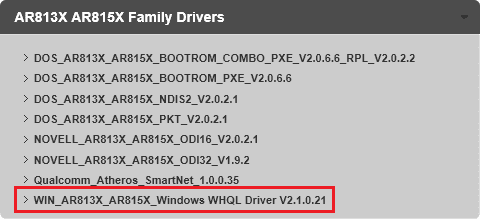
Download the Atheros Ethernet WIN_AR813X_AR815X_Windows WHQL Driver V2.1.0.21
Capture.PNG

do NOT install the driver until you post the SmartRG information and members have a chance to review and comment on the settings. ATMC has blessed the configuration and provided a new router so I don't want to muck around without knowing what both sides of the cable are.

Please follow this tutorial to provide the current operating environment of your machine.
http://www.sevenforums.com/tutorials/311593-speccy-publish-snapshot-your-system-specs.html

I think I asked this before - How often does this error message happen - where do you see the message
Other questions:
Do you get dropped
is the connection slow

You are able to connect to the Internet, so I'm not sure there is an issue, but you can continue trying to resolve the
It's always the your computer is unable to find it's ip address error
network address lease was denied by the server

Don't make any changes at this point - that only makes trouble shooting more difficult.

Thanks
 

My Computer My Computer

At a glance

x64 (6.3.9600) Win8.1 Pro & soon dual boot x6...AMD A6-3420M APU with Radeon(tm) HD Graphics6.00 GBAMD Radeon(TM) HD 6520G
Computer type
Laptop
Computer Manufacturer/Model Number
HP Pavilion dv6-6c10us
OS
x64 (6.3.9600) Win8.1 Pro & soon dual boot x64 (6.1.7601) Win7_SP1 HomePrem
CPU
AMD A6-3420M APU with Radeon(tm) HD Graphics
Motherboard
Hewlett-Packard 1805
Memory
6.00 GB
Graphics Card(s)
AMD Radeon(TM) HD 6520G
Sound Card
(1) AMD High Definition Audio Device (2) IDT High Definiti
Monitor(s) Displays
HP W2072a 20" LCD (1600 x 900) @ 60 Hz
Screen Resolution
1366 x 768 x 32 bits (4294967296 colors) @ 60 Hz
Hard Drives
ST640LM0 00 HM641JI SATA Disk Device
Keyboard
Logitech k520 wireless KB
Mouse
Logitech m320 wireless mouse (bundled with KB)
Internet Speed
15/5 | 54 MB Wireless 'n'
Antivirus
Realtime: Defender or Avast | On-demand: Malwarebytes, ESET
Browser
IE 11 on Win8, IE 10 on win 7
Other Info
Media: [Gimp, Audacity, VLC] || Comm: [WEmail 2012, Skype] || Productivity: [OpenOffice,| Textpad] || Utils: [Sysinternals, cCleaner, Speccy, Defraggler]
Here's a pic of the networks in network and sharing center.


I don't see that specific driver in the list, all i see is this one which closely matches the one you display but without the V2.1.0.21

WIN_AR81FamilyWinSetup-1.0.0.49_WHQL

Never mind , i found the right driver.


Should i delete all the profiles except for local area connection 2? Regarding the RG350N , i have no idea what it's configurations are , there is nowhere on my computer where it's listed.
 

Attachments

  • Untitled.jpg
    Untitled.jpg
    64.9 KB · Views: 3

My Computer My Computer

At a glance

Microsoft Windows 7 Home Premium 64-bit 7601 ...Intel(R) Core(TM) i5-2430M CPU @ 2.40GHz6.00 GBIntel(R) HD Graphics 3000
Computer type
Laptop
Computer Manufacturer/Model Number
Asus laptop U56E
OS
Microsoft Windows 7 Home Premium 64-bit 7601 Multiprocessor Free Service Pack 1
CPU
Intel(R) Core(TM) i5-2430M CPU @ 2.40GHz
Motherboard
ASUSTeK Computer Inc. U56E
Memory
6.00 GB
Graphics Card(s)
Intel(R) HD Graphics 3000
Sound Card
(1) High Definition Audio Device (2) High Definition Audio
Screen Resolution
1366 x 768 x 32 bits (4294967296 colors) @ 60 Hz
Hard Drives
WDC WD6400BPVT-80HXZT3
....
Should i delete all the profiles except for local area connection 2?

Regarding the RG350N , i have no idea what it's configurations are , there is nowhere on my computer where it's listed.

Yes, delete all but Local Area Connection 2.
Then rename Local Area Connection 2 to ATMC Atheros Ethernet
this is just housekeeping

The configuration for the SmartRG is on the cable modem, see the manual on how to administer.
Post# 23 has the link for the manual. I didn't read all of the way through, see if there is a way to dump or save the configuration

I'm a little confused - you identified one driver, but then said you found the right driver.
Please tell me exactly what driver you found and if you downloaded it.
 

My Computer My Computer

At a glance

x64 (6.3.9600) Win8.1 Pro & soon dual boot x6...AMD A6-3420M APU with Radeon(tm) HD Graphics6.00 GBAMD Radeon(TM) HD 6520G
Computer type
Laptop
Computer Manufacturer/Model Number
HP Pavilion dv6-6c10us
OS
x64 (6.3.9600) Win8.1 Pro & soon dual boot x64 (6.1.7601) Win7_SP1 HomePrem
CPU
AMD A6-3420M APU with Radeon(tm) HD Graphics
Motherboard
Hewlett-Packard 1805
Memory
6.00 GB
Graphics Card(s)
AMD Radeon(TM) HD 6520G
Sound Card
(1) AMD High Definition Audio Device (2) IDT High Definiti
Monitor(s) Displays
HP W2072a 20" LCD (1600 x 900) @ 60 Hz
Screen Resolution
1366 x 768 x 32 bits (4294967296 colors) @ 60 Hz
Hard Drives
ST640LM0 00 HM641JI SATA Disk Device
Keyboard
Logitech k520 wireless KB
Mouse
Logitech m320 wireless mouse (bundled with KB)
Internet Speed
15/5 | 54 MB Wireless 'n'
Antivirus
Realtime: Defender or Avast | On-demand: Malwarebytes, ESET
Browser
IE 11 on Win8, IE 10 on win 7
Other Info
Media: [Gimp, Audacity, VLC] || Comm: [WEmail 2012, Skype] || Productivity: [OpenOffice,| Textpad] || Utils: [Sysinternals, cCleaner, Speccy, Defraggler]
I was away from computer for a few days , apologize for not advising you of this . A little confused over what configuration means , is just one ethernet adapter plugged into the lan 4 port , there are three empty lan ports , i have no router .

It's as basic as you can get , the driver i downloaded is this one (WIN_AR813X_AR815X_Windows WHQL Driver V2.1.0.21) i did not install it .

You have a very good point about as long as i can connect whats the problem , maybe event log errors are no big deal .

I am in admin account and surprisingly i cannot delete the extra adapters , it has a delete option but for some reason it's translucent (greyed out) and won't let me delete them.


Thanks again
 

My Computer My Computer

At a glance

Microsoft Windows 7 Home Premium 64-bit 7601 ...Intel(R) Core(TM) i5-2430M CPU @ 2.40GHz6.00 GBIntel(R) HD Graphics 3000
Computer type
Laptop
Computer Manufacturer/Model Number
Asus laptop U56E
OS
Microsoft Windows 7 Home Premium 64-bit 7601 Multiprocessor Free Service Pack 1
CPU
Intel(R) Core(TM) i5-2430M CPU @ 2.40GHz
Motherboard
ASUSTeK Computer Inc. U56E
Memory
6.00 GB
Graphics Card(s)
Intel(R) HD Graphics 3000
Sound Card
(1) High Definition Audio Device (2) High Definition Audio
Screen Resolution
1366 x 768 x 32 bits (4294967296 colors) @ 60 Hz
Hard Drives
WDC WD6400BPVT-80HXZT3
No problem about being away.

I'll try to explain it differently.
Your PC is connected to the SmartRG Cable Modem via an Ethernet cable.
One end of the cable plugs into your PC Ehternet port.
The other end plugs into one of the four ports on the SmartRG Cable Modem.

You've provided configuration for the PC side of the cable (we might do that again in case the ATMC tech asked you to make changes)

Since you got a new SmartRG (I'm assuming that's what ATMC provided), I need to see how that device is configured. Then I can match things up to the PC.

This will be interesting... To access the SmartRG device, use your browser and type 192.168.50.1 into the address bar.
Why interesting? The subnet .50 might not get you to the SmartRG device, but try it - you can then try the default address as documented in the manual. (see post# 23)

Don't change anything on the SmartRG - just look (always cancel if you're not sure)

I'll read more of the manual to try and find a config save or dump to text file option - most have something like that.

This troubleshooting could take some time. Part of it is the nature of the forum (you post, I answer, you ask a question on my post, I answer....). Part of it is simple communication - I think we're on the same page as far as your network goes, but we see or discuss things differently - not uncommon.

I'll leave it up to you if you want to pursue the log error. I don't think it's an issue as long as the Internet can be reached, the connection is not dropped, and the throughput is acceptable.

To be honest, I've wrestled with the pseudo-adapter (really just services) issues on my own machine and they always cause me headaches trying to fix them. Usually there was nothing to fix in the first place, the 'extra' adapters and or log messages just bugged me.

Your call on going forward with troubleshooting.


Bill
.
 

My Computer My Computer

At a glance

x64 (6.3.9600) Win8.1 Pro & soon dual boot x6...AMD A6-3420M APU with Radeon(tm) HD Graphics6.00 GBAMD Radeon(TM) HD 6520G
Computer type
Laptop
Computer Manufacturer/Model Number
HP Pavilion dv6-6c10us
OS
x64 (6.3.9600) Win8.1 Pro & soon dual boot x64 (6.1.7601) Win7_SP1 HomePrem
CPU
AMD A6-3420M APU with Radeon(tm) HD Graphics
Motherboard
Hewlett-Packard 1805
Memory
6.00 GB
Graphics Card(s)
AMD Radeon(TM) HD 6520G
Sound Card
(1) AMD High Definition Audio Device (2) IDT High Definiti
Monitor(s) Displays
HP W2072a 20" LCD (1600 x 900) @ 60 Hz
Screen Resolution
1366 x 768 x 32 bits (4294967296 colors) @ 60 Hz
Hard Drives
ST640LM0 00 HM641JI SATA Disk Device
Keyboard
Logitech k520 wireless KB
Mouse
Logitech m320 wireless mouse (bundled with KB)
Internet Speed
15/5 | 54 MB Wireless 'n'
Antivirus
Realtime: Defender or Avast | On-demand: Malwarebytes, ESET
Browser
IE 11 on Win8, IE 10 on win 7
Other Info
Media: [Gimp, Audacity, VLC] || Comm: [WEmail 2012, Skype] || Productivity: [OpenOffice,| Textpad] || Utils: [Sysinternals, cCleaner, Speccy, Defraggler]
I'll have to think a bit on the inactive delete - it's a round-a-bout way if I recall.

Don't sweat anything on the PC side for now.

Thanks for the Artheros driver information. That's what I thought, but wanted to double check.
 

My Computer My Computer

At a glance

x64 (6.3.9600) Win8.1 Pro & soon dual boot x6...AMD A6-3420M APU with Radeon(tm) HD Graphics6.00 GBAMD Radeon(TM) HD 6520G
Computer type
Laptop
Computer Manufacturer/Model Number
HP Pavilion dv6-6c10us
OS
x64 (6.3.9600) Win8.1 Pro & soon dual boot x64 (6.1.7601) Win7_SP1 HomePrem
CPU
AMD A6-3420M APU with Radeon(tm) HD Graphics
Motherboard
Hewlett-Packard 1805
Memory
6.00 GB
Graphics Card(s)
AMD Radeon(TM) HD 6520G
Sound Card
(1) AMD High Definition Audio Device (2) IDT High Definiti
Monitor(s) Displays
HP W2072a 20" LCD (1600 x 900) @ 60 Hz
Screen Resolution
1366 x 768 x 32 bits (4294967296 colors) @ 60 Hz
Hard Drives
ST640LM0 00 HM641JI SATA Disk Device
Keyboard
Logitech k520 wireless KB
Mouse
Logitech m320 wireless mouse (bundled with KB)
Internet Speed
15/5 | 54 MB Wireless 'n'
Antivirus
Realtime: Defender or Avast | On-demand: Malwarebytes, ESET
Browser
IE 11 on Win8, IE 10 on win 7
Other Info
Media: [Gimp, Audacity, VLC] || Comm: [WEmail 2012, Skype] || Productivity: [OpenOffice,| Textpad] || Utils: [Sysinternals, cCleaner, Speccy, Defraggler]
Thanks so much Bill , you have been incredibly helpful and patient . Currently i am not getting the DNS messages anymore , don't know why but everything seems to be pretty good thanks to you.

That being the case i think i will just use the PC for now and keep track of it and let you concentrate your efforts on others who need assistance.

I will keep the driver and we can pick this up at a later date if something goes a little wacky or if i am having issues that are troublesome .

You are a Godsend my friend and i appreciate your help and expertise more than you know .
I will keep in touch and let you know how things develop .

Thanks again
 

My Computer My Computer

At a glance

Microsoft Windows 7 Home Premium 64-bit 7601 ...Intel(R) Core(TM) i5-2430M CPU @ 2.40GHz6.00 GBIntel(R) HD Graphics 3000
Computer type
Laptop
Computer Manufacturer/Model Number
Asus laptop U56E
OS
Microsoft Windows 7 Home Premium 64-bit 7601 Multiprocessor Free Service Pack 1
CPU
Intel(R) Core(TM) i5-2430M CPU @ 2.40GHz
Motherboard
ASUSTeK Computer Inc. U56E
Memory
6.00 GB
Graphics Card(s)
Intel(R) HD Graphics 3000
Sound Card
(1) High Definition Audio Device (2) High Definition Audio
Screen Resolution
1366 x 768 x 32 bits (4294967296 colors) @ 60 Hz
Hard Drives
WDC WD6400BPVT-80HXZT3
You're welcome Jonny.

Good to hear that the DNS messages are no longer an issue - not sure exactly what changed that (ATMC review & new Cable modem perhaps).

Sounds like a sound plan - hold on to the driver update until an issue requires a driver update.
If an issue does crop up, post as much information as you can.

You can short hand things, such as
error code: 0x00000000
error msg: Page could not be loaded
event msg:The XYZ service failed to start

a short explanation:
IE 11 - I was trying to go to the ABC website (abc.com) and got the following error (code, msg...)
I can (or cannot) go to other websites (yahoo.com, google.com)

If members need more information, they will ask.

My pleasure working through this issue with you.

Bill
.
 

My Computer My Computer

At a glance

x64 (6.3.9600) Win8.1 Pro & soon dual boot x6...AMD A6-3420M APU with Radeon(tm) HD Graphics6.00 GBAMD Radeon(TM) HD 6520G
Computer type
Laptop
Computer Manufacturer/Model Number
HP Pavilion dv6-6c10us
OS
x64 (6.3.9600) Win8.1 Pro & soon dual boot x64 (6.1.7601) Win7_SP1 HomePrem
CPU
AMD A6-3420M APU with Radeon(tm) HD Graphics
Motherboard
Hewlett-Packard 1805
Memory
6.00 GB
Graphics Card(s)
AMD Radeon(TM) HD 6520G
Sound Card
(1) AMD High Definition Audio Device (2) IDT High Definiti
Monitor(s) Displays
HP W2072a 20" LCD (1600 x 900) @ 60 Hz
Screen Resolution
1366 x 768 x 32 bits (4294967296 colors) @ 60 Hz
Hard Drives
ST640LM0 00 HM641JI SATA Disk Device
Keyboard
Logitech k520 wireless KB
Mouse
Logitech m320 wireless mouse (bundled with KB)
Internet Speed
15/5 | 54 MB Wireless 'n'
Antivirus
Realtime: Defender or Avast | On-demand: Malwarebytes, ESET
Browser
IE 11 on Win8, IE 10 on win 7
Other Info
Media: [Gimp, Audacity, VLC] || Comm: [WEmail 2012, Skype] || Productivity: [OpenOffice,| Textpad] || Utils: [Sysinternals, cCleaner, Speccy, Defraggler]
Back
Top