JavaScript is disabled. For a better experience, please enable JavaScript in your browser before proceeding.
You are using an out of date browser. It may not display this or other websites correctly.
You should upgrade or use an
alternative browser .
Show Path in Windows Explorer
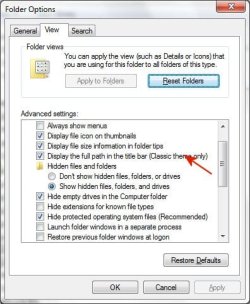
I have set the folder selection to show the path in Windows Explorer as shown here.
I then switched to the Microsoft Classic view and it still does not show the path in Windows Explorer.
Is there another way to do this?
OS Windows 7 Pro CPU Intel(R) Pentium(R) Duel CPU E2200 2.20 Ghz Motherboard GA-G41M-ES2L Memory 4 gb 2.96 Usable Graphics Card(s) Onboard Sound Card Onboard Hard Drives 2 - 1TB WD Sata Drives
Wish to be flying
Guru
Gold Member
VIP
Did you change to a classic theme under Control Panel\All Control Panel Items\Personalization?
Computer type PC/Desktop Computer Manufacturer/Model Number custom build OS Windows 7 HP 64 CPU i5 6600K - 800MHz to 4200MHz Motherboard GA-Z170-HD3P Memory 4+4G GSkill DDR4 3000 Graphics Card(s) IG - Intel 530 Monitor(s) Displays Samsung 226BW Screen Resolution 1680x1050 Hard Drives (1) -1 SM951 – 128GB M.2 AHCI PCIe SSD drive for Windows 7 and Lubuntu PSU Thermaltake 450W TR2 gold Keyboard Old and good Chicony mechanical keyboard Mouse Logitech mX performance - 9 buttons (had to disable some) Internet Speed 500Mb/s Browser Firefox 64 Other Info TinyWall firewall
Computer type Laptop System Manufacturer/Model Number Asus Q550LF OS Windows 7 Pro CPU i7-4500U 800MHz to 3.0GHz Motherboard Asus Q550LF Memory (4+4)G DDR3 1600 Graphics Card(s) IG intel 4400 + NVIDIA GeForce GT 745M Sound Card Realtek Monitor(s) Displays LG Display LP156WF4-SPH1 Screen Resolution 1920 x 1080 Hard Drives BX500 120G SSD for Windows and programs + Internet Speed 500 Mb/s Browser Firefox Other Info TinyWall firewall
New member
Pro User
Thread Starter
Yes I did and then rebooted just to make sure.
OS Windows 7 Pro CPU Intel(R) Pentium(R) Duel CPU E2200 2.20 Ghz Motherboard GA-G41M-ES2L Memory 4 gb 2.96 Usable Graphics Card(s) Onboard Sound Card Onboard Hard Drives 2 - 1TB WD Sata Drives
Well-known member
Guru
Gold Member
The screenshot clearly shows that you're still using an Aero theme. You must disable it for the title bar to show, it's a known bug in Explorer (and the options dialog tells about it).
As far as I remember, this bug has been fixed in Windows 8.
The other available option to have a working title bar and Aero enabled (other than downgrade to Windows 8 or 10) is to use the essential
Classic Shell plugin that fixes this bug among many others and adds tons of features to the broken Windows Explorer.
Computer type Laptop Computer Manufacturer/Model Number Toshiba Sattelite A665-S6092 OS Windows 7 Ultimate x64 CPU Intel Core i7-740QM Memory 8 GB DDR3 Graphics Card(s) NVIDIA GeForce 330GT Screen Resolution 1366x768 Hard Drives Samsung 840 SSD 500GB Cooling Coolermaster Notepal U3 notebook cooling pad Internet Speed 3mbps ASDL Antivirus ClamWin 0.98.7 Browser Opera 12.17 x86 (main), Firefox 38 (sec), IE11 (last resort)
New member
Pro User
Thread Starter
At the time I took that screen shot I was NOT in the Microsoft Classic view.
OS Windows 7 Pro CPU Intel(R) Pentium(R) Duel CPU E2200 2.20 Ghz Motherboard GA-G41M-ES2L Memory 4 gb 2.96 Usable Graphics Card(s) Onboard Sound Card Onboard Hard Drives 2 - 1TB WD Sata Drives
Well-known member
Guru
Gold Member
Can you post a screenshot what you're seeing in Explorer right now?
Computer type Laptop Computer Manufacturer/Model Number Toshiba Sattelite A665-S6092 OS Windows 7 Ultimate x64 CPU Intel Core i7-740QM Memory 8 GB DDR3 Graphics Card(s) NVIDIA GeForce 330GT Screen Resolution 1366x768 Hard Drives Samsung 840 SSD 500GB Cooling Coolermaster Notepal U3 notebook cooling pad Internet Speed 3mbps ASDL Antivirus ClamWin 0.98.7 Browser Opera 12.17 x86 (main), Firefox 38 (sec), IE11 (last resort)