

- Local time
- 3:06 PM
- Messages
- 715
I have set the folder selection to show the path in Windows Explorer as shown here.
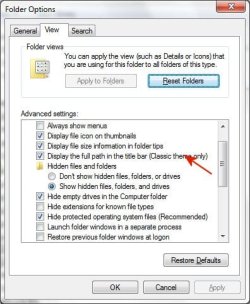
I then switched to the Microsoft Classic view and it still does not show the path in Windows Explorer.
Is there another way to do this?
I then switched to the Microsoft Classic view and it still does not show the path in Windows Explorer.
Is there another way to do this?
My Computer
- OS
- Windows 7 Pro
- CPU
- Intel(R) Pentium(R) Duel CPU E2200 2.20 Ghz
- Motherboard
- GA-G41M-ES2L
- Memory
- 4 gb 2.96 Usable
- Graphics Card(s)
- Onboard
- Sound Card
- Onboard
- Hard Drives
- 2 - 1TB WD Sata Drives


