Show us your hard drive performance

What block size are you guys using when you test your drives. My tests have all been with 64k blocks...which is the default I believe.

I run 64KB Strip Size for my RAID 0 array of two drives, but by block size, I assume you're talking about when you partition a drive with NTFS? If so, just leave it default. The block size won't affect performance too much unless you go with extreme values here. Typically, 128KB to 64KB block/strip size is fine and default.

I took the HD out of the Intel SATA controllers and plugged into the JMicron Gigabyte SATA controllers and tested and got same results. I then loaded the Gigabyte SATA 2 driver for Vista 64 for that controller and tested and still got 25ms-30ms access times on this drive with HDTune.

I'll put Vista on the computer tomorrow and load up the tools and see what happens. The real question is "if" performance is better under Vista....would I stick with Vista...or go with slower access times and use Windows 7 instead. My gut tells me Win7...as I have never been particularly fond of Vista.

Oh well, no more time to play tonight. This has got to wait.

That's interesting that you noticed normal access/seek times on another PC. It's telling that the drivers aren't quite right on your Windows 7 install.

I'd still try to push those Vista 64-bit drivers through if possible. Run the setup for it as Administrator, use the driver update option in Device Manger, of force the drivers by right clicking on the inf files that are part of the installer and choosing "install". It's Gigabyte's fault that they haven't updated their drivers for Windows 7. They shouldn't complain since Windows 7 is supposed to show itself as kernel 6.1 (to be compatible with software looking for a Vista kernel). But perhaps the Gigabyte driver installer is verifying the O/S incorrectly by a hard-coded, sloppy detection method?
 

My Computer

Computer Manufacturer/Model Number
custom build
OS
Windows 7 Ultimate 64-bit RTM
CPU
Intel Core i7 920 (D0), overclocked @ 3.6GHz (4.2GHz stable)
Motherboard
EVGA X58 A1
Memory
6GB of OCZ DDR3-1600 triple channel @ 7-7-7-20
Graphics Card(s)
EVGA GTX 295 Co-Op
Sound Card
Auzentech X Meridian 7.1
Monitor(s) Displays
(3x) Samsung 943BX, (1x) Samsung 2333HD, (1x) BenQ FP202W
Screen Resolution
3840x1024 + 1920x1080 + 1680x1050
Hard Drives
(4x) OCZ Vertex 30GB SATA2 SSDs on RAID 0 for 120GB total
(2x) Western Digital Black 1TB SATA2 on RAID 0
(1x) Lite-on DVD Burner and Blu-Ray player
PSU
PC Power & Cooling Super-quiet Silencer 910
Case
(modified) Tagan Black Pearl full tower, WCR edition
Cooling
Scythe Mugen2 CPU cooler, (5x) Scythe SFF21F, Zalaman cntrl.
Keyboard
Logitech G19
Mouse
Logitech G9x
Internet Speed
Comcast Cable, 22Mbps down and 5Mbps up
Other Info
Logitech Z-5500 Digital speaker system
I actually was having some trouble sleeping, so I am in the process of installing Vista right now on the box and will benchmark soon. I've got a system image of the Windows 7 install...so I can get back to that pretty quickly.
 

My Computer

Computer Manufacturer/Model Number
Self-Built in July 2009
OS
Windows 7 Ultimate x64
CPU
Intel Q9550 2.83Ghz OC'd to 3.40Ghz
Motherboard
Gigabyte GA-EP45-UD3R rev. 1.1, F12 BIOS
Memory
8GB G.Skill PI DDR2-800, 4-4-4-12 timings
Graphics Card(s)
EVGA 1280MB Nvidia GeForce GTX570
Sound Card
Realtek ALC899A 8 channel onboard audio
Monitor(s) Displays
23" Acer x233H
Screen Resolution
1920x1080
Hard Drives
Intel X25-M 80GB Gen 2 SSD
Western Digital 1TB Caviar Black, 32MB cache. WD1001FALS
PSU
Corsair 620HX modular
Case
Antec P182
Cooling
stock
Keyboard
ABS M1 Mechanical
Mouse
Logitech G9 Laser Mouse
Internet Speed
15/2 cable modem
Other Info
Windows and Linux enthusiast. Logitech G35 Headset.
I actually was having some trouble sleeping, so I am in the process of installing Vista right now on the box and will benchmark soon. I've got a system image of the Windows 7 install...so I can get back to that pretty quickly.

Good luck on it! I hope you're able to narrow down this problem. If it's reasonable access times in Vista, then it's an issues with the Windows 7 drivers you're running. If it's still too high in Vista, then it's an issue with your motherboard.
 

My Computer

Computer Manufacturer/Model Number
custom build
OS
Windows 7 Ultimate 64-bit RTM
CPU
Intel Core i7 920 (D0), overclocked @ 3.6GHz (4.2GHz stable)
Motherboard
EVGA X58 A1
Memory
6GB of OCZ DDR3-1600 triple channel @ 7-7-7-20
Graphics Card(s)
EVGA GTX 295 Co-Op
Sound Card
Auzentech X Meridian 7.1
Monitor(s) Displays
(3x) Samsung 943BX, (1x) Samsung 2333HD, (1x) BenQ FP202W
Screen Resolution
3840x1024 + 1920x1080 + 1680x1050
Hard Drives
(4x) OCZ Vertex 30GB SATA2 SSDs on RAID 0 for 120GB total
(2x) Western Digital Black 1TB SATA2 on RAID 0
(1x) Lite-on DVD Burner and Blu-Ray player
PSU
PC Power & Cooling Super-quiet Silencer 910
Case
(modified) Tagan Black Pearl full tower, WCR edition
Cooling
Scythe Mugen2 CPU cooler, (5x) Scythe SFF21F, Zalaman cntrl.
Keyboard
Logitech G19
Mouse
Logitech G9x
Internet Speed
Comcast Cable, 22Mbps down and 5Mbps up
Other Info
Logitech Z-5500 Digital speaker system
Good luck on it! I hope you're able to narrow down this problem. If it's reasonable access times in Vista, then it's an issues with the Windows 7 drivers you're running. If it's still too high in Vista, then it's an issue with your motherboard.

Yes, that was pretty much exactly what I told my wife. 1 thing that I have noticed right off the bat, when I installed the Intel Chipset utility under Vista...it loaded close to a dozen different things. However, under Windows 7 it only loaded about 2 things. And one of those items it installed was the Southbridge drivers for the Intel controller. I'll be posting back here shortly.
 

My Computer

Computer Manufacturer/Model Number
Self-Built in July 2009
OS
Windows 7 Ultimate x64
CPU
Intel Q9550 2.83Ghz OC'd to 3.40Ghz
Motherboard
Gigabyte GA-EP45-UD3R rev. 1.1, F12 BIOS
Memory
8GB G.Skill PI DDR2-800, 4-4-4-12 timings
Graphics Card(s)
EVGA 1280MB Nvidia GeForce GTX570
Sound Card
Realtek ALC899A 8 channel onboard audio
Monitor(s) Displays
23" Acer x233H
Screen Resolution
1920x1080
Hard Drives
Intel X25-M 80GB Gen 2 SSD
Western Digital 1TB Caviar Black, 32MB cache. WD1001FALS
PSU
Corsair 620HX modular
Case
Antec P182
Cooling
stock
Keyboard
ABS M1 Mechanical
Mouse
Logitech G9 Laser Mouse
Internet Speed
15/2 cable modem
Other Info
Windows and Linux enthusiast. Logitech G35 Headset.
Well, I'm afraid to report that moving to Vista did NOT rectify the problem that I was having with high access times. The Intel chipset drivers did install, but when I tried the install the SATA RAID drivers I got the same result that my computer did not meet the requirements....so I am starting to wonder if you have to be running in RAID/AHCI mode to actually use that driver.

Edit: Upon closer inspection of the readme...you do have to be in RAID or AHCI mode...which I am presently not using. Guess I could test under that.

I guess I will go dig around a bit in my BIOS and see if I come across anything...but I've spent a fair amount of time there...so I don't anticipate seeing much.

Guess it's time to get in touch with Gigabyte and see if they have any suggestions. I went to their website and filled out a support request. Time will tell.
 
Last edited:

My Computer

Computer Manufacturer/Model Number
Self-Built in July 2009
OS
Windows 7 Ultimate x64
CPU
Intel Q9550 2.83Ghz OC'd to 3.40Ghz
Motherboard
Gigabyte GA-EP45-UD3R rev. 1.1, F12 BIOS
Memory
8GB G.Skill PI DDR2-800, 4-4-4-12 timings
Graphics Card(s)
EVGA 1280MB Nvidia GeForce GTX570
Sound Card
Realtek ALC899A 8 channel onboard audio
Monitor(s) Displays
23" Acer x233H
Screen Resolution
1920x1080
Hard Drives
Intel X25-M 80GB Gen 2 SSD
Western Digital 1TB Caviar Black, 32MB cache. WD1001FALS
PSU
Corsair 620HX modular
Case
Antec P182
Cooling
stock
Keyboard
ABS M1 Mechanical
Mouse
Logitech G9 Laser Mouse
Internet Speed
15/2 cable modem
Other Info
Windows and Linux enthusiast. Logitech G35 Headset.
Edit: Upon closer inspection of the readme...you do have to be in RAID or AHCI mode...which I am presently not using. Guess I could test under that.

I guess I will go dig around a bit in my BIOS and see if I come across anything...but I've spent a fair amount of time there...so I don't anticipate seeing much.

I think you've identified the problem.

If you're getting these high access times in IDE/Compatibility mode, chances are your Windows driver for the SATA controller chip is running in PIO mode or a low-level DMA mode instead of SATA bus speeds.

If you change your drive to AHCI mode, you'll be better off. But this might require a new install of Windows. Sometimes switching forth from IDE to AHCI mode (or vice versa) will cause an install of Windows to complain and fail to load/bluescreen, even though the data is still fine.

Try to change this in the BIOS to AHCI then do a clean install of Windows 7 and benchmark the drive's speed before installing any other chipset drivers.
 

My Computer

Computer Manufacturer/Model Number
custom build
OS
Windows 7 Ultimate 64-bit RTM
CPU
Intel Core i7 920 (D0), overclocked @ 3.6GHz (4.2GHz stable)
Motherboard
EVGA X58 A1
Memory
6GB of OCZ DDR3-1600 triple channel @ 7-7-7-20
Graphics Card(s)
EVGA GTX 295 Co-Op
Sound Card
Auzentech X Meridian 7.1
Monitor(s) Displays
(3x) Samsung 943BX, (1x) Samsung 2333HD, (1x) BenQ FP202W
Screen Resolution
3840x1024 + 1920x1080 + 1680x1050
Hard Drives
(4x) OCZ Vertex 30GB SATA2 SSDs on RAID 0 for 120GB total
(2x) Western Digital Black 1TB SATA2 on RAID 0
(1x) Lite-on DVD Burner and Blu-Ray player
PSU
PC Power & Cooling Super-quiet Silencer 910
Case
(modified) Tagan Black Pearl full tower, WCR edition
Cooling
Scythe Mugen2 CPU cooler, (5x) Scythe SFF21F, Zalaman cntrl.
Keyboard
Logitech G19
Mouse
Logitech G9x
Internet Speed
Comcast Cable, 22Mbps down and 5Mbps up
Other Info
Logitech Z-5500 Digital speaker system
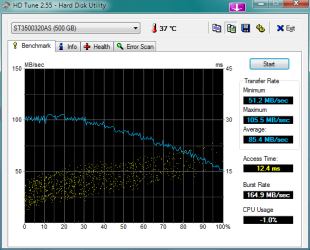
My results.

1.Vista 32 bit
2.W7RC 64 bit
3.XP 32 bit

I think i need to install W7 on the Vista drive :(
Although the W7 drive is mu newest.

Any recommendation on SATA2 Drives that would perform even better ?
 

Attachments

  • VistaDrive.png
    VistaDrive.png
    44.5 KB · Views: 29
  • W7Drive.png
    W7Drive.png
    46.2 KB · Views: 29
  • XPDrive.png
    XPDrive.png
    44.6 KB · Views: 22
ciphernemo,

I have tried the AHCI mode....both with the Intel controller as well as the Gigabyte controller. I did reinstall Windows both times and my results are the same.

When running non-AHCI, I was seeing in HDTune that my drive supported UDMA Mode 6, but was running in UDMA mode 5. From what I have read, there isn't much difference between 5 and 6 and as long as you were running 1 of the other you would be fine.

Today, I'm benchmarking a Dell workstation at my office with Win7 64-bit installed. Once I get the HDTune numbers, I'm going to take out the drive and take it home with me. I'll place that into my box and load Win7 to the drive. I'll then benchmark this drive and see what happens. This will help narrow this down to the hard drive or to the controller on the mobo itself.

I suspect at this point that either my hard drive has a small issue or my mobo itself does. The 7200.12 Seagate drive has been made to be very quiet and thus this results in slower seek times (A few articles on the web have covered this)...but usually I'm reading that it's in the ballpark of 15-20ms. Not the 25-40ms that I have been seeing.

If it's the drive itself, I'll just buy an WD Caviar Black or something and relegate this drive to an external enclosure and make it a USB drive...or use it as my hard drive for my "hackintosh" experiment.
 

My Computer

Computer Manufacturer/Model Number
Self-Built in July 2009
OS
Windows 7 Ultimate x64
CPU
Intel Q9550 2.83Ghz OC'd to 3.40Ghz
Motherboard
Gigabyte GA-EP45-UD3R rev. 1.1, F12 BIOS
Memory
8GB G.Skill PI DDR2-800, 4-4-4-12 timings
Graphics Card(s)
EVGA 1280MB Nvidia GeForce GTX570
Sound Card
Realtek ALC899A 8 channel onboard audio
Monitor(s) Displays
23" Acer x233H
Screen Resolution
1920x1080
Hard Drives
Intel X25-M 80GB Gen 2 SSD
Western Digital 1TB Caviar Black, 32MB cache. WD1001FALS
PSU
Corsair 620HX modular
Case
Antec P182
Cooling
stock
Keyboard
ABS M1 Mechanical
Mouse
Logitech G9 Laser Mouse
Internet Speed
15/2 cable modem
Other Info
Windows and Linux enthusiast. Logitech G35 Headset.
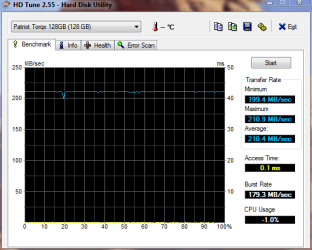
Here's my Patriot 128GB Torqx drive with the new v1571 firmware on it. I can't wait for RAID 0 in a couple of months.
Pat1571.PNG
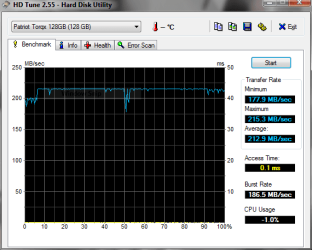
And with the firmware that came on it. Pretty close...this one has no OS installed.
hdpat128.PNG
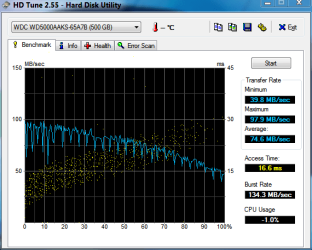
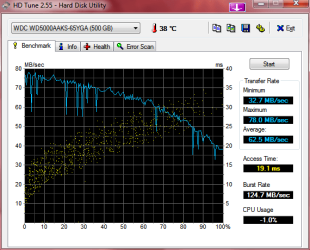
And here's what I had last (and am still using sometimes)
hdwd500.PNG
 

My Computer

Computer Manufacturer/Model Number
Keeps changing - (Custom)
OS
Windows 7 Professional x64
CPU
Intel Core i7 860
Motherboard
Gigabyte GA-P55-UD4P
Memory
4GB DDR3 Mushkin 1600Mhz @ 7-8-7-20
Graphics Card(s)
MSI GTS250 1GB DDR3 Twin Frozr
Sound Card
Onboard realtek
Monitor(s) Displays
Samsung SyncMaster 24" P2450 + Samsung 20" 2033
Screen Resolution
1920 X 1080 and 1600 X 900 (#2 system 1440 X 900)
Hard Drives
Patriot Inferno 120GB SSD + 3 WD Blue 640GB drives
PSU
Corsair 750 HX Modular
Case
Lancool PC-K62
Cooling
Cooler Master TX3 CPU cooler and 4-140mm and 1-120mm case
Keyboard
Gigabyte USB keyboard
Mouse
Microsoft wireless laser mouse 5000
Internet Speed
7 Mb down 1.5 up
Other Info
System #2: AMD Phenom II X6 1055T (Freezer 7 Pro cooler) - Gigabyte 880GMA-UD2H - WD 500GB Black - 9500GT (1GB) 500W OCZ modular PSU - Antec 200 case. System #3 (LapTop) Core 2 Duo T6670 - 320GB 7200RPM HD - 4GB DDR3 RAM.
My results.

1.Vista 32 bit
2.W7RC 64 bit
3.XP 32 bit

I think i need to install W7 on the Vista drive :(
Although the W7 drive is mu newest.

Any recommendation on SATA2 Drives that would perform even better ?

I would like to know HOW you go those results on W7 64 Bit WDC 500GB AAKS...

Here are mine:

HDTune_Benchmark_WDC_WD5000AAKS-65YGA.png
 

My Computer

OS
XP Pro & Vista Home Premium (x86); Windows Ultimate 7600 x64 Retail
Only thing i can think off is maybe firmware then


Hmmm.... HD Tune show my firmware version is 12.0. Would you mind checking your version please?

Thanks!
 

My Computer

OS
XP Pro & Vista Home Premium (x86); Windows Ultimate 7600 x64 Retail
Well, I've identified the problem as some type of incompatibility between my Seagate 7200.12 and my motherboard.

I got a Seagate 7200.10 160GB from work and put that into my computer and ran HDTune. My average access time was identical to what it tested out at work...16.1ms. Which for an older drive is perfectly acceptable.

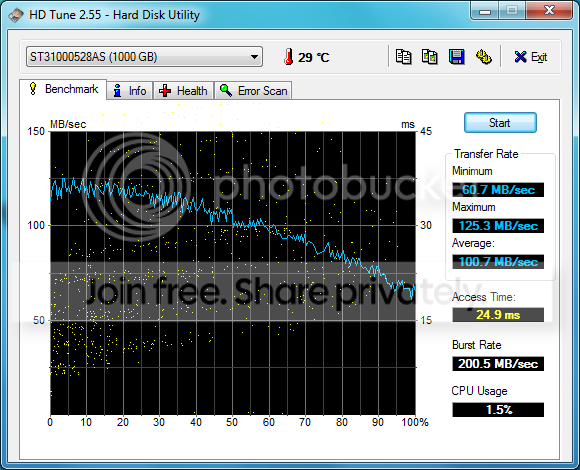
I put my Seagate 7200.12 back into my machine as a secondary drive (not running the OS) and ran HDtune again and here are the results. As you can see, I've still got slower access times than what I should be seeing.
StandAlone1TB-stillSlow.png


So, since I need a second hard drive for another project where speed isn't near as critical, I'm going to use this Seagate for that instead and just pick up a WD Caviar Black for Windows 7.
 

My Computer

Computer Manufacturer/Model Number
Self-Built in July 2009
OS
Windows 7 Ultimate x64
CPU
Intel Q9550 2.83Ghz OC'd to 3.40Ghz
Motherboard
Gigabyte GA-EP45-UD3R rev. 1.1, F12 BIOS
Memory
8GB G.Skill PI DDR2-800, 4-4-4-12 timings
Graphics Card(s)
EVGA 1280MB Nvidia GeForce GTX570
Sound Card
Realtek ALC899A 8 channel onboard audio
Monitor(s) Displays
23" Acer x233H
Screen Resolution
1920x1080
Hard Drives
Intel X25-M 80GB Gen 2 SSD
Western Digital 1TB Caviar Black, 32MB cache. WD1001FALS
PSU
Corsair 620HX modular
Case
Antec P182
Cooling
stock
Keyboard
ABS M1 Mechanical
Mouse
Logitech G9 Laser Mouse
Internet Speed
15/2 cable modem
Other Info
Windows and Linux enthusiast. Logitech G35 Headset.
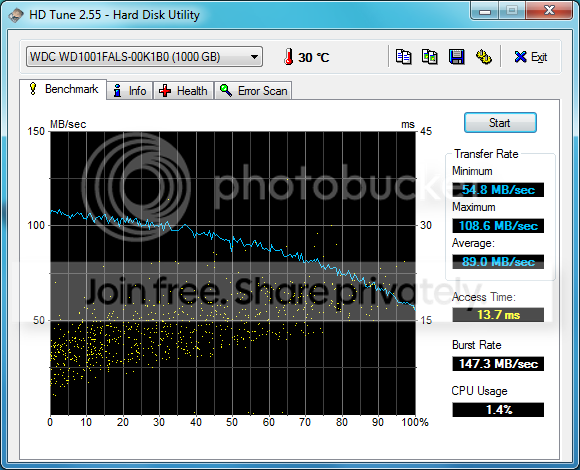
Alright, I picked up a Western Digital 1TB Caviar Black from the local store and installed on the machine. My speeds are just fine by me (about 90MB/s), but my access times are down to 13.7ms :) That certainly is better then 30ms.

StandAlone1TB-WDblack.png
 

My Computer

Computer Manufacturer/Model Number
Self-Built in July 2009
OS
Windows 7 Ultimate x64
CPU
Intel Q9550 2.83Ghz OC'd to 3.40Ghz
Motherboard
Gigabyte GA-EP45-UD3R rev. 1.1, F12 BIOS
Memory
8GB G.Skill PI DDR2-800, 4-4-4-12 timings
Graphics Card(s)
EVGA 1280MB Nvidia GeForce GTX570
Sound Card
Realtek ALC899A 8 channel onboard audio
Monitor(s) Displays
23" Acer x233H
Screen Resolution
1920x1080
Hard Drives
Intel X25-M 80GB Gen 2 SSD
Western Digital 1TB Caviar Black, 32MB cache. WD1001FALS
PSU
Corsair 620HX modular
Case
Antec P182
Cooling
stock
Keyboard
ABS M1 Mechanical
Mouse
Logitech G9 Laser Mouse
Internet Speed
15/2 cable modem
Other Info
Windows and Linux enthusiast. Logitech G35 Headset.
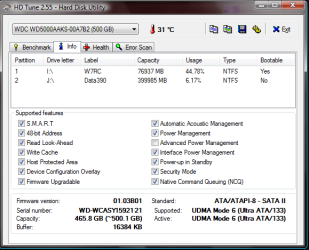
Hmmm.... HD Tune show my firmware version is 12.0. Would you mind checking your version please?

Thanks!

Sorry for the slow reply.
This is my info page about the WD.
Hope it helps.

- Phenom
 

Attachments

  • WDHDFW.png
    WDHDFW.png
    58.5 KB · Views: 21
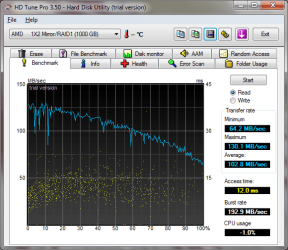
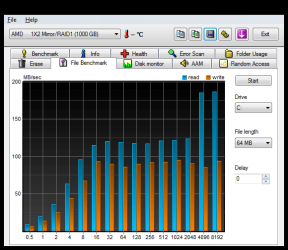
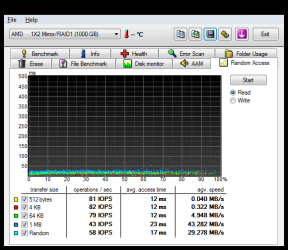
Mine.
U think these are ok?
2x 1tb barracuda 7200.12 raid1
HDTune_Benchmark_AMD_____1X2_Mirror_RAID1.png

HDTune_File_Benchmark_AMD_____1X2_Mirror_RAID1.png

HDTune_Random_Access_AMD_____1X2_Mirror_RAID1.png
 

My Computer

OS
Windows 7 PRO x64
CPU
Phenom II 1090T @ 4.00GHz
Motherboard
Crosshair IV Formula
Memory
8gb DDR3
Graphics Card(s)
1x ATI Diamond 5850
Monitor(s) Displays
50in HDTV (HDMI)
Screen Resolution
1080P
Hard Drives
2x 1TB barracuda
1x 1TB WD Black
1x 2TB WD
1x OCZ Vertex 2 40GB
PSU
1000w Xion
Case
Armor+ VH6000BWS
Cooling
W/C
Internet Speed
60Mbps down, 7 up
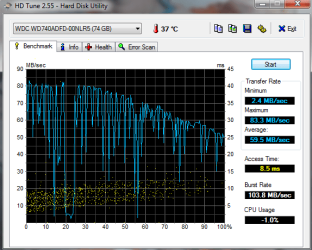
here is mine ...
its a 10k rpm WD raptor drive (74 GB)
The access time is good as well as the maximum read speed (on online reviews of this HD I've seen similar speeds) but my minimum read speed is just ... horrifying :S
The drive is newly formatted (with win7 build 7600 installation) so it can't be fragmentation or something like this...

Anybody got an idea why this could be like this?
 

Attachments

  • hdtune_windows_10k.png
    hdtune_windows_10k.png
    68.7 KB · Views: 31

My Computer

OS
Windows 7 Professional x64
CPU
Intel i7 930 2.8 Ghz
Motherboard
Gigabyte GA-EX58-UD5
Memory
Mushkin Redline 3x2GB, DDR3-1600 CL6-8-6-24
Graphics Card(s)
Sapphire HD 5770 1G
Sound Card
Creative X-Fi XtremeGamer Fatal1ty Pro Series
Monitor(s) Displays
Samsung SyncMaster 226BW
Hard Drives
1x 500 GB System
2x 1TB
1x 1.5 TB
2x 2TB
PSU
be quiet! DARK POWER PRO, P8 900W
Case
Lian Li PCB-70 Black
Cooling
stock
Keyboard
Logitech G15 Blue Backlight
Mouse
Logitech G5 Laser Mouse
Internet Speed
100 mbit
Alright, I picked up a Western Digital 1TB Caviar Black from the local store and installed on the machine. My speeds are just fine by me (about 90MB/s), but my access times are down to 13.7ms :) That certainly is better then 30ms.

I'm glad you were able to isolate it. If that Seagate drive is still under warranty, I'd RMA it. The Western Digital Black 1TB is an excellent drive. :)
 

My Computer

Computer Manufacturer/Model Number
custom build
OS
Windows 7 Ultimate 64-bit RTM
CPU
Intel Core i7 920 (D0), overclocked @ 3.6GHz (4.2GHz stable)
Motherboard
EVGA X58 A1
Memory
6GB of OCZ DDR3-1600 triple channel @ 7-7-7-20
Graphics Card(s)
EVGA GTX 295 Co-Op
Sound Card
Auzentech X Meridian 7.1
Monitor(s) Displays
(3x) Samsung 943BX, (1x) Samsung 2333HD, (1x) BenQ FP202W
Screen Resolution
3840x1024 + 1920x1080 + 1680x1050
Hard Drives
(4x) OCZ Vertex 30GB SATA2 SSDs on RAID 0 for 120GB total
(2x) Western Digital Black 1TB SATA2 on RAID 0
(1x) Lite-on DVD Burner and Blu-Ray player
PSU
PC Power & Cooling Super-quiet Silencer 910
Case
(modified) Tagan Black Pearl full tower, WCR edition
Cooling
Scythe Mugen2 CPU cooler, (5x) Scythe SFF21F, Zalaman cntrl.
Keyboard
Logitech G19
Mouse
Logitech G9x
Internet Speed
Comcast Cable, 22Mbps down and 5Mbps up
Other Info
Logitech Z-5500 Digital speaker system
here is mine ...
its a 10k rpm WD raptor drive (74 GB)
The access time is good as well as the maximum read speed (on online reviews of this HD I've seen similar speeds) but my minimum read speed is just ... horrifying :S
The drive is newly formatted (with win7 build 7600 installation) so it can't be fragmentation or something like this...

Anybody got an idea why this could be like this?

dont worry about your min speeds, that is simply the hdd being accessed by the o/s. you need to look at the average min speeds, in your case it is around 35-40mbps. you cant help the fluctuant droops unless you boot from another physical drive then test the other drive not in use in hd tune.

even if you disable most background services, disable pagefile and what ever else, you will still get droops from the o/s access.
 

My Computer

Computer Manufacturer/Model Number
Mad Customs #4
OS
Windows 7 7600 x64 (16385) Ultimate,Windows Vista x64 Ultimate
CPU
Intel Quad core Q9550 [email protected](AS5 lapped)(1845FSB)
Motherboard
EVGA 790i FTW DIGITAL PWM (AS5 re-pasted)
Memory
2gbx4 GSkill1600MHz9/9/9/24/2T-1.8v@1677MHz9/9/9/18/1T-1.8v
Graphics Card(s)
x2 Leadtek 9800GX2 Quad SLI(re-pasted/no cases)755/1120/1820
Sound Card
Crapative XF-i Plat
Monitor(s) Displays
Chimei22"ws(DVI)/LG32"LCD(HDMI)/Samsung 40"LCD(HDMI)
Screen Resolution
1680x1050/1360x768/1920x1080 (1080P)
Hard Drives
Seagate 1TB "40NS" 32mb sata2, Hitachi 500gb 16mb sata2 (backup storage), Sandisk 16gb micro SD (mobile storage)
PSU
Zalman 850-HP 850watt x6 12v@18A
Case
Tiled floor (nice and cold-usually 18c idle)
Cooling
fan forced 120 Xtreme (lapped)with push/pull setup
Keyboard
Logitech Di Novo Edge
Mouse
MX 1100
Internet Speed
Bigpond 17mbit/s cable=Max witnessed 2.5Mbyte/s down 30kb up
Other Info
Enzotech SLF-1+Enzotech CNB-EVGAi chipset coolers/Sunbeamtech Rheobus Extreme 30 Watt x 6 channel fan controller/Zalman ZM-MFC2 fan controller-Watt meter/Logitech G25 Racing Wheel/Logitech cordless number pad/OCZ NIA//HTPC:7600 x64/[email protected]/2x2Gb ST Proj.X DDR3 1800 9-9-9-24/Nvidia 8400GS 512Mb/Asus HDAV1.3 Delux(changed OPAmps to OPA627)/250Gb 16Mb 7200/480W PSU/Custom made cardboard box!!
I'm glad you were able to isolate it. If that Seagate drive is still under warranty, I'd RMA it. The Western Digital Black 1TB is an excellent drive. :)

I got the Seagate drive less than 2 weeks ago from NewEgg when I built the machine. However, since the drive technically works in my other machine at home and a test machine at work properly, NewEgg isn't going to accept it without charging me a 15% restocking fee.

The drive works just fine as far as I am concerned. It just doesn't work properly with my gigabyte mobo for some reason. So, I plan to put it into my primary Linux box which is running an Asus board and a 320GB WD drive currently. Then, I'm going to put that 320GB WD into my new box as the hard drive for my OSX install that I plan to do on my box.
 

My Computer

Computer Manufacturer/Model Number
Self-Built in July 2009
OS
Windows 7 Ultimate x64
CPU
Intel Q9550 2.83Ghz OC'd to 3.40Ghz
Motherboard
Gigabyte GA-EP45-UD3R rev. 1.1, F12 BIOS
Memory
8GB G.Skill PI DDR2-800, 4-4-4-12 timings
Graphics Card(s)
EVGA 1280MB Nvidia GeForce GTX570
Sound Card
Realtek ALC899A 8 channel onboard audio
Monitor(s) Displays
23" Acer x233H
Screen Resolution
1920x1080
Hard Drives
Intel X25-M 80GB Gen 2 SSD
Western Digital 1TB Caviar Black, 32MB cache. WD1001FALS
PSU
Corsair 620HX modular
Case
Antec P182
Cooling
stock
Keyboard
ABS M1 Mechanical
Mouse
Logitech G9 Laser Mouse
Internet Speed
15/2 cable modem
Other Info
Windows and Linux enthusiast. Logitech G35 Headset.
Back
Top