Show Us Your Rig [3]

Status
Not open for further replies.

My Computer My Computer

Computer Manufacturer/Model Number
Custom Build
OS
Windows 7 Ultimate x64/Windows 8 Consumer Preview x64/Ubuntu 11.04
CPU
Intel Pentium Dual Core E6700 3.2GHz
Motherboard
ASUS P5G41T-M LX
Memory
Strontium 8192MB DDR3 1333Mhz
Graphics Card(s)
msi GeForce N560GTX-M2D1GD5 1GB
Sound Card
Realtek HD Audio
Monitor(s) Displays
CHIMEI CMV 221D 22"
Screen Resolution
1680x1050
Hard Drives
Seagate Barracuda LP Green 3.5'' 2TB Internal HDD 5900RPM + WD Elements Desktop 1TB External HDD 7200RPM
PSU
SHAW Viper-1500w Gaming PSU
Case
Black eMaxx ATX Mini Tower Case
Keyboard
Microsoft Wireless Keyboard 1000
Mouse
Microsoft Wireless Optical Mouse 2000
Internet Speed
100GB @ 4.76Mbps
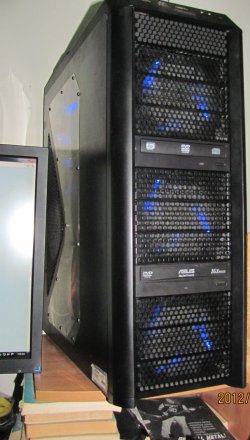
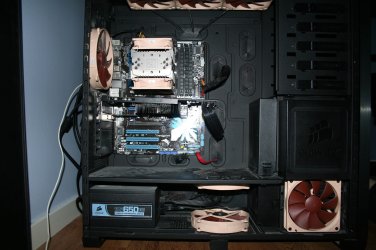
Ok... should i dare? :P Yes i should. Not the prettiest thing but kicks ass in Skyrim so that's enough for me :D And i mean without OC, i don't need to yet.
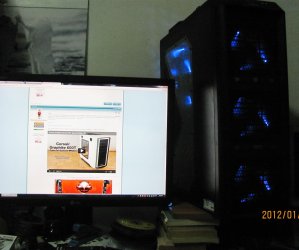
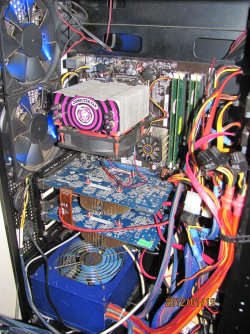
And yes it looks better in reality, i took the photos in quite a rush.
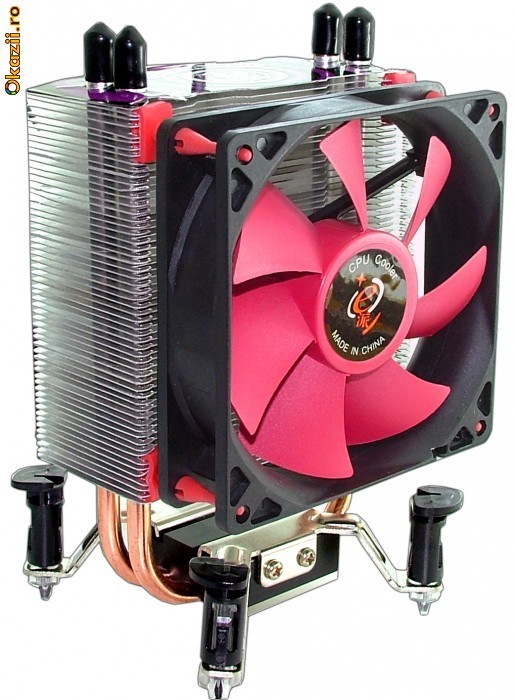
The CPU cooler is just called CPU cooler and is of unknown origin, probably China, got it for $5. It had a small diformity on the part that lands on the CPU, but fixed with fine sandpaper.
Same goes for everything except the case itself, motherboard and a HDD. The rest is all repaired/refurbished by me.
The maximum absolute CPU temp is 45 while with the stock Intel cooler it was 55 idle. Also i've placed 2 coolers on the NB of the mobo, only one visible in the photos, so with OC it never passed 40 celsius, and that's very low for Nvidia chipset. Also placed heatsink from older Asus board on the SB, since it came without one and heated badly. That's pretty much it... the case fans do the rest.
 

Attachments

  • IMG_3568.JPG
    IMG_3568.JPG
    185.4 KB · Views: 17
  • IMG_3570.JPG
    IMG_3570.JPG
    540 KB · Views: 30
  • IMG_3572.JPG
    IMG_3572.JPG
    346.9 KB · Views: 26
  • IMG_3569.JPG
    IMG_3569.JPG
    222.3 KB · Views: 18

My Computer My Computer

Computer type
PC/Desktop
Computer Manufacturer/Model Number
Home brewed
OS
Windows 7 Ultimate 64bit
CPU
Core2Quad Q6600
Motherboard
Asus P5N-E sli
Memory
8GB DDR 2 Kingmax
Graphics Card(s)
2x GT520 1GB/64bit
Sound Card
Realtek ALC883 :P
Monitor(s) Displays
LG Flatron W245
Screen Resolution
1920x1200
Hard Drives
2x STM3250820AS; 2x SP2014N; ST310005AS; WD3200BEVT; WD10EARS; WD1600AAJB; 6Y200M0; ST9160310AS;
PSU
Chieftec 650W
Case
Antec Twelve Hundred
Keyboard
Microsoft Wireless 800
Mouse
Microsoft Wireless 1000
R4dul- Now this is what I like to see, making something awesome out of something simple, I like that you spent time in repairing and upgrading products you got, it shows the hard work and makes the end product way more personal and special, WELL done!!

If I may add my 2cents, I would just say that you need to take some time and do cablemanegment, it all goes to waist if you have a nice rig and your proud of the components,but they then get spoiled and hidden by masses of wires. Other than that, it looks very cool!
 

My Computer My Computer

Computer type
PC/Desktop
Computer Manufacturer/Model Number
Custom built
OS
64bit Windows 10
CPU
Intel i9
Motherboard
MSI X299 Carbon pro
Memory
64g-8x8gig DDR4 3600
Graphics Card(s)
Asus ROg Strix 1080ti
Monitor(s) Displays
Samsung 49" Odyssey g9
Screen Resolution
5210x1440
Hard Drives
1 x 512GB m.2 OS Drive
2 x 512gb ssd
1 x 2tb

4x 1TB's
PSU
Corsair AX1200w
Case
Silverstone TJ11 B-W
Cooling
AIC
Keyboard
Asus Rog Claymore 2
Mouse
Asus Rog Apatha
Internet Speed
1gb Fibre
Never showed of my computer to anyone but I liked what others have done and thats pretty much what got me inspired on cable management so yeah this is my computer, and yes I know the graphic card is a bit well not straight ^^
 

Attachments

  • IMG_0703.JPG
    IMG_0703.JPG
    395.6 KB · Views: 51

My Computer My Computer

Computer type
PC/Desktop
OS
Windows 7 Home Premium x64
CPU
Intel Core i7 860 (Lynnfield)
Motherboard
Asus P7P55D (LGA1156)
Memory
Corsair Vengeance 9,9,9,24 1600Mhz 1.50v 2x4G
Graphics Card(s)
Asus nVidia 560 GTX
Sound Card
Asus Xonar DG
Monitor(s) Displays
Acer P235H & NEC E201W
Screen Resolution
1920x1080 & 900x1600
Hard Drives
2
PSU
Corsair 650 Modular
Case
Corsair 800D
Cooling
Corsair H80 with Noctua fans
Keyboard
Ducky Shine
Mouse
tT Theron
Internet Speed
100/100
Browser
IE10
Andreas- N+I+C+E job on that cable management, and I never thought anyone would use the brownish fans, so they are a first I see in a chassis, all in all very nice and clean look
 

My Computer My Computer

Computer type
PC/Desktop
Computer Manufacturer/Model Number
Custom built
OS
64bit Windows 10
CPU
Intel i9
Motherboard
MSI X299 Carbon pro
Memory
64g-8x8gig DDR4 3600
Graphics Card(s)
Asus ROg Strix 1080ti
Monitor(s) Displays
Samsung 49" Odyssey g9
Screen Resolution
5210x1440
Hard Drives
1 x 512GB m.2 OS Drive
2 x 512gb ssd
1 x 2tb

4x 1TB's
PSU
Corsair AX1200w
Case
Silverstone TJ11 B-W
Cooling
AIC
Keyboard
Asus Rog Claymore 2
Mouse
Asus Rog Apatha
Internet Speed
1gb Fibre
Ok... should i dare? :P Yes i should. Not the prettiest thing but kicks ass in Skyrim so that's enough for me :D And i mean without OC, i don't need to yet.
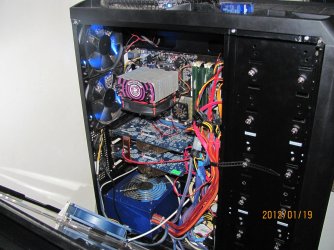
And yes it looks better in reality, i took the photos in quite a rush.
The CPU cooler is just called CPU cooler and is of unknown origin, probably China, got it for $5. It had a small diformity on the part that lands on the CPU, but fixed with fine sandpaper.
Same goes for everything except the case itself, motherboard and a HDD. The rest is all repaired/refurbished by me.
The maximum absolute CPU temp is 45 while with the stock Intel cooler it was 55 idle. Also i've placed 2 coolers on the NB of the mobo, only one visible in the photos, so with OC it never passed 40 celsius, and that's very low for Nvidia chipset. Also placed heatsink from older Asus board on the SB, since it came without one and heated badly. That's pretty much it... the case fans do the rest.
Very good. What's that cooler on the cpu ? That heat sink looks nice. :)
 

My Computer My Computer

Computer type
PC/Desktop
Computer Manufacturer/Model Number
Custom Build
OS
Windows 10 Pro x64
CPU
Intel Core i5 4440 @Stock
Motherboard
Gigabyte Z97 D3H
Memory
4 x 4GB HyperX Fury DDR3
Graphics Card(s)
Gigabyte GTX 1050Ti O4G
Sound Card
Integrated
Monitor(s) Displays
Dell P2417H
Screen Resolution
1920 x 1080
Hard Drives
Samsung EVO 850 120GB / Toshiba DT01ACA050 1TB 7200prm 32MB
PSU
Riotoro Onyx 750W
Case
NZXT H500 Black-Red
Cooling
Stock CPU + NZXT 120mm + 2x120mm red fans
Keyboard
Modecom Volcano Lanparty
Mouse
Asus ROG Gladius / DeepCool E-Pad Plus
Internet Speed
DOCSIS 50/3 Mbit
Browser
Google Chrome
Other Info
Asus K55VJ(i5 3210M, GT635M / 2GB, 8GB DDR3, 500GB HDD)
R4dul- Now this is what I like to see, making something awesome out of something simple, I like that you spent time in repairing and upgrading products you got, it shows the hard work and makes the end product way more personal and special, WELL done!!

If I may add my 2cents, I would just say that you need to take some time and do cablemanegment, it all goes to waist if you have a nice rig and your proud of the components,but they then get spoiled and hidden by masses of wires. Other than that, it looks very cool!

Thanks! Yes i do take pride in this rig, but as far as cable management goes, i'd love to see something done but recently i've been in a world of pain with the DVD-RW, changed 2 of them under warranty until i finally got a working one... different interfaces too, one was IDE, so i had to mess all the cables up and now i ran out of cable ties :P I'd also love to pass the power cables behind the motherboard support plate but they're not long enough in the FSP power supply.
by the way, great computer you got there... keywords: tidy and stylish.

Very good. What's that cooler on the cpu ? That heat sink looks nice.
As i said, it's just named CPU Cooler, i don't even know where it's made, but it has 4 heat pipes and does a fantastic job. I plan on replacing the cheap sleeve bearing fan with a better, PWM controllable fan (4 wired) so the PC will be more silent.

6007919033482043316124-5420709-700_700.jpg

618193917521802778005185-5420709-700_700.jpg
 
Last edited:

My Computer My Computer

Computer type
PC/Desktop
Computer Manufacturer/Model Number
Home brewed
OS
Windows 7 Ultimate 64bit
CPU
Core2Quad Q6600
Motherboard
Asus P5N-E sli
Memory
8GB DDR 2 Kingmax
Graphics Card(s)
2x GT520 1GB/64bit
Sound Card
Realtek ALC883 :P
Monitor(s) Displays
LG Flatron W245
Screen Resolution
1920x1200
Hard Drives
2x STM3250820AS; 2x SP2014N; ST310005AS; WD3200BEVT; WD10EARS; WD1600AAJB; 6Y200M0; ST9160310AS;
PSU
Chieftec 650W
Case
Antec Twelve Hundred
Keyboard
Microsoft Wireless 800
Mouse
Microsoft Wireless 1000
Thanx,and Aah,yeah,I had the same problem,the onlyway I could fix mine in the end was buying a modular powersupply....but that was a last resort, but your chassis has some nice potential for hiding cables, I think if you take some time you can do very well cable hiding in there.
 

My Computer My Computer

Computer type
PC/Desktop
Computer Manufacturer/Model Number
Custom built
OS
64bit Windows 10
CPU
Intel i9
Motherboard
MSI X299 Carbon pro
Memory
64g-8x8gig DDR4 3600
Graphics Card(s)
Asus ROg Strix 1080ti
Monitor(s) Displays
Samsung 49" Odyssey g9
Screen Resolution
5210x1440
Hard Drives
1 x 512GB m.2 OS Drive
2 x 512gb ssd
1 x 2tb

4x 1TB's
PSU
Corsair AX1200w
Case
Silverstone TJ11 B-W
Cooling
AIC
Keyboard
Asus Rog Claymore 2
Mouse
Asus Rog Apatha
Internet Speed
1gb Fibre
As i said, it's just named CPU Cooler, i don't even know where it's made, but it has 4 heat pipes and does a fantastic job. I plan on replacing the cheap sleeve bearing fan with a better, PWM controllable fan (4 wired) so the PC will be more silent.
Thanks for the answer. :)
 

My Computer My Computer

Computer type
PC/Desktop
Computer Manufacturer/Model Number
Custom Build
OS
Windows 10 Pro x64
CPU
Intel Core i5 4440 @Stock
Motherboard
Gigabyte Z97 D3H
Memory
4 x 4GB HyperX Fury DDR3
Graphics Card(s)
Gigabyte GTX 1050Ti O4G
Sound Card
Integrated
Monitor(s) Displays
Dell P2417H
Screen Resolution
1920 x 1080
Hard Drives
Samsung EVO 850 120GB / Toshiba DT01ACA050 1TB 7200prm 32MB
PSU
Riotoro Onyx 750W
Case
NZXT H500 Black-Red
Cooling
Stock CPU + NZXT 120mm + 2x120mm red fans
Keyboard
Modecom Volcano Lanparty
Mouse
Asus ROG Gladius / DeepCool E-Pad Plus
Internet Speed
DOCSIS 50/3 Mbit
Browser
Google Chrome
Other Info
Asus K55VJ(i5 3210M, GT635M / 2GB, 8GB DDR3, 500GB HDD)
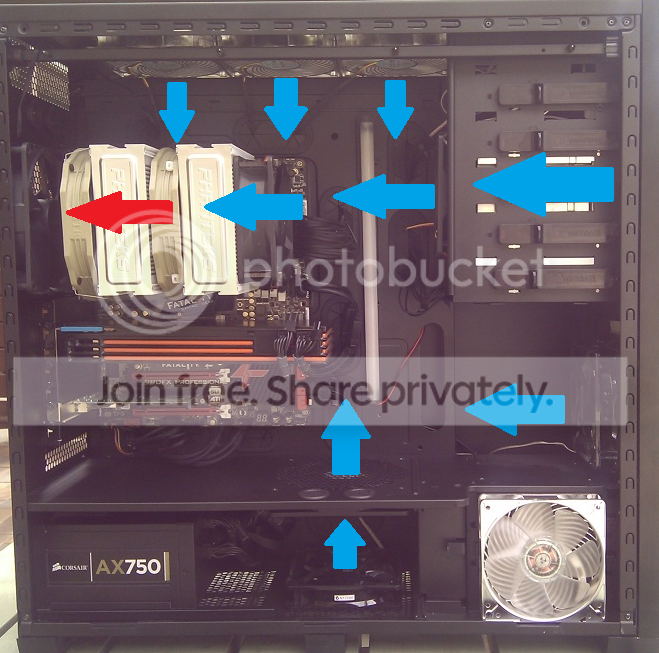
tweek, I notice you have air penetrators :D, nice fans, are the ones on top of your case intake? or exhaust?

All my fans are intake except the rear fan

airflow.png
 

My Computer My Computer

Computer Manufacturer/Model Number
tw33k
OS
Windows 7 Ultimate (x64) SP1
CPU
Intel 3770k 4.6GHz
Motherboard
ASUS Maximus V Formula
Memory
8GB (2x 4GB) Crucial Ballistix
Graphics Card(s)
Sapphire 7950 (1060/1600)
Sound Card
On Board Realtek HD Audio
Monitor(s) Displays
27" Acer B273HU (via HDMI)
Screen Resolution
2048 x 1152
Hard Drives
Crucial M4 128GB
2TB WD Black
1TB Samsung F3 SATA
1TB WD Elite External
2TB WD USB 3.0
PSU
Corsair AX750 Gold
Case
Corsair Obsidian 800DW
Cooling
Corsair H100 (2x AP-121/2x UK-3000 push/pull)
Keyboard
Microsoft Wireless 5000
Mouse
Microsoft Wireless 5000
Internet Speed
5mb/s
Other Info
Logitech z-2300 2.1 speakers
Lamptron FC-5 v2
All my fans are intake except the rear fan

Nice fan setup tw33k, looks like you've got your CPU cooler airflow pretty darn optimal there..
picture.php
 

My Computer My Computer

Computer type
PC/Desktop
OS
Win 10 x64 Pro x64 / Ubuntu 15.10 x64
CPU
Intel i7-4960X
Motherboard
Asus Rampage IV Black Edition
Memory
4x8GB Corsair Dominator Platinum @2400MHz 10-12-12-31
Graphics Card(s)
2x MSI GTX780Ti 3GB (SLI)
Sound Card
Onboard SupremeFX (Cirrus Logic CS4398)
Monitor(s) Displays
3x LG Cinema 27" IPS LED (27MP65)
Screen Resolution
[1920x1080]x3
Hard Drives
Crucial M500 120GB, Crucial M500 480GB, Toshiba DT01ACA200 2TB
PSU
CoolerMaster V1000
Case
Corsair Obsidian 750D
Cooling
ThermalTake Water 3.0 Extreme, 4xSP120, 3xAF120
Keyboard
Moshi Luna
Mouse
Logitech G700s / Roccat Tyon
Internet Speed
4Mb uncapped ADSL (Afrihost)
Antivirus
MS Security Essentials
Browser
Chrome... Duh. (:
Andreas- N+I+C+E job on that cable management, and I never thought anyone would use the brownish fans, so they are a first I see in a chassis, all in all very nice and clean look

Thanks a lot. Yeah they are maybe not the most desirable color but I am to afraid to paint them, scared I might do something that destroy them. But I am happy on how it looks. Gotten a few ideas also on how to have the fans so I might change directions on them, so far the 3 top are exhausting, the one in the back exhaust and the 2 at bottom are intake
 

My Computer My Computer

Computer type
PC/Desktop
OS
Windows 7 Home Premium x64
CPU
Intel Core i7 860 (Lynnfield)
Motherboard
Asus P7P55D (LGA1156)
Memory
Corsair Vengeance 9,9,9,24 1600Mhz 1.50v 2x4G
Graphics Card(s)
Asus nVidia 560 GTX
Sound Card
Asus Xonar DG
Monitor(s) Displays
Acer P235H & NEC E201W
Screen Resolution
1920x1080 & 900x1600
Hard Drives
2
PSU
Corsair 650 Modular
Case
Corsair 800D
Cooling
Corsair H80 with Noctua fans
Keyboard
Ducky Shine
Mouse
tT Theron
Internet Speed
100/100
Browser
IE10
Never showed of my computer to anyone but I liked what others have done and thats pretty much what got me inspired on cable management so yeah this is my computer, and yes I know the graphic card is a bit well not straight ^^

Looks good, but a bit dusty :)
 

My Computer My Computer

Computer type
PC/Desktop
Computer Manufacturer/Model Number
Novatech iRush Pro
OS
Windows 7 Ultimate SP1 - 64 Bit
CPU
Intel Core i5 2500k
Motherboard
Foxconn H67M-S/H67M-V/H67
Memory
2x4GB DDR3 1333Hz
Graphics Card(s)
Ati Radeon 6770
Sound Card
None
Monitor(s) Displays
Samsung S22B150
Screen Resolution
1920x1080
Hard Drives
2x500GB
PSU
500W
Cooling
Fan
Keyboard
HP KU0316
Mouse
Wireless Logitech M185
Internet Speed
20MB/s
Antivirus
Avast Free
Browser
Google Chrome
Other Info
Logitech M185 Mouse
KU-M316 Keyboard
Never showed of my computer to anyone but I liked what others have done and thats pretty much what got me inspired on cable management so yeah this is my computer, and yes I know the graphic card is a bit well not straight ^^

Looks good, but a bit dusty :)

Haha, yeah havent cleaned that lower part for a while and the graphic card is just weird, wont get much cleaner then that even if I use compressed air, or I just did a bad job cleaning it ^^
 

My Computer My Computer

Computer type
PC/Desktop
OS
Windows 7 Home Premium x64
CPU
Intel Core i7 860 (Lynnfield)
Motherboard
Asus P7P55D (LGA1156)
Memory
Corsair Vengeance 9,9,9,24 1600Mhz 1.50v 2x4G
Graphics Card(s)
Asus nVidia 560 GTX
Sound Card
Asus Xonar DG
Monitor(s) Displays
Acer P235H & NEC E201W
Screen Resolution
1920x1080 & 900x1600
Hard Drives
2
PSU
Corsair 650 Modular
Case
Corsair 800D
Cooling
Corsair H80 with Noctua fans
Keyboard
Ducky Shine
Mouse
tT Theron
Internet Speed
100/100
Browser
IE10
Never showed of my computer to anyone but I liked what others have done and thats pretty much what got me inspired on cable management so yeah this is my computer, and yes I know the graphic card is a bit well not straight ^^

Very nice, I like the clean look.
That case has excellent cable management, great work there.
Gotta like the Nocts they are great fans, the color doesn't bother me, but someday they will make a black version and their sales will double.

Hate to break this to you but, someone stole your hard drive(s) :shock:
 

My Computer My Computer

Computer type
PC/Desktop
Computer Manufacturer/Model Number
76~2.0
OS
Windows 7 Ult x64 - SP1/ Windows 8 Pro x64
CPU
Intel Core i5-3570K 4.6GHz
Motherboard
Gigabyte GA-Z77X UD3H, f18
Memory
8GB (2X4GB) DDR3 1600 Corsair Vengeance CL8 1.5v
Graphics Card(s)
Sapphire HD 7770 Vapor-X OC 1GB DDR5
Sound Card
Onboard VIA VT2021
Monitor(s) Displays
22" LCD Dell
Screen Resolution
1680x1050
Hard Drives
Samsung 840Pro 128GB SSD,
Seagate Barracuda 500GB SATA2 7200rpm 32MB cache, Seagate Barracuda 1TB SATA2 7200rpm 32MB cache,
PSU
Corsair HX650W
Case
Cooler Master Storm Scout
Cooling
Corsair H80 2x12cm Noctua NF P12 , 2x14cm case fans
Keyboard
Logitech Wave
Mouse
CM Sentinel
Internet Speed
Dismal
Antivirus
Avast
Browser
Opera Next
Other Info
Haswell laptop: HP Envy 17t-j, i7-4700MQ, GeForce 740M 2GB DDR3, 17.3" Full HD 1920x1080, 16GB RAM, Samsung 840 Pro 128GB, 1TB Hitachi 7200 HDD,
Desktop: eSATA ports,
External eSATA Seagate 500GB SATA2 7200rpm,
External WD USB 500GB
Never showed of my computer to anyone but I liked what others have done and thats pretty much what got me inspired on cable management so yeah this is my computer, and yes I know the graphic card is a bit well not straight ^^

Noctua heaven :)

A Guy
 

My Computer My Computer

Computer type
PC/Desktop
OS
Windows 10 Home x64
CPU
INTEL Core i5-750 Quad-Core 3.37GHz
Motherboard
ASUS P7P55D
Memory
HyperX Fury Black Series 8GB (2 x 4GB) 1866Mhz
Graphics Card(s)
EVGA GeForce GTX 750 Superclocked 1GB 128-Bit GDDR5
Monitor(s) Displays
LG 32MA68HY 32" IPS
Screen Resolution
1920 x 1080
Hard Drives
Samsung 840 Evo 120GB, SEAGATE 500GB Barracuda® 7200.12, SATA 3 Gb/s, 7200 RPM, 16MB cache
PSU
ANTEC TruePower New TP-550, 80 PLUS, 550W
Case
ANTEC Three Hundred Illusion
Cooling
COOLER MASTER Hyper 212 Plus, 4 x 120mm 1 x 140mm Noctua's
Internet Speed
85 + Mbps
Antivirus
Avast
Browser
Vivaldi
Noctua heaven :)

A Guy

Or hell considering how a single fan goes for. Id like to get some, but for the price ill prioritize elsewhere on my pc.
 

My Computer My Computer

Computer Manufacturer/Model Number
The Vampire
OS
Windows 7 Ultimate
CPU
Intel i5 2500k @ 3.30
Motherboard
P8Z68 V-Pro
Memory
G.Skill Ripjaws 1600 2x4 Gb
Graphics Card(s)
BFG GTX 260 MAXCORE 55 OC 896MB GDDR3
Sound Card
Onboard
Monitor(s) Displays
50'' Sony Display Panel
Screen Resolution
1360 x 768
Hard Drives
Seagate 750 GB
WD 160 GB
PSU
OCZ 750 Watts ZT Series Fully Modular PSU 80 Plus Bronze
Case
NZXT Red Phantom
Cooling
120mm x2 Intake, 120mm x 1 and 200mm x2 Exhaust
Keyboard
LX710 Logitech Wireless Keyboard
Mouse
Logitech Wireless Mouse
Andreas- N+I+C+E job on that cable management, and I never thought anyone would use the brownish fans, so they are a first I see in a chassis, all in all very nice and clean look

Thanks a lot. Yeah they are maybe not the most desirable color but I am to afraid to paint them, scared I might do something that destroy them. But I am happy on how it looks. Gotten a few ideas also on how to have the fans so I might change directions on them, so far the 3 top are exhausting, the one in the back exhaust and the 2 at bottom are intake

Well, from my xperiance (and anyone reading this correct me if i am wrong) I found its better having more intake fans then out take, i read a review on google, and it showed that more intake creates possative airflow and its better to have say 8 fans then 6 willl be intake, the air that gets taken in will xcape via the litle holes and openings in your chassis,so as far as I know its better to have more intake than out take, but i could be wrong, so hopefully someoneelse can add on
 

My Computer My Computer

Computer type
PC/Desktop
Computer Manufacturer/Model Number
Custom built
OS
64bit Windows 10
CPU
Intel i9
Motherboard
MSI X299 Carbon pro
Memory
64g-8x8gig DDR4 3600
Graphics Card(s)
Asus ROg Strix 1080ti
Monitor(s) Displays
Samsung 49" Odyssey g9
Screen Resolution
5210x1440
Hard Drives
1 x 512GB m.2 OS Drive
2 x 512gb ssd
1 x 2tb

4x 1TB's
PSU
Corsair AX1200w
Case
Silverstone TJ11 B-W
Cooling
AIC
Keyboard
Asus Rog Claymore 2
Mouse
Asus Rog Apatha
Internet Speed
1gb Fibre
All my fans are intake except the rear fan

Nice fan setup tw33k, looks like you've got your CPU cooler airflow pretty darn optimal there..
picture.php

thanks mate. I replaced the middle fan with a Silverstone AP-121. Have to do some proper testing but temps are down even more.
 

My Computer My Computer

Computer Manufacturer/Model Number
tw33k
OS
Windows 7 Ultimate (x64) SP1
CPU
Intel 3770k 4.6GHz
Motherboard
ASUS Maximus V Formula
Memory
8GB (2x 4GB) Crucial Ballistix
Graphics Card(s)
Sapphire 7950 (1060/1600)
Sound Card
On Board Realtek HD Audio
Monitor(s) Displays
27" Acer B273HU (via HDMI)
Screen Resolution
2048 x 1152
Hard Drives
Crucial M4 128GB
2TB WD Black
1TB Samsung F3 SATA
1TB WD Elite External
2TB WD USB 3.0
PSU
Corsair AX750 Gold
Case
Corsair Obsidian 800DW
Cooling
Corsair H100 (2x AP-121/2x UK-3000 push/pull)
Keyboard
Microsoft Wireless 5000
Mouse
Microsoft Wireless 5000
Internet Speed
5mb/s
Other Info
Logitech z-2300 2.1 speakers
Lamptron FC-5 v2
Well I just ordered my new chassis, it won't arive till 10-15days, but I plan on doing a black and white theme, the chassis is black, but i plan on getting white fans, sofar the only ones I saw was Zalman Shark’s Fin Blade 120mm fan and then NZXT FN-120 120mm x 25mm High Performance Case Fan - 1300 RPM and then Scythe Gentle Typhoon 1450RPM 120x120x25mm Fan. I like the zalmans, cause they seem to be low enough rpms and produce good airflow, but I hear the silent typhoons are also very good, but were I am from have limited stock. Anyway what I would like is a low rpm fan (900rpm-1500) in that range, with High cfm and white fan blades, if the entire fan is white even better. Anyone have some ideas let me know.
 

My Computer My Computer

Computer type
PC/Desktop
Computer Manufacturer/Model Number
Custom built
OS
64bit Windows 10
CPU
Intel i9
Motherboard
MSI X299 Carbon pro
Memory
64g-8x8gig DDR4 3600
Graphics Card(s)
Asus ROg Strix 1080ti
Monitor(s) Displays
Samsung 49" Odyssey g9
Screen Resolution
5210x1440
Hard Drives
1 x 512GB m.2 OS Drive
2 x 512gb ssd
1 x 2tb

4x 1TB's
PSU
Corsair AX1200w
Case
Silverstone TJ11 B-W
Cooling
AIC
Keyboard
Asus Rog Claymore 2
Mouse
Asus Rog Apatha
Internet Speed
1gb Fibre
Status
Not open for further replies.
Back
Top