Show Us Your Rig [4]

Status
Not open for further replies.
Bill is most likely right. He usually is, but I leave the cap to the reservoir off during leak testing. No scientific reason, I just do.

EDIT: I'm sure you know this, but never ever let the pump run without water (Cavitate, just so you know I know some big words.:D) for even 5 seconds. You'll be buying a new pump. Know where the intake line is and keep the water above it.

Thanks Steve. Will me sure it never runs dry.

J
 

My Computer My Computer

Computer type
PC/Desktop
Computer Manufacturer/Model Number
Custom built
OS
Windows 7 Ultimate x64 SP1
CPU
AMD FX 8320 4.8GHz, 1.475V
Motherboard
ASUS Crosshair V Formula-Z
Memory
4 x GSkill Ripjaws Z 4GB 1600 CL8
Graphics Card(s)
2 x ASUS HD7870 2GB DirectCu II
Sound Card
M-Audio Firewire 410
Monitor(s) Displays
2 x Samsung Syncmaster SA300
Screen Resolution
1600x900
Hard Drives
1 x Seagate Barracuda 2TB, 7200 rpm, 64 mb cache - Kingston HyperX 3K 120GB (OS) - Corsair FORCE Series 180GB (Games & Apps)
PSU
Corsair TX850M
Case
NZXT Switch 810
Cooling
Custom Water. XSPC Raystorm, Laing DDC 3.2T PWM, 360+120 rad
Keyboard
Corsair Vengeance 650
Mouse
Elephant Leviathan 3200 DPI
Internet Speed
Too slow
What kind of thermal paste are you currently using?
 

My Computer My Computer

Computer type
PC/Desktop
Computer Manufacturer/Model Number
Custom
OS
Windows 10 Technical Preview - x64
CPU
Core i5-3570K - 4.5GHz
Motherboard
ASUS Sabertooth Z77 [B. 2003]
Memory
G.Skill Sniper 12GB DDR3-1600
Graphics Card(s)
ASUS GeForce GTX 970 STRIX
Monitor(s) Displays
Acer K272HUL
Screen Resolution
2560x1440
Hard Drives
Samsung 840 Evo 250GB (OS), Samsung Spinpoint F3 HD103SJ 1TB (Games), Seagate Expansion 1TB (Additional storage, Backup)
PSU
Cooler Master Real Power Pro 750W, Corsair HX1000W
Case
HAF-X
Cooling
XSPC Rasa RS360
Keyboard
Gigabyte Osmium, Noppoo Choc Mid 87, Corsair K70 RGB
Mouse
Roccat Kova
Internet Speed
50 Mbps up, 50 Mbps down
Antivirus
BitDefender TS 2013, Malwarebytes AM, SUPERAntiSpyware
Browser
Google Chrome
Other Info
Razer Vespula Gaming Pad, Razer eXactMat, Blackmagic Intensity Pro, Corsair Vengeance 1500 USB Headset, Google/ASUS Nexus 7
If you were talking to me Michael, I'm using Coollaboratory Liquid Ultra .
 

My Computers My Computers

System One System Two

  • Computer type
    PC/Desktop
    Computer Manufacturer/Model Number
    ALWAYS UNDER CONSTRUCTION
    OS
    Windows 11 Pro
    CPU
    Ryzen 9 5900X
    Motherboard
    Asus X570 Crosshair Viii Hero
    Memory
    32GB G Skill DDR4-3600
    Graphics Card(s)
    EVGA RTX 3080 FTW 3 Ultra
    Sound Card
    On Board/Sennheiser PC37X Headset
    Monitor(s) Displays
    3 X Asus 27"
    Screen Resolution
    2560x1440
    Hard Drives
    2 X 1 TB NVME drives
    PSU
    EVGA 850
    Case
    Phanteks Eclipse P400A
    Cooling
    EVGA 280 AIO
    Keyboard
    Logitech G510s/ Logitech G13
    Mouse
    Logitech G502
    Internet Speed
    24/1
    Antivirus
    ESET/MBAM Pro/SAS Pro
    Browser
    Chrome/ Firefox/ Edge
  • Computer type
    Laptop
    System Manufacturer/Model Number
    Dell 16 Plus
    OS
    Windows 11 Pro
    CPU
    Intel Ultra 9 288V
    Memory
    32 GB LPDDR5X 8533
    Monitor(s) Displays
    16" Mini-LED HDR600 Touch 90 Hz
    Screen Resolution
    2560X1600
    Hard Drives
    1 TB NVME
Is it any better than MX-4 or the fantastically goopy Shin-Etsu?
 

My Computer My Computer

Computer type
PC/Desktop
Computer Manufacturer/Model Number
Custom
OS
Windows 10 Technical Preview - x64
CPU
Core i5-3570K - 4.5GHz
Motherboard
ASUS Sabertooth Z77 [B. 2003]
Memory
G.Skill Sniper 12GB DDR3-1600
Graphics Card(s)
ASUS GeForce GTX 970 STRIX
Monitor(s) Displays
Acer K272HUL
Screen Resolution
2560x1440
Hard Drives
Samsung 840 Evo 250GB (OS), Samsung Spinpoint F3 HD103SJ 1TB (Games), Seagate Expansion 1TB (Additional storage, Backup)
PSU
Cooler Master Real Power Pro 750W, Corsair HX1000W
Case
HAF-X
Cooling
XSPC Rasa RS360
Keyboard
Gigabyte Osmium, Noppoo Choc Mid 87, Corsair K70 RGB
Mouse
Roccat Kova
Internet Speed
50 Mbps up, 50 Mbps down
Antivirus
BitDefender TS 2013, Malwarebytes AM, SUPERAntiSpyware
Browser
Google Chrome
Other Info
Razer Vespula Gaming Pad, Razer eXactMat, Blackmagic Intensity Pro, Corsair Vengeance 1500 USB Headset, Google/ASUS Nexus 7
I made too many changes to be able to tell. But, it seems do do pretty good. It dries to a 'solid metal' which should be better. I found out about it on Overclock Net. Many of them use it and is what most of them use when they De lid their CPU's. As crazy as many think, it's quite prevalent. Some have reported as much as a 35°C drop in temps at the same overclock after de lidding. I figure if it is good enough for them, it will work for me. It's just a little on the expensive side. I know a couple here who use it. They even have a 'delidded club' on OCN. Go there sometime, meet the real crazies in the computer world.
 

My Computers My Computers

System One System Two

  • Computer type
    PC/Desktop
    Computer Manufacturer/Model Number
    ALWAYS UNDER CONSTRUCTION
    OS
    Windows 11 Pro
    CPU
    Ryzen 9 5900X
    Motherboard
    Asus X570 Crosshair Viii Hero
    Memory
    32GB G Skill DDR4-3600
    Graphics Card(s)
    EVGA RTX 3080 FTW 3 Ultra
    Sound Card
    On Board/Sennheiser PC37X Headset
    Monitor(s) Displays
    3 X Asus 27"
    Screen Resolution
    2560x1440
    Hard Drives
    2 X 1 TB NVME drives
    PSU
    EVGA 850
    Case
    Phanteks Eclipse P400A
    Cooling
    EVGA 280 AIO
    Keyboard
    Logitech G510s/ Logitech G13
    Mouse
    Logitech G502
    Internet Speed
    24/1
    Antivirus
    ESET/MBAM Pro/SAS Pro
    Browser
    Chrome/ Firefox/ Edge
  • Computer type
    Laptop
    System Manufacturer/Model Number
    Dell 16 Plus
    OS
    Windows 11 Pro
    CPU
    Intel Ultra 9 288V
    Memory
    32 GB LPDDR5X 8533
    Monitor(s) Displays
    16" Mini-LED HDR600 Touch 90 Hz
    Screen Resolution
    2560X1600
    Hard Drives
    1 TB NVME
I'm certain I already have an account there because of the Sabertooth Z77 thread (which I haven't posted in since I acquired the board last year :p)

in other news, these are down to the awesome price of $24.99. Seriously considering picking them up right now.
 

My Computer My Computer

Computer type
PC/Desktop
Computer Manufacturer/Model Number
Custom
OS
Windows 10 Technical Preview - x64
CPU
Core i5-3570K - 4.5GHz
Motherboard
ASUS Sabertooth Z77 [B. 2003]
Memory
G.Skill Sniper 12GB DDR3-1600
Graphics Card(s)
ASUS GeForce GTX 970 STRIX
Monitor(s) Displays
Acer K272HUL
Screen Resolution
2560x1440
Hard Drives
Samsung 840 Evo 250GB (OS), Samsung Spinpoint F3 HD103SJ 1TB (Games), Seagate Expansion 1TB (Additional storage, Backup)
PSU
Cooler Master Real Power Pro 750W, Corsair HX1000W
Case
HAF-X
Cooling
XSPC Rasa RS360
Keyboard
Gigabyte Osmium, Noppoo Choc Mid 87, Corsair K70 RGB
Mouse
Roccat Kova
Internet Speed
50 Mbps up, 50 Mbps down
Antivirus
BitDefender TS 2013, Malwarebytes AM, SUPERAntiSpyware
Browser
Google Chrome
Other Info
Razer Vespula Gaming Pad, Razer eXactMat, Blackmagic Intensity Pro, Corsair Vengeance 1500 USB Headset, Google/ASUS Nexus 7
I'm certain I already have an account there because of the Sabertooth Z77 thread (which I haven't posted in since I acquired the board last year :p)

in other news, these are down to the awesome price of $24.99. Seriously considering picking them up right now.

Michael, that's an excellent price for those. I paid about $100 for my AX850 set from Corsair. I know the HX set would have 2 fewer cables, but still you can't go wrong if you like that look. You would pay twice that much for the NZXT Extension cables and still have an extra 9" of cable on each cable to deal with behind the motherboard. Great find.
 

My Computers My Computers

System One System Two

  • Computer type
    PC/Desktop
    Computer Manufacturer/Model Number
    ALWAYS UNDER CONSTRUCTION
    OS
    Windows 11 Pro
    CPU
    Ryzen 9 5900X
    Motherboard
    Asus X570 Crosshair Viii Hero
    Memory
    32GB G Skill DDR4-3600
    Graphics Card(s)
    EVGA RTX 3080 FTW 3 Ultra
    Sound Card
    On Board/Sennheiser PC37X Headset
    Monitor(s) Displays
    3 X Asus 27"
    Screen Resolution
    2560x1440
    Hard Drives
    2 X 1 TB NVME drives
    PSU
    EVGA 850
    Case
    Phanteks Eclipse P400A
    Cooling
    EVGA 280 AIO
    Keyboard
    Logitech G510s/ Logitech G13
    Mouse
    Logitech G502
    Internet Speed
    24/1
    Antivirus
    ESET/MBAM Pro/SAS Pro
    Browser
    Chrome/ Firefox/ Edge
  • Computer type
    Laptop
    System Manufacturer/Model Number
    Dell 16 Plus
    OS
    Windows 11 Pro
    CPU
    Intel Ultra 9 288V
    Memory
    32 GB LPDDR5X 8533
    Monitor(s) Displays
    16" Mini-LED HDR600 Touch 90 Hz
    Screen Resolution
    2560X1600
    Hard Drives
    1 TB NVME
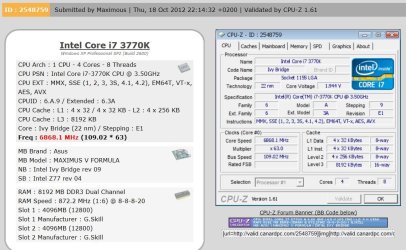
Michael, speaking of the legitimate Crazies at OCN, how about this? And they said Ivy Bridge wouldn't overclock well.

X.JPG
 

My Computers My Computers

System One System Two

  • Computer type
    PC/Desktop
    Computer Manufacturer/Model Number
    ALWAYS UNDER CONSTRUCTION
    OS
    Windows 11 Pro
    CPU
    Ryzen 9 5900X
    Motherboard
    Asus X570 Crosshair Viii Hero
    Memory
    32GB G Skill DDR4-3600
    Graphics Card(s)
    EVGA RTX 3080 FTW 3 Ultra
    Sound Card
    On Board/Sennheiser PC37X Headset
    Monitor(s) Displays
    3 X Asus 27"
    Screen Resolution
    2560x1440
    Hard Drives
    2 X 1 TB NVME drives
    PSU
    EVGA 850
    Case
    Phanteks Eclipse P400A
    Cooling
    EVGA 280 AIO
    Keyboard
    Logitech G510s/ Logitech G13
    Mouse
    Logitech G502
    Internet Speed
    24/1
    Antivirus
    ESET/MBAM Pro/SAS Pro
    Browser
    Chrome/ Firefox/ Edge
  • Computer type
    Laptop
    System Manufacturer/Model Number
    Dell 16 Plus
    OS
    Windows 11 Pro
    CPU
    Intel Ultra 9 288V
    Memory
    32 GB LPDDR5X 8533
    Monitor(s) Displays
    16" Mini-LED HDR600 Touch 90 Hz
    Screen Resolution
    2560X1600
    Hard Drives
    1 TB NVME
Wow I wonder how much dry ice that took?
 

My Computer My Computer

Computer type
PC/Desktop
Computer Manufacturer/Model Number
A blend of brains, brawn and dumb luck.
OS
Windows 7 Ultimate 64
CPU
i7 3770k OC'd 4.6 @ 1.17v, also FX 8120 & i5 miniITX
Motherboard
MSI P67A-GD80 b3
Memory
32 gb G.Skill Sniper DDR3 10-12-12-31 @ 2133
Graphics Card(s)
XFX Radeon 7870 2GB DDR5
Sound Card
Sound Blaster Z Series Card
Monitor(s) Displays
(2) LG LED 23" 1920 x 1080 2ms Monitors via mini d-port
Screen Resolution
1680 X 1050 p
Hard Drives
Samsung 256 gb 830 SSD sata III
(1) 1 tb WD Black
(2) 1 tb Hitachi deskmates/sata II
(2) 1 tb WD green/sata II
(2) 3 tb Seagate Barracuda
(1) 120 gb OCZ Vertex SS
(1) Drobo 5N w/5 Seagate 3tb
PSU
EVGA modular 1000G2 80% gold rating & APC 1200 RS
Case
CoolerMaster Storm Styker
Cooling
7 case fans 140mm & 120mm, NZXT Kraken X60
Keyboard
(2) Logitech Illuminated Keyboards (1) usb (1) wireless
Mouse
Logitech G700 & T-BC21 - nano nx for the laptop
Internet Speed
Basic 120mbps down
Antivirus
Trend Micro Titanium Max Security & Malwarebytes Premium
Browser
Chrome and IE 10
Other Info
5 Noctua case fans + 3 Noctua in p/p on NZXT cooler
Integrated hot swap drive bays for 2.5" Drives
(2) Lite-on dvd/cd/Blu Ray optical 22X
Integrated fan controller and led on/off
HP Officejet Pro 8630 all-n-one
Hot-swappable 3.5" hard drive bay
Netgear Nighthawk router
Asus USB 3 & sata 6 PCIe card
Vantec IDE to sata adptr./Ultra sata adptr
Lenovo L420 i5 lappy with m sata
Drobo 5N advanced NAS
Probably a truck load for sure. But don't tell me they aren't tough chips. Just look at that Vcore. Any other chip would have blown up.
 

My Computers My Computers

System One System Two

  • Computer type
    PC/Desktop
    Computer Manufacturer/Model Number
    ALWAYS UNDER CONSTRUCTION
    OS
    Windows 11 Pro
    CPU
    Ryzen 9 5900X
    Motherboard
    Asus X570 Crosshair Viii Hero
    Memory
    32GB G Skill DDR4-3600
    Graphics Card(s)
    EVGA RTX 3080 FTW 3 Ultra
    Sound Card
    On Board/Sennheiser PC37X Headset
    Monitor(s) Displays
    3 X Asus 27"
    Screen Resolution
    2560x1440
    Hard Drives
    2 X 1 TB NVME drives
    PSU
    EVGA 850
    Case
    Phanteks Eclipse P400A
    Cooling
    EVGA 280 AIO
    Keyboard
    Logitech G510s/ Logitech G13
    Mouse
    Logitech G502
    Internet Speed
    24/1
    Antivirus
    ESET/MBAM Pro/SAS Pro
    Browser
    Chrome/ Firefox/ Edge
  • Computer type
    Laptop
    System Manufacturer/Model Number
    Dell 16 Plus
    OS
    Windows 11 Pro
    CPU
    Intel Ultra 9 288V
    Memory
    32 GB LPDDR5X 8533
    Monitor(s) Displays
    16" Mini-LED HDR600 Touch 90 Hz
    Screen Resolution
    2560X1600
    Hard Drives
    1 TB NVME

My Computer My Computer

Computer type
PC/Desktop
Computer Manufacturer/Model Number
Custom
OS
Windows 10 Technical Preview - x64
CPU
Core i5-3570K - 4.5GHz
Motherboard
ASUS Sabertooth Z77 [B. 2003]
Memory
G.Skill Sniper 12GB DDR3-1600
Graphics Card(s)
ASUS GeForce GTX 970 STRIX
Monitor(s) Displays
Acer K272HUL
Screen Resolution
2560x1440
Hard Drives
Samsung 840 Evo 250GB (OS), Samsung Spinpoint F3 HD103SJ 1TB (Games), Seagate Expansion 1TB (Additional storage, Backup)
PSU
Cooler Master Real Power Pro 750W, Corsair HX1000W
Case
HAF-X
Cooling
XSPC Rasa RS360
Keyboard
Gigabyte Osmium, Noppoo Choc Mid 87, Corsair K70 RGB
Mouse
Roccat Kova
Internet Speed
50 Mbps up, 50 Mbps down
Antivirus
BitDefender TS 2013, Malwarebytes AM, SUPERAntiSpyware
Browser
Google Chrome
Other Info
Razer Vespula Gaming Pad, Razer eXactMat, Blackmagic Intensity Pro, Corsair Vengeance 1500 USB Headset, Google/ASUS Nexus 7
I'm certain I already have an account there because of the Sabertooth Z77 thread (which I haven't posted in since I acquired the board last year :p)

in other news, these are down to the awesome price of $24.99. Seriously considering picking them up right now.

Michael, that's an excellent price for those. I paid about $100 for my AX850 set from Corsair. I know the HX set would have 2 fewer cables, but still you can't go wrong if you like that look. You would pay twice that much for the NZXT Extension cables and still have an extra 9" of cable on each cable to deal with behind the motherboard. Great find.

Since you are talking cables: the friggin' corsair tx 850m I got as a loaner till hey replace my seasonic doesnt have enough modular cables, or conectors, to both power my twin video cards and the two eps connectors on new mobo. Would a 4 pin molex to 4 pin eps adaptor do?

Cheers,

J
 

My Computer My Computer

Computer type
PC/Desktop
Computer Manufacturer/Model Number
Custom built
OS
Windows 7 Ultimate x64 SP1
CPU
AMD FX 8320 4.8GHz, 1.475V
Motherboard
ASUS Crosshair V Formula-Z
Memory
4 x GSkill Ripjaws Z 4GB 1600 CL8
Graphics Card(s)
2 x ASUS HD7870 2GB DirectCu II
Sound Card
M-Audio Firewire 410
Monitor(s) Displays
2 x Samsung Syncmaster SA300
Screen Resolution
1600x900
Hard Drives
1 x Seagate Barracuda 2TB, 7200 rpm, 64 mb cache - Kingston HyperX 3K 120GB (OS) - Corsair FORCE Series 180GB (Games & Apps)
PSU
Corsair TX850M
Case
NZXT Switch 810
Cooling
Custom Water. XSPC Raystorm, Laing DDC 3.2T PWM, 360+120 rad
Keyboard
Corsair Vengeance 650
Mouse
Elephant Leviathan 3200 DPI
Internet Speed
Too slow
I got a reply today from LSI and it really didn't tell me a whole heck of a lot other than the only time I need to install the card during a install/reinstall of windows is if I want to boot from the card. Since I have two perfectly good SATA ports on the MOBO that I can boot from, I don't need the LSI card for that. I had done a little web surfing and found a review that said the user just plugged it in, plugged the cables into some HDDs, and it worked right out of the box. So, I lugged the QE2's anchor back to the washing machine, pulled out the appropriate cover, installed the card and one breakout cable, then plugged one SATA end to the HDD I had temporarily connected to a port on the MOBO and a second one to the 3.5" swap bay.

I lugged the anchor back to its home on the nightstand at the end of my desk, plugged in the cables I've been using so far, then fired up the machine. The computer recognized the card, went hunting around for a driver, found and installed one, then went on to boot. It took a minute or two to finish installing itself but once it did, I found the HDD connected to it. I plugged an HDD in the swap bay and, after around 15-20 seconds, the computer found it. Pulling the HDD from thhe bay didn't crash the anchor...er...computer and when I plugged it back in, the computer sniffed around for a another 15-20 seconds and found it again. Whoo hoo! :dinesh: I was really worried that, besides if I could get the card to work, period, I wouldn't be able to hot swap with it. Since I'm a firm believer in if it ain't broke, don't fix it, I'm not going to worry about installing a driver for now (if ever).

The only thing I don't like about the card is it has its own BIOS which as to also boot up when I fire up the machine so it takes about 10-20 seconds longer to get to the desktop (I didn't bother to time it). Since I will be running it 24/7 and reboot only once or twice a week, when something gets scrambled, or when installing software, it's not that big a problem. At least, once Win 7 starts booting up, the SSD speeds thing s up.

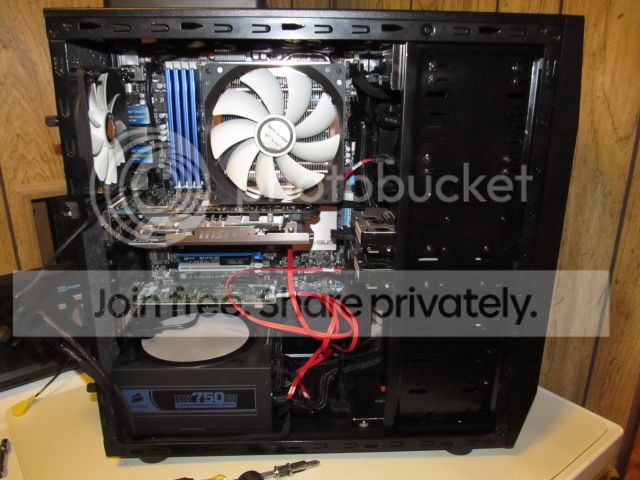
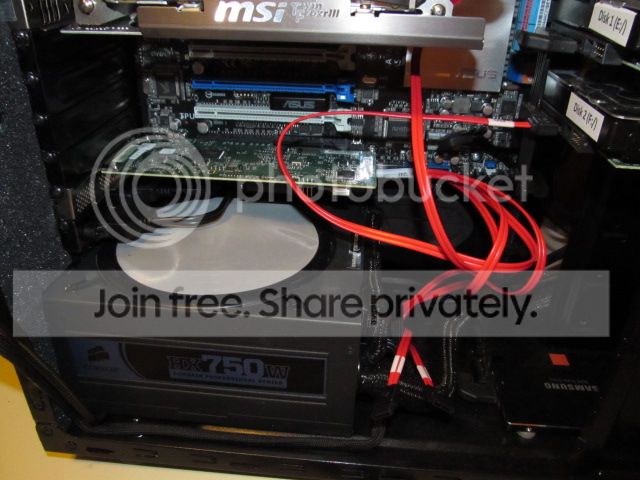
Here's a couple of shots of it residing in my case (I left some tools showing for Steve):

IMG_0104_zps437c1fb1.jpg


IMG_0105_zps1773b107.jpg


I had seen references in reviews of similar cards the heat sink tended to get "toasty" so I decided to stick in the bottom slot to make sure it could get plenty of air to it and get that air away from it (with just one HDD hooked up to it, it does get hot). Air should come from the front fans blowing through the HDD stack and a bit from the side fan. The PSU fan should be able to exhaust the air heated air. Once I'm certain the card works alright and it doesn't need the ventilation holes in the slot cover, I'm going to cover them with aluminum duct tape (the real stuff) and color the cover black (same with the GPU card). That will cut down on the amount of dust that can get into the case.

Obviously (as in, no DUH!), I need to do a bit of work with the cables. The octopus (two break-out cables with eight ends total) need to be partially sleeved from the mini-SAS connectors to where the cables duck behind into the micro-abyss to the right of the HDD stack (when looking from the front of the case), then take a black felt pen to the remaining lengths so they will match the other cables. Then the fun of routing the things willl commence (shudder).

NewEgg just sent me an email today with discount codes and, for a change, it included one for a part I'm ready to buy. I just ordered an internal card reader that has a powered USB 3.0 hub so I can have some USB 3.0 ports on the front of the case (the MOBO has only two on the rear I/O panel but also does have a header).

I got my speakers hooked up and running the other day. For some strange reason, the center speaker and subwoofer are tied together (I had the same problem on my XP machine), causing the center speaker to be too loud. When I tried to reduce the volume of the speaker in the Realtech driver, the sub would also be reduced. If tried to bring back the sub's volume on the control module, the center speaker would also be increased. I had the same problem on my XP machine (it also used Realtech so I don't know if the problem is the driver or the speakers) so I used the same solution; disconnect the center speaker.

I ran a stress test the other day and the CPU was getting up to 71°C; the max for the i7-3030K is supposed to be rated for up to 72.6°C so that makes me a bit nervous, especially since the case sides are still off. The old CPU fan could spin up to 1800 rpm but the new one only goes up to 1200 rpm and it gets up to close to that when the CPU gets up past 68-69°C. I may have to either replace the old 120mm fan or find another 140mm that will spin faster. I'm going to wait to see if I actually load the CPU enough to cause the temps to go that high. Anyone know of monitor software that shows CPU temp in the system tray or taskbar?

 
Last edited:

My Computer My Computer

Computer type
PC/Desktop
Computer Manufacturer/Model Number
Custom Build
OS
Win 7 Ultimate 64 bit
CPU
Intel i7-3930K
Motherboard
ASUS P9X79 WS
Memory
Kingston HyperX Genesis 32GB Kit (8x4GB Modules) 1600MHz DDR
Graphics Card(s)
MSI R7850 Twin Frozr 2GD5/OC Radeon HD 7850 2GB 256-bit GDDR
Sound Card
Asus Xonar Essence STX
Monitor(s) Displays
3x Asus VG248QE 24", Vizio 32" TV
Screen Resolution
1920 x 1080, ?
Hard Drives
Samsung 128GB 840 Pro SSD (1),
Samsung 4TB 850 EVO SSDs (4)
Samsung 4TB 850 EVO SSDs (16) external backup drives used in 2.5" hot swap bays in the computer.
PSU
Corsair HX750w
Case
Antec Two Hundred v2 (modified)
Cooling
Cooler Master GeminII S524 120mm (fan replaced with a 140mm)
Keyboard
Logitech G510s
Mouse
Logitech M525 (two in use)
Internet Speed
=< 32Mbps down, 8Mbps up
Antivirus
AVAST!, MBAM, SAS, Spybot S&D (all but MBAM free) Glary Util
Browser
IE11
Other Info
LSI 9211-8i HBA card (8 SATA III ports), 2.5" & 3.5" Hot Swap Bays, HooToo HT-CR001 PCI-E to USB 3.0 Internal Hub + 6 Slot Card Reader, and LG Model CH12LS28 BD-ROM Optical Drive. Also, ScanSnap S1500 ADF duplexing scanner, Canon 9000F flat bed scanner, Corsair SP2500 2.1 speakers, Samsung CLP 415nw laser color printer, Cyberpower PP2200SW UPS
Core temp will. I have mine set that way. But, is your max temp T Case or TJ Max? TCase is the temp in the center of the CPU that no software I know of can read. TJ Max is the Temp Junction. The temp of the cores, that's what software reads. TJ Max usually has a higher max than TCase. Core temp will tell you what it is.

EDIT: as an example, I believe my 3770K has a Tcase Max of 72°C but TJ Max is 105°C
 

My Computers My Computers

System One System Two

  • Computer type
    PC/Desktop
    Computer Manufacturer/Model Number
    ALWAYS UNDER CONSTRUCTION
    OS
    Windows 11 Pro
    CPU
    Ryzen 9 5900X
    Motherboard
    Asus X570 Crosshair Viii Hero
    Memory
    32GB G Skill DDR4-3600
    Graphics Card(s)
    EVGA RTX 3080 FTW 3 Ultra
    Sound Card
    On Board/Sennheiser PC37X Headset
    Monitor(s) Displays
    3 X Asus 27"
    Screen Resolution
    2560x1440
    Hard Drives
    2 X 1 TB NVME drives
    PSU
    EVGA 850
    Case
    Phanteks Eclipse P400A
    Cooling
    EVGA 280 AIO
    Keyboard
    Logitech G510s/ Logitech G13
    Mouse
    Logitech G502
    Internet Speed
    24/1
    Antivirus
    ESET/MBAM Pro/SAS Pro
    Browser
    Chrome/ Firefox/ Edge
  • Computer type
    Laptop
    System Manufacturer/Model Number
    Dell 16 Plus
    OS
    Windows 11 Pro
    CPU
    Intel Ultra 9 288V
    Memory
    32 GB LPDDR5X 8533
    Monitor(s) Displays
    16" Mini-LED HDR600 Touch 90 Hz
    Screen Resolution
    2560X1600
    Hard Drives
    1 TB NVME
Core temp will. I have mine set that way. But, is your max temp T Case or TJ Max? TCase is the temp in the center of the CPU that no software I know of can read. TJ Max is the Temp Junction. The temp of the cores, that's what software reads. TJ Max usually has a higher max than TCase. Core temp will tell you what it is.

EDIT: as an example, I believe my 3770K has a Tcase Max of 72°C but TJ Max is 105°C

I haven't the foggiest notion which it is. I had fun just finding the figure I did find.

I'll check out Core temp. Thanks!
 

My Computer My Computer

Computer type
PC/Desktop
Computer Manufacturer/Model Number
Custom Build
OS
Win 7 Ultimate 64 bit
CPU
Intel i7-3930K
Motherboard
ASUS P9X79 WS
Memory
Kingston HyperX Genesis 32GB Kit (8x4GB Modules) 1600MHz DDR
Graphics Card(s)
MSI R7850 Twin Frozr 2GD5/OC Radeon HD 7850 2GB 256-bit GDDR
Sound Card
Asus Xonar Essence STX
Monitor(s) Displays
3x Asus VG248QE 24", Vizio 32" TV
Screen Resolution
1920 x 1080, ?
Hard Drives
Samsung 128GB 840 Pro SSD (1),
Samsung 4TB 850 EVO SSDs (4)
Samsung 4TB 850 EVO SSDs (16) external backup drives used in 2.5" hot swap bays in the computer.
PSU
Corsair HX750w
Case
Antec Two Hundred v2 (modified)
Cooling
Cooler Master GeminII S524 120mm (fan replaced with a 140mm)
Keyboard
Logitech G510s
Mouse
Logitech M525 (two in use)
Internet Speed
=< 32Mbps down, 8Mbps up
Antivirus
AVAST!, MBAM, SAS, Spybot S&D (all but MBAM free) Glary Util
Browser
IE11
Other Info
LSI 9211-8i HBA card (8 SATA III ports), 2.5" & 3.5" Hot Swap Bays, HooToo HT-CR001 PCI-E to USB 3.0 Internal Hub + 6 Slot Card Reader, and LG Model CH12LS28 BD-ROM Optical Drive. Also, ScanSnap S1500 ADF duplexing scanner, Canon 9000F flat bed scanner, Corsair SP2500 2.1 speakers, Samsung CLP 415nw laser color printer, Cyberpower PP2200SW UPS
Since you are talking cables: the friggin' corsair tx 850m I got as a loaner till hey replace my seasonic doesnt have enough modular cables, or conectors, to both power my twin video cards and the two eps connectors on new mobo. Would a 4 pin molex to 4 pin eps adaptor do?

Cheers,

J

As long as you're not swapping cables or anything, yeah it should be able to withhold the load... assuming there's enough amperage on the 12V rail.
 

My Computer My Computer

Computer type
PC/Desktop
Computer Manufacturer/Model Number
Custom
OS
Windows 10 Technical Preview - x64
CPU
Core i5-3570K - 4.5GHz
Motherboard
ASUS Sabertooth Z77 [B. 2003]
Memory
G.Skill Sniper 12GB DDR3-1600
Graphics Card(s)
ASUS GeForce GTX 970 STRIX
Monitor(s) Displays
Acer K272HUL
Screen Resolution
2560x1440
Hard Drives
Samsung 840 Evo 250GB (OS), Samsung Spinpoint F3 HD103SJ 1TB (Games), Seagate Expansion 1TB (Additional storage, Backup)
PSU
Cooler Master Real Power Pro 750W, Corsair HX1000W
Case
HAF-X
Cooling
XSPC Rasa RS360
Keyboard
Gigabyte Osmium, Noppoo Choc Mid 87, Corsair K70 RGB
Mouse
Roccat Kova
Internet Speed
50 Mbps up, 50 Mbps down
Antivirus
BitDefender TS 2013, Malwarebytes AM, SUPERAntiSpyware
Browser
Google Chrome
Other Info
Razer Vespula Gaming Pad, Razer eXactMat, Blackmagic Intensity Pro, Corsair Vengeance 1500 USB Headset, Google/ASUS Nexus 7
Since you are talking cables: the friggin' corsair tx 850m I got as a loaner till hey replace my seasonic doesnt have enough modular cables, or conectors, to both power my twin video cards and the two eps connectors on new mobo. Would a 4 pin molex to 4 pin eps adaptor do?

Cheers,

J

As long as you're not swapping cables or anything, yeah it should be able to withhold the load... assuming there's enough amperage on the 12V rail.

And Asus Tech Support, FWIW, said you only need the 8 pin connected, you don't need the 8 pin and the 4 pin. I have just the 8 pin hooked up now, and have had no issues.
 

My Computers My Computers

System One System Two

  • Computer type
    PC/Desktop
    Computer Manufacturer/Model Number
    ALWAYS UNDER CONSTRUCTION
    OS
    Windows 11 Pro
    CPU
    Ryzen 9 5900X
    Motherboard
    Asus X570 Crosshair Viii Hero
    Memory
    32GB G Skill DDR4-3600
    Graphics Card(s)
    EVGA RTX 3080 FTW 3 Ultra
    Sound Card
    On Board/Sennheiser PC37X Headset
    Monitor(s) Displays
    3 X Asus 27"
    Screen Resolution
    2560x1440
    Hard Drives
    2 X 1 TB NVME drives
    PSU
    EVGA 850
    Case
    Phanteks Eclipse P400A
    Cooling
    EVGA 280 AIO
    Keyboard
    Logitech G510s/ Logitech G13
    Mouse
    Logitech G502
    Internet Speed
    24/1
    Antivirus
    ESET/MBAM Pro/SAS Pro
    Browser
    Chrome/ Firefox/ Edge
  • Computer type
    Laptop
    System Manufacturer/Model Number
    Dell 16 Plus
    OS
    Windows 11 Pro
    CPU
    Intel Ultra 9 288V
    Memory
    32 GB LPDDR5X 8533
    Monitor(s) Displays
    16" Mini-LED HDR600 Touch 90 Hz
    Screen Resolution
    2560X1600
    Hard Drives
    1 TB NVME
Wait, did I misunderstand something?

*Is lost*
 

My Computer My Computer

Computer type
PC/Desktop
Computer Manufacturer/Model Number
Custom
OS
Windows 10 Technical Preview - x64
CPU
Core i5-3570K - 4.5GHz
Motherboard
ASUS Sabertooth Z77 [B. 2003]
Memory
G.Skill Sniper 12GB DDR3-1600
Graphics Card(s)
ASUS GeForce GTX 970 STRIX
Monitor(s) Displays
Acer K272HUL
Screen Resolution
2560x1440
Hard Drives
Samsung 840 Evo 250GB (OS), Samsung Spinpoint F3 HD103SJ 1TB (Games), Seagate Expansion 1TB (Additional storage, Backup)
PSU
Cooler Master Real Power Pro 750W, Corsair HX1000W
Case
HAF-X
Cooling
XSPC Rasa RS360
Keyboard
Gigabyte Osmium, Noppoo Choc Mid 87, Corsair K70 RGB
Mouse
Roccat Kova
Internet Speed
50 Mbps up, 50 Mbps down
Antivirus
BitDefender TS 2013, Malwarebytes AM, SUPERAntiSpyware
Browser
Google Chrome
Other Info
Razer Vespula Gaming Pad, Razer eXactMat, Blackmagic Intensity Pro, Corsair Vengeance 1500 USB Headset, Google/ASUS Nexus 7
Michael, I'm not sure what you're lost about. It may be the 8 Pin CPU power cables. Our boards have an 8 pin and a 4 pin CPU power cable. I think yours has only the 8 pin. Asus tech support says only 8 pins are needed. But, the Corsair PSU's will do 2 8 pin CPU power connectors, but the second 8 pin takes up the slot for the second pcie connector. What she is saying is you can't have both 2 CPU power connectors(2 X 8 pin) and 2 GPU cards. It's one or the other. You can have 1 8 pin CPU power and 2 GPUs though. I think I got that right.
 

My Computers My Computers

System One System Two

  • Computer type
    PC/Desktop
    Computer Manufacturer/Model Number
    ALWAYS UNDER CONSTRUCTION
    OS
    Windows 11 Pro
    CPU
    Ryzen 9 5900X
    Motherboard
    Asus X570 Crosshair Viii Hero
    Memory
    32GB G Skill DDR4-3600
    Graphics Card(s)
    EVGA RTX 3080 FTW 3 Ultra
    Sound Card
    On Board/Sennheiser PC37X Headset
    Monitor(s) Displays
    3 X Asus 27"
    Screen Resolution
    2560x1440
    Hard Drives
    2 X 1 TB NVME drives
    PSU
    EVGA 850
    Case
    Phanteks Eclipse P400A
    Cooling
    EVGA 280 AIO
    Keyboard
    Logitech G510s/ Logitech G13
    Mouse
    Logitech G502
    Internet Speed
    24/1
    Antivirus
    ESET/MBAM Pro/SAS Pro
    Browser
    Chrome/ Firefox/ Edge
  • Computer type
    Laptop
    System Manufacturer/Model Number
    Dell 16 Plus
    OS
    Windows 11 Pro
    CPU
    Intel Ultra 9 288V
    Memory
    32 GB LPDDR5X 8533
    Monitor(s) Displays
    16" Mini-LED HDR600 Touch 90 Hz
    Screen Resolution
    2560X1600
    Hard Drives
    1 TB NVME
Oh, that's what I was misunderstanding.

I presume the additional EPS connection is for added stability purposes when OC'ing?
 

My Computer My Computer

Computer type
PC/Desktop
Computer Manufacturer/Model Number
Custom
OS
Windows 10 Technical Preview - x64
CPU
Core i5-3570K - 4.5GHz
Motherboard
ASUS Sabertooth Z77 [B. 2003]
Memory
G.Skill Sniper 12GB DDR3-1600
Graphics Card(s)
ASUS GeForce GTX 970 STRIX
Monitor(s) Displays
Acer K272HUL
Screen Resolution
2560x1440
Hard Drives
Samsung 840 Evo 250GB (OS), Samsung Spinpoint F3 HD103SJ 1TB (Games), Seagate Expansion 1TB (Additional storage, Backup)
PSU
Cooler Master Real Power Pro 750W, Corsair HX1000W
Case
HAF-X
Cooling
XSPC Rasa RS360
Keyboard
Gigabyte Osmium, Noppoo Choc Mid 87, Corsair K70 RGB
Mouse
Roccat Kova
Internet Speed
50 Mbps up, 50 Mbps down
Antivirus
BitDefender TS 2013, Malwarebytes AM, SUPERAntiSpyware
Browser
Google Chrome
Other Info
Razer Vespula Gaming Pad, Razer eXactMat, Blackmagic Intensity Pro, Corsair Vengeance 1500 USB Headset, Google/ASUS Nexus 7
Status
Not open for further replies.
Back
Top