Show Us Your Rig [5]

Status
Not open for further replies.
I'm really liking that 600T Zalith, So much so that i'm trying to figure how to raise the 150 nicker to get one myself :P
Nice choice :thumbsup:

Lmao Juan :D you got it baaad mate. Looking like it's gonna be another epic build mate.
Good job
 

My Computer

Computer type
PC/Desktop
Computer Manufacturer/Model Number
Custom build
OS
Win7 Home Premium x64 SP1
CPU
i7 4770k
Motherboard
Asus maximus VI Hero
Memory
8Gb Kingston HyperX Beast 2400MHz @2133MHz 11-12-11-30
Graphics Card(s)
MSI GTX 780ti Gaming Oc x2
Sound Card
Onboard ROG SupremeFX
Monitor(s) Displays
Asus VG248QE
Screen Resolution
3840X1080 144Hz
Hard Drives
Samung Evo 256Gb, OCZ Agility4 128Gb
1x1TB hitachi storage
PSU
EVGA Supernova 1000w Platinum
Case
Corsair Air 540
Cooling
Corsair H100i
Keyboard
Coolermaster Quickfire Pro
Mouse
Corsair M65 RGB
Internet Speed
74mb dwn/16up
Antivirus
MSE,Malwarebytes
Browser
Chrome
Actually it is 4X4 metres I must admit and behind me is a whole area of workspace but still cramped.

Could you get a small shelf under the desktop and slide it in under it? instead of on the floor.

Mind you if you have it on the floor it is a good idea to have it on a hard surface if you have carpets even so a small board with castors would make it easy for you to move it around and make cooling a lot better :)

I could if I didn't have any legs. The knee hole of the desk already has a small sub woofer in there. The remaining space is for my legs and feet. Everywhere else has drawers in the way. Trust me, I know the room and there just isn't room for anything longer.
Ah look Lady Fitz mate I was not having a go just some logic mixed with my warped sense of humour sorry if I upset you.
I don't indulge in any behaviour that would deliberately upset anyone and if I did sound a bit facetious or patronising when I posted it was not meant to be that at all - just as I said as above. Life is way too short to have conflict of any sort and well perhaps I should have just not said anything eh? :)
 

My Computer

Computer type
PC/Desktop
Computer Manufacturer/Model Number
Own build (new) Desk1 / Asus ROG Win 7 / Desk2 1st build
OS
Desk1 7 Home Prem / Desk2 10 Pro / Main lap Asus ROG 10 Pro 2 laptop Toshiba 7 Pro Asus P2520 7 & 10
CPU
Desk1 i5 3750K / Laptop i7 GTX 860M / Desk2 i5 2500
Motherboard
Desk1 Asus P877-V / Desk2 Gigabyte H67 UD3H / Laptop ?
Memory
Desk1 8GB (1866) / Desk2 16GB (1333) / Laptop 8Gb DDR3
Graphics Card(s)
Desk 1& 2NVidia GTX 650 & Laptops on board Intel
Sound Card
Desk 1 & 2 -XONAR DG Realtek High Def audio Laptop
Monitor(s) Displays
Desk 1 Benq HD 2450 / Desk2 Philips 24" / Laptop 17.5"
Screen Resolution
1920x1080 D1 & D2 & Laptop 1
Hard Drives
Desk1 Samsung 120GB 830 SSD
Asus ROG 256GB 850 Pro SSD
Desk2 Samsung 840 256 SSD
Toshiba 120GB EVO
PSU
Desk 1 Corsair HX 1050/ Laptop ? / Desk 2 Corsair HX 650
Case
Desk 1 Cooler HAF XM ? Toshiba laptop / Desk2 Coolermaster
Cooling
Fans on all Desk1 -2 Desk2 - all Coolermasters 5 Laptop ?
Keyboard
Desk 1 MS Sidewinder X6 Desk 2 MS Sidewinder X 4
Mouse
Desk 1&2 - Gigabyte MS 900 gamer - laptop - Logitec wireless
Internet Speed
ADSL2+
Other Info
One other Desktop (tester) and spare Toshba laptop both with SSD's
Running Kaspersky 2016 ISS on all machines config'd identically
Logitec audio stereo systems on each machine (x3)
Canon MG5250MFC
Router/modem TP-Link running WPA2SK
Thank you Ryan!
You are absolutely right I got it very bad! :geek:

Cheers,

J
 

My Computer

Computer type
PC/Desktop
Computer Manufacturer/Model Number
Custom built
OS
Windows 7 Ultimate x64 SP1
CPU
AMD FX 8320 4.8GHz, 1.475V
Motherboard
ASUS Crosshair V Formula-Z
Memory
4 x GSkill Ripjaws Z 4GB 1600 CL8
Graphics Card(s)
2 x ASUS HD7870 2GB DirectCu II
Sound Card
M-Audio Firewire 410
Monitor(s) Displays
2 x Samsung Syncmaster SA300
Screen Resolution
1600x900
Hard Drives
1 x Seagate Barracuda 2TB, 7200 rpm, 64 mb cache - Kingston HyperX 3K 120GB (OS) - Corsair FORCE Series 180GB (Games & Apps)
PSU
Corsair TX850M
Case
NZXT Switch 810
Cooling
Custom Water. XSPC Raystorm, Laing DDC 3.2T PWM, 360+120 rad
Keyboard
Corsair Vengeance 650
Mouse
Elephant Leviathan 3200 DPI
Internet Speed
Too slow
Bungee18 and Zalith,
Great builds both. I love how white is the new black !

ICit2lol,
Nice cubby for your quiver of electronics like being surrounded by space heaters !

pparks1,
Was wondering where you were hiding out. Welcome back and don't be a stranger, remember we were your friends first....lol. I still have yet to use my W8 upgrade but when I do I'll be over at the 8 forum asking dumb questions.....hope you'll help !
 

My Computer

Computer type
PC/Desktop
Computer Manufacturer/Model Number
A blend of brains, brawn and dumb luck.
OS
Windows 7 Ultimate 64
CPU
i7 3770k OC'd 4.6 @ 1.17v, also FX 8120 & i5 miniITX
Motherboard
MSI P67A-GD80 b3
Memory
32 gb G.Skill Sniper DDR3 10-12-12-31 @ 2133
Graphics Card(s)
XFX Radeon 7870 2GB DDR5
Sound Card
Sound Blaster Z Series Card
Monitor(s) Displays
(2) LG LED 23" 1920 x 1080 2ms Monitors via mini d-port
Screen Resolution
1680 X 1050 p
Hard Drives
Samsung 256 gb 830 SSD sata III
(1) 1 tb WD Black
(2) 1 tb Hitachi deskmates/sata II
(2) 1 tb WD green/sata II
(2) 3 tb Seagate Barracuda
(1) 120 gb OCZ Vertex SS
(1) Drobo 5N w/5 Seagate 3tb
PSU
EVGA modular 1000G2 80% gold rating & APC 1200 RS
Case
CoolerMaster Storm Styker
Cooling
7 case fans 140mm & 120mm, NZXT Kraken X60
Keyboard
(2) Logitech Illuminated Keyboards (1) usb (1) wireless
Mouse
Logitech G700 & T-BC21 - nano nx for the laptop
Internet Speed
Basic 120mbps down
Antivirus
Trend Micro Titanium Max Security & Malwarebytes Premium
Browser
Chrome and IE 10
Other Info
5 Noctua case fans + 3 Noctua in p/p on NZXT cooler
Integrated hot swap drive bays for 2.5" Drives
(2) Lite-on dvd/cd/Blu Ray optical 22X
Integrated fan controller and led on/off
HP Officejet Pro 8630 all-n-one
Hot-swappable 3.5" hard drive bay
Netgear Nighthawk router
Asus USB 3 & sata 6 PCIe card
Vantec IDE to sata adptr./Ultra sata adptr
Lenovo L420 i5 lappy with m sata
Drobo 5N advanced NAS
pparks1,
Was wondering where you were hiding out. Welcome back and don't be a stranger, remember we were your friends first....lol. I still have yet to use my W8 upgrade but when I do I'll be over at the 8 forum asking dumb questions.....hope you'll help !

Yeah, sorry about my extended absence. Hopefully nobody was loosing sleep over where I disappeared to. I was always checking back in on occasion, but found that there was SOOO MUCH to post about on the 8 forums, that I couldn't handle any more tech speak (or drama).
 

My Computer

Computer Manufacturer/Model Number
Self-Built in July 2009
OS
Windows 7 Ultimate x64
CPU
Intel Q9550 2.83Ghz OC'd to 3.40Ghz
Motherboard
Gigabyte GA-EP45-UD3R rev. 1.1, F12 BIOS
Memory
8GB G.Skill PI DDR2-800, 4-4-4-12 timings
Graphics Card(s)
EVGA 1280MB Nvidia GeForce GTX570
Sound Card
Realtek ALC899A 8 channel onboard audio
Monitor(s) Displays
23" Acer x233H
Screen Resolution
1920x1080
Hard Drives
Intel X25-M 80GB Gen 2 SSD
Western Digital 1TB Caviar Black, 32MB cache. WD1001FALS
PSU
Corsair 620HX modular
Case
Antec P182
Cooling
stock
Keyboard
ABS M1 Mechanical
Mouse
Logitech G9 Laser Mouse
Internet Speed
15/2 cable modem
Other Info
Windows and Linux enthusiast. Logitech G35 Headset.
Thank you Ryan!
You are absolutely right I got it very bad! :geek:

Cheers,

J
:D Noubt wrong with that though mate. We enjoy it so why not aye :p
 

My Computer

Computer type
PC/Desktop
Computer Manufacturer/Model Number
Custom build
OS
Win7 Home Premium x64 SP1
CPU
i7 4770k
Motherboard
Asus maximus VI Hero
Memory
8Gb Kingston HyperX Beast 2400MHz @2133MHz 11-12-11-30
Graphics Card(s)
MSI GTX 780ti Gaming Oc x2
Sound Card
Onboard ROG SupremeFX
Monitor(s) Displays
Asus VG248QE
Screen Resolution
3840X1080 144Hz
Hard Drives
Samung Evo 256Gb, OCZ Agility4 128Gb
1x1TB hitachi storage
PSU
EVGA Supernova 1000w Platinum
Case
Corsair Air 540
Cooling
Corsair H100i
Keyboard
Coolermaster Quickfire Pro
Mouse
Corsair M65 RGB
Internet Speed
74mb dwn/16up
Antivirus
MSE,Malwarebytes
Browser
Chrome
Wow... Look away for a day and the thread grows by two more pages. Lol.

I always laid big boxes like that on their sides, opened the bottom and folded the flaps out of the way, tipped the box back up, then pulled the box off the product inside. I find that much easier than wrestling with whatever is inside.
I would've done that, but unfortunately the polystyrene packaging didn't seem to be the original.. I did get it second hand and it was still packed pretty well, but I was a bit scared of letting it fall. Not sure if you know or not (some people here already do) but I can't use my left arm, so I do everything one-handed.
picture.php


Really like the case, nice and roomy.
Is there a way to turn off or disable the leds ?
Not by default, but I do plan to mod a few fans for that exact purpose. I'm thinking two switches, one to control all the lights, and another to completely turn off certain fans. But since adding the Antec tri-speed 120mm fan that the seller sent with the case, I now have two white lights (200mm), a green one (CPU) and a red one (120mm). It's quite a light show at the moment.

It's so big!
picture.php
Hehe...

It's been kind of hectic for the past few days and couldn't find the time to check in as often as I'd like to.
Looks like I missed a lot!
@ Zalith, great case. That rig of yours is turning into some heavy duty piece of equipment. Congrats!
@ Cranky, you really went all out on that case. It is looking very nice, but follow Paul's advice and tips on wiring to improve air flow and keep your high performance parts as cool as possible.

Anyhow, I thought I'd share what I'm putting together for a very good friend whom after seeing my rig asked if I could build something similar for him, but with some extra customizations. Of course I was more than happy to oblige!!!!

...
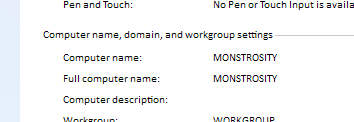
Thanks, my baby really is at long last living up to her name, I've used the same computer name for more years than I can remember. I love that design you did though, the black/white/red combo really works nicely!
PC Name.PNG

Bungee18 and Zalith,
Great builds both. I love how white is the new black !
Haha... Is it really? I actually surprised myself with getting a white case, I never thought I would. Actually, most of my friends thought that too, especially after seeing the (cheap) black/green XFX attempt I had before. Honestly though, it grew on me very fast... Like, 15 seconds after getting it out of the box and I was in love.
picture.php


Edit: Awesome... My 1111'st post.
picture.php
And yes, that was a very random edit.
 

My Computer

Computer type
PC/Desktop
OS
Win 10 x64 Pro x64 / Ubuntu 15.10 x64
CPU
Intel i7-4960X
Motherboard
Asus Rampage IV Black Edition
Memory
4x8GB Corsair Dominator Platinum @2400MHz 10-12-12-31
Graphics Card(s)
2x MSI GTX780Ti 3GB (SLI)
Sound Card
Onboard SupremeFX (Cirrus Logic CS4398)
Monitor(s) Displays
3x LG Cinema 27" IPS LED (27MP65)
Screen Resolution
[1920x1080]x3
Hard Drives
Crucial M500 120GB, Crucial M500 480GB, Toshiba DT01ACA200 2TB
PSU
CoolerMaster V1000
Case
Corsair Obsidian 750D
Cooling
ThermalTake Water 3.0 Extreme, 4xSP120, 3xAF120
Keyboard
Moshi Luna
Mouse
Logitech G700s / Roccat Tyon
Internet Speed
4Mb uncapped ADSL (Afrihost)
Antivirus
MS Security Essentials
Browser
Chrome... Duh. (:
C'mon man you know if you could ban the sale of those large cases you would :D
I would never go so far as to say they should be banned. However, I think there is an unrational desire out there for those who want super powerful computers to equate the size of the case to the power and performance contained within. For others, they really do want to install 15 hard drives and run 24 case fans. However, for many people, we won't ever venture anywhere near that far. A slightly smaller case that can be more easily moved around and tucked out of site can often be advantageous and doesn't necessarily make the computer less powerful or impressive looking. I don't want anybody to think that they simply cannot build their own powerful computer simply because they don't have the physical space to store a jumbo sized case.


I don't prefer tight, tiny cases either but, unfortunately, I live in tight, tiny quarters that don't have room for a bigger case.
Yeah, I have 3 desktops on my desk at work, so I don't have room for 3 HAF X's. But I do have room for the Antec 300 and it's big enough for my needs. Although admittedly, could use more cable management features.
 

My Computer

Computer Manufacturer/Model Number
Self-Built in July 2009
OS
Windows 7 Ultimate x64
CPU
Intel Q9550 2.83Ghz OC'd to 3.40Ghz
Motherboard
Gigabyte GA-EP45-UD3R rev. 1.1, F12 BIOS
Memory
8GB G.Skill PI DDR2-800, 4-4-4-12 timings
Graphics Card(s)
EVGA 1280MB Nvidia GeForce GTX570
Sound Card
Realtek ALC899A 8 channel onboard audio
Monitor(s) Displays
23" Acer x233H
Screen Resolution
1920x1080
Hard Drives
Intel X25-M 80GB Gen 2 SSD
Western Digital 1TB Caviar Black, 32MB cache. WD1001FALS
PSU
Corsair 620HX modular
Case
Antec P182
Cooling
stock
Keyboard
ABS M1 Mechanical
Mouse
Logitech G9 Laser Mouse
Internet Speed
15/2 cable modem
Other Info
Windows and Linux enthusiast. Logitech G35 Headset.
...I do have room for the Antec 300 and it's big enough for my needs. Although admittedly, could use more cable management features.

My Antec Two Hundred V2 had even fewer cable management features. I had to add four grommetted cable management holes at the bottom of the MOBO, do a bit of metal massaging elsewhere, and wound up making custom PSU cables so I could cram everything in without the cables obstructing air flow.
 
Last edited:

My Computer

Computer type
PC/Desktop
Computer Manufacturer/Model Number
Custom Build
OS
Win 7 Ultimate 64 bit
CPU
Intel i7-3930K
Motherboard
ASUS P9X79 WS
Memory
Kingston HyperX Genesis 32GB Kit (8x4GB Modules) 1600MHz DDR
Graphics Card(s)
MSI R7850 Twin Frozr 2GD5/OC Radeon HD 7850 2GB 256-bit GDDR
Sound Card
Asus Xonar Essence STX
Monitor(s) Displays
3x Asus VG248QE 24", Vizio 32" TV
Screen Resolution
1920 x 1080, ?
Hard Drives
Samsung 128GB 840 Pro SSD (1),
Samsung 4TB 850 EVO SSDs (4)
Samsung 4TB 850 EVO SSDs (16) external backup drives used in 2.5" hot swap bays in the computer.
PSU
Corsair HX750w
Case
Antec Two Hundred v2 (modified)
Cooling
Cooler Master GeminII S524 120mm (fan replaced with a 140mm)
Keyboard
Logitech G510s
Mouse
Logitech M525 (two in use)
Internet Speed
=< 32Mbps down, 8Mbps up
Antivirus
AVAST!, MBAM, SAS, Spybot S&D (all but MBAM free) Glary Util
Browser
IE11
Other Info
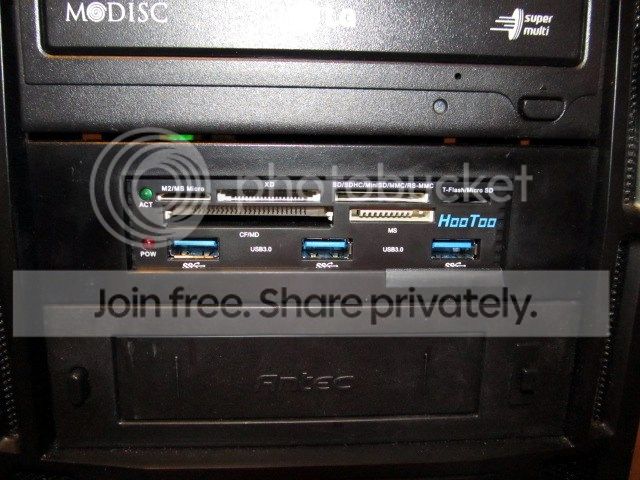
LSI 9211-8i HBA card (8 SATA III ports), 2.5" & 3.5" Hot Swap Bays, HooToo HT-CR001 PCI-E to USB 3.0 Internal Hub + 6 Slot Card Reader, and LG Model CH12LS28 BD-ROM Optical Drive. Also, ScanSnap S1500 ADF duplexing scanner, Canon 9000F flat bed scanner, Corsair SP2500 2.1 speakers, Samsung CLP 415nw laser color printer, Cyberpower PP2200SW UPS
my home machine is in an Antec P180 case, and while it's got good airflow and plenty of power management features, it's a little bigger now that I would like. I'd shrink it to about 60% of it's full size if I could. I only run 1 single network card (nVidia 570GTX), and 2 hard drives (1 SSD, and 1 standard mechanical drive). I boot only Windows 7.
 

My Computer

Computer Manufacturer/Model Number
Self-Built in July 2009
OS
Windows 7 Ultimate x64
CPU
Intel Q9550 2.83Ghz OC'd to 3.40Ghz
Motherboard
Gigabyte GA-EP45-UD3R rev. 1.1, F12 BIOS
Memory
8GB G.Skill PI DDR2-800, 4-4-4-12 timings
Graphics Card(s)
EVGA 1280MB Nvidia GeForce GTX570
Sound Card
Realtek ALC899A 8 channel onboard audio
Monitor(s) Displays
23" Acer x233H
Screen Resolution
1920x1080
Hard Drives
Intel X25-M 80GB Gen 2 SSD
Western Digital 1TB Caviar Black, 32MB cache. WD1001FALS
PSU
Corsair 620HX modular
Case
Antec P182
Cooling
stock
Keyboard
ABS M1 Mechanical
Mouse
Logitech G9 Laser Mouse
Internet Speed
15/2 cable modem
Other Info
Windows and Linux enthusiast. Logitech G35 Headset.
my home machine is in an Antec P180 case, and while it's got good airflow and plenty of power management features, it's a little bigger now that I would like. I'd shrink it to about 60% of it's full size if I could. I only run 1 single network card (nVidia 570GTX), and 2 hard drives (1 SSD, and 1 standard mechanical drive). I boot only Windows 7.

If you like the P180, take a look at the P280.
 

My Computer

Computer type
PC/Desktop
Computer Manufacturer/Model Number
Custom Build
OS
Win 7 Ultimate 64 bit
CPU
Intel i7-3930K
Motherboard
ASUS P9X79 WS
Memory
Kingston HyperX Genesis 32GB Kit (8x4GB Modules) 1600MHz DDR
Graphics Card(s)
MSI R7850 Twin Frozr 2GD5/OC Radeon HD 7850 2GB 256-bit GDDR
Sound Card
Asus Xonar Essence STX
Monitor(s) Displays
3x Asus VG248QE 24", Vizio 32" TV
Screen Resolution
1920 x 1080, ?
Hard Drives
Samsung 128GB 840 Pro SSD (1),
Samsung 4TB 850 EVO SSDs (4)
Samsung 4TB 850 EVO SSDs (16) external backup drives used in 2.5" hot swap bays in the computer.
PSU
Corsair HX750w
Case
Antec Two Hundred v2 (modified)
Cooling
Cooler Master GeminII S524 120mm (fan replaced with a 140mm)
Keyboard
Logitech G510s
Mouse
Logitech M525 (two in use)
Internet Speed
=< 32Mbps down, 8Mbps up
Antivirus
AVAST!, MBAM, SAS, Spybot S&D (all but MBAM free) Glary Util
Browser
IE11
Other Info
LSI 9211-8i HBA card (8 SATA III ports), 2.5" & 3.5" Hot Swap Bays, HooToo HT-CR001 PCI-E to USB 3.0 Internal Hub + 6 Slot Card Reader, and LG Model CH12LS28 BD-ROM Optical Drive. Also, ScanSnap S1500 ADF duplexing scanner, Canon 9000F flat bed scanner, Corsair SP2500 2.1 speakers, Samsung CLP 415nw laser color printer, Cyberpower PP2200SW UPS
Bungee18 and Zalith,
Great builds both. I love how white is the new black !

ICit2lol,
Nice cubby for your quiver of electronics like being surrounded by space heaters !

pparks1,
Was wondering where you were hiding out. Welcome back and don't be a stranger, remember we were your friends first....lol. I still have yet to use my W8 upgrade but when I do I'll be over at the 8 forum asking dumb questions.....hope you'll help !
Well linne I set up an 8 laptop for a neighbour just the the day and I was surprised really it was not that hard it was to do that and I installed some word processing software and changed the security etc tec mind you I just had to fix it to look more like 7.

Personally and in spite of what I have said in the past if it were not for that awful first screen it seemed ok.

Oh and welcome back from me PP:)
 

My Computer

Computer type
PC/Desktop
Computer Manufacturer/Model Number
Own build (new) Desk1 / Asus ROG Win 7 / Desk2 1st build
OS
Desk1 7 Home Prem / Desk2 10 Pro / Main lap Asus ROG 10 Pro 2 laptop Toshiba 7 Pro Asus P2520 7 & 10
CPU
Desk1 i5 3750K / Laptop i7 GTX 860M / Desk2 i5 2500
Motherboard
Desk1 Asus P877-V / Desk2 Gigabyte H67 UD3H / Laptop ?
Memory
Desk1 8GB (1866) / Desk2 16GB (1333) / Laptop 8Gb DDR3
Graphics Card(s)
Desk 1& 2NVidia GTX 650 & Laptops on board Intel
Sound Card
Desk 1 & 2 -XONAR DG Realtek High Def audio Laptop
Monitor(s) Displays
Desk 1 Benq HD 2450 / Desk2 Philips 24" / Laptop 17.5"
Screen Resolution
1920x1080 D1 & D2 & Laptop 1
Hard Drives
Desk1 Samsung 120GB 830 SSD
Asus ROG 256GB 850 Pro SSD
Desk2 Samsung 840 256 SSD
Toshiba 120GB EVO
PSU
Desk 1 Corsair HX 1050/ Laptop ? / Desk 2 Corsair HX 650
Case
Desk 1 Cooler HAF XM ? Toshiba laptop / Desk2 Coolermaster
Cooling
Fans on all Desk1 -2 Desk2 - all Coolermasters 5 Laptop ?
Keyboard
Desk 1 MS Sidewinder X6 Desk 2 MS Sidewinder X 4
Mouse
Desk 1&2 - Gigabyte MS 900 gamer - laptop - Logitec wireless
Internet Speed
ADSL2+
Other Info
One other Desktop (tester) and spare Toshba laptop both with SSD's
Running Kaspersky 2016 ISS on all machines config'd identically
Logitec audio stereo systems on each machine (x3)
Canon MG5250MFC
Router/modem TP-Link running WPA2SK
...
IMG_0211_zps3ac150a8.jpg


That gap above the reader is from the optical drive. I have a BD drive on order that will hopefully fill that gap (but, then again, it's the same brand as the existing drive).

Remember that gap I mentioned between the optical drive and the card reader (of course you do, I just reposted it)? Well, I picked up my new BD-ROM drive from my mail service yesterday, installed it today, and it's still got that stupid gap. What is it with LG and under-height faceplates on their optical drives? Before I cinched down the drive for keeps, I stuck a piece of double sided scotch tape on top of the card reader faceplate and stuck a thin scrap of the anti-static foam I had knocking about to the tape. That filled the gap up nicely and the foam isn't noticeable if you aren't looking for it.

Installation was a breeze...or so I thought until I tried to remove the front panel of the case (I should have known it was too easy). The LG faceplate is just a hair wider than the faceplates of the card reader and the 3.5" swap bay and catches on a tiny lip in the 5.25" bay opening in the case front panel. I had the Divil's own time getting the front panel off (it took about 15 minutes to get it off). I then wasted the next 45 minutes using a knife and nail file to trim down and taper the lip on the front panel and to taper the backside of the LG's faceplate near the corner that was catching so the front panel wouldn't get hung up. It's done now, thank God, and one can't see my surgery when the front panel is installed. I'm not bothering with pictures becasue I'm pretty sure everyone knows what an optical drive looks like.

I finally put the side panels on the case—I had been running it without the panels since I was too lazy to be taking them on and off—and have been fooling around with fan speed. With the front and side fans set to a barely noticeable drone and the exhaust fan at the back set to full speed (oddly enough, I can't hear the rear fan running full speed over the other fans), the CPU temps have been about the same as when the sides are off. I did a smoke test at a gap I couldn't seal up on the front panel and, when I got source of the smoke (a recently extinguished match) about a quarter of an inch from the gap, the case would suck in the smoke so the case was running negative pressure. If I turned the rear fan down all the way, the smoke wouldn't suck in but wouldn't blow out, either, suggesting I'm close to neutral pressure. The CPU doesn't seem to run much, if any, warmer with that fan turned down. It's hard to tell since the ambient and the CPU temps keep fluctuating. Core 5 is the hottest core on my CPU and it hasn't gone over 45°C when just surfing the net (ambient is 27°C). I'm just going to keep an eye on it to see what it does. I would rather increase the front and side fans' speed than raise the speed of the exhaust fan. I'll, probably will have to up the front and side fans' speed anyway to counter dust accumulation on the filters.

I still want to add a TV tuner or two but methinks I'll spend some time using the machine for a while before doing any more work on it.
 
Last edited:

My Computer

Computer type
PC/Desktop
Computer Manufacturer/Model Number
Custom Build
OS
Win 7 Ultimate 64 bit
CPU
Intel i7-3930K
Motherboard
ASUS P9X79 WS
Memory
Kingston HyperX Genesis 32GB Kit (8x4GB Modules) 1600MHz DDR
Graphics Card(s)
MSI R7850 Twin Frozr 2GD5/OC Radeon HD 7850 2GB 256-bit GDDR
Sound Card
Asus Xonar Essence STX
Monitor(s) Displays
3x Asus VG248QE 24", Vizio 32" TV
Screen Resolution
1920 x 1080, ?
Hard Drives
Samsung 128GB 840 Pro SSD (1),
Samsung 4TB 850 EVO SSDs (4)
Samsung 4TB 850 EVO SSDs (16) external backup drives used in 2.5" hot swap bays in the computer.
PSU
Corsair HX750w
Case
Antec Two Hundred v2 (modified)
Cooling
Cooler Master GeminII S524 120mm (fan replaced with a 140mm)
Keyboard
Logitech G510s
Mouse
Logitech M525 (two in use)
Internet Speed
=< 32Mbps down, 8Mbps up
Antivirus
AVAST!, MBAM, SAS, Spybot S&D (all but MBAM free) Glary Util
Browser
IE11
Other Info
LSI 9211-8i HBA card (8 SATA III ports), 2.5" & 3.5" Hot Swap Bays, HooToo HT-CR001 PCI-E to USB 3.0 Internal Hub + 6 Slot Card Reader, and LG Model CH12LS28 BD-ROM Optical Drive. Also, ScanSnap S1500 ADF duplexing scanner, Canon 9000F flat bed scanner, Corsair SP2500 2.1 speakers, Samsung CLP 415nw laser color printer, Cyberpower PP2200SW UPS
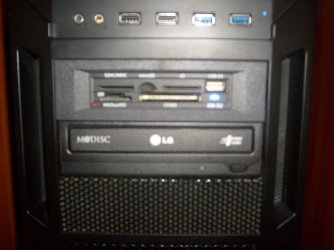
I have that same LG CD/DVD with M Disc support(wish I had gotten the BR model) and I didn't have a gap on the top/bottom, but when I locked it into the 5.25" bay, it shifted to one side and left a small gap on the left. Small piece of cardboard as a spacer fixed it. I feel your pain, because I'm a bit of a perfectionist myself and it literally irritated me to no end to see it offset like that.
S6302663.jpgS6302664.jpg
 

My Computer

Computer type
PC/Desktop
Computer Manufacturer/Model Number
Custom Built
OS
Windows 7 Professional 64bit SP1
CPU
Intel Core i5-3570K @ 4.5GHz
Motherboard
Asus Sabertooth Z77
Memory
Corsair Vengeance 16GB (4x4) @1866MHz CL 9-9-9-24 1T
Graphics Card(s)
EVGA GTX 750 Ti FTW
Sound Card
Onboard Audio
Monitor(s) Displays
Dell S2309W
Screen Resolution
1920x1080
Hard Drives
Samsung 830 128GB SSD - OS
(4) Seagate 5TB HDD
(1) Seagate 2TB HDD
PSU
Seasonic X750 80+ Gold Full Modular
Case
Antec Eleven Hundred Super Mid Tower
Cooling
Intel Liquid Cooler
Keyboard
Max Nighthawk X8 Mechanical keyboard
Mouse
Mionix Naos 7000
Internet Speed
50 Mbps Down / 10 Mbps Up
Antivirus
Microsoft Security Essentials/Malwarebytes Anti-Malware
Browser
Chrome/Firefox
Other Info
Klipsch ProMedia 2.1's
Asus RT-N66R Wireless Router
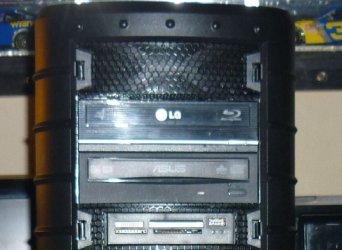
Lady Fitz, that's more the fault of how the case mounts the drive. I am using 3 opto drives, HP, ASUS, and an LG BluRay, all the face plates are identical in size and are different ages, the oldest about 7. (Well it still works)

drives.JPG
This was a tight fit, case is an Inwin Dragon Rider.
 

My Computer

Computer type
PC/Desktop
Computer Manufacturer/Model Number
Home Built Desktop By DataTech
OS
Windows 7 Ultimate X64 SP1
CPU
Intel i5-2550K, Differing ~4.4-4.8GHz No built in GPU
Motherboard
ASUS P8Z68-V PRO/GEN3
Memory
16GB G.Skill Sniper 1866MHz @ 2133MHz 2x8GB
Graphics Card(s)
ASUS GTX650TIB-DC2OC-2GD5, (650TI Boost)
Sound Card
Onboard Realtek 5-1
Monitor(s) Displays
Samsung P2570HD
Screen Resolution
1920x1080
Hard Drives
Samsung 840 Pro 256GB SSD for OS, 500GB Seagate Constellation (Enterprise drive) for Data
PSU
Corsair HX650W
Case
Inwin Dragon Rider
Cooling
Hyper 212 EVO w/two Noctua fans, push-pull, @1300 RPM
Keyboard
E-Z Eyes, bright yellow keys with large characters
Mouse
steelseries SENSEI Laser Pro Gaming
Internet Speed
48-51Mbs Mbs down, 11 Mbs up Xfinity Cable
Antivirus
Norton Internet Security 2013
Browser
IE 10, Opera, Pale Moon if needed
Other Info
4 case fans, LG BluRay-RE, ASUS DVD-RW, Mr. Fusion power supply, 1.21 gigawatts.
Lady Fitz, that's more the fault of how the case mounts the drive. I am using 3 opto drives, HP, ASUS, and an LG BluRay, all the face plates are identical in size and are different ages, the oldest about 7. (Well it still works)

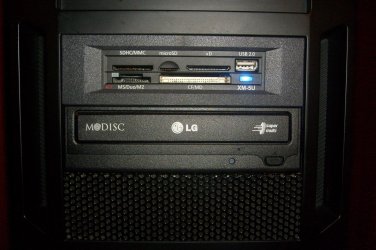
Actually, no, it's not the fault of the case. The previous LG drive, other than that stupid gap at the bottom due to being under-height, fit just fine. I had no trouble removing the cover with the previous drive in place.

Both LG drives faceplates aren't as high as the faceplates on the card reader and the swap bay. The newer LG drive's faceplate is a tad wider than the faceplates on the previous LG drive, the card reader (actually, the 3.5" to 5.25" adapter), and the swap bay. The carder reader and swap bay face plates are identical in size.
 

My Computer

Computer type
PC/Desktop
Computer Manufacturer/Model Number
Custom Build
OS
Win 7 Ultimate 64 bit
CPU
Intel i7-3930K
Motherboard
ASUS P9X79 WS
Memory
Kingston HyperX Genesis 32GB Kit (8x4GB Modules) 1600MHz DDR
Graphics Card(s)
MSI R7850 Twin Frozr 2GD5/OC Radeon HD 7850 2GB 256-bit GDDR
Sound Card
Asus Xonar Essence STX
Monitor(s) Displays
3x Asus VG248QE 24", Vizio 32" TV
Screen Resolution
1920 x 1080, ?
Hard Drives
Samsung 128GB 840 Pro SSD (1),
Samsung 4TB 850 EVO SSDs (4)
Samsung 4TB 850 EVO SSDs (16) external backup drives used in 2.5" hot swap bays in the computer.
PSU
Corsair HX750w
Case
Antec Two Hundred v2 (modified)
Cooling
Cooler Master GeminII S524 120mm (fan replaced with a 140mm)
Keyboard
Logitech G510s
Mouse
Logitech M525 (two in use)
Internet Speed
=< 32Mbps down, 8Mbps up
Antivirus
AVAST!, MBAM, SAS, Spybot S&D (all but MBAM free) Glary Util
Browser
IE11
Other Info
LSI 9211-8i HBA card (8 SATA III ports), 2.5" & 3.5" Hot Swap Bays, HooToo HT-CR001 PCI-E to USB 3.0 Internal Hub + 6 Slot Card Reader, and LG Model CH12LS28 BD-ROM Optical Drive. Also, ScanSnap S1500 ADF duplexing scanner, Canon 9000F flat bed scanner, Corsair SP2500 2.1 speakers, Samsung CLP 415nw laser color printer, Cyberpower PP2200SW UPS
A much better picture

S6302677.jpg
 

My Computer

Computer type
PC/Desktop
Computer Manufacturer/Model Number
Custom Built
OS
Windows 7 Professional 64bit SP1
CPU
Intel Core i5-3570K @ 4.5GHz
Motherboard
Asus Sabertooth Z77
Memory
Corsair Vengeance 16GB (4x4) @1866MHz CL 9-9-9-24 1T
Graphics Card(s)
EVGA GTX 750 Ti FTW
Sound Card
Onboard Audio
Monitor(s) Displays
Dell S2309W
Screen Resolution
1920x1080
Hard Drives
Samsung 830 128GB SSD - OS
(4) Seagate 5TB HDD
(1) Seagate 2TB HDD
PSU
Seasonic X750 80+ Gold Full Modular
Case
Antec Eleven Hundred Super Mid Tower
Cooling
Intel Liquid Cooler
Keyboard
Max Nighthawk X8 Mechanical keyboard
Mouse
Mionix Naos 7000
Internet Speed
50 Mbps Down / 10 Mbps Up
Antivirus
Microsoft Security Essentials/Malwarebytes Anti-Malware
Browser
Chrome/Firefox
Other Info
Klipsch ProMedia 2.1's
Asus RT-N66R Wireless Router
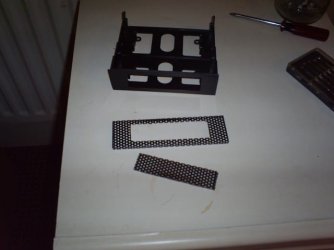
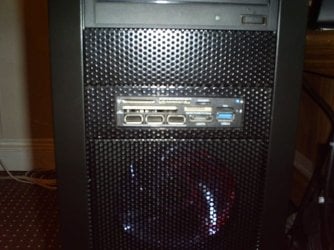
I did a similar thing with my card reader, Only i chopped up 1 of the drive bay covers and a drive bay converter with a Dremmel. the face of the bay converter needed sanding down to size a fair bit to fit the mesh over it. I didn't quite get it straight though.
 

Attachments

  • 1 Mod Drive Bay For Card Reader.JPG
    1 Mod Drive Bay For Card Reader.JPG
    88.6 KB · Views: 10
  • 2  Icy Box in.JPG
    2 Icy Box in.JPG
    125.5 KB · Views: 12

My Computer

Computer type
PC/Desktop
Computer Manufacturer/Model Number
Custom build
OS
Win7 Home Premium x64 SP1
CPU
i7 4770k
Motherboard
Asus maximus VI Hero
Memory
8Gb Kingston HyperX Beast 2400MHz @2133MHz 11-12-11-30
Graphics Card(s)
MSI GTX 780ti Gaming Oc x2
Sound Card
Onboard ROG SupremeFX
Monitor(s) Displays
Asus VG248QE
Screen Resolution
3840X1080 144Hz
Hard Drives
Samung Evo 256Gb, OCZ Agility4 128Gb
1x1TB hitachi storage
PSU
EVGA Supernova 1000w Platinum
Case
Corsair Air 540
Cooling
Corsair H100i
Keyboard
Coolermaster Quickfire Pro
Mouse
Corsair M65 RGB
Internet Speed
74mb dwn/16up
Antivirus
MSE,Malwarebytes
Browser
Chrome
That's a good solution! I lucked up and my buddy had an adapter from an old Dell that works perfectly.
 

My Computer

Computer type
PC/Desktop
Computer Manufacturer/Model Number
Custom Built
OS
Windows 7 Professional 64bit SP1
CPU
Intel Core i5-3570K @ 4.5GHz
Motherboard
Asus Sabertooth Z77
Memory
Corsair Vengeance 16GB (4x4) @1866MHz CL 9-9-9-24 1T
Graphics Card(s)
EVGA GTX 750 Ti FTW
Sound Card
Onboard Audio
Monitor(s) Displays
Dell S2309W
Screen Resolution
1920x1080
Hard Drives
Samsung 830 128GB SSD - OS
(4) Seagate 5TB HDD
(1) Seagate 2TB HDD
PSU
Seasonic X750 80+ Gold Full Modular
Case
Antec Eleven Hundred Super Mid Tower
Cooling
Intel Liquid Cooler
Keyboard
Max Nighthawk X8 Mechanical keyboard
Mouse
Mionix Naos 7000
Internet Speed
50 Mbps Down / 10 Mbps Up
Antivirus
Microsoft Security Essentials/Malwarebytes Anti-Malware
Browser
Chrome/Firefox
Other Info
Klipsch ProMedia 2.1's
Asus RT-N66R Wireless Router
That's a good solution! I lucked up and my buddy had an adapter from an old Dell that works perfectly.

Yeah yours looks like it was meant to be there :D Good find
 

My Computer

Computer type
PC/Desktop
Computer Manufacturer/Model Number
Custom build
OS
Win7 Home Premium x64 SP1
CPU
i7 4770k
Motherboard
Asus maximus VI Hero
Memory
8Gb Kingston HyperX Beast 2400MHz @2133MHz 11-12-11-30
Graphics Card(s)
MSI GTX 780ti Gaming Oc x2
Sound Card
Onboard ROG SupremeFX
Monitor(s) Displays
Asus VG248QE
Screen Resolution
3840X1080 144Hz
Hard Drives
Samung Evo 256Gb, OCZ Agility4 128Gb
1x1TB hitachi storage
PSU
EVGA Supernova 1000w Platinum
Case
Corsair Air 540
Cooling
Corsair H100i
Keyboard
Coolermaster Quickfire Pro
Mouse
Corsair M65 RGB
Internet Speed
74mb dwn/16up
Antivirus
MSE,Malwarebytes
Browser
Chrome
Status
Not open for further replies.
Back
Top