Show Us Your Rig

Status
Not open for further replies.
Price margin in Australia is big!!!!! AMD phenom2 X6 1090T $320
Intel Core i7 980x $1400
Latest technology Intel chip is always outrageously expensive. AMD has to keep theirs cheaper or it doesn't sell. Intel chip outperforms it. You could get lesser expensive Intel chips that would rival the performance of that 6 core AMD.
 

My Computer

Computer Manufacturer/Model Number
Self-Built in July 2009
OS
Windows 7 Ultimate x64
CPU
Intel Q9550 2.83Ghz OC'd to 3.40Ghz
Motherboard
Gigabyte GA-EP45-UD3R rev. 1.1, F12 BIOS
Memory
8GB G.Skill PI DDR2-800, 4-4-4-12 timings
Graphics Card(s)
EVGA 1280MB Nvidia GeForce GTX570
Sound Card
Realtek ALC899A 8 channel onboard audio
Monitor(s) Displays
23" Acer x233H
Screen Resolution
1920x1080
Hard Drives
Intel X25-M 80GB Gen 2 SSD
Western Digital 1TB Caviar Black, 32MB cache. WD1001FALS
PSU
Corsair 620HX modular
Case
Antec P182
Cooling
stock
Keyboard
ABS M1 Mechanical
Mouse
Logitech G9 Laser Mouse
Internet Speed
15/2 cable modem
Other Info
Windows and Linux enthusiast. Logitech G35 Headset.
Nothing special really.
 

Attachments

  • 02062010398.jpg
    02062010398.jpg
    395.5 KB · Views: 9
  • 02062010399.jpg
    02062010399.jpg
    433.6 KB · Views: 20
  • 02062010402.jpg
    02062010402.jpg
    571.4 KB · Views: 28

My Computer

Computer Manufacturer/Model Number
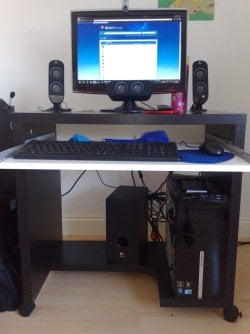
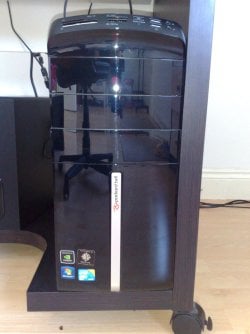
Modified Packard Bell M5772
OS
Windows 7 Ultimate 64 bit
CPU
Intel Core 2 Quad CPU Q8300 @ 2.55GHz
Motherboard
Packard Bell EG43M
Memory
6 GB DDR2
Graphics Card(s)
MSI GTX 570 TWIN FROZR III POWER EDITION
Sound Card
XONAR DG
Monitor(s) Displays
Samsung T200HD
Screen Resolution
1680 x 1050
Hard Drives
Western Digital Caviar Green Hard Disk (1 TB)
Western Digital Caviar Green Hard Disk (500GB)
PSU
EzCool Tornado 800w PSU
Case
Packard Bell Case
Cooling
Stock
Keyboard
Microsoft sidewinder x6
Mouse
Microsoft sidewinder x8
Internet Speed
10 mb/s
Other Info
http://support.packardbell.com/uk/item/index.php?pn=PT.U4002.012&g=1400

My Computer

Computer Manufacturer/Model Number
* BFK Customs *
OS
W 7 64-bit Ultimate
CPU
Intel Q9550 Yorkfield
Motherboard
ASUS P5Q Pro
Memory
8GB Dominator 8500C5D
Graphics Card(s)
ATI : XFX 5870
Sound Card
Realtek HD Audio 7-1
Monitor(s) Displays
1x 47" LCD HDMI & 3x 26" LCD HDMI
Screen Resolution
1920x1080P & 1920x1200
Hard Drives
1x 80GB Intel X25-M G2 SSD : 1x 500GB & 1x 640GB WD Caviar Black(s)
PSU
Corsair 620HX
Case
Cooler Master RC-690
Cooling
Tuniq Tower 120, 2x 140mm and 3x 120mm case fans
Keyboard
Microsoft 500
Mouse
Razer Diamondback 3G
Internet Speed
14 Mb/s
Other Info
1x Koutech 3Gb/s SATA HDD Hot Swap Rack

My Computer

Computer Manufacturer/Model Number
Homemade
OS
Win 7 64 bit professional
CPU
CPU: 3930K @ 4.8 MHz Stable as a rock
Motherboard
ASUS Rampage IV Extreme LGA 2011
Memory
CORSAIR DOMINATOR GT 16GB (4 x 4GB) 240-Pin DDR3
Graphics Card(s)
EVGA SuperClocked+ GeForce GTX 680
Monitor(s) Displays
Dell 3007WFP
Screen Resolution
2560 x 1600
Hard Drives
Vector(256gb) x 2
RevoDrive 3 X2 space (240 GB)
Crucial C300 256 GB SSD
PSU
CORSAIR AX1200i 1200W Digital ATX12V v2.31 and EPS 2.92 SLI
Cooling
Water cooling EK Supremacy ELITE
Mouse
ratZ-7
Other Info
WEI-7.8
Thanks guys :)
 

My Computer

Computer Manufacturer/Model Number
Modified Packard Bell M5772
OS
Windows 7 Ultimate 64 bit
CPU
Intel Core 2 Quad CPU Q8300 @ 2.55GHz
Motherboard
Packard Bell EG43M
Memory
6 GB DDR2
Graphics Card(s)
MSI GTX 570 TWIN FROZR III POWER EDITION
Sound Card
XONAR DG
Monitor(s) Displays
Samsung T200HD
Screen Resolution
1680 x 1050
Hard Drives
Western Digital Caviar Green Hard Disk (1 TB)
Western Digital Caviar Green Hard Disk (500GB)
PSU
EzCool Tornado 800w PSU
Case
Packard Bell Case
Cooling
Stock
Keyboard
Microsoft sidewinder x6
Mouse
Microsoft sidewinder x8
Internet Speed
10 mb/s
Other Info
http://support.packardbell.com/uk/item/index.php?pn=PT.U4002.012&g=1400
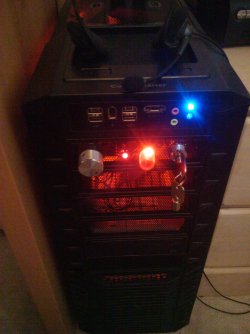
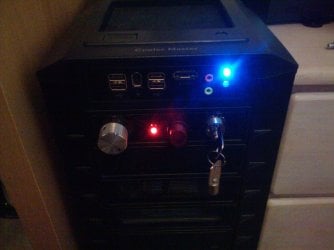
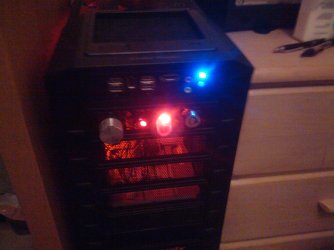
I now officially have my proof of concept switch plate finished!

The key switch, Fan controller, and now light switch all are on and work.
I just finished adding the switch (lighted) to my Red Cathodes, and it looks pretty cool.

Now, it is on to designing and cutting the full plate and mounting it, then finishing the wiring for everything else.

~Lordbob
 

My Computer

Computer Manufacturer/Model Number
Hera
OS
Windows 7 Ultimate x64, Mint 9
CPU
Intel i5-2500k
Motherboard
ASUS P8P67 Pro
Memory
2x 4Gb Corsair VENGEANCE DDR3-1600
Graphics Card(s)
NVidia GeForce N260GTX Twin Frozr
Sound Card
Realtek HD OnBoard Audio
Monitor(s) Displays
ASUS 24" Monitor
Screen Resolution
1920x1080
Hard Drives
G.SKILL Phoenix Series 60GB SATA II MLC Internal Solid State Drive (SSD)
SAMSUNG Spinpoint F3R 1TB 7200 RPM 32MB Cache SATA II
PSU
Cooler Master Real Power Pro 750W
Case
Cooler Master Haf 932
Cooling
Fans
Keyboard
Razer Tarantula
Mouse
Razer Lachesis
Internet Speed
not fast enough
very nice ADT
 

My Computer

Computer Manufacturer/Model Number
Custom built by myself
OS
Windows 7 Ultimate 64 bit
CPU
Intel Core 2 quad Q9550 2.83 12 MB Cache 95 Watt OC to 3.4
Motherboard
Gigabyte GA-EP45-UD3P Rev 1.6 Socket 775 Running 1600 FSB
Memory
4 GB Patriot Viper II 1066 2X2GB Memory PV224G8500ELKB
Graphics Card(s)
NVIDIA GeForce 9500 GT GV-N95TOC-1GI overclocked to 650 MHz
Sound Card
Realtec HD on board
Monitor(s) Displays
LG W2053TQ
Screen Resolution
1600X900
Hard Drives
Hatchi 160 GB SATA II System drive
Hatchi 400 GB SATA II Data
Hatchi 500 GB SATA II Data
Hitachi 2 TB SATA II Backup
PSU
Ultra LSP750 750-Watt
Case
Leadertek FX626 or Foxconn FX-626BKH
Cooling
Cool Master V-8 (its Big),1 80 MM Fan and 2 92 MM Fan
Keyboard
Dell Quietkey (POS)
Mouse
GE PS2 Optical
Internet Speed
8 down 1 up
Other Info
LS-120 Drive(IDE) - Lite-on iHOS104 Blu-ray(SATA) - HP DVD Burner with lightscribe(IDE) - media card reader
I now officially have my proof of concept switch plate finished!

The key switch, Fan controller, and now light switch all are on and work.
I just finished adding the switch (lighted) to my Red Cathodes, and it looks pretty cool.

Now, it is on to designing and cutting the full plate and mounting it, then finishing the wiring for everything else.

~Lordbob


Where's the pics? :shock:
 

My Computer

Computer Manufacturer/Model Number
* BFK Customs *
OS
W 7 64-bit Ultimate
CPU
Intel Q9550 Yorkfield
Motherboard
ASUS P5Q Pro
Memory
8GB Dominator 8500C5D
Graphics Card(s)
ATI : XFX 5870
Sound Card
Realtek HD Audio 7-1
Monitor(s) Displays
1x 47" LCD HDMI & 3x 26" LCD HDMI
Screen Resolution
1920x1080P & 1920x1200
Hard Drives
1x 80GB Intel X25-M G2 SSD : 1x 500GB & 1x 640GB WD Caviar Black(s)
PSU
Corsair 620HX
Case
Cooler Master RC-690
Cooling
Tuniq Tower 120, 2x 140mm and 3x 120mm case fans
Keyboard
Microsoft 500
Mouse
Razer Diamondback 3G
Internet Speed
14 Mb/s
Other Info
1x Koutech 3Gb/s SATA HDD Hot Swap Rack
Nothing special really.
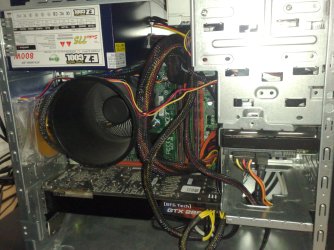
I like the way you say it's nothing special, then add a pic of your GTX 285... nice sttup btw, love the fan duct :P

I now officially have my proof of concept switch plate finished!

The key switch, Fan controller, and now light switch all are on and work.
I just finished adding the switch (lighted) to my Red Cathodes, and it looks pretty cool.

Now, it is on to designing and cutting the full plate and mounting it, then finishing the wiring for everything else.

~Lordbob
Can't wait to see how this turns out!


As promised in a much earlier post, my Best mate's rig, complete with the GX-750 it was supposed to have originally :D

1004800.jpg


1004796e.jpg


1004797p.jpg


1004798x.jpg


1004799.jpg


And for a history lesson (lol, sort of...)
from top to bottom, Michael's XFX HD 5850, my Zotac GTX 275 followed by Michael's old Sparkle 8800 GTS (with 320MB of RAM :P)
1004783o.jpg
 

My Computer

Computer Manufacturer/Model Number
Myself/Model 006, Mk.1, Revision 1.5
OS
Windows 7 Professional x64
CPU
Intel Core i7 3930K
Motherboard
ASUS Rampage IV Extreme
Memory
4GB Corsair DOMINATOR DDR2 1066
Graphics Card(s)
eVGA GeForce GTX 680 2GB, SLi
Sound Card
Realtek HD audio
Monitor(s) Displays
LG E2351, 23.5" LED
Screen Resolution
1920x1080p 32bit colour @60Hz
Hard Drives
Western Digital 1TB SATA3 Caviar Blue
PSU
Coolermaster 1050w Silent Pro Hybrid
Case
Coolermaster Cosmos II
Cooling
Coolermaster 212 Evo, 3x 120mm, 1x 140mm, 1x 200mm
Keyboard
Logitech G510
Mouse
CM Storm Sentinel Advance II
Internet Speed
can hardly call it speed...
Other Info
Hyundai HY-Z-2700 2.1 Gaming speakers,
Razer Carcharias Headset,
'Storm Tactics' Gaming mouse mat.
9000 cable ties.
Nice looking rig ;)

Great pics, how's it running?
 

My Computer

Computer type
PC/Desktop
Computer Manufacturer/Model Number
76~2.0
OS
Windows 7 Ult x64 - SP1/ Windows 8 Pro x64
CPU
Intel Core i5-3570K 4.6GHz
Motherboard
Gigabyte GA-Z77X UD3H, f18
Memory
8GB (2X4GB) DDR3 1600 Corsair Vengeance CL8 1.5v
Graphics Card(s)
Sapphire HD 7770 Vapor-X OC 1GB DDR5
Sound Card
Onboard VIA VT2021
Monitor(s) Displays
22" LCD Dell
Screen Resolution
1680x1050
Hard Drives
Samsung 840Pro 128GB SSD,
Seagate Barracuda 500GB SATA2 7200rpm 32MB cache, Seagate Barracuda 1TB SATA2 7200rpm 32MB cache,
PSU
Corsair HX650W
Case
Cooler Master Storm Scout
Cooling
Corsair H80 2x12cm Noctua NF P12 , 2x14cm case fans
Keyboard
Logitech Wave
Mouse
CM Sentinel
Internet Speed
Dismal
Antivirus
Avast
Browser
Opera Next
Other Info
Haswell laptop: HP Envy 17t-j, i7-4700MQ, GeForce 740M 2GB DDR3, 17.3" Full HD 1920x1080, 16GB RAM, Samsung 840 Pro 128GB, 1TB Hitachi 7200 HDD,
Desktop: eSATA ports,
External eSATA Seagate 500GB SATA2 7200rpm,
External WD USB 500GB
I now officially have my proof of concept switch plate finished!

The key switch, Fan controller, and now light switch all are on and work.
I just finished adding the switch (lighted) to my Red Cathodes, and it looks pretty cool.

Now, it is on to designing and cutting the full plate and mounting it, then finishing the wiring for everything else.

~Lordbob


Where's the pics? :shock:
It is REALLY hard to see because of the lights, but here are some I took:
Proof of Concept2.jpg
Proof of Concpet3.jpg
proof of concept4.jpg

In order from left to right: Fan controller knob, Fan LED (will be removed), Cathode Switch (on and off), Key Switch.

~Lordbob
 

Attachments

  • proof of concept1.jpg
    proof of concept1.jpg
    593.2 KB · Views: 3

My Computer

Computer Manufacturer/Model Number
Hera
OS
Windows 7 Ultimate x64, Mint 9
CPU
Intel i5-2500k
Motherboard
ASUS P8P67 Pro
Memory
2x 4Gb Corsair VENGEANCE DDR3-1600
Graphics Card(s)
NVidia GeForce N260GTX Twin Frozr
Sound Card
Realtek HD OnBoard Audio
Monitor(s) Displays
ASUS 24" Monitor
Screen Resolution
1920x1080
Hard Drives
G.SKILL Phoenix Series 60GB SATA II MLC Internal Solid State Drive (SSD)
SAMSUNG Spinpoint F3R 1TB 7200 RPM 32MB Cache SATA II
PSU
Cooler Master Real Power Pro 750W
Case
Cooler Master Haf 932
Cooling
Fans
Keyboard
Razer Tarantula
Mouse
Razer Lachesis
Internet Speed
not fast enough

My Computer

Computer Manufacturer/Model Number
Modified Packard Bell M5772
OS
Windows 7 Ultimate 64 bit
CPU
Intel Core 2 Quad CPU Q8300 @ 2.55GHz
Motherboard
Packard Bell EG43M
Memory
6 GB DDR2
Graphics Card(s)
MSI GTX 570 TWIN FROZR III POWER EDITION
Sound Card
XONAR DG
Monitor(s) Displays
Samsung T200HD
Screen Resolution
1680 x 1050
Hard Drives
Western Digital Caviar Green Hard Disk (1 TB)
Western Digital Caviar Green Hard Disk (500GB)
PSU
EzCool Tornado 800w PSU
Case
Packard Bell Case
Cooling
Stock
Keyboard
Microsoft sidewinder x6
Mouse
Microsoft sidewinder x8
Internet Speed
10 mb/s
Other Info
http://support.packardbell.com/uk/item/index.php?pn=PT.U4002.012&g=1400
I have noticed on my motherboard which is a Gigabyte GA-M575L1-S4 there is a molex connector on it marked PCIE_12V.
Can anyone tell me what it is used for. My guess is for powering two pci-e cards, is that correct.
Never seen this on a motherboard before.
 

My Computer

Computer Manufacturer/Model Number
Samsung R519 Notebook
OS
Windows 7 Home Premium with Service Pack 1
CPU
Intel Dual Core 2.2 GHZ
Memory
2 Gig
Graphics Card(s)
Intel
Sound Card
On board
Monitor(s) Displays
Built in
Screen Resolution
1366x768
Hard Drives
250 Gig Sata2
Mouse
Microsoft Arc Mouse
Internet Speed
15 meg down
Nothing special really.
I like the way you say it's nothing special, then add a pic of your GTX 285... nice sttup btw, love the fan duct :P

Thanks and trust me it's nothing special here comparing to the rigs posted here already :P


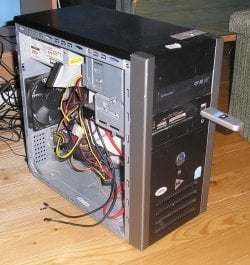
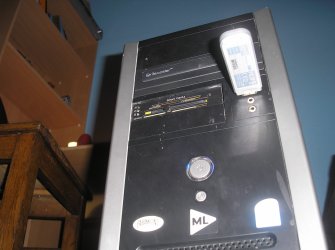
u mean rigs like this?

BEWARE OF MY SHITBOX !!!!

P6036193.JPGP6036194.JPGP6036196.JPG


PS! its a WiFi receiver (i think its the right word).
PPS! i got one more screwed on my mobo (lowest thing there), and if i take my graphic card out, i can put 1 more from my printer :D
 

My Computer

Computer Manufacturer/Model Number
Sh*tBox 2.0.0.18
OS
Windows 7 Enterprise X64
CPU
Intel Core I3 550 @ 3.6 GHz
Motherboard
Gigabyte S-series H55M-S2
Memory
4GB DDR3 @ 1333MHz
Graphics Card(s)
ATI Radeon HD 5670
Sound Card
Realtek High Definition Audio ?
Monitor(s) Displays
BENQ FP93G S
Screen Resolution
1280x1024
Hard Drives
1TB SAMSUNG HD103SJ ATA Device
PSU
havent checked
Case
Xigmatek Asgard
Cooling
Stock something
Keyboard
Logitech Internet 350 Keyboard
Mouse
Logitech
Internet Speed
schools ISP @ 300 kbit/s - 100 mbit/s
Other Info
«And on the eighth day, god created Intel Core i3.»
Nice looking rig ;)

Great pics, how's it running?
lol, Mike asked me to stress the system yeaterday after I installed the PSU, Crysis maxed at 1680x1050, and 8xAA. No lag. What-so-ever. At least, none untill that point in the Storyline where the Marines invade. I guess 9000 explosions and half the USMC on the screen at any given moment may have been slightly taxing on the system... :P

I now officially have my proof of concept switch plate finished!

The key switch, Fan controller, and now light switch all are on and work.
I just finished adding the switch (lighted) to my Red Cathodes, and it looks pretty cool.

Now, it is on to designing and cutting the full plate and mounting it, then finishing the wiring for everything else.

~Lordbob


Where's the pics? :shock:
It is REALLY hard to see because of the lights, but here are some I took:
View attachment 76616
View attachment 76617
View attachment 76618

In order from left to right: Fan controller knob, Fan LED (will be removed), Cathode Switch (on and off), Key Switch.

~Lordbob
Nice work mate! looks pretty damn awesome, I'll bet the funcionality is pretty good too :P

Nothing special really.
I like the way you say it's nothing special, then add a pic of your GTX 285... nice sttup btw, love the fan duct :P

Thanks and trust me it's nothing special here comparing to the rigs posted here already :P
lol, no worries. True, compared to some of the setups on here it's not as flashy, but compared to most systems, it's pretty sweet ;)
 

My Computer

Computer Manufacturer/Model Number
Myself/Model 006, Mk.1, Revision 1.5
OS
Windows 7 Professional x64
CPU
Intel Core i7 3930K
Motherboard
ASUS Rampage IV Extreme
Memory
4GB Corsair DOMINATOR DDR2 1066
Graphics Card(s)
eVGA GeForce GTX 680 2GB, SLi
Sound Card
Realtek HD audio
Monitor(s) Displays
LG E2351, 23.5" LED
Screen Resolution
1920x1080p 32bit colour @60Hz
Hard Drives
Western Digital 1TB SATA3 Caviar Blue
PSU
Coolermaster 1050w Silent Pro Hybrid
Case
Coolermaster Cosmos II
Cooling
Coolermaster 212 Evo, 3x 120mm, 1x 140mm, 1x 200mm
Keyboard
Logitech G510
Mouse
CM Storm Sentinel Advance II
Internet Speed
can hardly call it speed...
Other Info
Hyundai HY-Z-2700 2.1 Gaming speakers,
Razer Carcharias Headset,
'Storm Tactics' Gaming mouse mat.
9000 cable ties.
I have noticed on my motherboard which is a Gigabyte GA-M575L1-S4 there is a molex connector on it marked PCIE_12V.
Can anyone tell me what it is used for. My guess is for powering two pci-e cards, is that correct.
Never seen this on a motherboard before.

Your right, usually a graphics card that require more power.
 

My Computer

Computer type
PC/Desktop
Computer Manufacturer/Model Number
76~2.0
OS
Windows 7 Ult x64 - SP1/ Windows 8 Pro x64
CPU
Intel Core i5-3570K 4.6GHz
Motherboard
Gigabyte GA-Z77X UD3H, f18
Memory
8GB (2X4GB) DDR3 1600 Corsair Vengeance CL8 1.5v
Graphics Card(s)
Sapphire HD 7770 Vapor-X OC 1GB DDR5
Sound Card
Onboard VIA VT2021
Monitor(s) Displays
22" LCD Dell
Screen Resolution
1680x1050
Hard Drives
Samsung 840Pro 128GB SSD,
Seagate Barracuda 500GB SATA2 7200rpm 32MB cache, Seagate Barracuda 1TB SATA2 7200rpm 32MB cache,
PSU
Corsair HX650W
Case
Cooler Master Storm Scout
Cooling
Corsair H80 2x12cm Noctua NF P12 , 2x14cm case fans
Keyboard
Logitech Wave
Mouse
CM Sentinel
Internet Speed
Dismal
Antivirus
Avast
Browser
Opera Next
Other Info
Haswell laptop: HP Envy 17t-j, i7-4700MQ, GeForce 740M 2GB DDR3, 17.3" Full HD 1920x1080, 16GB RAM, Samsung 840 Pro 128GB, 1TB Hitachi 7200 HDD,
Desktop: eSATA ports,
External eSATA Seagate 500GB SATA2 7200rpm,
External WD USB 500GB
I have noticed on my motherboard which is a Gigabyte GA-M575L1-S4 there is a molex connector on it marked PCIE_12V.
Can anyone tell me what it is used for. My guess is for powering two pci-e cards, is that correct.
Never seen this on a motherboard before.

Your right, usually a graphics card that require more power.
Yeah, that's common for higher powered PCI-e and some AGP cards, but as twdawson said, it's unusual to see it on a motherboard...

Oh, and btw twdawson, I think you meant to say a GA-M57SLI-S, not GA-M575L1-S (is this the one? [link]). :) Just in case you try search for more details on it. I can't seem to figure out what that connector is for though, and the pictures I found aren't that clear as to whether the M/B has the female or male molex connector.

If it's a female connection on the board, then my best guess would be that a molex to PCI-e power adapter can be connected there instead of on the end of a power cable coming from the PSU... But I've never seen a setup quite like that before, so I'm not sure if that's even done on any boards.


Edit: Ok, I found what it is... It's a male connector on the motherboard, here's a passage from your user manual:
"The motherboard includes a PCIE_12V power connector, which provides extra power to the onboard PCI Express x16 slot. When installing two graphics cards, please connect the power cable from the power supply to this connector." Hopefully that helps clear up what it's for.
 

My Computer

Computer type
PC/Desktop
OS
Win 10 x64 Pro x64 / Ubuntu 15.10 x64
CPU
Intel i7-4960X
Motherboard
Asus Rampage IV Black Edition
Memory
4x8GB Corsair Dominator Platinum @2400MHz 10-12-12-31
Graphics Card(s)
2x MSI GTX780Ti 3GB (SLI)
Sound Card
Onboard SupremeFX (Cirrus Logic CS4398)
Monitor(s) Displays
3x LG Cinema 27" IPS LED (27MP65)
Screen Resolution
[1920x1080]x3
Hard Drives
Crucial M500 120GB, Crucial M500 480GB, Toshiba DT01ACA200 2TB
PSU
CoolerMaster V1000
Case
Corsair Obsidian 750D
Cooling
ThermalTake Water 3.0 Extreme, 4xSP120, 3xAF120
Keyboard
Moshi Luna
Mouse
Logitech G700s / Roccat Tyon
Internet Speed
4Mb uncapped ADSL (Afrihost)
Antivirus
MS Security Essentials
Browser
Chrome... Duh. (:
I have noticed on my motherboard which is a Gigabyte GA-M575L1-S4 there is a molex connector on it marked PCIE_12V.
Can anyone tell me what it is used for. My guess is for powering two pci-e cards, is that correct.
Never seen this on a motherboard before.

Your right, usually a graphics card that require more power.
Yeah, that's common for higher powered PCI-e and some AGP cards, but as twdawson said, it's unusual to see it on a motherboard...

Oh, and btw twdawson, I think you meant to say a GA-M57SLI-S, not GA-M575L1-S (is this the one? [link]). :) Just in case you try search for more details on it. I can't seem to figure out what that connector is for though, and the pictures I found aren't that clear as to whether the M/B has the female or male molex connector.

If it's a female connection on the board, then my best guess would be that a molex to PCI-e power adapter can be connected there instead of on the end of a power cable coming from the PSU... But I've never seen a setup quite like that before, so I'm not sure if that's even done on any boards.


Edit: Ok, I found what it is... It's a male connector on the motherboard, here's a passage from your user manual:
"The motherboard includes a PCIE_12V power connector, which provides extra power to the onboard PCI Express x16 slot. When installing two graphics cards, please connect the power cable from the power supply to this connector." Hopefully that helps clear up what it's for.

Yeah thats the one, it was a typo when i posted, and thanks for the replys. I was just curious and thought thats what it was for, not that it will ever get used.
 

My Computer

Computer Manufacturer/Model Number
Samsung R519 Notebook
OS
Windows 7 Home Premium with Service Pack 1
CPU
Intel Dual Core 2.2 GHZ
Memory
2 Gig
Graphics Card(s)
Intel
Sound Card
On board
Monitor(s) Displays
Built in
Screen Resolution
1366x768
Hard Drives
250 Gig Sata2
Mouse
Microsoft Arc Mouse
Internet Speed
15 meg down
Yeah thats the one, it was a typo when i posted, and thanks for the replys. I was just curious and thought thats what it was for, not that it will ever get used.
Yeah sure, no problem at all.. I'm guessing that onboard PCI-e power connector would only really be required to use the onboard graphics for something like Hybrid SLI, but then again my XFX 750a motherboard supports Hybrid SLI and I don't have any connectors like that onboard.. Oh well, such is life I guess.
picture.php
If everything in life made perfect sense all the time, I think it would be rather boring.
 

My Computer

Computer type
PC/Desktop
OS
Win 10 x64 Pro x64 / Ubuntu 15.10 x64
CPU
Intel i7-4960X
Motherboard
Asus Rampage IV Black Edition
Memory
4x8GB Corsair Dominator Platinum @2400MHz 10-12-12-31
Graphics Card(s)
2x MSI GTX780Ti 3GB (SLI)
Sound Card
Onboard SupremeFX (Cirrus Logic CS4398)
Monitor(s) Displays
3x LG Cinema 27" IPS LED (27MP65)
Screen Resolution
[1920x1080]x3
Hard Drives
Crucial M500 120GB, Crucial M500 480GB, Toshiba DT01ACA200 2TB
PSU
CoolerMaster V1000
Case
Corsair Obsidian 750D
Cooling
ThermalTake Water 3.0 Extreme, 4xSP120, 3xAF120
Keyboard
Moshi Luna
Mouse
Logitech G700s / Roccat Tyon
Internet Speed
4Mb uncapped ADSL (Afrihost)
Antivirus
MS Security Essentials
Browser
Chrome... Duh. (:
BEWARE OF MY SHITBOX !!!!

As long as it works mate, that's all that counts :)

One day I should post a pic of my 24/7 pentium D machine - that should be good for a chuckle or two ;)
 

My Computer

Computer type
PC/Desktop
Computer Manufacturer/Model Number
Systems by SmartEyeball
OS
8 Pro x64
CPU
i7 3770K 4.6GHz
Motherboard
ASUS P8Z77 WS
Memory
16GB G.Skill Trident X 2666mhz
Graphics Card(s)
x2 EVGA 780 Ti Superclocked SLI
Sound Card
SB X-FI Surround 5.1 PRO USB / ATH-AD900 Headphones
Monitor(s) Displays
x3 Dell U2410 / 58" Samsung
Screen Resolution
5760*1200/ 1920*1200
Hard Drives
2x Intel 520 240GB (RAID 0) * 2x WD Caviar Blacks 2TB (RAID 0) * 2TB WD Caviar Black * Sony Optirac DVD
PSU
Silverstone Strider Evolution 1200W
Case
Thermaltake Level 10 GT Snow Edition
Cooling
Noctua NH-D14
Keyboard
Topre Realforce // Ducky Shine MX Black // Filco Ninja TKL
Mouse
Thermaltake Theron (Highly Recommended) + Razer Imperator
Antivirus
MSE
Browser
IE, FF, WaterFox
Other Info
GT Extreme V2 Sim Racing Cockpit + 40" LCD and K/B Mouse stand ▼
Fanatec CSR Elite Wheel + Clubsport V1 Pedals + CSR shifter/7G-H ▼Saitek X52 Pro ▼ TrackIR 5 Pro
Buttkicker v2 Seat Rumbler with Dedicated 5.1 and Sub Woofer attached to frame ▼
=
Bloody Big Grin
Status
Not open for further replies.
Back
Top