Show Us Your Rig

Status
Not open for further replies.
My fans (I have three 230mm fans and one 180mm) are DEAD SILENT. Even my Video Card (at Idle, not max) is silent. Though at 100% it sounds like a jet engine, it is not like that all the time.

On the other hand, it seems that they don't sell 230mm fans with LEDs.
You can get the coolermaster ones... here and here
Yeah, I saw the Blue LED ones on NewEgg, but they are technically 200mm.

Also, I don't really want to pay $35 for a fan. That and it is red LEDs, I was looking for blue.
The NewEgg ones are still $20, which is better, but I would need 3... A little out of the price range for now.

~Lordbob
 

My Computer

Computer Manufacturer/Model Number
Hera
OS
Windows 7 Ultimate x64, Mint 9
CPU
Intel i5-2500k
Motherboard
ASUS P8P67 Pro
Memory
2x 4Gb Corsair VENGEANCE DDR3-1600
Graphics Card(s)
NVidia GeForce N260GTX Twin Frozr
Sound Card
Realtek HD OnBoard Audio
Monitor(s) Displays
ASUS 24" Monitor
Screen Resolution
1920x1080
Hard Drives
G.SKILL Phoenix Series 60GB SATA II MLC Internal Solid State Drive (SSD)
SAMSUNG Spinpoint F3R 1TB 7200 RPM 32MB Cache SATA II
PSU
Cooler Master Real Power Pro 750W
Case
Cooler Master Haf 932
Cooling
Fans
Keyboard
Razer Tarantula
Mouse
Razer Lachesis
Internet Speed
not fast enough
Very niiice! Welcome to the corsair H50 Owners club:p
You'll definately get lower temps when you use the "Push-Pull" setup, in order to do that you'll need 2x 120mm fans(identical, same brand)... I'm using twin "antec 3 speed" fans, and I've set them at the low fan speed setting, because they become a tad noisy at the medium speed(well, it's amost inaudible) and very noisy at the high speed setting.

The lowest average temp I get on one of the CPU cores at idle is 25ºC, I'll post a screenshot as soon as I get home.

I recommend you visit this corsair blog post for in-depth instructions with pictures...

Cheers:)

Yeah, after looking at the blog, that's a really good idea. I'll probably run out tomorrow and grab another fan and the screws to do that. Thanks for the link. :)
 

My Computer

Computer type
PC/Desktop
Computer Manufacturer/Model Number
SuperBeast
OS
Windows 10 Tech Preview 9926 x64
CPU
AMD FX-8350
Motherboard
Gigabyte GA-990FXA-UD3
Memory
16GB DDR3 1333
Graphics Card(s)
Asus R9 290 DirectCU II OC, Gigabyte Windforce R9 290 OC
Sound Card
Integrated w/ Creative A250 2.1 speakers
Monitor(s) Displays
Main: Asus VN289H 28" Secondary: Acer G246HL 24"
Screen Resolution
1920x1080
Hard Drives
128 GB SanDisk Ultra Plus (Windows drive)

240 GB Crucial M500 SSD (Games drive)

1 TB WDC WD10EACS 7200RPM HDD (Data drive)

2 TB Seagate Expansion Desktop external HDD (Backup drive)
PSU
900w Antec HCG-900
Case
Raidmax Agusta Full ATX
Cooling
Corsair H80
Keyboard
Cooler Master Devastator MB24
Mouse
Cooler Master Devastator MS2K 1000/1600/2000 DPI
Internet Speed
100Mbps cable
Antivirus
Avast!
Browser
Chrome
Very niiice! Welcome to the corsair H50 Owners club:p
You'll definately get lower temps when you use the "Push-Pull" setup, in order to do that you'll need 2x 120mm fans(identical, same brand)... I'm using twin "antec 3 speed" fans, and I've set them at the low fan speed setting, because they become a tad noisy at the medium speed(well, it's amost inaudible) and very noisy at the high speed setting.

The lowest average temp I get on one of the CPU cores at idle is 25ºC, I'll post a screenshot as soon as I get home.

I recommend you visit this corsair blog post for in-depth instructions with pictures...

Cheers:)

Yeah. That's one of the good things about this case. 1 of the fans is pushing and 3 are pulling. I'm thinking about putting the other 230mm fan on the outside of the side of the case to have another fan pushing air out. I'll check out the blog. Thanks for the link. :)
The only problem there is you now have a negative pressure case, which sucks in dust.

Though I am still now sure how to get a positive pressure in mine...

~Lordbob
 

My Computer

Computer Manufacturer/Model Number
Hera
OS
Windows 7 Ultimate x64, Mint 9
CPU
Intel i5-2500k
Motherboard
ASUS P8P67 Pro
Memory
2x 4Gb Corsair VENGEANCE DDR3-1600
Graphics Card(s)
NVidia GeForce N260GTX Twin Frozr
Sound Card
Realtek HD OnBoard Audio
Monitor(s) Displays
ASUS 24" Monitor
Screen Resolution
1920x1080
Hard Drives
G.SKILL Phoenix Series 60GB SATA II MLC Internal Solid State Drive (SSD)
SAMSUNG Spinpoint F3R 1TB 7200 RPM 32MB Cache SATA II
PSU
Cooler Master Real Power Pro 750W
Case
Cooler Master Haf 932
Cooling
Fans
Keyboard
Razer Tarantula
Mouse
Razer Lachesis
Internet Speed
not fast enough
The only problem there is you now have a negative pressure case, which sucks in dust.

Though I am still now sure how to get a positive pressure in mine...

~Lordbob

Yeah, I'm hoping that installing that 230mm fan on the outside of the case to pull air out will help with that a bit. Just have to figure out how to get the molex connector into the case without cutting into it...
 

My Computer

Computer type
PC/Desktop
Computer Manufacturer/Model Number
SuperBeast
OS
Windows 10 Tech Preview 9926 x64
CPU
AMD FX-8350
Motherboard
Gigabyte GA-990FXA-UD3
Memory
16GB DDR3 1333
Graphics Card(s)
Asus R9 290 DirectCU II OC, Gigabyte Windforce R9 290 OC
Sound Card
Integrated w/ Creative A250 2.1 speakers
Monitor(s) Displays
Main: Asus VN289H 28" Secondary: Acer G246HL 24"
Screen Resolution
1920x1080
Hard Drives
128 GB SanDisk Ultra Plus (Windows drive)

240 GB Crucial M500 SSD (Games drive)

1 TB WDC WD10EACS 7200RPM HDD (Data drive)

2 TB Seagate Expansion Desktop external HDD (Backup drive)
PSU
900w Antec HCG-900
Case
Raidmax Agusta Full ATX
Cooling
Corsair H80
Keyboard
Cooler Master Devastator MB24
Mouse
Cooler Master Devastator MS2K 1000/1600/2000 DPI
Internet Speed
100Mbps cable
Antivirus
Avast!
Browser
Chrome
The only problem there is you now have a negative pressure case, which sucks in dust.

Though I am still now sure how to get a positive pressure in mine...

~Lordbob

To get any type of differing air pressure in the case, whether it be positive or negative, would depend entirely on how and where your fans are set up.
You could possy it by directing the fans inwards, which would suck dust through the fans...
Or direct them out, removing the heat, but sucking dust through the gaps and holes in the case.
You could use airfilters before the intake fan(s) if they're top or front mounted? Or would this impose on the aethetics?

Thoughts?

This thread has also inspired me to start a case mod too now...
I've got a generic vanilla ATX beige tower to play with, any designs or further inspiration would be appreciated :D
Oh... and I can fibreglass too...
 

My Computer

OS
Windows 7 Enterprise
CPU
Intel Pentium Dual E2200 @2.2GHz
Motherboard
Gigabyte II-G31
Memory
4GB
Graphics Card(s)
Palit GForce 9500GT 1GB
Sound Card
onBoard
Hard Drives
WesternDigital: 250GB + 1TB + 1TB + 2TB
PSU
450W
Case
CoolerMaster CM690
Cooling
Corsair H50
Mouse
Logitech MX518
Yeah, after looking at the blog, that's a really good idea. I'll probably run out tomorrow and grab another fan and the screws to do that. Thanks for the link. :)
Well, like I said earlier, you should get 2 identical fans.... I'll just quote what corsair recommended on that blog post:
To ensure that the fans do not compete with each other, it’s important to use two identical fans, or two fans with similar airflow characteristics.
 

My Computer

Computer Manufacturer/Model Number
It's a Custom Build.....
OS
Windows 7 Ultimate x64, 7600.20647 RTM
CPU
Intel Core2Quad Q9505 @ 4.0Ghz
Motherboard
Intel Skyburg DP45SG
Memory
6GB Transcend DDR3-1333 Dual Channel
Graphics Card(s)
ASUS GTX285 1GB GDDR3
Sound Card
OnBoard Intel IDT HD Audio
Monitor(s) Displays
HP w2207h 22" WideScreen LCD, VGA & HDMI
Screen Resolution
1680x1050, 60Hz
Hard Drives
1TB WD Caviar Black, Green Power...
1TB Dell, 32Mb/s, Internal SATA
320GB Seagate Internal SATA (3 Partitions)
PSU
Omega 600W ATX2.0 Dual Rail, 2x Fans
Case
Cooler Master HAF 922
Cooling
Corsair Hydro H50 in Push-Pull mode, 4 Case Fans with LED
Keyboard
White aigo keyboard with blue LED on the keys....
Mouse
Genius Mini Tracer
Internet Speed
I'm ashamed to say...
Other Info
Aigo wireless keyboard(black) and a 2.1 Speaker System(white)
Yeah, after looking at the blog, that's a really good idea. I'll probably run out tomorrow and grab another fan and the screws to do that. Thanks for the link. :)
Well, like I said earlier, you should get 2 identical fans.... I'll just quote what corsair recommended on that blog post:
To ensure that the fans do not compete with each other, it’s important to use two identical fans, or two fans with similar airflow characteristics.

Yeah, I read that. I'll probably just grab a couple of Corsair 140mm fans tomorrow and attach them. Temps are good now, but the lower the better. :)
 

My Computer

Computer type
PC/Desktop
Computer Manufacturer/Model Number
SuperBeast
OS
Windows 10 Tech Preview 9926 x64
CPU
AMD FX-8350
Motherboard
Gigabyte GA-990FXA-UD3
Memory
16GB DDR3 1333
Graphics Card(s)
Asus R9 290 DirectCU II OC, Gigabyte Windforce R9 290 OC
Sound Card
Integrated w/ Creative A250 2.1 speakers
Monitor(s) Displays
Main: Asus VN289H 28" Secondary: Acer G246HL 24"
Screen Resolution
1920x1080
Hard Drives
128 GB SanDisk Ultra Plus (Windows drive)

240 GB Crucial M500 SSD (Games drive)

1 TB WDC WD10EACS 7200RPM HDD (Data drive)

2 TB Seagate Expansion Desktop external HDD (Backup drive)
PSU
900w Antec HCG-900
Case
Raidmax Agusta Full ATX
Cooling
Corsair H80
Keyboard
Cooler Master Devastator MB24
Mouse
Cooler Master Devastator MS2K 1000/1600/2000 DPI
Internet Speed
100Mbps cable
Antivirus
Avast!
Browser
Chrome
@BlackroseMD1: When I added an additional fan to the H50, my temps dropped another 2-3 degrees. Your outside and ambient temps down in SD are probably about what the are here. When I turn on my pc in the morning, I get temps about 26 - 28C with light use (web browser and email). This afternoon in LBC, it got to about 71, with my indoor temp maybe only a few degrees warmer. I edited and transcoded a video to HD WMV using Vegas 9 and during the process, I hit 40C. Once done, it dropped back to 33 in seconds. I'm using the supplied fan with the H50 and the fan from the Sunbeam Core Contact Freezer (yeah, I know they're not identical, but it works.)
 

My Computer

Computer Manufacturer/Model Number
Rig 1
OS
Windows 7 Ultimate x64
CPU
AMD Phenom II X4 940 Black Edition @ 3.4GHz (AM2+)
Motherboard
Gigabyte GA-MA790X-UD4P (AM2+)
Memory
Corsair CM2X4096-8500C5 (4 X 2GB)
Graphics Card(s)
XFX Radeon HD 5770 / Diamond Radeon HD 5770 CrossFireX
Sound Card
Asus Xonar DS (PCI)
Monitor(s) Displays
Samsung SyncMaster 932bw+ (3)
Screen Resolution
4320x900
Hard Drives
OCZ Vertex 2 80 GB - Windows 7 System --
WD Caviar Black 1TB - Music, Movies, Vids, Pics --
WD Caviar Black 640GB - User Profiles & Games --
WD My Book 320GB external
PSU
Corsair CMPSU-750TX
Case
Cooler Master HAF 932
Cooling
Corsair Hydro Series H50
Keyboard
Logitech Desktop Wave
Mouse
Logitech LX8 Laser
Internet Speed
20 down / 2 up
Other Info
LG GGC-H20L Blu-Ray / HDDVD combo --
Hauppauge HVR-1250 --
Silverstone MFP-51 --
Logitech Webcam C600
@BlackroseMD1: When I added an additional fan to the H50, my temps dropped another 2-3 degrees. Your outside and ambient temps down in SD are probably about what the are here. When I turn on my pc in the morning, I get temps about 26 - 28C with light use (web browser and email). This afternoon in LBC, it got to about 71, with my indoor temp maybe only a few degrees warmer. I edited and transcoded a video to HD WMV using Vegas 9 and during the process, I hit 40C. Once done, it dropped back to 33 in seconds. I'm using the supplied fan with the H50 and the fan from the Sunbeam Core Contact Freezer (yeah, I know they're not identical, but it works.)

Well, one thing that I think causes my higher temps is that I live in a studio apartment, and then ambient temps are usually pretty high...probably about 7 or 8 degrees warmer than outside. I do plan on adding another fan to the H50, along with seeing about adding another exhaust fan, if I can find a way to add it on without modding my case.
 

My Computer

Computer type
PC/Desktop
Computer Manufacturer/Model Number
SuperBeast
OS
Windows 10 Tech Preview 9926 x64
CPU
AMD FX-8350
Motherboard
Gigabyte GA-990FXA-UD3
Memory
16GB DDR3 1333
Graphics Card(s)
Asus R9 290 DirectCU II OC, Gigabyte Windforce R9 290 OC
Sound Card
Integrated w/ Creative A250 2.1 speakers
Monitor(s) Displays
Main: Asus VN289H 28" Secondary: Acer G246HL 24"
Screen Resolution
1920x1080
Hard Drives
128 GB SanDisk Ultra Plus (Windows drive)

240 GB Crucial M500 SSD (Games drive)

1 TB WDC WD10EACS 7200RPM HDD (Data drive)

2 TB Seagate Expansion Desktop external HDD (Backup drive)
PSU
900w Antec HCG-900
Case
Raidmax Agusta Full ATX
Cooling
Corsair H80
Keyboard
Cooler Master Devastator MB24
Mouse
Cooler Master Devastator MS2K 1000/1600/2000 DPI
Internet Speed
100Mbps cable
Antivirus
Avast!
Browser
Chrome
Well, got the Corsair H50 installed in my new case. Quite a nice drop in temps. Went from idling at 50-54 to now idling at 34-40. :D

Also, this new case has a ton of fans. One 120mm for the motherboard, one in the front for the HDDs, a 23cm fan on top, and the 140mm in the back that the H50 is using. It had another 23cm in the side panel, but my video card wouldn't allow me to close the case with the fan on. Sorry for the crappy pics, it's from my phone.
I have 4 fans in my case too, although I couldn't tell you their sizes. What's amazing to me is they keep my setup cool, yet it is very quiet compared to my ancient XP computer that only had one fan.
For a lot of people, fan noise seems to be a BIG, HUGE problem. I don't get it.

My fans (I have three 230mm fans and one 180mm) are DEAD SILENT. Even my Video Card (at Idle, not max) is silent. Though at 100% it sounds like a jet engine, it is not like that all the time.

On the other hand, it seems that they don't sell 230mm fans with LEDs.

~Lordbob

I have the Antec 300 Illusion. 2 120mm intake, 1 120mm exhast, and 1 140mm top exhaust, all set to low speed. My PC sits on my desk 12" from me, and while I can hear the fans, it's quieter than the PC I replaced that had only 1 exhaust fan. I will willing acceopt some fan noise to get this superior cooling. A Guy
 

My Computer

Computer type
PC/Desktop
OS
Windows 10 Home x64
CPU
INTEL Core i5-750 Quad-Core 3.37GHz
Motherboard
ASUS P7P55D
Memory
HyperX Fury Black Series 8GB (2 x 4GB) 1866Mhz
Graphics Card(s)
EVGA GeForce GTX 750 Superclocked 1GB 128-Bit GDDR5
Monitor(s) Displays
LG 32MA68HY 32" IPS
Screen Resolution
1920 x 1080
Hard Drives
Samsung 840 Evo 120GB, SEAGATE 500GB Barracuda® 7200.12, SATA 3 Gb/s, 7200 RPM, 16MB cache
PSU
ANTEC TruePower New TP-550, 80 PLUS, 550W
Case
ANTEC Three Hundred Illusion
Cooling
COOLER MASTER Hyper 212 Plus, 4 x 120mm 1 x 140mm Noctua's
Internet Speed
85 + Mbps
Antivirus
Avast
Browser
Vivaldi
4 Builds same case. Here are some pics of my rigs starting with my first build in 2008. First is MSI P6 Diamond. This board is still running today in a rig I put together for my wife. Next is a MSI P7 Diamond that I only had for about two month's. I found out a bad Bios flash really does leave you with and expensive paper wieght. Next is a XFX 750i, Never was real happy with this board but I have it boxed up waiting for the next time I do something stupid. Last is my current and most saisfying build. I really wanted to change my case with this build, but when I reached the 1700 dollar mark I decided I would have to wait79048View attachment 79042
.View attachment 79041
View attachment 79043

View attachment 79044

View attachment 79045

View attachment 79046

View attachment 79047

Cool pics kellymac35 :thumbsup: the pic off all the parts piled up, it's like Xmas :)

A Guy
 

My Computer

Computer type
PC/Desktop
OS
Windows 10 Home x64
CPU
INTEL Core i5-750 Quad-Core 3.37GHz
Motherboard
ASUS P7P55D
Memory
HyperX Fury Black Series 8GB (2 x 4GB) 1866Mhz
Graphics Card(s)
EVGA GeForce GTX 750 Superclocked 1GB 128-Bit GDDR5
Monitor(s) Displays
LG 32MA68HY 32" IPS
Screen Resolution
1920 x 1080
Hard Drives
Samsung 840 Evo 120GB, SEAGATE 500GB Barracuda® 7200.12, SATA 3 Gb/s, 7200 RPM, 16MB cache
PSU
ANTEC TruePower New TP-550, 80 PLUS, 550W
Case
ANTEC Three Hundred Illusion
Cooling
COOLER MASTER Hyper 212 Plus, 4 x 120mm 1 x 140mm Noctua's
Internet Speed
85 + Mbps
Antivirus
Avast
Browser
Vivaldi
4 Builds same case. Here are some pics of my rigs starting with my first build in 2008. First is MSI P6 Diamond. This board is still running today in a rig I put together for my wife. Next is a MSI P7 Diamond that I only had for about two month's. I found out a bad Bios flash really does leave you with and expensive paper wieght. Next is a XFX 750i, Never was real happy with this board but I have it boxed up waiting for the next time I do something stupid. Last is my current and most saisfying build. I really wanted to change my case with this build, but when I reached the 1700 dollar mark I decided I would have to wait

Nice rig, great clean job :)

Looks like your case is well ventilated.

Like the box of M&Ms :cool:
 

My Computer

Computer type
PC/Desktop
Computer Manufacturer/Model Number
76~2.0
OS
Windows 7 Ult x64 - SP1/ Windows 8 Pro x64
CPU
Intel Core i5-3570K 4.6GHz
Motherboard
Gigabyte GA-Z77X UD3H, f18
Memory
8GB (2X4GB) DDR3 1600 Corsair Vengeance CL8 1.5v
Graphics Card(s)
Sapphire HD 7770 Vapor-X OC 1GB DDR5
Sound Card
Onboard VIA VT2021
Monitor(s) Displays
22" LCD Dell
Screen Resolution
1680x1050
Hard Drives
Samsung 840Pro 128GB SSD,
Seagate Barracuda 500GB SATA2 7200rpm 32MB cache, Seagate Barracuda 1TB SATA2 7200rpm 32MB cache,
PSU
Corsair HX650W
Case
Cooler Master Storm Scout
Cooling
Corsair H80 2x12cm Noctua NF P12 , 2x14cm case fans
Keyboard
Logitech Wave
Mouse
CM Sentinel
Internet Speed
Dismal
Antivirus
Avast
Browser
Opera Next
Other Info
Haswell laptop: HP Envy 17t-j, i7-4700MQ, GeForce 740M 2GB DDR3, 17.3" Full HD 1920x1080, 16GB RAM, Samsung 840 Pro 128GB, 1TB Hitachi 7200 HDD,
Desktop: eSATA ports,
External eSATA Seagate 500GB SATA2 7200rpm,
External WD USB 500GB
Hello just visting again this thread wanna share my current setup
 

Attachments

  • 36451_135876363094211_100000155442245_394287_332467_n.jpg
    36451_135876363094211_100000155442245_394287_332467_n.jpg
    55.9 KB · Views: 35
  • 36451_135876353094212_100000155442245_394286_2076702_n.jpg
    36451_135876353094212_100000155442245_394286_2076702_n.jpg
    54.2 KB · Views: 18
  • 36451_135876379760876_100000155442245_394289_5515860_n.jpg
    36451_135876379760876_100000155442245_394289_5515860_n.jpg
    71.7 KB · Views: 27
  • 28632_131953296819851_100000155442245_369805_1531937_n.jpg
    28632_131953296819851_100000155442245_369805_1531937_n.jpg
    76.7 KB · Views: 32

My Computer

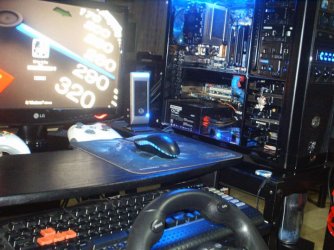
Computer Manufacturer/Model Number
BXD-X1A
OS
Windows 7 X64
CPU
Intel C2D E8400 @ 3Ghz
Motherboard
Gigabyte GA-EP43-US3L
Memory
Patriot Viper II Series PC2-8500 4GB kit @ 1000 (5-5-5-15) 2
Graphics Card(s)
Galaxy GTX 260+ 896MB 216SP
Sound Card
Creative SoundBlaster Audigy Value
Monitor(s) Displays
LG W2043T 20" LCD wide
Screen Resolution
1600x900 @60Hz
Hard Drives
Samsung SATA 250GB
WD Caviar SATA 160GB
PSU
OCZ ModXStream Pro 600w PSU
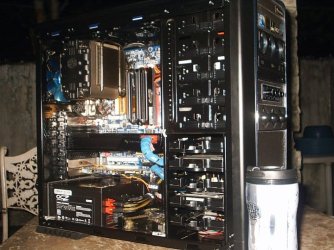
Case
Cooler Master 690 pure (RC-690K) chasis
Cooling
Cooler Master V8
Keyboard
Logitech G110 gaming keyboard
Mouse
NZXT Avatar mouse
Internet Speed
DSL @ 1280kbps
Other Info
3x2.1 subwoofer
[Logitech S200]
[Edifier M1350]
[Eacan E-099]
Belkin N150 Enhanced Wireless Router
LG GH22 SuperMulti DVDRewriter 22x
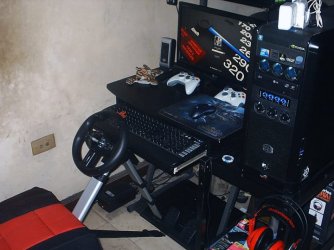
Xbox 360 wired controller
BigBen Xbox 360 wired controller
BigBen Racing seat 4in1
Steelseries QcK limited edition WOTLK gaming mousepad
Deep Cool Rockman (PWM)
1 Cooler Master blue led silent fan 120mm (front)
2 Deep Cool Wind Blade 120mm fan (top)
1 G

My Computer

Computer type
PC/Desktop
Computer Manufacturer/Model Number
Self Built
OS
Win 10 Pro x64
CPU
Intel I5-2500K @3.3GHz
Motherboard
Asrock P67 Extreme4
Memory
16GB G.Skill Ripjaws X (4x4GB)
Graphics Card(s)
EVGA GeForce 750 Ti SC 2GB
Sound Card
ASUS Xonar DG 5.1 Channels 24-bit 96KHz PCI Interface Sound
Monitor(s) Displays
auria eq2367
Screen Resolution
1920 x 1080
Hard Drives
250GB Samsung 850 EVO SSD
1TB WD Blue
1TB Hitachi
PSU
SeaSonic X 650W 80 Plus Gold
Case
Corsair Obsidian 750D
Cooling
Corsair H60, Three 140mm case fans
Keyboard
Logitech Wireless Keyboard K520
Mouse
Logitech Wireless Mouse M310
Internet Speed
Wave Broadband ~ 100 dn 5 up
Antivirus
Windows Defender, Malwarebytes Premium
Browser
Edge, IE11, Chrome
Other Info
Laptop specs: HP g7-1365dx /
CPU: AMD A6-3420M APU with Radeon(tm) HD Graphics /
RAM: Crucial 8Gb (2x4Gb) /
SSD: Crucial M4-CT128M4SSD2 ATA Device/ FW 000F /
GFX: AMD Radeon HD 6520G /
OS: Windows 10 Pro x64
Hello just visting again this thread wanna share my current setup

Nice rig :)

But you still can't average more than 30 k/hr in Manila traffic ;)
 

My Computer

Computer type
PC/Desktop
Computer Manufacturer/Model Number
76~2.0
OS
Windows 7 Ult x64 - SP1/ Windows 8 Pro x64
CPU
Intel Core i5-3570K 4.6GHz
Motherboard
Gigabyte GA-Z77X UD3H, f18
Memory
8GB (2X4GB) DDR3 1600 Corsair Vengeance CL8 1.5v
Graphics Card(s)
Sapphire HD 7770 Vapor-X OC 1GB DDR5
Sound Card
Onboard VIA VT2021
Monitor(s) Displays
22" LCD Dell
Screen Resolution
1680x1050
Hard Drives
Samsung 840Pro 128GB SSD,
Seagate Barracuda 500GB SATA2 7200rpm 32MB cache, Seagate Barracuda 1TB SATA2 7200rpm 32MB cache,
PSU
Corsair HX650W
Case
Cooler Master Storm Scout
Cooling
Corsair H80 2x12cm Noctua NF P12 , 2x14cm case fans
Keyboard
Logitech Wave
Mouse
CM Sentinel
Internet Speed
Dismal
Antivirus
Avast
Browser
Opera Next
Other Info
Haswell laptop: HP Envy 17t-j, i7-4700MQ, GeForce 740M 2GB DDR3, 17.3" Full HD 1920x1080, 16GB RAM, Samsung 840 Pro 128GB, 1TB Hitachi 7200 HDD,
Desktop: eSATA ports,
External eSATA Seagate 500GB SATA2 7200rpm,
External WD USB 500GB
Thanx derekimo & Dave76!

But you still can't average more than 30 k/hr in Manila traffic
wink.gif
lol this maked me laugh so hard hahaha true!!
 

My Computer

Computer Manufacturer/Model Number
BXD-X1A
OS
Windows 7 X64
CPU
Intel C2D E8400 @ 3Ghz
Motherboard
Gigabyte GA-EP43-US3L
Memory
Patriot Viper II Series PC2-8500 4GB kit @ 1000 (5-5-5-15) 2
Graphics Card(s)
Galaxy GTX 260+ 896MB 216SP
Sound Card
Creative SoundBlaster Audigy Value
Monitor(s) Displays
LG W2043T 20" LCD wide
Screen Resolution
1600x900 @60Hz
Hard Drives
Samsung SATA 250GB
WD Caviar SATA 160GB
PSU
OCZ ModXStream Pro 600w PSU
Case
Cooler Master 690 pure (RC-690K) chasis
Cooling
Cooler Master V8
Keyboard
Logitech G110 gaming keyboard
Mouse
NZXT Avatar mouse
Internet Speed
DSL @ 1280kbps
Other Info
3x2.1 subwoofer
[Logitech S200]
[Edifier M1350]
[Eacan E-099]
Belkin N150 Enhanced Wireless Router
LG GH22 SuperMulti DVDRewriter 22x
Xbox 360 wired controller
BigBen Xbox 360 wired controller
BigBen Racing seat 4in1
Steelseries QcK limited edition WOTLK gaming mousepad
Deep Cool Rockman (PWM)
1 Cooler Master blue led silent fan 120mm (front)
2 Deep Cool Wind Blade 120mm fan (top)
1 G
Today is a good day...
picture.php
It's like Christmas, or my birthday, or some other special day that's meant to be celebrated...

I got a very nice parcel in the post this morning. My mesh panels, double-sided clear industrial strength tape, and my black cable sleeving kit all arrived, so I can continue with my case mod.

Complete package:
picture.php


Close-up of the cable sleeving kit:
picture.php


Mesh unwrapped:
picture.php


Not bad for a total cost of $52 (approx R400 local currency), including international airmail cost... This is going to be a fun weekend. I can't wait to get home and play with these now!
picture.php
 

My Computer

Computer type
PC/Desktop
OS
Win 10 x64 Pro x64 / Ubuntu 15.10 x64
CPU
Intel i7-4960X
Motherboard
Asus Rampage IV Black Edition
Memory
4x8GB Corsair Dominator Platinum @2400MHz 10-12-12-31
Graphics Card(s)
2x MSI GTX780Ti 3GB (SLI)
Sound Card
Onboard SupremeFX (Cirrus Logic CS4398)
Monitor(s) Displays
3x LG Cinema 27" IPS LED (27MP65)
Screen Resolution
[1920x1080]x3
Hard Drives
Crucial M500 120GB, Crucial M500 480GB, Toshiba DT01ACA200 2TB
PSU
CoolerMaster V1000
Case
Corsair Obsidian 750D
Cooling
ThermalTake Water 3.0 Extreme, 4xSP120, 3xAF120
Keyboard
Moshi Luna
Mouse
Logitech G700s / Roccat Tyon
Internet Speed
4Mb uncapped ADSL (Afrihost)
Antivirus
MS Security Essentials
Browser
Chrome... Duh. (:
Today is a good day...
picture.php
It's like Christmas, or my birthday, or some other special day that's meant to be celebrated...

I got a very nice parcel in the post this morning. My mesh panels, double-sided clear industrial strength tape, and my black cable sleeving kit all arrived, so I can continue with my case mod.

Complete package:
picture.php


Close-up of the cable sleeving kit:
picture.php


Mesh unwrapped:
picture.php


Not bad for a total cost of $52 (approx R400 local currency), including international airmail cost... This is going to be a fun weekend. I can't wait to get home and play with these now!
picture.php
NICE. What do you plan to do with those?

And what did the sleeving kit run you? I have just been buying 20 feet of expandable sleeving (black) from Frys and then the appropriate sized heat shrink in like 4 foot tubes. Total of $8 for that, which isn't bad. Course, you only get 1 size.

~Lordbob
 

My Computer

Computer Manufacturer/Model Number
Hera
OS
Windows 7 Ultimate x64, Mint 9
CPU
Intel i5-2500k
Motherboard
ASUS P8P67 Pro
Memory
2x 4Gb Corsair VENGEANCE DDR3-1600
Graphics Card(s)
NVidia GeForce N260GTX Twin Frozr
Sound Card
Realtek HD OnBoard Audio
Monitor(s) Displays
ASUS 24" Monitor
Screen Resolution
1920x1080
Hard Drives
G.SKILL Phoenix Series 60GB SATA II MLC Internal Solid State Drive (SSD)
SAMSUNG Spinpoint F3R 1TB 7200 RPM 32MB Cache SATA II
PSU
Cooler Master Real Power Pro 750W
Case
Cooler Master Haf 932
Cooling
Fans
Keyboard
Razer Tarantula
Mouse
Razer Lachesis
Internet Speed
not fast enough
NICE. What do you plan to do with those?
The mesh I want to make new covers for the side fans (pics of my side panel here: Windows 7 Forums - ZaLiTH's Album: Computer Case Mod Project), and also replace the perspex cover over the front case fan with mesh.

The front panel was very badly designed when I got the case; the front fan doesn't have sufficient airflow to actually do anything except make a noise while spinning under strain.. :(

Other than that; I'm going to spray the inside of my case black (much like you did, but I've been wanting to do that for months already), and mod my fan speed controller slightly. I don't like the blue lights that much.

And what did the sleeving kit run you? I have just been buying 20 feet of expandable sleeving (black) from Frys and then the appropriate sized heat shrink in like 4 foot tubes. Total of $8 for that, which isn't bad. Course, you only get 1 size.

~Lordbob
Well, I know it's not the best quality sleeving kit ever... But from all the research that I did on OverClock.net forums, PCFormat forums (local PC mag), and various other Google searches, MNPCTech's sleeving kits were about the best value for money without skimping on quality (it's the multi-threaded sleeving, so it covers cables properly). $9.99 per kit, have a look here: PC Cable and Wire Sleeving Kit

This case mod is a practice-run, I've never done this kinda stuff before... My next project will be with a Cooler Master Cosmos RC-1010 and using sleeving from Million Dollar PC's shop, mesh for my next mod I haven't quite decided yet, but I really like the look and feel of this MNPCTech mesh.. It's nice and light as well.
 

My Computer

Computer type
PC/Desktop
OS
Win 10 x64 Pro x64 / Ubuntu 15.10 x64
CPU
Intel i7-4960X
Motherboard
Asus Rampage IV Black Edition
Memory
4x8GB Corsair Dominator Platinum @2400MHz 10-12-12-31
Graphics Card(s)
2x MSI GTX780Ti 3GB (SLI)
Sound Card
Onboard SupremeFX (Cirrus Logic CS4398)
Monitor(s) Displays
3x LG Cinema 27" IPS LED (27MP65)
Screen Resolution
[1920x1080]x3
Hard Drives
Crucial M500 120GB, Crucial M500 480GB, Toshiba DT01ACA200 2TB
PSU
CoolerMaster V1000
Case
Corsair Obsidian 750D
Cooling
ThermalTake Water 3.0 Extreme, 4xSP120, 3xAF120
Keyboard
Moshi Luna
Mouse
Logitech G700s / Roccat Tyon
Internet Speed
4Mb uncapped ADSL (Afrihost)
Antivirus
MS Security Essentials
Browser
Chrome... Duh. (:
NICE. What do you plan to do with those?
The mesh I want to make new covers for the side fans (pics of my side panel here: Windows 7 Forums - ZaLiTH's Album: Computer Case Mod Project), and also replace the perspex cover over the front case fan with mesh.

The front panel was very badly designed when I got the case; the front fan doesn't have sufficient airflow to actually do anything except make a noise while spinning under strain.. :(

Other than that; I'm going to spray the inside of my case black (much like you did, but I've been wanting to do that for months already), and mod my fan speed controller slightly. I don't like the blue lights that much.

And what did the sleeving kit run you? I have just been buying 20 feet of expandable sleeving (black) from Frys and then the appropriate sized heat shrink in like 4 foot tubes. Total of $8 for that, which isn't bad. Course, you only get 1 size.

~Lordbob
Well, I know it's not the best quality sleeving kit ever... But from all the research that I did on OverClock.net forums, PCFormat forums (local PC mag), and various other Google searches, MNPCTech's sleeving kits were about the best value for money without skimping on quality (it's the multi-threaded sleeving, so it covers cables properly). $9.99 per kit, have a look here: PC Cable and Wire Sleeving Kit
So sounds like I didn't get a bad deal, considering I only need one size for now (PSU was already sleeved).

The mesh idea is not a bad one. How do you plan to fit it to the fans? On the outside, inside, between fan and case or on the inside of the fan with a second set of screws?

~Lordbob
 

My Computer

Computer Manufacturer/Model Number
Hera
OS
Windows 7 Ultimate x64, Mint 9
CPU
Intel i5-2500k
Motherboard
ASUS P8P67 Pro
Memory
2x 4Gb Corsair VENGEANCE DDR3-1600
Graphics Card(s)
NVidia GeForce N260GTX Twin Frozr
Sound Card
Realtek HD OnBoard Audio
Monitor(s) Displays
ASUS 24" Monitor
Screen Resolution
1920x1080
Hard Drives
G.SKILL Phoenix Series 60GB SATA II MLC Internal Solid State Drive (SSD)
SAMSUNG Spinpoint F3R 1TB 7200 RPM 32MB Cache SATA II
PSU
Cooler Master Real Power Pro 750W
Case
Cooler Master Haf 932
Cooling
Fans
Keyboard
Razer Tarantula
Mouse
Razer Lachesis
Internet Speed
not fast enough
Status
Not open for further replies.
Back
Top