Show Us Your Rig

Status
Not open for further replies.

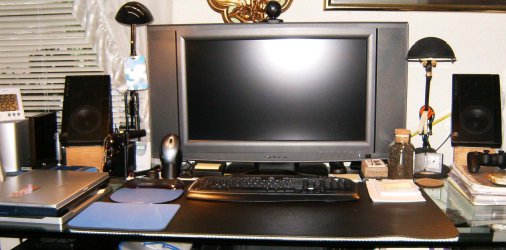
Yes big monitors make all the difference in the world, you have to see it to believe it, eh Doc. ;)

After modding my Nemesis Elite case a bit (changed the Red NEMESIS to Blue, some other minor things as well) I finally am ready to show it on here. :p

Looks good Steven! :party:


Thanks :) Still looking for more things to do, I'm hoping NZXT has some sort of step-up program so I can upgrade to the NZXT Phantom (black).

Having fun modding this thing though, that red LED drove me crazy. Was out of place!
 

My Computer

Computer Manufacturer/Model Number
Custom | Whitebox
OS
Windows 7 Ultimate, OS X 10.7, Ubuntu 11.04
CPU
Intel E6750 @ 3.80GHz
Motherboard
Gigabyte GA-EP45-UD3L (Revision 1.1)
Memory
2x2GB & 2x1GB (6GB) OCZ Reaper 1066MHz @ 1080MHz
Graphics Card(s)
EVGA nVidia GTX 260 896mb (216 Core) FTW Edition
Sound Card
Realtek ALC888
Monitor(s) Displays
21" VIZIO TV
Screen Resolution
1680x1050 @ 60Hz
Hard Drives
Western Digital WD6401AALS - 640GB
Hitachi HDP725016GLA380 - 160GB
PSU
Corsair 750W
Case
NZXT Nemesis Elite
Cooling
Thermaltake SpinQ
Keyboard
Logitech Wireless S520
Mouse
Logitech Wireless S520 - Microsoft Wireless Arc Mouse
Internet Speed
Download: 20mbps, Upload: 3mbps
My Computer

Computer type
PC/Desktop
OS
Windows 10 Home x64
CPU
INTEL Core i5-750 Quad-Core 3.37GHz
Motherboard
ASUS P7P55D
Memory
HyperX Fury Black Series 8GB (2 x 4GB) 1866Mhz
Graphics Card(s)
EVGA GeForce GTX 750 Superclocked 1GB 128-Bit GDDR5
Monitor(s) Displays
LG 32MA68HY 32" IPS
Screen Resolution
1920 x 1080
Hard Drives
Samsung 840 Evo 120GB, SEAGATE 500GB Barracuda® 7200.12, SATA 3 Gb/s, 7200 RPM, 16MB cache
PSU
ANTEC TruePower New TP-550, 80 PLUS, 550W
Case
ANTEC Three Hundred Illusion
Cooling
COOLER MASTER Hyper 212 Plus, 4 x 120mm 1 x 140mm Noctua's
Internet Speed
85 + Mbps
Antivirus
Avast
Browser
Vivaldi
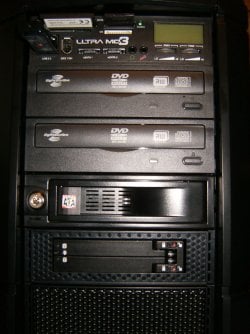
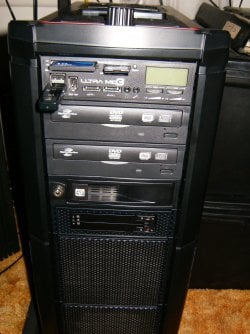
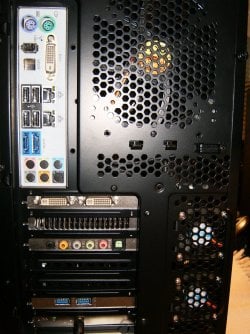
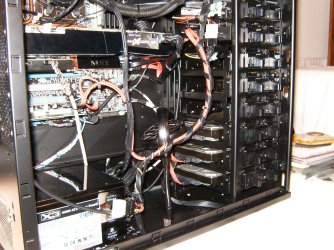
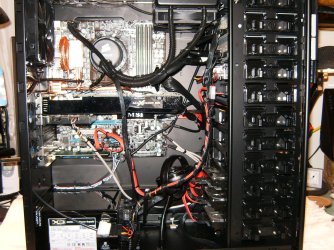
I'm working on cleaning the cable clutter but I've just added a dual SSD dock and two Lite on DVD drives. What do you think ?
HPIM0931.JPG

HPIM0983.JPG

HPIM0934.JPG

HPIM0942.JPG

HPIM0959.JPG

HPIM0961.JPG

HPIM0962.JPG

HPIM0965.JPG

HPIM0981.JPG

HPIM0957.JPG
 

My Computer

Computer type
PC/Desktop
Computer Manufacturer/Model Number
A blend of brains, brawn and dumb luck.
OS
Windows 7 Ultimate 64
CPU
i7 3770k OC'd 4.6 @ 1.17v, also FX 8120 & i5 miniITX
Motherboard
MSI P67A-GD80 b3
Memory
32 gb G.Skill Sniper DDR3 10-12-12-31 @ 2133
Graphics Card(s)
XFX Radeon 7870 2GB DDR5
Sound Card
Sound Blaster Z Series Card
Monitor(s) Displays
(2) LG LED 23" 1920 x 1080 2ms Monitors via mini d-port
Screen Resolution
1680 X 1050 p
Hard Drives
Samsung 256 gb 830 SSD sata III
(1) 1 tb WD Black
(2) 1 tb Hitachi deskmates/sata II
(2) 1 tb WD green/sata II
(2) 3 tb Seagate Barracuda
(1) 120 gb OCZ Vertex SS
(1) Drobo 5N w/5 Seagate 3tb
PSU
EVGA modular 1000G2 80% gold rating & APC 1200 RS
Case
CoolerMaster Storm Styker
Cooling
7 case fans 140mm & 120mm, NZXT Kraken X60
Keyboard
(2) Logitech Illuminated Keyboards (1) usb (1) wireless
Mouse
Logitech G700 & T-BC21 - nano nx for the laptop
Internet Speed
Basic 120mbps down
Antivirus
Trend Micro Titanium Max Security & Malwarebytes Premium
Browser
Chrome and IE 10
Other Info
5 Noctua case fans + 3 Noctua in p/p on NZXT cooler
Integrated hot swap drive bays for 2.5" Drives
(2) Lite-on dvd/cd/Blu Ray optical 22X
Integrated fan controller and led on/off
HP Officejet Pro 8630 all-n-one
Hot-swappable 3.5" hard drive bay
Netgear Nighthawk router
Asus USB 3 & sata 6 PCIe card
Vantec IDE to sata adptr./Ultra sata adptr
Lenovo L420 i5 lappy with m sata
Drobo 5N advanced NAS
man you guys are lucky look at my specs
 

My Computer

Computer Manufacturer/Model Number
Emachines 1331G
OS
MS Windows 7 Home Premium 64-bit
CPU
AMD Athlon II X2 235 Regor 45nm Technology 2.7 Ghz
Motherboard
eMachines MCP61PM-GM (CPU 1)
Memory
6.0GB Dual-Channel DDR2 @ 401MHz (5-5-5-18)
Graphics Card(s)
1024MB GeForce 9800 GT (Pny) overclocked at 662
Sound Card
Speakers (Realtek High Definition Audio)
Monitor(s) Displays
Generic Non-PnP Monitor @ 1280x1024
Screen Resolution
1280x1024
Hard Drives
733GB Seagate ST375052 8AS SCSI Disk Device (IDE)
PSU
450W
Case
not sure
Cooling
fan/air
Keyboard
Standard PS/2 Keyboard
Mouse
Microsoft PS/2 Mouse
Internet Speed
26mbps
Linne, nice tidy up job. Cable ties always work ;)

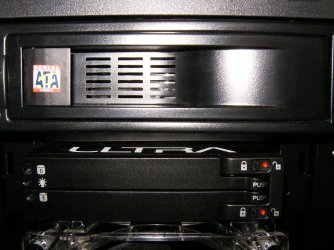
What is that in the 3.5" bay?
 

My Computer

OS
Windows 7 Enterprise
CPU
Intel Pentium Dual E2200 @2.2GHz
Motherboard
Gigabyte II-G31
Memory
4GB
Graphics Card(s)
Palit GForce 9500GT 1GB
Sound Card
onBoard
Hard Drives
WesternDigital: 250GB + 1TB + 1TB + 2TB
PSU
450W
Case
CoolerMaster CM690
Cooling
Corsair H50
Mouse
Logitech MX518
I'm working on cleaning the cable clutter but I've just added a dual SSD dock and two Lite on DVD drives. What do you think ?


Yes, it does look good.
 

My Computer

Computer Manufacturer/Model Number
* BFK Customs *
OS
W 7 64-bit Ultimate
CPU
Intel Q9550 Yorkfield
Motherboard
ASUS P5Q Pro
Memory
8GB Dominator 8500C5D
Graphics Card(s)
ATI : XFX 5870
Sound Card
Realtek HD Audio 7-1
Monitor(s) Displays
1x 47" LCD HDMI & 3x 26" LCD HDMI
Screen Resolution
1920x1080P & 1920x1200
Hard Drives
1x 80GB Intel X25-M G2 SSD : 1x 500GB & 1x 640GB WD Caviar Black(s)
PSU
Corsair 620HX
Case
Cooler Master RC-690
Cooling
Tuniq Tower 120, 2x 140mm and 3x 120mm case fans
Keyboard
Microsoft 500
Mouse
Razer Diamondback 3G
Internet Speed
14 Mb/s
Other Info
1x Koutech 3Gb/s SATA HDD Hot Swap Rack
Xarden,

The 3.5 bay is the coolest little widget. It's a Ultra Products dual 2.5" sata hot swap drive port. This works with 2.5 HHD's and 2.5" SSD's. Now when my laptop's drive crashes and it's crashed 3 times in the last year and a half.....wtf! It will speed re-loading of the WD drive. Then the big news is I've ordered my first SSD drive a wicked deal on a 64 gb Crucial Real C 300 Sata III.

Cheers,
Alan
 

My Computer

Computer type
PC/Desktop
Computer Manufacturer/Model Number
A blend of brains, brawn and dumb luck.
OS
Windows 7 Ultimate 64
CPU
i7 3770k OC'd 4.6 @ 1.17v, also FX 8120 & i5 miniITX
Motherboard
MSI P67A-GD80 b3
Memory
32 gb G.Skill Sniper DDR3 10-12-12-31 @ 2133
Graphics Card(s)
XFX Radeon 7870 2GB DDR5
Sound Card
Sound Blaster Z Series Card
Monitor(s) Displays
(2) LG LED 23" 1920 x 1080 2ms Monitors via mini d-port
Screen Resolution
1680 X 1050 p
Hard Drives
Samsung 256 gb 830 SSD sata III
(1) 1 tb WD Black
(2) 1 tb Hitachi deskmates/sata II
(2) 1 tb WD green/sata II
(2) 3 tb Seagate Barracuda
(1) 120 gb OCZ Vertex SS
(1) Drobo 5N w/5 Seagate 3tb
PSU
EVGA modular 1000G2 80% gold rating & APC 1200 RS
Case
CoolerMaster Storm Styker
Cooling
7 case fans 140mm & 120mm, NZXT Kraken X60
Keyboard
(2) Logitech Illuminated Keyboards (1) usb (1) wireless
Mouse
Logitech G700 & T-BC21 - nano nx for the laptop
Internet Speed
Basic 120mbps down
Antivirus
Trend Micro Titanium Max Security & Malwarebytes Premium
Browser
Chrome and IE 10
Other Info
5 Noctua case fans + 3 Noctua in p/p on NZXT cooler
Integrated hot swap drive bays for 2.5" Drives
(2) Lite-on dvd/cd/Blu Ray optical 22X
Integrated fan controller and led on/off
HP Officejet Pro 8630 all-n-one
Hot-swappable 3.5" hard drive bay
Netgear Nighthawk router
Asus USB 3 & sata 6 PCIe card
Vantec IDE to sata adptr./Ultra sata adptr
Lenovo L420 i5 lappy with m sata
Drobo 5N advanced NAS
ok, this is what i bought so far for my new Rig (mostly music production, but gaming won`t be a problem ;))

Intel Core I7 930 2.80 GHz
Noctua NH-C12P SE14
GigaByte GA-X58A-UD5
Zalman ZM1000
Asus Radeon HD 5750 Formula 1024 MB
Thermaltake Element V

and this is still in backorder:

Corsair Dominator GT 12 GB, PC3-14900, 1866 MHz, :rolleyes:
Crucial RealSSD C300 64 GB, S-ATA 600, 70 Mb's, 355 MB/s (OS)
WD Caviar Black 1 TB, 7200 Rpm, 64 MB, Sata III/600 (Music files)
5x Samsung Spinpoint F3EG EcoGreen 2 TB, 5400 Rpm, 32 MB, S-ATA II/300 (Storage)


what do you think, have i made all the right choices?

when i`ve finished it, i`ll post some pics!
 

My Computer

Computer Manufacturer/Model Number
me, myself and i
OS
windows 7 Ultimate 64-bit
CPU
Intel Core I7 930 2.80 GHz
Motherboard
GigaByte GA-X58A-UD5
Memory
Corsair Dominator GT 12 GB, PC3-14900, 1866 MHz
Graphics Card(s)
Asus Radeon HD 5750 Formula 1024 MB
Sound Card
integrated
Monitor(s) Displays
samsung 82cm lcd 1080p
Screen Resolution
1920 x 1080
Hard Drives
1 x Crucial RealSSD C300 64 GB, S-ATA 600, 70 Mb's, 355 MB/s
1 x WD Caviar Black 1 TB, 7200 Rpm, 64 MB, Sata III/600
4 x WD Caviar Green 1 TB, 5400 Rpm, 64 MB, S-ATA II/300
PSU
Zalman ZM1000
Case
Thermaltake Element V
Cooling
Noctua NH-C12P SE14
Keyboard
Logitech G19
Mouse
Logitech MX Revolution
Internet Speed
Cable
janno,
Looks to be a wicked fast demon of a machine. One with which you'll be able to OC if needed with ease. The storage is off the hook. I just got my Crucial today. I've installed it but will wait till tomorrow to start loading the OS and software. I love my Element V case and highly recommend it the lights in the fans is a bit how shall I say disco but being able to change to a constant color or turn off is nice. Check out my rig above with a paltry 8gb of ram... lol ! Have a blast with your build and do send some pic's when it's done !
Cheers, Alan
 

My Computer

Computer type
PC/Desktop
Computer Manufacturer/Model Number
A blend of brains, brawn and dumb luck.
OS
Windows 7 Ultimate 64
CPU
i7 3770k OC'd 4.6 @ 1.17v, also FX 8120 & i5 miniITX
Motherboard
MSI P67A-GD80 b3
Memory
32 gb G.Skill Sniper DDR3 10-12-12-31 @ 2133
Graphics Card(s)
XFX Radeon 7870 2GB DDR5
Sound Card
Sound Blaster Z Series Card
Monitor(s) Displays
(2) LG LED 23" 1920 x 1080 2ms Monitors via mini d-port
Screen Resolution
1680 X 1050 p
Hard Drives
Samsung 256 gb 830 SSD sata III
(1) 1 tb WD Black
(2) 1 tb Hitachi deskmates/sata II
(2) 1 tb WD green/sata II
(2) 3 tb Seagate Barracuda
(1) 120 gb OCZ Vertex SS
(1) Drobo 5N w/5 Seagate 3tb
PSU
EVGA modular 1000G2 80% gold rating & APC 1200 RS
Case
CoolerMaster Storm Styker
Cooling
7 case fans 140mm & 120mm, NZXT Kraken X60
Keyboard
(2) Logitech Illuminated Keyboards (1) usb (1) wireless
Mouse
Logitech G700 & T-BC21 - nano nx for the laptop
Internet Speed
Basic 120mbps down
Antivirus
Trend Micro Titanium Max Security & Malwarebytes Premium
Browser
Chrome and IE 10
Other Info
5 Noctua case fans + 3 Noctua in p/p on NZXT cooler
Integrated hot swap drive bays for 2.5" Drives
(2) Lite-on dvd/cd/Blu Ray optical 22X
Integrated fan controller and led on/off
HP Officejet Pro 8630 all-n-one
Hot-swappable 3.5" hard drive bay
Netgear Nighthawk router
Asus USB 3 & sata 6 PCIe card
Vantec IDE to sata adptr./Ultra sata adptr
Lenovo L420 i5 lappy with m sata
Drobo 5N advanced NAS
ok, this is what i bought so far for my new Rig (mostly music production, but gaming won`t be a problem ;))

Intel Core I7 930 2.80 GHz
Noctua NH-C12P SE14
GigaByte GA-X58A-UD5
Zalman ZM1000
Asus Radeon HD 5750 Formula 1024 MB
Thermaltake Element V

and this is still in backorder:

Corsair Dominator GT 12 GB, PC3-14900, 1866 MHz, :rolleyes:
Crucial RealSSD C300 64 GB, S-ATA 600, 70 Mb's, 355 MB/s (OS)
WD Caviar Black 1 TB, 7200 Rpm, 64 MB, Sata III/600 (Music files)
5x Samsung Spinpoint F3EG EcoGreen 2 TB, 5400 Rpm, 32 MB, S-ATA II/300 (Storage)


what do you think, have i made all the right choices?

when i`ve finished it, i`ll post some pics!

BEFORE YOU GET THE RAM PLEASE READ!!!

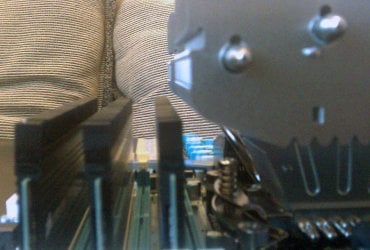
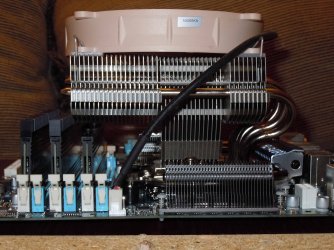
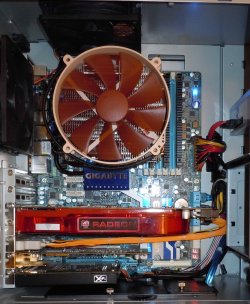
FYI.... With the Dominator GT's and the Noctua NH-C12P SE14 cooler with regards to RAM clearence. Depending on how you want to orient the cooler, you will have to remove one of the RAM's heatsink. Here's a couple of images.... (sorry about that first photo, that's the only one I have and it's cell phone quality :()

In the first set of images, the heatsink is NOT removed. In the second photo notice the orientation of the CPU cooler has the heat pipes facing down.

SE14-RAM-Clearance.jpg
SE14-Orientation1.jpg

In the second set of images, the heatsink is removed, and the Cooler heat pipes are facing towards the rear. With this orientation, the heatsink of the RAM must be removed to install the CPU cooler!!!

SE14-with-RAM-fin-removed.jpg
SE14-Orientation2.jpg

Now, I can say that it made no difference in cooling which way I oriented the cooler as temp remained the same. Also Noctua does not recommend the heat pipes face up in a tower case, so I would orient it like I have in the first set of photos.

Now, since you are going with the GT's, you "might" still run into clearence problems as it's my understanding that the GT's have taller heatsinks than the regular Dominator sticks do.

BTW you can also read my thoughts on the SE14 cooler here... http://www.sevenforums.com/hardware-devices/81169-experience-gigabyte-motherboards-3.html#post775794

Err.... I just noticed you're talking 12gig of Dominator RAM... that throws a wrench in the works with the SE14 as you can see that first DIMM slot is covered no matter which way you orient the SE14 :eek:

Just FYI.

Also here's my system... http://www.sevenforums.com/overclocking-case-mods/347-show-us-your-rig-174.html#post848996
 
Last edited:

My Computer

Computer type
PC/Desktop
Computer Manufacturer/Model Number
Custom built by me.
OS
Windows 10 Pro
CPU
Intel Core i7-4770K (3.5Ghz)
Motherboard
Gigabyte G1 Sniper 5 (F10 Bios)
Memory
32 gig Corsair Dominator Platinum (4x8Gig)
Graphics Card(s)
Sapphire Tri-X R9 Fury
Sound Card
Soundblaster ZXR
Monitor(s) Displays
NEC PA242W 24" LCD Monitor
Screen Resolution
1920 x 1200
Hard Drives
Primary - Samsung 850 Pro (512gig), Samsung 840 Pro (256gig), 2TB WD Caviar Black.
PSU
EVGA Supernova 1000 G2
Case
Cooler Master HAF X
Cooling
Corsair H100i with Corsair Air Series SP120 Quiet Fans
Keyboard
Logitech Wireless Wave
Mouse
Logitech Performance MX
Internet Speed
High Speed Cable
Antivirus
Norton Security
Browser
IE11
Other Info
Memory Timings - 1866MHz @ 9-9-9-27-1T @ 1.5 volts
ok, this is what i bought so far for my new Rig (mostly music production, but gaming won`t be a problem ;))

Intel Core I7 930 2.80 GHz
Noctua NH-C12P SE14
GigaByte GA-X58A-UD5
Zalman ZM1000
Asus Radeon HD 5750 Formula 1024 MB
Thermaltake Element V

and this is still in backorder:

Corsair Dominator GT 12 GB, PC3-14900, 1866 MHz, :rolleyes:
Crucial RealSSD C300 64 GB, S-ATA 600, 70 Mb's, 355 MB/s (OS)
WD Caviar Black 1 TB, 7200 Rpm, 64 MB, Sata III/600 (Music files)
5x Samsung Spinpoint F3EG EcoGreen 2 TB, 5400 Rpm, 32 MB, S-ATA II/300 (Storage)


what do you think, have i made all the right choices?

when i`ve finished it, i`ll post some pics!
I was just about to make a few comments on your choice of CPU cooler and then I saw sygnus21's post... CPU cooler size and motherboard layouts are a big headache to the home PC builder, I know, I've been bitten by it many times...

However, I'm going on a different tangent though; I'd suggest go for the Dominator (you can't go wrong with Corsair), and try find a better CPU cooler. In fact, combining those two thoughts, Corsair had a self-contained water cooling unit (H50), I see they've just recently announced the H70... Smaller, more efficient, might be worth considering.

Anyway, back to the size issue: looking at the motherboard picture on Gigabyte's site, it seems your board has a similar layout to mine. You might be better off getting a taller caller with a side-facing fan. For example, I got the Zalman CNPS9700NT; if you're running an i7 930, you might be better off with a 9900, but essentially I'd suggest something of that shape. The Scythe Mugen 2 looks like a pretty good one (Mugen 2 Rev. B: Scythe EU GmbH).
 

My Computer

Computer type
PC/Desktop
OS
Win 10 x64 Pro x64 / Ubuntu 15.10 x64
CPU
Intel i7-4960X
Motherboard
Asus Rampage IV Black Edition
Memory
4x8GB Corsair Dominator Platinum @2400MHz 10-12-12-31
Graphics Card(s)
2x MSI GTX780Ti 3GB (SLI)
Sound Card
Onboard SupremeFX (Cirrus Logic CS4398)
Monitor(s) Displays
3x LG Cinema 27" IPS LED (27MP65)
Screen Resolution
[1920x1080]x3
Hard Drives
Crucial M500 120GB, Crucial M500 480GB, Toshiba DT01ACA200 2TB
PSU
CoolerMaster V1000
Case
Corsair Obsidian 750D
Cooling
ThermalTake Water 3.0 Extreme, 4xSP120, 3xAF120
Keyboard
Moshi Luna
Mouse
Logitech G700s / Roccat Tyon
Internet Speed
4Mb uncapped ADSL (Afrihost)
Antivirus
MS Security Essentials
Browser
Chrome... Duh. (:
I was just about to make a few comments on your choice of CPU cooler and then I saw sygnus21's post... CPU cooler size and motherboard layouts are a big headache to the home PC builder, I know, I've been bitten by it many times...

However, I'm going on a different tangent though; I'd suggest go for the Dominator (you can't go wrong with Corsair), and try find a better CPU cooler. In fact, combining those two thoughts, Corsair had a self-contained water cooling unit (H50), I see they've just recently announced the H70... Smaller, more efficient, might be worth considering.

Anyway, back to the size issue: looking at the motherboard picture on Gigabyte's site, it seems your board has a similar layout to mine. You might be better off getting a taller caller with a side-facing fan. For example, I got the Zalman CNPS9700NT; if you're running an i7 930, you might be better off with a 9900, but essentially I'd suggest something of that shape. The Scythe Mugen 2 looks like a pretty good one (Mugen 2 Rev. B: Scythe EU GmbH).

My main problem is the noise reduction.

my whole setup is made with noise reduction in mind.
:oactually this was a demand from my Girlf(r)iend, since my rig is in our livingroom, hooked on my 32 inch lcd:devil:.

my current rig is producing quite a lot of noise, so this was my main goal (before i get banned to the 3rd floor:confused:)...

i chose the SE14 because of the low noise production.

in about 2 week i finally have the time to put it all together, i`ll find out then if it fits or not ;)

keep giving me options though, because if it doesnt fit, ill need the advise.

i also don`t know if my SSD choice is a good one, because this is my first SSD, so i dont have any knowledge of SSD`s.

the main reason i chose this SSD, is because of the SataIII connection, this will boost speed quite a bit (i think:()

Thanx so far!

Janno
 

My Computer

Computer Manufacturer/Model Number
me, myself and i
OS
windows 7 Ultimate 64-bit
CPU
Intel Core I7 930 2.80 GHz
Motherboard
GigaByte GA-X58A-UD5
Memory
Corsair Dominator GT 12 GB, PC3-14900, 1866 MHz
Graphics Card(s)
Asus Radeon HD 5750 Formula 1024 MB
Sound Card
integrated
Monitor(s) Displays
samsung 82cm lcd 1080p
Screen Resolution
1920 x 1080
Hard Drives
1 x Crucial RealSSD C300 64 GB, S-ATA 600, 70 Mb's, 355 MB/s
1 x WD Caviar Black 1 TB, 7200 Rpm, 64 MB, Sata III/600
4 x WD Caviar Green 1 TB, 5400 Rpm, 64 MB, S-ATA II/300
PSU
Zalman ZM1000
Case
Thermaltake Element V
Cooling
Noctua NH-C12P SE14
Keyboard
Logitech G19
Mouse
Logitech MX Revolution
Internet Speed
Cable
To clearify....

I whole heartedly agree on getting Corsair Dominator RAM :D

Now.... as you can see, I am using the SE14 cooler with the dominator RAM, however, if I wanted to go with 12gig, I would have to remove the heatsink from at least one RAM stick, regardless of which orientation I use because that first DIMM slot is going to be overlapped by the cooler.

At the moment I don't have any clearance issues which requires me to remove a heatsink from my RAM modules since I only have 6gig.

So...does the cooler work with Dominator RAM.... yes... and no. You could argue no because the RAM modules will pose a clearance problem If you want to populate all the DIMM slots. However, you can always remove the heatsink fins, but...

I'll also say that if you plan on using the fan that some of the Dominator modules come with, that's going to be a tight fit. I have a fan for my RAM, but I haven't tried to use it as I think it's pretty useless. My opinion.

As to the SE14 CPU cooler itself.... If you're going for 4gig+ OC's, this isn't the cooler for you! I have it, and at 3.5gig load, it hits 73ish. I don't even want to think about 4gig :eek:

Also, what is the OP going to do to need 12gig of Dominator GT? That's some expensive stuff. If he's going to do some heavy overclocking to need that type of RAM, the SE14 is the last CPU cooler I'd be looking at! Again, see my thoughts here.... Experience with Gigabyte motherboards?

BTW I've read quite a few reviews and I find this one closer to the truth... Overclock3D :: Review :: Noctua NH-C12P SE14 Review :: Introduction

My two cents.

Nite Nite :sleepy:

in about 2 week i finally have the time to put it all together, i`ll find out then if it fits or not ;)

I urge you to read my posts before final decision.... http://www.sevenforums.com/overclocking-case-mods/347-show-us-your-rig-190.html#post892292 ;)
 

My Computer

Computer type
PC/Desktop
Computer Manufacturer/Model Number
Custom built by me.
OS
Windows 10 Pro
CPU
Intel Core i7-4770K (3.5Ghz)
Motherboard
Gigabyte G1 Sniper 5 (F10 Bios)
Memory
32 gig Corsair Dominator Platinum (4x8Gig)
Graphics Card(s)
Sapphire Tri-X R9 Fury
Sound Card
Soundblaster ZXR
Monitor(s) Displays
NEC PA242W 24" LCD Monitor
Screen Resolution
1920 x 1200
Hard Drives
Primary - Samsung 850 Pro (512gig), Samsung 840 Pro (256gig), 2TB WD Caviar Black.
PSU
EVGA Supernova 1000 G2
Case
Cooler Master HAF X
Cooling
Corsair H100i with Corsair Air Series SP120 Quiet Fans
Keyboard
Logitech Wireless Wave
Mouse
Logitech Performance MX
Internet Speed
High Speed Cable
Antivirus
Norton Security
Browser
IE11
Other Info
Memory Timings - 1866MHz @ 9-9-9-27-1T @ 1.5 volts
My main problem is the noise reduction.

my whole setup is made with noise reduction in mind.
:oactually this was a demand from my Girlf(r)iend, since my rig is in our livingroom, hooked on my 32 inch lcd:devil:.
If that's the case, why not go for a decent ThermalRight CPU cooler? They have a few that are specially designed to run a fanless design. Try doing some research on the HR-01 and HR-02, I think you'll like what you see. Besides, if it comes to it, you can still add one or two fans to them.

If I remember correctly, you can have 120mm for the HR-01 and 140mm for the HR-02, I might be mistaken though. The only issue with using these heatsinks is their height, however with the width of the Thermaltake Element V case, you shouldn't have any problems there.
 

My Computer

Computer type
PC/Desktop
OS
Win 10 x64 Pro x64 / Ubuntu 15.10 x64
CPU
Intel i7-4960X
Motherboard
Asus Rampage IV Black Edition
Memory
4x8GB Corsair Dominator Platinum @2400MHz 10-12-12-31
Graphics Card(s)
2x MSI GTX780Ti 3GB (SLI)
Sound Card
Onboard SupremeFX (Cirrus Logic CS4398)
Monitor(s) Displays
3x LG Cinema 27" IPS LED (27MP65)
Screen Resolution
[1920x1080]x3
Hard Drives
Crucial M500 120GB, Crucial M500 480GB, Toshiba DT01ACA200 2TB
PSU
CoolerMaster V1000
Case
Corsair Obsidian 750D
Cooling
ThermalTake Water 3.0 Extreme, 4xSP120, 3xAF120
Keyboard
Moshi Luna
Mouse
Logitech G700s / Roccat Tyon
Internet Speed
4Mb uncapped ADSL (Afrihost)
Antivirus
MS Security Essentials
Browser
Chrome... Duh. (:
To clearify....

I whole heartedly agree on getting Corsair Dominator RAM :D

Now.... as you can see, I am using the SE14 cooler with the dominator RAM, however, if I wanted to go with 12gig, I would have to remove the heatsink from at least one RAM stick, regardless of which orientation I use because that first DIMM slot is going to be overlapped by the cooler.

At the moment I don't have any clearance issues which requires me to remove a heatsink from my RAM modules since I only have 6gig.

So...does the cooler work with Dominator RAM.... yes... and no. You could argue no because the RAM modules will pose a clearance problem If you want to populate all the DIMM slots. However, you can always remove the heatsink fins, but...

I'll also say that if you plan on using the fan that some of the Dominator modules come with, that's going to be a tight fit. I have a fan for my RAM, but I haven't tried to use it as I think it's pretty useless. My opinion.

As to the SE14 CPU cooler itself.... If you're going for 4gig+ OC's, this isn't the cooler for you! I have it, and at 3.5gig load, it hits 73ish. I don't even want to think about 4gig :eek:

Also, what is the OP going to do to need 12gig of Dominator GT? That's some expensive stuff. If he's going to do some heavy overclocking to need that type of RAM, the SE14 is the last CPU cooler I'd be looking at! Again, see my thoughts here.... Experience with Gigabyte motherboards?

BTW I've read quite a few reviews and I find this one closer to the truth... Overclock3D :: Review :: Noctua NH-C12P SE14 Review :: Introduction

My two cents.

Nite Nite :sleepy:

in about 2 week i finally have the time to put it all together, i`ll find out then if it fits or not ;)

I urge you to read my posts before final decision.... http://www.sevenforums.com/overclocking-case-mods/347-show-us-your-rig-190.html#post892292 ;)

i`m going to use the rig for music production, and my current 4GB isn`t cutting it.
so with future needs in mind i thought, why not go for 12GB right away...

i`m not planning to overclock in any way, i`ve never done it before, and with this rig i don`t think there is a need to do so.

so, with that in mind, i still think that the SE14 isn`t that bad of a choice...

but i could still be mistaken ofcourse...

Grtz,

Janno
 

My Computer

Computer Manufacturer/Model Number
me, myself and i
OS
windows 7 Ultimate 64-bit
CPU
Intel Core I7 930 2.80 GHz
Motherboard
GigaByte GA-X58A-UD5
Memory
Corsair Dominator GT 12 GB, PC3-14900, 1866 MHz
Graphics Card(s)
Asus Radeon HD 5750 Formula 1024 MB
Sound Card
integrated
Monitor(s) Displays
samsung 82cm lcd 1080p
Screen Resolution
1920 x 1080
Hard Drives
1 x Crucial RealSSD C300 64 GB, S-ATA 600, 70 Mb's, 355 MB/s
1 x WD Caviar Black 1 TB, 7200 Rpm, 64 MB, Sata III/600
4 x WD Caviar Green 1 TB, 5400 Rpm, 64 MB, S-ATA II/300
PSU
Zalman ZM1000
Case
Thermaltake Element V
Cooling
Noctua NH-C12P SE14
Keyboard
Logitech G19
Mouse
Logitech MX Revolution
Internet Speed
Cable
My main problem is the noise reduction.

my whole setup is made with noise reduction in mind.
:oactually this was a demand from my Girlf(r)iend, since my rig is in our livingroom, hooked on my 32 inch lcd:devil:.
If that's the case, why not go for a decent ThermalRight CPU cooler? They have a few that are specially designed to run a fanless design. Try doing some research on the HR-01 and HR-02, I think you'll like what you see. Besides, if it comes to it, you can still add one or two fans to them.

If I remember correctly, you can have 120mm for the HR-01 and 140mm for the HR-02, I might be mistaken though. The only issue with using these heatsinks is their height, however with the width of the Thermaltake Element V case, you shouldn't have any problems there.

this wouldnt be a bad choice, besides the fact that you`ve got to put extra fans on it if it doesnt cool sufficiently...

then there`s the problem of my supplier. i buy everything with one supplier, and he has a lot of cool stuff, an with the responses in mind i`ve gotten so far, this is still the best option.

i will try to look for something else in his stock, but keep in mind that the SE14 is already waiting on my stack, just screaming to be put in my new rig (if only my work would grant me some time to put it together:cry:)
 

My Computer

Computer Manufacturer/Model Number
me, myself and i
OS
windows 7 Ultimate 64-bit
CPU
Intel Core I7 930 2.80 GHz
Motherboard
GigaByte GA-X58A-UD5
Memory
Corsair Dominator GT 12 GB, PC3-14900, 1866 MHz
Graphics Card(s)
Asus Radeon HD 5750 Formula 1024 MB
Sound Card
integrated
Monitor(s) Displays
samsung 82cm lcd 1080p
Screen Resolution
1920 x 1080
Hard Drives
1 x Crucial RealSSD C300 64 GB, S-ATA 600, 70 Mb's, 355 MB/s
1 x WD Caviar Black 1 TB, 7200 Rpm, 64 MB, Sata III/600
4 x WD Caviar Green 1 TB, 5400 Rpm, 64 MB, S-ATA II/300
PSU
Zalman ZM1000
Case
Thermaltake Element V
Cooling
Noctua NH-C12P SE14
Keyboard
Logitech G19
Mouse
Logitech MX Revolution
Internet Speed
Cable

Also, what is the OP going to do to need 12gig of Dominator GT? That's some expensive stuff.

i don`t consider €400,- a lot of money to spend on RAM, it beats buying 6 GB now (€280,-) and upgrading it later.

i was actually thinking of buying 24GB of ram, but that was just to much (€1200,-)

so the best value for money is still the 12GB Dominator GT:D
 

My Computer

Computer Manufacturer/Model Number
me, myself and i
OS
windows 7 Ultimate 64-bit
CPU
Intel Core I7 930 2.80 GHz
Motherboard
GigaByte GA-X58A-UD5
Memory
Corsair Dominator GT 12 GB, PC3-14900, 1866 MHz
Graphics Card(s)
Asus Radeon HD 5750 Formula 1024 MB
Sound Card
integrated
Monitor(s) Displays
samsung 82cm lcd 1080p
Screen Resolution
1920 x 1080
Hard Drives
1 x Crucial RealSSD C300 64 GB, S-ATA 600, 70 Mb's, 355 MB/s
1 x WD Caviar Black 1 TB, 7200 Rpm, 64 MB, Sata III/600
4 x WD Caviar Green 1 TB, 5400 Rpm, 64 MB, S-ATA II/300
PSU
Zalman ZM1000
Case
Thermaltake Element V
Cooling
Noctua NH-C12P SE14
Keyboard
Logitech G19
Mouse
Logitech MX Revolution
Internet Speed
Cable
i will try to look for something else in his stock, but keep in mind that the SE14 is already waiting on my stack, just screaming to be put in my new rig (if only my work would grant me some time to put it together:cry:)
Well, try it and see how it goes.. I'm curious to see what this rig is going to look like when it's done. :D

i don`t consider €400,- a lot of money to spend on RAM...
*gasp* Your RAM alone is a third of the value of my entire rig.... :shock: Lol.
 

My Computer

Computer type
PC/Desktop
OS
Win 10 x64 Pro x64 / Ubuntu 15.10 x64
CPU
Intel i7-4960X
Motherboard
Asus Rampage IV Black Edition
Memory
4x8GB Corsair Dominator Platinum @2400MHz 10-12-12-31
Graphics Card(s)
2x MSI GTX780Ti 3GB (SLI)
Sound Card
Onboard SupremeFX (Cirrus Logic CS4398)
Monitor(s) Displays
3x LG Cinema 27" IPS LED (27MP65)
Screen Resolution
[1920x1080]x3
Hard Drives
Crucial M500 120GB, Crucial M500 480GB, Toshiba DT01ACA200 2TB
PSU
CoolerMaster V1000
Case
Corsair Obsidian 750D
Cooling
ThermalTake Water 3.0 Extreme, 4xSP120, 3xAF120
Keyboard
Moshi Luna
Mouse
Logitech G700s / Roccat Tyon
Internet Speed
4Mb uncapped ADSL (Afrihost)
Antivirus
MS Security Essentials
Browser
Chrome... Duh. (:
*gasp* Your RAM alone is a third of the value of my entire rig.... :shock: Lol.

My rig in total costs about € 2.000,- , so about a fifth is spend on RAM.

its acceptable, although a little bit over the top, but not at all excessive, since my storage (8TB total) will set me back about the same (about) € 400,-

ive worked very hard all year with this new rig in mind, so my hard work is finally paying off (if it wasnt for my extra hours work, i wouldnt be able to afford this rig anyway :o)...
 

My Computer

Computer Manufacturer/Model Number
me, myself and i
OS
windows 7 Ultimate 64-bit
CPU
Intel Core I7 930 2.80 GHz
Motherboard
GigaByte GA-X58A-UD5
Memory
Corsair Dominator GT 12 GB, PC3-14900, 1866 MHz
Graphics Card(s)
Asus Radeon HD 5750 Formula 1024 MB
Sound Card
integrated
Monitor(s) Displays
samsung 82cm lcd 1080p
Screen Resolution
1920 x 1080
Hard Drives
1 x Crucial RealSSD C300 64 GB, S-ATA 600, 70 Mb's, 355 MB/s
1 x WD Caviar Black 1 TB, 7200 Rpm, 64 MB, Sata III/600
4 x WD Caviar Green 1 TB, 5400 Rpm, 64 MB, S-ATA II/300
PSU
Zalman ZM1000
Case
Thermaltake Element V
Cooling
Noctua NH-C12P SE14
Keyboard
Logitech G19
Mouse
Logitech MX Revolution
Internet Speed
Cable
Well, I think I mentioned last week that I was planning to spray my PC case in matte-black, and I actually got a chance to do that on Saturday... Unfortunately though, I only managed to get some pictures of it now. I haven't got any pics of the paint process unfortunately, but if anybody asks for it, I can give information of what I did, what problems I ran into, and a few tips on how to get a nice even finish.

Anyway, enough babling, on with the pictures:

I decided to take the silver crap off my power and reset buttons to match the rest of the case nicely:
picture.php


Nice clear view of the drive bays after the spray job:
picture.php


My HDDs after switching them around for cable management; the cables are now hidden below and in front of the drives, and all drive connectors are in front of the drives instead of at the back:
picture.php


Finally, a rear-view with the black back panel, the reflection makes it a bit difficult to see the drive bays (I was too lazy to take the side panel off again....):
picture.php


Thanks to the sheer size of the Zalman CNPS9700NT I installed, I had to remove one of the side panel fans for now (hense the ugly double-sided tape holding my side panel mesh in place), but I'll be ordering more perspex to redo the side panel in a few weeks..
picture.php


At that stage, I'll be moving the two 120mm fans I had in the side panel to new locations, and adding two black dust filters (DEMCiflex Computer Dust Filters) to the intake fans. I also have another plan to hide certain components with black perspex, but I won't give away too much there, I'll keep that as a surprise for now..
picture.php
 

My Computer

Computer type
PC/Desktop
OS
Win 10 x64 Pro x64 / Ubuntu 15.10 x64
CPU
Intel i7-4960X
Motherboard
Asus Rampage IV Black Edition
Memory
4x8GB Corsair Dominator Platinum @2400MHz 10-12-12-31
Graphics Card(s)
2x MSI GTX780Ti 3GB (SLI)
Sound Card
Onboard SupremeFX (Cirrus Logic CS4398)
Monitor(s) Displays
3x LG Cinema 27" IPS LED (27MP65)
Screen Resolution
[1920x1080]x3
Hard Drives
Crucial M500 120GB, Crucial M500 480GB, Toshiba DT01ACA200 2TB
PSU
CoolerMaster V1000
Case
Corsair Obsidian 750D
Cooling
ThermalTake Water 3.0 Extreme, 4xSP120, 3xAF120
Keyboard
Moshi Luna
Mouse
Logitech G700s / Roccat Tyon
Internet Speed
4Mb uncapped ADSL (Afrihost)
Antivirus
MS Security Essentials
Browser
Chrome... Duh. (:
Status
Not open for further replies.
Back
Top