Show us your SSD performance 2

The 4K 64 THRD are the only numbers that look way off compared to mine.
Starting to get to me. There must be a reason.
 

My Computer

Computer type
PC/Desktop
Computer Manufacturer/Model Number
Own build
OS
Windows 7x64 Home Premium SP1
CPU
Intel i7 2600k
Motherboard
ASUS P8Z68 Deluxe
Memory
G.Skill Ripjaws (DDR3-1600) 2x4GB
Graphics Card(s)
Nvidia GeForce GTS 450; Intel HD Graphics 3000(GT2+)
Monitor(s) Displays
Dell Ultrasharp IPS panel U2311H, Samsung SyncMaster P2350
Screen Resolution
1920x1080
Hard Drives
Samsung 850 Pro SSD 256GB, Samsung SSD 840 120GB, Seagates 1TB Barracuda ST31000528AS x2
PSU
Seasonic M12II 520W
Case
Lian Li Lancool PC-K60
Cooling
Case: 1x120mm, 3x140mm CPU: Hyper 212+
Keyboard
Logitech MK520 (wireless)
Mouse
Logitech MK520
Internet Speed
6-7 Mbps
Antivirus
Norton Security Premium, Malwarebytes on 2 (MSE on 3rd PC)
Browser
FireFox
Other Info
Audio: Logitech Z523 2.1
That's quite good. Keep those shots for all the people who are worried about how long will an SSD last, and how fragile they are.
 

My Computers

System One System Two

  • Computer type
    PC/Desktop
    Computer Manufacturer/Model Number
    ALWAYS UNDER CONSTRUCTION
    OS
    Windows 11 Pro
    CPU
    Ryzen 9 5900X
    Motherboard
    Asus X570 Crosshair Viii Hero
    Memory
    32GB G Skill DDR4-3600
    Graphics Card(s)
    EVGA RTX 3080 FTW 3 Ultra
    Sound Card
    On Board/Sennheiser PC37X Headset
    Monitor(s) Displays
    3 X Asus 27"
    Screen Resolution
    2560x1440
    Hard Drives
    2 X 1 TB NVME drives
    PSU
    EVGA 850
    Case
    Phanteks Eclipse P400A
    Cooling
    EVGA 280 AIO
    Keyboard
    Logitech G510s/ Logitech G13
    Mouse
    Logitech G502
    Internet Speed
    24/1
    Antivirus
    ESET/MBAM Pro/SAS Pro
    Browser
    Chrome/ Firefox/ Edge
  • Computer type
    Laptop
    System Manufacturer/Model Number
    Dell 16 Plus
    OS
    Windows 11 Pro
    CPU
    Intel Ultra 9 288V
    Memory
    32 GB LPDDR5X 8533
    Monitor(s) Displays
    16" Mini-LED HDR600 Touch 90 Hz
    Screen Resolution
    2560X1600
    Hard Drives
    1 TB NVME
I'm not sure how my results are, but here is what I have using my 2x120 GB Corsair SSD's in a RAID 0..

HD Tune: Intel Raid 0 Volume Benchmark
Transfer Rate Minimum : 426.1 MB/sec
Transfer Rate Maximum : 536.1 MB/sec
Transfer Rate Average : 524.0 MB/sec
Access Time : 0.1 ms
Burst Rate : 2481.3 MB/sec
CPU Usage : -1.0%


I used another one too!

-----------------------------------------------------------------------
CrystalDiskMark 3.0.1 x64 (C) 2007-2010 hiyohiyo
Crystal Dew World : Crystal Dew World
-----------------------------------------------------------------------
* MB/s = 1,000,000 byte/s [SATA/300 = 300,000,000 byte/s]
Sequential Read : 503.719 MB/s
Sequential Write : 277.805 MB/s
Random Read 512KB : 460.146 MB/s
Random Write 512KB : 250.947 MB/s
Random Read 4KB (QD=1) : 29.997 MB/s [ 7323.6 IOPS]
Random Write 4KB (QD=1) : 18.041 MB/s [ 4404.6 IOPS]
Random Read 4KB (QD=32) : 198.989 MB/s [ 48581.3 IOPS]
Random Write 4KB (QD=32) : 274.542 MB/s [ 67026.8 IOPS]
Test : 1000 MB [C: 34.5% (77.1/223.5 GB)] (x5)
Date : 2012/03/03 14:30:06
OS : Windows 7 SP1 [6.1 Build 7601] (x64)

results.png
 

My Computer

Computer type
PC/Desktop
Computer Manufacturer/Model Number
ASUS-Self Built
OS
Windows 10 Anniversary, Linux & still Windows 7 Professional x64
CPU
Intel i7-920 2.67 GHz
Motherboard
ASUS-Rampage II Extreme Mobo
Memory
12 GB
Graphics Card(s)
EVGA Nvidia 970 GTX
Sound Card
Supreme FX X-fi-Audigy
Monitor(s) Displays
BenQ XL2730Z,Samsung SyncMaster PX2370 LED,Samsung 226BW LCD
Screen Resolution
2560 x 1440, LED-1920x1080, LCD-1680x1050
Hard Drives
4 internal :
1x TB SSD Samsung Evo
1x 1 TB
1x 3 TB
1x 4 TB
3 TB External
PSU
Coolermaster 750 watt PSU
Case
Thermaltake-Spedo case
Cooling
8 Cooling Fans on case and inside case
Keyboard
Logitech G-15 and G-13
Mouse
Logitech G-9 Optical and Logitech Mx-Revolutiom
Internet Speed
DSL
Those numbers are pretty good for a data disk. But the 4K numbers that count for the OS are avarage.

Random Read 4KB (QD=1) : 29.997 MB/s [ 7323.6 IOPS]
Random Write 4KB (QD=1) : 18.041 MB/s [ 4404.6 IOPS]
 

My Computer

Computer Manufacturer/Model Number
HP, Dell, Gateway, Toshiba - 4 laptops and 2 desktops
OS
Vista, Windows7, Mint Mate, Zorin, Windows 8
CPU
from 1.6GHz Duo to i7
Monitor(s) Displays
2x HP w2207
Hard Drives
5x HDD, 7x SSD, 12x Externals
Keyboard
with trackball - no mices
Mouse
Trackball mice
Internet Speed
DSL 6000
Those numbers are pretty good for a data disk. But the 4K numbers that count for the OS are avarage.

Random Read 4KB (QD=1) : 29.997 MB/s [ 7323.6 IOPS]
Random Write 4KB (QD=1) : 18.041 MB/s [ 4404.6 IOPS]

How do I fix that?
 

My Computer

Computer type
PC/Desktop
Computer Manufacturer/Model Number
ASUS-Self Built
OS
Windows 10 Anniversary, Linux & still Windows 7 Professional x64
CPU
Intel i7-920 2.67 GHz
Motherboard
ASUS-Rampage II Extreme Mobo
Memory
12 GB
Graphics Card(s)
EVGA Nvidia 970 GTX
Sound Card
Supreme FX X-fi-Audigy
Monitor(s) Displays
BenQ XL2730Z,Samsung SyncMaster PX2370 LED,Samsung 226BW LCD
Screen Resolution
2560 x 1440, LED-1920x1080, LCD-1680x1050
Hard Drives
4 internal :
1x TB SSD Samsung Evo
1x 1 TB
1x 3 TB
1x 4 TB
3 TB External
PSU
Coolermaster 750 watt PSU
Case
Thermaltake-Spedo case
Cooling
8 Cooling Fans on case and inside case
Keyboard
Logitech G-15 and G-13
Mouse
Logitech G-9 Optical and Logitech Mx-Revolutiom
Internet Speed
DSL
There is nothing to fix. It is the nature of the beast.
 

My Computer

Computer Manufacturer/Model Number
HP, Dell, Gateway, Toshiba - 4 laptops and 2 desktops
OS
Vista, Windows7, Mint Mate, Zorin, Windows 8
CPU
from 1.6GHz Duo to i7
Monitor(s) Displays
2x HP w2207
Hard Drives
5x HDD, 7x SSD, 12x Externals
Keyboard
with trackball - no mices
Mouse
Trackball mice
Internet Speed
DSL 6000
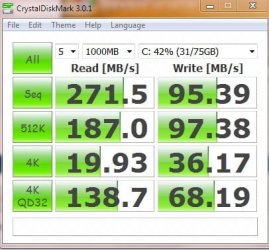
These are mine for a Crucial M4 128GB (0309 firmware)

-----------------------------------------------------------------------
CrystalDiskMark 3.0.1 x64 (C) 2007-2010 hiyohiyo
Crystal Dew World : Crystal Dew World
-----------------------------------------------------------------------
* MB/s = 1,000,000 byte/s [SATA/300 = 300,000,000 byte/s]

Sequential Read : 494.378 MB/s
Sequential Write : 199.273 MB/s
Random Read 512KB : 368.470 MB/s
Random Write 512KB : 199.646 MB/s
Random Read 4KB (QD=1) : 26.725 MB/s [ 6524.6 IOPS]
Random Write 4KB (QD=1) : 67.085 MB/s [ 16378.2 IOPS]
Random Read 4KB (QD=32) : 196.150 MB/s [ 47888.1 IOPS]
Random Write 4KB (QD=32) : 107.755 MB/s [ 26307.4 IOPS]

Test : 1000 MB [C: 37.2% (44.3/119.0 GB)] (x1)
Date : 2012/03/05 6:07:04
OS : Windows 7 Home Premium Edition SP1 [6.1 Build 7601] (x64)
Crucial M4 128GB (0309)

The only significant difference is the "Random Write 4KB (QD=1)". Your result is a fair bit lower.

I've tried a number of tweaks including using the Intel chipset drivers rather than the ms ones.
 

My Computer

Computer type
PC/Desktop
Computer Manufacturer/Model Number
Own build
OS
Windows 7x64 Home Premium SP1
CPU
Intel i7 2600k
Motherboard
ASUS P8Z68 Deluxe
Memory
G.Skill Ripjaws (DDR3-1600) 2x4GB
Graphics Card(s)
Nvidia GeForce GTS 450; Intel HD Graphics 3000(GT2+)
Monitor(s) Displays
Dell Ultrasharp IPS panel U2311H, Samsung SyncMaster P2350
Screen Resolution
1920x1080
Hard Drives
Samsung 850 Pro SSD 256GB, Samsung SSD 840 120GB, Seagates 1TB Barracuda ST31000528AS x2
PSU
Seasonic M12II 520W
Case
Lian Li Lancool PC-K60
Cooling
Case: 1x120mm, 3x140mm CPU: Hyper 212+
Keyboard
Logitech MK520 (wireless)
Mouse
Logitech MK520
Internet Speed
6-7 Mbps
Antivirus
Norton Security Premium, Malwarebytes on 2 (MSE on 3rd PC)
Browser
FireFox
Other Info
Audio: Logitech Z523 2.1
These are mine for a Crucial M4 128GB (0309 firmware)

-----------------------------------------------------------------------
CrystalDiskMark 3.0.1 x64 (C) 2007-2010 hiyohiyo
Crystal Dew World : Crystal Dew World
-----------------------------------------------------------------------
* MB/s = 1,000,000 byte/s [SATA/300 = 300,000,000 byte/s]

Sequential Read : 494.378 MB/s
Sequential Write : 199.273 MB/s
Random Read 512KB : 368.470 MB/s
Random Write 512KB : 199.646 MB/s
Random Read 4KB (QD=1) : 26.725 MB/s [ 6524.6 IOPS]
Random Write 4KB (QD=1) : 67.085 MB/s [ 16378.2 IOPS]
Random Read 4KB (QD=32) : 196.150 MB/s [ 47888.1 IOPS]
Random Write 4KB (QD=32) : 107.755 MB/s [ 26307.4 IOPS]

Test : 1000 MB [C: 37.2% (44.3/119.0 GB)] (x1)
Date : 2012/03/05 6:07:04
OS : Windows 7 Home Premium Edition SP1 [6.1 Build 7601] (x64)
Crucial M4 128GB (0309)

The only significant difference is the "Random Write 4KB (QD=1)". Your result is a fair bit lower.

I've tried a number of tweaks including using the Intel chipset drivers rather than the ms ones.


How did you check your firmware version?
 

My Computer

Computer type
PC/Desktop
Computer Manufacturer/Model Number
ASUS-Self Built
OS
Windows 10 Anniversary, Linux & still Windows 7 Professional x64
CPU
Intel i7-920 2.67 GHz
Motherboard
ASUS-Rampage II Extreme Mobo
Memory
12 GB
Graphics Card(s)
EVGA Nvidia 970 GTX
Sound Card
Supreme FX X-fi-Audigy
Monitor(s) Displays
BenQ XL2730Z,Samsung SyncMaster PX2370 LED,Samsung 226BW LCD
Screen Resolution
2560 x 1440, LED-1920x1080, LCD-1680x1050
Hard Drives
4 internal :
1x TB SSD Samsung Evo
1x 1 TB
1x 3 TB
1x 4 TB
3 TB External
PSU
Coolermaster 750 watt PSU
Case
Thermaltake-Spedo case
Cooling
8 Cooling Fans on case and inside case
Keyboard
Logitech G-15 and G-13
Mouse
Logitech G-9 Optical and Logitech Mx-Revolutiom
Internet Speed
DSL
These are mine for a Crucial M4 128GB (0309 firmware)

-----------------------------------------------------------------------
CrystalDiskMark 3.0.1 x64 (C) 2007-2010 hiyohiyo
Crystal Dew World : Crystal Dew World
-----------------------------------------------------------------------
* MB/s = 1,000,000 byte/s [SATA/300 = 300,000,000 byte/s]

Sequential Read : 494.378 MB/s
Sequential Write : 199.273 MB/s
Random Read 512KB : 368.470 MB/s
Random Write 512KB : 199.646 MB/s
Random Read 4KB (QD=1) : 26.725 MB/s [ 6524.6 IOPS]
Random Write 4KB (QD=1) : 67.085 MB/s [ 16378.2 IOPS]
Random Read 4KB (QD=32) : 196.150 MB/s [ 47888.1 IOPS]
Random Write 4KB (QD=32) : 107.755 MB/s [ 26307.4 IOPS]

Test : 1000 MB [C: 37.2% (44.3/119.0 GB)] (x1)
Date : 2012/03/05 6:07:04
OS : Windows 7 Home Premium Edition SP1 [6.1 Build 7601] (x64)
Crucial M4 128GB (0309)

The only significant difference is the "Random Write 4KB (QD=1)". Your result is a fair bit lower.

I've tried a number of tweaks including using the Intel chipset drivers rather than the ms ones.


How did you check your firmware version?

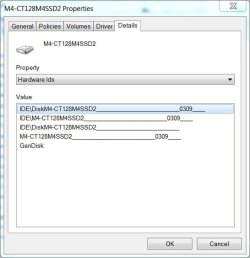
To check firmware version go to device manager, expand disk drives and find the SSD. Right click and select properties, click on the 'Details" tab, in the dropdpwn box you will see the 2nd item is hardware ID, you will see my firmware version is 0309.

Z.JPG
 

My Computers

System One System Two

  • Computer type
    PC/Desktop
    Computer Manufacturer/Model Number
    ALWAYS UNDER CONSTRUCTION
    OS
    Windows 11 Pro
    CPU
    Ryzen 9 5900X
    Motherboard
    Asus X570 Crosshair Viii Hero
    Memory
    32GB G Skill DDR4-3600
    Graphics Card(s)
    EVGA RTX 3080 FTW 3 Ultra
    Sound Card
    On Board/Sennheiser PC37X Headset
    Monitor(s) Displays
    3 X Asus 27"
    Screen Resolution
    2560x1440
    Hard Drives
    2 X 1 TB NVME drives
    PSU
    EVGA 850
    Case
    Phanteks Eclipse P400A
    Cooling
    EVGA 280 AIO
    Keyboard
    Logitech G510s/ Logitech G13
    Mouse
    Logitech G502
    Internet Speed
    24/1
    Antivirus
    ESET/MBAM Pro/SAS Pro
    Browser
    Chrome/ Firefox/ Edge
  • Computer type
    Laptop
    System Manufacturer/Model Number
    Dell 16 Plus
    OS
    Windows 11 Pro
    CPU
    Intel Ultra 9 288V
    Memory
    32 GB LPDDR5X 8533
    Monitor(s) Displays
    16" Mini-LED HDR600 Touch 90 Hz
    Screen Resolution
    2560X1600
    Hard Drives
    1 TB NVME
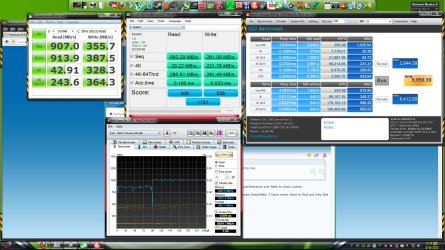
My little 320 Series Intel looks weak in comparison to these SATA 3 SSDs ...

1.JPG

But, for day to day real world use, it does perform well for me.
 

My Computer

Computer Manufacturer/Model Number
Custom (Self Build)
OS
Windows 7 Home Premium 64bit
CPU
Intel Core i7 2700k
Motherboard
eVGA P67 SLI
Memory
8GB Mushkin Redline Ridgebacks @1866
Graphics Card(s)
EVGA GTX570 SC
Sound Card
XiFi Titanium HD
Monitor(s) Displays
LG W2453V
Screen Resolution
1920x1080
Hard Drives
Intel 320 80GB -- Intel X25-V 40GB --WD Black 1TB x2 -- WD Blue 640GB
PSU
Seasonic x750
Case
Corsair 600T SE White
Cooling
eVGA Superclocked CPU Cooler
Keyboard
Saitek Cyborg
Antivirus
Kaspersky
Browser
IE
Other Info
LG BD/DVD
But, for day to day real world use, it does perform well for me.
That's the point. The nums are one thing - but the actual performance one feels is what counts.

I have one Vertex2 that the WEI rates at 6.9 - but it performs beautifully. I have never tried to find out why this WEI is so low. All settings and the alignment are OK.
 

My Computer

Computer Manufacturer/Model Number
HP, Dell, Gateway, Toshiba - 4 laptops and 2 desktops
OS
Vista, Windows7, Mint Mate, Zorin, Windows 8
CPU
from 1.6GHz Duo to i7
Monitor(s) Displays
2x HP w2207
Hard Drives
5x HDD, 7x SSD, 12x Externals
Keyboard
with trackball - no mices
Mouse
Trackball mice
Internet Speed
DSL 6000
To check firmware version go to device manager, expand disk drives and find the SSD. Right click and select properties, click on the 'Details" tab, in the dropdpwn box you will see the 2nd item is hardware ID, you will see my firmware version is 0309

If I did it correctly, I chose the name of my RAID and it shows my ver. Is 1.0.0 and Corsair has 1.3.3 and they say "If you are stable and do not have issues, we suggest that you do not flash your firmware." I think I should leave it alone...Don't you?
 

My Computer

Computer type
PC/Desktop
Computer Manufacturer/Model Number
ASUS-Self Built
OS
Windows 10 Anniversary, Linux & still Windows 7 Professional x64
CPU
Intel i7-920 2.67 GHz
Motherboard
ASUS-Rampage II Extreme Mobo
Memory
12 GB
Graphics Card(s)
EVGA Nvidia 970 GTX
Sound Card
Supreme FX X-fi-Audigy
Monitor(s) Displays
BenQ XL2730Z,Samsung SyncMaster PX2370 LED,Samsung 226BW LCD
Screen Resolution
2560 x 1440, LED-1920x1080, LCD-1680x1050
Hard Drives
4 internal :
1x TB SSD Samsung Evo
1x 1 TB
1x 3 TB
1x 4 TB
3 TB External
PSU
Coolermaster 750 watt PSU
Case
Thermaltake-Spedo case
Cooling
8 Cooling Fans on case and inside case
Keyboard
Logitech G-15 and G-13
Mouse
Logitech G-9 Optical and Logitech Mx-Revolutiom
Internet Speed
DSL
I don't believe you should flash the firmware unless you have a good reason. In the case of the Crucial M4s there was a very good reason to flash to V 0309.
 

My Computer

Computer type
PC/Desktop
Computer Manufacturer/Model Number
Own build
OS
Windows 7x64 Home Premium SP1
CPU
Intel i7 2600k
Motherboard
ASUS P8Z68 Deluxe
Memory
G.Skill Ripjaws (DDR3-1600) 2x4GB
Graphics Card(s)
Nvidia GeForce GTS 450; Intel HD Graphics 3000(GT2+)
Monitor(s) Displays
Dell Ultrasharp IPS panel U2311H, Samsung SyncMaster P2350
Screen Resolution
1920x1080
Hard Drives
Samsung 850 Pro SSD 256GB, Samsung SSD 840 120GB, Seagates 1TB Barracuda ST31000528AS x2
PSU
Seasonic M12II 520W
Case
Lian Li Lancool PC-K60
Cooling
Case: 1x120mm, 3x140mm CPU: Hyper 212+
Keyboard
Logitech MK520 (wireless)
Mouse
Logitech MK520
Internet Speed
6-7 Mbps
Antivirus
Norton Security Premium, Malwarebytes on 2 (MSE on 3rd PC)
Browser
FireFox
Other Info
Audio: Logitech Z523 2.1
Agreed. If you have no reason to or are not affected by a issue, just leave it alone.

The M4s and the early Intel 320s had a issue that were what would be considered critical updates. Thats a bit different though.
 

My Computer

Computer Manufacturer/Model Number
Custom (Self Build)
OS
Windows 7 Home Premium 64bit
CPU
Intel Core i7 2700k
Motherboard
eVGA P67 SLI
Memory
8GB Mushkin Redline Ridgebacks @1866
Graphics Card(s)
EVGA GTX570 SC
Sound Card
XiFi Titanium HD
Monitor(s) Displays
LG W2453V
Screen Resolution
1920x1080
Hard Drives
Intel 320 80GB -- Intel X25-V 40GB --WD Black 1TB x2 -- WD Blue 640GB
PSU
Seasonic x750
Case
Corsair 600T SE White
Cooling
eVGA Superclocked CPU Cooler
Keyboard
Saitek Cyborg
Antivirus
Kaspersky
Browser
IE
Other Info
LG BD/DVD
Agreed,I'll leave it alone...Thanks!
 
Last edited:

My Computer

Computer type
PC/Desktop
Computer Manufacturer/Model Number
ASUS-Self Built
OS
Windows 10 Anniversary, Linux & still Windows 7 Professional x64
CPU
Intel i7-920 2.67 GHz
Motherboard
ASUS-Rampage II Extreme Mobo
Memory
12 GB
Graphics Card(s)
EVGA Nvidia 970 GTX
Sound Card
Supreme FX X-fi-Audigy
Monitor(s) Displays
BenQ XL2730Z,Samsung SyncMaster PX2370 LED,Samsung 226BW LCD
Screen Resolution
2560 x 1440, LED-1920x1080, LCD-1680x1050
Hard Drives
4 internal :
1x TB SSD Samsung Evo
1x 1 TB
1x 3 TB
1x 4 TB
3 TB External
PSU
Coolermaster 750 watt PSU
Case
Thermaltake-Spedo case
Cooling
8 Cooling Fans on case and inside case
Keyboard
Logitech G-15 and G-13
Mouse
Logitech G-9 Optical and Logitech Mx-Revolutiom
Internet Speed
DSL
Upgraded to 2 Intel 520 120Gb in RAID0
 

Attachments

  • Capture007.jpg
    Capture007.jpg
    481.5 KB · Views: 103

My Computer

Computer type
PC/Desktop
OS
Win8.1 Pro x64
CPU
Intel Core i7 2700K
Motherboard
Asus Maximus IV Extreme-Z
Memory
Silicon Power 2400@2133 16gb
Graphics Card(s)
Diamond R9 290X
Sound Card
onboard
Monitor(s) Displays
AOC 23"
Screen Resolution
1920x1080
Hard Drives
2-Intel 520 120Gb RAID0 (OS and Games)
2 OCZ Solid 3 60gb RAID0 (Apps)
2-WD Caviar Black 500Gb (Storage)
PSU
Thermaltake TR2 RX 750W
Case
corsair 750D
Cooling
Corsair H100i
Keyboard
Gigabyte Force K7
Mouse
Cyborg R.A.T. 5
Ahhh, the Big Block :D

A Guy
 

My Computer

Computer type
PC/Desktop
OS
Windows 10 Home x64
CPU
INTEL Core i5-750 Quad-Core 3.37GHz
Motherboard
ASUS P7P55D
Memory
HyperX Fury Black Series 8GB (2 x 4GB) 1866Mhz
Graphics Card(s)
EVGA GeForce GTX 750 Superclocked 1GB 128-Bit GDDR5
Monitor(s) Displays
LG 32MA68HY 32" IPS
Screen Resolution
1920 x 1080
Hard Drives
Samsung 840 Evo 120GB, SEAGATE 500GB Barracuda® 7200.12, SATA 3 Gb/s, 7200 RPM, 16MB cache
PSU
ANTEC TruePower New TP-550, 80 PLUS, 550W
Case
ANTEC Three Hundred Illusion
Cooling
COOLER MASTER Hyper 212 Plus, 4 x 120mm 1 x 140mm Noctua's
Internet Speed
85 + Mbps
Antivirus
Avast
Browser
Vivaldi
Envious but don't understand how you get those great results.
 

My Computer

Computer type
PC/Desktop
Computer Manufacturer/Model Number
Own build
OS
Windows 7x64 Home Premium SP1
CPU
Intel i7 2600k
Motherboard
ASUS P8Z68 Deluxe
Memory
G.Skill Ripjaws (DDR3-1600) 2x4GB
Graphics Card(s)
Nvidia GeForce GTS 450; Intel HD Graphics 3000(GT2+)
Monitor(s) Displays
Dell Ultrasharp IPS panel U2311H, Samsung SyncMaster P2350
Screen Resolution
1920x1080
Hard Drives
Samsung 850 Pro SSD 256GB, Samsung SSD 840 120GB, Seagates 1TB Barracuda ST31000528AS x2
PSU
Seasonic M12II 520W
Case
Lian Li Lancool PC-K60
Cooling
Case: 1x120mm, 3x140mm CPU: Hyper 212+
Keyboard
Logitech MK520 (wireless)
Mouse
Logitech MK520
Internet Speed
6-7 Mbps
Antivirus
Norton Security Premium, Malwarebytes on 2 (MSE on 3rd PC)
Browser
FireFox
Other Info
Audio: Logitech Z523 2.1
Envious but don't understand how you get those great results.

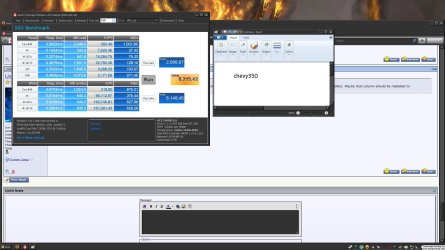
RAID0 on Intel SATAIII ports with latest RST, write cache enabled....plus the drives have a little bit to do with it also. My OCZ Solid 3's on the same ports were getting the pic below. Haven't checked to see what they get on the SATAII ports yet ;) Plus I used the guide posted here to set everything in the registry except for moving temp files
 

Attachments

  • screenie002.jpg
    screenie002.jpg
    258.7 KB · Views: 47

My Computer

Computer type
PC/Desktop
OS
Win8.1 Pro x64
CPU
Intel Core i7 2700K
Motherboard
Asus Maximus IV Extreme-Z
Memory
Silicon Power 2400@2133 16gb
Graphics Card(s)
Diamond R9 290X
Sound Card
onboard
Monitor(s) Displays
AOC 23"
Screen Resolution
1920x1080
Hard Drives
2-Intel 520 120Gb RAID0 (OS and Games)
2 OCZ Solid 3 60gb RAID0 (Apps)
2-WD Caviar Black 500Gb (Storage)
PSU
Thermaltake TR2 RX 750W
Case
corsair 750D
Cooling
Corsair H100i
Keyboard
Gigabyte Force K7
Mouse
Cyborg R.A.T. 5
Plus I used the guide posted here to set everything in the registry except for moving temp files
Which one are you referring to? The AHCI 0 registry entry?
 

My Computer

Computer type
PC/Desktop
Computer Manufacturer/Model Number
Own build
OS
Windows 7x64 Home Premium SP1
CPU
Intel i7 2600k
Motherboard
ASUS P8Z68 Deluxe
Memory
G.Skill Ripjaws (DDR3-1600) 2x4GB
Graphics Card(s)
Nvidia GeForce GTS 450; Intel HD Graphics 3000(GT2+)
Monitor(s) Displays
Dell Ultrasharp IPS panel U2311H, Samsung SyncMaster P2350
Screen Resolution
1920x1080
Hard Drives
Samsung 850 Pro SSD 256GB, Samsung SSD 840 120GB, Seagates 1TB Barracuda ST31000528AS x2
PSU
Seasonic M12II 520W
Case
Lian Li Lancool PC-K60
Cooling
Case: 1x120mm, 3x140mm CPU: Hyper 212+
Keyboard
Logitech MK520 (wireless)
Mouse
Logitech MK520
Internet Speed
6-7 Mbps
Antivirus
Norton Security Premium, Malwarebytes on 2 (MSE on 3rd PC)
Browser
FireFox
Other Info
Audio: Logitech Z523 2.1
Back
Top