
You are using an out of date browser. It may not display this or other websites correctly.
You should upgrade or use an alternative browser.
You should upgrade or use an alternative browser.
Show us your SSD performance 2
- Thread starter Brink
- Start date

New life for laptop
SSD - OCZ Vertex Plus 120 sata ii (W7 Pro installed, might reinstall with home premium seeing how I realy don't need XP mode like I thought I would)
Dell Laptop d-820 (96' ish designed for XP) Centrino Duo 1.6 4 gigs ddr2
Processor 4.6
Ram 4.6
Graphics 3.5 / 3.2
Hard Disk 6.9
Boot time 31 seconds. Shutdown time 5-6 seconds.
Note; Laptop used mostly at camp off grid solar power, (12v -to- 19.5v converter). With the SSD the total avg power draw is about 1/3 less amp. DC 2.5 before, avg 1.7 with ssd, keep in mind this is not a high end laptop even in it's day. Ment for business jazz. I mainly use it to run a few spreadsheets, track solar info, dvd player, view photo's etc.
SSD - OCZ Vertex Plus 120 sata ii (W7 Pro installed, might reinstall with home premium seeing how I realy don't need XP mode like I thought I would)
Dell Laptop d-820 (96' ish designed for XP) Centrino Duo 1.6 4 gigs ddr2
Processor 4.6
Ram 4.6
Graphics 3.5 / 3.2
Hard Disk 6.9
Boot time 31 seconds. Shutdown time 5-6 seconds.
Note; Laptop used mostly at camp off grid solar power, (12v -to- 19.5v converter). With the SSD the total avg power draw is about 1/3 less amp. DC 2.5 before, avg 1.7 with ssd, keep in mind this is not a high end laptop even in it's day. Ment for business jazz. I mainly use it to run a few spreadsheets, track solar info, dvd player, view photo's etc.
My Computer
- Computer type
- PC/Desktop
- Computer Manufacturer/Model Number
- Self - Build | Asus K53e Laptop
- OS
- 10 x64 | 7 x64
- CPU
- AMD FX-9590 Vishera 4.7 | i5 Sandy Bridge
- Motherboard
- MSI 990 FXA | K53e
- Memory
- 16 gigs Crucial Ballistix | 8 gigs Adata ddr3 1600
- Graphics Card(s)
- RX-570 4gd5 | Intel HD 3000
- Sound Card
- Realtek HD OnBoard Audio
- Monitor(s) Displays
- Samsung 22" & 37" Toshiba | 15.6
- Hard Drives
- ADATA 240 ssd & 750 Caviar Black 7200 sata | 250 840 EVO ssd & samsung ssd
- PSU
- Thermaltake 700 | 65w
- Case
- CoolMaster Centurion 534+
- Cooling
- Corsair H60
- Keyboard
- Rosewill RK-800G PS/2 Gaming Keyboard | Asus Chiclet
- Mouse
- Ventus | MS w/side buttons
- Internet Speed
- RoadRunner
- Other Info
- I hate the smell of friggin corn chip butt breath snacks.

Sounds like a great upgrade.SSD - OCZ Vertex Plus 120 sata ii (W7 Pro installed, might reinstall with home premium seeing how I realy don't need XP mode like I thought I would)
Dell Laptop d-820 (96' ish designed for XP) Centrino Duo 1.6 4 gigs ddr2
Processor 4.6
Ram 4.6
Graphics 3.5 / 3.2
Hard Disk 6.9
Boot time 31 seconds. Shutdown time 5-6 seconds.
Note; Laptop used mostly at camp off grid solar power, (12v -to- 19.5v converter). With the SSD the total avg power draw is about 1/3 less amp. DC 2.5 before, avg 1.7 with ssd, keep in mind this is not a high end laptop even in it's day. Ment for business jazz. I mainly use it to run a few spreadsheets, track solar info, dvd player, view photo's etc.

My Computer
- Computer Manufacturer/Model Number
- Hopalong/ Godzilla
- OS
- Windows7 Pro 64bit SP-1; Windows XP Pro 32bit
- CPU
- Intel Core i7-870 Lynnfield 2.93GHz LGA 1156 95W Quad-Core
- Motherboard
- ASUS P7P55D-E PRO
- Memory
- 8GB@1400MHz Crucial Ballistix DDR3-1600 4x2GB
- Graphics Card(s)
- ASUS ENGTX460 DirectCU/2DI/1GD5 1GB 256-bit GDDR5
- Sound Card
- VIA Onboard
- Monitor(s) Displays
- Asus VS248H-P 24"; Samsung SyncMaster 941BW 19"ws
- Screen Resolution
- 1920x1080; 1440x900
- Hard Drives
- Samsung 830 120GB SSD
Intel 320 120GB SSD
Western Digital Caviar Black WD7501AALS 750GB 7200 RPM SATA 3.0Gb/s
Western Digital Caviar Black WD6401AALS 640GB 7200 RPM SATA 3.0Gb/s
- PSU
- COOLER MASTER Silent Pro RS850-AMBAJ3-US 850W Modular
- Case
- COOLER MASTER HAF 932 RC-932-KKN5-GP Black
- Cooling
- Scythe "Mugen-2 Rev.B" (2 ScytheKaze-Jyuni PWM fans)
- Keyboard
- Logitech K-320
- Mouse
- Kensington
- Antivirus
- Avast Inernet Suite
- Browser
- IE 9 ; Chrome

- Local time
- 7:13 PM
- Messages
- 218
What do you guys think of hybrid SSD? I know for some, they wouldn't give it a second look. But it looks like Seagate finally got the latest firmware issues corrected with their hybrid Momentus line. It's so tempting to get 750Gb for "near" SSD performance at less than what you'd pay for a quality 256Gb SSD.
Another thing... Sandisk recently came out with "Ready Cache". It's a 32Gb card (just $55 on Amazon right now) you install in your system that essentially creates a virtual hybrid SSD, using your existing hard drive.
Another thing... Sandisk recently came out with "Ready Cache". It's a 32Gb card (just $55 on Amazon right now) you install in your system that essentially creates a virtual hybrid SSD, using your existing hard drive.
My Computer
- Computer type
- Laptop
- Computer Manufacturer/Model Number
- HP Pavillion dv6 (dv6-6165dx)
- OS
- Windows 7 Home Premium x64
- CPU
- AMD Vision A8-3500M 4 Core
- Motherboard
- AMD
- Memory
- 8Gb
- Graphics Card(s)
- AMD Radeon HD 6620G
- Screen Resolution
- 1366x768
- Hard Drives
- Hitachi Travelstar 500Gb
- Internet Speed
- Realtek RTL8188CE 802.11b/g/n

A hybrid HDD may be a good upgrade. From what I've read w7 handles caching well and your write/read speeds will be somewhere between a Raptor and a SSD.
I think the cache card will offer similar performance.
I think the cache card will offer similar performance.
My Computer
- Computer type
- PC/Desktop
- Computer Manufacturer/Model Number
- Home Built Desktop By DataTech
- OS
- Windows 7 Ultimate X64 SP1
- CPU
- Intel i5-2550K, Differing ~4.4-4.8GHz No built in GPU
- Motherboard
- ASUS P8Z68-V PRO/GEN3
- Memory
- 16GB G.Skill Sniper 1866MHz @ 2133MHz 2x8GB
- Graphics Card(s)
- ASUS GTX650TIB-DC2OC-2GD5, (650TI Boost)
- Sound Card
- Onboard Realtek 5-1
- Monitor(s) Displays
- Samsung P2570HD
- Screen Resolution
- 1920x1080
- Hard Drives
- Samsung 840 Pro 256GB SSD for OS, 500GB Seagate Constellation (Enterprise drive) for Data
- PSU
- Corsair HX650W
- Case
- Inwin Dragon Rider
- Cooling
- Hyper 212 EVO w/two Noctua fans, push-pull, @1300 RPM
- Keyboard
- E-Z Eyes, bright yellow keys with large characters
- Mouse
- steelseries SENSEI Laser Pro Gaming
- Internet Speed
- 48-51Mbs Mbs down, 11 Mbs up Xfinity Cable
- Antivirus
- Norton Internet Security 2013
- Browser
- IE 10, Opera, Pale Moon if needed
- Other Info
- 4 case fans, LG BluRay-RE, ASUS DVD-RW, Mr. Fusion power supply, 1.21 gigawatts.
My Honda minivan is "near" as fast as a Porsche 911 Turbo S.
"Porsche SSD there is no substitute."
"
My Computer
- Computer Manufacturer/Model Number
- Hopalong/ Godzilla
- OS
- Windows7 Pro 64bit SP-1; Windows XP Pro 32bit
- CPU
- Intel Core i7-870 Lynnfield 2.93GHz LGA 1156 95W Quad-Core
- Motherboard
- ASUS P7P55D-E PRO
- Memory
- 8GB@1400MHz Crucial Ballistix DDR3-1600 4x2GB
- Graphics Card(s)
- ASUS ENGTX460 DirectCU/2DI/1GD5 1GB 256-bit GDDR5
- Sound Card
- VIA Onboard
- Monitor(s) Displays
- Asus VS248H-P 24"; Samsung SyncMaster 941BW 19"ws
- Screen Resolution
- 1920x1080; 1440x900
- Hard Drives
- Samsung 830 120GB SSD
Intel 320 120GB SSD
Western Digital Caviar Black WD7501AALS 750GB 7200 RPM SATA 3.0Gb/s
Western Digital Caviar Black WD6401AALS 640GB 7200 RPM SATA 3.0Gb/s
- PSU
- COOLER MASTER Silent Pro RS850-AMBAJ3-US 850W Modular
- Case
- COOLER MASTER HAF 932 RC-932-KKN5-GP Black
- Cooling
- Scythe "Mugen-2 Rev.B" (2 ScytheKaze-Jyuni PWM fans)
- Keyboard
- Logitech K-320
- Mouse
- Kensington
- Antivirus
- Avast Inernet Suite
- Browser
- IE 9 ; Chrome
My Honda minivan is "near" as fast as a Porsche 911 Turbo S.
"PorscheSSD there is no substitute."
 :roflmao:
My Computer
- Computer type
- PC/Desktop
- Computer Manufacturer/Model Number
- Home Built Desktop By DataTech
- OS
- Windows 7 Ultimate X64 SP1
- CPU
- Intel i5-2550K, Differing ~4.4-4.8GHz No built in GPU
- Motherboard
- ASUS P8Z68-V PRO/GEN3
- Memory
- 16GB G.Skill Sniper 1866MHz @ 2133MHz 2x8GB
- Graphics Card(s)
- ASUS GTX650TIB-DC2OC-2GD5, (650TI Boost)
- Sound Card
- Onboard Realtek 5-1
- Monitor(s) Displays
- Samsung P2570HD
- Screen Resolution
- 1920x1080
- Hard Drives
- Samsung 840 Pro 256GB SSD for OS, 500GB Seagate Constellation (Enterprise drive) for Data
- PSU
- Corsair HX650W
- Case
- Inwin Dragon Rider
- Cooling
- Hyper 212 EVO w/two Noctua fans, push-pull, @1300 RPM
- Keyboard
- E-Z Eyes, bright yellow keys with large characters
- Mouse
- steelseries SENSEI Laser Pro Gaming
- Internet Speed
- 48-51Mbs Mbs down, 11 Mbs up Xfinity Cable
- Antivirus
- Norton Internet Security 2013
- Browser
- IE 10, Opera, Pale Moon if needed
- Other Info
- 4 case fans, LG BluRay-RE, ASUS DVD-RW, Mr. Fusion power supply, 1.21 gigawatts.

I don't own a hybrid, but I have read very controversial comments about it. I guess it is a matter of trying.
Given the choice of a 250GB SSD and a 750GB hybrid I would always vote for the SSD. Very few people will have a need to put more the 250GBs of stuff on a fast access device. And the rest can go on a normal HDD - even an external.
I run 4 laptops on 60GB and 90GB SSDs plus external devices and never had a need for more space on the internal disk. Most space is taken by the images and videos and that goes to the externals anyhow.
I am always stunned by the disk space requirements that some people seem to have. On this desktop here I have a 60GB Vertex2 from where I run Windows7 and Virtual Box with Windows 8 and Ubuntu - and I have 20GB of free space on the Vertex. All my user data is on one of the internal HDDs though.
Given the choice of a 250GB SSD and a 750GB hybrid I would always vote for the SSD. Very few people will have a need to put more the 250GBs of stuff on a fast access device. And the rest can go on a normal HDD - even an external.
I run 4 laptops on 60GB and 90GB SSDs plus external devices and never had a need for more space on the internal disk. Most space is taken by the images and videos and that goes to the externals anyhow.
I am always stunned by the disk space requirements that some people seem to have. On this desktop here I have a 60GB Vertex2 from where I run Windows7 and Virtual Box with Windows 8 and Ubuntu - and I have 20GB of free space on the Vertex. All my user data is on one of the internal HDDs though.
My Computer
- Computer Manufacturer/Model Number
- HP, Dell, Gateway, Toshiba - 4 laptops and 2 desktops
- OS
- Vista, Windows7, Mint Mate, Zorin, Windows 8
- CPU
- from 1.6GHz Duo to i7
- Monitor(s) Displays
- 2x HP w2207
- Hard Drives
- 5x HDD, 7x SSD, 12x Externals
- Keyboard
- with trackball - no mices
- Mouse
- Trackball mice
- Internet Speed
- DSL 6000
- Local time
- 7:13 PM
- Messages
- 218
I think your average computer user is not a very good steward of their computer. I've gotten to see the computers of family and friends over the years. Only once did I find someone who had a well maintained file system. Most of the time people copy files someplace and then forget about them. I've seen in some cases people having duplicates of the same files as well. So... letting random activities like this progress and eventually you end up with a drive consumed with clutter.
The problem is that people learn how to use a computer, but not maintain it. A Mac is pretty good about shielding the user from burdens like defragging and deleting temp files. While Microsoft finally added a fairly useful "disk cleanup", the default defrag program is extremely limited and not very effective if you've got less than 25% disk space free. And the problem with how it works is that if you schedule it automatically, inevitably the defragging will take place while you're in the middle of something and processing performance slows down quite a bit.
I have a large music archive that takes up 30Gb of space, and I need to keep it local. However, I also have a lot of video files as well and after doing some inventory checking, I've realized that there is plenty of stuff on there that I rarely access. I've moved that off to an external storage drive.
The problem is that people learn how to use a computer, but not maintain it. A Mac is pretty good about shielding the user from burdens like defragging and deleting temp files. While Microsoft finally added a fairly useful "disk cleanup", the default defrag program is extremely limited and not very effective if you've got less than 25% disk space free. And the problem with how it works is that if you schedule it automatically, inevitably the defragging will take place while you're in the middle of something and processing performance slows down quite a bit.
I have a large music archive that takes up 30Gb of space, and I need to keep it local. However, I also have a lot of video files as well and after doing some inventory checking, I've realized that there is plenty of stuff on there that I rarely access. I've moved that off to an external storage drive.
My Computer
- Computer type
- Laptop
- Computer Manufacturer/Model Number
- HP Pavillion dv6 (dv6-6165dx)
- OS
- Windows 7 Home Premium x64
- CPU
- AMD Vision A8-3500M 4 Core
- Motherboard
- AMD
- Memory
- 8Gb
- Graphics Card(s)
- AMD Radeon HD 6620G
- Screen Resolution
- 1366x768
- Hard Drives
- Hitachi Travelstar 500Gb
- Internet Speed
- Realtek RTL8188CE 802.11b/g/n

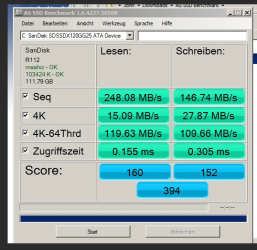
Have just fitted a SanDisk Extreme 120GB to my old Toshiba A200 laptop and it is just flying but am just wondering what everyone thinks of these AS SSD test results as I am not overly familiar with what they mean, as compared to some of the other shots I have seen they don't scrub up too well.
I bought this drive to try and usually use Samsung 830 or the Crucial M4 but it is a marked improvement on the old HDD with a boot of 28 seconds to login.
I bought this drive to try and usually use Samsung 830 or the Crucial M4 but it is a marked improvement on the old HDD with a boot of 28 seconds to login.
Attachments
My Computer
- Computer type
- PC/Desktop
- Computer Manufacturer/Model Number
- Own build (new) Desk1 / Asus ROG Win 7 / Desk2 1st build
- OS
- Desk1 7 Home Prem / Desk2 10 Pro / Main lap Asus ROG 10 Pro 2 laptop Toshiba 7 Pro Asus P2520 7 & 10
- CPU
- Desk1 i5 3750K / Laptop i7 GTX 860M / Desk2 i5 2500
- Motherboard
- Desk1 Asus P877-V / Desk2 Gigabyte H67 UD3H / Laptop ?
- Memory
- Desk1 8GB (1866) / Desk2 16GB (1333) / Laptop 8Gb DDR3
- Graphics Card(s)
- Desk 1& 2NVidia GTX 650 & Laptops on board Intel
- Sound Card
- Desk 1 & 2 -XONAR DG Realtek High Def audio Laptop
- Monitor(s) Displays
- Desk 1 Benq HD 2450 / Desk2 Philips 24" / Laptop 17.5"
- Screen Resolution
- 1920x1080 D1 & D2 & Laptop 1
- Hard Drives
- Desk1 Samsung 120GB 830 SSD
Asus ROG 256GB 850 Pro SSD
Desk2 Samsung 840 256 SSD
Toshiba 120GB EVO
- PSU
- Desk 1 Corsair HX 1050/ Laptop ? / Desk 2 Corsair HX 650
- Case
- Desk 1 Cooler HAF XM ? Toshiba laptop / Desk2 Coolermaster
- Cooling
- Fans on all Desk1 -2 Desk2 - all Coolermasters 5 Laptop ?
- Keyboard
- Desk 1 MS Sidewinder X6 Desk 2 MS Sidewinder X 4
- Mouse
- Desk 1&2 - Gigabyte MS 900 gamer - laptop - Logitec wireless
- Internet Speed
- ADSL2+
- Other Info
- One other Desktop (tester) and spare Toshba laptop both with SSD's
Running Kaspersky 2016 ISS on all machines config'd identically
Logitec audio stereo systems on each machine (x3)
Canon MG5250MFC
Router/modem TP-Link running WPA2SK

John, the Sandisk is rated at 550/510 but that's SataIII. Sata II I would think, would be faster than that.
My Computers
System One System Two
-
- Computer type
- PC/Desktop
- Computer Manufacturer/Model Number
- ALWAYS UNDER CONSTRUCTION
- OS
- Windows 11 Pro
- CPU
- Ryzen 9 5900X
- Motherboard
- Asus X570 Crosshair Viii Hero
- Memory
- 32GB G Skill DDR4-3600
- Graphics Card(s)
- EVGA RTX 3080 FTW 3 Ultra
- Sound Card
- On Board/Sennheiser PC37X Headset
- Monitor(s) Displays
- 3 X Asus 27"
- Screen Resolution
- 2560x1440
- Hard Drives
- 2 X 1 TB NVME drives
- PSU
- EVGA 850
- Case
- Phanteks Eclipse P400A
- Cooling
- EVGA 280 AIO
- Keyboard
- Logitech G510s/ Logitech G13
- Mouse
- Logitech G502
- Internet Speed
- 24/1
- Antivirus
- ESET/MBAM Pro/SAS Pro
- Browser
- Chrome/ Firefox/ Edge
-
- Computer type
- Laptop
- System Manufacturer/Model Number
- Dell 16 Plus
- OS
- Windows 11 Pro
- CPU
- Intel Ultra 9 288V
- Memory
- 32 GB LPDDR5X 8533
- Monitor(s) Displays
- 16" Mini-LED HDR600 Touch 90 Hz
- Screen Resolution
- 2560X1600
- Hard Drives
- 1 TB NVME
Ah now you have me at a disadvantage there mate as I don't quite get what that means. Is it because I am running an old machine with DDR2? or the way it is set up in the BIOS or something?John, the Sandisk is rated at 550/510 but that's SataIII. Sata II I would think, would be faster than that.
I mean I can't complain about the increase in speed in fact it totally took me by complete surprise as I only had 2GB RAM and that small CPU in for starters.
I will have a Google and see what the difference is between II and III

My Computer
- Computer type
- PC/Desktop
- Computer Manufacturer/Model Number
- Own build (new) Desk1 / Asus ROG Win 7 / Desk2 1st build
- OS
- Desk1 7 Home Prem / Desk2 10 Pro / Main lap Asus ROG 10 Pro 2 laptop Toshiba 7 Pro Asus P2520 7 & 10
- CPU
- Desk1 i5 3750K / Laptop i7 GTX 860M / Desk2 i5 2500
- Motherboard
- Desk1 Asus P877-V / Desk2 Gigabyte H67 UD3H / Laptop ?
- Memory
- Desk1 8GB (1866) / Desk2 16GB (1333) / Laptop 8Gb DDR3
- Graphics Card(s)
- Desk 1& 2NVidia GTX 650 & Laptops on board Intel
- Sound Card
- Desk 1 & 2 -XONAR DG Realtek High Def audio Laptop
- Monitor(s) Displays
- Desk 1 Benq HD 2450 / Desk2 Philips 24" / Laptop 17.5"
- Screen Resolution
- 1920x1080 D1 & D2 & Laptop 1
- Hard Drives
- Desk1 Samsung 120GB 830 SSD
Asus ROG 256GB 850 Pro SSD
Desk2 Samsung 840 256 SSD
Toshiba 120GB EVO
- PSU
- Desk 1 Corsair HX 1050/ Laptop ? / Desk 2 Corsair HX 650
- Case
- Desk 1 Cooler HAF XM ? Toshiba laptop / Desk2 Coolermaster
- Cooling
- Fans on all Desk1 -2 Desk2 - all Coolermasters 5 Laptop ?
- Keyboard
- Desk 1 MS Sidewinder X6 Desk 2 MS Sidewinder X 4
- Mouse
- Desk 1&2 - Gigabyte MS 900 gamer - laptop - Logitec wireless
- Internet Speed
- ADSL2+
- Other Info
- One other Desktop (tester) and spare Toshba laptop both with SSD's
Running Kaspersky 2016 ISS on all machines config'd identically
Logitec audio stereo systems on each machine (x3)
Canon MG5250MFC
Router/modem TP-Link running WPA2SK
If you have DDR2 memory, I can just about assure you, you do not have sataIII. Sata is the Interface, sataIII is 6 Gb/s and sata II is 3 Gb/s. It's just a faster interface, but it doesn't make that big a difference. I would think you have it in AHCI mode in BIOS.
My Computers
System One System Two
-
- Computer type
- PC/Desktop
- Computer Manufacturer/Model Number
- ALWAYS UNDER CONSTRUCTION
- OS
- Windows 11 Pro
- CPU
- Ryzen 9 5900X
- Motherboard
- Asus X570 Crosshair Viii Hero
- Memory
- 32GB G Skill DDR4-3600
- Graphics Card(s)
- EVGA RTX 3080 FTW 3 Ultra
- Sound Card
- On Board/Sennheiser PC37X Headset
- Monitor(s) Displays
- 3 X Asus 27"
- Screen Resolution
- 2560x1440
- Hard Drives
- 2 X 1 TB NVME drives
- PSU
- EVGA 850
- Case
- Phanteks Eclipse P400A
- Cooling
- EVGA 280 AIO
- Keyboard
- Logitech G510s/ Logitech G13
- Mouse
- Logitech G502
- Internet Speed
- 24/1
- Antivirus
- ESET/MBAM Pro/SAS Pro
- Browser
- Chrome/ Firefox/ Edge
-
- Computer type
- Laptop
- System Manufacturer/Model Number
- Dell 16 Plus
- OS
- Windows 11 Pro
- CPU
- Intel Ultra 9 288V
- Memory
- 32 GB LPDDR5X 8533
- Monitor(s) Displays
- 16" Mini-LED HDR600 Touch 90 Hz
- Screen Resolution
- 2560X1600
- Hard Drives
- 1 TB NVME
Ok yes I was just curious essenbe I cannot find any ref to what the machine supports except that the machine CPU may run a 64bit 7 which I think I might get because the board I originally put the OEM on is defunct and I am getting the "warning" for that OEM (32bit) I used then and now have flipped it into the laptop so unless M$ take pity on me I shall have to get another.If you have DDR2 memory, I can just about assure you, you do not have sataIII. Sata is the Interface, sataIII is 6 Gb/s and sata II is 3 Gb/s. It's just a faster interface, but it doesn't make that big a difference. I would think you have it in AHCI mode in BIOS.
Otherwise I shall have to go back to the dreaded Vista or a Ubuntu OS

Never rains but it pours eh?
My Computer
- Computer type
- PC/Desktop
- Computer Manufacturer/Model Number
- Own build (new) Desk1 / Asus ROG Win 7 / Desk2 1st build
- OS
- Desk1 7 Home Prem / Desk2 10 Pro / Main lap Asus ROG 10 Pro 2 laptop Toshiba 7 Pro Asus P2520 7 & 10
- CPU
- Desk1 i5 3750K / Laptop i7 GTX 860M / Desk2 i5 2500
- Motherboard
- Desk1 Asus P877-V / Desk2 Gigabyte H67 UD3H / Laptop ?
- Memory
- Desk1 8GB (1866) / Desk2 16GB (1333) / Laptop 8Gb DDR3
- Graphics Card(s)
- Desk 1& 2NVidia GTX 650 & Laptops on board Intel
- Sound Card
- Desk 1 & 2 -XONAR DG Realtek High Def audio Laptop
- Monitor(s) Displays
- Desk 1 Benq HD 2450 / Desk2 Philips 24" / Laptop 17.5"
- Screen Resolution
- 1920x1080 D1 & D2 & Laptop 1
- Hard Drives
- Desk1 Samsung 120GB 830 SSD
Asus ROG 256GB 850 Pro SSD
Desk2 Samsung 840 256 SSD
Toshiba 120GB EVO
- PSU
- Desk 1 Corsair HX 1050/ Laptop ? / Desk 2 Corsair HX 650
- Case
- Desk 1 Cooler HAF XM ? Toshiba laptop / Desk2 Coolermaster
- Cooling
- Fans on all Desk1 -2 Desk2 - all Coolermasters 5 Laptop ?
- Keyboard
- Desk 1 MS Sidewinder X6 Desk 2 MS Sidewinder X 4
- Mouse
- Desk 1&2 - Gigabyte MS 900 gamer - laptop - Logitec wireless
- Internet Speed
- ADSL2+
- Other Info
- One other Desktop (tester) and spare Toshba laptop both with SSD's
Running Kaspersky 2016 ISS on all machines config'd identically
Logitec audio stereo systems on each machine (x3)
Canon MG5250MFC
Router/modem TP-Link running WPA2SK
John, you are OK. Given your base hardware, that's all you can expect.
What Steve is saying pertains to a more modern sata interface (that you do not have). But since it gives you a significant performance improvement over the old HDD, you should be happy.
What Steve is saying pertains to a more modern sata interface (that you do not have). But since it gives you a significant performance improvement over the old HDD, you should be happy.
My Computer
- Computer Manufacturer/Model Number
- HP, Dell, Gateway, Toshiba - 4 laptops and 2 desktops
- OS
- Vista, Windows7, Mint Mate, Zorin, Windows 8
- CPU
- from 1.6GHz Duo to i7
- Monitor(s) Displays
- 2x HP w2207
- Hard Drives
- 5x HDD, 7x SSD, 12x Externals
- Keyboard
- with trackball - no mices
- Mouse
- Trackball mice
- Internet Speed
- DSL 6000
Thanks Wolfgang yep the machine is five years old now and as you say the performance is that much faster its scary. The old Vista set up was areal slow coach of a thing so it makes a good backup for my main laptop.John, you are OK. Given your base hardware, that's all you can expect.
What Steve is saying pertains to a more modern sata interface (that you do not have). But since it gives you a significant performance improvement over the old HDD, you should be happy.
I see now how much how getting the bloat off is such a bonus
My Computer
- Computer type
- PC/Desktop
- Computer Manufacturer/Model Number
- Own build (new) Desk1 / Asus ROG Win 7 / Desk2 1st build
- OS
- Desk1 7 Home Prem / Desk2 10 Pro / Main lap Asus ROG 10 Pro 2 laptop Toshiba 7 Pro Asus P2520 7 & 10
- CPU
- Desk1 i5 3750K / Laptop i7 GTX 860M / Desk2 i5 2500
- Motherboard
- Desk1 Asus P877-V / Desk2 Gigabyte H67 UD3H / Laptop ?
- Memory
- Desk1 8GB (1866) / Desk2 16GB (1333) / Laptop 8Gb DDR3
- Graphics Card(s)
- Desk 1& 2NVidia GTX 650 & Laptops on board Intel
- Sound Card
- Desk 1 & 2 -XONAR DG Realtek High Def audio Laptop
- Monitor(s) Displays
- Desk 1 Benq HD 2450 / Desk2 Philips 24" / Laptop 17.5"
- Screen Resolution
- 1920x1080 D1 & D2 & Laptop 1
- Hard Drives
- Desk1 Samsung 120GB 830 SSD
Asus ROG 256GB 850 Pro SSD
Desk2 Samsung 840 256 SSD
Toshiba 120GB EVO
- PSU
- Desk 1 Corsair HX 1050/ Laptop ? / Desk 2 Corsair HX 650
- Case
- Desk 1 Cooler HAF XM ? Toshiba laptop / Desk2 Coolermaster
- Cooling
- Fans on all Desk1 -2 Desk2 - all Coolermasters 5 Laptop ?
- Keyboard
- Desk 1 MS Sidewinder X6 Desk 2 MS Sidewinder X 4
- Mouse
- Desk 1&2 - Gigabyte MS 900 gamer - laptop - Logitec wireless
- Internet Speed
- ADSL2+
- Other Info
- One other Desktop (tester) and spare Toshba laptop both with SSD's
Running Kaspersky 2016 ISS on all machines config'd identically
Logitec audio stereo systems on each machine (x3)
Canon MG5250MFC
Router/modem TP-Link running WPA2SK

If you have DDR2 memory, I can just about assure you, you do not have sataIII. Sata is the Interface, sataIII is 6 Gb/s and sata II is 3 Gb/s. It's just a faster interface, but it doesn't make that big a difference. I would think you have it in AHCI mode in BIOS.
Just to be clear on this,
What is being alluded to here is that SATAll is usually associated with the newer motherboards that use DDR3 memory, whereas the older "DDR2" motherboards didn't utilize SATAlll interfaces. They're not related, it's just one way to tell look at features associated with a part.
Example - If someone says they have 8gig of RAM, I can infer they have a 64-bit OS as opposed to a 32-bit.
My Computer
- Computer type
- PC/Desktop
- Computer Manufacturer/Model Number
- Custom built by me.
- OS
- Windows 10 Pro
- CPU
- Intel Core i7-4770K (3.5Ghz)
- Motherboard
- Gigabyte G1 Sniper 5 (F10 Bios)
- Memory
- 32 gig Corsair Dominator Platinum (4x8Gig)
- Graphics Card(s)
- Sapphire Tri-X R9 Fury
- Sound Card
- Soundblaster ZXR
- Monitor(s) Displays
- NEC PA242W 24" LCD Monitor
- Screen Resolution
- 1920 x 1200
- Hard Drives
- Primary - Samsung 850 Pro (512gig), Samsung 840 Pro (256gig), 2TB WD Caviar Black.
- PSU
- EVGA Supernova 1000 G2
- Case
- Cooler Master HAF X
- Cooling
- Corsair H100i with Corsair Air Series SP120 Quiet Fans
- Keyboard
- Logitech Wireless Wave
- Mouse
- Logitech Performance MX
- Internet Speed
- High Speed Cable
- Antivirus
- Norton Security
- Browser
- IE11
- Other Info
- Memory Timings - 1866MHz @ 9-9-9-27-1T @ 1.5 volts
What Steve alluded to is that if John had a board that only supports DDR2, It does not have any SATA III ports. SATA II is associated with older boards.If you have DDR2 memory, I can just about assure you, you do not have sataIII. Sata is the Interface, sataIII is 6 Gb/s and sata II is 3 Gb/s. It's just a faster interface, but it doesn't make that big a difference. I would think you have it in AHCI mode in BIOS.
Just to be clear on this,
What is being alluded to here is that SATAll is usually associated with the newer motherboards that use DDR3 memory, whereas the older "DDR2" motherboards didn't utilize SATAlll interfaces. They're not related, it's just one way to tell look at features associated with a part.
Example - If someone says they have 8gig of RAM, I can infer they have a 64-bit OS as opposed to a 32-bit.
My Computer
- Computer type
- PC/Desktop
- Computer Manufacturer/Model Number
- Home Built Desktop By DataTech
- OS
- Windows 7 Ultimate X64 SP1
- CPU
- Intel i5-2550K, Differing ~4.4-4.8GHz No built in GPU
- Motherboard
- ASUS P8Z68-V PRO/GEN3
- Memory
- 16GB G.Skill Sniper 1866MHz @ 2133MHz 2x8GB
- Graphics Card(s)
- ASUS GTX650TIB-DC2OC-2GD5, (650TI Boost)
- Sound Card
- Onboard Realtek 5-1
- Monitor(s) Displays
- Samsung P2570HD
- Screen Resolution
- 1920x1080
- Hard Drives
- Samsung 840 Pro 256GB SSD for OS, 500GB Seagate Constellation (Enterprise drive) for Data
- PSU
- Corsair HX650W
- Case
- Inwin Dragon Rider
- Cooling
- Hyper 212 EVO w/two Noctua fans, push-pull, @1300 RPM
- Keyboard
- E-Z Eyes, bright yellow keys with large characters
- Mouse
- steelseries SENSEI Laser Pro Gaming
- Internet Speed
- 48-51Mbs Mbs down, 11 Mbs up Xfinity Cable
- Antivirus
- Norton Internet Security 2013
- Browser
- IE 10, Opera, Pale Moon if needed
- Other Info
- 4 case fans, LG BluRay-RE, ASUS DVD-RW, Mr. Fusion power supply, 1.21 gigawatts.
If you have DDR2 memory, I can just about assure you, you do not have sataIII. Sata is the Interface, sataIII is 6 Gb/s and sata II is 3 Gb/s. It's just a faster interface, but it doesn't make that big a difference. I would think you have it in AHCI mode in BIOS.
Just to be clear on this,
What is being alluded to here is that SATAll is usually associated with the newer motherboards that use DDR3 memory, whereas the older "DDR2" motherboards didn't utilize SATAlll interfaces. They're not related, it's just one way to tell look at features associated with a part.
Example - If someone says they have 8gig of RAM, I can infer they have a 64-bit OS as opposed to a 32-bit.
What Steve alluded to is that if John had a board that only supports DDR2, It does not have any SATA III ports. SATA II is associated with older boards.
I'm sorry, but I thought that's what I said :huh:
I guess it's your way of clarifying what I said

My Computer
- Computer type
- PC/Desktop
- Computer Manufacturer/Model Number
- Custom built by me.
- OS
- Windows 10 Pro
- CPU
- Intel Core i7-4770K (3.5Ghz)
- Motherboard
- Gigabyte G1 Sniper 5 (F10 Bios)
- Memory
- 32 gig Corsair Dominator Platinum (4x8Gig)
- Graphics Card(s)
- Sapphire Tri-X R9 Fury
- Sound Card
- Soundblaster ZXR
- Monitor(s) Displays
- NEC PA242W 24" LCD Monitor
- Screen Resolution
- 1920 x 1200
- Hard Drives
- Primary - Samsung 850 Pro (512gig), Samsung 840 Pro (256gig), 2TB WD Caviar Black.
- PSU
- EVGA Supernova 1000 G2
- Case
- Cooler Master HAF X
- Cooling
- Corsair H100i with Corsair Air Series SP120 Quiet Fans
- Keyboard
- Logitech Wireless Wave
- Mouse
- Logitech Performance MX
- Internet Speed
- High Speed Cable
- Antivirus
- Norton Security
- Browser
- IE11
- Other Info
- Memory Timings - 1866MHz @ 9-9-9-27-1T @ 1.5 volts

Just to be clear on this,
What is being alluded to here is that SATAll is usually associated with the newer motherboards that use DDR3 memory, whereas the older "DDR2" motherboards didn't utilize SATAlll interfaces. They're not related, it's just one way to tell look at features associated with a part.
Example - If someone says they have 8gig of RAM, I can infer they have a 64-bit OS as opposed to a 32-bit.
What Steve alluded to is that if John had a board that only supports DDR2, It does not have any SATA III ports. SATA II is associated with older boards.
I'm sorry, but I thought that's what I said :huh:
I guess it's your way of clarifying what I said
Drew, you said SATAll is usually associated with the newer motherboards I know you meant older MBs, which is what Gary was pointing out

A Guy
My Computer
- Computer type
- PC/Desktop
- OS
- Windows 10 Home x64
- CPU
- INTEL Core i5-750 Quad-Core 3.37GHz
- Motherboard
- ASUS P7P55D
- Memory
- HyperX Fury Black Series 8GB (2 x 4GB) 1866Mhz
- Graphics Card(s)
- EVGA GeForce GTX 750 Superclocked 1GB 128-Bit GDDR5
- Monitor(s) Displays
- LG 32MA68HY 32" IPS
- Screen Resolution
- 1920 x 1080
- Hard Drives
- Samsung 840 Evo 120GB, SEAGATE 500GB Barracuda® 7200.12, SATA 3 Gb/s, 7200 RPM, 16MB cache
- PSU
- ANTEC TruePower New TP-550, 80 PLUS, 550W
- Case
- ANTEC Three Hundred Illusion
- Cooling
- COOLER MASTER Hyper 212 Plus, 4 x 120mm 1 x 140mm Noctua's
- Internet Speed
- 85 + Mbps
- Antivirus
- Avast
- Browser
- Vivaldi
Similar threads

- Replies
- 11
- Views
- 4K

- Replies
- 4
- Views
- 6K

- Replies
- 3K
- Views
- 538K

