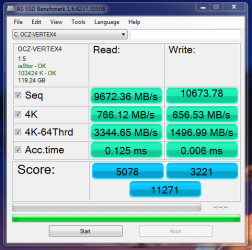
Show us your SSD performance 2

Everything is through the roof but the read access time appears ok but not that great. I wonder what is going on here.

If READ/WRITES are high, but access times are only moderate/high, maybe AS-SSD is reading access time from the SSD itself, but also getting READ/WRITEs stats from data moving in the RAM image of the drive and thinking it's the SSD doing it all instead of the RAM. That might explain the discrepancy betw access times and Read/Write speeds.... just a guess.
 

My Computer My Computer

Computer type
PC/Desktop
Computer Manufacturer/Model Number
Homemade with cube tower
OS
Windows 7 Ultimate x64
CPU
2x - Xeon E5-2687W
Motherboard
ASUS Z9PE-D8 WS
Memory
128GB Kingston - (2ea kits – 4x16GB)
Graphics Card(s)
Gigabyte GTX-680 & EVGA GTX-Titan
Sound Card
Realtek ALC898 8-chan audio
Monitor(s) Displays
2ea - Samsung T260HD 25.5-Inch LCD HDTV / Monitors
Screen Resolution
1920x1200
Hard Drives
8 ea. Crucial & Samsung EVO 2TB SSDs; misc 4ea. 8TB external Seagate spinners.
PSU
Corsair AX-1200
Case
Lian-Li cube custom
Cooling
2x Dynatron R-17 - CPU Air sinks (160watts TDP)
Keyboard
HP slimline wireless
Mouse
Microsoft ARC
Internet Speed
Faster than a speeding bullet.
Antivirus
Norton Security 360 - 2020
Would be nice if one could read them.

Click on the image, wait for the new popup, click again.....brings up full size image. I know it is a bit hard to read, due to the dark theme, but it is readable.:)
I know all that. But if you have eyes with 40% vision, you need contrast.
 

My Computer My Computer

Computer Manufacturer/Model Number
HP, Dell, Gateway, Toshiba - 4 laptops and 2 desktops
OS
Vista, Windows7, Mint Mate, Zorin, Windows 8
CPU
from 1.6GHz Duo to i7
Monitor(s) Displays
2x HP w2207
Hard Drives
5x HDD, 7x SSD, 12x Externals
Keyboard
with trackball - no mices
Mouse
Trackball mice
Internet Speed
DSL 6000

My Computer My Computer

Computer Manufacturer/Model Number
HP, Dell, Gateway, Toshiba - 4 laptops and 2 desktops
OS
Vista, Windows7, Mint Mate, Zorin, Windows 8
CPU
from 1.6GHz Duo to i7
Monitor(s) Displays
2x HP w2207
Hard Drives
5x HDD, 7x SSD, 12x Externals
Keyboard
with trackball - no mices
Mouse
Trackball mice
Internet Speed
DSL 6000
@ WHS

True......I hadn't thought about that :o Sorry.
 

My Computer My Computer

Computer type
Laptop
Computer Manufacturer/Model Number
Dell Latitude E6410
OS
Windows 7 Home Premium (64 bit)
CPU
Intel I5 520m
Memory
8 GB
Graphics Card(s)
Intel integrated
Sound Card
IDT Digital Audio
Monitor(s) Displays
Dell ST2010
Screen Resolution
1600X900
Hard Drives
WD Scorpio Black 750GB
Keyboard
Microsoft Wireless Comfort Keyboard 5000
Mouse
Microsoft Wireless Mouse 5000
Internet Speed
350 mb/s down 12 mb/s up
Antivirus
NIS
Browser
Firefox
Other Info
Repaired trash lappy
I was just testing this PrimoCache out, it certainly gives some impressive numbers.
 

Attachments

  • primo.PNG
    primo.PNG
    22.3 KB · Views: 35

My Computer My Computer

OS
Windows 7 Professional 64 bit
The numbers are impressive but are you testing the RAM rather than the SSD? Does the caching give a noticeable improvement in typical PC activities when using the SSD? For example if you copy a large file on the SSD do you notice those blistering sequential R/W speeds?
 

My Computer My Computer

Computer type
PC/Desktop
Computer Manufacturer/Model Number
Own build
OS
Windows 7x64 Home Premium SP1
CPU
Intel i7 2600k
Motherboard
ASUS P8Z68 Deluxe
Memory
G.Skill Ripjaws (DDR3-1600) 2x4GB
Graphics Card(s)
Nvidia GeForce GTS 450; Intel HD Graphics 3000(GT2+)
Monitor(s) Displays
Dell Ultrasharp IPS panel U2311H, Samsung SyncMaster P2350
Screen Resolution
1920x1080
Hard Drives
Samsung 850 Pro SSD 256GB, Samsung SSD 840 120GB, Seagates 1TB Barracuda ST31000528AS x2
PSU
Seasonic M12II 520W
Case
Lian Li Lancool PC-K60
Cooling
Case: 1x120mm, 3x140mm CPU: Hyper 212+
Keyboard
Logitech MK520 (wireless)
Mouse
Logitech MK520
Internet Speed
6-7 Mbps
Antivirus
Norton Security Premium, Malwarebytes on 2 (MSE on 3rd PC)
Browser
FireFox
Other Info
Audio: Logitech Z523 2.1
The numbers are impressive but are you testing the RAM rather than the SSD? Does the caching give a noticeable improvement in typical PC activities when using the SSD? For example if you copy a large file on the SSD do you notice those blistering sequential R/W speeds?

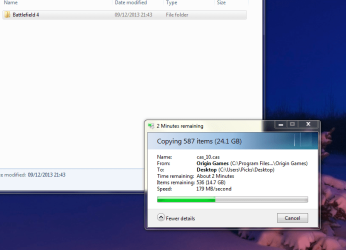
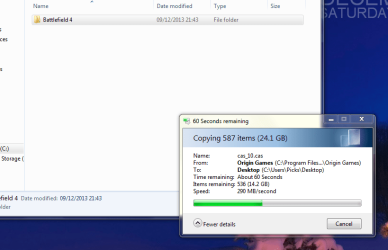
A good point and something that I have just tested out. It certainly does not equate to the figures in the benchmark but it appears there is some difference.
I tested it out using the BF4 file and copied it to desktop, once with the cache enabled and once without, I gave it enough time in both instances to level out to a stable rate. The difference was 52MB/s in favor of the cache.
 

Attachments

  • cache.PNG
    cache.PNG
    63.2 KB · Views: 1
  • regular.PNG
    regular.PNG
    55.9 KB · Views: 1

My Computer My Computer

OS
Windows 7 Professional 64 bit
That's a noticable difference - nearly 30%.
 

My Computer My Computer

Computer Manufacturer/Model Number
HP, Dell, Gateway, Toshiba - 4 laptops and 2 desktops
OS
Vista, Windows7, Mint Mate, Zorin, Windows 8
CPU
from 1.6GHz Duo to i7
Monitor(s) Displays
2x HP w2207
Hard Drives
5x HDD, 7x SSD, 12x Externals
Keyboard
with trackball - no mices
Mouse
Trackball mice
Internet Speed
DSL 6000
That's a noticable difference - nearly 30%.

Yes, also the speed appears to increase with the amount of RAM you allocate to the cache. The original test I did was with 4GB allocated, with 12GB allocated it improved some more.

I think I need to do further testing to record the actual time taken for all 3 runs to give firm evidence that it is a good improvement.
 

Attachments

  • moreram.PNG
    moreram.PNG
    38.3 KB · Views: 0

My Computer My Computer

OS
Windows 7 Professional 64 bit
This is for the rich who have acres of RAM, :D
 

My Computer My Computer

Computer Manufacturer/Model Number
HP, Dell, Gateway, Toshiba - 4 laptops and 2 desktops
OS
Vista, Windows7, Mint Mate, Zorin, Windows 8
CPU
from 1.6GHz Duo to i7
Monitor(s) Displays
2x HP w2207
Hard Drives
5x HDD, 7x SSD, 12x Externals
Keyboard
with trackball - no mices
Mouse
Trackball mice
Internet Speed
DSL 6000
OK the results are in, it started off real strong with 12GB allocated but dropped off a fair bit in the end.

So the actual times for transferring the 24.1GB file are as follows -

Without the cache tool running - 2m 38s
With 4GB of ram allocated - 2m dead
With 12GB of ram allocated - 2m dead

So the extra ram actually serves no purpose in relation to transferring large files. But at any rate with the cache enabled it saved nearly 40 seconds which is quite impressive for the total time we are talking about.

Paul.
 

My Computer My Computer

OS
Windows 7 Professional 64 bit
Hmmmmm............it seems as if I may have uncovered a little gem, eh?
Most daily activities don't seem to be affected, but it still works. We are gonna have to follow the development of this proggie.......no?

It seems to be along the same lines as Samsungs "rapid mode" from their "evo" line.
 

My Computer My Computer

Computer type
Laptop
Computer Manufacturer/Model Number
Dell Latitude E6410
OS
Windows 7 Home Premium (64 bit)
CPU
Intel I5 520m
Memory
8 GB
Graphics Card(s)
Intel integrated
Sound Card
IDT Digital Audio
Monitor(s) Displays
Dell ST2010
Screen Resolution
1600X900
Hard Drives
WD Scorpio Black 750GB
Keyboard
Microsoft Wireless Comfort Keyboard 5000
Mouse
Microsoft Wireless Mouse 5000
Internet Speed
350 mb/s down 12 mb/s up
Antivirus
NIS
Browser
Firefox
Other Info
Repaired trash lappy
Would it be more meaningful to copy a single large file such as a HD video file? I run tests to compare USB 2 vs. USB 3 and it was suggested I do the same.

I'm unsure how Rapid mode works, with it enabled I show all RAM (16GB) available and resource monitor shows no large amount in reserve for it.
 

My Computer My Computer

Computer type
PC/Desktop
Computer Manufacturer/Model Number
Home Built Desktop By DataTech
OS
Windows 7 Ultimate X64 SP1
CPU
Intel i5-2550K, Differing ~4.4-4.8GHz No built in GPU
Motherboard
ASUS P8Z68-V PRO/GEN3
Memory
16GB G.Skill Sniper 1866MHz @ 2133MHz 2x8GB
Graphics Card(s)
ASUS GTX650TIB-DC2OC-2GD5, (650TI Boost)
Sound Card
Onboard Realtek 5-1
Monitor(s) Displays
Samsung P2570HD
Screen Resolution
1920x1080
Hard Drives
Samsung 840 Pro 256GB SSD for OS, 500GB Seagate Constellation (Enterprise drive) for Data
PSU
Corsair HX650W
Case
Inwin Dragon Rider
Cooling
Hyper 212 EVO w/two Noctua fans, push-pull, @1300 RPM
Keyboard
E-Z Eyes, bright yellow keys with large characters
Mouse
steelseries SENSEI Laser Pro Gaming
Internet Speed
48-51Mbs Mbs down, 11 Mbs up Xfinity Cable
Antivirus
Norton Internet Security 2013
Browser
IE 10, Opera, Pale Moon if needed
Other Info
4 case fans, LG BluRay-RE, ASUS DVD-RW, Mr. Fusion power supply, 1.21 gigawatts.
I clearly need a rethink on caching. The SSD is essentially a solid state memory device which is slower than your high speed RAM and even SATA 3 speeds can't be met. Can multiple threading be assisting here? (probably a dumb question).
Also, can PrimoCache assist with HDDs? - yes I know try it out yourself!

I also need to try out Samsung's Rapid mode since I've got a couple of them.

I find this useful interaction :)
 

My Computer My Computer

Computer type
PC/Desktop
Computer Manufacturer/Model Number
Own build
OS
Windows 7x64 Home Premium SP1
CPU
Intel i7 2600k
Motherboard
ASUS P8Z68 Deluxe
Memory
G.Skill Ripjaws (DDR3-1600) 2x4GB
Graphics Card(s)
Nvidia GeForce GTS 450; Intel HD Graphics 3000(GT2+)
Monitor(s) Displays
Dell Ultrasharp IPS panel U2311H, Samsung SyncMaster P2350
Screen Resolution
1920x1080
Hard Drives
Samsung 850 Pro SSD 256GB, Samsung SSD 840 120GB, Seagates 1TB Barracuda ST31000528AS x2
PSU
Seasonic M12II 520W
Case
Lian Li Lancool PC-K60
Cooling
Case: 1x120mm, 3x140mm CPU: Hyper 212+
Keyboard
Logitech MK520 (wireless)
Mouse
Logitech MK520
Internet Speed
6-7 Mbps
Antivirus
Norton Security Premium, Malwarebytes on 2 (MSE on 3rd PC)
Browser
FireFox
Other Info
Audio: Logitech Z523 2.1
I clearly need a rethink on caching. The SSD is essentially a solid state memory device which is slower than your high speed RAM and even SATA 3 speeds can't be met. Can multiple threading be assisting here? (probably a dumb question).
Also, can PrimoCache assist with HDDs? - yes I know try it out yourself!

I also need to try out Samsung's Rapid mode since I've got a couple of them.

I find this useful interaction :)
According to the devs, It can....as l2 cache. (level 2)
Visit the page and read the FAQs....I believe it says so there.
I have not used that feature.
 

My Computer My Computer

Computer type
Laptop
Computer Manufacturer/Model Number
Dell Latitude E6410
OS
Windows 7 Home Premium (64 bit)
CPU
Intel I5 520m
Memory
8 GB
Graphics Card(s)
Intel integrated
Sound Card
IDT Digital Audio
Monitor(s) Displays
Dell ST2010
Screen Resolution
1600X900
Hard Drives
WD Scorpio Black 750GB
Keyboard
Microsoft Wireless Comfort Keyboard 5000
Mouse
Microsoft Wireless Mouse 5000
Internet Speed
350 mb/s down 12 mb/s up
Antivirus
NIS
Browser
Firefox
Other Info
Repaired trash lappy
Yes Michael Primo does work with HDDs as well. Not SSD speeds but much faster as they show in some snips.
 

My Computer My Computer

Computer type
PC/Desktop
Computer Manufacturer/Model Number
Home Built Desktop By DataTech
OS
Windows 7 Ultimate X64 SP1
CPU
Intel i5-2550K, Differing ~4.4-4.8GHz No built in GPU
Motherboard
ASUS P8Z68-V PRO/GEN3
Memory
16GB G.Skill Sniper 1866MHz @ 2133MHz 2x8GB
Graphics Card(s)
ASUS GTX650TIB-DC2OC-2GD5, (650TI Boost)
Sound Card
Onboard Realtek 5-1
Monitor(s) Displays
Samsung P2570HD
Screen Resolution
1920x1080
Hard Drives
Samsung 840 Pro 256GB SSD for OS, 500GB Seagate Constellation (Enterprise drive) for Data
PSU
Corsair HX650W
Case
Inwin Dragon Rider
Cooling
Hyper 212 EVO w/two Noctua fans, push-pull, @1300 RPM
Keyboard
E-Z Eyes, bright yellow keys with large characters
Mouse
steelseries SENSEI Laser Pro Gaming
Internet Speed
48-51Mbs Mbs down, 11 Mbs up Xfinity Cable
Antivirus
Norton Internet Security 2013
Browser
IE 10, Opera, Pale Moon if needed
Other Info
4 case fans, LG BluRay-RE, ASUS DVD-RW, Mr. Fusion power supply, 1.21 gigawatts.
OK the results are in.... So the actual times for transferring the 24.1GB file are as follows -

Without the cache tool running - 2m 38s
With 4GB of ram allocated - 2m dead
With 12GB of ram allocated - 2m dead

So the extra ram actually serves no purpose in relation to transferring large files. But at any rate with the cache enabled it saved nearly 40 seconds which is quite impressive for the total time we are talking about.
Ordinarily, I try not to get caught up in the SSD-speed fervor, since in the end I agree with “whs” — it’s real world performance that truly matters, not ideal-situation benches. But when the bench numbers exceed 10K on READ or WRITE, I can’t help but become curious as to how they do it — since over 10K exceeds the speed of current RamDrive technology using the fastest memory available. But I’m having difficulty finding any real specifics on how Primo does it, other than their webpage block diagram.

Paul, your first example comparing Primo/no-Primo file xfers was 158secs Xfer. Your 2nd w/Primo was 120secs at 4G RAM. Then again #3 was 120secs at 12G RAM setting. You concluded that RAM size doesn't matter. I’m not so sure I agree with that in the long run over time.

Based on my vague understanding of Primo’s block diagram, and drawing somewhat on my limited RamDisk knowledge — I’m guessing that the reason xfer #2 and #3 were the same length of time, is because Primo likely uses RAM allocated cache to store and retain certain data from previous transactions (and their webpage description seems to suggest this). Therefore perhaps the #2 and #3 were both the same time (120secs) because the #2 xfer was still stored in the RAM cache or the “Fancy Cache” as they call it — so naturally one would expect all subsequent xfers containing the same data or file would be the same time period; because it’s using the same data from the same cached memory.

That’s just my guess. I’m going to try to get more detail on how Primo does it, to see if it’s different from RamDisk techniques. I speculate it’s just a variation of RamDrive technology. And likely the huge bench numbers are the product of simply reading RAM speeds, not from using SSD real estate activity. I’ll post if I come up with anything concrete on how it works.

I hope you guys appreciate my additional research on Primo, because it’s really cutting into my “old geezer” 4-hour mid-afternoon nap time! lol :geek:
 

My Computer My Computer

Computer type
PC/Desktop
Computer Manufacturer/Model Number
Homemade with cube tower
OS
Windows 7 Ultimate x64
CPU
2x - Xeon E5-2687W
Motherboard
ASUS Z9PE-D8 WS
Memory
128GB Kingston - (2ea kits – 4x16GB)
Graphics Card(s)
Gigabyte GTX-680 & EVGA GTX-Titan
Sound Card
Realtek ALC898 8-chan audio
Monitor(s) Displays
2ea - Samsung T260HD 25.5-Inch LCD HDTV / Monitors
Screen Resolution
1920x1200
Hard Drives
8 ea. Crucial & Samsung EVO 2TB SSDs; misc 4ea. 8TB external Seagate spinners.
PSU
Corsair AX-1200
Case
Lian-Li cube custom
Cooling
2x Dynatron R-17 - CPU Air sinks (160watts TDP)
Keyboard
HP slimline wireless
Mouse
Microsoft ARC
Internet Speed
Faster than a speeding bullet.
Antivirus
Norton Security 360 - 2020
OK the results are in.... So the actual times for transferring the 24.1GB file are as follows -

Without the cache tool running - 2m 38s
With 4GB of ram allocated - 2m dead
With 12GB of ram allocated - 2m dead

So the extra ram actually serves no purpose in relation to transferring large files. But at any rate with the cache enabled it saved nearly 40 seconds which is quite impressive for the total time we are talking about.
Ordinarily, I try not to get caught up in the SSD-speed fervor, since in the end I agree with “whs” — it’s real world performance that truly matters, not ideal-situation benches. But when the bench numbers exceed 10K on READ or WRITE, I can’t help but become curious as to how they do it — since over 10K exceeds the speed of current RamDrive technology using the fastest memory available. But I’m having difficulty finding any real specifics on how Primo does it, other than their webpage block diagram.

Paul, your first example comparing Primo/no-Primo file xfers was 158secs Xfer. Your 2nd w/Primo was 120secs at 4G RAM. Then again #3 was 120secs at 12G RAM setting. You concluded that RAM size doesn't matter. I’m not so sure I agree with that in the long run over time.

Based on my vague understanding of Primo’s block diagram, and drawing somewhat on my limited RamDisk knowledge — I’m guessing that the reason xfer #2 and #3 were the same length of time, is because Primo likely uses RAM allocated cache to store and retain certain data from previous transactions (and their webpage description seems to suggest this). Therefore perhaps the #2 and #3 were both the same time (120secs) because the #2 xfer was still stored in the RAM cache or the “Fancy Cache” as they call it — so naturally one would expect all subsequent xfers containing the same data or file would be the same time period; because it’s using the same data from the same cached memory.

That’s just my guess. I’m going to try to get more detail on how Primo does it, to see if it’s different from RamDisk techniques. I speculate it’s just a variation of RamDrive technology. And likely the huge bench numbers are the product of simply reading RAM speeds, not from using SSD real estate activity. I’ll post if I come up with anything concrete on how it works.

I hope you guys appreciate my additional research on Primo, because it’s really cutting into my “old geezer” 4-hour mid-afternoon nap time! lol :geek:

Seems like a good idea to me. I would like to know more myself on this.
Please post back with your results/findings. Thanks
 

My Computer My Computer

Computer type
Laptop
Computer Manufacturer/Model Number
Dell Latitude E6410
OS
Windows 7 Home Premium (64 bit)
CPU
Intel I5 520m
Memory
8 GB
Graphics Card(s)
Intel integrated
Sound Card
IDT Digital Audio
Monitor(s) Displays
Dell ST2010
Screen Resolution
1600X900
Hard Drives
WD Scorpio Black 750GB
Keyboard
Microsoft Wireless Comfort Keyboard 5000
Mouse
Microsoft Wireless Mouse 5000
Internet Speed
350 mb/s down 12 mb/s up
Antivirus
NIS
Browser
Firefox
Other Info
Repaired trash lappy
OK the results are in.... So the actual times for transferring the 24.1GB file are as follows -

Without the cache tool running - 2m 38s
With 4GB of ram allocated - 2m dead
With 12GB of ram allocated - 2m dead

So the extra ram actually serves no purpose in relation to transferring large files. But at any rate with the cache enabled it saved nearly 40 seconds which is quite impressive for the total time we are talking about.
Ordinarily, I try not to get caught up in the SSD-speed fervor, since in the end I agree with “whs” — it’s real world performance that truly matters, not ideal-situation benches. But when the bench numbers exceed 10K on READ or WRITE, I can’t help but become curious as to how they do it — since over 10K exceeds the speed of current RamDrive technology using the fastest memory available. But I’m having difficulty finding any real specifics on how Primo does it, other than their webpage block diagram.

Paul, your first example comparing Primo/no-Primo file xfers was 158secs Xfer. Your 2nd w/Primo was 120secs at 4G RAM. Then again #3 was 120secs at 12G RAM setting. You concluded that RAM size doesn't matter. I’m not so sure I agree with that in the long run over time.

Based on my vague understanding of Primo’s block diagram, and drawing somewhat on my limited RamDisk knowledge — I’m guessing that the reason xfer #2 and #3 were the same length of time, is because Primo likely uses RAM allocated cache to store and retain certain data from previous transactions (and their webpage description seems to suggest this). Therefore perhaps the #2 and #3 were both the same time (120secs) because the #2 xfer was still stored in the RAM cache or the “Fancy Cache” as they call it — so naturally one would expect all subsequent xfers containing the same data or file would be the same time period; because it’s using the same data from the same cached memory.

That’s just my guess. I’m going to try to get more detail on how Primo does it, to see if it’s different from RamDisk techniques. I speculate it’s just a variation of RamDrive technology. And likely the huge bench numbers are the product of simply reading RAM speeds, not from using SSD real estate activity. I’ll post if I come up with anything concrete on how it works.

I hope you guys appreciate my additional research on Primo, because it’s really cutting into my “old geezer” 4-hour mid-afternoon nap time! lol :geek:

Hello garuda,

It is certainly interesting testing things out like this, and I will also be interested to hear your findings.

Now regarding what I have highlighted in red, If this is indeed true then I should be able to test it by simply ending the current Cache process, restarting the PC and then creating a new Cache process with 12GB of ram used. Am I correct in thinking that will delete any previously stored data?

I am going to test this out now anyway to see if it makes any difference.

Paul.
 

My Computer My Computer

OS
Windows 7 Professional 64 bit
The time was 1m 59.3s so essentially the same time as the 2 previous runs.
 

My Computer My Computer

OS
Windows 7 Professional 64 bit
Back
Top