Show us your SSD performance 2

I was just testing this PrimoCache out, it certainly gives some impressive numbers.

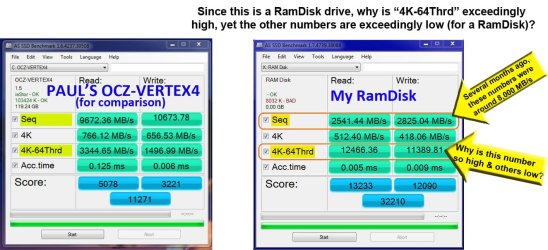
With the recent discussion on the PrimoCache, I decided to bench my Ramdisk out of curiosity. I was a bit surprised with the results compared to what I remember from several months ago. I don’t recall the numbers being so disproportionate to each other.

If anyone has any insight as to why the numbers seem strange, please often your opinion. Paul's numbers seem to be more proportional to each other -- what you would expect. So I put Paul’s numbers in there for comparison. See photos below.

P.S. - the AS-SSD people need to change their font size or widen their numeric windows; I noticed both in Paul's and mine that whenever the numbers go over 9,999MB/s, the window truncates the "MB/s" suffix. They likely never expected the numbers to get so high. :eek:
 

Attachments

  • Both Drives.jpg
    Both Drives.jpg
    150.6 KB · Views: 6

My Computer My Computer

Computer type
PC/Desktop
Computer Manufacturer/Model Number
Homemade with cube tower
OS
Windows 7 Ultimate x64
CPU
2x - Xeon E5-2687W
Motherboard
ASUS Z9PE-D8 WS
Memory
128GB Kingston - (2ea kits – 4x16GB)
Graphics Card(s)
Gigabyte GTX-680 & EVGA GTX-Titan
Sound Card
Realtek ALC898 8-chan audio
Monitor(s) Displays
2ea - Samsung T260HD 25.5-Inch LCD HDTV / Monitors
Screen Resolution
1920x1200
Hard Drives
8 ea. Crucial & Samsung EVO 2TB SSDs; misc 4ea. 8TB external Seagate spinners.
PSU
Corsair AX-1200
Case
Lian-Li cube custom
Cooling
2x Dynatron R-17 - CPU Air sinks (160watts TDP)
Keyboard
HP slimline wireless
Mouse
Microsoft ARC
Internet Speed
Faster than a speeding bullet.
Antivirus
Norton Security 360 - 2020
Can I ask how much RAM you dedicated to the Cache garuda? And did you alter any other settings apart from the amount of RAM used for Read/Write?

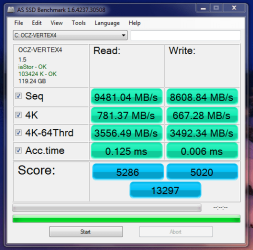
My results vary quite a lot from run to run. Here is a run with 12GB used.
 

Attachments

  • asssd.PNG
    asssd.PNG
    23.1 KB · Views: 76

My Computer My Computer

OS
Windows 7 Professional 64 bit
Can I ask how much RAM you dedicated to the Cache garuda? And did you alter any other settings apart from the amount of RAM used for Read/Write?

I use a RamDisk program (and there are many out there), not PrimoCache. It depends on the project in determining how much RAM I dedicate. For large projects/files in Adobe Premiere or AfterEffects et al, my RamDisk is 50GB; for projects using Prem, AE, Photoshop, etc together, I can go up to 90GB RAM. For small stuff I scratchpad at 10-20GB. It all depends.

When using large files (over 20-40GB total, have cache assigned for preview files, and rendering --- lots of RamDisk is needed. Way more than I initially calculated. I have learned from many people much smarter than me: you can never have too much memory or too many cores. They were right. Enough preaching.

I should mention one other thing here, with this new Primo thing getting attention. A word of caution for those who have installed PrimoCache on their main computer. Romex has reported BSOD bugs with versions prior to v0.9.2 back in November. Version 0.9.2 may have fixed some of those bugs. It may or may not cause data loss when it blue-screens depending on what your level-2 cache settings are. I would not trust this beta version with any critical files, until they get the acknowledged bugs ironed out. Enabling level-2 cache can cause data issues or BSOD in some instances. It still seems to be in Beta and who knows when it will become stable. It may still have known issues that are unresolved.

Some have claimed that the PrimoCache developers have known about past BSOD bugs and yet failed to promptly warn customers about these unresolved issues. I would use caution in what files you address with this software until a stable version arrives. You can check the Romex forum for warnings, news, and updates at this link:
Romex Software Forum ? View forum - PrimoCache Section
 

My Computer My Computer

Computer type
PC/Desktop
Computer Manufacturer/Model Number
Homemade with cube tower
OS
Windows 7 Ultimate x64
CPU
2x - Xeon E5-2687W
Motherboard
ASUS Z9PE-D8 WS
Memory
128GB Kingston - (2ea kits – 4x16GB)
Graphics Card(s)
Gigabyte GTX-680 & EVGA GTX-Titan
Sound Card
Realtek ALC898 8-chan audio
Monitor(s) Displays
2ea - Samsung T260HD 25.5-Inch LCD HDTV / Monitors
Screen Resolution
1920x1200
Hard Drives
8 ea. Crucial & Samsung EVO 2TB SSDs; misc 4ea. 8TB external Seagate spinners.
PSU
Corsair AX-1200
Case
Lian-Li cube custom
Cooling
2x Dynatron R-17 - CPU Air sinks (160watts TDP)
Keyboard
HP slimline wireless
Mouse
Microsoft ARC
Internet Speed
Faster than a speeding bullet.
Antivirus
Norton Security 360 - 2020
Can I ask how much RAM you dedicated to the Cache garuda? And did you alter any other settings apart from the amount of RAM used for Read/Write?

I use a RamDisk program (and there are many out there), not PrimoCache. It depends on the project in determining how much RAM I dedicate. For large projects/files in Adobe Premiere or AfterEffects et al, my RamDisk is 50GB; for projects using Prem, AE, Photoshop, etc together, I can go up to 90GB RAM. For small stuff I scratchpad at 10-20GB. It all depends.

When using large files (over 20-40GB total, have cache assigned for preview files, and rendering --- lots of RamDisk is needed. Way more than I initially calculated. I have learned from many people much smarter than me: you can never have too much memory or too many cores. They were right. Enough preaching.

I should mention one other thing here, with this new Primo thing getting attention. A word of caution for those who have installed PrimoCache on their main computer. Romex has reported BSOD bugs with versions prior to v0.9.2 back in November. Version 0.9.2 may have fixed some of those bugs. It may or may not cause data loss when it blue-screens depending on what your level-2 cache settings are. I would not trust this beta version with any critical files, until they get the acknowledged bugs ironed out. Enabling level-2 cache can cause data issues or BSOD in some instances. It still seems to be in Beta and who knows when it will become stable. It may still have known issues that are unresolved.

Some have claimed that the PrimoCache developers have known about past BSOD bugs and yet failed to promptly warn customers about these unresolved issues. I would use caution in what files you address with this software until a stable version arrives. You can check the Romex forum for warnings, news, and updates at this link:
Romex Software Forum ? View forum - PrimoCache Section

Thanks for the info.

I should have worded my question better, I was attempting to try and help with your disproportionate numbers.
What I should have asked was how much RAM did you have allocated when you ran the AS SSD test in your screenshot? I understand you are not using Primo, but my findings in Primo indicate the more RAM allocated gives higher scores in AS SSD. I figured if you were using a particularly large amount of RAM then this could explain the disproportionate figures. It's only a theory. Maybe try it with 4GB or 12GB allocated to see if there is any difference.

Paul.
 

My Computer My Computer

OS
Windows 7 Professional 64 bit
Garuda AS SSD says the alignment id bad for your RAM disk even though 8032K is divisible by 4. The alignment must be divisible evenly by for the structure of the SSD files system and how it addresses data. I don't know exactly how that translates to the scores shown though.

I can't say how it can be changed on a RAM disk. It could also be the way AS SSD reads it since RAM isn't the same as an SSD's NAND memory.
 

My Computer My Computer

Computer type
PC/Desktop
Computer Manufacturer/Model Number
Home Built Desktop By DataTech
OS
Windows 7 Ultimate X64 SP1
CPU
Intel i5-2550K, Differing ~4.4-4.8GHz No built in GPU
Motherboard
ASUS P8Z68-V PRO/GEN3
Memory
16GB G.Skill Sniper 1866MHz @ 2133MHz 2x8GB
Graphics Card(s)
ASUS GTX650TIB-DC2OC-2GD5, (650TI Boost)
Sound Card
Onboard Realtek 5-1
Monitor(s) Displays
Samsung P2570HD
Screen Resolution
1920x1080
Hard Drives
Samsung 840 Pro 256GB SSD for OS, 500GB Seagate Constellation (Enterprise drive) for Data
PSU
Corsair HX650W
Case
Inwin Dragon Rider
Cooling
Hyper 212 EVO w/two Noctua fans, push-pull, @1300 RPM
Keyboard
E-Z Eyes, bright yellow keys with large characters
Mouse
steelseries SENSEI Laser Pro Gaming
Internet Speed
48-51Mbs Mbs down, 11 Mbs up Xfinity Cable
Antivirus
Norton Internet Security 2013
Browser
IE 10, Opera, Pale Moon if needed
Other Info
4 case fans, LG BluRay-RE, ASUS DVD-RW, Mr. Fusion power supply, 1.21 gigawatts.
..... I figured if you were using a particularly large amount of RAM then this could explain the disproportionate figures. It's only a theory. Maybe try it with 4GB or 12GB allocated to see if there is any difference.
Paul, your question was fine, sometimes I don't interpret so good. I ran AS-SSD with both 50GB & 10GB RAM based on your theory earlier posted. But the numbers were very similar both ways: 50 or 10G; it was the disproportionate part that threw me. And thanks for your suggestion in trying different sizes, often that makes a difference as you found in your runs. I'm stumped on this one. I hope Britton has found the answer.


Garuda AS SSD says the alignment is bad for your RAM disk even though 8032K is divisible by 4. The alignment must be divisible evenly by for the structure of the SSD files system and how it addresses data. I don't know exactly how that translates to the scores shown though.

I can't say how it can be changed on a RAM disk. It could also be the way AS SSD reads it since RAM isn't the same as an SSD's NAND memory.

Good eye finding that. I have since checked Diskpart and it verifies that the alignment is bad. Since I think alignment relates to handling block sizes, you likely discovered the reason for disproportionate readings -- it handles different block sizes better than others when align is off. And this seems REALLY off: 8032K. Thanks! I'm putting together the documentation to send to RamDisk company to ask for their help on this. And yes, I checked for any settings in the RamDisk setup for alignment adjustment and found nothing. I'll have to see what the RamDisk company says.
 

My Computer My Computer

Computer type
PC/Desktop
Computer Manufacturer/Model Number
Homemade with cube tower
OS
Windows 7 Ultimate x64
CPU
2x - Xeon E5-2687W
Motherboard
ASUS Z9PE-D8 WS
Memory
128GB Kingston - (2ea kits – 4x16GB)
Graphics Card(s)
Gigabyte GTX-680 & EVGA GTX-Titan
Sound Card
Realtek ALC898 8-chan audio
Monitor(s) Displays
2ea - Samsung T260HD 25.5-Inch LCD HDTV / Monitors
Screen Resolution
1920x1200
Hard Drives
8 ea. Crucial & Samsung EVO 2TB SSDs; misc 4ea. 8TB external Seagate spinners.
PSU
Corsair AX-1200
Case
Lian-Li cube custom
Cooling
2x Dynatron R-17 - CPU Air sinks (160watts TDP)
Keyboard
HP slimline wireless
Mouse
Microsoft ARC
Internet Speed
Faster than a speeding bullet.
Antivirus
Norton Security 360 - 2020
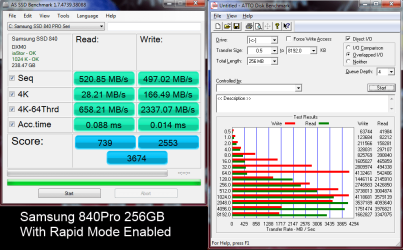
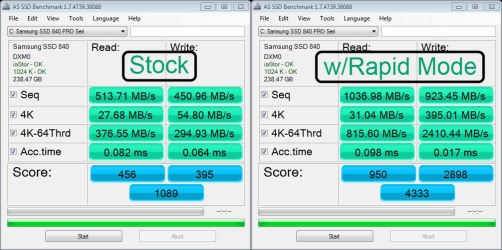
I just restored an image to this fresh drive, enabled Rapid Mode. Not as high marks as the 8840EVO but still impressive.

840 Pro Rapid Mode.png
 

My Computer My Computer

Computer type
PC/Desktop
Computer Manufacturer/Model Number
Home Built Desktop By DataTech
OS
Windows 7 Ultimate X64 SP1
CPU
Intel i5-2550K, Differing ~4.4-4.8GHz No built in GPU
Motherboard
ASUS P8Z68-V PRO/GEN3
Memory
16GB G.Skill Sniper 1866MHz @ 2133MHz 2x8GB
Graphics Card(s)
ASUS GTX650TIB-DC2OC-2GD5, (650TI Boost)
Sound Card
Onboard Realtek 5-1
Monitor(s) Displays
Samsung P2570HD
Screen Resolution
1920x1080
Hard Drives
Samsung 840 Pro 256GB SSD for OS, 500GB Seagate Constellation (Enterprise drive) for Data
PSU
Corsair HX650W
Case
Inwin Dragon Rider
Cooling
Hyper 212 EVO w/two Noctua fans, push-pull, @1300 RPM
Keyboard
E-Z Eyes, bright yellow keys with large characters
Mouse
steelseries SENSEI Laser Pro Gaming
Internet Speed
48-51Mbs Mbs down, 11 Mbs up Xfinity Cable
Antivirus
Norton Internet Security 2013
Browser
IE 10, Opera, Pale Moon if needed
Other Info
4 case fans, LG BluRay-RE, ASUS DVD-RW, Mr. Fusion power supply, 1.21 gigawatts.
Impressive indeed.
 

My Computer My Computer

Computer Manufacturer/Model Number
HP, Dell, Gateway, Toshiba - 4 laptops and 2 desktops
OS
Vista, Windows7, Mint Mate, Zorin, Windows 8
CPU
from 1.6GHz Duo to i7
Monitor(s) Displays
2x HP w2207
Hard Drives
5x HDD, 7x SSD, 12x Externals
Keyboard
with trackball - no mices
Mouse
Trackball mice
Internet Speed
DSL 6000
when mine gets to access time it gives me this. anyone know why?
 

Attachments

  • accestime.PNG
    accestime.PNG
    117.1 KB · Views: 1

My Computer My Computer

Computer type
PC/Desktop
Computer Manufacturer/Model Number
Custom
OS
10 Pro x64
CPU
Ryzen 9 3900X
Motherboard
Asrock x370 Tachi
Memory
64GB(4x16GB) DDR4
Graphics Card(s)
EVGA 1080ti FTW3
Sound Card
ASUS Xonar Essence STX (V4 Bursons), ODAC rev B, NFB-11, O2
Monitor(s) Displays
3xASUS PB278Q/R, Optoma HD142X
Screen Resolution
3x1440p, 1080p
Hard Drives
512GB 850 EVO(OS, Programs)
4TB (Movies)
3TB (Downloads)
3TB (Programs)
1TB HDD (Games)
2x6TB R1 (videos)
PSU
AX760
Case
Fractal Define R5
Cooling
NH-D15S
Keyboard
Massdrop Ctrl with Box Navy's
Mouse
G903, Alioth XXL Mat
Internet Speed
280/40
Antivirus
MBAM, ESET
Browser
Canary 64 Bit
Other Info
I also own a Thinkpad P50 Xeon 4K, X220T, X1C5
Something has locked access? A Ram drive, some caching software? A Guy
 

My Computer My Computer

Computer type
PC/Desktop
OS
Windows 10 Home x64
CPU
INTEL Core i5-750 Quad-Core 3.37GHz
Motherboard
ASUS P7P55D
Memory
HyperX Fury Black Series 8GB (2 x 4GB) 1866Mhz
Graphics Card(s)
EVGA GeForce GTX 750 Superclocked 1GB 128-Bit GDDR5
Monitor(s) Displays
LG 32MA68HY 32" IPS
Screen Resolution
1920 x 1080
Hard Drives
Samsung 840 Evo 120GB, SEAGATE 500GB Barracuda® 7200.12, SATA 3 Gb/s, 7200 RPM, 16MB cache
PSU
ANTEC TruePower New TP-550, 80 PLUS, 550W
Case
ANTEC Three Hundred Illusion
Cooling
COOLER MASTER Hyper 212 Plus, 4 x 120mm 1 x 140mm Noctua's
Internet Speed
85 + Mbps
Antivirus
Avast
Browser
Vivaldi
when mine gets to access time it gives me this. anyone know why?
I have had the same error, I don't know why or what it means but when re-running AS SSD again it completed the run fine.
 

My Computer My Computer

Computer type
PC/Desktop
Computer Manufacturer/Model Number
Home Built Desktop By DataTech
OS
Windows 7 Ultimate X64 SP1
CPU
Intel i5-2550K, Differing ~4.4-4.8GHz No built in GPU
Motherboard
ASUS P8Z68-V PRO/GEN3
Memory
16GB G.Skill Sniper 1866MHz @ 2133MHz 2x8GB
Graphics Card(s)
ASUS GTX650TIB-DC2OC-2GD5, (650TI Boost)
Sound Card
Onboard Realtek 5-1
Monitor(s) Displays
Samsung P2570HD
Screen Resolution
1920x1080
Hard Drives
Samsung 840 Pro 256GB SSD for OS, 500GB Seagate Constellation (Enterprise drive) for Data
PSU
Corsair HX650W
Case
Inwin Dragon Rider
Cooling
Hyper 212 EVO w/two Noctua fans, push-pull, @1300 RPM
Keyboard
E-Z Eyes, bright yellow keys with large characters
Mouse
steelseries SENSEI Laser Pro Gaming
Internet Speed
48-51Mbs Mbs down, 11 Mbs up Xfinity Cable
Antivirus
Norton Internet Security 2013
Browser
IE 10, Opera, Pale Moon if needed
Other Info
4 case fans, LG BluRay-RE, ASUS DVD-RW, Mr. Fusion power supply, 1.21 gigawatts.
Any Windows 8.1 users here?

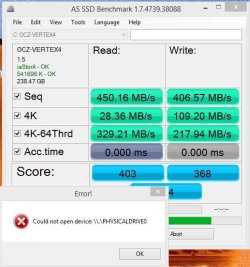
This is my second attempt to run AS SSD Benchmark I still get this error. This is after rebooting the system from the first attempt.

AS SSD Error.JPG

Anyone know what's going on :confused:

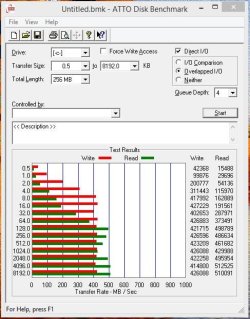
ATTO seems to be working though....

ATTO Score - Vertex 4.JPG

BTW this is with an OCZ Vertex 4, which is being replaced tomorrow by a Samsung 840 Pro.

Anyway can somebody help with the error.

Thanks
 

My Computer My Computer

Computer type
PC/Desktop
Computer Manufacturer/Model Number
Custom built by me.
OS
Windows 10 Pro
CPU
Intel Core i7-4770K (3.5Ghz)
Motherboard
Gigabyte G1 Sniper 5 (F10 Bios)
Memory
32 gig Corsair Dominator Platinum (4x8Gig)
Graphics Card(s)
Sapphire Tri-X R9 Fury
Sound Card
Soundblaster ZXR
Monitor(s) Displays
NEC PA242W 24" LCD Monitor
Screen Resolution
1920 x 1200
Hard Drives
Primary - Samsung 850 Pro (512gig), Samsung 840 Pro (256gig), 2TB WD Caviar Black.
PSU
EVGA Supernova 1000 G2
Case
Cooler Master HAF X
Cooling
Corsair H100i with Corsair Air Series SP120 Quiet Fans
Keyboard
Logitech Wireless Wave
Mouse
Logitech Performance MX
Internet Speed
High Speed Cable
Antivirus
Norton Security
Browser
IE11
Other Info
Memory Timings - 1866MHz @ 9-9-9-27-1T @ 1.5 volts
I installed a 960GB Crucial M500 over the Holidays. Here's a comparison of the M500 to the M4 it replaced (Crystal Disk Mark for both; AS SSD for the M500):

CricialM500vsM4_zps4b17ba16.jpg


CricialM500vsM4-2_zpsc143fa0b.jpg
 

My Computer My Computer

OS
Win 7 RC
The M500 series looks like a really good performer Defender.:party:
 

My Computer My Computer

Computer type
PC/Desktop
Computer Manufacturer/Model Number
Home Built Desktop By DataTech
OS
Windows 7 Ultimate X64 SP1
CPU
Intel i5-2550K, Differing ~4.4-4.8GHz No built in GPU
Motherboard
ASUS P8Z68-V PRO/GEN3
Memory
16GB G.Skill Sniper 1866MHz @ 2133MHz 2x8GB
Graphics Card(s)
ASUS GTX650TIB-DC2OC-2GD5, (650TI Boost)
Sound Card
Onboard Realtek 5-1
Monitor(s) Displays
Samsung P2570HD
Screen Resolution
1920x1080
Hard Drives
Samsung 840 Pro 256GB SSD for OS, 500GB Seagate Constellation (Enterprise drive) for Data
PSU
Corsair HX650W
Case
Inwin Dragon Rider
Cooling
Hyper 212 EVO w/two Noctua fans, push-pull, @1300 RPM
Keyboard
E-Z Eyes, bright yellow keys with large characters
Mouse
steelseries SENSEI Laser Pro Gaming
Internet Speed
48-51Mbs Mbs down, 11 Mbs up Xfinity Cable
Antivirus
Norton Internet Security 2013
Browser
IE 10, Opera, Pale Moon if needed
Other Info
4 case fans, LG BluRay-RE, ASUS DVD-RW, Mr. Fusion power supply, 1.21 gigawatts.
The M500 series looks like a really good performer Defender.:party:

Thanks - I think I'll keep it. :D I was looking at the Samsung, but the price of the Crucial was pretty good on Black Friday. Since I basically use the machine for home use and the occasional first person shooter, the performance advantage of the Samsung didn't justify the increased price.
 

My Computer My Computer

OS
Win 7 RC
You're right, the Samsungs are not that much difference for the price.
My 840Pro 265GB. Nearly the same in 4K Read/Wrote which is the number important to the OS. Sequential scores are for the marketing departments but, buyers are getting smarter and want the 4K numbers.


840Pro AS SSD.png
 

My Computer My Computer

Computer type
PC/Desktop
Computer Manufacturer/Model Number
Home Built Desktop By DataTech
OS
Windows 7 Ultimate X64 SP1
CPU
Intel i5-2550K, Differing ~4.4-4.8GHz No built in GPU
Motherboard
ASUS P8Z68-V PRO/GEN3
Memory
16GB G.Skill Sniper 1866MHz @ 2133MHz 2x8GB
Graphics Card(s)
ASUS GTX650TIB-DC2OC-2GD5, (650TI Boost)
Sound Card
Onboard Realtek 5-1
Monitor(s) Displays
Samsung P2570HD
Screen Resolution
1920x1080
Hard Drives
Samsung 840 Pro 256GB SSD for OS, 500GB Seagate Constellation (Enterprise drive) for Data
PSU
Corsair HX650W
Case
Inwin Dragon Rider
Cooling
Hyper 212 EVO w/two Noctua fans, push-pull, @1300 RPM
Keyboard
E-Z Eyes, bright yellow keys with large characters
Mouse
steelseries SENSEI Laser Pro Gaming
Internet Speed
48-51Mbs Mbs down, 11 Mbs up Xfinity Cable
Antivirus
Norton Internet Security 2013
Browser
IE 10, Opera, Pale Moon if needed
Other Info
4 case fans, LG BluRay-RE, ASUS DVD-RW, Mr. Fusion power supply, 1.21 gigawatts.
There is an interesting video about the Mushkin Chronos 240GB performance measurements on this Neweeg website.

Btw: This 240 GB (which is really a 256GB) SSD sells for $129,99 right now which is an excellent price. I paid $138 for it 3 months ago and thought it was a good price, lol.
 

My Computer My Computer

Computer Manufacturer/Model Number
HP, Dell, Gateway, Toshiba - 4 laptops and 2 desktops
OS
Vista, Windows7, Mint Mate, Zorin, Windows 8
CPU
from 1.6GHz Duo to i7
Monitor(s) Displays
2x HP w2207
Hard Drives
5x HDD, 7x SSD, 12x Externals
Keyboard
with trackball - no mices
Mouse
Trackball mice
Internet Speed
DSL 6000
Wolfgang, I don't think you'll miss the $8. LOL. But, that is a good price for it. I've heard they are very good drives.
 

My Computers My Computers

System One System Two

  • Computer type
    PC/Desktop
    Computer Manufacturer/Model Number
    ALWAYS UNDER CONSTRUCTION
    OS
    Windows 11 Pro
    CPU
    Ryzen 9 5900X
    Motherboard
    Asus X570 Crosshair Viii Hero
    Memory
    32GB G Skill DDR4-3600
    Graphics Card(s)
    EVGA RTX 3080 FTW 3 Ultra
    Sound Card
    On Board/Sennheiser PC37X Headset
    Monitor(s) Displays
    3 X Asus 27"
    Screen Resolution
    2560x1440
    Hard Drives
    2 X 1 TB NVME drives
    PSU
    EVGA 850
    Case
    Phanteks Eclipse P400A
    Cooling
    EVGA 280 AIO
    Keyboard
    Logitech G510s/ Logitech G13
    Mouse
    Logitech G502
    Internet Speed
    24/1
    Antivirus
    ESET/MBAM Pro/SAS Pro
    Browser
    Chrome/ Firefox/ Edge
  • Computer type
    Laptop
    System Manufacturer/Model Number
    Dell 16 Plus
    OS
    Windows 11 Pro
    CPU
    Intel Ultra 9 288V
    Memory
    32 GB LPDDR5X 8533
    Monitor(s) Displays
    16" Mini-LED HDR600 Touch 90 Hz
    Screen Resolution
    2560X1600
    Hard Drives
    1 TB NVME
Steve, not only are they good drives, but Mushkin stands behind their products,

I had a 2 year old 60GB Mushkin fail. Wrote a note to Mushkin and within 2 hours they agreed to replace it - which they did after I had mailed in the defunct drive.
 

My Computer My Computer

Computer Manufacturer/Model Number
HP, Dell, Gateway, Toshiba - 4 laptops and 2 desktops
OS
Vista, Windows7, Mint Mate, Zorin, Windows 8
CPU
from 1.6GHz Duo to i7
Monitor(s) Displays
2x HP w2207
Hard Drives
5x HDD, 7x SSD, 12x Externals
Keyboard
with trackball - no mices
Mouse
Trackball mice
Internet Speed
DSL 6000
I forgot to give an update on my dead Crucial M4.

I updated the firmware and it is working fine again. :)
 

My Computer My Computer

OS
Windows 7 Professional 64 bit
Back
Top