Show Us Your WEI (2)

Status
Not open for further replies.
For the SSD you do not need special glasses on your nose - LOL. Btw: for games, the SSD will probably be of little interest because games typically do not read much from disk. But for the OS and the general operation, SSDs are brilliant.
So If I was to install my OS on an SSD and rou my games off a SATA internal there would be no speed loss? and I would gain nothing by loading my games onto it anyway?
I use loads of applications, my program files is huge, but if I just use the SSD for OS and the programs I use the most I will benefit?
If this is true then no one really needs a big SSD!
With a 320GB SSD OCZ Vertex 2 like you have costing nearly £700, This is great news, a 90-120GB SSD could be plenty.
 

My Computer My Computer

Computer Manufacturer/Model Number
Custom
OS
Windows 7 Ultimate X64
CPU
AMD Phenom II X6 1100T Black Edition @3.6GHz
Motherboard
ASUS AM3+ CROSSHAIR V FORMULA S/L 990FX
Memory
16GB (4 X 4GB) Corsair CMZ8GX3M2A1600C9 1600MHz CL9 DDR3 Ven
Graphics Card(s)
2 X ATI Sapphire HD 5770 1GB DDR5 @850/1200MHz in CrossfireX
Sound Card
Onboard 7.1 HD Audio/Bluetooth Stereo Audio/C-Media USB 5.1
Monitor(s) Displays
LGW2363D 23", HANNspreeXM-S HANNSverona22" & 42"Samsung HDTV
Screen Resolution
2880X900
Hard Drives
Seagate Barracuda LP 1.5TB
SAMSUNG HD154UI 1.5TB
SAMSUNG HD 204UI 2TB
PSU
Evo Labs 900W 80+ 80 plus Dual 12V ATX PC PSU
Case
Cooler Master Mystique 631
Cooling
Corsair H50 With 2X120mm Push/Pull,3X 120mm (FrX1,SideX2).
Keyboard
Accuratus Toughball 2.4GHz
Mouse
Microsoft Laser Mouse 5000/Emprex Cheetah 2000dpi Optical
Internet Speed
5500kbps
Other Info
LG BH10LS30.AUAU10B 10x Internal Blu-Ray BDRW
Corsair H50 Water Cooling With Push/Pull 120mm Fans vent out
Front 120mm Intake
Side Panel 2 X120mm Intake
90mm Extraction fan in top of case.
OCZ - Extreme Thermal Convection
Quiet PC AcoustiPack Lite 2 Ply Sound Deadening both side panels, front, rear, top and bottom.
Actually it would be great if you could afford a 500GB SSD. But for most of us that will never happen. But, I love my 90GB Vertex2. I put all user files on a spinner. I only use the SSD for OS and the programs I use frequently. Programs I want, but do not get used very often, get installed on the spinner. I have 60GB free space on the SSD. Of course I don't have a great deal of programs but do not see any degradation in the speed of user files or programs on the spinner. They will be at least as fast as they are right now, I think faster. You can have a quick, responsive OS drive without a large SSD if you plan right.
 

My Computers My Computers

System One System Two

  • Computer type
    PC/Desktop
    Computer Manufacturer/Model Number
    ALWAYS UNDER CONSTRUCTION
    OS
    Windows 11 Pro
    CPU
    Ryzen 9 5900X
    Motherboard
    Asus X570 Crosshair Viii Hero
    Memory
    32GB G Skill DDR4-3600
    Graphics Card(s)
    EVGA RTX 3080 FTW 3 Ultra
    Sound Card
    On Board/Sennheiser PC37X Headset
    Monitor(s) Displays
    3 X Asus 27"
    Screen Resolution
    2560x1440
    Hard Drives
    2 X 1 TB NVME drives
    PSU
    EVGA 850
    Case
    Phanteks Eclipse P400A
    Cooling
    EVGA 280 AIO
    Keyboard
    Logitech G510s/ Logitech G13
    Mouse
    Logitech G502
    Internet Speed
    24/1
    Antivirus
    ESET/MBAM Pro/SAS Pro
    Browser
    Chrome/ Firefox/ Edge
  • Computer type
    Laptop
    System Manufacturer/Model Number
    Dell 16 Plus
    OS
    Windows 11 Pro
    CPU
    Intel Ultra 9 288V
    Memory
    32 GB LPDDR5X 8533
    Monitor(s) Displays
    16" Mini-LED HDR600 Touch 90 Hz
    Screen Resolution
    2560X1600
    Hard Drives
    1 TB NVME
You are about right. Now there may be programs or games that have a lot of disk traffic. But I think those are rare and far apart. Those you may chose to install on the SSD.

I own only 60GB, 80GB and 90GB SSDs. The "larger" ones for the laptops. But I have a collection of external disks that supplement - now even Sata3. Some people installed 40GB SSDs (there is a nice little Intel) on Desktops and are happy with it.

I think you will get the full SSD experience with a 60GB SSD on desktops and 90GB on laptops. No need to spend more money - unless you are a real enthusiast. But then I would go for a Revo drive: Newegg.com - OCZ RevoDrive X2 OCZSSDPX-1RVDX0100 PCI-E 100GB PCI-Express x4 MLC Internal Solid State Drive (SSD)
 

My Computer My Computer

Computer Manufacturer/Model Number
HP, Dell, Gateway, Toshiba - 4 laptops and 2 desktops
OS
Vista, Windows7, Mint Mate, Zorin, Windows 8
CPU
from 1.6GHz Duo to i7
Monitor(s) Displays
2x HP w2207
Hard Drives
5x HDD, 7x SSD, 12x Externals
Keyboard
with trackball - no mices
Mouse
Trackball mice
Internet Speed
DSL 6000
WHS, what do you think of the Crucial real SSD's? I have SATA3 in my desktop and the Crucials are the only ones that will run at SATA3 speeds right now. Sata 3 seems to make very little difference even with sata3 spinners, so why not take advantage of it if you have it.
 

My Computers My Computers

System One System Two

  • Computer type
    PC/Desktop
    Computer Manufacturer/Model Number
    ALWAYS UNDER CONSTRUCTION
    OS
    Windows 11 Pro
    CPU
    Ryzen 9 5900X
    Motherboard
    Asus X570 Crosshair Viii Hero
    Memory
    32GB G Skill DDR4-3600
    Graphics Card(s)
    EVGA RTX 3080 FTW 3 Ultra
    Sound Card
    On Board/Sennheiser PC37X Headset
    Monitor(s) Displays
    3 X Asus 27"
    Screen Resolution
    2560x1440
    Hard Drives
    2 X 1 TB NVME drives
    PSU
    EVGA 850
    Case
    Phanteks Eclipse P400A
    Cooling
    EVGA 280 AIO
    Keyboard
    Logitech G510s/ Logitech G13
    Mouse
    Logitech G502
    Internet Speed
    24/1
    Antivirus
    ESET/MBAM Pro/SAS Pro
    Browser
    Chrome/ Firefox/ Edge
  • Computer type
    Laptop
    System Manufacturer/Model Number
    Dell 16 Plus
    OS
    Windows 11 Pro
    CPU
    Intel Ultra 9 288V
    Memory
    32 GB LPDDR5X 8533
    Monitor(s) Displays
    16" Mini-LED HDR600 Touch 90 Hz
    Screen Resolution
    2560X1600
    Hard Drives
    1 TB NVME
@ RealGoneKid, just having a bit of fun :)

@ steve-pressman, what's your 930 clocked at to get 7.7? My 950 is at 3.5gig and I got 7.6

I think it is just over 4.01gig as we say here in good old blighty "like shite off a hot shovel"

Don't always use the overclock though, mostly for converting DVD or music files otherwise I use the stock setting which is still pretty dam quick.

Regards

Steve
 

My Computer My Computer

Computer Manufacturer/Model Number
Over Clockers Ultima Viper 2.80Ghz
OS
Windows 7 Ultimate 64 - OEM Service Pack 1
CPU
Intel Core i7 930 2.80Ghz Bloomfield Socket LGA 1366
Motherboard
Gigabyte GA-X58A-UD3R Intel X58 Socket 1366 DDR3
Memory
Patriot Viper 6GB 3x2GB DDR3 PC3-1200C9 1600Mhz Tri Channel
Graphics Card(s)
Asus ATI Radeon HD 5770 CuCore 1024MB GDDR5 PCI Express
Sound Card
Realtek ALC889 @ Intel 82801JB ICH10 - High Definition Audio
Monitor(s) Displays
Samsung SyncMaster 920N 19"
Screen Resolution
1280*1024
Hard Drives
1 x OCZ Vertex2 Series 120GB 2.5" SATA-II SSD
1 x Seagate Barracuda 7200.12 1TB SATA-II 32MB Cache
1 x Western Digital Caviar Green 2TB SATA-II 64 MB Cache
PSU
Corsair TX 650W ATX SLi
Case
Antec 902 Ultimate Gaming Case Black
Cooling
Prolimatech Megahalems Rev B CPU Cooler Socket 775/1156/1366
Keyboard
Microsoft Comfort Curve Keyboard
Mouse
Microsoft Optical USB
Internet Speed
ADSL24 FTTC 34.2 Mbps Down 7.1Mbps Up
Other Info
OcUK 22x DVDSATA ReWriter Black
Akasa AK-FN058 Apache Black Super Silent 120mm Fan
Printer Epson Stylus Photo R300
Scanner Canon Canoscan 8000F
WHS, what do you think of the Crucial real SSD's? I have SATA3 in my desktop and the Crucials are the only ones that will run at SATA3 speeds right now. Sata 3 seems to make very little difference even with sata3 spinners, so why not take advantage of it if you have it.
Yeah, The C300 is mighty fast (on paper). But you have to realize that in real life those speeds never come to bear - especially for the OS that deals a lot with 4K records. Just look at the various Atto charts in this thread and you will see.

Besides, the C300 has the Marvell Controller that might give you problems - at least some guys say so.

I think the usefulness of Sata3 is highly overstated. Looks good on paper, but the devices are unable to feed it an any speeds that come even close to the capacity or exeeds Sata2. It is an investment into the future, if you want so,
 

My Computer My Computer

Computer Manufacturer/Model Number
HP, Dell, Gateway, Toshiba - 4 laptops and 2 desktops
OS
Vista, Windows7, Mint Mate, Zorin, Windows 8
CPU
from 1.6GHz Duo to i7
Monitor(s) Displays
2x HP w2207
Hard Drives
5x HDD, 7x SSD, 12x Externals
Keyboard
with trackball - no mices
Mouse
Trackball mice
Internet Speed
DSL 6000
@ RealGoneKid, just having a bit of fun :)

@ steve-pressman, what's your 930 clocked at to get 7.7? My 950 is at 3.5gig and I got 7.6

I think it is just over 4.01gig as we say here in good old blighty "like shite off a hot shovel"

Don't always use the overclock though, mostly for converting DVD or music files otherwise I use the stock setting which is still pretty dam quick.

Regards

Steve

Yeah I'm only at 3.5 may go to 3.8 but that's it. 3.5 works pretty good for me though.

Thanks.
 

My Computer My Computer

Computer type
PC/Desktop
Computer Manufacturer/Model Number
Custom built by me.
OS
Windows 10 Pro
CPU
Intel Core i7-4770K (3.5Ghz)
Motherboard
Gigabyte G1 Sniper 5 (F10 Bios)
Memory
32 gig Corsair Dominator Platinum (4x8Gig)
Graphics Card(s)
Sapphire Tri-X R9 Fury
Sound Card
Soundblaster ZXR
Monitor(s) Displays
NEC PA242W 24" LCD Monitor
Screen Resolution
1920 x 1200
Hard Drives
Primary - Samsung 850 Pro (512gig), Samsung 840 Pro (256gig), 2TB WD Caviar Black.
PSU
EVGA Supernova 1000 G2
Case
Cooler Master HAF X
Cooling
Corsair H100i with Corsair Air Series SP120 Quiet Fans
Keyboard
Logitech Wireless Wave
Mouse
Logitech Performance MX
Internet Speed
High Speed Cable
Antivirus
Norton Security
Browser
IE11
Other Info
Memory Timings - 1866MHz @ 9-9-9-27-1T @ 1.5 volts
@ RealGoneKid, just having a bit of fun :)

@ steve-pressman, what's your 930 clocked at to get 7.7? My 950 is at 3.5gig and I got 7.6

I think it is just over 4.01gig as we say here in good old blighty "like shite off a hot shovel"

Don't always use the overclock though, mostly for converting DVD or music files otherwise I use the stock setting which is still pretty dam quick.

Regards

Steve

Yeah I'm only at 3.5 may go to 3.8 but that's it. 3.5 works pretty good for me though.

Thanks.

I'm running i7 930, o/c'd to 3.5 and score 7.6 too, I got 7.7 at 4.0Ghz which doesn't seem right for a 500Mhz increase? I run at 3.5 because I don't really need the extra power now. I'd love to know why my kingston 128Gb SSD always drops from a rating of 7.1 to 7.0 when I over clock???

Edit, Ps what's your vcore? I get 3.5 at about 1.17v
 

My Computer My Computer

Computer Manufacturer/Model Number
Homebuild
OS
Windows 7 pro 64bit
CPU
i7 930
Motherboard
Asus P6X58D Premium
Memory
6Gb DDr3 Corsair domminator 1866mghz
Graphics Card(s)
Asus 5870 1Gb DDr5 V2
Sound Card
onboard
Monitor(s) Displays
LG 22 flatron
Screen Resolution
1080
Hard Drives
Kingston 128Gb SSD, Western Digital Caviar 1Tb
PSU
XFX 850w
Case
Haf 932
Cooling
Thermaltake push pull (cpu) 3x200mm, 1x120mm, 2x60mm memmo
Keyboard
Wireless Microsoft
Mouse
Wireless laser, Microsoft
Internet Speed
3.5Mb
Other Info
Asus USB-n13 wireless adapter, Asus DSL-n11 router, Scythe 6 channel fan controller
System O/c'd to 3.5Ghz
I'm running i7 930, o/c'd to 3.5 and score 7.6 too, I got 7.7 at 4.0Ghz which doesn't seem right for a 500Mhz increase? I run at 3.5 because I don't really need the extra power now. I'd love to know why my kingston 128Gb SSD always drops from a rating of 7.1 to 7.0 when I over clock???

Edit, Ps what's your vcore? I get 3.5 at about 1.17v

I'm not sure how Windows determines the score. At 4.7GHz I can only score 7.8 in the CPU test. Just re-ran it at 4.8GHz and didn't achieve anything higher. I can get up to 5GHz, I'll test later to see if it makes any difference.

It also doesn't take dual video cards into effect, I would have thought that 2 Radeons 6850 would have scored higher than 7.7 :confused:

http://www.sevenforums.com/overclocking-case-mods/142415-i7-2600k-5ghz.html#post1222738

http://www.sevenforums.com/performance-maintenance/83699-show-us-your-wei-2-a-153.html#post1217484
 

My Computer My Computer

Computer type
PC/Desktop
Computer Manufacturer/Model Number
Misfits Machine!
OS
Windows 7 Professional
CPU
Intel i7 4790K
Motherboard
ASUS Maximus VII Hero
Memory
32 GB G.SKILL TridentX F3-2400C10D-GTX
Graphics Card(s)
EVGA GeForce GTX 980 Superclocked X2 SLI
Sound Card
Teac UD-501 External USB DAC/Bryston BHA-1 Headphone Amp
Monitor(s) Displays
BenQ BL3200PT
Screen Resolution
2560x1440
Hard Drives
Samsung 850 Pro Series 256GB SSD
Western Digital Red 3TB
PSU
Corsair RM Series Gold 1000W
Case
Corsair Carbide Series Air 540
Cooling
Corsair Hydro Series H110
Keyboard
Corsair Vengeance K70 - Cherry MX Red/Razer Orbweaver Elite
Mouse
Razer DeathAdder Chroma
@ Qmass55 - My v-core is set to 1.23xx (have to check bios for exact number). Make sure your memory is getting the full volts required for them. See these posts....

- http://www.sevenforums.com/crashes-debugging/138554-new-rig-radeon-6950-trouble-2.html#post1191297
- http://www.sevenforums.com/crashes-debugging/138554-new-rig-radeon-6950-trouble-2.html#post1191432

Anyway my memory is set to 1.640volts, timings are 8-8-8-20 1T. I get 7.9 on WEI.

@ society misfit - my single 6950 scores a 7.9 in WEI. It also might have something to do with the drivers. Point: Crossfire has always been problematic so the drivers you're using might not be the best for your Crossfire setup. Just a guess. And yeah, you probably are using the latest drivers!?

Anyway I think the video card is the only item under WEI that really heavily relies on drivers - they’re the only drivers you constantly upgrade that affects WEI.
 

My Computer My Computer

Computer type
PC/Desktop
Computer Manufacturer/Model Number
Custom built by me.
OS
Windows 10 Pro
CPU
Intel Core i7-4770K (3.5Ghz)
Motherboard
Gigabyte G1 Sniper 5 (F10 Bios)
Memory
32 gig Corsair Dominator Platinum (4x8Gig)
Graphics Card(s)
Sapphire Tri-X R9 Fury
Sound Card
Soundblaster ZXR
Monitor(s) Displays
NEC PA242W 24" LCD Monitor
Screen Resolution
1920 x 1200
Hard Drives
Primary - Samsung 850 Pro (512gig), Samsung 840 Pro (256gig), 2TB WD Caviar Black.
PSU
EVGA Supernova 1000 G2
Case
Cooler Master HAF X
Cooling
Corsair H100i with Corsair Air Series SP120 Quiet Fans
Keyboard
Logitech Wireless Wave
Mouse
Logitech Performance MX
Internet Speed
High Speed Cable
Antivirus
Norton Security
Browser
IE11
Other Info
Memory Timings - 1866MHz @ 9-9-9-27-1T @ 1.5 volts
@ Qmass55 - My v-core is set to 1.23xx (have to check bios for exact number). Make sure your memory is getting the full volts required for it. My memory is set to 1.640volts, timings are 8-8-8-20 1T. I get 7.9 on WEI there.

@ society misfit - my single 6950 scores a 7.9 in WEI. It also might have something to do with the drivers. Point: Crossfire has always been problematic so the drivers you're using might not be the best for your Crossfire setup. Just a guess. And yeah, you probably are using the latest drivers!?

Anyway I think the video card is the only item under WEI that really heavily relies on drivers - they’re the only drivers you constantly upgrade that affects WEI.

My mem's at 9 9 9 24 using XMP, it's 1866 but I'm runing it at a target of 16xx (cant remember either), I get better stability that way at lower qpi voltage and still attain 7.9 WEI. Vcore 1.175 qpi 1.25 cpu PLL 1.82 ICH 1.2 IOH 1.18
 

My Computer My Computer

Computer Manufacturer/Model Number
Homebuild
OS
Windows 7 pro 64bit
CPU
i7 930
Motherboard
Asus P6X58D Premium
Memory
6Gb DDr3 Corsair domminator 1866mghz
Graphics Card(s)
Asus 5870 1Gb DDr5 V2
Sound Card
onboard
Monitor(s) Displays
LG 22 flatron
Screen Resolution
1080
Hard Drives
Kingston 128Gb SSD, Western Digital Caviar 1Tb
PSU
XFX 850w
Case
Haf 932
Cooling
Thermaltake push pull (cpu) 3x200mm, 1x120mm, 2x60mm memmo
Keyboard
Wireless Microsoft
Mouse
Wireless laser, Microsoft
Internet Speed
3.5Mb
Other Info
Asus USB-n13 wireless adapter, Asus DSL-n11 router, Scythe 6 channel fan controller
System O/c'd to 3.5Ghz
Again... what is the memory's voltage set to??? That's the issue. Also XMP tends to overvolt other stuff, that's why I like to "manually" set my memory setings. Again read the posts I linked to.

I have a i7-900 series X58 system myself.
 

My Computer My Computer

Computer type
PC/Desktop
Computer Manufacturer/Model Number
Custom built by me.
OS
Windows 10 Pro
CPU
Intel Core i7-4770K (3.5Ghz)
Motherboard
Gigabyte G1 Sniper 5 (F10 Bios)
Memory
32 gig Corsair Dominator Platinum (4x8Gig)
Graphics Card(s)
Sapphire Tri-X R9 Fury
Sound Card
Soundblaster ZXR
Monitor(s) Displays
NEC PA242W 24" LCD Monitor
Screen Resolution
1920 x 1200
Hard Drives
Primary - Samsung 850 Pro (512gig), Samsung 840 Pro (256gig), 2TB WD Caviar Black.
PSU
EVGA Supernova 1000 G2
Case
Cooler Master HAF X
Cooling
Corsair H100i with Corsair Air Series SP120 Quiet Fans
Keyboard
Logitech Wireless Wave
Mouse
Logitech Performance MX
Internet Speed
High Speed Cable
Antivirus
Norton Security
Browser
IE11
Other Info
Memory Timings - 1866MHz @ 9-9-9-27-1T @ 1.5 volts
@ sygnus21 – I saw your score, very impressive. And nice card BTW!!! :D


As with the graphics WEI score, my score has been the same with and without Crossfire. I’ve ran the test with 3 different drivers on 2 different machines. I can only suspect that even though WEI detects the dual cards (at least the amount of Dedicated Graphics Memory) it doesn’t fully utilize the second (or 3rd,4th) card. Perhaps someone else with multiple cards can confirm.

I have also heard by many on these forums about the problems with dual cards, be it Crossfire or SLI. And to be quite frank, I really do not know what all the fuss is about! It had to be one of the easiest upgrades I’ve ever performed. Turn machine off, remove cover, insert card into slot, connect Crossfire bridge and power then turn the machine back on. The drivers activated Crossfire the second Windows booted. I never took the time to bench the difference between single and dual cards but I can say that the performance increase is substantial!! And given what I paid for my cards ($149 each!!) it was well worth it! Perhaps the issues that others are experiencing has to do with insufficient power, or a non-certified motherboard. Or maybe even a mix match of manufactures despite both AMD and Nvidia claims that can be done as long as the GPU is the same. Maybe with the these new breed of cards, Crossfire and SLI troubles are a thing of the past!
 

My Computer My Computer

Computer type
PC/Desktop
Computer Manufacturer/Model Number
Misfits Machine!
OS
Windows 7 Professional
CPU
Intel i7 4790K
Motherboard
ASUS Maximus VII Hero
Memory
32 GB G.SKILL TridentX F3-2400C10D-GTX
Graphics Card(s)
EVGA GeForce GTX 980 Superclocked X2 SLI
Sound Card
Teac UD-501 External USB DAC/Bryston BHA-1 Headphone Amp
Monitor(s) Displays
BenQ BL3200PT
Screen Resolution
2560x1440
Hard Drives
Samsung 850 Pro Series 256GB SSD
Western Digital Red 3TB
PSU
Corsair RM Series Gold 1000W
Case
Corsair Carbide Series Air 540
Cooling
Corsair Hydro Series H110
Keyboard
Corsair Vengeance K70 - Cherry MX Red/Razer Orbweaver Elite
Mouse
Razer DeathAdder Chroma
As for the scores, thanks :)

With regards to Crossfire/SLI as you noted this, and many other forums are rife with complaints about Crossfire/SLI setups. But they're not about the physical part of the setup, you're right - it's not hard to install two cards! It's the software part of the equation - games and drivers!!! That's the major issue! A quick search around the net will bear this out.

Yes, there are hardware issues as well, but again, the majority of issues are software related. This is the major reason I won't buy into a dual card setup.

My two cents.
 

My Computer My Computer

Computer type
PC/Desktop
Computer Manufacturer/Model Number
Custom built by me.
OS
Windows 10 Pro
CPU
Intel Core i7-4770K (3.5Ghz)
Motherboard
Gigabyte G1 Sniper 5 (F10 Bios)
Memory
32 gig Corsair Dominator Platinum (4x8Gig)
Graphics Card(s)
Sapphire Tri-X R9 Fury
Sound Card
Soundblaster ZXR
Monitor(s) Displays
NEC PA242W 24" LCD Monitor
Screen Resolution
1920 x 1200
Hard Drives
Primary - Samsung 850 Pro (512gig), Samsung 840 Pro (256gig), 2TB WD Caviar Black.
PSU
EVGA Supernova 1000 G2
Case
Cooler Master HAF X
Cooling
Corsair H100i with Corsair Air Series SP120 Quiet Fans
Keyboard
Logitech Wireless Wave
Mouse
Logitech Performance MX
Internet Speed
High Speed Cable
Antivirus
Norton Security
Browser
IE11
Other Info
Memory Timings - 1866MHz @ 9-9-9-27-1T @ 1.5 volts
Again... what is the memory's voltage set to??? That's the issue. Also XMP tends to overvolt other stuff, that's why I like to "manually" set my memory setings. Again read the posts I linked to.

I have a i7-900 series X58 system myself.


sorry, thought i put it down, 1.64v. xmp on my mobo does change a bunch of settings at first but it allows you to change them again
 

My Computer My Computer

Computer Manufacturer/Model Number
Homebuild
OS
Windows 7 pro 64bit
CPU
i7 930
Motherboard
Asus P6X58D Premium
Memory
6Gb DDr3 Corsair domminator 1866mghz
Graphics Card(s)
Asus 5870 1Gb DDr5 V2
Sound Card
onboard
Monitor(s) Displays
LG 22 flatron
Screen Resolution
1080
Hard Drives
Kingston 128Gb SSD, Western Digital Caviar 1Tb
PSU
XFX 850w
Case
Haf 932
Cooling
Thermaltake push pull (cpu) 3x200mm, 1x120mm, 2x60mm memmo
Keyboard
Wireless Microsoft
Mouse
Wireless laser, Microsoft
Internet Speed
3.5Mb
Other Info
Asus USB-n13 wireless adapter, Asus DSL-n11 router, Scythe 6 channel fan controller
System O/c'd to 3.5Ghz
Well looks like your RAM is running at their full vols. Can't say why your SSD drive score drops.
 

My Computer My Computer

Computer type
PC/Desktop
Computer Manufacturer/Model Number
Custom built by me.
OS
Windows 10 Pro
CPU
Intel Core i7-4770K (3.5Ghz)
Motherboard
Gigabyte G1 Sniper 5 (F10 Bios)
Memory
32 gig Corsair Dominator Platinum (4x8Gig)
Graphics Card(s)
Sapphire Tri-X R9 Fury
Sound Card
Soundblaster ZXR
Monitor(s) Displays
NEC PA242W 24" LCD Monitor
Screen Resolution
1920 x 1200
Hard Drives
Primary - Samsung 850 Pro (512gig), Samsung 840 Pro (256gig), 2TB WD Caviar Black.
PSU
EVGA Supernova 1000 G2
Case
Cooler Master HAF X
Cooling
Corsair H100i with Corsair Air Series SP120 Quiet Fans
Keyboard
Logitech Wireless Wave
Mouse
Logitech Performance MX
Internet Speed
High Speed Cable
Antivirus
Norton Security
Browser
IE11
Other Info
Memory Timings - 1866MHz @ 9-9-9-27-1T @ 1.5 volts
As for the scores, thanks :)

With regards to Crossfire/SLI as you noted this, and many other forums are rife with complaints about Crossfire/SLI setups. But they're not about the physical part of the setup, you're right - it's not hard to install two cards! It's the software part of the equation - games and drivers!!! That's the major issue! A quick search around the net will bear this out.

Yes, there are hardware issues as well, but again, the majority of issues are software related. This is the major reason I won't buy into a dual card setup.

My two cents.

Good point! I guess I was focusing more on the hardware side of multiple graphics cards. But I can say first hand that I’ve yet to experience any issues playing games with my Crossfire set up. Although I can only manage 15 FPS in Freecell. (Hmmm…might have to upgrade!). I like to keep a clean running machine. Perhaps that contributes to my good fortune. Anyways, what works for you may not work for me and vice versa. How bout we toast (cheers!!) and agree to disagree!:party:
 

My Computer My Computer

Computer type
PC/Desktop
Computer Manufacturer/Model Number
Misfits Machine!
OS
Windows 7 Professional
CPU
Intel i7 4790K
Motherboard
ASUS Maximus VII Hero
Memory
32 GB G.SKILL TridentX F3-2400C10D-GTX
Graphics Card(s)
EVGA GeForce GTX 980 Superclocked X2 SLI
Sound Card
Teac UD-501 External USB DAC/Bryston BHA-1 Headphone Amp
Monitor(s) Displays
BenQ BL3200PT
Screen Resolution
2560x1440
Hard Drives
Samsung 850 Pro Series 256GB SSD
Western Digital Red 3TB
PSU
Corsair RM Series Gold 1000W
Case
Corsair Carbide Series Air 540
Cooling
Corsair Hydro Series H110
Keyboard
Corsair Vengeance K70 - Cherry MX Red/Razer Orbweaver Elite
Mouse
Razer DeathAdder Chroma

My Computer My Computer

Computer type
PC/Desktop
Computer Manufacturer/Model Number
Custom built by me.
OS
Windows 10 Pro
CPU
Intel Core i7-4770K (3.5Ghz)
Motherboard
Gigabyte G1 Sniper 5 (F10 Bios)
Memory
32 gig Corsair Dominator Platinum (4x8Gig)
Graphics Card(s)
Sapphire Tri-X R9 Fury
Sound Card
Soundblaster ZXR
Monitor(s) Displays
NEC PA242W 24" LCD Monitor
Screen Resolution
1920 x 1200
Hard Drives
Primary - Samsung 850 Pro (512gig), Samsung 840 Pro (256gig), 2TB WD Caviar Black.
PSU
EVGA Supernova 1000 G2
Case
Cooler Master HAF X
Cooling
Corsair H100i with Corsair Air Series SP120 Quiet Fans
Keyboard
Logitech Wireless Wave
Mouse
Logitech Performance MX
Internet Speed
High Speed Cable
Antivirus
Norton Security
Browser
IE11
Other Info
Memory Timings - 1866MHz @ 9-9-9-27-1T @ 1.5 volts
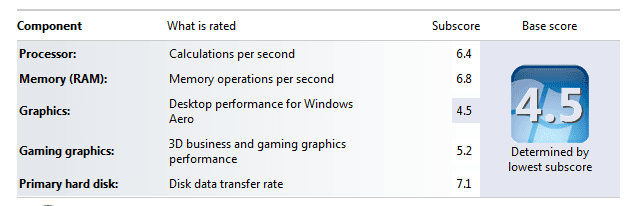
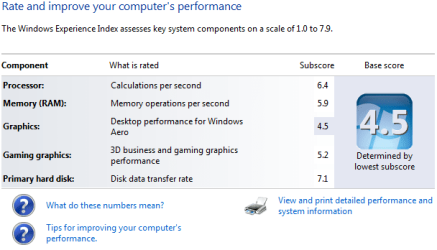
New laptop :D Currently 4GB ram from factory, Crucial 8GB kit ordered today. Curious to see the numbers after upgrade.

Finally got the ram in the mail. :D Updated score... No huge change but I'll take it.
 

Attachments

  • Capture.PNG
    Capture.PNG
    9.9 KB · Views: 14
  • Wei.PNG
    Wei.PNG
    15.5 KB · Views: 14

My Computer My Computer

Computer Manufacturer/Model Number
Samsung Chronos 7
OS
windows 7 Pro 64Bit
CPU
2.2 GHz Intel Core i7-2675QM
Memory
8GB
Graphics Card(s)
Intel HD Graphics 3000/Radeon HD 6490M
Sound Card
Realtek High Definition Audio
Monitor(s) Displays
Built in LCD and external Dell 22 inch LCD
Screen Resolution
1600x900
Hard Drives
1 TB HDD
Internet Speed
20 MBPS Down 1500 KBPS Up
Got 2nd Vertex 2 drive.

performanceinformationa.png


Next one out is the video card. Haven't decided on what is coming in. :D
 

My Computer My Computer

Computer Manufacturer/Model Number
Self built
OS
Windows 8 Pro x64
CPU
Intel Core i7 2600k @ 4.5GHz
Motherboard
ASRock Z68 Extreme4
Memory
16GB Corsair Vengeance 1600MHz
Graphics Card(s)
Palit GTX670 JetStream @1155MHz
Sound Card
Creative X-Fi Titanium PCI-E
Monitor(s) Displays
Iiyama ProLite E2773HDS
Screen Resolution
1920x1080
Hard Drives
Samsung 840 series 250GB,
Toshiba DT01ACA300 3TB (Data),
Western Digital Caviar Green WD30EZRX-00DC0B0 3TB (Backup)
PSU
Corsair TX850
Case
Silverstone Raven RV03
Cooling
Zalman CNPS9900MAX-B
Keyboard
Logitech G15 V2
Mouse
Logitech G500 + Steelseries QCK mat
Internet Speed
100Mbps/100Mbps unlimited
Status
Not open for further replies.
Back
Top