Show Us Your WEI (2)

Status
Not open for further replies.
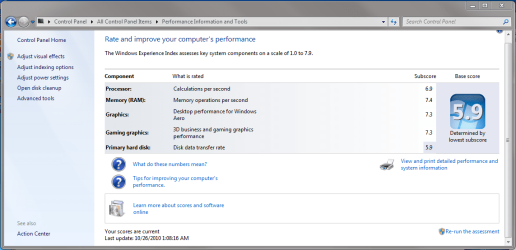
Blue Pearl...who could have guessed?

~Maxx~
.
da59fa57.png
 

My Computer My Computer

Computer Manufacturer/Model Number
HP HPE 270f
OS
Windows 7 x64 Home Premium
CPU
Intel Core i7 930 @ 2.8 Ghz Socket 1366 LGA
Motherboard
Pegatron Truckee v1.04E41
Memory
8 GB 1366 Mhz DDR3 (PC3-10700) RAM
Graphics Card(s)
ATI Radeon 5770 1 GB DDR5 RAM
Sound Card
Realtech High Definition
Monitor(s) Displays
32" Sony Bravia
Screen Resolution
1366 X 768
Hard Drives
Intel 25nm 120 GB Series 320 SSD HD Tune- 265 MBps Read/ 130 MBps Write

LaCie 1TB + 1TB RAID 0 eSATA Drive HD Tune- 160 MBps Read/ 90 MBps Write
Keyboard
Logitech Illuminated
Mouse
Logitech MX Revolution
Internet Speed
36.4 Mbps Maximum on a 37 Mbps Motorola SB501 Modem
Hi everyone, Been away for a while.. Just got built me a new computer with Win Se7en pro installed. Check my specs. :) Not very impressed with my WEI score I never figured the hard drive to hold me back. Hmmm..... May have to sneek in a SSD boot drive :)
 

Attachments

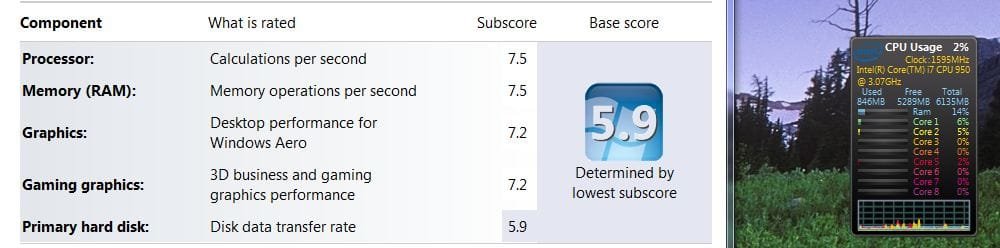
  • WEI + Core Gadget.JPG
    WEI + Core Gadget.JPG
    43.4 KB · Views: 82

My Computer My Computer

Computer type
PC/Desktop
Computer Manufacturer/Model Number
Generic Homebuilt
OS
Windows 7 Home Premium 64bit
CPU
Int i7 950 [3.06] O.C @3.36ghz Quad Core (HT) = 7.6 WEI
Motherboard
ATX LGA1366 DDR3 Asus Rampage III Formula
Memory
DDR3 6GB/Kit PC3-16000 Patriot @ 1733 mhz = 7.9 WEI
Graphics Card(s)
NVIDIA GTS450 1GB PCI-E Zotac = 7.2 WEI
Sound Card
X-Fi 2 Built-in 8-Channel High Definition
Monitor(s) Displays
LG-27"
Screen Resolution
1920 x1200
Hard Drives
Kingston 2.5" 120GB SATA 3.x MLC Int. SSD. = 7.9 WEI, 1TB WD SATA 3.x 64MB Blue.
PSU
600W Coolermaster eXtremePower Plus
Case
Coolermaster Centurion 590
Cooling
Zalman CNPS10X Extreme
Keyboard
Multimedia USB Logitech Wave
Mouse
Team Scorpion (Wired)
Other Info
Windows Experience Index = 7.2 overall
That's pretty decent :) A platter drive will keep your base score down, for sure.
 

My Computer My Computer

Computer Manufacturer/Model Number
Pugh Technologies
OS
W7 Professional x64
CPU
AMD Athlon II X3 445 Rana 3.10 GHz
Motherboard
MSI 870A-G54
Memory
PNY XLR DDR3 1600 4x2GB
Graphics Card(s)
NVIDIA GeForce GTS 450 (fermi) 1GB GDDR5
Sound Card
Realtek ALC892 onboard
Monitor(s) Displays
ASUS VE205t, Viewsonic VX2035WM
Screen Resolution
1600x900, 1600x1050
Hard Drives
977GB Hitachi Hitachi HDS721010CLA332
244GB Western Digital WDC WD2500AAJS-65B4A0
488GB Western Digital WDC WD5000AAJS-00A8B0
488GB Western Digital WDC WD5000AAKS-00UU3A0
PSU
Antec EarthWatts EA650 650W
Case
ThermalTake Armor A90 Mid Tower
Cooling
3x 120mm in, 1x 120mm & 200mm out, self built hydro-cooler
Keyboard
Logitec 55
Mouse
Razer Deathadder
Internet Speed
20 Mbps D/L, 9 Mbps U/L
Hi everyone, Been away for a while.. Just got built me a new computer with Win Se7en pro installed. Check my specs. :) Not very impressed with my WEI score I never figured the hard drive to hold me back. Hmmm..... May have to sneek in a SSD boot drive :)
That's a sweet looking machine that a lot of us would be proud to own, even without the SSD.:geek:
 

My Computer My Computer

Computer type
PC/Desktop
Computer Manufacturer/Model Number
Gigabyte Technology Co., Ltd.
OS
Win 7 Ultimate 64-bit SP1 (desktop)
CPU
Intel Core 2 Duo E8400
Motherboard
Gigabyte GA-EP35-DS3R
Memory
2x 2GB OCZ DDR II SDRAM PC2-6400
Graphics Card(s)
NVIDIA GeForce 9400GT
Monitor(s) Displays
HP 2009m(primary), Acer P191W
Screen Resolution
1600x900, 1440x900
Hard Drives
Internal:WD Caviar Black 640GB 32MB cache 7200RPM
External:Samsung Story Station 1TB HDD desktop drive
500GB Toshiba portable drive
PSU
Antec Earthwatts EA500D
Case
Antec Sonata III
Cooling
4 fans
Keyboard
Logitech Wave
Mouse
Logitech M-SBF90
Internet Speed
Slow due to home Wireless-G router
Antivirus
MSE, Hitman Pro, Malwarebytes
Browser
Chrome and Palemoon
Other Info
Laptop....Acer 5750Z-4835
15.6" HD Widescreen CineCrystal™ LED-backlit LCD Display: (1366x768 resolution, 16:9 aspect ratio)
Intel® Pentium® Processor B940 (2.0GHz, 2MB L3 cache)
Windows® 7 Home Premium,500GB Hard Drive,4GB DDR3 RAM, Intel® HD Graphics,8X DVD-Super Multi Double-Layer Drive
Multi-in-1 Digital Media Card Reader,802.11b/g/n Wi-Fi
Chrome and Palemoon, MSE, Hitman Pro
Hi everyone, Been away for a while.. Just got built me a new computer with Win Se7en pro installed. Check my specs. :) Not very impressed with my WEI score I never figured the hard drive to hold me back. Hmmm..... May have to sneek in a SSD boot drive :)


Nice rig, toss in the SSD boot drive and it will fly :cool:
 

My Computer My Computer

Computer type
PC/Desktop
Computer Manufacturer/Model Number
76~2.0
OS
Windows 7 Ult x64 - SP1/ Windows 8 Pro x64
CPU
Intel Core i5-3570K 4.6GHz
Motherboard
Gigabyte GA-Z77X UD3H, f18
Memory
8GB (2X4GB) DDR3 1600 Corsair Vengeance CL8 1.5v
Graphics Card(s)
Sapphire HD 7770 Vapor-X OC 1GB DDR5
Sound Card
Onboard VIA VT2021
Monitor(s) Displays
22" LCD Dell
Screen Resolution
1680x1050
Hard Drives
Samsung 840Pro 128GB SSD,
Seagate Barracuda 500GB SATA2 7200rpm 32MB cache, Seagate Barracuda 1TB SATA2 7200rpm 32MB cache,
PSU
Corsair HX650W
Case
Cooler Master Storm Scout
Cooling
Corsair H80 2x12cm Noctua NF P12 , 2x14cm case fans
Keyboard
Logitech Wave
Mouse
CM Sentinel
Internet Speed
Dismal
Antivirus
Avast
Browser
Opera Next
Other Info
Haswell laptop: HP Envy 17t-j, i7-4700MQ, GeForce 740M 2GB DDR3, 17.3" Full HD 1920x1080, 16GB RAM, Samsung 840 Pro 128GB, 1TB Hitachi 7200 HDD,
Desktop: eSATA ports,
External eSATA Seagate 500GB SATA2 7200rpm,
External WD USB 500GB
So... I was looking up on the internet about how to unlock a fourth core. Just for fun, and to see how to do it, as I was curious. I finished a process that needed a reboot. BAM right in POST "press 4 to unlock your fourth core"

Success? From Athlon II x3 to Phenom II x4 with the push of a single keyboard key. The only problem? Now I cannot see my core temps in HW monitor...
 

Attachments

  • UL4core.PNG
    UL4core.PNG
    50.9 KB · Views: 75

My Computer My Computer

Computer Manufacturer/Model Number
Pugh Technologies
OS
W7 Professional x64
CPU
AMD Athlon II X3 445 Rana 3.10 GHz
Motherboard
MSI 870A-G54
Memory
PNY XLR DDR3 1600 4x2GB
Graphics Card(s)
NVIDIA GeForce GTS 450 (fermi) 1GB GDDR5
Sound Card
Realtek ALC892 onboard
Monitor(s) Displays
ASUS VE205t, Viewsonic VX2035WM
Screen Resolution
1600x900, 1600x1050
Hard Drives
977GB Hitachi Hitachi HDS721010CLA332
244GB Western Digital WDC WD2500AAJS-65B4A0
488GB Western Digital WDC WD5000AAJS-00A8B0
488GB Western Digital WDC WD5000AAKS-00UU3A0
PSU
Antec EarthWatts EA650 650W
Case
ThermalTake Armor A90 Mid Tower
Cooling
3x 120mm in, 1x 120mm & 200mm out, self built hydro-cooler
Keyboard
Logitec 55
Mouse
Razer Deathadder
Internet Speed
20 Mbps D/L, 9 Mbps U/L
Desktop and Laptop - both with SSD

Updates ..
I7-920, nVidia 260, 12Gb RAM, OCZ Vertex 2 plus 2 1TB HD drives:

2cpqjys.jpg


And here is my little old laptop with a dual core AMD and a Kingston SSD:

2lvee5l.jpg
 

My Computer My Computer

OS
Windows 7 Ultimate
CPU
I7-920
Motherboard
TBGM01
Memory
12 GB DDR3-1333
Graphics Card(s)
nVidia GTX 260
Sound Card
none
Monitor(s) Displays
2xGateway FHX2300
Hard Drives
OCZ Vertex 2
Kingston SNV425S2/64GB SSD
ST31000528AS Seagate
WDC WD1001FALS x 2 Western Digital
PSU
750w
Cooling
Air
Internet Speed
30M down, 1.8M up
Other Info
Router DGL-400
Time for SLI 460's? ;)

Great scores. A pretty well done pair of machines I think.
 
Last edited:

My Computer My Computer

Computer Manufacturer/Model Number
Pugh Technologies
OS
W7 Professional x64
CPU
AMD Athlon II X3 445 Rana 3.10 GHz
Motherboard
MSI 870A-G54
Memory
PNY XLR DDR3 1600 4x2GB
Graphics Card(s)
NVIDIA GeForce GTS 450 (fermi) 1GB GDDR5
Sound Card
Realtek ALC892 onboard
Monitor(s) Displays
ASUS VE205t, Viewsonic VX2035WM
Screen Resolution
1600x900, 1600x1050
Hard Drives
977GB Hitachi Hitachi HDS721010CLA332
244GB Western Digital WDC WD2500AAJS-65B4A0
488GB Western Digital WDC WD5000AAJS-00A8B0
488GB Western Digital WDC WD5000AAKS-00UU3A0
PSU
Antec EarthWatts EA650 650W
Case
ThermalTake Armor A90 Mid Tower
Cooling
3x 120mm in, 1x 120mm & 200mm out, self built hydro-cooler
Keyboard
Logitec 55
Mouse
Razer Deathadder
Internet Speed
20 Mbps D/L, 9 Mbps U/L
Updates ..
I7-920, nVidia 260, 12Gb RAM, OCZ Vertex 2 plus 2 1TB HD drives:


And here is my little old laptop with a dual core AMD and a Kingston SSD:


Nice scores, you've got nice rigs :)
 

My Computer My Computer

Computer type
PC/Desktop
Computer Manufacturer/Model Number
76~2.0
OS
Windows 7 Ult x64 - SP1/ Windows 8 Pro x64
CPU
Intel Core i5-3570K 4.6GHz
Motherboard
Gigabyte GA-Z77X UD3H, f18
Memory
8GB (2X4GB) DDR3 1600 Corsair Vengeance CL8 1.5v
Graphics Card(s)
Sapphire HD 7770 Vapor-X OC 1GB DDR5
Sound Card
Onboard VIA VT2021
Monitor(s) Displays
22" LCD Dell
Screen Resolution
1680x1050
Hard Drives
Samsung 840Pro 128GB SSD,
Seagate Barracuda 500GB SATA2 7200rpm 32MB cache, Seagate Barracuda 1TB SATA2 7200rpm 32MB cache,
PSU
Corsair HX650W
Case
Cooler Master Storm Scout
Cooling
Corsair H80 2x12cm Noctua NF P12 , 2x14cm case fans
Keyboard
Logitech Wave
Mouse
CM Sentinel
Internet Speed
Dismal
Antivirus
Avast
Browser
Opera Next
Other Info
Haswell laptop: HP Envy 17t-j, i7-4700MQ, GeForce 740M 2GB DDR3, 17.3" Full HD 1920x1080, 16GB RAM, Samsung 840 Pro 128GB, 1TB Hitachi 7200 HDD,
Desktop: eSATA ports,
External eSATA Seagate 500GB SATA2 7200rpm,
External WD USB 500GB
Boy oh boy this is looking more and more like I'm going to have to get that SSD. If I'm not wrong even if I get a platter drive for the SATA 6.0Gb/s conections, It still won't be that much of a different score. Or do I have my facts messed up? Any ideas?
 

My Computer My Computer

Computer type
PC/Desktop
Computer Manufacturer/Model Number
Generic Homebuilt
OS
Windows 7 Home Premium 64bit
CPU
Int i7 950 [3.06] O.C @3.36ghz Quad Core (HT) = 7.6 WEI
Motherboard
ATX LGA1366 DDR3 Asus Rampage III Formula
Memory
DDR3 6GB/Kit PC3-16000 Patriot @ 1733 mhz = 7.9 WEI
Graphics Card(s)
NVIDIA GTS450 1GB PCI-E Zotac = 7.2 WEI
Sound Card
X-Fi 2 Built-in 8-Channel High Definition
Monitor(s) Displays
LG-27"
Screen Resolution
1920 x1200
Hard Drives
Kingston 2.5" 120GB SATA 3.x MLC Int. SSD. = 7.9 WEI, 1TB WD SATA 3.x 64MB Blue.
PSU
600W Coolermaster eXtremePower Plus
Case
Coolermaster Centurion 590
Cooling
Zalman CNPS10X Extreme
Keyboard
Multimedia USB Logitech Wave
Mouse
Team Scorpion (Wired)
Other Info
Windows Experience Index = 7.2 overall
Spinners are limited to the speed of the spinning disk and the speed of the reading arm.

As far as I've been able to find info on these 6.0Gb/s connections and HDDs, there is not much use except for fast SSDs, the HDDs can't max out the 3.0Gb/s bandwidth.
 

My Computer My Computer

Computer type
PC/Desktop
Computer Manufacturer/Model Number
76~2.0
OS
Windows 7 Ult x64 - SP1/ Windows 8 Pro x64
CPU
Intel Core i5-3570K 4.6GHz
Motherboard
Gigabyte GA-Z77X UD3H, f18
Memory
8GB (2X4GB) DDR3 1600 Corsair Vengeance CL8 1.5v
Graphics Card(s)
Sapphire HD 7770 Vapor-X OC 1GB DDR5
Sound Card
Onboard VIA VT2021
Monitor(s) Displays
22" LCD Dell
Screen Resolution
1680x1050
Hard Drives
Samsung 840Pro 128GB SSD,
Seagate Barracuda 500GB SATA2 7200rpm 32MB cache, Seagate Barracuda 1TB SATA2 7200rpm 32MB cache,
PSU
Corsair HX650W
Case
Cooler Master Storm Scout
Cooling
Corsair H80 2x12cm Noctua NF P12 , 2x14cm case fans
Keyboard
Logitech Wave
Mouse
CM Sentinel
Internet Speed
Dismal
Antivirus
Avast
Browser
Opera Next
Other Info
Haswell laptop: HP Envy 17t-j, i7-4700MQ, GeForce 740M 2GB DDR3, 17.3" Full HD 1920x1080, 16GB RAM, Samsung 840 Pro 128GB, 1TB Hitachi 7200 HDD,
Desktop: eSATA ports,
External eSATA Seagate 500GB SATA2 7200rpm,
External WD USB 500GB
That figures.. :) Thanks for the heads up...
 

My Computer My Computer

Computer type
PC/Desktop
Computer Manufacturer/Model Number
Generic Homebuilt
OS
Windows 7 Home Premium 64bit
CPU
Int i7 950 [3.06] O.C @3.36ghz Quad Core (HT) = 7.6 WEI
Motherboard
ATX LGA1366 DDR3 Asus Rampage III Formula
Memory
DDR3 6GB/Kit PC3-16000 Patriot @ 1733 mhz = 7.9 WEI
Graphics Card(s)
NVIDIA GTS450 1GB PCI-E Zotac = 7.2 WEI
Sound Card
X-Fi 2 Built-in 8-Channel High Definition
Monitor(s) Displays
LG-27"
Screen Resolution
1920 x1200
Hard Drives
Kingston 2.5" 120GB SATA 3.x MLC Int. SSD. = 7.9 WEI, 1TB WD SATA 3.x 64MB Blue.
PSU
600W Coolermaster eXtremePower Plus
Case
Coolermaster Centurion 590
Cooling
Zalman CNPS10X Extreme
Keyboard
Multimedia USB Logitech Wave
Mouse
Team Scorpion (Wired)
Other Info
Windows Experience Index = 7.2 overall
You're welcome :)
 

My Computer My Computer

Computer type
PC/Desktop
Computer Manufacturer/Model Number
76~2.0
OS
Windows 7 Ult x64 - SP1/ Windows 8 Pro x64
CPU
Intel Core i5-3570K 4.6GHz
Motherboard
Gigabyte GA-Z77X UD3H, f18
Memory
8GB (2X4GB) DDR3 1600 Corsair Vengeance CL8 1.5v
Graphics Card(s)
Sapphire HD 7770 Vapor-X OC 1GB DDR5
Sound Card
Onboard VIA VT2021
Monitor(s) Displays
22" LCD Dell
Screen Resolution
1680x1050
Hard Drives
Samsung 840Pro 128GB SSD,
Seagate Barracuda 500GB SATA2 7200rpm 32MB cache, Seagate Barracuda 1TB SATA2 7200rpm 32MB cache,
PSU
Corsair HX650W
Case
Cooler Master Storm Scout
Cooling
Corsair H80 2x12cm Noctua NF P12 , 2x14cm case fans
Keyboard
Logitech Wave
Mouse
CM Sentinel
Internet Speed
Dismal
Antivirus
Avast
Browser
Opera Next
Other Info
Haswell laptop: HP Envy 17t-j, i7-4700MQ, GeForce 740M 2GB DDR3, 17.3" Full HD 1920x1080, 16GB RAM, Samsung 840 Pro 128GB, 1TB Hitachi 7200 HDD,
Desktop: eSATA ports,
External eSATA Seagate 500GB SATA2 7200rpm,
External WD USB 500GB
Spinners are limited to the speed of the spinning disk and the speed of the reading arm.

As far as I've been able to find info on these 6.0Gb/s connections and HDDs, there is not much use except for fast SSDs, the HDDs can't max out the 3.0Gb/s bandwidth.

Even SATA III with only one device will not perform any better than a fast SSD on SATA II. i.e. almost all Sandforce drives on a SATA II connection will outperform ALL of the Crucial drives in write performance even if the Crucial is on a SATA III controller.

Here is why you absolutely must get an SSD drive:

fc1d8h.jpg


vs

331fva1.jpg


The lowest performing numbers in burst mode on the SSD (1 Mb) are still an order of magnitude faster than the best the Seagate can provide and the really important numbers (4K) for loading an OS are in the order of 100 times faster in favour of the SSD. And this Seagate is faster by 10% than both my WD1001FALS.

Here's the kicker ... the Kingston SNV425S2/64gb drive I first bought has terrible performance in the 4K and 16K writes. However, it is still so fast compared to the little 5400rpm Hitachi HTS542516K9SA00 in my Acer 4520 that it loads Windows 7 in 35 seconds vs 2 minutes and something. And when I replaced the Kingston with the OCZ on my desktop ... I'm being honest ... I cannot feel ... note the word feel ... any difference. Benchmark numbers favour the OCZ over the Kingston but it doesn't feel any faster, nor does it load the OS any faster.

If you are good at keeping things to a minimum you can easily put Windows 7 and a few apps on a 30 or 40Gb SSD and put your swapfile and major apps on a seperate Seagate or Western Digital.
As they are now going for well under $100 for drives between 30 and 64Gb ... what's the hold up !
 

My Computer My Computer

OS
Windows 7 Ultimate
CPU
I7-920
Motherboard
TBGM01
Memory
12 GB DDR3-1333
Graphics Card(s)
nVidia GTX 260
Sound Card
none
Monitor(s) Displays
2xGateway FHX2300
Hard Drives
OCZ Vertex 2
Kingston SNV425S2/64GB SSD
ST31000528AS Seagate
WDC WD1001FALS x 2 Western Digital
PSU
750w
Cooling
Air
Internet Speed
30M down, 1.8M up
Other Info
Router DGL-400
Quote "If you are good at keeping things to a minimum you can easily put Windows 7 and a few apps on a 30 or 40Gb SSD and put your swapfile and major apps on a seperate Seagate or Western Digital.
As they are now going for well under $100 for drives between 30 and 64Gb ... what's the hold up !"

I Realize this is a real Noob question, but how do you put the swap file and the Temp files on the spinner. I am fixing to go to a OCZ SSD and am just trying to get things straight. Thanks
 

My Computers My Computers

System One System Two

  • Computer type
    PC/Desktop
    Computer Manufacturer/Model Number
    ALWAYS UNDER CONSTRUCTION
    OS
    Windows 11 Pro
    CPU
    Ryzen 9 5900X
    Motherboard
    Asus X570 Crosshair Viii Hero
    Memory
    32GB G Skill DDR4-3600
    Graphics Card(s)
    EVGA RTX 3080 FTW 3 Ultra
    Sound Card
    On Board/Sennheiser PC37X Headset
    Monitor(s) Displays
    3 X Asus 27"
    Screen Resolution
    2560x1440
    Hard Drives
    2 X 1 TB NVME drives
    PSU
    EVGA 850
    Case
    Phanteks Eclipse P400A
    Cooling
    EVGA 280 AIO
    Keyboard
    Logitech G510s/ Logitech G13
    Mouse
    Logitech G502
    Internet Speed
    24/1
    Antivirus
    ESET/MBAM Pro/SAS Pro
    Browser
    Chrome/ Firefox/ Edge
  • Computer type
    Laptop
    System Manufacturer/Model Number
    Dell 16 Plus
    OS
    Windows 11 Pro
    CPU
    Intel Ultra 9 288V
    Memory
    32 GB LPDDR5X 8533
    Monitor(s) Displays
    16" Mini-LED HDR600 Touch 90 Hz
    Screen Resolution
    2560X1600
    Hard Drives
    1 TB NVME
If you are good at keeping things to a minimum you can easily put Windows 7 and a few apps on a 30 or 40Gb SSD and put your swapfile and major apps on a seperate Seagate or Western Digital.
As they are now going for well under $100 for drives between 30 and 64Gb ... what's the hold up !


Agree.

Check my specs, you're preaching to the choir ;)

Have had my SSD for over six months, it's been a blast tweaking it.

I've been running my OS on a separate partition from my data for at least 15 years, so using a small boot drive was a no brainer.

The highly advertised sequential rates don't mean anything compared to the random read/write and access times that make SSDs so fast.

Best upgrade for pure performance there is, you would have to drag me kicking and screaming to put my OS and programs on a spinner again.

My OS loads in 18 seconds with this SSD.

The 25nm are coming soon for twice the size at approximately the same price point and faster.
 

My Computer My Computer

Computer type
PC/Desktop
Computer Manufacturer/Model Number
76~2.0
OS
Windows 7 Ult x64 - SP1/ Windows 8 Pro x64
CPU
Intel Core i5-3570K 4.6GHz
Motherboard
Gigabyte GA-Z77X UD3H, f18
Memory
8GB (2X4GB) DDR3 1600 Corsair Vengeance CL8 1.5v
Graphics Card(s)
Sapphire HD 7770 Vapor-X OC 1GB DDR5
Sound Card
Onboard VIA VT2021
Monitor(s) Displays
22" LCD Dell
Screen Resolution
1680x1050
Hard Drives
Samsung 840Pro 128GB SSD,
Seagate Barracuda 500GB SATA2 7200rpm 32MB cache, Seagate Barracuda 1TB SATA2 7200rpm 32MB cache,
PSU
Corsair HX650W
Case
Cooler Master Storm Scout
Cooling
Corsair H80 2x12cm Noctua NF P12 , 2x14cm case fans
Keyboard
Logitech Wave
Mouse
CM Sentinel
Internet Speed
Dismal
Antivirus
Avast
Browser
Opera Next
Other Info
Haswell laptop: HP Envy 17t-j, i7-4700MQ, GeForce 740M 2GB DDR3, 17.3" Full HD 1920x1080, 16GB RAM, Samsung 840 Pro 128GB, 1TB Hitachi 7200 HDD,
Desktop: eSATA ports,
External eSATA Seagate 500GB SATA2 7200rpm,
External WD USB 500GB
... snip ... snip ...

I Realize this is a real Noob question, but how do you put the swap file and the Temp files on the spinner. I am fixing to go to a OCZ SSD and am just trying to get things straight. Thanks

Click on Control Panel
Click on System
Click on Advance system settings
Click on Advanced
Click Settings for Performance
Click on Advanced
Click on Change under Virtual memory


Read carefully and ask for help online if necessary but it should be pretty self-explanatory. Change Paging File Size on your C drive to none and on your D: drive or whereever, select your new Pagefile.

p.s. If you have 6Gb or more of RAM a pagefile should not be necessary. I do a lot of photo editing and I have 12 Gb of RAM. I have not had a pagefile since June when I bought my first SSD. No problems of ANY kind.
 

My Computer My Computer

OS
Windows 7 Ultimate
CPU
I7-920
Motherboard
TBGM01
Memory
12 GB DDR3-1333
Graphics Card(s)
nVidia GTX 260
Sound Card
none
Monitor(s) Displays
2xGateway FHX2300
Hard Drives
OCZ Vertex 2
Kingston SNV425S2/64GB SSD
ST31000528AS Seagate
WDC WD1001FALS x 2 Western Digital
PSU
750w
Cooling
Air
Internet Speed
30M down, 1.8M up
Other Info
Router DGL-400
usbhubman, Thanks for the help - I need all that I can get.
 

My Computers My Computers

System One System Two

  • Computer type
    PC/Desktop
    Computer Manufacturer/Model Number
    ALWAYS UNDER CONSTRUCTION
    OS
    Windows 11 Pro
    CPU
    Ryzen 9 5900X
    Motherboard
    Asus X570 Crosshair Viii Hero
    Memory
    32GB G Skill DDR4-3600
    Graphics Card(s)
    EVGA RTX 3080 FTW 3 Ultra
    Sound Card
    On Board/Sennheiser PC37X Headset
    Monitor(s) Displays
    3 X Asus 27"
    Screen Resolution
    2560x1440
    Hard Drives
    2 X 1 TB NVME drives
    PSU
    EVGA 850
    Case
    Phanteks Eclipse P400A
    Cooling
    EVGA 280 AIO
    Keyboard
    Logitech G510s/ Logitech G13
    Mouse
    Logitech G502
    Internet Speed
    24/1
    Antivirus
    ESET/MBAM Pro/SAS Pro
    Browser
    Chrome/ Firefox/ Edge
  • Computer type
    Laptop
    System Manufacturer/Model Number
    Dell 16 Plus
    OS
    Windows 11 Pro
    CPU
    Intel Ultra 9 288V
    Memory
    32 GB LPDDR5X 8533
    Monitor(s) Displays
    16" Mini-LED HDR600 Touch 90 Hz
    Screen Resolution
    2560X1600
    Hard Drives
    1 TB NVME
Wouldn't leaving the pagefile on a spinner sound bad for the performance? I know it would do a Loy of writes to the SSD and would take up a lot of space which could otherwise have use for apps, but if u are low on RAM constant access to the drive will slow down the pc. It is always better to invest on more RAM (6gb or more) and not use a pagefile at all for best performance.
 

My Computer My Computer

Computer Manufacturer/Model Number
Self built
OS
Windows 8 Pro x64
CPU
Intel Core i7 2600k @ 4.5GHz
Motherboard
ASRock Z68 Extreme4
Memory
16GB Corsair Vengeance 1600MHz
Graphics Card(s)
Palit GTX670 JetStream @1155MHz
Sound Card
Creative X-Fi Titanium PCI-E
Monitor(s) Displays
Iiyama ProLite E2773HDS
Screen Resolution
1920x1080
Hard Drives
Samsung 840 series 250GB,
Toshiba DT01ACA300 3TB (Data),
Western Digital Caviar Green WD30EZRX-00DC0B0 3TB (Backup)
PSU
Corsair TX850
Case
Silverstone Raven RV03
Cooling
Zalman CNPS9900MAX-B
Keyboard
Logitech G15 V2
Mouse
Logitech G500 + Steelseries QCK mat
Internet Speed
100Mbps/100Mbps unlimited
Wouldn't leaving the pagefile on a spinner sound bad for the performance? I know it would do a Loy of writes to the SSD and would take up a lot of space which could otherwise have use for apps, but if u are low on RAM constant access to the drive will slow down the pc. It is always better to invest on more RAM (6gb or more) and not use a pagefile at all for best performance.

General consensus is move the Pagefile to another drive. You can ensure the fastest performance by using an empty spinner and putting the pagefile on first before putting any data on. Overall performance will improve by using the space that the pagefile would have used for apps.

Another performance enhancer is to remove hyberfil.sys if you don't need it. Most people either shut their system down or put it to sleep. Hibernate is handy on laptops, but then, most laptops don't have more than 2 or 3Gb of RAM so you're not going to take a big hit on disk space there. I have a pretty nice setup and this is the 3rd mobo in a row that I have had that does NOT come back from sleep properly - network most often goes to sleep and does not wake up. Windows 7 will install hiberfil even though, with more than 4 gigs of ram the system can't hibernate anyway !!!! yeah I know .. how stupid. So, especially on an SSD where space is at a premium, do away with hiberfil.sys if you don't need it or use it. It will be equal to + the amount of RAM on your system so if you have 12G of RAM for instance, the OS will install a 12G hiberfil.sys even though Hibernate will be missing from the shutdown menu. Go figure. Further info:
 

My Computer My Computer

OS
Windows 7 Ultimate
CPU
I7-920
Motherboard
TBGM01
Memory
12 GB DDR3-1333
Graphics Card(s)
nVidia GTX 260
Sound Card
none
Monitor(s) Displays
2xGateway FHX2300
Hard Drives
OCZ Vertex 2
Kingston SNV425S2/64GB SSD
ST31000528AS Seagate
WDC WD1001FALS x 2 Western Digital
PSU
750w
Cooling
Air
Internet Speed
30M down, 1.8M up
Other Info
Router DGL-400
Status
Not open for further replies.
Back
Top