Show Us Your WEI (2)

Status
Not open for further replies.
Update.
 

Attachments

  • Windows 7 WEI.png
    Windows 7 WEI.png
    26.9 KB · Views: 369
  • img0083ij.jpg
    img0083ij.jpg
    63.2 KB · Views: 40

My Computer My Computer

OS
Windows 7 Home Premium x64
CPU
Core i7 930 @ 4.2GHz/1.33v
Motherboard
EVGA X58 Classified E760
Memory
3x2GB Corsair Dominator GT @ 2000MHz
Graphics Card(s)
2x EVGA GTX 480 Superclocked + (Backplate/High Flow Bracket)
Sound Card
Sound Blaster X-Fi Fatal1ty Professional
Monitor(s) Displays
Dell U2711
Screen Resolution
2560x1440
Hard Drives
Intel X-25M G2 80GB
2x 1TB Samsung F3 RAID 0
PSU
Corsair AX1200
Case
Corsair Obsidian 800D
Cooling
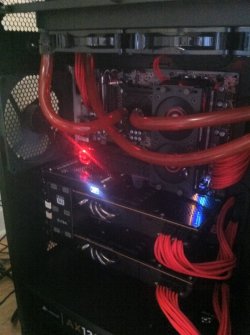
EK Supreme HF Nickel Acetal + XSPC RX360
Yes, I've noticed that the Turbo mode is still on, even if it is not an option in the BIOS.

Two key points, high temps are bad and you should think about getting an after market CPU cooler.
The Intel cooler is very limited. You can get a good air cooler for $20-50.

Make sure your case gets proper air ventilation, don't put it in a small closed cabinet.

CPU thermal paste is very important to get applied correctly, read up on it, there are a lot of info on how to do it. Too little doesn't work, too much doesn't work either, just remember you are filling micro holes on the metal finish so it needs to be very thin, almost transparent. Ensure the cooler mounting bolts are tight.
I have Noctua NH14 CPU cooler with ArticSilver 5 applied, as per instruction at ArticSilver site. You did summarize the process well, better than the site did.

I don't use the cooler that comes with the CPU, it's more of a noise reduction purpose than anything else. The tower also have four case fans; two on the front pulling in air, while the back ones are pushing air out. There's one internal fan for the four hard drive and of course the standard CPU, power supply, and video card fan(s). It's still quite since the fans run at 900-1200 RPM.

Thanks for the specs...

The RealTemp 3.6 indicates TJmax as 99 degree Celsius; evidently, that's an incorrect value then, right?

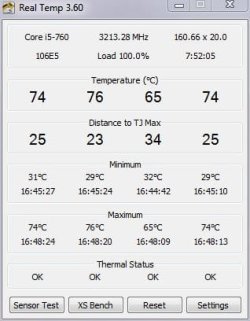
Here are some of the temperatures, using Real Temp.

Default settings in the BIOS, no OC:

I am not sure that the temperature for the torture test is normal. Other than that, the system runs just fined OC-d to 3.2.

The temperature difference from the idle to the torture is about 40; is that a "normal" swing? Once the torture is over, the temperature quickly drops down to the idle values.

The RealTemp TJmax of 99°C is wrong for your CPU, it's the default value RealTemp uses. Each CPU has a different max temp safe limit, RealTemp doesn't change automatically.

Mine idles at 29°C and with Prime95 torture test at 57°C.
My OC goes to 3.84 on 1&2 cores and 3.36 on 3&4 cores.

I would put the fan on your CPU cooler, it will cool much better when your CPU is running fast. You should have about 30°C increase when running Prime95.
The fan should drop your temps by 10°C when the CPU is running at max speed.
 

My Computer My Computer

Computer type
PC/Desktop
Computer Manufacturer/Model Number
76~2.0
OS
Windows 7 Ult x64 - SP1/ Windows 8 Pro x64
CPU
Intel Core i5-3570K 4.6GHz
Motherboard
Gigabyte GA-Z77X UD3H, f18
Memory
8GB (2X4GB) DDR3 1600 Corsair Vengeance CL8 1.5v
Graphics Card(s)
Sapphire HD 7770 Vapor-X OC 1GB DDR5
Sound Card
Onboard VIA VT2021
Monitor(s) Displays
22" LCD Dell
Screen Resolution
1680x1050
Hard Drives
Samsung 840Pro 128GB SSD,
Seagate Barracuda 500GB SATA2 7200rpm 32MB cache, Seagate Barracuda 1TB SATA2 7200rpm 32MB cache,
PSU
Corsair HX650W
Case
Cooler Master Storm Scout
Cooling
Corsair H80 2x12cm Noctua NF P12 , 2x14cm case fans
Keyboard
Logitech Wave
Mouse
CM Sentinel
Internet Speed
Dismal
Antivirus
Avast
Browser
Opera Next
Other Info
Haswell laptop: HP Envy 17t-j, i7-4700MQ, GeForce 740M 2GB DDR3, 17.3" Full HD 1920x1080, 16GB RAM, Samsung 840 Pro 128GB, 1TB Hitachi 7200 HDD,
Desktop: eSATA ports,
External eSATA Seagate 500GB SATA2 7200rpm,
External WD USB 500GB

My Computer My Computer

Computer type
PC/Desktop
OS
Windows 10 Home x64
CPU
INTEL Core i5-750 Quad-Core 3.37GHz
Motherboard
ASUS P7P55D
Memory
HyperX Fury Black Series 8GB (2 x 4GB) 1866Mhz
Graphics Card(s)
EVGA GeForce GTX 750 Superclocked 1GB 128-Bit GDDR5
Monitor(s) Displays
LG 32MA68HY 32" IPS
Screen Resolution
1920 x 1080
Hard Drives
Samsung 840 Evo 120GB, SEAGATE 500GB Barracuda® 7200.12, SATA 3 Gb/s, 7200 RPM, 16MB cache
PSU
ANTEC TruePower New TP-550, 80 PLUS, 550W
Case
ANTEC Three Hundred Illusion
Cooling
COOLER MASTER Hyper 212 Plus, 4 x 120mm 1 x 140mm Noctua's
Internet Speed
85 + Mbps
Antivirus
Avast
Browser
Vivaldi
The RealTemp TJmax of 99°C is wrong for your CPU, it's the default value RealTemp uses. Each CPU has a different max temp safe limit, RealTemp doesn't change automatically.

Mine idles at 29°C and with Prime95 torture test at 57°C.
My OC goes to 3.84 on 1&2 cores and 3.36 on 3&4 cores.

I would put the fan on your CPU cooler, it will cool much better when your CPU is running fast. You should have about 30°C increase when running Prime95.
The fan should drop your temps by 10°C when the CPU is running at max speed.

Dave, are you sure? I've done a lot of reading on this, and while I've yet to see an Intel page saying X is the TJmax, it is widely said that both the i5 750 and i5 760 have a TJmax of approx. 100c. It is said that the creators of Real Temp have done extensive testing with DTS on the case and the actual die. I am led to believe that this is the actual TJmax for these CPUs. While it is a relative moot point if your max temps don't exceed say 70c. Any clarification would be great. A Guy
 

My Computer My Computer

Computer type
PC/Desktop
OS
Windows 10 Home x64
CPU
INTEL Core i5-750 Quad-Core 3.37GHz
Motherboard
ASUS P7P55D
Memory
HyperX Fury Black Series 8GB (2 x 4GB) 1866Mhz
Graphics Card(s)
EVGA GeForce GTX 750 Superclocked 1GB 128-Bit GDDR5
Monitor(s) Displays
LG 32MA68HY 32" IPS
Screen Resolution
1920 x 1080
Hard Drives
Samsung 840 Evo 120GB, SEAGATE 500GB Barracuda® 7200.12, SATA 3 Gb/s, 7200 RPM, 16MB cache
PSU
ANTEC TruePower New TP-550, 80 PLUS, 550W
Case
ANTEC Three Hundred Illusion
Cooling
COOLER MASTER Hyper 212 Plus, 4 x 120mm 1 x 140mm Noctua's
Internet Speed
85 + Mbps
Antivirus
Avast
Browser
Vivaldi
any1 seen the WEI score for the i7 980x or any xeon?
 

My Computer My Computer

Computer type
PC/Desktop
Computer Manufacturer/Model Number
Acer M802
OS
Win 7 & 10 x64
CPU
Intel(R) Core(TM)2 Quad CPU Q8400 @ 2.66GHz (4 CPUs), ~2.7GH
Motherboard
MB.SCQ07.002 MB KIT G43 ICH10R HMII EUPLOT6 ECS R
Memory
8GB DDR2
Graphics Card(s)
HD 6970 2 GB
Sound Card
Realtek ALC 888s
Monitor(s) Displays
AOC
Screen Resolution
1920x1080 60hz
Hard Drives
WD Black 1 TB

WD My Book Essential 1 TB external HDD
PSU
Corsair TX650m
Case
CM 690 II Advanced mid tower
Cooling
fan
The RealTemp TJmax of 99°C is wrong for your CPU, it's the default value RealTemp uses. Each CPU has a different max temp safe limit, RealTemp doesn't change automatically.

Mine idles at 29°C and with Prime95 torture test at 57°C.
My OC goes to 3.84 on 1&2 cores and 3.36 on 3&4 cores.
That's a "cool" machine you've got there...

Mine does idle about the same value with open case, but during the torture it goes up to the mid-seventies:

Prime95_torture_open case.JPG

Closing it up and placing the case back into my desk increases both values by 6-8 degree Celsius.
I would put the fan on your CPU cooler, it will cool much better when your CPU is running fast. You should have about 30°C increase when running Prime95. The fan should drop your temps by 10°C when the CPU is running at max speed.
I do have a fan on the heatsink that is also right next to the case fan in the back and top of the case. I used Zalman heatsink in the same case for my Core2 CPU and I could disconnect the CPU fan, close the case, and the CPU temperature didn't change much. That's how well the two case fans moved the air around the CPU.

The Noctua heatsink did come with two fans, 120 and 140mm, and I am only using 140mm one due to space restriction and keeping the machine quite as well. Maybe I should reset the heatsink, figure out a way for adding the second fan, or should have stayed with Zalman.
 

Attachments

  • Prime95_torture_open case.JPG
    Prime95_torture_open case.JPG
    27.8 KB · Views: 8
Last edited:

My Computer My Computer

Computer type
PC/Desktop
Computer Manufacturer/Model Number
Custom built at Home
OS
Windows 7 64-bit, Windows 8.1 64-bit, OSX El Capitan, Windows 10 (VMware)
CPU
Intel i5-3350P 3.1 GHz
Motherboard
Gigabyte GA-Z77X-UP5 TH
Memory
16 GBs GSkill Sniper
Graphics Card(s)
Radeon HD 7850
Sound Card
VIA HD Audio
Monitor(s) Displays
Dell U2410 24"
Screen Resolution
1920x1200
Hard Drives
1 x Intel 520 240 GBs
1 x Seagate 1TBs SATA 2.0,
1 x Seagate 1TBs eSATA 2.0
PSU
Thermaltake 850W
Case
Antec P183
Cooling
Noctua NH-D14 Heatsink 2 x 120mm fans, 4 x 120mm case fans
Keyboard
Dell Multimedia keyboard
Mouse
Logitech Trackball
Internet Speed
28.5 Mb/s
The RealTemp TJmax of 99°C is wrong for your CPU, it's the default value RealTemp uses. Each CPU has a different max temp safe limit, RealTemp doesn't change automatically.

Mine idles at 29°C and with Prime95 torture test at 57°C.
My OC goes to 3.84 on 1&2 cores and 3.36 on 3&4 cores.

I would put the fan on your CPU cooler, it will cool much better when your CPU is running fast. You should have about 30°C increase when running Prime95.
The fan should drop your temps by 10°C when the CPU is running at max speed.

Dave, are you sure? I've done a lot of reading on this, and while I've yet to see an Intel page saying X is the TJmax, it is widely said that both the i5 750 and i5 760 have a TJmax of approx. 100c. It is said that the creators of Real Temp have done extensive testing with DTS on the case and the actual die. I am led to believe that this is the actual TJmax for these CPUs. While it is a relative moot point if your max temps don't exceed say 70c. Any clarification would be great. A Guy

Intel® Core™ i5-750 Processor (8M Cache, 2.66 GHz)

Tcase is the CPU, add 5°C for the core temps.

72.7 °C + 5°C=77.7°C is the max safe temp recommended by Intel.


This thread explains it pretty well.


Scroll down to
CompuTronix's post.


Core i and Core 2 processors have 2 different types of temperature sensors; a CPU case (not computer case) Thermal Diode centered under the Cores, and Digital Thermal Sensors located on each Core. The case Thermal Diode measures Tcase(Temperature case), which is CPU temperature, and the Digital Thermal Sensors measure Tjunction (Temperaturejunction), which is Core temperature. Since these sensors measure 2 distinct thermal levels, there is a 5c temperature difference between them, which is Tcase to Tjunction Gradient. Core i7’s / i5’s and Core 2 Quad’s have 1 Tcase and 4Tjunction sensors, while Core 2 Duo's have 1 Tcase and 2 Tjunction sensors ...

The Thermal Specification shown in Intel's Processor Spec Finder is Tcase Max (CPU) not Tjunction (Core), which is a very common misconception among most enthusiasts. Since there's a 5c gradient between the CPU sensor and the Core sensors, (shown in the following Intel document) - http://arxiv.org/ftp/arxiv/papers/0709/0709.1861.pdf - just add 5c to the value shown in the Spec Finder to determine the corresponding Core temperature, which is 73c for all Core i7 9xx variants.​

Intel's second and frequently misunderstood Thermal Specification, Tjunction Max, (100c for all Core i7 9xx variants) applies to overtemp protection such as Throttle and Shutdown, so you don't toast your transistors. As such, any i7 9xx Core temperatures which exceed 73c should be considered "overtemp". Further, when specifications are exceeded, then processor degradation becomes a concern, which is explained in the following AnandTech article -http://anandtech.com/cpuchipsets/i [...] i=3251&p=6

To clarify my post above, most people think TJmax is the max temp they can run there system at, it's actually the over temp protection functions that keeps you from melting your CPU. To make shorter explainations I usually assume they mean max temp they should run there system at.

Intel CPU's maximum voltages and temps!
 
Last edited:

My Computer My Computer

Computer type
PC/Desktop
Computer Manufacturer/Model Number
76~2.0
OS
Windows 7 Ult x64 - SP1/ Windows 8 Pro x64
CPU
Intel Core i5-3570K 4.6GHz
Motherboard
Gigabyte GA-Z77X UD3H, f18
Memory
8GB (2X4GB) DDR3 1600 Corsair Vengeance CL8 1.5v
Graphics Card(s)
Sapphire HD 7770 Vapor-X OC 1GB DDR5
Sound Card
Onboard VIA VT2021
Monitor(s) Displays
22" LCD Dell
Screen Resolution
1680x1050
Hard Drives
Samsung 840Pro 128GB SSD,
Seagate Barracuda 500GB SATA2 7200rpm 32MB cache, Seagate Barracuda 1TB SATA2 7200rpm 32MB cache,
PSU
Corsair HX650W
Case
Cooler Master Storm Scout
Cooling
Corsair H80 2x12cm Noctua NF P12 , 2x14cm case fans
Keyboard
Logitech Wave
Mouse
CM Sentinel
Internet Speed
Dismal
Antivirus
Avast
Browser
Opera Next
Other Info
Haswell laptop: HP Envy 17t-j, i7-4700MQ, GeForce 740M 2GB DDR3, 17.3" Full HD 1920x1080, 16GB RAM, Samsung 840 Pro 128GB, 1TB Hitachi 7200 HDD,
Desktop: eSATA ports,
External eSATA Seagate 500GB SATA2 7200rpm,
External WD USB 500GB

My Computer My Computer

Computer Manufacturer/Model Number
Custom
OS
Windows 7 Ultimate SP1 x64
CPU
AMD Phenom II x6 1090T
Motherboard
ASUS Crosshair V Formula
Memory
16GB Mushkin Silverline DDR3-1333
Graphics Card(s)
XFX Radeon HD 7970
Sound Card
Onboard
Monitor(s) Displays
ASUS VK246H
Screen Resolution
24", 1920x1080
Hard Drives
60GB OCZ Vertex 2
3TB Hitachi Deskstar (5400 RPM)
3TB Hitachi Deskstar (7200 RPM)
PSU
Corsair AX1200
Case
NXZT Phantom
Cooling
Cooler Master Hyper 212+ (push-pull, 2x Blade Master 120mm)
Keyboard
Razer Black Widow
Mouse
Razer Abyssus
Internet Speed
10mbit down, 1 mbit up

My Computer My Computer

Computer type
PC/Desktop
Computer Manufacturer/Model Number
Acer M802
OS
Win 7 & 10 x64
CPU
Intel(R) Core(TM)2 Quad CPU Q8400 @ 2.66GHz (4 CPUs), ~2.7GH
Motherboard
MB.SCQ07.002 MB KIT G43 ICH10R HMII EUPLOT6 ECS R
Memory
8GB DDR2
Graphics Card(s)
HD 6970 2 GB
Sound Card
Realtek ALC 888s
Monitor(s) Displays
AOC
Screen Resolution
1920x1080 60hz
Hard Drives
WD Black 1 TB

WD My Book Essential 1 TB external HDD
PSU
Corsair TX650m
Case
CM 690 II Advanced mid tower
Cooling
fan

My Computer My Computer

Computer Manufacturer/Model Number
Custom
OS
Windows 7 Ultimate SP1 x64
CPU
AMD Phenom II x6 1090T
Motherboard
ASUS Crosshair V Formula
Memory
16GB Mushkin Silverline DDR3-1333
Graphics Card(s)
XFX Radeon HD 7970
Sound Card
Onboard
Monitor(s) Displays
ASUS VK246H
Screen Resolution
24", 1920x1080
Hard Drives
60GB OCZ Vertex 2
3TB Hitachi Deskstar (5400 RPM)
3TB Hitachi Deskstar (7200 RPM)
PSU
Corsair AX1200
Case
NXZT Phantom
Cooling
Cooler Master Hyper 212+ (push-pull, 2x Blade Master 120mm)
Keyboard
Razer Black Widow
Mouse
Razer Abyssus
Internet Speed
10mbit down, 1 mbit up

To clarify my post above, most people think TJmax is the max temp they can run there system at, it's actually the over temp protection functions that keeps you from melting your CPU. To make shorter explainations I usually assume they mean max temp they should run there system at.
So, the TJmax is 100 degree Celsius for the i5-7xx CPU at which point the thermal protection of the CPU kicks in to throttle it back, or shut it down, to protect the CPU. The 72-77 degree Celsius is the limit to safely run the CPU at for prolonged time. Am I understanding you correctly?

XBIT has tested the i5-860 and they had no issues running it at 89 degree Celsius for a prolonged time:

Intel Core i5-760 CPU Review. Page 8 - X-bit labs
 

My Computer My Computer

Computer type
PC/Desktop
Computer Manufacturer/Model Number
Custom built at Home
OS
Windows 7 64-bit, Windows 8.1 64-bit, OSX El Capitan, Windows 10 (VMware)
CPU
Intel i5-3350P 3.1 GHz
Motherboard
Gigabyte GA-Z77X-UP5 TH
Memory
16 GBs GSkill Sniper
Graphics Card(s)
Radeon HD 7850
Sound Card
VIA HD Audio
Monitor(s) Displays
Dell U2410 24"
Screen Resolution
1920x1200
Hard Drives
1 x Intel 520 240 GBs
1 x Seagate 1TBs SATA 2.0,
1 x Seagate 1TBs eSATA 2.0
PSU
Thermaltake 850W
Case
Antec P183
Cooling
Noctua NH-D14 Heatsink 2 x 120mm fans, 4 x 120mm case fans
Keyboard
Dell Multimedia keyboard
Mouse
Logitech Trackball
Internet Speed
28.5 Mb/s
Yes, that's right.

Define prolonged time. 24 hours, 24 days, until degraded and then sell it?
EDIT: The above comment, especially 'Until degraded' was intended for the linked site article from the above post.

72°C is listed on Intel's site as Tcase, the CPU case, add 5°C for Tjunction which is CPU cores, this is what CPU temp monitoring programs use. So when using SpeedFan, RealTemp, CoreTemp, etc. max temp is 77.7°C.

If you search around enough you will find many different "operating temps" listed.
You will find that many people especially on OC sites will say anything under TJmax is OK, if they are pushed they will say it's ok because they plan on selling the CPU in less than a year (to some poor unsuspecting person) or they don't mind tossing it in the garbage and buying a new one for the sake of getting the bragging rights to high long term speeds.
Knowledgable members at good sites always give the disclaimer: OC at your own risk.

Running CPUs at high temps has its risks, each CPU runs differently, speeds obtainable, temps, etc.
Heat kills electronics.
The manufactoring processor grading is known as binning, when the processors are made they are tested and separated by the results of the tests and then put into bins, these are used for different models, i7-980 to the lowest models. Some i7-980s run hotter than others due to the quality of the transistors and won't OC without more heat compared to another with the better transistors.
It's the luck of the draw.

Each person has to decide for themselves if they want to OC, and decide the level of risk/level of OC.
Heat is the key to the risk level.

I OC'ed until I found my heat wall, with my cooling system, then backed it down so I could run at a safe temp. But that's just me, some people must reach that 4+ GHz level no matter the risk.

Decide your risk level, start slow and find your 'Walls' and do what you can to keep reasonable temps.
Unless you don't mind tossing your CPU and getting a new one, then go ahead and crank it up.

 
Last edited:

My Computer My Computer

Computer type
PC/Desktop
Computer Manufacturer/Model Number
76~2.0
OS
Windows 7 Ult x64 - SP1/ Windows 8 Pro x64
CPU
Intel Core i5-3570K 4.6GHz
Motherboard
Gigabyte GA-Z77X UD3H, f18
Memory
8GB (2X4GB) DDR3 1600 Corsair Vengeance CL8 1.5v
Graphics Card(s)
Sapphire HD 7770 Vapor-X OC 1GB DDR5
Sound Card
Onboard VIA VT2021
Monitor(s) Displays
22" LCD Dell
Screen Resolution
1680x1050
Hard Drives
Samsung 840Pro 128GB SSD,
Seagate Barracuda 500GB SATA2 7200rpm 32MB cache, Seagate Barracuda 1TB SATA2 7200rpm 32MB cache,
PSU
Corsair HX650W
Case
Cooler Master Storm Scout
Cooling
Corsair H80 2x12cm Noctua NF P12 , 2x14cm case fans
Keyboard
Logitech Wave
Mouse
CM Sentinel
Internet Speed
Dismal
Antivirus
Avast
Browser
Opera Next
Other Info
Haswell laptop: HP Envy 17t-j, i7-4700MQ, GeForce 740M 2GB DDR3, 17.3" Full HD 1920x1080, 16GB RAM, Samsung 840 Pro 128GB, 1TB Hitachi 7200 HDD,
Desktop: eSATA ports,
External eSATA Seagate 500GB SATA2 7200rpm,
External WD USB 500GB
^well said there Dave
 

My Computer My Computer

Computer type
PC/Desktop
Computer Manufacturer/Model Number
Generic Homebuilt
OS
Windows 7 Home Premium 64bit
CPU
Int i7 950 [3.06] O.C @3.36ghz Quad Core (HT) = 7.6 WEI
Motherboard
ATX LGA1366 DDR3 Asus Rampage III Formula
Memory
DDR3 6GB/Kit PC3-16000 Patriot @ 1733 mhz = 7.9 WEI
Graphics Card(s)
NVIDIA GTS450 1GB PCI-E Zotac = 7.2 WEI
Sound Card
X-Fi 2 Built-in 8-Channel High Definition
Monitor(s) Displays
LG-27"
Screen Resolution
1920 x1200
Hard Drives
Kingston 2.5" 120GB SATA 3.x MLC Int. SSD. = 7.9 WEI, 1TB WD SATA 3.x 64MB Blue.
PSU
600W Coolermaster eXtremePower Plus
Case
Coolermaster Centurion 590
Cooling
Zalman CNPS10X Extreme
Keyboard
Multimedia USB Logitech Wave
Mouse
Team Scorpion (Wired)
Other Info
Windows Experience Index = 7.2 overall
Yes, that's right.

Define prolonged time. 24 hours, 24 days, until degraded and then sell it?

72°C is listed on Intel's site as Tcase, the CPU case, add 5°C for Tjunction which is CPU cores, this is what CPU temp monitoring programs use. So when using SpeedFan, RealTemp, CoreTemp, etc. max temp is 77.7°C.

If you search around enough you will find many different "operating temps" listed.
You will find that many people especially on OC sites will say anything under TJmax is OK, if they are pushed they will say it's ok because they plan on selling the CPU in less than a year (to some poor unsuspecting person) or they don't mind tossing it in the garbage and buying a new one for the sake of getting the bragging rights to high long term speeds.
Knowledgable members at good sites always give the disclaimer: OC at your own risk.

Running CPUs at high temps has its risks, each CPU runs differently, speeds obtainable, temps, etc.
Heat kills electronics.
The manufactoring processor grading is known as binning, when the processors are made they are tested and separated by the results of the tests and then put into bins, these are used for different models, i7-980 to the lowest models. Some i7-980s run hotter than others due to the quality of the transistors and won't OC without more heat compared to another with the better transistors.
It's the luck of the draw.

Each person has to decide for themselves if they want to OC, and decide the level of risk/level of OC.
Heat is the key to the risk level.

I OC'ed until I found my heat wall, with my cooling system, then backed it down so I could run at a safe temp. But that's just me, some people must reach that 4+ GHz level no matter the risk.

Decide your risk level, start slow and find your 'Walls' and do what you can to keep reasonable temps.
Unless you don't mind tossing your CPU and getting a new one, then go ahead and crank it up.
Fair plays, modern philosophy, Great advice...
 

My Computer My Computer

Computer Manufacturer/Model Number
Custom
OS
Windows 7 Ultimate X64
CPU
AMD Phenom II X6 1100T Black Edition @3.6GHz
Motherboard
ASUS AM3+ CROSSHAIR V FORMULA S/L 990FX
Memory
16GB (4 X 4GB) Corsair CMZ8GX3M2A1600C9 1600MHz CL9 DDR3 Ven
Graphics Card(s)
2 X ATI Sapphire HD 5770 1GB DDR5 @850/1200MHz in CrossfireX
Sound Card
Onboard 7.1 HD Audio/Bluetooth Stereo Audio/C-Media USB 5.1
Monitor(s) Displays
LGW2363D 23", HANNspreeXM-S HANNSverona22" & 42"Samsung HDTV
Screen Resolution
2880X900
Hard Drives
Seagate Barracuda LP 1.5TB
SAMSUNG HD154UI 1.5TB
SAMSUNG HD 204UI 2TB
PSU
Evo Labs 900W 80+ 80 plus Dual 12V ATX PC PSU
Case
Cooler Master Mystique 631
Cooling
Corsair H50 With 2X120mm Push/Pull,3X 120mm (FrX1,SideX2).
Keyboard
Accuratus Toughball 2.4GHz
Mouse
Microsoft Laser Mouse 5000/Emprex Cheetah 2000dpi Optical
Internet Speed
5500kbps
Other Info
LG BH10LS30.AUAU10B 10x Internal Blu-Ray BDRW
Corsair H50 Water Cooling With Push/Pull 120mm Fans vent out
Front 120mm Intake
Side Panel 2 X120mm Intake
90mm Extraction fan in top of case.
OCZ - Extreme Thermal Convection
Quiet PC AcoustiPack Lite 2 Ply Sound Deadening both side panels, front, rear, top and bottom.
Mine is just 5.9.. Damn SATA II hard disk!! :(
 

My Computer My Computer

Computer type
PC/Desktop
Computer Manufacturer/Model Number
I've made it myself :)
OS
Windows 10 1703
CPU
intel Core i7 920
Motherboard
ASUS P6T
Memory
12GB DDR3 Corsair XMS3
Graphics Card(s)
Sapphire AMD R9 270X
Sound Card
onboard
Monitor(s) Displays
My living room TV
Screen Resolution
Too high for that card
Hard Drives
If they're that hard, why do they break so often?
PSU
LC Power GP3 650W
Case
CoolerMaster Centurion
Cooling
Still lots of fans :(
Keyboard
Logitech K400r
Mouse
Mice are overrated
Internet Speed
I'd rather use travelling pigeons
Yes, that's right.

Define prolonged time. 24 hours, 24 days, until degraded and then sell it?

72°C is listed on Intel's site as Tcase, the CPU case, add 5°C for Tjunction which is CPU cores, this is what CPU temp monitoring programs use. So when using SpeedFan, RealTemp, CoreTemp, etc. max temp is 77.7°C.
First of all, I build my systems, use them for 3-4 years, no or minimal upgrades, then build another one. I do not sell old parts, damaged or otherwise; I still have in an envelop loaded with CPUs from the 386 CPU to the Core 2 CPU, and anything between. Not once I had to change the CPU because it has degraded.

Second of all, you were the one who suggested that I OC my system; yes, it was my choice not yours. When I tried first time and the CPU reached close to 100 degree Celsius, this is how you started your reply:

Good start in your OC'ing.

Here's the link to your referenced post:
http://www.sevenforums.com/performance-maintenance/83699-show-us-your-wei-2-a-137.html#post1168728

I was simply asking you if I've understand your previous post correctly. I had no intent to run my CPU at high temperature, even if I just started to OC. I know that the prolonged high temperature does damage the CPU. In testing, maybe once or twice for a minute or so the CPU reached did high nineties. Since there was a disagreement of the max temp, I was looking for advise. I did not anticipate that you'll just accuse me of selling damaged CPU. Thanks Dave...

And for your knowledge, a simple reset of the heatsink did lower the CPU temperature by 20+ degree; currently my system idles in the mid-thirties and full load is in the mid-fifties.
 

My Computer My Computer

Computer type
PC/Desktop
Computer Manufacturer/Model Number
Custom built at Home
OS
Windows 7 64-bit, Windows 8.1 64-bit, OSX El Capitan, Windows 10 (VMware)
CPU
Intel i5-3350P 3.1 GHz
Motherboard
Gigabyte GA-Z77X-UP5 TH
Memory
16 GBs GSkill Sniper
Graphics Card(s)
Radeon HD 7850
Sound Card
VIA HD Audio
Monitor(s) Displays
Dell U2410 24"
Screen Resolution
1920x1200
Hard Drives
1 x Intel 520 240 GBs
1 x Seagate 1TBs SATA 2.0,
1 x Seagate 1TBs eSATA 2.0
PSU
Thermaltake 850W
Case
Antec P183
Cooling
Noctua NH-D14 Heatsink 2 x 120mm fans, 4 x 120mm case fans
Keyboard
Dell Multimedia keyboard
Mouse
Logitech Trackball
Internet Speed
28.5 Mb/s
WEI.JPG

I really want one of those 940XM...

Anyone know what scores they get?
 

My Computer My Computer

Computer Manufacturer/Model Number
Alienware M15x
OS
Windows 7 Home Premium x64
CPU
Intel Core i7-720QM
Motherboard
Alienware
Memory
Nanya Technology: NT2GC64B8HC0NS-BE 4GB - 1066Mhz
Graphics Card(s)
ATI Mobility Radeon HD 5850
Sound Card
IDT - Most likely integrated into motherboard.
Monitor(s) Displays
H162K€156WF1
Screen Resolution
1080p
Hard Drives
OCZ Vertex 2 - 60GB
PSU
Laptop
Case
Standard Alienware M15x
Cooling
HPANHCS
Keyboard
Standard Alienware M15x
Mouse
Razer Orochi
Internet Speed
12Mbps/1Mbps - Apartment 2Mbps/512Kbps - Home
Other Info
This is a laptop
Yes, that's right.

Define prolonged time. 24 hours, 24 days, until degraded and then sell it?

72°C is listed on Intel's site as Tcase, the CPU case, add 5°C for Tjunction which is CPU cores, this is what CPU temp monitoring programs use. So when using SpeedFan, RealTemp, CoreTemp, etc. max temp is 77.7°C.
First of all, I build my systems, use them for 3-4 years, no or minimal upgrades, then build another one. I do not sell old parts, damaged or otherwise; I still have in an envelop loaded with CPUs from the 386 CPU to the Core 2 CPU, and anything between. Not once I had to change the CPU because it has degraded.

Second of all, you were the one who suggested that I OC my system; yes, it was my choice not yours. When I tried first time and the CPU reached close to 100 degree Celsius, this is how you started your reply:

Good start in your OC'ing.

Here's the link to your referenced post:
http://www.sevenforums.com/performance-maintenance/83699-show-us-your-wei-2-a-137.html#post1168728

I was simply asking you if I've understand your previous post correctly. I had no intent to run my CPU at high temperature, even if I just started to OC. I know that the prolonged high temperature does damage the CPU. In testing, maybe once or twice for a minute or so the CPU reached did high nineties. Since there was a disagreement of the max temp, I was looking for advise. I did not anticipate that you'll just accuse me of selling damaged CPU. Thanks Dave...

And for your knowledge, a simple reset of the heatsink did lower the CPU temperature by 20+ degree; currently my system idles in the mid-thirties and full load is in the mid-fifties.


I think it was getting very late when I wrote that, did not mean to imply you would sell any degraded hardware.

I've read many OC'ing forums where this was said, and was just mentioning that some info you read on OC'ing sites is not what the average enthusiast would want to do, mainly OC'ing at high temps because they don't plan on keeping the hardware or they just don't care if it dies.
I have seen a lot of posts at different sites telling someone, that is just starting to OC, that 90-100°C is ok, I think it's appropiate to mention the risk and possible damage that can occur at these high clocks and temps and tell them "OC at your own risk'.
There are a few members at these other forums that do mention these things, but don't see it enough.

Glad to hear that your CPU temps are down.
 
Last edited:

My Computer My Computer

Computer type
PC/Desktop
Computer Manufacturer/Model Number
76~2.0
OS
Windows 7 Ult x64 - SP1/ Windows 8 Pro x64
CPU
Intel Core i5-3570K 4.6GHz
Motherboard
Gigabyte GA-Z77X UD3H, f18
Memory
8GB (2X4GB) DDR3 1600 Corsair Vengeance CL8 1.5v
Graphics Card(s)
Sapphire HD 7770 Vapor-X OC 1GB DDR5
Sound Card
Onboard VIA VT2021
Monitor(s) Displays
22" LCD Dell
Screen Resolution
1680x1050
Hard Drives
Samsung 840Pro 128GB SSD,
Seagate Barracuda 500GB SATA2 7200rpm 32MB cache, Seagate Barracuda 1TB SATA2 7200rpm 32MB cache,
PSU
Corsair HX650W
Case
Cooler Master Storm Scout
Cooling
Corsair H80 2x12cm Noctua NF P12 , 2x14cm case fans
Keyboard
Logitech Wave
Mouse
CM Sentinel
Internet Speed
Dismal
Antivirus
Avast
Browser
Opera Next
Other Info
Haswell laptop: HP Envy 17t-j, i7-4700MQ, GeForce 740M 2GB DDR3, 17.3" Full HD 1920x1080, 16GB RAM, Samsung 840 Pro 128GB, 1TB Hitachi 7200 HDD,
Desktop: eSATA ports,
External eSATA Seagate 500GB SATA2 7200rpm,
External WD USB 500GB
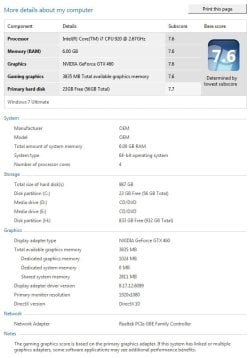
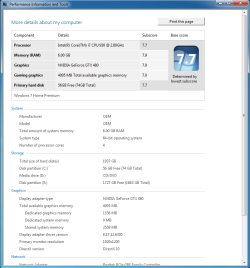
updated score :)

Got my new Intel AHCI drivers installed, and with a mild overclock, I'm at a lowest of 7.6 :) I love my Microcenter SSD and MSI GTX460. It's so quiet now!
 

Attachments

  • wei2.JPG
    wei2.JPG
    60.9 KB · Views: 58

My Computer My Computer

OS
Windows 7 Ultimate x64 Steve Ballmer Edition
CPU
Core i7 920 @ 3.6GHz
Motherboard
EVGA X58 SLI Micro
Memory
6Gb Kingston DDR3 1066MHz
Graphics Card(s)
MSI GTX460 1GB Cyclone
Monitor(s) Displays
LG W2361V
Screen Resolution
1920 x 1080p
Hard Drives
64GB Microcenter SSD (Adata S599)
1TB SeaGate Barracuda 7200
PSU
Corsair HX750
Case
Antec 1200
Cooling
Corsair H50
Mouse
Logitech M/X Revolution
Internet Speed
2mb/s
Other Info
SSD Boot drive with MS Office
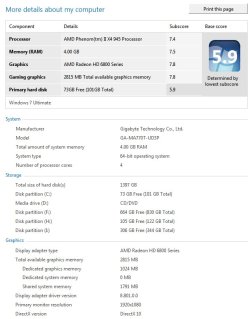
Just upgraded my GTX 260 to a Radeon HD 6870. So far happy with the results in games. WEI also jumped from 7.3 to 7.8 :)
 

Attachments

  • weinew.jpg
    weinew.jpg
    64.4 KB · Views: 34

My Computer My Computer

Computer type
PC/Desktop
Computer Manufacturer/Model Number
Home Built
OS
Win7 Ultimate x64
CPU
Intel I5 4690k
Motherboard
MSI Z97 Gaming 5
Memory
16gb Corsair DDR3 @1600mhz
Graphics Card(s)
GTX 970
Sound Card
Realtek HD 5.1
Monitor(s) Displays
Acer 23" LCD
Screen Resolution
1920x1080
Hard Drives
Samsung Evo III SSD
WD 1TB Black
PSU
EVGA Supernove 650w
Case
Diabolik
Cooling
Cooler Master
Keyboard
Logitech
Mouse
Logitech
Internet Speed
Fiber
Other Info
Logitech X-540 5.1 Surround Sound/
Logitech Rumblepad2/
Thrustmaster RGT FFB Wheel
Status
Not open for further replies.
Back
Top