Show Us Your WEI (2)

Status
Not open for further replies.

My Computers My Computers

System One System Two

  • Computer type
    PC/Desktop
    Computer Manufacturer/Model Number
    ALWAYS UNDER CONSTRUCTION
    OS
    Windows 11 Pro
    CPU
    Ryzen 9 5900X
    Motherboard
    Asus X570 Crosshair Viii Hero
    Memory
    32GB G Skill DDR4-3600
    Graphics Card(s)
    EVGA RTX 3080 FTW 3 Ultra
    Sound Card
    On Board/Sennheiser PC37X Headset
    Monitor(s) Displays
    3 X Asus 27"
    Screen Resolution
    2560x1440
    Hard Drives
    2 X 1 TB NVME drives
    PSU
    EVGA 850
    Case
    Phanteks Eclipse P400A
    Cooling
    EVGA 280 AIO
    Keyboard
    Logitech G510s/ Logitech G13
    Mouse
    Logitech G502
    Internet Speed
    24/1
    Antivirus
    ESET/MBAM Pro/SAS Pro
    Browser
    Chrome/ Firefox/ Edge
  • Computer type
    Laptop
    System Manufacturer/Model Number
    Dell 16 Plus
    OS
    Windows 11 Pro
    CPU
    Intel Ultra 9 288V
    Memory
    32 GB LPDDR5X 8533
    Monitor(s) Displays
    16" Mini-LED HDR600 Touch 90 Hz
    Screen Resolution
    2560X1600
    Hard Drives
    1 TB NVME
you n me both. from what ive heard they r a lot faster but not as reliable. i maybe wrong. worth lookin into tho as so many peeps doing it.
 

My Computer My Computer

Computer type
PC/Desktop
Computer Manufacturer/Model Number
Custom build
OS
Win7 Home Premium x64 SP1
CPU
i7 4770k
Motherboard
Asus maximus VI Hero
Memory
8Gb Kingston HyperX Beast 2400MHz @2133MHz 11-12-11-30
Graphics Card(s)
MSI GTX 780ti Gaming Oc x2
Sound Card
Onboard ROG SupremeFX
Monitor(s) Displays
Asus VG248QE
Screen Resolution
3840X1080 144Hz
Hard Drives
Samung Evo 256Gb, OCZ Agility4 128Gb
1x1TB hitachi storage
PSU
EVGA Supernova 1000w Platinum
Case
Corsair Air 540
Cooling
Corsair H100i
Keyboard
Coolermaster Quickfire Pro
Mouse
Corsair M65 RGB
Internet Speed
74mb dwn/16up
Antivirus
MSE,Malwarebytes
Browser
Chrome
My humble system...

WEI.png
 

My Computer My Computer

OS
Win 3.11
Mouse
MS 3500 Wireless
2h5mkck.jpg
 

My Computer My Computer

Computer Manufacturer/Model Number
P5K-E
OS
Windows 7 Home Premium x64
CPU
Intel Core 2 Quad Q9300 @2.6Ghz
Motherboard
Asus P5K-E
Memory
4GB DDR3 1333Mhz RAM
Graphics Card(s)
NVIDIA GeForce 9600 GT 512MB
Monitor(s) Displays
Samsung 2200WM
Screen Resolution
1680x1050
Hard Drives
150GB 7200RPM
750GB 5400RPM
500GB 5900RPM
250GB 5400RPM
PSU
500W
Case
Antec
Other Info
See sig for new build, ordering this April..
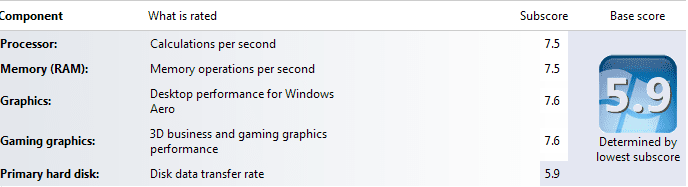
WEI 7.2 7.2 6.8 6.8 5.9
If you read the sticky's there is a tutorial on how to post screenshots using the snipping tool (Paperclip Icon). The tinypic links you posted are not visible sorry.
 

My Computer My Computer

Computer Manufacturer/Model Number
Custom
OS
Windows 7 Ultimate X64
CPU
AMD Phenom II X6 1100T Black Edition @3.6GHz
Motherboard
ASUS AM3+ CROSSHAIR V FORMULA S/L 990FX
Memory
16GB (4 X 4GB) Corsair CMZ8GX3M2A1600C9 1600MHz CL9 DDR3 Ven
Graphics Card(s)
2 X ATI Sapphire HD 5770 1GB DDR5 @850/1200MHz in CrossfireX
Sound Card
Onboard 7.1 HD Audio/Bluetooth Stereo Audio/C-Media USB 5.1
Monitor(s) Displays
LGW2363D 23", HANNspreeXM-S HANNSverona22" & 42"Samsung HDTV
Screen Resolution
2880X900
Hard Drives
Seagate Barracuda LP 1.5TB
SAMSUNG HD154UI 1.5TB
SAMSUNG HD 204UI 2TB
PSU
Evo Labs 900W 80+ 80 plus Dual 12V ATX PC PSU
Case
Cooler Master Mystique 631
Cooling
Corsair H50 With 2X120mm Push/Pull,3X 120mm (FrX1,SideX2).
Keyboard
Accuratus Toughball 2.4GHz
Mouse
Microsoft Laser Mouse 5000/Emprex Cheetah 2000dpi Optical
Internet Speed
5500kbps
Other Info
LG BH10LS30.AUAU10B 10x Internal Blu-Ray BDRW
Corsair H50 Water Cooling With Push/Pull 120mm Fans vent out
Front 120mm Intake
Side Panel 2 X120mm Intake
90mm Extraction fan in top of case.
OCZ - Extreme Thermal Convection
Quiet PC AcoustiPack Lite 2 Ply Sound Deadening both side panels, front, rear, top and bottom.

My Computer My Computer

Computer type
PC/Desktop
OS
Windows 10 Home x64
CPU
INTEL Core i5-750 Quad-Core 3.37GHz
Motherboard
ASUS P7P55D
Memory
HyperX Fury Black Series 8GB (2 x 4GB) 1866Mhz
Graphics Card(s)
EVGA GeForce GTX 750 Superclocked 1GB 128-Bit GDDR5
Monitor(s) Displays
LG 32MA68HY 32" IPS
Screen Resolution
1920 x 1080
Hard Drives
Samsung 840 Evo 120GB, SEAGATE 500GB Barracuda® 7200.12, SATA 3 Gb/s, 7200 RPM, 16MB cache
PSU
ANTEC TruePower New TP-550, 80 PLUS, 550W
Case
ANTEC Three Hundred Illusion
Cooling
COOLER MASTER Hyper 212 Plus, 4 x 120mm 1 x 140mm Noctua's
Internet Speed
85 + Mbps
Antivirus
Avast
Browser
Vivaldi
Here's my latest :D
 

Attachments

  • WEI.png
    WEI.png
    10.4 KB · Views: 19

My Computer My Computer

Computer Manufacturer/Model Number
W477ZY MkIII
OS
Windows 7 HP x64
CPU
AMD Phenom II X4 965 Black Edition @ 4.0GHz
Motherboard
ASUS M4A89TD PRO USB3
Memory
8.00GB G.Skill Ripjaws X CL7D DDR3
Graphics Card(s)
Gigabyte Radeon HD 6970 (OC Windforce 3X)
Monitor(s) Displays
BenQ GL2430 LED & HP 2009f LCD
Screen Resolution
1920x1080 (BenQ) & 1600x900 (HP)
Hard Drives
Western Digital Caviar Black (640GB)
PSU
Antec High Current Gamer 750W
Case
Antec
Cooling
Zalman CNPS10X Performa
Keyboard
HP VoodooDNA (Razer Lycosa)
Mouse
Sharkoon Fireglider
Internet Speed
ADSL 2+
Other Info
Thrustmaster Dual Analogue Game pad
Welcome to Seven Forums W477ZY.

Afraid you're another spinner victim, SSD is the best hardware upgrade you can do, the results are very noticeable.
Don't do it for the WEI score, do it for the performance ;)
 

My Computer My Computer

Computer type
PC/Desktop
Computer Manufacturer/Model Number
76~2.0
OS
Windows 7 Ult x64 - SP1/ Windows 8 Pro x64
CPU
Intel Core i5-3570K 4.6GHz
Motherboard
Gigabyte GA-Z77X UD3H, f18
Memory
8GB (2X4GB) DDR3 1600 Corsair Vengeance CL8 1.5v
Graphics Card(s)
Sapphire HD 7770 Vapor-X OC 1GB DDR5
Sound Card
Onboard VIA VT2021
Monitor(s) Displays
22" LCD Dell
Screen Resolution
1680x1050
Hard Drives
Samsung 840Pro 128GB SSD,
Seagate Barracuda 500GB SATA2 7200rpm 32MB cache, Seagate Barracuda 1TB SATA2 7200rpm 32MB cache,
PSU
Corsair HX650W
Case
Cooler Master Storm Scout
Cooling
Corsair H80 2x12cm Noctua NF P12 , 2x14cm case fans
Keyboard
Logitech Wave
Mouse
CM Sentinel
Internet Speed
Dismal
Antivirus
Avast
Browser
Opera Next
Other Info
Haswell laptop: HP Envy 17t-j, i7-4700MQ, GeForce 740M 2GB DDR3, 17.3" Full HD 1920x1080, 16GB RAM, Samsung 840 Pro 128GB, 1TB Hitachi 7200 HDD,
Desktop: eSATA ports,
External eSATA Seagate 500GB SATA2 7200rpm,
External WD USB 500GB
its gotta b done enit. do u do away with standard hd totally n transfer all to ssd? or just add on. would b well pricey 4 1tb ssd
 

My Computer My Computer

Computer type
PC/Desktop
Computer Manufacturer/Model Number
Custom build
OS
Win7 Home Premium x64 SP1
CPU
i7 4770k
Motherboard
Asus maximus VI Hero
Memory
8Gb Kingston HyperX Beast 2400MHz @2133MHz 11-12-11-30
Graphics Card(s)
MSI GTX 780ti Gaming Oc x2
Sound Card
Onboard ROG SupremeFX
Monitor(s) Displays
Asus VG248QE
Screen Resolution
3840X1080 144Hz
Hard Drives
Samung Evo 256Gb, OCZ Agility4 128Gb
1x1TB hitachi storage
PSU
EVGA Supernova 1000w Platinum
Case
Corsair Air 540
Cooling
Corsair H100i
Keyboard
Coolermaster Quickfire Pro
Mouse
Corsair M65 RGB
Internet Speed
74mb dwn/16up
Antivirus
MSE,Malwarebytes
Browser
Chrome
picture.php
 

My Computer My Computer

Computer Manufacturer/Model Number
Windows 7 Ultimate 64-bit
OS
Windows 7 Ultimate N 64-bit
CPU
AMD Black Edition - AMD Phenom X4 2.5 GHz Processor
Motherboard
Bio Star
Memory
8GB DDR2 800MHZ BRANDED
Graphics Card(s)
Palti NVIDIA GeForce GTX 460
Monitor(s) Displays
3D 23.6" & 22"
Screen Resolution
1920x1080@120Hz
Hard Drives
313GB SAMSUNG SAMSUNG HD321KJ
PSU
OCZ 600W StealthXStream PSU, PowerWhisper, Active PFC
Internet Speed
22793
Thanks Dave, I have been considering it for a while. Unsure on what I exactly need to do to install the SSD. Can I just whack in the SSD, install my W7 on it and select it as the boot drive in BIOS? If I do that will I still be able to access all my files and whatnot on the other hard disk? Or do I need to format the existing drive, install the SSD with Win7 on it and then put in my blank HDD for file storage? If you could point me in the right direction and upgrade will definitely be in order :D
 

My Computer My Computer

Computer Manufacturer/Model Number
W477ZY MkIII
OS
Windows 7 HP x64
CPU
AMD Phenom II X4 965 Black Edition @ 4.0GHz
Motherboard
ASUS M4A89TD PRO USB3
Memory
8.00GB G.Skill Ripjaws X CL7D DDR3
Graphics Card(s)
Gigabyte Radeon HD 6970 (OC Windforce 3X)
Monitor(s) Displays
BenQ GL2430 LED & HP 2009f LCD
Screen Resolution
1920x1080 (BenQ) & 1600x900 (HP)
Hard Drives
Western Digital Caviar Black (640GB)
PSU
Antec High Current Gamer 750W
Case
Antec
Cooling
Zalman CNPS10X Performa
Keyboard
HP VoodooDNA (Razer Lycosa)
Mouse
Sharkoon Fireglider
Internet Speed
ADSL 2+
Other Info
Thrustmaster Dual Analogue Game pad
I'm not Dave, but there is a good tutorial for optimizing an SSD for install, however for a new SSD the 'Clean All' command is not necessary. If set in bios for your OS drive, you will have access to all of the information on all of your other disks. In that respect it is no different than adding another HD.
 

My Computers My Computers

System One System Two

  • Computer type
    PC/Desktop
    Computer Manufacturer/Model Number
    ALWAYS UNDER CONSTRUCTION
    OS
    Windows 11 Pro
    CPU
    Ryzen 9 5900X
    Motherboard
    Asus X570 Crosshair Viii Hero
    Memory
    32GB G Skill DDR4-3600
    Graphics Card(s)
    EVGA RTX 3080 FTW 3 Ultra
    Sound Card
    On Board/Sennheiser PC37X Headset
    Monitor(s) Displays
    3 X Asus 27"
    Screen Resolution
    2560x1440
    Hard Drives
    2 X 1 TB NVME drives
    PSU
    EVGA 850
    Case
    Phanteks Eclipse P400A
    Cooling
    EVGA 280 AIO
    Keyboard
    Logitech G510s/ Logitech G13
    Mouse
    Logitech G502
    Internet Speed
    24/1
    Antivirus
    ESET/MBAM Pro/SAS Pro
    Browser
    Chrome/ Firefox/ Edge
  • Computer type
    Laptop
    System Manufacturer/Model Number
    Dell 16 Plus
    OS
    Windows 11 Pro
    CPU
    Intel Ultra 9 288V
    Memory
    32 GB LPDDR5X 8533
    Monitor(s) Displays
    16" Mini-LED HDR600 Touch 90 Hz
    Screen Resolution
    2560X1600
    Hard Drives
    1 TB NVME
its gotta b done enit. do u do away with standard hd totally n transfer all to ssd? or just add on. would b well pricey 4 1tb ssd


It's best to get a SSD big enough for your OS and programs, keep all your personal data on a HDD. Most people can use a 60GB SSD for this.
So yes, add it on to your system.


Thanks Dave, I have been considering it for a while. Unsure on what I exactly need to do to install the SSD. Can I just whack in the SSD, install my W7 on it and select it as the boot drive in BIOS? If I do that will I still be able to access all my files and whatnot on the other hard disk? Or do I need to format the existing drive, install the SSD with Win7 on it and then put in my blank HDD for file storage? If you could point me in the right direction and upgrade will definitely be in order :D

You have the basic plan correct.

Add the SSD and put your OS and apps on it, keep your HDD for personal data. You don't need to do anything to your HDD, you can still access all your data on the HDD.
You might want to move all your data to a different partition on the HDD so you can eventually remove the OS from the HDD as you likely won't use it anymore, will be too slow.

Win7 will optimize the SSD for you, just be sure set it to AHCI in BIOS and leave it un-formatted, then just install Win7 to it.
If you search for SSD installation you will find a lot of optimization threads, most of these are for Gen1 SSDs, Gen2 SSDs don't need any changes besides what Win7 will do for you.
 

My Computer My Computer

Computer type
PC/Desktop
Computer Manufacturer/Model Number
76~2.0
OS
Windows 7 Ult x64 - SP1/ Windows 8 Pro x64
CPU
Intel Core i5-3570K 4.6GHz
Motherboard
Gigabyte GA-Z77X UD3H, f18
Memory
8GB (2X4GB) DDR3 1600 Corsair Vengeance CL8 1.5v
Graphics Card(s)
Sapphire HD 7770 Vapor-X OC 1GB DDR5
Sound Card
Onboard VIA VT2021
Monitor(s) Displays
22" LCD Dell
Screen Resolution
1680x1050
Hard Drives
Samsung 840Pro 128GB SSD,
Seagate Barracuda 500GB SATA2 7200rpm 32MB cache, Seagate Barracuda 1TB SATA2 7200rpm 32MB cache,
PSU
Corsair HX650W
Case
Cooler Master Storm Scout
Cooling
Corsair H80 2x12cm Noctua NF P12 , 2x14cm case fans
Keyboard
Logitech Wave
Mouse
CM Sentinel
Internet Speed
Dismal
Antivirus
Avast
Browser
Opera Next
Other Info
Haswell laptop: HP Envy 17t-j, i7-4700MQ, GeForce 740M 2GB DDR3, 17.3" Full HD 1920x1080, 16GB RAM, Samsung 840 Pro 128GB, 1TB Hitachi 7200 HDD,
Desktop: eSATA ports,
External eSATA Seagate 500GB SATA2 7200rpm,
External WD USB 500GB
cheers thought it would just b 4 op sytem n progs. out of curiosity i looked 4 a price of a 1TB ssd. LMAO! $4000+
 

My Computer My Computer

Computer type
PC/Desktop
Computer Manufacturer/Model Number
Custom build
OS
Win7 Home Premium x64 SP1
CPU
i7 4770k
Motherboard
Asus maximus VI Hero
Memory
8Gb Kingston HyperX Beast 2400MHz @2133MHz 11-12-11-30
Graphics Card(s)
MSI GTX 780ti Gaming Oc x2
Sound Card
Onboard ROG SupremeFX
Monitor(s) Displays
Asus VG248QE
Screen Resolution
3840X1080 144Hz
Hard Drives
Samung Evo 256Gb, OCZ Agility4 128Gb
1x1TB hitachi storage
PSU
EVGA Supernova 1000w Platinum
Case
Corsair Air 540
Cooling
Corsair H100i
Keyboard
Coolermaster Quickfire Pro
Mouse
Corsair M65 RGB
Internet Speed
74mb dwn/16up
Antivirus
MSE,Malwarebytes
Browser
Chrome
From what I have read the way I understand it is that games will be the biggest installed applications that will quickly fill up an SSD, so all that is needed to do is when you install your games instead of clicking the "Easy Install" option, select a "Custom Install", then select a location on your standard spinning hard drive. (You can simply create a new folder for this called "Games"). Apparently you will get no increase in gaming speed by installing to your SSD so install your games to a spinner along with your media and personal data.
 

My Computer My Computer

Computer Manufacturer/Model Number
Custom
OS
Windows 7 Ultimate X64
CPU
AMD Phenom II X6 1100T Black Edition @3.6GHz
Motherboard
ASUS AM3+ CROSSHAIR V FORMULA S/L 990FX
Memory
16GB (4 X 4GB) Corsair CMZ8GX3M2A1600C9 1600MHz CL9 DDR3 Ven
Graphics Card(s)
2 X ATI Sapphire HD 5770 1GB DDR5 @850/1200MHz in CrossfireX
Sound Card
Onboard 7.1 HD Audio/Bluetooth Stereo Audio/C-Media USB 5.1
Monitor(s) Displays
LGW2363D 23", HANNspreeXM-S HANNSverona22" & 42"Samsung HDTV
Screen Resolution
2880X900
Hard Drives
Seagate Barracuda LP 1.5TB
SAMSUNG HD154UI 1.5TB
SAMSUNG HD 204UI 2TB
PSU
Evo Labs 900W 80+ 80 plus Dual 12V ATX PC PSU
Case
Cooler Master Mystique 631
Cooling
Corsair H50 With 2X120mm Push/Pull,3X 120mm (FrX1,SideX2).
Keyboard
Accuratus Toughball 2.4GHz
Mouse
Microsoft Laser Mouse 5000/Emprex Cheetah 2000dpi Optical
Internet Speed
5500kbps
Other Info
LG BH10LS30.AUAU10B 10x Internal Blu-Ray BDRW
Corsair H50 Water Cooling With Push/Pull 120mm Fans vent out
Front 120mm Intake
Side Panel 2 X120mm Intake
90mm Extraction fan in top of case.
OCZ - Extreme Thermal Convection
Quiet PC AcoustiPack Lite 2 Ply Sound Deadening both side panels, front, rear, top and bottom.
cheers,
if u only get performance with windows andd other progs. not games then i wnt bother as all i do with my pc is play games n burn the odd disc. so i dnt think i would realy benefit.
maybe in the future if need b
 

My Computer My Computer

Computer type
PC/Desktop
Computer Manufacturer/Model Number
Custom build
OS
Win7 Home Premium x64 SP1
CPU
i7 4770k
Motherboard
Asus maximus VI Hero
Memory
8Gb Kingston HyperX Beast 2400MHz @2133MHz 11-12-11-30
Graphics Card(s)
MSI GTX 780ti Gaming Oc x2
Sound Card
Onboard ROG SupremeFX
Monitor(s) Displays
Asus VG248QE
Screen Resolution
3840X1080 144Hz
Hard Drives
Samung Evo 256Gb, OCZ Agility4 128Gb
1x1TB hitachi storage
PSU
EVGA Supernova 1000w Platinum
Case
Corsair Air 540
Cooling
Corsair H100i
Keyboard
Coolermaster Quickfire Pro
Mouse
Corsair M65 RGB
Internet Speed
74mb dwn/16up
Antivirus
MSE,Malwarebytes
Browser
Chrome
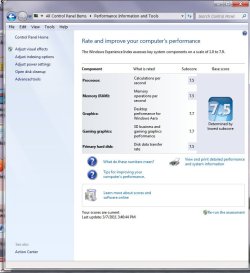
Heres mine I went from a 4.6 to a 7.5 even though the on board graphics run my plasma and my 24" monitor OK at 1080 the card I through in seems to have made a vast improvement.
 

Attachments

  • base.jpg
    base.jpg
    68.8 KB · Views: 55

My Computer My Computer

Computer type
PC/Desktop
Computer Manufacturer/Model Number
Home Built Media Center PC
OS
Window pro 8 64bit
CPU
AMD PHENON 1090T 6 core
Motherboard
Gigabyte GA-890GPA-UD3H
Memory
16.00 GB mushkin 1333mhz
Graphics Card(s)
ATI RADEON HD 6850 1GB DDR5
Sound Card
On Board Realtec ALC880
Monitor(s) Displays
Samsung 27Inch IPS LED & LG 42 Inch Plasma
Screen Resolution
1920 - 1080
Hard Drives
C:/Windows Drive = Corsair Force III Series Solid State Drive, 240GB

2 X Hitachi 1TB Deskstar 7K1000.C SATA II Internal Drive Kit w/ 32MB Cache
2 X Hitachi 2TB Deskstar 7K1000.C SATA II Internal Drive Kit w/ 64MB Cache
LG Super-Multi 22x DVD Wri
PSU
Corsair 650
Case
Full Tower Antec ARMOR
Cooling
3 x 120 Fans
Keyboard
Microsoft Curve Keyboard
Mouse
Logitec T650 Touch pad
Internet Speed
Shaw 50 Mbs
Antivirus
Microsoft security Essentials
Browser
Crome
Other Info
A few updates March 2013
Heres mine I went from a 4.6 to a 7.5 even though the on board graphics run my plasma and my 24" monitor OK at 1080 the card I through in seems to have made a vast improvement.
That's a great score!
 

My Computer My Computer

Computer Manufacturer/Model Number
Custom
OS
Windows 7 Ultimate X64
CPU
AMD Phenom II X6 1100T Black Edition @3.6GHz
Motherboard
ASUS AM3+ CROSSHAIR V FORMULA S/L 990FX
Memory
16GB (4 X 4GB) Corsair CMZ8GX3M2A1600C9 1600MHz CL9 DDR3 Ven
Graphics Card(s)
2 X ATI Sapphire HD 5770 1GB DDR5 @850/1200MHz in CrossfireX
Sound Card
Onboard 7.1 HD Audio/Bluetooth Stereo Audio/C-Media USB 5.1
Monitor(s) Displays
LGW2363D 23", HANNspreeXM-S HANNSverona22" & 42"Samsung HDTV
Screen Resolution
2880X900
Hard Drives
Seagate Barracuda LP 1.5TB
SAMSUNG HD154UI 1.5TB
SAMSUNG HD 204UI 2TB
PSU
Evo Labs 900W 80+ 80 plus Dual 12V ATX PC PSU
Case
Cooler Master Mystique 631
Cooling
Corsair H50 With 2X120mm Push/Pull,3X 120mm (FrX1,SideX2).
Keyboard
Accuratus Toughball 2.4GHz
Mouse
Microsoft Laser Mouse 5000/Emprex Cheetah 2000dpi Optical
Internet Speed
5500kbps
Other Info
LG BH10LS30.AUAU10B 10x Internal Blu-Ray BDRW
Corsair H50 Water Cooling With Push/Pull 120mm Fans vent out
Front 120mm Intake
Side Panel 2 X120mm Intake
90mm Extraction fan in top of case.
OCZ - Extreme Thermal Convection
Quiet PC AcoustiPack Lite 2 Ply Sound Deadening both side panels, front, rear, top and bottom.
cheers,
if u only get performance with windows and other progs. not games then i won't bother as all i do with my PC is play games n burn the odd disc. so i don't think i would really benefit.
maybe in the future if need b
Bear in mind though that if you bought that 1TB SSD you would have plenty of room for your OS/Standard Programs/ And Games....It would make for an incredible Editing PC with that much space, You could probably keep 40% free at all times which would keep it running fast.
Extremely expensive though ($4000). That's loads of pairs of kids shoes......
Perhaps 1 for lottery winners!
 

My Computer My Computer

Computer Manufacturer/Model Number
Custom
OS
Windows 7 Ultimate X64
CPU
AMD Phenom II X6 1100T Black Edition @3.6GHz
Motherboard
ASUS AM3+ CROSSHAIR V FORMULA S/L 990FX
Memory
16GB (4 X 4GB) Corsair CMZ8GX3M2A1600C9 1600MHz CL9 DDR3 Ven
Graphics Card(s)
2 X ATI Sapphire HD 5770 1GB DDR5 @850/1200MHz in CrossfireX
Sound Card
Onboard 7.1 HD Audio/Bluetooth Stereo Audio/C-Media USB 5.1
Monitor(s) Displays
LGW2363D 23", HANNspreeXM-S HANNSverona22" & 42"Samsung HDTV
Screen Resolution
2880X900
Hard Drives
Seagate Barracuda LP 1.5TB
SAMSUNG HD154UI 1.5TB
SAMSUNG HD 204UI 2TB
PSU
Evo Labs 900W 80+ 80 plus Dual 12V ATX PC PSU
Case
Cooler Master Mystique 631
Cooling
Corsair H50 With 2X120mm Push/Pull,3X 120mm (FrX1,SideX2).
Keyboard
Accuratus Toughball 2.4GHz
Mouse
Microsoft Laser Mouse 5000/Emprex Cheetah 2000dpi Optical
Internet Speed
5500kbps
Other Info
LG BH10LS30.AUAU10B 10x Internal Blu-Ray BDRW
Corsair H50 Water Cooling With Push/Pull 120mm Fans vent out
Front 120mm Intake
Side Panel 2 X120mm Intake
90mm Extraction fan in top of case.
OCZ - Extreme Thermal Convection
Quiet PC AcoustiPack Lite 2 Ply Sound Deadening both side panels, front, rear, top and bottom.
its gotta b done enit. do u do away with standard hd totally n transfer all to ssd? or just add on. would b well pricey 4 1tb ssd


It's best to get a SSD big enough for your OS and programs, keep all your personal data on a HDD. Most people can use a 60GB SSD for this.
So yes, add it on to your system.


Thanks Dave, I have been considering it for a while. Unsure on what I exactly need to do to install the SSD. Can I just whack in the SSD, install my W7 on it and select it as the boot drive in BIOS? If I do that will I still be able to access all my files and whatnot on the other hard disk? Or do I need to format the existing drive, install the SSD with Win7 on it and then put in my blank HDD for file storage? If you could point me in the right direction and upgrade will definitely be in order :D

You have the basic plan correct.

Add the SSD and put your OS and apps on it, keep your HDD for personal data. You don't need to do anything to your HDD, you can still access all your data on the HDD.
You might want to move all your data to a different partition on the HDD so you can eventually remove the OS from the HDD as you likely won't use it anymore, will be too slow.

Win7 will optimize the SSD for you, just be sure set it to AHCI in BIOS and leave it un-formatted, then just install Win7 to it.
If you search for SSD installation you will find a lot of optimization threads, most of these are for Gen1 SSDs, Gen2 SSDs don't need any changes besides what Win7 will do for you.

Sorry to completely derail the thread but which SSD would you recommend for a $200 budget? I have 32gb of programs on my computer (leaving the 200+gb of media etc. on the HDD)
 

My Computer My Computer

Computer Manufacturer/Model Number
W477ZY MkIII
OS
Windows 7 HP x64
CPU
AMD Phenom II X4 965 Black Edition @ 4.0GHz
Motherboard
ASUS M4A89TD PRO USB3
Memory
8.00GB G.Skill Ripjaws X CL7D DDR3
Graphics Card(s)
Gigabyte Radeon HD 6970 (OC Windforce 3X)
Monitor(s) Displays
BenQ GL2430 LED & HP 2009f LCD
Screen Resolution
1920x1080 (BenQ) & 1600x900 (HP)
Hard Drives
Western Digital Caviar Black (640GB)
PSU
Antec High Current Gamer 750W
Case
Antec
Cooling
Zalman CNPS10X Performa
Keyboard
HP VoodooDNA (Razer Lycosa)
Mouse
Sharkoon Fireglider
Internet Speed
ADSL 2+
Other Info
Thrustmaster Dual Analogue Game pad
Status
Not open for further replies.
Back
Top