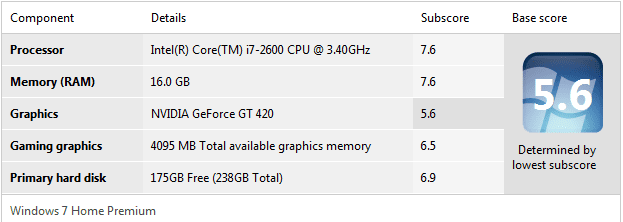
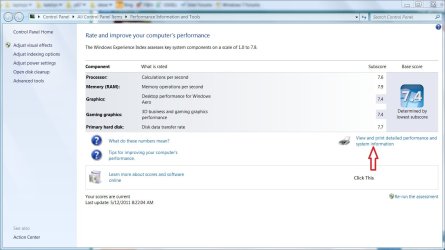
Show Us Your WEI [3]

Status
Not open for further replies.
Looks like a good looking laptop, I want one.
 

My Computers My Computers

System One System Two

  • Computer type
    PC/Desktop
    Computer Manufacturer/Model Number
    ALWAYS UNDER CONSTRUCTION
    OS
    Windows 11 Pro
    CPU
    Ryzen 9 5900X
    Motherboard
    Asus X570 Crosshair Viii Hero
    Memory
    32GB G Skill DDR4-3600
    Graphics Card(s)
    EVGA RTX 3080 FTW 3 Ultra
    Sound Card
    On Board/Sennheiser PC37X Headset
    Monitor(s) Displays
    3 X Asus 27"
    Screen Resolution
    2560x1440
    Hard Drives
    2 X 1 TB NVME drives
    PSU
    EVGA 850
    Case
    Phanteks Eclipse P400A
    Cooling
    EVGA 280 AIO
    Keyboard
    Logitech G510s/ Logitech G13
    Mouse
    Logitech G502
    Internet Speed
    24/1
    Antivirus
    ESET/MBAM Pro/SAS Pro
    Browser
    Chrome/ Firefox/ Edge
  • Computer type
    Laptop
    System Manufacturer/Model Number
    Dell 16 Plus
    OS
    Windows 11 Pro
    CPU
    Intel Ultra 9 288V
    Memory
    32 GB LPDDR5X 8533
    Monitor(s) Displays
    16" Mini-LED HDR600 Touch 90 Hz
    Screen Resolution
    2560X1600
    Hard Drives
    1 TB NVME
o2RUmPd

Got RAM?

Really need new hdd, not much of a gamer
 

My Computer My Computer

Computer Manufacturer/Model Number
Custom Built by me
OS
Windows 7 Ultimate 64-bit SP1
CPU
Intel Core i5-2400 @ 3.10GHz
Motherboard
MSI PH67A-C43
Memory
16GB DDR3-1333
Graphics Card(s)
NVIDIA GeForce GTX 570
Sound Card
Realtek High Definition Audio
Monitor(s) Displays
Phillips 244EL LED
Screen Resolution
1920x1080
Hard Drives
64GB Kingston SATAII (SSD)
1000GB Western Digital SATAIII (HDD)
PSU
Cooler Master Extreme Power Plus 700W
Vatec, good scores, yes an SSD would help. you'd love it. Good scores though without the SSD.
 

My Computers My Computers

System One System Two

  • Computer type
    PC/Desktop
    Computer Manufacturer/Model Number
    ALWAYS UNDER CONSTRUCTION
    OS
    Windows 11 Pro
    CPU
    Ryzen 9 5900X
    Motherboard
    Asus X570 Crosshair Viii Hero
    Memory
    32GB G Skill DDR4-3600
    Graphics Card(s)
    EVGA RTX 3080 FTW 3 Ultra
    Sound Card
    On Board/Sennheiser PC37X Headset
    Monitor(s) Displays
    3 X Asus 27"
    Screen Resolution
    2560x1440
    Hard Drives
    2 X 1 TB NVME drives
    PSU
    EVGA 850
    Case
    Phanteks Eclipse P400A
    Cooling
    EVGA 280 AIO
    Keyboard
    Logitech G510s/ Logitech G13
    Mouse
    Logitech G502
    Internet Speed
    24/1
    Antivirus
    ESET/MBAM Pro/SAS Pro
    Browser
    Chrome/ Firefox/ Edge
  • Computer type
    Laptop
    System Manufacturer/Model Number
    Dell 16 Plus
    OS
    Windows 11 Pro
    CPU
    Intel Ultra 9 288V
    Memory
    32 GB LPDDR5X 8533
    Monitor(s) Displays
    16" Mini-LED HDR600 Touch 90 Hz
    Screen Resolution
    2560X1600
    Hard Drives
    1 TB NVME
New WEI scores, with the i7 720QM OC'd from 1.6-2.8GHz to 1.77-3.1GHz and the 5870m core/memory speeds up from 700/1000MHz to 810/1105MHz. RAM is up to 1477MHz from 1333. Using W7 from a 7200rpm spinner this time.

Seeing as my mobo limits the RAM to 1333MHz (running at stock FSB speeds), there's no way to OC my Kingston HyperX without changing the FSB speed and thus OCing the CPU too right? Because I really want to see how high these babies can get on the WEI.

Very nice gamers laptop.

To check the CPU core temps, play your most stressful game or run Prime95.
Be carefull with heat on a laptop, your's has a very nice cooling system, just watch the core temps.
Intel is vague, actually they omitted posting the max CPU temp (Tcase), for this CPU's recommended max core temp.
I'm conservative when it comes to CPU temps, even for a laptop I wouldn't want to be much over 60°C for more than a couple of minutes.
Heat is the number one computer component killer.

CPU - Stress Test with Prime95
Prime95 Torture test
First open Real Temp to monitor CPU temperatures, don't go over 77°C.
Open Prime95 and stop the test if it is running, in Advanced tab select 'Round off checking', in the Options tab select 'Torture Test...', in the window that opens select 'Blend', after 'Number of torture test threads to run' enter 8, then click OK to start the test.

This program will max out your CPU, max frequency and 100% useage, during the test.
It usually takes less than a minute to reach max temps.
For a laptop I would just use this program to test the max temps, run it for 1-2 minutes only.

That extra hard drive bay is just begging for a SSD, you only need a 60GB SSD for your OS and apps, then keep all data on the spinner.
I have a 40GB SSD and a HDD in my laptop, two bays.
The performance is simply amazing, battery time went from 4 hours to 7+ hours.
 

My Computer My Computer

Computer type
PC/Desktop
Computer Manufacturer/Model Number
76~2.0
OS
Windows 7 Ult x64 - SP1/ Windows 8 Pro x64
CPU
Intel Core i5-3570K 4.6GHz
Motherboard
Gigabyte GA-Z77X UD3H, f18
Memory
8GB (2X4GB) DDR3 1600 Corsair Vengeance CL8 1.5v
Graphics Card(s)
Sapphire HD 7770 Vapor-X OC 1GB DDR5
Sound Card
Onboard VIA VT2021
Monitor(s) Displays
22" LCD Dell
Screen Resolution
1680x1050
Hard Drives
Samsung 840Pro 128GB SSD,
Seagate Barracuda 500GB SATA2 7200rpm 32MB cache, Seagate Barracuda 1TB SATA2 7200rpm 32MB cache,
PSU
Corsair HX650W
Case
Cooler Master Storm Scout
Cooling
Corsair H80 2x12cm Noctua NF P12 , 2x14cm case fans
Keyboard
Logitech Wave
Mouse
CM Sentinel
Internet Speed
Dismal
Antivirus
Avast
Browser
Opera Next
Other Info
Haswell laptop: HP Envy 17t-j, i7-4700MQ, GeForce 740M 2GB DDR3, 17.3" Full HD 1920x1080, 16GB RAM, Samsung 840 Pro 128GB, 1TB Hitachi 7200 HDD,
Desktop: eSATA ports,
External eSATA Seagate 500GB SATA2 7200rpm,
External WD USB 500GB
New WEI scores, with the i7 720QM OC'd from 1.6-2.8GHz to 1.77-3.1GHz and the 5870m core/memory speeds up from 700/1000MHz to 810/1105MHz. RAM is up to 1477MHz from 1333. Using W7 from a 7200rpm spinner this time.

Seeing as my mobo limits the RAM to 1333MHz (running at stock FSB speeds), there's no way to OC my Kingston HyperX without changing the FSB speed and thus OCing the CPU too right? Because I really want to see how high these babies can get on the WEI.

Very nice gamers laptop.

To check the CPU core temps, play your most stressful game or run Prime95.
Be carefull with heat on a laptop, your's has a very nice cooling system, just watch the core temps.
Intel is vague, actually they omitted posting the max CPU temp (Tcase), for this CPU's recommended max core temp.
I'm conservative when it comes to CPU temps, even for a laptop I wouldn't want to be much over 60°C for more than a couple of minutes.
Heat is the number one computer component killer.

CPU - Stress Test with Prime95
Prime95 Torture test
First open Real Temp to monitor CPU temperatures, don't go over 77°C.
Open Prime95 and stop the test if it is running, in Advanced tab select 'Round off checking', in the Options tab select 'Torture Test...', in the window that opens select 'Blend', after 'Number of torture test threads to run' enter 8, then click OK to start the test.

This program will max out your CPU, max frequency and 100% useage, during the test.
It usually takes less than a minute to reach max temps.
For a laptop I would just use this program to test the max temps, run it for 1-2 minutes only.

That extra hard drive bay is just begging for a SSD, you only need a 60GB SSD for your OS and apps, then keep all data on the spinner.
I have a 40GB SSD and a HDD in my laptop, two bays.
The performance is simply amazing, battery time went from 4 hours to 7+ hours.
This is a great bit of information for those who want to change the stock settings of components and confirms my point, you should be really careful, you have a nice laptop, there is no point pushing it too far as you could lose everything.
 

My Computer My Computer

Computer Manufacturer/Model Number
Custom
OS
Windows 7 Ultimate X64
CPU
AMD Phenom II X6 1100T Black Edition @3.6GHz
Motherboard
ASUS AM3+ CROSSHAIR V FORMULA S/L 990FX
Memory
16GB (4 X 4GB) Corsair CMZ8GX3M2A1600C9 1600MHz CL9 DDR3 Ven
Graphics Card(s)
2 X ATI Sapphire HD 5770 1GB DDR5 @850/1200MHz in CrossfireX
Sound Card
Onboard 7.1 HD Audio/Bluetooth Stereo Audio/C-Media USB 5.1
Monitor(s) Displays
LGW2363D 23", HANNspreeXM-S HANNSverona22" & 42"Samsung HDTV
Screen Resolution
2880X900
Hard Drives
Seagate Barracuda LP 1.5TB
SAMSUNG HD154UI 1.5TB
SAMSUNG HD 204UI 2TB
PSU
Evo Labs 900W 80+ 80 plus Dual 12V ATX PC PSU
Case
Cooler Master Mystique 631
Cooling
Corsair H50 With 2X120mm Push/Pull,3X 120mm (FrX1,SideX2).
Keyboard
Accuratus Toughball 2.4GHz
Mouse
Microsoft Laser Mouse 5000/Emprex Cheetah 2000dpi Optical
Internet Speed
5500kbps
Other Info
LG BH10LS30.AUAU10B 10x Internal Blu-Ray BDRW
Corsair H50 Water Cooling With Push/Pull 120mm Fans vent out
Front 120mm Intake
Side Panel 2 X120mm Intake
90mm Extraction fan in top of case.
OCZ - Extreme Thermal Convection
Quiet PC AcoustiPack Lite 2 Ply Sound Deadening both side panels, front, rear, top and bottom.
Looks like a good looking laptop, I want one.

Then buy one ;) they're not actually that expensive. I'm kicking myself for getting one *just before* they released them with sandy bridge i7's :(

Very nice gamers laptop.

To check the CPU core temps, play your most stressful game or run Prime95.
Be carefull with heat on a laptop, your's has a very nice cooling system, just watch the core temps.
Intel is vague, actually they omitted posting the max CPU temp (Tcase), for this CPU's recommended max core temp.
I'm conservative when it comes to CPU temps, even for a laptop I wouldn't want to be much over 60°C for more than a couple of minutes.
Heat is the number one computer component killer.

CPU - Stress Test with Prime95
Prime95 Torture test
First open Real Temp to monitor CPU temperatures, don't go over 77°C.
Open Prime95 and stop the test if it is running, in Advanced tab select 'Round off checking', in the Options tab select 'Torture Test...', in the window that opens select 'Blend', after 'Number of torture test threads to run' enter 8, then click OK to start the test.

This program will max out your CPU, max frequency and 100% useage, during the test.
It usually takes less than a minute to reach max temps.
For a laptop I would just use this program to test the max temps, run it for 1-2 minutes only.

That extra hard drive bay is just begging for a SSD, you only need a 60GB SSD for your OS and apps, then keep all data on the spinner.
I have a 40GB SSD and a HDD in my laptop, two bays.
The performance is simply amazing, battery time went from 4 hours to 7+ hours.

Yeah I've run Prime before, max temps on the CPU are 64/59/63/61 under full load and 45 idle. You say you wouldn't like 'em to go over 60, but the shutdown temp for the 720QM is 100 and it's not anywhere close really. If my temps get to 85ish I'd still think it was normal after many many hours of straight gameplay and wouldn't be too worried. If it heads over 90 though, I'd have to do something about it.

GPU is idle at 52-54, gonna repaste it soon though when I stick my other 2x4GB SODIMMs in.

My current new install is at 45GB with *most* things in there, but I'd like room to have a couple of games installed as well, just to impress with those load times ;) so 128 would be minimum for me. A 120Hz 3D screen would be nice too :o but I can't seem to find many...oh, not to mention I don't think ATi cards have the necessary drivers or whatever 'til the 6xxx series :(

As an aside, what's the r/w speed from/to RAM? Do some SSDs actually have faster r/w speeds? Or is that silly? ^_^ I'd like a C300 really, I've heard there's a few faults with them but also that there's work arounds. I'm still waiting for the SSD market to get cheaper and hopefully more reliable. As a student I don't have *that* much money.

I'm already finding myself wanting to upgrade everything, so I'd better have a well paying job at the end of this to fund my technology habits. Still, spending a year in the US (CA) in 2 years time, and it'll be about time to upgrade then...think I'll buy desktop parts over there, you guys have it easy with your cheaper electronic goods!


EDIT: My Acer Aspire One netbook which is half-way across the room atm is making more noise than this :D

EDIT2: Completely missed this post


This is a great bit of information for those who want to change the stock settings of components and confirms my point, you should be really careful, you have a nice laptop, there is no point pushing it too far as you could lose everything.

Mmm I'm being careful with the CPU, hence why I backed away from anything that came remotely close to BSODing me. Checked my temps, see above. GPU I'm being even more careful with, making sure it can pass ATi OverDrive's own GPU test (which backs out and stops if anything's up), then testing it running WEI, then 3DMark11. Gonna test it with Crysis/Furmark in a bit.

 
Last edited:

My Computer My Computer

Computer Manufacturer/Model Number
Asus G73JH-RBBX05
OS
Windows 7 Home Premium x64
CPU
Intel Core i7-720QM @ 1.6-2.97GHz
Motherboard
Asus G73JH
Memory
3 x 2GB Kingston 1333MHz 9-9-9-24
Graphics Card(s)
ATI Mobility Radeon HD 5870 (1GB GDDR5, DX11, 700/1000MHz)
Sound Card
ATI HD Audio
Monitor(s) Displays
17.3" LCD Internal, 27" Samsung LCD External
Screen Resolution
1600x900, 1920x1080
Hard Drives
Seagate 500GB 7200rpm
Waiting for cheap SSDs...
PSU
Stock
Case
...it's a damn notebook!
Cooling
The gigantic vents on the back
Keyboard
Stock
Mouse
Microsoft Wireless something-or-other. Looking at Razer's.
Internet Speed
25Mb/s
Other Info
This notebook is beastly.
Those are good temps for a laptop.

Intel states Tjunction as 100°C, this is the temp that the CPU will throttle down, actually before this temp, to keep the CPU from melting down.
The max temp for your CPU cores is always listed as Tcase, this is the CPU case, core temps are +5°C from Tcase.

Intel seemed to have stopped posting Tcase for laptop CPU's, maybe because they can't really be overclocked, though some manufacturers do now and even the usual OEMs, like yours, let you do a little OC'ing.

Check Intel desktop CPUs and you will see a max Tcase listed.

I think 85°C is pretty hot, older laptops always seemed to run a little hotter than desktops, which is why Intel doesn't have the same limits for laptops.
Who would buy them if the temps aren't safe?
They are made from the same material as a desktop CPU, the cooler the better.

The Intel® Core™ i7-860 Processor Tcase is 72.7°C so the CPU core temp max is 77.7°C.
Why should a similar CPU in a laptop be ok to run at 85°C?
I think the reason they don't mention the safe max temp is because some of the laptop manufacturers laptop CPUs run very hot, due to the cooling system they designed.
They are getting better in the last couple of years, which goes nicely with my theory.

For a SSD, there are pretty easy ways to get 45GB of OS, apps and data down to less that 30GB.
Then there is more room for games.
Route your downloads onto the spinner, all data files saved to the spinner, all pics and vids - same. It can all add up pretty quickly.
My desktop SSD is at 25GB now (86GB free), no games but, I put all apps on it.
When a good Win8 beta comes out I'll be partitioning it 55/55Gb and run Win7/Win8. They will stay around 50% free space.
 

My Computer My Computer

Computer type
PC/Desktop
Computer Manufacturer/Model Number
76~2.0
OS
Windows 7 Ult x64 - SP1/ Windows 8 Pro x64
CPU
Intel Core i5-3570K 4.6GHz
Motherboard
Gigabyte GA-Z77X UD3H, f18
Memory
8GB (2X4GB) DDR3 1600 Corsair Vengeance CL8 1.5v
Graphics Card(s)
Sapphire HD 7770 Vapor-X OC 1GB DDR5
Sound Card
Onboard VIA VT2021
Monitor(s) Displays
22" LCD Dell
Screen Resolution
1680x1050
Hard Drives
Samsung 840Pro 128GB SSD,
Seagate Barracuda 500GB SATA2 7200rpm 32MB cache, Seagate Barracuda 1TB SATA2 7200rpm 32MB cache,
PSU
Corsair HX650W
Case
Cooler Master Storm Scout
Cooling
Corsair H80 2x12cm Noctua NF P12 , 2x14cm case fans
Keyboard
Logitech Wave
Mouse
CM Sentinel
Internet Speed
Dismal
Antivirus
Avast
Browser
Opera Next
Other Info
Haswell laptop: HP Envy 17t-j, i7-4700MQ, GeForce 740M 2GB DDR3, 17.3" Full HD 1920x1080, 16GB RAM, Samsung 840 Pro 128GB, 1TB Hitachi 7200 HDD,
Desktop: eSATA ports,
External eSATA Seagate 500GB SATA2 7200rpm,
External WD USB 500GB
Ehh, my HDD is only 5400RPM.. don't hate me.. But, I guess it's not terrible for a laptop?

Hmmm what CPU do you have? I wants it ^_^
 

My Computer My Computer

Computer Manufacturer/Model Number
Asus G73JH-RBBX05
OS
Windows 7 Home Premium x64
CPU
Intel Core i7-720QM @ 1.6-2.97GHz
Motherboard
Asus G73JH
Memory
3 x 2GB Kingston 1333MHz 9-9-9-24
Graphics Card(s)
ATI Mobility Radeon HD 5870 (1GB GDDR5, DX11, 700/1000MHz)
Sound Card
ATI HD Audio
Monitor(s) Displays
17.3" LCD Internal, 27" Samsung LCD External
Screen Resolution
1600x900, 1920x1080
Hard Drives
Seagate 500GB 7200rpm
Waiting for cheap SSDs...
PSU
Stock
Case
...it's a damn notebook!
Cooling
The gigantic vents on the back
Keyboard
Stock
Mouse
Microsoft Wireless something-or-other. Looking at Razer's.
Internet Speed
25Mb/s
Other Info
This notebook is beastly.


I think the only thing I've seen remotely close to 7.9 on the CPU was the i7-2600K at 4.7GHz. It scored a 7.8 on a rig I've seen. On my chipset, the i7-870, i7-875K and the i7-880 all score 7.7 when they are overclocked to 4.0GHz. I guess those are the only upgrades I could make, I think not.

My old(er) post is here...http://www.sevenforums.com/performance-maintenance/83699-show-us-your-wei-2-a-187.html#post1349343

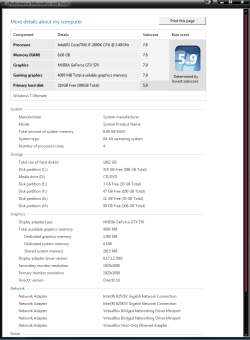
New W.E.I. score in this pic (Graphics up .1 to max)

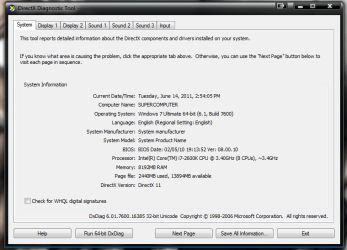
Not sure why but it is showing my DirectX version as 10 but I have DirectX11??
 

Attachments

  • new W.E.I..PNG
    new W.E.I..PNG
    26.9 KB · Views: 134
  • DirectX11.PNG
    DirectX11.PNG
    26.4 KB · Views: 45

My Computer My Computer

Computer type
PC/Desktop
Computer Manufacturer/Model Number
Jeepmann/Custom Built
OS
Windows 7 Ultimate 64bit
CPU
Intel Core i7-2600K Sandy Bridge 3.4GHz (@[email protected])
Motherboard
Asus Maximus IV Extreme LGA 1155 Intel P67
Memory
G.SKILL Ripjaws X Series 16GB 1600Mhz (4 x 4GB) (Stock)
Graphics Card(s)
x2 EVGA GeForce GTX 760's w/ACXCoolers in SLI Surround
Sound Card
On-Board
Monitor(s) Displays
3x Acer 24" HDMI Widescreen LCD Monitor
Screen Resolution
3@ 1920x1080 (5760x1080 In Surround)
Hard Drives
Samsung 830 128gb ssd
Western Digital Caviar Black 640GB 7200 RPM
Western Digital Caviar Black 500GB 7200 RPM
Seagate 2tb 7200 RPM
PSU
COOLER MASTER Silent Pro 1000W
Case
COOLER MASTER HAF X Black
Cooling
CORSAIR Hydro H70
Keyboard
Logitech G510
Mouse
Zalman M300
Internet Speed
100mbps-ish Down & 5mbps-ish Up
Other Info
I installed the stock 140mm case fan outside of case then installed the H70+ 1 of its 120mm fans inside case. Used the 2nd 120mm from the H70 to go in the Gpu tunnel.
230mm Front,200mm side,200mm top,120mm Gpu tunnel,120mm&140mm on H70.
I can see why you named it supercomputer, I probably would have too. How high did you OC it to get 7.8? I had my i5 OC to 4.6 and could only get 7.6.
 

My Computers My Computers

System One System Two

  • Computer type
    PC/Desktop
    Computer Manufacturer/Model Number
    ALWAYS UNDER CONSTRUCTION
    OS
    Windows 11 Pro
    CPU
    Ryzen 9 5900X
    Motherboard
    Asus X570 Crosshair Viii Hero
    Memory
    32GB G Skill DDR4-3600
    Graphics Card(s)
    EVGA RTX 3080 FTW 3 Ultra
    Sound Card
    On Board/Sennheiser PC37X Headset
    Monitor(s) Displays
    3 X Asus 27"
    Screen Resolution
    2560x1440
    Hard Drives
    2 X 1 TB NVME drives
    PSU
    EVGA 850
    Case
    Phanteks Eclipse P400A
    Cooling
    EVGA 280 AIO
    Keyboard
    Logitech G510s/ Logitech G13
    Mouse
    Logitech G502
    Internet Speed
    24/1
    Antivirus
    ESET/MBAM Pro/SAS Pro
    Browser
    Chrome/ Firefox/ Edge
  • Computer type
    Laptop
    System Manufacturer/Model Number
    Dell 16 Plus
    OS
    Windows 11 Pro
    CPU
    Intel Ultra 9 288V
    Memory
    32 GB LPDDR5X 8533
    Monitor(s) Displays
    16" Mini-LED HDR600 Touch 90 Hz
    Screen Resolution
    2560X1600
    Hard Drives
    1 TB NVME
I can see why you named it supercomputer, I probably would have too. How high did you OC it to get 7.8? I had my i5 OC to 4.6 and could only get 7.6.

I thought the name fit..:D May not be the worlds Supercomputer, but it's my Supercomputer!

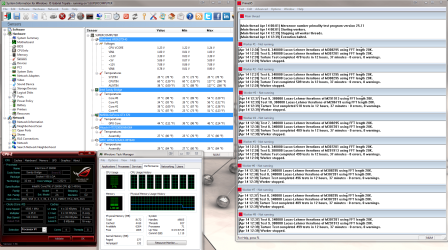
I got the 7.8 with my 24/7 oc of 4.5Ghz(see specs), you can see the oc pics in the old post but I guess I should of added that one too. Here it is... Can also see the whole build here....Longlast The New Build is DONE-ISH
 

Attachments

My Computer My Computer

Computer type
PC/Desktop
Computer Manufacturer/Model Number
Jeepmann/Custom Built
OS
Windows 7 Ultimate 64bit
CPU
Intel Core i7-2600K Sandy Bridge 3.4GHz (@[email protected])
Motherboard
Asus Maximus IV Extreme LGA 1155 Intel P67
Memory
G.SKILL Ripjaws X Series 16GB 1600Mhz (4 x 4GB) (Stock)
Graphics Card(s)
x2 EVGA GeForce GTX 760's w/ACXCoolers in SLI Surround
Sound Card
On-Board
Monitor(s) Displays
3x Acer 24" HDMI Widescreen LCD Monitor
Screen Resolution
3@ 1920x1080 (5760x1080 In Surround)
Hard Drives
Samsung 830 128gb ssd
Western Digital Caviar Black 640GB 7200 RPM
Western Digital Caviar Black 500GB 7200 RPM
Seagate 2tb 7200 RPM
PSU
COOLER MASTER Silent Pro 1000W
Case
COOLER MASTER HAF X Black
Cooling
CORSAIR Hydro H70
Keyboard
Logitech G510
Mouse
Zalman M300
Internet Speed
100mbps-ish Down & 5mbps-ish Up
Other Info
I installed the stock 140mm case fan outside of case then installed the H70+ 1 of its 120mm fans inside case. Used the 2nd 120mm from the H70 to go in the Gpu tunnel.
230mm Front,200mm side,200mm top,120mm Gpu tunnel,120mm&140mm on H70.
That's a good looking build. I know you are enjoying it. Those numbers are as good as WEI gets. Supercomputer is an appropriate name.
 

My Computers My Computers

System One System Two

  • Computer type
    PC/Desktop
    Computer Manufacturer/Model Number
    ALWAYS UNDER CONSTRUCTION
    OS
    Windows 11 Pro
    CPU
    Ryzen 9 5900X
    Motherboard
    Asus X570 Crosshair Viii Hero
    Memory
    32GB G Skill DDR4-3600
    Graphics Card(s)
    EVGA RTX 3080 FTW 3 Ultra
    Sound Card
    On Board/Sennheiser PC37X Headset
    Monitor(s) Displays
    3 X Asus 27"
    Screen Resolution
    2560x1440
    Hard Drives
    2 X 1 TB NVME drives
    PSU
    EVGA 850
    Case
    Phanteks Eclipse P400A
    Cooling
    EVGA 280 AIO
    Keyboard
    Logitech G510s/ Logitech G13
    Mouse
    Logitech G502
    Internet Speed
    24/1
    Antivirus
    ESET/MBAM Pro/SAS Pro
    Browser
    Chrome/ Firefox/ Edge
  • Computer type
    Laptop
    System Manufacturer/Model Number
    Dell 16 Plus
    OS
    Windows 11 Pro
    CPU
    Intel Ultra 9 288V
    Memory
    32 GB LPDDR5X 8533
    Monitor(s) Displays
    16" Mini-LED HDR600 Touch 90 Hz
    Screen Resolution
    2560X1600
    Hard Drives
    1 TB NVME
Looks like a good looking laptop, I want one.

Then buy one ;) they're not actually that expensive. I'm kicking myself for getting one *just before* they released them with sandy bridge i7's :(

Very nice gamers laptop.

To check the CPU core temps, play your most stressful game or run Prime95.
Be carefull with heat on a laptop, your's has a very nice cooling system, just watch the core temps.
Intel is vague, actually they omitted posting the max CPU temp (Tcase), for this CPU's recommended max core temp.
I'm conservative when it comes to CPU temps, even for a laptop I wouldn't want to be much over 60°C for more than a couple of minutes.
Heat is the number one computer component killer.

CPU - Stress Test with Prime95
Prime95 Torture test
First open Real Temp to monitor CPU temperatures, don't go over 77°C.
Open Prime95 and stop the test if it is running, in Advanced tab select 'Round off checking', in the Options tab select 'Torture Test...', in the window that opens select 'Blend', after 'Number of torture test threads to run' enter 8, then click OK to start the test.

This program will max out your CPU, max frequency and 100% useage, during the test.
It usually takes less than a minute to reach max temps.
For a laptop I would just use this program to test the max temps, run it for 1-2 minutes only.

That extra hard drive bay is just begging for a SSD, you only need a 60GB SSD for your OS and apps, then keep all data on the spinner.
I have a 40GB SSD and a HDD in my laptop, two bays.
The performance is simply amazing, battery time went from 4 hours to 7+ hours.

Yeah I've run Prime before, max temps on the CPU are 64/59/63/61 under full load and 45 idle. You say you wouldn't like 'em to go over 60, but the shutdown temp for the 720QM is 100 and it's not anywhere close really. If my temps get to 85ish I'd still think it was normal after many many hours of straight gameplay and wouldn't be too worried. If it heads over 90 though, I'd have to do something about it.

GPU is idle at 52-54, gonna repaste it soon though when I stick my other 2x4GB SODIMMs in.

My current new install is at 45GB with *most* things in there, but I'd like room to have a couple of games installed as well, just to impress with those load times ;) so 128 would be minimum for me. A 120Hz 3D screen would be nice too :o but I can't seem to find many...oh, not to mention I don't think ATi cards have the necessary drivers or whatever 'til the 6xxx series :(

As an aside, what's the r/w speed from/to RAM? Do some SSDs actually have faster r/w speeds? Or is that silly? ^_^ I'd like a C300 really, I've heard there's a few faults with them but also that there's work arounds. I'm still waiting for the SSD market to get cheaper and hopefully more reliable. As a student I don't have *that* much money.

I'm already finding myself wanting to upgrade everything, so I'd better have a well paying job at the end of this to fund my technology habits. Still, spending a year in the US (CA) in 2 years time, and it'll be about time to upgrade then...think I'll buy desktop parts over there, you guys have it easy with your cheaper electronic goods!


EDIT: My Acer Aspire One netbook which is half-way across the room atm is making more noise than this :D

EDIT2: Completely missed this post


This is a great bit of information for those who want to change the stock settings of components and confirms my point, you should be really careful, you have a nice laptop, there is no point pushing it too far as you could lose everything.

Mmm I'm being careful with the CPU, hence why I backed away from anything that came remotely close to BSODing me. Checked my temps, see above. GPU I'm being even more careful with, making sure it can pass ATi OverDrive's own GPU test (which backs out and stops if anything's up), then testing it running WEI, then 3DMark11. Gonna test it with Crysis/Furmark in a bit.
I can't help it, but every time I look over your specs I have visions of LAN party's with people wheeling in their HAFX cases with SLI and 1200w PSU's and you just open up your Laptop bag and join the fun! Class really...
 

My Computer My Computer

Computer Manufacturer/Model Number
Custom
OS
Windows 7 Ultimate X64
CPU
AMD Phenom II X6 1100T Black Edition @3.6GHz
Motherboard
ASUS AM3+ CROSSHAIR V FORMULA S/L 990FX
Memory
16GB (4 X 4GB) Corsair CMZ8GX3M2A1600C9 1600MHz CL9 DDR3 Ven
Graphics Card(s)
2 X ATI Sapphire HD 5770 1GB DDR5 @850/1200MHz in CrossfireX
Sound Card
Onboard 7.1 HD Audio/Bluetooth Stereo Audio/C-Media USB 5.1
Monitor(s) Displays
LGW2363D 23", HANNspreeXM-S HANNSverona22" & 42"Samsung HDTV
Screen Resolution
2880X900
Hard Drives
Seagate Barracuda LP 1.5TB
SAMSUNG HD154UI 1.5TB
SAMSUNG HD 204UI 2TB
PSU
Evo Labs 900W 80+ 80 plus Dual 12V ATX PC PSU
Case
Cooler Master Mystique 631
Cooling
Corsair H50 With 2X120mm Push/Pull,3X 120mm (FrX1,SideX2).
Keyboard
Accuratus Toughball 2.4GHz
Mouse
Microsoft Laser Mouse 5000/Emprex Cheetah 2000dpi Optical
Internet Speed
5500kbps
Other Info
LG BH10LS30.AUAU10B 10x Internal Blu-Ray BDRW
Corsair H50 Water Cooling With Push/Pull 120mm Fans vent out
Front 120mm Intake
Side Panel 2 X120mm Intake
90mm Extraction fan in top of case.
OCZ - Extreme Thermal Convection
Quiet PC AcoustiPack Lite 2 Ply Sound Deadening both side panels, front, rear, top and bottom.
wei11_6.jpg

no change with latest AMD GFX driver 11.6
results still limited by SSD performance..

- no prob..:geek:
 

My Computer My Computer

Computer type
PC/Desktop
Computer Manufacturer/Model Number
benchtec, built to personal specs
OS
Windows10 Pro - 64Bit vs.10547
CPU
i7-965 Extreme Edition (8 Cores) at 3.3GHz (no OC)
Motherboard
BloodRageX58 (Socket1366)
Memory
12G Corsair Dominator DDR3 - tripled
Graphics Card(s)
2xAMD SapphireNITRO R9 380(4G) crossfire
Sound Card
Sonar(SB)X-Fi onboard
Monitor(s) Displays
SyncMaster P2050 20"
Screen Resolution
1600x900 (widescreen)
Hard Drives
480G\OCZSolid3SSD, 64G\OCZVertex3SSD,60G\OCZVertex2SSD, 1TB\spinpointF1SATAHDD
PSU
1200w Power Station Gold
Case
ANTEC 900/2 all blue lights, etc..
Cooling
Noctua SE1366 NH-U12P - a tight fit, but a monster cooler!!
Keyboard
Logitech G19 (wired)
Mouse
Logitech G9 Laser (wired)
Internet Speed
150mb unlimited
Browser
IE11(RP)
Other Info
Xbox One, Nokia735 Windows10 mobile, LG HD/DVD/Blu-Ray r/w, CyberlinkPowerDVD15, LogitechZ5500-SS(5.1), LogitechG35Phones-SS(7.1),MSOffice 2007,CorelDrawX7,Painter2016, Wacom Intuos Pro-SE
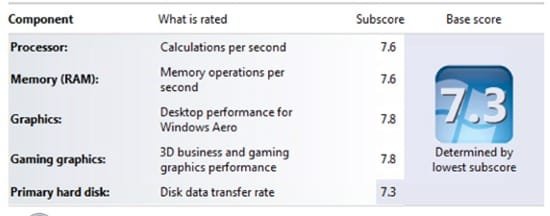
My overall score didn't go up by much, but individual scores did.
 

Attachments

  • WEI Score.PNG
    WEI Score.PNG
    8.3 KB · Views: 31

My Computer My Computer

Computer type
PC/Desktop
Computer Manufacturer/Model Number
Dell Vostro 460
OS
Windows 10 Pro 64bit
CPU
Intel Core i7 2600 @ 3.4Ghz
Motherboard
Dell 0Y2MRG
Memory
16GB PC3-10600 DDR3 @ 1333Mhz
Graphics Card(s)
ASUS GeForce GTX 550 Ti 1GB DDR5
Sound Card
Realtek ALC888 HD Audio
Monitor(s) Displays
Dell E2211H 22" Widescreen Flat Panel
Screen Resolution
1920 x 1080
Hard Drives
Kingston 480GB SATA III SSD, Western Digital 1TB SATA III HDD
PSU
Antec Modular 550W
Keyboard
Dell USB Keyboard
Mouse
Dell USB Mouse
Internet Speed
200Mbs Down/20Mbs Up
Other Info
Netgear C7000 Cable Modem/Wireless Router
Build is what's in my System Specs.

Odd that my Patriot Torqx SSD is what's holding me back. And my HIS 5830 is the best component, not my AMD x6 1055T. It all should be pretty fairly balanced--I tried to build a decent gaming rig with no bottlenecks.
 

Attachments

  • wei.png
    wei.png
    11.5 KB · Views: 23

My Computer My Computer

Computer Manufacturer/Model Number
Myself
OS
Win7 Ultimate x64, Server 2008 R2
CPU
AMD Phenom II X6 1055T Thuban 2.8GHz
Motherboard
GIGABYTE GA-890FXA-UD5
Memory
8GB G.SKILL Ripjaws Series DDR3 1600 (PC3 12800)
Graphics Card(s)
2x HIS/Sapphire ATI Radeon HD 5830 in CrossfireX
Sound Card
Sound Blaster X-Fi Xtreme
Monitor(s) Displays
Dell 2407WFP 24", Dell 22"
Screen Resolution
1920x1200
Hard Drives
Patriot Torqx 128GB SSD
3TB other HD
PSU
CORSAIR HX Series CMPSU-750HX 750W
Case
Antec Nine Hundred
Cooling
Cooler Master Hyper 212 Plus CPU cooler
Keyboard
SteelSeries MercStealth
Mouse
Razer Lachesis
Internet Speed
HAHA NO MOAR COMCAST. Now, FiOS :D
Other Info
I am a virtualization enthusiast. I like Hyper-V. It's free.
I'm a Windows 7 fangirl. I will teach a class for you or write a custom course for you RIGHT NOW.
I love EVE Online. I'm Sayra Sainer. I play Starcraft II. My gamertag is Tal0nn. I'm trying not to play Minecraft.
I also like coffee. I'll take a basic triple grande extra-hot breve stirred ristretto caramel machiatto.
My overall score didn't go up by much, but individual scores did.

jeffro, how do you get your WEI to show component names like that?
 

My Computer My Computer

Computer Manufacturer/Model Number
Myself
OS
Win7 Ultimate x64, Server 2008 R2
CPU
AMD Phenom II X6 1055T Thuban 2.8GHz
Motherboard
GIGABYTE GA-890FXA-UD5
Memory
8GB G.SKILL Ripjaws Series DDR3 1600 (PC3 12800)
Graphics Card(s)
2x HIS/Sapphire ATI Radeon HD 5830 in CrossfireX
Sound Card
Sound Blaster X-Fi Xtreme
Monitor(s) Displays
Dell 2407WFP 24", Dell 22"
Screen Resolution
1920x1200
Hard Drives
Patriot Torqx 128GB SSD
3TB other HD
PSU
CORSAIR HX Series CMPSU-750HX 750W
Case
Antec Nine Hundred
Cooling
Cooler Master Hyper 212 Plus CPU cooler
Keyboard
SteelSeries MercStealth
Mouse
Razer Lachesis
Internet Speed
HAHA NO MOAR COMCAST. Now, FiOS :D
Other Info
I am a virtualization enthusiast. I like Hyper-V. It's free.
I'm a Windows 7 fangirl. I will teach a class for you or write a custom course for you RIGHT NOW.
I love EVE Online. I'm Sayra Sainer. I play Starcraft II. My gamertag is Tal0nn. I'm trying not to play Minecraft.
I also like coffee. I'll take a basic triple grande extra-hot breve stirred ristretto caramel machiatto.

My Computers My Computers

System One System Two

  • Computer type
    PC/Desktop
    Computer Manufacturer/Model Number
    ALWAYS UNDER CONSTRUCTION
    OS
    Windows 11 Pro
    CPU
    Ryzen 9 5900X
    Motherboard
    Asus X570 Crosshair Viii Hero
    Memory
    32GB G Skill DDR4-3600
    Graphics Card(s)
    EVGA RTX 3080 FTW 3 Ultra
    Sound Card
    On Board/Sennheiser PC37X Headset
    Monitor(s) Displays
    3 X Asus 27"
    Screen Resolution
    2560x1440
    Hard Drives
    2 X 1 TB NVME drives
    PSU
    EVGA 850
    Case
    Phanteks Eclipse P400A
    Cooling
    EVGA 280 AIO
    Keyboard
    Logitech G510s/ Logitech G13
    Mouse
    Logitech G502
    Internet Speed
    24/1
    Antivirus
    ESET/MBAM Pro/SAS Pro
    Browser
    Chrome/ Firefox/ Edge
  • Computer type
    Laptop
    System Manufacturer/Model Number
    Dell 16 Plus
    OS
    Windows 11 Pro
    CPU
    Intel Ultra 9 288V
    Memory
    32 GB LPDDR5X 8533
    Monitor(s) Displays
    16" Mini-LED HDR600 Touch 90 Hz
    Screen Resolution
    2560X1600
    Hard Drives
    1 TB NVME
hjonesMCT, those are good scores. Besides, WEI is not a good measure of performance. You have a good rig.
 

My Computers My Computers

System One System Two

  • Computer type
    PC/Desktop
    Computer Manufacturer/Model Number
    ALWAYS UNDER CONSTRUCTION
    OS
    Windows 11 Pro
    CPU
    Ryzen 9 5900X
    Motherboard
    Asus X570 Crosshair Viii Hero
    Memory
    32GB G Skill DDR4-3600
    Graphics Card(s)
    EVGA RTX 3080 FTW 3 Ultra
    Sound Card
    On Board/Sennheiser PC37X Headset
    Monitor(s) Displays
    3 X Asus 27"
    Screen Resolution
    2560x1440
    Hard Drives
    2 X 1 TB NVME drives
    PSU
    EVGA 850
    Case
    Phanteks Eclipse P400A
    Cooling
    EVGA 280 AIO
    Keyboard
    Logitech G510s/ Logitech G13
    Mouse
    Logitech G502
    Internet Speed
    24/1
    Antivirus
    ESET/MBAM Pro/SAS Pro
    Browser
    Chrome/ Firefox/ Edge
  • Computer type
    Laptop
    System Manufacturer/Model Number
    Dell 16 Plus
    OS
    Windows 11 Pro
    CPU
    Intel Ultra 9 288V
    Memory
    32 GB LPDDR5X 8533
    Monitor(s) Displays
    16" Mini-LED HDR600 Touch 90 Hz
    Screen Resolution
    2560X1600
    Hard Drives
    1 TB NVME
I know... :o I just see 7.9 and must have it. Or as close to it as possible... or at least have the same score across the board. Consistency!

(also, thanks!! I don't know why I didn't click that before).
 

My Computer My Computer

Computer Manufacturer/Model Number
Myself
OS
Win7 Ultimate x64, Server 2008 R2
CPU
AMD Phenom II X6 1055T Thuban 2.8GHz
Motherboard
GIGABYTE GA-890FXA-UD5
Memory
8GB G.SKILL Ripjaws Series DDR3 1600 (PC3 12800)
Graphics Card(s)
2x HIS/Sapphire ATI Radeon HD 5830 in CrossfireX
Sound Card
Sound Blaster X-Fi Xtreme
Monitor(s) Displays
Dell 2407WFP 24", Dell 22"
Screen Resolution
1920x1200
Hard Drives
Patriot Torqx 128GB SSD
3TB other HD
PSU
CORSAIR HX Series CMPSU-750HX 750W
Case
Antec Nine Hundred
Cooling
Cooler Master Hyper 212 Plus CPU cooler
Keyboard
SteelSeries MercStealth
Mouse
Razer Lachesis
Internet Speed
HAHA NO MOAR COMCAST. Now, FiOS :D
Other Info
I am a virtualization enthusiast. I like Hyper-V. It's free.
I'm a Windows 7 fangirl. I will teach a class for you or write a custom course for you RIGHT NOW.
I love EVE Online. I'm Sayra Sainer. I play Starcraft II. My gamertag is Tal0nn. I'm trying not to play Minecraft.
I also like coffee. I'll take a basic triple grande extra-hot breve stirred ristretto caramel machiatto.
Status
Not open for further replies.
Back
Top