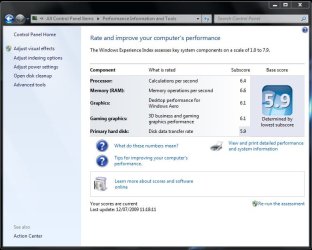
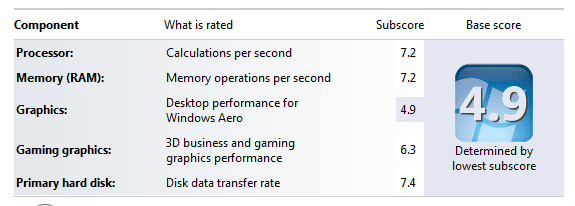
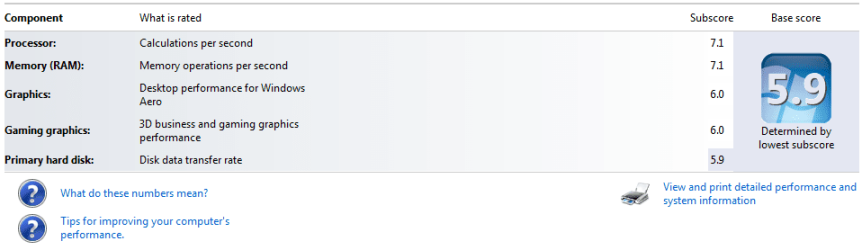
Show Us Your WEI

Status
Not open for further replies.
Why do you need enormous storage? For me, I don't have many programs installed, and little to no games. An 80GB HDD is fine! Once you add music, and videos and stuff, that is where the data starts to fill up, but that's what external/more HDD's are for!
 

My Computer

Computer Manufacturer/Model Number
Custom
OS
Windows 7 Home Premium x64
CPU
AMD 9850 Black Edition
Motherboard
Gigabyte MA78G - DS3H
Memory
4GB DDR2 (Showing 3GB)
Graphics Card(s)
PNY 8800GT
Sound Card
Intigrated
Monitor(s) Displays
Samsung 22" monitor, model#2233 and some **** Sony monitor.
Screen Resolution
1860x1050 | 1024x768
Hard Drives
80GB - OS HDD | 500GB - Backups/Media
PSU
600W CoolerMaster
Case
Off-brand Alienware look-a-like
Cooling
Stock plus extra fans
Keyboard
Microsoft Wired Keyboard
Mouse
Off-brand
Internet Speed
2.95 mb/s down | 0.26mb/s up
Why do you need enormous storage? For me, I don't have many programs installed, and little to no games. An 80GB HDD is fine! Once you add music, and videos and stuff, that is where the data starts to fill up, but that's what external/more HDD's are for!
Internally controlled drive configurations are faster and in the long run the storage system is more reliable and manageable. However hardware-wise they are more of a pain to assemble.
 

My Computer

Computer Manufacturer/Model Number
Custom workstation /// Lenovo X61t tablet notebook
OS
Windows 7 RTM x64
CPU
Core i7 980X @ 4.04GHz OC /// Core Duo L7500 @ 1.6GHz
Motherboard
Asus P6T6 WS Revolution ///
Memory
12GB G. Skill @ DDR-1600 OC /// 4GB
Graphics Card(s)
Saphire HD4870 Toxic 1GB /// Intel Mobile GMA X3100
Monitor(s) Displays
Dual Eizo 24" SX2461W /// 12"
Screen Resolution
1920x1200 /// 1400x1050
Hard Drives
Workstation:
5x 750GB Barracuda-11 on Areca ARC-1220;
4x 1.5TB Barracuda-11 on Intel ICH10R;
Volumes:
300GB RAID 0, 2.7TB RAID 10 on Intel;
100GB RAID 0, 1.4TB RAID 10 on Areca ///
Notebook: G.Skill Titan 256GB SSD
PSU
Tagan ITZ 1100
Case
GHS-1500 ///
Cooling
Thermalright IFX-14 + a slew of stealth fans ///
Keyboard
Logitech Edge ///
Mouse
Logitech Wireless Optical Trackball
Internet Speed
5Mbps down / 820Kbps up
Other Info
Main use: photography;
DVD Drive: L.G GGW-H20L Blu-Ray / DVD;
OC: QPI/DRAM @ 1.33v, CPU @ 1.293v, DRAM Bus @ 1.65v, CPU PLL @ 1.88v, CPU mult = 25x, BCLK = 160, DDR3-1604 @ 7-8-7-24
Internally controlled drive configurations are faster and in the long run the storage system is more reliable and manageable. However hardware-wise they are more of a pain to assemble.

Not only that, it's sometimes easier to have it all in one place.
 

My Computer

Computer Manufacturer/Model Number
Acer Aspire 5610
OS
Windows 7 Professional, Windows Longhorn 4074
CPU
Intel Centrino Duo T2350 @ 1.87 GHz
Motherboard
Acer Grapevine
Memory
1GB (2x 512MB DDR2 400Mz)
Graphics Card(s)
Intel Integrated 945GM Chipset
Sound Card
On-Board RealTek HD Audio
Monitor(s) Displays
Generic PnP Monitor
Screen Resolution
1280x800
Hard Drives
160GB SATA HD
PSU
Generic PSU
Case
Acer Aspire 5610 Standard Case (U.S. Version)
Cooling
Air
Keyboard
Built-In / Random Logitech wireless keyboard
Mouse
Synaptics Touchpad / Logitech Click! optical mouse.
Internet Speed
2.57 Mbps Download / 0.29 Mbps Upload / 57ms Ping
Other Info
I call it the craptop.
Personally, I think that the WD 1TB Caviar Black is better than most of the SSD's out there. Sure it's slower than them, but the storage is enormous.

It's a LOT slower, lol. I use a RAID 0 of OCZ Vertex 30GB SSDs to get 60GB (plenty for a C: partition). I do so because of performance. But the WD Black 1TB drives are amazing values for their performance level when compared with other mechanical drives. I actually run one as my D: and E: partitions to store my documents, media files, etc. They are solid for massive amounts of storage.

Why do you need enormous storage? For me, I don't have many programs installed, and little to no games. An 80GB HDD is fine! Once you add music, and videos and stuff, that is where the data starts to fill up, but that's what external/more HDD's are for!

You're just not expanding your mind enough to consider all of the possibilities. ;)

I'm only using 134GB on my 1TB drive right now, but I can easily use more. Some examples:

  • On my gaming rig I sometimes use FRAPS to record video of a game I'm playing. In raw format at 50% size of my 3840x1024 resolution (3x 1280x1024 monitors), which is 1920x512, it eats up 1GB every minute. So an hour long recording is 60GB.
  • On my Ubuntu Linux system running a program called "MythTV", I have it scheduling and recording TV programs (it's acting as an HTPC). It takes 7GB per hour of recording in a very high quality format. It only has a 250GB hard drive, and split into two partitions, with one for the OS and the other for the sotrage (197GB for recordings), I'm limited to recording and saving 28 hours of TV at one time. I'll be switching this older system out for my previous gaming rig, so I'll upgrade to a WD Black 1TB drive at that point.
  • My relatively small MP3 collection is 20GB. I can easily ramp this up to 100GB or so now with tons of space. I put off collecting too much in MP3 format in the past because of drive limitations. Now I don't have to hold back. :D
  • All of my real documents are 89GB. This includes images I work on in Photoshop, Office documents, resumes, my programming projects, and other small projects, etc.
And I wouldn't dare run all of these things on an external drive. That's just silly since I have plenty of room in my case and my case has better cooling than an external enclosure for a drive. The performance is better (unless you run eSATA for your external drives), there are less cables to deal with on your desk, and your drive is better protected in a PC case than external.

So depending upon what you're doing, it is easy to make use of 1TB of space.

Now compare that to my little netbook with a 4GB SSD and a 16GB SD card. I cut all of the fat for that thing, but it serves a very different purpose.
 

My Computer

Computer Manufacturer/Model Number
custom build
OS
Windows 7 Ultimate 64-bit RTM
CPU
Intel Core i7 920 (D0), overclocked @ 3.6GHz (4.2GHz stable)
Motherboard
EVGA X58 A1
Memory
6GB of OCZ DDR3-1600 triple channel @ 7-7-7-20
Graphics Card(s)
EVGA GTX 295 Co-Op
Sound Card
Auzentech X Meridian 7.1
Monitor(s) Displays
(3x) Samsung 943BX, (1x) Samsung 2333HD, (1x) BenQ FP202W
Screen Resolution
3840x1024 + 1920x1080 + 1680x1050
Hard Drives
(4x) OCZ Vertex 30GB SATA2 SSDs on RAID 0 for 120GB total
(2x) Western Digital Black 1TB SATA2 on RAID 0
(1x) Lite-on DVD Burner and Blu-Ray player
PSU
PC Power & Cooling Super-quiet Silencer 910
Case
(modified) Tagan Black Pearl full tower, WCR edition
Cooling
Scythe Mugen2 CPU cooler, (5x) Scythe SFF21F, Zalaman cntrl.
Keyboard
Logitech G19
Mouse
Logitech G9x
Internet Speed
Comcast Cable, 22Mbps down and 5Mbps up
Other Info
Logitech Z-5500 Digital speaker system
This is mine :)
 

Attachments

  • ScreenHunter_01 Jul. 12 11.19.jpg
    ScreenHunter_01 Jul. 12 11.19.jpg
    55.4 KB · Views: 60

My Computer

Computer Manufacturer/Model Number
Home Build
OS
Windows 7 Ultimate RC1 / XP Black 2009
CPU
Core2Duo E8400
Motherboard
MSI
Memory
3GB
Graphics Card(s)
ATI Radeon HD 3850
Hard Drives
W/D 250GB x2
Case
Thermaltake Tsunami Dream
Keyboard
Logitech G15
Mouse
Razer Death Adder
Internet Speed
6.5 - 7 MB
It's a LOT slower, lol. I use a RAID 0 of OCZ Vertex 30GB SSDs to get 60GB (plenty for a C: partition). I do so because of performance. But the WD Black 1TB drives are amazing values for their performance level when compared with other mechanical drives. I actually run one as my D: and E: partitions to store my documents, media files, etc. They are solid for massive amounts of storage.


You're just not expanding your mind enough to consider all of the possibilities. ;)

I'm only using 134GB on my 1TB drive right now, but I can easily use more. Some examples:

  • On my gaming rig I sometimes use FRAPS to record video of a game I'm playing. In raw format at 50% size of my 3840x1024 resolution (3x 1280x1024 monitors), which is 1920x512, it eats up 1GB every minute. So an hour long recording is 60GB.
  • On my Ubuntu Linux system running a program called "MythTV", I have it scheduling and recording TV programs (it's acting as an HTPC). It takes 7GB per hour of recording in a very high quality format. It only has a 250GB hard drive, and split into two partitions, with one for the OS and the other for the sotrage (197GB for recordings), I'm limited to recording and saving 28 hours of TV at one time. I'll be switching this older system out for my previous gaming rig, so I'll upgrade to a WD Black 1TB drive at that point.
  • My relatively small MP3 collection is 20GB. I can easily ramp this up to 100GB or so now with tons of space. I put off collecting too much in MP3 format in the past because of drive limitations. Now I don't have to hold back. :D
  • All of my real documents are 89GB. This includes images I work on in Photoshop, Office documents, resumes, my programming projects, and other small projects, etc.
And I wouldn't dare run all of these things on an external drive. That's just silly since I have plenty of room in my case and my case has better cooling than an external enclosure for a drive. The performance is better (unless you run eSATA for your external drives), there are less cables to deal with on your desk, and your drive is better protected in a PC case than external.

So depending upon what you're doing, it is easy to make use of 1TB of space.

Now compare that to my little netbook with a 4GB SSD and a 16GB SD card. I cut all of the fat for that thing, but it serves a very different purpose.

I understand your point, but I was arguing that you don't need 1TB of space on your C: drive. You can easily get away with maybe a 120GB C: drive. I was arguing that when you need space, you can put in some 1TB internal Hard Drives, rather than put it all on a single hard drive.
 

My Computer

Computer Manufacturer/Model Number
Custom
OS
Windows 7 Home Premium x64
CPU
AMD 9850 Black Edition
Motherboard
Gigabyte MA78G - DS3H
Memory
4GB DDR2 (Showing 3GB)
Graphics Card(s)
PNY 8800GT
Sound Card
Intigrated
Monitor(s) Displays
Samsung 22" monitor, model#2233 and some **** Sony monitor.
Screen Resolution
1860x1050 | 1024x768
Hard Drives
80GB - OS HDD | 500GB - Backups/Media
PSU
600W CoolerMaster
Case
Off-brand Alienware look-a-like
Cooling
Stock plus extra fans
Keyboard
Microsoft Wired Keyboard
Mouse
Off-brand
Internet Speed
2.95 mb/s down | 0.26mb/s up
You can have a 64-80GB SSD for your applications and OS (you can probably fit 2-3 games, CS4, office enterprise, visual studio, and an AV with room to spare), then just map all your libraries to a better GB/$ HDD for storage.

The problem is that some applications like to store media in their own directories.
 

My Computer

Computer Manufacturer/Model Number
Intel WBIBX10J
OS
Linux (Debian, Android)
CPU
Intel Core i7 860
Motherboard
Intel DP55WB
Memory
2x 2GB Kingston DDR3-1333
Graphics Card(s)
AMD Radeon HD 5750
Sound Card
Realtek ALC888
Monitor(s) Displays
2x Dell Inc. E248WFP
Screen Resolution
3840x1200
Hard Drives
Intel X25-V
Samsung HD103SJ
PSU
Corsair CX400
Case
Silverstone GD05
Cooling
Stock
Keyboard
Dell Inc. Bluetooth Wireless
Internet Speed
30 Mbps

My Computer

OS
XP Pro & Vista Home Premium (x86); Windows Ultimate 7600 x64 Retail
Well having been through the thread from start to here it would appear that single mechanical drives, of good to very good performance ratings, top out at about a WEI of 5.7-5.9. Cross-referencing this thread with the Show Us Your Hard Drive thread:

http://www.sevenforums.com/performance-maintenance/4269-show-us-your-hard-drive-performance.html

that is about 80-100MB/s HD Tune results.

Hmmm.... wonder if SSDs will drop in price dramatically for the Black Friday sales? :thumbsup:

Or laptops will be thrown around at Wal-Mart like during christmas.
 

My Computer

Computer Manufacturer/Model Number
Acer Aspire 5610
OS
Windows 7 Professional, Windows Longhorn 4074
CPU
Intel Centrino Duo T2350 @ 1.87 GHz
Motherboard
Acer Grapevine
Memory
1GB (2x 512MB DDR2 400Mz)
Graphics Card(s)
Intel Integrated 945GM Chipset
Sound Card
On-Board RealTek HD Audio
Monitor(s) Displays
Generic PnP Monitor
Screen Resolution
1280x800
Hard Drives
160GB SATA HD
PSU
Generic PSU
Case
Acer Aspire 5610 Standard Case (U.S. Version)
Cooling
Air
Keyboard
Built-In / Random Logitech wireless keyboard
Mouse
Synaptics Touchpad / Logitech Click! optical mouse.
Internet Speed
2.57 Mbps Download / 0.29 Mbps Upload / 57ms Ping
Other Info
I call it the craptop.
You can have a 64-80GB SSD for your applications and OS (you can probably fit 2-3 games, CS4, office enterprise, visual studio, and an AV with room to spare), then just map all your libraries to a better GB/$ HDD for storage.

The problem is that some applications like to store media in their own directories.

Yes. Some will use PROGRAM DATA as well as PROGRAM FILES\COMMON FILES folders on the OS Drive extensively regardless where the actual user specified "Install Folder" is located.

Also, the RC to 7xxxx Win7 upgrades have thus far required about 20Gb of FREE space to do the upgrade install.

And WINSXS does not seem to be getting smaller.

My guestimate is a 64GB SSD configuration (since 32 and 64GB sizes are "common") would be the minimum for future expansion/upgrade capability.
 

My Computer

OS
XP Pro & Vista Home Premium (x86); Windows Ultimate 7600 x64 Retail
I've searched Google up and down about this build and just thought that I would mention that I was unable to find anything about an x86 build.

Hopefully, that will change.
 

My Computer

Computer Manufacturer/Model Number
Acer Aspire 5610
OS
Windows 7 Professional, Windows Longhorn 4074
CPU
Intel Centrino Duo T2350 @ 1.87 GHz
Motherboard
Acer Grapevine
Memory
1GB (2x 512MB DDR2 400Mz)
Graphics Card(s)
Intel Integrated 945GM Chipset
Sound Card
On-Board RealTek HD Audio
Monitor(s) Displays
Generic PnP Monitor
Screen Resolution
1280x800
Hard Drives
160GB SATA HD
PSU
Generic PSU
Case
Acer Aspire 5610 Standard Case (U.S. Version)
Cooling
Air
Keyboard
Built-In / Random Logitech wireless keyboard
Mouse
Synaptics Touchpad / Logitech Click! optical mouse.
Internet Speed
2.57 Mbps Download / 0.29 Mbps Upload / 57ms Ping
Other Info
I call it the craptop.
You can have a 64-80GB SSD for your applications and OS (you can probably fit 2-3 games, CS4, office enterprise, visual studio, and an AV with room to spare), then just map all your libraries to a better GB/$ HDD for storage.

The problem is that some applications like to store media in their own directories.

That won't really help gamers. Games these days can be a few GB to 15+GB. They need to load those data files quickly, and hence why people want them installed on fast drives.

Also, as Muad Dib pointed out, it isn't practical for the average user to do this. Everything application is installed in %PROGRAMFILES% or %PROGRAMFILES(x86)%
 

My Computer

Computer Manufacturer/Model Number
custom build
OS
Windows 7 Ultimate 64-bit RTM
CPU
Intel Core i7 920 (D0), overclocked @ 3.6GHz (4.2GHz stable)
Motherboard
EVGA X58 A1
Memory
6GB of OCZ DDR3-1600 triple channel @ 7-7-7-20
Graphics Card(s)
EVGA GTX 295 Co-Op
Sound Card
Auzentech X Meridian 7.1
Monitor(s) Displays
(3x) Samsung 943BX, (1x) Samsung 2333HD, (1x) BenQ FP202W
Screen Resolution
3840x1024 + 1920x1080 + 1680x1050
Hard Drives
(4x) OCZ Vertex 30GB SATA2 SSDs on RAID 0 for 120GB total
(2x) Western Digital Black 1TB SATA2 on RAID 0
(1x) Lite-on DVD Burner and Blu-Ray player
PSU
PC Power & Cooling Super-quiet Silencer 910
Case
(modified) Tagan Black Pearl full tower, WCR edition
Cooling
Scythe Mugen2 CPU cooler, (5x) Scythe SFF21F, Zalaman cntrl.
Keyboard
Logitech G19
Mouse
Logitech G9x
Internet Speed
Comcast Cable, 22Mbps down and 5Mbps up
Other Info
Logitech Z-5500 Digital speaker system
WAIK (7)
WAIK (7) Reference
Both are English language.

Create a custom installation - place %USERPROFILES%, %PROGRAMFILES% where you want to.

Install your drivers of choice, install preferred apps as part of OS install.

Apply all reg tweaks as part of OS install.

And so on.
 
That won't really help gamers. Games these days can be a few GB to 15+GB. They need to load those data files quickly, and hence why people want them installed on fast drives.

Also, as Muad Dib pointed out, it isn't practical for the average user to do this. Everything application is installed in %PROGRAMFILES% or %PROGRAMFILES(x86)%

WAIK (7)
WAIK (7) Reference
Both are English language.

Create a custom installation - place %USERPROFILES%, %PROGRAMFILES% where you want to.

Install your drivers of choice, install preferred apps as part of OS install.

Apply all reg tweaks as part of OS install.

And so on.

Antman, your solution is correct, known and appreciated to the world of the tech savvy but I believe Ciphernemo understood my point best.

When W7 RTM is out I WILL be looking at keeping MY OS and critical apps/data able to fit nicely on a 64GB SSD (1x64 or 2x32 RAID0) for speed just as a curiosity. But would not even mention it to any of my clients.

SSDs are still far away from a reasonable $$$/GB AVERAGE consumer price point.
 

My Computer

OS
XP Pro & Vista Home Premium (x86); Windows Ultimate 7600 x64 Retail
I guess I need a good video card and I will have a "real" computer. The rest look pretty good to me. I currently have a 9500GT. Thinking of a GTX260 or GTX 275.
WEI.PNG

What will making the "desktop performance" do for me as opposed to the "gaming graphics"?

Seems like a big difference between the two.
 

My Computer

Computer Manufacturer/Model Number
Keeps changing - (Custom)
OS
Windows 7 Professional x64
CPU
Intel Core i7 860
Motherboard
Gigabyte GA-P55-UD4P
Memory
4GB DDR3 Mushkin 1600Mhz @ 7-8-7-20
Graphics Card(s)
MSI GTS250 1GB DDR3 Twin Frozr
Sound Card
Onboard realtek
Monitor(s) Displays
Samsung SyncMaster 24" P2450 + Samsung 20" 2033
Screen Resolution
1920 X 1080 and 1600 X 900 (#2 system 1440 X 900)
Hard Drives
Patriot Inferno 120GB SSD + 3 WD Blue 640GB drives
PSU
Corsair 750 HX Modular
Case
Lancool PC-K62
Cooling
Cooler Master TX3 CPU cooler and 4-140mm and 1-120mm case
Keyboard
Gigabyte USB keyboard
Mouse
Microsoft wireless laser mouse 5000
Internet Speed
7 Mb down 1.5 up
Other Info
System #2: AMD Phenom II X6 1055T (Freezer 7 Pro cooler) - Gigabyte 880GMA-UD2H - WD 500GB Black - 9500GT (1GB) 500W OCZ modular PSU - Antec 200 case. System #3 (LapTop) Core 2 Duo T6670 - 320GB 7200RPM HD - 4GB DDR3 RAM.
I guess I need a good video card and I will have a "real" computer. The rest look pretty good to me. I currently have a 9500GT. Thinking of a GTX260 or GTX 275.
View attachment 17884

What will making the "desktop performance" do for me as opposed to the "gaming graphics"?

Seems like a big difference between the two.

Your on the right track - I have an OCed Sapphire HD4830 and get 7.3 WEI across the board except for HDD (I envy your SSDs man!).

Anyway in case you have not seen it before check out Tom's Video Heirarchy: Graphics Card Hierarchy Chart - Review Tom's Hardware : Best Graphics Cards For The Money: Jan. '09

P.S. You need to go UP the heirarchy 4-5 steps to make the upgrade gains worth the cost according to many.


P.S.S. I looked at your HD Tune results. I have a WD5000AAKS as well. What firmware and driver version are you running to get your HD Tune results? Reason I ask is my results are less and I don't know why.....

P.S.S.S. Gaming graphics tests the 3D processors/accleration on the cards which are not used in normal operations (less power, less heat, less fan noise). Desktop graphics will test a cards 2D capabilities for niceties such as multiple windows on multiple virtual desktops on multiple monitors, dragging windows contents, windows open/close animation eye candy, etc, etc, etc.
 

My Computer

OS
XP Pro & Vista Home Premium (x86); Windows Ultimate 7600 x64 Retail
And while looking for GFX cards please check out if your MB supports Nforce or Crossfire.
It would make a difference if you'd go for ATI or Nvidia.

Nforce makes 2 or more Nvidia cards possible
Crossfire makes 2 or more ATI cards possible.

Only ofc. if your interested in using 2 vid cards.

Correct me if i'm wrong people.

- Phenom
 
Mine under Windows 7 RC

WEI scores.PNG
 

My Computer

Computer Manufacturer/Model Number
Systemax N2000 Gaming PC
OS
Windows 7 Ultimate x64
CPU
Q6600 @2.4ghz (G0 stepping)
Motherboard
XFX nforce 680i LT
Memory
8 gb OCZ vista essential sli PC-6400
Graphics Card(s)
Dual 9800gt in SLI mode
Sound Card
Integrated 8.1 High Definition Audio
Monitor(s) Displays
Dual Sceptre x246w 24 inch monitors
Screen Resolution
1920 x 1200 each monitor
Hard Drives
500 GB SATA II / 7500 rpm
PSU
Cooler Master Real Power Pro 1250W
Case
N2000 server tower
Cooling
Thermaltake Bigwater 760 is
Keyboard
MS Intelitype 6000 v2.0
Mouse
MS Intelipoint 6000
Internet Speed
Wi-power 1.5GB up / 512k down
Other Info
Windows 7 Ultimate x64, Windows 7 Pro x64, Windows Home Premium X86, Windows XP pro, Windows Home Server x86, Ubuntu 10.4 x86 and x64, Ubuntu server 10.4, SQL Server 2005, MySQL 5.0
SSDs are still far away from a reasonable $$$/GB AVERAGE consumer price point.

Yup, they have some ways to go before they replace HDDs. They need to get closer to the 1GB/$1 range for the performance drives. Those like the OCZ Vertex and Summit series are closer to 1GB/$5 range for smaller sizes and 1GB/$2.50-$3 for larger sizes. And the top-dog Intel drives are 1GB/$5+ all the way through their sizes.

But for us gamers and enthusiasts, they're at the "justifiable" price range, hehehe. ;)
 

My Computer

Computer Manufacturer/Model Number
custom build
OS
Windows 7 Ultimate 64-bit RTM
CPU
Intel Core i7 920 (D0), overclocked @ 3.6GHz (4.2GHz stable)
Motherboard
EVGA X58 A1
Memory
6GB of OCZ DDR3-1600 triple channel @ 7-7-7-20
Graphics Card(s)
EVGA GTX 295 Co-Op
Sound Card
Auzentech X Meridian 7.1
Monitor(s) Displays
(3x) Samsung 943BX, (1x) Samsung 2333HD, (1x) BenQ FP202W
Screen Resolution
3840x1024 + 1920x1080 + 1680x1050
Hard Drives
(4x) OCZ Vertex 30GB SATA2 SSDs on RAID 0 for 120GB total
(2x) Western Digital Black 1TB SATA2 on RAID 0
(1x) Lite-on DVD Burner and Blu-Ray player
PSU
PC Power & Cooling Super-quiet Silencer 910
Case
(modified) Tagan Black Pearl full tower, WCR edition
Cooling
Scythe Mugen2 CPU cooler, (5x) Scythe SFF21F, Zalaman cntrl.
Keyboard
Logitech G19
Mouse
Logitech G9x
Internet Speed
Comcast Cable, 22Mbps down and 5Mbps up
Other Info
Logitech Z-5500 Digital speaker system
Status
Not open for further replies.
Back
Top