Show Us Your WEI

Status
Not open for further replies.
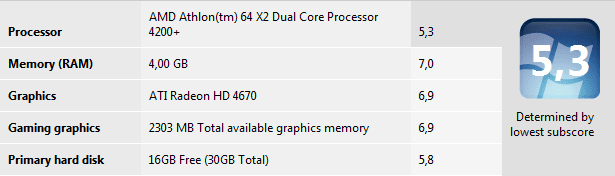
The test itself must be wrong then because 6.9 is what it says on my PC. The only difference being that it doesn't show that my CPU is Overclocked @3.0Ghz

What type of hard drive do you have to get that 7.2 score? I have a new hdd and its only 5.9
 

My Computer

Computer Manufacturer/Model Number
Built
OS
Windows 7 RTM
CPU
Intel I7 920 2.67 ghz
Motherboard
EVGA X58
Memory
6GB CORSAIR DOMINATOR
Graphics Card(s)
GeForce GTX 260 Core 216 896MB 448-bit GDDR3 PCI Express 2.0
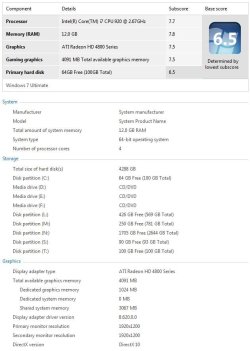
SSDs have a significant performance advantage so they need to leave headroom for them. Hell, my 4-spindle mechanical RAID 0 barely rates a 6.5 :(.
 

My Computer

Computer Manufacturer/Model Number
Custom workstation /// Lenovo X61t tablet notebook
OS
Windows 7 RTM x64
CPU
Core i7 980X @ 4.04GHz OC /// Core Duo L7500 @ 1.6GHz
Motherboard
Asus P6T6 WS Revolution ///
Memory
12GB G. Skill @ DDR-1600 OC /// 4GB
Graphics Card(s)
Saphire HD4870 Toxic 1GB /// Intel Mobile GMA X3100
Monitor(s) Displays
Dual Eizo 24" SX2461W /// 12"
Screen Resolution
1920x1200 /// 1400x1050
Hard Drives
Workstation:
5x 750GB Barracuda-11 on Areca ARC-1220;
4x 1.5TB Barracuda-11 on Intel ICH10R;
Volumes:
300GB RAID 0, 2.7TB RAID 10 on Intel;
100GB RAID 0, 1.4TB RAID 10 on Areca ///
Notebook: G.Skill Titan 256GB SSD
PSU
Tagan ITZ 1100
Case
GHS-1500 ///
Cooling
Thermalright IFX-14 + a slew of stealth fans ///
Keyboard
Logitech Edge ///
Mouse
Logitech Wireless Optical Trackball
Internet Speed
5Mbps down / 820Kbps up
Other Info
Main use: photography;
DVD Drive: L.G GGW-H20L Blu-Ray / DVD;
OC: QPI/DRAM @ 1.33v, CPU @ 1.293v, DRAM Bus @ 1.65v, CPU PLL @ 1.88v, CPU mult = 25x, BCLK = 160, DDR3-1604 @ 7-8-7-24
Em.. Updated few drivers, and I like my new results :D

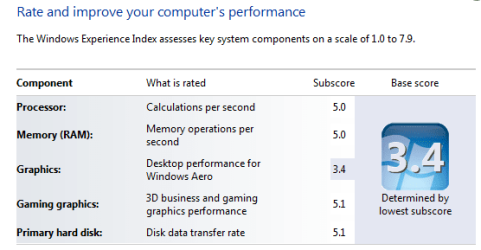
It could be better, but dont have ideas why "Desktop performance for Windows Aero" is so low, only 3.5 When gaming graphics is 5.1..
Maybe I missed something? Any sugestions how can I improve that?
My system specs:
Acer Aspire 7720G (Laptop)
*Intel Core 2 Duo procesor T5750 (2GHz, 667 Mhz, 2mb cache L2 cache)
* Geforce 9300M G
* 3 GB DDR2
* 250 GB HDD

Waiting for your answers, u can PM me too if u like :p
 

Attachments

  • Performance.png
    Performance.png
    11.7 KB · Views: 27

My Computer

Computer Manufacturer/Model Number
Acer 7720G
OS
Windows 7
CPU
2.0 GHz Intel @ Core 2 Duo Processor T5720
Memory
3GB DDR2
Graphics Card(s)
Geforce 9300M
Monitor(s) Displays
17" WXGA+ Acer CrystalBrite LCD
Hard Drives
250GB HDD
I installed Vista on my computer. I got a 3.1. Goodness!!

P.S. BucSox, hate your avatar. No big deal, its your opinion.
 

My Computer

Computer Manufacturer/Model Number
Acer Aspire 5610
OS
Windows 7 Professional, Windows Longhorn 4074
CPU
Intel Centrino Duo T2350 @ 1.87 GHz
Motherboard
Acer Grapevine
Memory
1GB (2x 512MB DDR2 400Mz)
Graphics Card(s)
Intel Integrated 945GM Chipset
Sound Card
On-Board RealTek HD Audio
Monitor(s) Displays
Generic PnP Monitor
Screen Resolution
1280x800
Hard Drives
160GB SATA HD
PSU
Generic PSU
Case
Acer Aspire 5610 Standard Case (U.S. Version)
Cooling
Air
Keyboard
Built-In / Random Logitech wireless keyboard
Mouse
Synaptics Touchpad / Logitech Click! optical mouse.
Internet Speed
2.57 Mbps Download / 0.29 Mbps Upload / 57ms Ping
Other Info
I call it the craptop.
P.S. BucSox, hate your avatar. No big deal, its your opinion.

:p I love his avatar, lol. But I wouldn't put any political thing for my avatar any ways because I'd end up pissing off people, lol. And I would expect the same from others too. So, yes, I could see his avatar being a bit offensive to Obama supporters.
 

My Computer

Computer Manufacturer/Model Number
custom build
OS
Windows 7 Ultimate 64-bit RTM
CPU
Intel Core i7 920 (D0), overclocked @ 3.6GHz (4.2GHz stable)
Motherboard
EVGA X58 A1
Memory
6GB of OCZ DDR3-1600 triple channel @ 7-7-7-20
Graphics Card(s)
EVGA GTX 295 Co-Op
Sound Card
Auzentech X Meridian 7.1
Monitor(s) Displays
(3x) Samsung 943BX, (1x) Samsung 2333HD, (1x) BenQ FP202W
Screen Resolution
3840x1024 + 1920x1080 + 1680x1050
Hard Drives
(4x) OCZ Vertex 30GB SATA2 SSDs on RAID 0 for 120GB total
(2x) Western Digital Black 1TB SATA2 on RAID 0
(1x) Lite-on DVD Burner and Blu-Ray player
PSU
PC Power & Cooling Super-quiet Silencer 910
Case
(modified) Tagan Black Pearl full tower, WCR edition
Cooling
Scythe Mugen2 CPU cooler, (5x) Scythe SFF21F, Zalaman cntrl.
Keyboard
Logitech G19
Mouse
Logitech G9x
Internet Speed
Comcast Cable, 22Mbps down and 5Mbps up
Other Info
Logitech Z-5500 Digital speaker system
:p I love his avatar, lol. But I wouldn't put any political thing for my avatar any ways because I'd end up pissing off people, lol. And I would expect the same from others too. So, yes, I could see his avatar being a bit offensive to Obama supporters.


You're right. I should change it. No need for it on these forums, I just felt strongly about it before and wanted to send a message to anyone I could that Im one of the few that feel this way. That mentality doesnt belong here and should be checked at the door. Im at work now and Ill change it when I get another moment.
 

My Computer

Computer Manufacturer/Model Number
Built
OS
Windows 7 RTM
CPU
Intel I7 920 2.67 ghz
Motherboard
EVGA X58
Memory
6GB CORSAIR DOMINATOR
Graphics Card(s)
GeForce GTX 260 Core 216 896MB 448-bit GDDR3 PCI Express 2.0
wee... new gpu, much better then the 8500gt i had before.
 

Attachments

  • wei.png
    wei.png
    7.2 KB · Views: 36

My Computer

Computer Manufacturer/Model Number
Me, Myself and I
OS
Windows 7 Ultimate x64
CPU
AMD Athlon II X3 435 @ 2.9GHz 1.15v
Motherboard
Gigabyte GA-M56S-3S
Memory
4 x 1GB DDR2
Graphics Card(s)
Sapphire Radeon HD4670 512MB GDDR4
Sound Card
SB Live! 24-bit
Monitor(s) Displays
Samsung S22A350H LED FullHD
Screen Resolution
1920 x 1080
Hard Drives
Samsung F3 500GB & Samsung T166 320GB
PSU
Fortron 400W
Case
HEC Compucase 6A21
Keyboard
Logitech UltraX
Mouse
Logitech MX310
Internet Speed
15997 / 950 kbps
Yes, what a new processor and mobo will do...

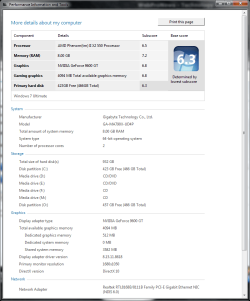
Finally got my AMD Phenom II X2 550 Black Edition and Gigabyte GA-MA790X-UD4P Motherboard in and to my surprise the mobo was too big for the HP Pavilion case. I ended up pulling out the Antec Sonata case I had put away, gutted it and started from scratch putting together a new system with SATA 500GB HDD, 2x SATA Lightscribe Optical drives, 4x 2GB DDR2 800MB Corsair modules (8GB), PCIe BFG 512MB GDDR3 9600GT OC video card. Hooked everything up, fired it up into BIOS inserted Windows 7 7232 x64 in the DVD drive, clean installed and reinstalled everything and BOY!!! this thing is fast. I was tickled to death:p... My WEI went up also:

New WEI.png
 

My Computer

Computer type
PC/Desktop
Computer Manufacturer/Model Number
Custom by Charbroil57
OS
Windows 7 Home Premium x64 (clean install 8/05/2015)
CPU
AMD Phenom II X2 550 Black Edition 3.1GHz
Motherboard
Gigabyte GA-MA790X-UD4P AM3/AM2+/AM2 AMD 790X ATX AMD
Memory
8 GB (4 x 2 GB) Corsair 6400C5 800 MHz
Graphics Card(s)
BFG 512MB GDDR3 9600GT OC
Sound Card
Realtec HD Audio 5.1
Monitor(s) Displays
DVI Viewsonic VA2231
Screen Resolution
1920 x 1080 (1080p)
Hard Drives
1 TB SATA 6G Seagate Barracuda (Boot drive, limited to 3G due to Mobo)
500 GB SATA 3G Seagate Barracuda
500 GB USB Seagate Desktop Drive
PSU
Ultra X4 750w Modular(upgraded)
Case
Antec Sonata
Cooling
Stock (80w CPU)
Keyboard
Microsoft Wireless Desktop Elite
Mouse
Wirless Intellimouse Explorer 2.0
Internet Speed
Xfinity Broadband (Home 75 MB Download)
Antivirus
Norton Internet Security
Browser
Firefox 39 (default) and IE 11
Other Info
SATA HP Lightscribe DVD RW
SATA Samsung Lightscribe DVD RW
I'm even running a slightly older version of it, 8.7.

You mentioned "write caching" (ie: from the device manager) which is different from "write-back cache". Make sure you right click on the RAID volume in your Intel Matrix Storage Console and choose to enable the "write-back cache".
I was being generic - I turned off all of it, write caching in dev mgr and write-back caching in the Storage Mgr.. Sorry, should've been more clear.

Edit: I should also mention it increased the WEI, not the performance! Write-back cache enabled will often double your disk write speed, at the expense of being succeptible to corrupting your filesystem if you lose power or crash the system suddenly - battery backup / UPS recommended.

Here's my current WEI, with system disk now a 4-spindle RAID 0 instead of RAID 10 array.
 

Attachments

  • WEI 2.jpg
    WEI 2.jpg
    53.4 KB · Views: 63
Last edited:

My Computer

Computer Manufacturer/Model Number
Custom workstation /// Lenovo X61t tablet notebook
OS
Windows 7 RTM x64
CPU
Core i7 980X @ 4.04GHz OC /// Core Duo L7500 @ 1.6GHz
Motherboard
Asus P6T6 WS Revolution ///
Memory
12GB G. Skill @ DDR-1600 OC /// 4GB
Graphics Card(s)
Saphire HD4870 Toxic 1GB /// Intel Mobile GMA X3100
Monitor(s) Displays
Dual Eizo 24" SX2461W /// 12"
Screen Resolution
1920x1200 /// 1400x1050
Hard Drives
Workstation:
5x 750GB Barracuda-11 on Areca ARC-1220;
4x 1.5TB Barracuda-11 on Intel ICH10R;
Volumes:
300GB RAID 0, 2.7TB RAID 10 on Intel;
100GB RAID 0, 1.4TB RAID 10 on Areca ///
Notebook: G.Skill Titan 256GB SSD
PSU
Tagan ITZ 1100
Case
GHS-1500 ///
Cooling
Thermalright IFX-14 + a slew of stealth fans ///
Keyboard
Logitech Edge ///
Mouse
Logitech Wireless Optical Trackball
Internet Speed
5Mbps down / 820Kbps up
Other Info
Main use: photography;
DVD Drive: L.G GGW-H20L Blu-Ray / DVD;
OC: QPI/DRAM @ 1.33v, CPU @ 1.293v, DRAM Bus @ 1.65v, CPU PLL @ 1.88v, CPU mult = 25x, BCLK = 160, DDR3-1604 @ 7-8-7-24
Edit: I should also mention it increased the WEI, not the performance! Write-back cache enabled will often double your disk write speed, at the expense of being succeptible to corrupting your filesystem if you lose power or crash the system suddenly - battery backup / UPS recommended.

Write-back caching doesn't necessarily cause loss of data. It's different that the write buffer clearing options in the device manager.
 

My Computer

Computer Manufacturer/Model Number
custom build
OS
Windows 7 Ultimate 64-bit RTM
CPU
Intel Core i7 920 (D0), overclocked @ 3.6GHz (4.2GHz stable)
Motherboard
EVGA X58 A1
Memory
6GB of OCZ DDR3-1600 triple channel @ 7-7-7-20
Graphics Card(s)
EVGA GTX 295 Co-Op
Sound Card
Auzentech X Meridian 7.1
Monitor(s) Displays
(3x) Samsung 943BX, (1x) Samsung 2333HD, (1x) BenQ FP202W
Screen Resolution
3840x1024 + 1920x1080 + 1680x1050
Hard Drives
(4x) OCZ Vertex 30GB SATA2 SSDs on RAID 0 for 120GB total
(2x) Western Digital Black 1TB SATA2 on RAID 0
(1x) Lite-on DVD Burner and Blu-Ray player
PSU
PC Power & Cooling Super-quiet Silencer 910
Case
(modified) Tagan Black Pearl full tower, WCR edition
Cooling
Scythe Mugen2 CPU cooler, (5x) Scythe SFF21F, Zalaman cntrl.
Keyboard
Logitech G19
Mouse
Logitech G9x
Internet Speed
Comcast Cable, 22Mbps down and 5Mbps up
Other Info
Logitech Z-5500 Digital speaker system
Failed writes of cached writes is indeed a cause of corrupted or lost data.

Thanks for including this link: Write Back Cache Experiments

That was a nice read and very informative. :) But VERY dated being written/done in 2003. In the 90s and even up to early 21st century, write-back caching was frowned upon because the controller chip technology wasn't nearly as advanced as it is today. Also, they're using EXT3 and other Linux file allocation methods and older ATA (IDE) drives, not NTFS or anything on the Windows side with newer SATA drives.

Let's not confuse write-back caching with disabling the write buffer flushing which is what that "advanced" mode or last checkmark box in Windows 7 is about. The two are a little different.

Yes, it is possible to lose and corrupt data with write-back caching enabled, but it's also possible to lose and corrupt data if your HDD or SSD is writing when it loses power, regardless of its cache state or operational mode. There is hardly any additional risk in using write-back caching these days (it is nominal).

In fact, for larger files, write-back caching will speed up writing and reading to/from a disk, lessening the risk. In smaller files, the overhead for working with the buffer is greater, and therefore it takes roughly the same time. With lots of reads and writes being queued up in the buffer (ie: when an application is loading and a log is being written), then having write-back caching is a little more risk.

Write-back itself means the data is flagged as being written to the drive even if it's still in the cache. But the cache is often flushed regularly and very quickly when the read/write demmand on the drive or drive array is low. There is actually a lower risk of data corruption (file partially written before a power loss or crash) with write-back caching because the write from a buffer occurs faster than a write-through transaction. But there is a higher risk of data loss (losing a files completely due to a power loss or crash).

If we Google it, you'll find advocates for both enabling it and disabling it. I only enable it when I'm gaming (reading files more than writing them) and disable it when I'm doing any real work. But regardless, the risk of data corruption and loss is there regardless of whether you enable it or not.

Either way, I always run on a UPS, but an O/S can still crash hard and lose data.

 

My Computer

Computer Manufacturer/Model Number
custom build
OS
Windows 7 Ultimate 64-bit RTM
CPU
Intel Core i7 920 (D0), overclocked @ 3.6GHz (4.2GHz stable)
Motherboard
EVGA X58 A1
Memory
6GB of OCZ DDR3-1600 triple channel @ 7-7-7-20
Graphics Card(s)
EVGA GTX 295 Co-Op
Sound Card
Auzentech X Meridian 7.1
Monitor(s) Displays
(3x) Samsung 943BX, (1x) Samsung 2333HD, (1x) BenQ FP202W
Screen Resolution
3840x1024 + 1920x1080 + 1680x1050
Hard Drives
(4x) OCZ Vertex 30GB SATA2 SSDs on RAID 0 for 120GB total
(2x) Western Digital Black 1TB SATA2 on RAID 0
(1x) Lite-on DVD Burner and Blu-Ray player
PSU
PC Power & Cooling Super-quiet Silencer 910
Case
(modified) Tagan Black Pearl full tower, WCR edition
Cooling
Scythe Mugen2 CPU cooler, (5x) Scythe SFF21F, Zalaman cntrl.
Keyboard
Logitech G19
Mouse
Logitech G9x
Internet Speed
Comcast Cable, 22Mbps down and 5Mbps up
Other Info
Logitech Z-5500 Digital speaker system

My Computer

Computer Manufacturer/Model Number
Acer Aspire 5610
OS
Windows 7 Professional, Windows Longhorn 4074
CPU
Intel Centrino Duo T2350 @ 1.87 GHz
Motherboard
Acer Grapevine
Memory
1GB (2x 512MB DDR2 400Mz)
Graphics Card(s)
Intel Integrated 945GM Chipset
Sound Card
On-Board RealTek HD Audio
Monitor(s) Displays
Generic PnP Monitor
Screen Resolution
1280x800
Hard Drives
160GB SATA HD
PSU
Generic PSU
Case
Acer Aspire 5610 Standard Case (U.S. Version)
Cooling
Air
Keyboard
Built-In / Random Logitech wireless keyboard
Mouse
Synaptics Touchpad / Logitech Click! optical mouse.
Internet Speed
2.57 Mbps Download / 0.29 Mbps Upload / 57ms Ping
Other Info
I call it the craptop.
Write-back caching doesn't necessarily cause loss of data. It's different that the write buffer clearing options in the device manager.
Indeed - it just makes you more succeptible, how much more depends on your hardware & configuration. Pressing the reset button during write operations can also frappe your filesystem good, but not necessarily :).

Edit: too much coffee ...
 

My Computer

Computer Manufacturer/Model Number
Custom workstation /// Lenovo X61t tablet notebook
OS
Windows 7 RTM x64
CPU
Core i7 980X @ 4.04GHz OC /// Core Duo L7500 @ 1.6GHz
Motherboard
Asus P6T6 WS Revolution ///
Memory
12GB G. Skill @ DDR-1600 OC /// 4GB
Graphics Card(s)
Saphire HD4870 Toxic 1GB /// Intel Mobile GMA X3100
Monitor(s) Displays
Dual Eizo 24" SX2461W /// 12"
Screen Resolution
1920x1200 /// 1400x1050
Hard Drives
Workstation:
5x 750GB Barracuda-11 on Areca ARC-1220;
4x 1.5TB Barracuda-11 on Intel ICH10R;
Volumes:
300GB RAID 0, 2.7TB RAID 10 on Intel;
100GB RAID 0, 1.4TB RAID 10 on Areca ///
Notebook: G.Skill Titan 256GB SSD
PSU
Tagan ITZ 1100
Case
GHS-1500 ///
Cooling
Thermalright IFX-14 + a slew of stealth fans ///
Keyboard
Logitech Edge ///
Mouse
Logitech Wireless Optical Trackball
Internet Speed
5Mbps down / 820Kbps up
Other Info
Main use: photography;
DVD Drive: L.G GGW-H20L Blu-Ray / DVD;
OC: QPI/DRAM @ 1.33v, CPU @ 1.293v, DRAM Bus @ 1.65v, CPU PLL @ 1.88v, CPU mult = 25x, BCLK = 160, DDR3-1604 @ 7-8-7-24
Indeed - it just makes you more succeptible, how much more depends on your hardware & configuration. Pressing the reset button during write operations can also frappe your filesystem good, but not necessarily :).

Yup, very true. :)

Edit: too much coffee ...

Totally NOT TRUE!!! Wei canz neber hab too mutz coffeeeeee! ;) *is a coffee addict*
 

My Computer

Computer Manufacturer/Model Number
custom build
OS
Windows 7 Ultimate 64-bit RTM
CPU
Intel Core i7 920 (D0), overclocked @ 3.6GHz (4.2GHz stable)
Motherboard
EVGA X58 A1
Memory
6GB of OCZ DDR3-1600 triple channel @ 7-7-7-20
Graphics Card(s)
EVGA GTX 295 Co-Op
Sound Card
Auzentech X Meridian 7.1
Monitor(s) Displays
(3x) Samsung 943BX, (1x) Samsung 2333HD, (1x) BenQ FP202W
Screen Resolution
3840x1024 + 1920x1080 + 1680x1050
Hard Drives
(4x) OCZ Vertex 30GB SATA2 SSDs on RAID 0 for 120GB total
(2x) Western Digital Black 1TB SATA2 on RAID 0
(1x) Lite-on DVD Burner and Blu-Ray player
PSU
PC Power & Cooling Super-quiet Silencer 910
Case
(modified) Tagan Black Pearl full tower, WCR edition
Cooling
Scythe Mugen2 CPU cooler, (5x) Scythe SFF21F, Zalaman cntrl.
Keyboard
Logitech G19
Mouse
Logitech G9x
Internet Speed
Comcast Cable, 22Mbps down and 5Mbps up
Other Info
Logitech Z-5500 Digital speaker system
Yup, very true. :)


Totally NOT TRUE!!! Wei canz neber hab too mutz coffeeeeee! ;) *is a coffee addict*
No, not addict, the proper term is "professional coffee consumer" :D
 

My Computer

Computer Manufacturer/Model Number
Custom workstation /// Lenovo X61t tablet notebook
OS
Windows 7 RTM x64
CPU
Core i7 980X @ 4.04GHz OC /// Core Duo L7500 @ 1.6GHz
Motherboard
Asus P6T6 WS Revolution ///
Memory
12GB G. Skill @ DDR-1600 OC /// 4GB
Graphics Card(s)
Saphire HD4870 Toxic 1GB /// Intel Mobile GMA X3100
Monitor(s) Displays
Dual Eizo 24" SX2461W /// 12"
Screen Resolution
1920x1200 /// 1400x1050
Hard Drives
Workstation:
5x 750GB Barracuda-11 on Areca ARC-1220;
4x 1.5TB Barracuda-11 on Intel ICH10R;
Volumes:
300GB RAID 0, 2.7TB RAID 10 on Intel;
100GB RAID 0, 1.4TB RAID 10 on Areca ///
Notebook: G.Skill Titan 256GB SSD
PSU
Tagan ITZ 1100
Case
GHS-1500 ///
Cooling
Thermalright IFX-14 + a slew of stealth fans ///
Keyboard
Logitech Edge ///
Mouse
Logitech Wireless Optical Trackball
Internet Speed
5Mbps down / 820Kbps up
Other Info
Main use: photography;
DVD Drive: L.G GGW-H20L Blu-Ray / DVD;
OC: QPI/DRAM @ 1.33v, CPU @ 1.293v, DRAM Bus @ 1.65v, CPU PLL @ 1.88v, CPU mult = 25x, BCLK = 160, DDR3-1604 @ 7-8-7-24
mine
 

Attachments

  • my WEI.jpg
    my WEI.jpg
    61.7 KB · Views: 65

My Computer

Computer Manufacturer/Model Number
Custom Made Model
OS
Windows 7 Ultimate x64
CPU
Intel Core 2 Duo E4700 2.66Ghz
Motherboard
Asus P5GC-MX/GBL
Memory
Kingston Value RAM KVR667 DDR2 4GB
Graphics Card(s)
Gigabyte GeForce 8800GT NX88T512HP
Sound Card
Realtek HD Audio
Monitor(s) Displays
BenQ G700A
Hard Drives
Seagate 160GB SATA
Maxtor 160GB SATA
PSU
Huntkey V-Power 550w
Case
Powerlogic Quatro 200
Cooling
Evercool Fox-2
No, not addict, the proper term is "professional coffee consumer" :D

Oh. I have to remember to use that term! :)
 

My Computer

Computer Manufacturer/Model Number
custom build
OS
Windows 7 Ultimate 64-bit RTM
CPU
Intel Core i7 920 (D0), overclocked @ 3.6GHz (4.2GHz stable)
Motherboard
EVGA X58 A1
Memory
6GB of OCZ DDR3-1600 triple channel @ 7-7-7-20
Graphics Card(s)
EVGA GTX 295 Co-Op
Sound Card
Auzentech X Meridian 7.1
Monitor(s) Displays
(3x) Samsung 943BX, (1x) Samsung 2333HD, (1x) BenQ FP202W
Screen Resolution
3840x1024 + 1920x1080 + 1680x1050
Hard Drives
(4x) OCZ Vertex 30GB SATA2 SSDs on RAID 0 for 120GB total
(2x) Western Digital Black 1TB SATA2 on RAID 0
(1x) Lite-on DVD Burner and Blu-Ray player
PSU
PC Power & Cooling Super-quiet Silencer 910
Case
(modified) Tagan Black Pearl full tower, WCR edition
Cooling
Scythe Mugen2 CPU cooler, (5x) Scythe SFF21F, Zalaman cntrl.
Keyboard
Logitech G19
Mouse
Logitech G9x
Internet Speed
Comcast Cable, 22Mbps down and 5Mbps up
Other Info
Logitech Z-5500 Digital speaker system
...That was a nice read and very informative...
As was your post. In fact, of all the isolated banter in these threads, this is my favorite. Not because of it's subject matter, but because of it's form and content. If only we were all sitting about the conference room and learning together.
...But VERY dated being written/done in 2003...
There is little if anything outdated in computer science. Babbage's work in mechanical computing will soon come full circle. See Kruglick, E.J.J.: Microrelay design, performance, and systems
 
There is little if anything outdated in computer science. Babbage's work in mechanical computing will soon come full circle. See Kruglick, E.J.J.: Microrelay design, performance, and systems

There is quite a bit of truth in that statement. Principles remain the same even if their application evolves. And even future technology is based on past principles: things are still governed by them same set of physics (even if we don't know the full extent of this 'set' yet).

What we're discussing here is a principle that hasn't changed.

What I mean by outdated is that it has evolved to the point of exponentially diminishing risk. Unfortunately, that risk never reaches zero, so yes, the principles are still the same. At least they'll be the same until the next technological architecture level, and even that may or may not eliminate risk of some caching methods.

For SSDs, I envision a controller and memory (buffer) chip that can keep itself powered long enough to flush its own cache in the event of power loss.
 

My Computer

Computer Manufacturer/Model Number
custom build
OS
Windows 7 Ultimate 64-bit RTM
CPU
Intel Core i7 920 (D0), overclocked @ 3.6GHz (4.2GHz stable)
Motherboard
EVGA X58 A1
Memory
6GB of OCZ DDR3-1600 triple channel @ 7-7-7-20
Graphics Card(s)
EVGA GTX 295 Co-Op
Sound Card
Auzentech X Meridian 7.1
Monitor(s) Displays
(3x) Samsung 943BX, (1x) Samsung 2333HD, (1x) BenQ FP202W
Screen Resolution
3840x1024 + 1920x1080 + 1680x1050
Hard Drives
(4x) OCZ Vertex 30GB SATA2 SSDs on RAID 0 for 120GB total
(2x) Western Digital Black 1TB SATA2 on RAID 0
(1x) Lite-on DVD Burner and Blu-Ray player
PSU
PC Power & Cooling Super-quiet Silencer 910
Case
(modified) Tagan Black Pearl full tower, WCR edition
Cooling
Scythe Mugen2 CPU cooler, (5x) Scythe SFF21F, Zalaman cntrl.
Keyboard
Logitech G19
Mouse
Logitech G9x
Internet Speed
Comcast Cable, 22Mbps down and 5Mbps up
Other Info
Logitech Z-5500 Digital speaker system
Status
Not open for further replies.
Back
Top