Show Us Your WEI

Status
Not open for further replies.
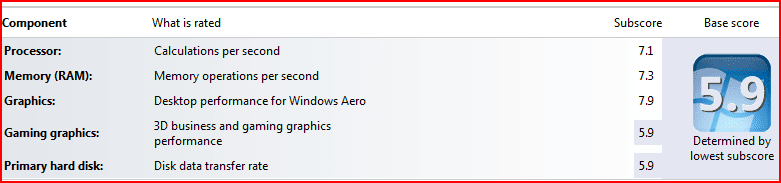
Here's my WEI for an old (over 3 years old) Dell Dimension 9150:

Windows%207%20x64%20WEI.JPG


Admittedly it's not the original hardware - the motherboard is fairly well maxed out with an upgraded Pentium D processor and 4GB RAM, and the GFX card is now an NVidia 8800GT rather than the original 6600.

Windows 7 is as smooth as silk, and I'm looking forward to a further extension in my desktops usable life as a result (it's running smoother than the original XP SP1 install now I think).
 

My Computer

OS
Windows 7 Home Premium x64
CPU
Pentium D 945
Motherboard
Dell DXP051
Memory
4GB 667MHz DDR2
Graphics Card(s)
NVidia 8800GT
Sound Card
Soundblaster Audigy 2 ZS
Monitor(s) Displays
1680 x 1050
Screen Resolution
1680 x 1050
Hard Drives
1 x Intel MX-25 G2 SSD, 1 x 7200RPM Western Digital
PSU
Stock Dell
Case
Stock Dell XPS400
Cooling
Stock Dell XPS400
Internet Speed
13.4Mbps Throughput / 15.3Mbps Synch
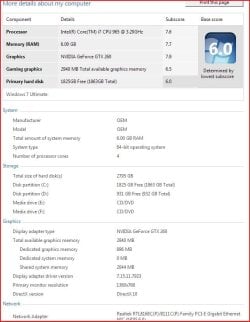
everyone seems to top out at 6.0

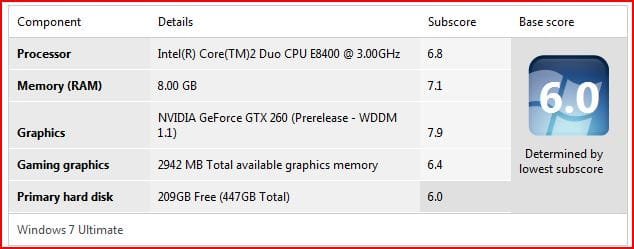
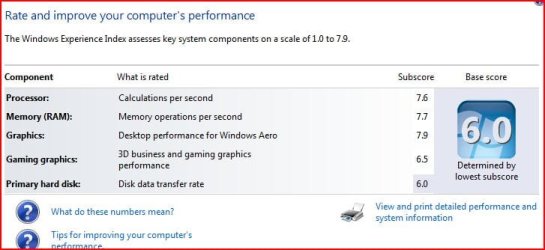
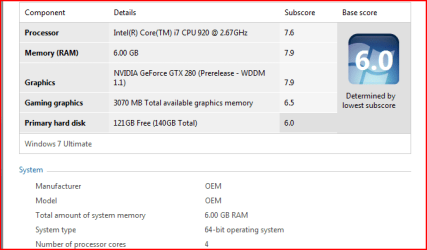
Capture2.JPGMy score is 6.0 as well, Dont think I've seen anyone above 6.0 Capture.JPG
 
Last edited:

My Computer

Computer Manufacturer/Model Number
EVGA
OS
Windows 7
CPU
I-7 980X
Motherboard
EVGA X58
Memory
12 GB CORSEAIR XMS3
Graphics Card(s)
2 GTX295'S IN quad SLI
Sound Card
REALTECK ON BOARD
Monitor(s) Displays
LG HDTV, 35in 1080P
Screen Resolution
1920 X1080
Hard Drives
2 Seagate 7200 1TB SATAII IN RAID 0 for vista
3 Intel X25M-G80's Raid 0
PSU
CORSAIR HX1200W
Case
COOLER MASTER HAF-X
Cooling
H-70
Other Info
OC TO 4.0
Win 7 RC1 WEI 6.4
could somebody post their WEI file(.xml) so i could copy it to the DataStore folder...because my system crashes when it calculates the score.....my geforce 2 mx drivers supports windows xp only....that's why it crashes everytime..thanks

umm what you can do is
Control Panel\All Control Panel Items\Performance Information and Tools\Advanced Tools
go here and then go to
"Clear all WinEI scores and re-rate the system"
if that doesnt work then your system cant run the Wei
 

My Computer

Computer Manufacturer/Model Number
Tx2500z Tablet Pc/Homemade Server
OS
Windows 7 Ult x64(x2), HomePrem x32(x4), Server 08 (+VM), 08 R2 (VM) , SuSe 11.2 (VM), XP 32 (VM)
CPU
Turion X2 ultra (oh well came with laptop)/P4 @3.2 (yes P4)
Motherboard
IDK HP Motherboard / Intel DG965SS
Memory
OCZ Dual Channel 4GB kit/ 1gb Dual Channel
Graphics Card(s)
HD 3200 graphics /GMA x3100 (yay for intergrated!!)
Sound Card
Realtek HD Audio(mic working, well sort of)/Siig IC-70012
Monitor(s) Displays
built-in Hp 12" laptop screen/ Acer 19"
Screen Resolution
1280x800 /1440x900
Cooling
All Air Cooled
Mouse
Logi MX Rev. /MS Wheel Optical 1.1A /Logitech Optical Mouse
Internet Speed
College baby but its still routed through vpn to 1536k...
Other Info
love my wacom pen and pressure sensitivity...
wished it worked in 7, SUSE for that matter though
I'd post mine, but surely you all can picture a vivid "2.0".

WEI keeps rating my disk performance as 2.0, in Vista it's the highest (5.9, right?). My system scores maximum scores on Vista.. yet my system yields a 2.0 for disk performance on W7, I wonder why.
 

My Computer

OS
Windows 7 x64
CPU
AMD Phenom X4 9850 Black Edition @ 2.65GHz
Motherboard
NVIDIA nForce 720
Memory
8 GB
Graphics Card(s)
NVIDIA 9800 GT 512MB
Sound Card
Creative XTreme-Gamer
Monitor(s) Displays
22" ViewSonic
Screen Resolution
1680x1050
Hard Drives
750 GB
500 GB
PSU
500 watt
Keyboard
Razer Lycosa (Mirror)
Mouse
Razer DeathAdder
Internet Speed
1.5Mbps
Other Info
5.1 surround sound
Here is mine .....
 

Attachments

  • MyScore.jpg
    MyScore.jpg
    105.6 KB · Views: 122

My Computer

Computer Manufacturer/Model Number
AMD
OS
Windows 7.
CPU
AMD AM2 X2 4200+ 64Bit
Motherboard
Asus M2A-VM
Memory
Corsiar DRR2
Graphics Card(s)
ATI Radeon X 1250 - 512 Mb DDR 2 (Integrated)
Sound Card
5.1 HD
Monitor(s) Displays
LCD HP L1800 18 Inch Dual Input.
Screen Resolution
1024 - 768
Hard Drives
Western Digital 400 Gb 16Mb Cache 7200 RPM.
PSU
400 Watts
Case
Tower
Keyboard
A4Tech Wireless
Mouse
A4Tech Wireless 8 Button Gaming.
Internet Speed
2 Mbps
bench_WEI.PNG

Bench_passmark.gif
 

My Computer

Computer Manufacturer/Model Number
Custom by me.
OS
Windows 7 64bit RTM
CPU
Intel Core i7 920 Nehalem Over clocked to 3.5 Ghz
Motherboard
EVGA 132-BL-E758-A1 LGA 1366 Intel X58
Memory
CORSAIR DOMINATOR 6GB (3 x 2GB) 240-Pin DDR3 SDRAM DDR3 1600
Graphics Card(s)
EVGA 01G-P3-1280-AR GeForce GTX 280 1GB
Sound Card
Soundblaster X-Fi Fatal1ty
Monitor(s) Displays
2 x 20in Dell Flatpanels 3200x1200
Screen Resolution
3200x1200
Hard Drives
150GB WD Velociraptor(C:), WD 750GB (D:Games), WD 1TB Black (E:Data1), WD 1TB Green (F:Data2)
PSU
CORSAIR HX1000 1000 watt
Case
Desktop
Cooling
Air
Keyboard
Logitech G15
Mouse
Logitech Revolution MX
Internet Speed
25 MB/s
I'd post mine, but surely you all can picture a vivid "2.0".

WEI keeps rating my disk performance as 2.0, in Vista it's the highest (5.9, right?). My system scores maximum scores on Vista.. yet my system yields a 2.0 for disk performance on W7, I wonder why.

That's exactly my problem on both of my machines running 64 bit windows 7. The destop has Q9300 quad - 8 gig of ram to 500 gig sata drives and Nvidoa GEFORCE 9800 GT.
It used to run max numbers on Vista 64 bit and now the HD brings it all down to rating of 2.
I am hoping it's bug as the system is running lightning fast and absolutely faster and more stable than Vista ever did.
I don't see other people having this problem ecept a few of us. So I would like to know from those who have had their rating drop what the might think the reasons may be.

Thanks
JR
 

My Computer

OS
windows 7
CPU
Q9300
Memory
8 Gig
Screen Resolution
1920x1200
Hard Drives
1st 500 gig 2nd 1 TB SATAs
Internet Speed
20 mb FIOS
That's exactly my problem on both of my machines running 64 bit windows 7. The destop has Q9300 quad - 8 gig of ram to 500 gig sata drives and Nvidoa GEFORCE 9800 GT.
It used to run max numbers on Vista 64 bit and now the HD brings it all down to rating of 2.
I am hoping it's bug as the system is running lightning fast and absolutely faster and more stable than Vista ever did.
I don't see other people having this problem ecept a few of us. So I would like to know from those who have had their rating drop what the might think the reasons may be.

Thanks
JR

You're the first person I've met that has this issue too :shock:

I'm gonna go ahead and say it's a bug, because my disk drive functions fine under Linux and Vista. Also, my video card scores a lower score on W7 too -- a 5.3, compared to a 5.9 on Vista, I wonder why :(
 

My Computer

OS
Windows 7 x64
CPU
AMD Phenom X4 9850 Black Edition @ 2.65GHz
Motherboard
NVIDIA nForce 720
Memory
8 GB
Graphics Card(s)
NVIDIA 9800 GT 512MB
Sound Card
Creative XTreme-Gamer
Monitor(s) Displays
22" ViewSonic
Screen Resolution
1680x1050
Hard Drives
750 GB
500 GB
PSU
500 watt
Keyboard
Razer Lycosa (Mirror)
Mouse
Razer DeathAdder
Internet Speed
1.5Mbps
Other Info
5.1 surround sound
You're the first person I've met that has this issue too :shock:

I'm gonna go ahead and say it's a bug, because my disk drive functions fine under Linux and Vista. Also, my video card scores a lower score on W7 too -- a 5.3, compared to a 5.9 on Vista, I wonder why :(

How is W7 Installed? Dual boot? Clean disk? new partition? etc.
 

My Computer

Computer Manufacturer/Model Number
Custom by me.
OS
Windows 7 64bit RTM
CPU
Intel Core i7 920 Nehalem Over clocked to 3.5 Ghz
Motherboard
EVGA 132-BL-E758-A1 LGA 1366 Intel X58
Memory
CORSAIR DOMINATOR 6GB (3 x 2GB) 240-Pin DDR3 SDRAM DDR3 1600
Graphics Card(s)
EVGA 01G-P3-1280-AR GeForce GTX 280 1GB
Sound Card
Soundblaster X-Fi Fatal1ty
Monitor(s) Displays
2 x 20in Dell Flatpanels 3200x1200
Screen Resolution
3200x1200
Hard Drives
150GB WD Velociraptor(C:), WD 750GB (D:Games), WD 1TB Black (E:Data1), WD 1TB Green (F:Data2)
PSU
CORSAIR HX1000 1000 watt
Case
Desktop
Cooling
Air
Keyboard
Logitech G15
Mouse
Logitech Revolution MX
Internet Speed
25 MB/s
How is W7 Installed? Dual boot? Clean disk? new partition? etc.

I'm dual booting W7 with Vista. I have a single disk, so they are both on it together (no RAID). The partition size is 200GB. Both operating systems are 64-bit :geek:
 

My Computer

OS
Windows 7 x64
CPU
AMD Phenom X4 9850 Black Edition @ 2.65GHz
Motherboard
NVIDIA nForce 720
Memory
8 GB
Graphics Card(s)
NVIDIA 9800 GT 512MB
Sound Card
Creative XTreme-Gamer
Monitor(s) Displays
22" ViewSonic
Screen Resolution
1680x1050
Hard Drives
750 GB
500 GB
PSU
500 watt
Keyboard
Razer Lycosa (Mirror)
Mouse
Razer DeathAdder
Internet Speed
1.5Mbps
Other Info
5.1 surround sound
How is W7 Installed? Dual boot? Clean disk? new partition? etc.


Mine is a clean install on both my tower and laptop. Both of which suffer from the same much lower overall scores due to a much lower HD data transfer rate score.

As I said, I have not experienced slower performance than when they were running Vista or XP. In fact it is the best performance I've ever experienced on any of my machine.
 

My Computer

OS
windows 7
CPU
Q9300
Memory
8 Gig
Screen Resolution
1920x1200
Hard Drives
1st 500 gig 2nd 1 TB SATAs
Internet Speed
20 mb FIOS
There has been a few posts about this prob with hard drives, and some people seem to think that turning off disc write caching, and rerunning the test seems to give them a better score,try it and let us know.
 

My Computer

Computer Manufacturer/Model Number
Self Build 64bit
OS
Vista Ult64, Win7600
CPU
Intel Core 2 Quad Q6600 @ 2400 MHz 64bit OS
Motherboard
Asus P5E3 Deluxe WiFi @p 64 bit OS
Memory
4096 MB DDR3-SDRAM
Graphics Card(s)
ATI Radeon HD 3870 Series x2 Crossfired
Sound Card
Realtek on board
Monitor(s) Displays
Samsung SyncMaster - 23 inches
Screen Resolution
1680x1050 pixels at 60 Hz in True Colors
Hard Drives
Hitachi (250 GB)/Samsung 750 GB. /Barracuda 160 GB.
My Book 1 TB external..
PSU
Cooler Master 1000w
Case
Cooler Master Cosmos 1000.
Cooling
Fans and fresh air,
Keyboard
Wireless
Mouse
Wireless
Internet Speed
Never fast enough
Other Info
I use a Magnum.
Turning off disk write caching worked like a charm!

I wish it was higher though :(

jtoolman, try turning off the cache:

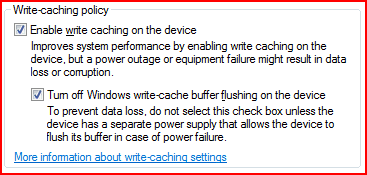
Right-click on Computer click Manage, go to device manager on the left, select your drive from "disk drives", right click, properties, then go to the policies tab :)
 

Attachments

  • weiscore.PNG
    weiscore.PNG
    11.5 KB · Views: 40

My Computer

OS
Windows 7 x64
CPU
AMD Phenom X4 9850 Black Edition @ 2.65GHz
Motherboard
NVIDIA nForce 720
Memory
8 GB
Graphics Card(s)
NVIDIA 9800 GT 512MB
Sound Card
Creative XTreme-Gamer
Monitor(s) Displays
22" ViewSonic
Screen Resolution
1680x1050
Hard Drives
750 GB
500 GB
PSU
500 watt
Keyboard
Razer Lycosa (Mirror)
Mouse
Razer DeathAdder
Internet Speed
1.5Mbps
Other Info
5.1 surround sound
Turning off disk write caching worked like a charm!

I wish it was higher though :(

jtoolman, try turning off the cache:

Right-click on Computer click Manage, go to device manager on the left, select your drive from "disk drives", right click, properties, then go to the policies tab :)
Hi glad that helped, Now if I was you I would check around and see if you should be turning it back on or not, because I am not sure about the memory end of things.
 

My Computer

Computer Manufacturer/Model Number
Self Build 64bit
OS
Vista Ult64, Win7600
CPU
Intel Core 2 Quad Q6600 @ 2400 MHz 64bit OS
Motherboard
Asus P5E3 Deluxe WiFi @p 64 bit OS
Memory
4096 MB DDR3-SDRAM
Graphics Card(s)
ATI Radeon HD 3870 Series x2 Crossfired
Sound Card
Realtek on board
Monitor(s) Displays
Samsung SyncMaster - 23 inches
Screen Resolution
1680x1050 pixels at 60 Hz in True Colors
Hard Drives
Hitachi (250 GB)/Samsung 750 GB. /Barracuda 160 GB.
My Book 1 TB external..
PSU
Cooler Master 1000w
Case
Cooler Master Cosmos 1000.
Cooling
Fans and fresh air,
Keyboard
Wireless
Mouse
Wireless
Internet Speed
Never fast enough
Other Info
I use a Magnum.
Hey jfar,

I experimented a little. I turned caching back on, and also disabled the write cache buffer flushing (the option under write cache). This seemed to bring me to a score of 5.9 aswell :geek:
 

Attachments

  • diskoptions.PNG
    diskoptions.PNG
    5 KB · Views: 11

My Computer

OS
Windows 7 x64
CPU
AMD Phenom X4 9850 Black Edition @ 2.65GHz
Motherboard
NVIDIA nForce 720
Memory
8 GB
Graphics Card(s)
NVIDIA 9800 GT 512MB
Sound Card
Creative XTreme-Gamer
Monitor(s) Displays
22" ViewSonic
Screen Resolution
1680x1050
Hard Drives
750 GB
500 GB
PSU
500 watt
Keyboard
Razer Lycosa (Mirror)
Mouse
Razer DeathAdder
Internet Speed
1.5Mbps
Other Info
5.1 surround sound
Worked like a charm!
These are my scores not from top to bottom

7.2
7.2
7.9
5.9
5.9

Now I'll have to check if the overall performance will improve even more.
Thanks a million guys. This forum has some pretty damn smart folks. Quite humbling!

JR
 

My Computer

OS
windows 7
CPU
Q9300
Memory
8 Gig
Screen Resolution
1920x1200
Hard Drives
1st 500 gig 2nd 1 TB SATAs
Internet Speed
20 mb FIOS
Worked like a charm!
These are my scores not from top to bottom

7.2
7.2
7.9
5.9
5.9

Now I'll have to check if the overall performance will improve even more.
Thanks a million guys. This forum has some pretty damn smart folks. Quite humbling!

JR

Try running it again, with the buffer flushing disabled. Maybe that'll increase the performance too :)
 

My Computer

OS
Windows 7 x64
CPU
AMD Phenom X4 9850 Black Edition @ 2.65GHz
Motherboard
NVIDIA nForce 720
Memory
8 GB
Graphics Card(s)
NVIDIA 9800 GT 512MB
Sound Card
Creative XTreme-Gamer
Monitor(s) Displays
22" ViewSonic
Screen Resolution
1680x1050
Hard Drives
750 GB
500 GB
PSU
500 watt
Keyboard
Razer Lycosa (Mirror)
Mouse
Razer DeathAdder
Internet Speed
1.5Mbps
Other Info
5.1 surround sound
Worked like a charm!
These are my scores not from top to bottom

7.2
7.2
7.9
5.9
5.9

Now I'll have to check if the overall performance will improve even more.
Thanks a million guys. This forum has some pretty damn smart folks. Quite humbling!

JR
Thanks, its nice to be humbling,
 

My Computer

Computer Manufacturer/Model Number
Self Build 64bit
OS
Vista Ult64, Win7600
CPU
Intel Core 2 Quad Q6600 @ 2400 MHz 64bit OS
Motherboard
Asus P5E3 Deluxe WiFi @p 64 bit OS
Memory
4096 MB DDR3-SDRAM
Graphics Card(s)
ATI Radeon HD 3870 Series x2 Crossfired
Sound Card
Realtek on board
Monitor(s) Displays
Samsung SyncMaster - 23 inches
Screen Resolution
1680x1050 pixels at 60 Hz in True Colors
Hard Drives
Hitachi (250 GB)/Samsung 750 GB. /Barracuda 160 GB.
My Book 1 TB external..
PSU
Cooler Master 1000w
Case
Cooler Master Cosmos 1000.
Cooling
Fans and fresh air,
Keyboard
Wireless
Mouse
Wireless
Internet Speed
Never fast enough
Other Info
I use a Magnum.
The lap top also went way up on the Drive Transfer rate category!

Thanks

JR
 

My Computer

OS
windows 7
CPU
Q9300
Memory
8 Gig
Screen Resolution
1920x1200
Hard Drives
1st 500 gig 2nd 1 TB SATAs
Internet Speed
20 mb FIOS
Status
Not open for further replies.
Back
Top