
Solved Shrinking my 7 partition, where do I want the unallocated space to be?

Tinsby

New member
Member
VIP
Local time
5:24 PM
Messages
176
My 7 install to my SSD didn't go exactly as I'd like. The OS is on a huge partition I want to shrink it using Partition Wizard.

I see from reading about it, you can either have the unallocated, free space in front of or behind the shrunken partition.

The next partition behind the 7 one, is my Linux partition that I'd like to enlarge a bit. To me it would make sense to have that unallocated space ahead of the Linux one so I can use it. Am I thinking correctly? I do have an image of all my drives just to make sure.... :)

Thanks to all in advance!
 

My Computer My Computer

At a glance

Dual boot Win7 Pro 64 & Linux Mint 18.3Intel Core 2 Quad Core8GBNvidia GeForce GTX 750 Ti
Computer type
PC/Desktop
Computer Manufacturer/Model Number
Home/Custom built
OS
Dual boot Win7 Pro 64 & Linux Mint 18.3
CPU
Intel Core 2 Quad Core
Motherboard
Asus Rampage Extreme
Memory
8GB
Graphics Card(s)
Nvidia GeForce GTX 750 Ti
Sound Card
PCIe Supreme FX X-fi
Monitor(s) Displays
Viewsonic VX2450WM LED
Screen Resolution
1920x1080
Hard Drives
Intel SSD 240GB
WD 500GB HDD
PSU
Corsair 850 watt
Case
Lian Li
Cooling
Zalman
Keyboard
MS natural/ergonomic
Mouse
Intellimouse
Internet Speed
240 Mbps +/- Dnld, 12Mbps Upld via Xfinity Blast
Antivirus
Norton Security Suite by Xfinity
Browser
Firefox & Chrome
Other Info
4 slot memory card reader
Floppy drive
2 DVD burners
Brother MFCJ450dw AIO Printer/Scanner/Fax
eSATA connections

My Computers My Computers

  • At a glance

    Windows 7 pro/Windows 10 ProIntel i7 860 Quad core 2.8 ghz8 gbATI Radeon HD 5770 1 gb ram
    Computer type
    PC/Desktop
    Computer Manufacturer/Model Number
    HP Pavillion Elite HPE-250f
    OS
    Windows 7 pro/Windows 10 Pro
    CPU
    Intel i7 860 Quad core 2.8 ghz
    Memory
    8 gb
    Graphics Card(s)
    ATI Radeon HD 5770 1 gb ram
    Monitor(s) Displays
    Alienware 25 AW2521HF & Viewsonic
    Screen Resolution
    1920 x1080 & 1680x1050
    Hard Drives
    WD blue 1 tb & 500 gb.
    Browser
    FF of course.
    Other Info
    https://www.bestbuy.com/site/hp-pavilion-elite-desktop-intel-core-i7-processor-8gb-memory-1tb-hard-drive/9921493.p?skuId=9921493
  • At a glance

    Windows 2012 R2 Data center/Linux Minti3 9100 3.6GHz, 8M cache, 4C/4T8GB 2666MT/s DDR4 ECC UDIMM
    Computer type
    PC/Desktop
    System Manufacturer/Model Number
    Dell Poweredge T140
    OS
    Windows 2012 R2 Data center/Linux Mint
    CPU
    i3 9100 3.6GHz, 8M cache, 4C/4T
    Memory
    8GB 2666MT/s DDR4 ECC UDIMM
    Monitor(s) Displays
    Viewsonic
    Screen Resolution
    1680x1050
    Hard Drives
    1 TB & 750 GB
    Other Info
    https://www.dell.com/en-us/work/shop/productdetailstxn/poweredge-t140?~ck=bt
Put windows to the left and have the un allocated space to the right, as shown in disk management.
 

My Computer My Computer

At a glance

Windows 10 Pro x64Intel Core i7 6700KGSkill TridentZ RGB 16GB 3600 16-16-16-36EVGA GTX 980 Ti SC x2
Computer type
PC/Desktop
Computer Manufacturer/Model Number
Skylake Special #666
OS
Windows 10 Pro x64
CPU
Intel Core i7 6700K
Motherboard
Asus Sabertooth Z170 Mark 1
Memory
GSkill TridentZ RGB 16GB 3600 16-16-16-36
Graphics Card(s)
EVGA GTX 980 Ti SC x2
Sound Card
Realtek High Definition
Monitor(s) Displays
AOC G2460PG
Screen Resolution
1920 x 1080 144Hz
Hard Drives
Samsung 860 Pro 256GB, Seagate Barracuda 4TB x2
PSU
EVGA 1000 P2, EVGA White Custom Braided Cables
Case
Corsair Vengeance C70 Gunmetal Black
Cooling
Corsair H100i v2, Corsair ML120 x2, Thermal Grizzly Kryonaut
Keyboard
Logitech G910 Orion Spectrum
Mouse
Logitech G700s
Internet Speed
Verizon Fios Quantum Gateway 75/75
Antivirus
Windows Defender, Malwarebytes Free 3.8.3
Browser
Chrome
Other Info
Corsair SP120 x4, LG Blu-ray Drive, Durabrand HT-395 100 Watt Dolby Digital Amp, Corsair H2100 Wireless 7.1 Headset
Here you go...

For a mechanical HD I'd want Win7 in first position closest to where the reader parks for faster reads. Put the Linux partition to its right and then storage to the right of it.

If you already have existing adjacent partitions you can adjust their size using How to extend partition easily with Partition Wizard - video help.

Post back a screenshot of Disk Management - Post a Screen Capture Image and tell us what you want to do so we can give you informed steps.

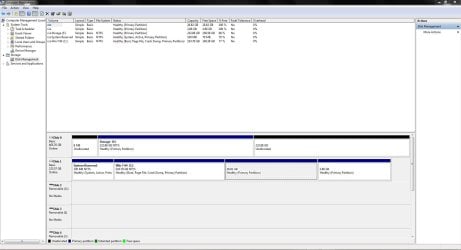
Here's the screenshot you asked for. As you can see my storage drive is a separate HDD not a partition on the SSD. You can also see that I was never able sort out making the SSD Drive 0 and not Drive 1. No matter when the OS sees it all the drive letters are correct. I just won't look at them in DM!

I read an article showing how to shrink drives w/ Partition Wizard, that raised the question where should the unallocated space appear, since I want to use it for Linux, to the right of the 7 partition.

Thanks as always

J T
 

Attachments

  • Capture  004.JPG
    Capture 004.JPG
    127.5 KB · Views: 11

My Computer My Computer

At a glance

Dual boot Win7 Pro 64 & Linux Mint 18.3Intel Core 2 Quad Core8GBNvidia GeForce GTX 750 Ti
Computer type
PC/Desktop
Computer Manufacturer/Model Number
Home/Custom built
OS
Dual boot Win7 Pro 64 & Linux Mint 18.3
CPU
Intel Core 2 Quad Core
Motherboard
Asus Rampage Extreme
Memory
8GB
Graphics Card(s)
Nvidia GeForce GTX 750 Ti
Sound Card
PCIe Supreme FX X-fi
Monitor(s) Displays
Viewsonic VX2450WM LED
Screen Resolution
1920x1080
Hard Drives
Intel SSD 240GB
WD 500GB HDD
PSU
Corsair 850 watt
Case
Lian Li
Cooling
Zalman
Keyboard
MS natural/ergonomic
Mouse
Intellimouse
Internet Speed
240 Mbps +/- Dnld, 12Mbps Upld via Xfinity Blast
Antivirus
Norton Security Suite by Xfinity
Browser
Firefox & Chrome
Other Info
4 slot memory card reader
Floppy drive
2 DVD burners
Brother MFCJ450dw AIO Printer/Scanner/Fax
eSATA connections
That board is wee bit old, does it have Intel 6.0 GBs sata ports ?

http://www.asus.com/Motherboards/RAMPAGE_EXTREME/

Is the ssd connected to the 1st Intel 6.0 GBps sata port? (Check physically and check in the bios)

Did you install the latest Intel Sata controller drivers ?

Have you installed Intel Rapid Storage Technology ?
 

My Computer My Computer

At a glance

Windows 10 Pro x64Intel Core i7 6700KGSkill TridentZ RGB 16GB 3600 16-16-16-36EVGA GTX 980 Ti SC x2
Computer type
PC/Desktop
Computer Manufacturer/Model Number
Skylake Special #666
OS
Windows 10 Pro x64
CPU
Intel Core i7 6700K
Motherboard
Asus Sabertooth Z170 Mark 1
Memory
GSkill TridentZ RGB 16GB 3600 16-16-16-36
Graphics Card(s)
EVGA GTX 980 Ti SC x2
Sound Card
Realtek High Definition
Monitor(s) Displays
AOC G2460PG
Screen Resolution
1920 x 1080 144Hz
Hard Drives
Samsung 860 Pro 256GB, Seagate Barracuda 4TB x2
PSU
EVGA 1000 P2, EVGA White Custom Braided Cables
Case
Corsair Vengeance C70 Gunmetal Black
Cooling
Corsair H100i v2, Corsair ML120 x2, Thermal Grizzly Kryonaut
Keyboard
Logitech G910 Orion Spectrum
Mouse
Logitech G700s
Internet Speed
Verizon Fios Quantum Gateway 75/75
Antivirus
Windows Defender, Malwarebytes Free 3.8.3
Browser
Chrome
Other Info
Corsair SP120 x4, LG Blu-ray Drive, Durabrand HT-395 100 Watt Dolby Digital Amp, Corsair H2100 Wireless 7.1 Headset
I'd use the Partition Wizard bootable CD burned to disk using Windows Image burner, following the steps How to extend partition easily with Partition Wizard - video help to see if you can extend the Linux partition the easy way by annexing some of the unused space in C. It may require temporarily issuing the partition a drive letter for PW to Extend it, although it should work since PW supports any partition format.

If not then you can shrink C in Disk Mgmt which is always safest, then try moving the Linux partition left border to the left using Partition Wizard Resize Partition - Video Help. However if PW will Resize only the left border then it should Extend which does it all for you including the shrink. Extend will borrow space from any partition whether it is adjacent or not.

Let us know how this goes.
 
If you want to add the unallocated space to the Linux partition, it does not really matter a lot where the unallocated space is. Partition Wizard can add it from any area to any partition. However, If it is to the right of your C partition, PW has to shove less data arouns and it would be faster.

Make sure you make images of all those partitions before you venture into those manipulations. Mistakes happen and you certainly don't want to lose your stuff.

As far as restoring the image to the SSD goes, for this you need not shrink C (at least when you use Macrium). You have only 45GB of data on C and that should fit on the SSD. The total size of the originaating partition is irrelevant.
 

My Computer My Computer

At a glance

Vista, Windows7, Mint Mate, Zorin, Windows 8from 1.6GHz Duo to i7
Computer Manufacturer/Model Number
HP, Dell, Gateway, Toshiba - 4 laptops and 2 desktops
OS
Vista, Windows7, Mint Mate, Zorin, Windows 8
CPU
from 1.6GHz Duo to i7
Monitor(s) Displays
2x HP w2207
Hard Drives
5x HDD, 7x SSD, 12x Externals
Keyboard
with trackball - no mices
Mouse
Trackball mice
Internet Speed
DSL 6000
OK

I'd use the Partition Wizard bootable CD burned to disk using Windows Image burner, following the steps How to extend partition easily with Partition Wizard - video help to see if you can extend the Linux partition the easy way by annexing some of the unused space in C. It may require temporarily issuing the partition a drive letter for PW to Extend it, although it should work since PW supports any partition format.

If not then you can shrink C in Disk Mgmt which is always safest, then try moving the Linux partition left border to the left using Partition Wizard Resize Partition - Video Help. However if PW will Resize only the left border then it should Extend which does it all for you including the shrink. Extend will borrow space from any partition whether it is adjacent or not.

Let us know how this goes.

DM won't let me shrink the C any smaller than it is, it must be using the files it surely isn't full. The OS and all my programs only use 41GB.

So I will use PW to do the work and maybe Gparted too for the Linux stuff.

You're right I have a fresh image of everything so if it goes amiss I can bail out...famous last words! Plus I still have the original HDD that has everything on it but isn't being used anymore. My backups have backups!

I'll let you guys know. Thanks
 

My Computer My Computer

At a glance

Dual boot Win7 Pro 64 & Linux Mint 18.3Intel Core 2 Quad Core8GBNvidia GeForce GTX 750 Ti
Computer type
PC/Desktop
Computer Manufacturer/Model Number
Home/Custom built
OS
Dual boot Win7 Pro 64 & Linux Mint 18.3
CPU
Intel Core 2 Quad Core
Motherboard
Asus Rampage Extreme
Memory
8GB
Graphics Card(s)
Nvidia GeForce GTX 750 Ti
Sound Card
PCIe Supreme FX X-fi
Monitor(s) Displays
Viewsonic VX2450WM LED
Screen Resolution
1920x1080
Hard Drives
Intel SSD 240GB
WD 500GB HDD
PSU
Corsair 850 watt
Case
Lian Li
Cooling
Zalman
Keyboard
MS natural/ergonomic
Mouse
Intellimouse
Internet Speed
240 Mbps +/- Dnld, 12Mbps Upld via Xfinity Blast
Antivirus
Norton Security Suite by Xfinity
Browser
Firefox & Chrome
Other Info
4 slot memory card reader
Floppy drive
2 DVD burners
Brother MFCJ450dw AIO Printer/Scanner/Fax
eSATA connections
The only tool that has never failed besides Disk Mgmt in tens of thousands of these operations we've helped with here is PW boot disk.
 
DM won't let me shrink the C any smaller than it is, it must be using the files it surely isn't full. The OS and all my programs only use 41GB.

As I stated disk management is very limited. If there are "unmovable" files then it won't shrink the disk past them even if you have the room. easus will restart the system and move the files giving you much more flexibility. The downside is that it isn't as easy to use.
 

My Computers My Computers

  • At a glance

    Windows 7 pro/Windows 10 ProIntel i7 860 Quad core 2.8 ghz8 gbATI Radeon HD 5770 1 gb ram
    Computer type
    PC/Desktop
    Computer Manufacturer/Model Number
    HP Pavillion Elite HPE-250f
    OS
    Windows 7 pro/Windows 10 Pro
    CPU
    Intel i7 860 Quad core 2.8 ghz
    Memory
    8 gb
    Graphics Card(s)
    ATI Radeon HD 5770 1 gb ram
    Monitor(s) Displays
    Alienware 25 AW2521HF & Viewsonic
    Screen Resolution
    1920 x1080 & 1680x1050
    Hard Drives
    WD blue 1 tb & 500 gb.
    Browser
    FF of course.
    Other Info
    https://www.bestbuy.com/site/hp-pavilion-elite-desktop-intel-core-i7-processor-8gb-memory-1tb-hard-drive/9921493.p?skuId=9921493
  • At a glance

    Windows 2012 R2 Data center/Linux Minti3 9100 3.6GHz, 8M cache, 4C/4T8GB 2666MT/s DDR4 ECC UDIMM
    Computer type
    PC/Desktop
    System Manufacturer/Model Number
    Dell Poweredge T140
    OS
    Windows 2012 R2 Data center/Linux Mint
    CPU
    i3 9100 3.6GHz, 8M cache, 4C/4T
    Memory
    8GB 2666MT/s DDR4 ECC UDIMM
    Monitor(s) Displays
    Viewsonic
    Screen Resolution
    1680x1050
    Hard Drives
    1 TB & 750 GB
    Other Info
    https://www.dell.com/en-us/work/shop/productdetailstxn/poweredge-t140?~ck=bt
That board is wee bit old, does it have Intel 6.0 GBs sata ports ?

Motherboards - RAMPAGE EXTREME - ASUS

Is the ssd connected to the 1st Intel 6.0 GBps sata port? (Check physically and check in the bios)

Did you install the latest Intel Sata controller drivers ?

Have you installed Intel Rapid Storage Technology ?

Hi!
The SSD is connected to the 1st of 6 SATA ports not the 2 that are marked "speeding"
Drivers installed afaik yes
Intel rapid Storage Technology not so sure about that one :/
 

My Computer My Computer

At a glance

Dual boot Win7 Pro 64 & Linux Mint 18.3Intel Core 2 Quad Core8GBNvidia GeForce GTX 750 Ti
Computer type
PC/Desktop
Computer Manufacturer/Model Number
Home/Custom built
OS
Dual boot Win7 Pro 64 & Linux Mint 18.3
CPU
Intel Core 2 Quad Core
Motherboard
Asus Rampage Extreme
Memory
8GB
Graphics Card(s)
Nvidia GeForce GTX 750 Ti
Sound Card
PCIe Supreme FX X-fi
Monitor(s) Displays
Viewsonic VX2450WM LED
Screen Resolution
1920x1080
Hard Drives
Intel SSD 240GB
WD 500GB HDD
PSU
Corsair 850 watt
Case
Lian Li
Cooling
Zalman
Keyboard
MS natural/ergonomic
Mouse
Intellimouse
Internet Speed
240 Mbps +/- Dnld, 12Mbps Upld via Xfinity Blast
Antivirus
Norton Security Suite by Xfinity
Browser
Firefox & Chrome
Other Info
4 slot memory card reader
Floppy drive
2 DVD burners
Brother MFCJ450dw AIO Printer/Scanner/Fax
eSATA connections
I'd use the Partition Wizard bootable CD burned to disk using Windows Image burner, following the steps How to extend partition easily with Partition Wizard - video help to see if you can extend the Linux partition the easy way by annexing some of the unused space in C. It may require temporarily issuing the partition a drive letter for PW to Extend it, although it should work since PW supports any partition format.

If not then you can shrink C in Disk Mgmt which is always safest, then try moving the Linux partition left border to the left using Partition Wizard Resize Partition - Video Help. However if PW will Resize only the left border then it should Extend which does it all for you including the shrink. Extend will borrow space from any partition whether it is adjacent or not.

Let us know how this goes.

gregrocker,

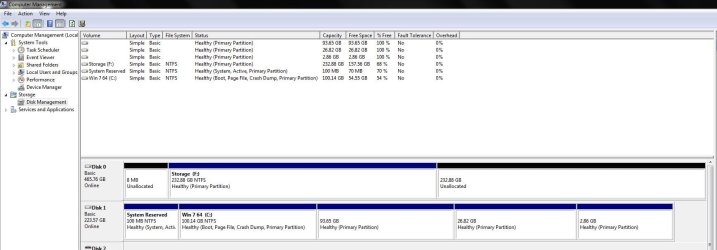
I was able to shrink the C drive down to 100GB, with the great PW, which will be more than enough over provisioning for it. I only intend to add 1 other program to it and I am done.

The fly in in the ointment so to speak is space left over, I wanted to be able to use that to make the Linux partition and the swap file larger.The unallocated space is right next to the Linux partition. But using PW and having that space unallocated I couldn't make the Linux partition larger or the swap. So I formatted it as EXT4 and named it 'extra space' ( how original). I thought that maybe if it was formatted like the other 2 Linux partitions I could steal some of it's space. But formatting it didn't help either.

Also tried to use Gparted, the Linux partition editor and that didn't show me ANY Linux partitions! Yet Linux opens and runs fine.I don't expect you to field Linux questions, but just wanted to let you know where I am in the process.
In the screen shot the 93.65GB partition is the unallocated space that I formatted in an effort to make it available to the 26.82 partition..didn't work tho'.

Thank you as always!
 

Attachments

  • Capture 007.JPG
    Capture 007.JPG
    99.4 KB · Views: 1

My Computer My Computer

At a glance

Dual boot Win7 Pro 64 & Linux Mint 18.3Intel Core 2 Quad Core8GBNvidia GeForce GTX 750 Ti
Computer type
PC/Desktop
Computer Manufacturer/Model Number
Home/Custom built
OS
Dual boot Win7 Pro 64 & Linux Mint 18.3
CPU
Intel Core 2 Quad Core
Motherboard
Asus Rampage Extreme
Memory
8GB
Graphics Card(s)
Nvidia GeForce GTX 750 Ti
Sound Card
PCIe Supreme FX X-fi
Monitor(s) Displays
Viewsonic VX2450WM LED
Screen Resolution
1920x1080
Hard Drives
Intel SSD 240GB
WD 500GB HDD
PSU
Corsair 850 watt
Case
Lian Li
Cooling
Zalman
Keyboard
MS natural/ergonomic
Mouse
Intellimouse
Internet Speed
240 Mbps +/- Dnld, 12Mbps Upld via Xfinity Blast
Antivirus
Norton Security Suite by Xfinity
Browser
Firefox & Chrome
Other Info
4 slot memory card reader
Floppy drive
2 DVD burners
Brother MFCJ450dw AIO Printer/Scanner/Fax
eSATA connections
What happened when you tried Partition Wizard Extend function as I suggested and provided a video how-to? This would borrow as much space from C as you want for the Linux partition. As I stated you might need to issue the partition a letter temporarily to get it to run. So what happened when you tried this which I suggested twice?

If you only used the Resize function to shrink C, then what happened when you right clicked on the Linux partition to Resize it to the left? Did you try issuing it a letter to get it to work?

It isn't helpful when you don't report back the exact problem with getting PW to work. How can we advise you?
 
Third party tools are the only way to get the size that you want. Again disk management is limited.
 

My Computers My Computers

  • At a glance

    Windows 7 pro/Windows 10 ProIntel i7 860 Quad core 2.8 ghz8 gbATI Radeon HD 5770 1 gb ram
    Computer type
    PC/Desktop
    Computer Manufacturer/Model Number
    HP Pavillion Elite HPE-250f
    OS
    Windows 7 pro/Windows 10 Pro
    CPU
    Intel i7 860 Quad core 2.8 ghz
    Memory
    8 gb
    Graphics Card(s)
    ATI Radeon HD 5770 1 gb ram
    Monitor(s) Displays
    Alienware 25 AW2521HF & Viewsonic
    Screen Resolution
    1920 x1080 & 1680x1050
    Hard Drives
    WD blue 1 tb & 500 gb.
    Browser
    FF of course.
    Other Info
    https://www.bestbuy.com/site/hp-pavilion-elite-desktop-intel-core-i7-processor-8gb-memory-1tb-hard-drive/9921493.p?skuId=9921493
  • At a glance

    Windows 2012 R2 Data center/Linux Minti3 9100 3.6GHz, 8M cache, 4C/4T8GB 2666MT/s DDR4 ECC UDIMM
    Computer type
    PC/Desktop
    System Manufacturer/Model Number
    Dell Poweredge T140
    OS
    Windows 2012 R2 Data center/Linux Mint
    CPU
    i3 9100 3.6GHz, 8M cache, 4C/4T
    Memory
    8GB 2666MT/s DDR4 ECC UDIMM
    Monitor(s) Displays
    Viewsonic
    Screen Resolution
    1680x1050
    Hard Drives
    1 TB & 750 GB
    Other Info
    https://www.dell.com/en-us/work/shop/productdetailstxn/poweredge-t140?~ck=bt
Got it sorted but only after a re-install

What happened when you tried Partition Wizard Extend function as I suggested and provided a video how-to? This would borrow as much space from C as you want for the Linux partition. As I stated you might need to issue the partition a letter temporarily to get it to run. So what happened when you tried this which I suggested twice?

If you only used the Resize function to shrink C, then what happened when you right clicked on the Linux partition to Resize it to the left? Did you try issuing it a letter to get it to work?

It isn't helpful when you don't report back the exact problem with getting PW to work. How can we advise you?

gregrocker,

I was able to shrink the C partition using Partition Wizard with no trouble, nice program!

But, I was unable to shrink, move, extend, expand, stretch or do anything with my Linux partitions! Grrr.

Realizing that this is a 7 forum I won't go into detail about why, but I will say that the Linux partition editor, Gparted, couldn't see the Linux partitions at all! Not good!

The report on the size of the partitions was wrong as well, I got that by using a Linux "terminal", very much like a CMD prompt in Windows. It was decided after a discussion in a Linux forum to simply remove and re-install that OS.

That's what I did and everything is fine now, since I had nothing of any value on the Linux system it wasn't a problem to re-install it and start over.Took only about 20 minutes to do it, now all the partitions are the size I wanted plus I have some leftover space on the SSD.

That PW program is a gem I'll keep that on hand from now on!

So thanks to everyone who contributed and gave their valued opinions on the problem initially. :D

Regards,

J T
 

My Computer My Computer

At a glance

Dual boot Win7 Pro 64 & Linux Mint 18.3Intel Core 2 Quad Core8GBNvidia GeForce GTX 750 Ti
Computer type
PC/Desktop
Computer Manufacturer/Model Number
Home/Custom built
OS
Dual boot Win7 Pro 64 & Linux Mint 18.3
CPU
Intel Core 2 Quad Core
Motherboard
Asus Rampage Extreme
Memory
8GB
Graphics Card(s)
Nvidia GeForce GTX 750 Ti
Sound Card
PCIe Supreme FX X-fi
Monitor(s) Displays
Viewsonic VX2450WM LED
Screen Resolution
1920x1080
Hard Drives
Intel SSD 240GB
WD 500GB HDD
PSU
Corsair 850 watt
Case
Lian Li
Cooling
Zalman
Keyboard
MS natural/ergonomic
Mouse
Intellimouse
Internet Speed
240 Mbps +/- Dnld, 12Mbps Upld via Xfinity Blast
Antivirus
Norton Security Suite by Xfinity
Browser
Firefox & Chrome
Other Info
4 slot memory card reader
Floppy drive
2 DVD burners
Brother MFCJ450dw AIO Printer/Scanner/Fax
eSATA connections
Once again you don't respond to whether you attempted to extend partition easily with Partition Wizard - video help. I've now asked you repeatedly after providing you with this video to show how it is done.

I've also repeatedly asked if you tried assigning a drive letter to the Linux partition to do this operation, which again you have not replied. Is there some reason you cannot explain what you did? Saying it failed is not adequate when using a tool we've provided here tens of thousands of times to successfully complete operations like this. It does not fail if done correctly.

We need feedback to know what to advise you to do next, not to just give up and not let us help you do it correctly.
 
Back
Top