Solved Shutdown Problem when Power On Virtual Machine

Botard

New member
Member
Local time
7:02 AM
Messages
92
Location
Cavite
I don't understand the problem every time I powered on the virtual machine the host was shutdown?
 

My Computer

Computer type
PC/Desktop
Computer Manufacturer/Model Number
MSI
OS
Windows 7 guest, Debian host
CPU
AMD FX-6100
Motherboard
880GMS-E41(FX)(MS-7641)
Memory
DDR3/16384 MBytes/2000.6MHz
Graphics Card(s)
AMD Radeon HD 5500 Series
Sound Card
Built-in
Monitor(s) Displays
Samsung SyncMaster S23B300
Screen Resolution
1920x1080
Hard Drives
ST1000DM003-9YN162 ATA Device
WDC WD5000AAKX-00ERMAQ ATA Device
PSU
500W NAXN
Case
APOLLO
Cooling
XY
Keyboard
Logitech
Mouse
Samsung
Internet Speed
.79Mbps/1.71Mbps
Antivirus
Microsoft Security Essentials
Browser
Google Chrome/FireFox/Internet Explorer
Other Info
3in1 creative speaker
Please explain more about what is going on and tell us what you are doing.
 

My Computers

System One System Two

My pc is good a windows 7 64 bit, no problem when using it alone but powering virtual machine on, the host will shutdown. Totally shutdown the screen went black no power like pulling out the power cord in an outlet accidentally. Oh man, I don't really know what is going on the program. There are times I can use the virtual machine for several minutes while other a few minutes before shutdown.

I tried to look a solution on internet but no specific or a direct answer to my problem. There's no program installed in virtual machine environment. The VMware is a 64bit. One thing in my mind is the host bios, does it need to configure before installing VMware?

Thanks for the attention.
 
Last edited:

My Computer

Computer type
PC/Desktop
Computer Manufacturer/Model Number
MSI
OS
Windows 7 guest, Debian host
CPU
AMD FX-6100
Motherboard
880GMS-E41(FX)(MS-7641)
Memory
DDR3/16384 MBytes/2000.6MHz
Graphics Card(s)
AMD Radeon HD 5500 Series
Sound Card
Built-in
Monitor(s) Displays
Samsung SyncMaster S23B300
Screen Resolution
1920x1080
Hard Drives
ST1000DM003-9YN162 ATA Device
WDC WD5000AAKX-00ERMAQ ATA Device
PSU
500W NAXN
Case
APOLLO
Cooling
XY
Keyboard
Logitech
Mouse
Samsung
Internet Speed
.79Mbps/1.71Mbps
Antivirus
Microsoft Security Essentials
Browser
Google Chrome/FireFox/Internet Explorer
Other Info
3in1 creative speaker
Update, it also shutdown in the host without powering the virtual machine, I have doubt either the physical drive or the power supply.
 

My Computer

Computer type
PC/Desktop
Computer Manufacturer/Model Number
MSI
OS
Windows 7 guest, Debian host
CPU
AMD FX-6100
Motherboard
880GMS-E41(FX)(MS-7641)
Memory
DDR3/16384 MBytes/2000.6MHz
Graphics Card(s)
AMD Radeon HD 5500 Series
Sound Card
Built-in
Monitor(s) Displays
Samsung SyncMaster S23B300
Screen Resolution
1920x1080
Hard Drives
ST1000DM003-9YN162 ATA Device
WDC WD5000AAKX-00ERMAQ ATA Device
PSU
500W NAXN
Case
APOLLO
Cooling
XY
Keyboard
Logitech
Mouse
Samsung
Internet Speed
.79Mbps/1.71Mbps
Antivirus
Microsoft Security Essentials
Browser
Google Chrome/FireFox/Internet Explorer
Other Info
3in1 creative speaker
With a random shutdown your problem is likely either the power supply or the cpu is overheating. It would be different if you are getting blue screens or freezes. Please confirm that you are only getting a shutdown. How have you ruled out the PSU? The next step would be to install speed fan to monitor your cpu temps. SpeedFan - Access temperature sensor in your computer

After you install that install prime95 to stress test your cpu. Watch the temps and turn off prime95 if the temp gets over 60C. GIMPS - Free Prime95 software downloads - PrimeNet

With this happening outside of vmware then your issue isn't with vmware and to answer your question there shouldn't be any bios configurations required for vmware.
 

My Computers

System One System Two

Yes only shutdown for now as it also freeze before with some insect noise alike I heard in my drive but this was fixed several times by unplug the cord back and forth in physical drive. Freezes happen when the system unit inside is touched or when I cleaned it.

A while ago I just installed the game in cd drive the first cd was successful but the second one at the middle process was shutdown the host. Then I power on the pc and log on windows password, a few minutes while clicking windows explorer, it happen again. So far, the pc is doing fine and I uninstall the game and deleting manually considering my pc is very sensitive now.

About CPU, is it matter the thermal paste I used because I bought it and didn't know if it work properly or having a brand name not recommended by motherboard manufacturer?
 

My Computer

Computer type
PC/Desktop
Computer Manufacturer/Model Number
MSI
OS
Windows 7 guest, Debian host
CPU
AMD FX-6100
Motherboard
880GMS-E41(FX)(MS-7641)
Memory
DDR3/16384 MBytes/2000.6MHz
Graphics Card(s)
AMD Radeon HD 5500 Series
Sound Card
Built-in
Monitor(s) Displays
Samsung SyncMaster S23B300
Screen Resolution
1920x1080
Hard Drives
ST1000DM003-9YN162 ATA Device
WDC WD5000AAKX-00ERMAQ ATA Device
PSU
500W NAXN
Case
APOLLO
Cooling
XY
Keyboard
Logitech
Mouse
Samsung
Internet Speed
.79Mbps/1.71Mbps
Antivirus
Microsoft Security Essentials
Browser
Google Chrome/FireFox/Internet Explorer
Other Info
3in1 creative speaker
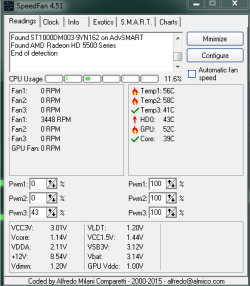
What is wrong with this pc? I installed the speed fan and ran it, then the free prime95. When I opened free prime95 and select stress test the pc shutdown twice same at selecting stress test again.
 

Attachments

  • ffan.PNG
    ffan.PNG
    31.2 KB · Views: 23

My Computer

Computer type
PC/Desktop
Computer Manufacturer/Model Number
MSI
OS
Windows 7 guest, Debian host
CPU
AMD FX-6100
Motherboard
880GMS-E41(FX)(MS-7641)
Memory
DDR3/16384 MBytes/2000.6MHz
Graphics Card(s)
AMD Radeon HD 5500 Series
Sound Card
Built-in
Monitor(s) Displays
Samsung SyncMaster S23B300
Screen Resolution
1920x1080
Hard Drives
ST1000DM003-9YN162 ATA Device
WDC WD5000AAKX-00ERMAQ ATA Device
PSU
500W NAXN
Case
APOLLO
Cooling
XY
Keyboard
Logitech
Mouse
Samsung
Internet Speed
.79Mbps/1.71Mbps
Antivirus
Microsoft Security Essentials
Browser
Google Chrome/FireFox/Internet Explorer
Other Info
3in1 creative speaker
Your cpu looks like it is burning a little high but not enough to cause a shutdown. Is that while running prime95? What does it get to when prime95 is running? As for thermal compound I used a silver based paste-it is better than the paste that comes with the cpu. I don't know how much you used but you only put a thin layer. You only need to put enough to cover the cpu. Too much and it doesn't work. Also make sure that the heat sink is cleaned out. Every now and then I had to remove the fan off of the heat sink to get all of the dust off. Dust also prevents heat dissipation.
 

My Computers

System One System Two

It seems my system cannot handle selecting the stress test in prime95 or any program that might trigger to shut-off the windows.

I took the image above after shut the windows off twice when running prime95. There's no other doing in my system when running prime95 except the system was off randomly. So, I didn't had a chance to snip it like I did the speedfan image.

Ok, for your advice for dust removing, I'll follow it and I'm going to use this speedfan to monitor the temperature whether the heat properly sink, later on after I figure out the issue.
 

My Computer

Computer type
PC/Desktop
Computer Manufacturer/Model Number
MSI
OS
Windows 7 guest, Debian host
CPU
AMD FX-6100
Motherboard
880GMS-E41(FX)(MS-7641)
Memory
DDR3/16384 MBytes/2000.6MHz
Graphics Card(s)
AMD Radeon HD 5500 Series
Sound Card
Built-in
Monitor(s) Displays
Samsung SyncMaster S23B300
Screen Resolution
1920x1080
Hard Drives
ST1000DM003-9YN162 ATA Device
WDC WD5000AAKX-00ERMAQ ATA Device
PSU
500W NAXN
Case
APOLLO
Cooling
XY
Keyboard
Logitech
Mouse
Samsung
Internet Speed
.79Mbps/1.71Mbps
Antivirus
Microsoft Security Essentials
Browser
Google Chrome/FireFox/Internet Explorer
Other Info
3in1 creative speaker
You haven't told me how hot it gets. You can set speedfan to log it's results. That way even if it shuts off you still have a record of what was happening at the time. Please do so and try prime95 again and upload the log. All you need to select to log are the temps. I don't care about anything else. Do you overclock?
 

My Computers

System One System Two

NO, I don't want overclocking the cpu.

Here's the pdf file log's result, please let me know if this is what you need.

Again, opening prime95 shut off the windows.
 

Attachments

My Computer

Computer type
PC/Desktop
Computer Manufacturer/Model Number
MSI
OS
Windows 7 guest, Debian host
CPU
AMD FX-6100
Motherboard
880GMS-E41(FX)(MS-7641)
Memory
DDR3/16384 MBytes/2000.6MHz
Graphics Card(s)
AMD Radeon HD 5500 Series
Sound Card
Built-in
Monitor(s) Displays
Samsung SyncMaster S23B300
Screen Resolution
1920x1080
Hard Drives
ST1000DM003-9YN162 ATA Device
WDC WD5000AAKX-00ERMAQ ATA Device
PSU
500W NAXN
Case
APOLLO
Cooling
XY
Keyboard
Logitech
Mouse
Samsung
Internet Speed
.79Mbps/1.71Mbps
Antivirus
Microsoft Security Essentials
Browser
Google Chrome/FireFox/Internet Explorer
Other Info
3in1 creative speaker
Did you look at that? It only has seconds not temps.
 

My Computers

System One System Two

Townsbg, how are you today.

been busy that time the reason I didn't response to you. Until then, I noticed my hard drive not fully working. Now I got a replace from my laptop hard drive spare. So far, I got no issue only the transfer rate is slower than the one hdd I replaced. I still used it as back up saving drive temporarily while looking an almost brand-new drive but the cheapest.

What do you think that noise in the drive is the reason this pc got the issue?
 

My Computer

Computer type
PC/Desktop
Computer Manufacturer/Model Number
MSI
OS
Windows 7 guest, Debian host
CPU
AMD FX-6100
Motherboard
880GMS-E41(FX)(MS-7641)
Memory
DDR3/16384 MBytes/2000.6MHz
Graphics Card(s)
AMD Radeon HD 5500 Series
Sound Card
Built-in
Monitor(s) Displays
Samsung SyncMaster S23B300
Screen Resolution
1920x1080
Hard Drives
ST1000DM003-9YN162 ATA Device
WDC WD5000AAKX-00ERMAQ ATA Device
PSU
500W NAXN
Case
APOLLO
Cooling
XY
Keyboard
Logitech
Mouse
Samsung
Internet Speed
.79Mbps/1.71Mbps
Antivirus
Microsoft Security Essentials
Browser
Google Chrome/FireFox/Internet Explorer
Other Info
3in1 creative speaker
It depends upon the noise. It could simply be that the hard drive was being read from or it could have been a sign of hard drive failure. As for a change in transfer speed, that could happen if you replaced the drive with one of a lower rpm.
 

My Computers

System One System Two

Okay, I strongly believe and being hopeful this time my pc is going back to normal. About this hard drive failing, I reformatted it then checked disk to recover bad sectors, and it always found some problems but fixed the windows. So I reattached it to have a second hard drive, to use its life span this one terabytes lame drive.
 

My Computer

Computer type
PC/Desktop
Computer Manufacturer/Model Number
MSI
OS
Windows 7 guest, Debian host
CPU
AMD FX-6100
Motherboard
880GMS-E41(FX)(MS-7641)
Memory
DDR3/16384 MBytes/2000.6MHz
Graphics Card(s)
AMD Radeon HD 5500 Series
Sound Card
Built-in
Monitor(s) Displays
Samsung SyncMaster S23B300
Screen Resolution
1920x1080
Hard Drives
ST1000DM003-9YN162 ATA Device
WDC WD5000AAKX-00ERMAQ ATA Device
PSU
500W NAXN
Case
APOLLO
Cooling
XY
Keyboard
Logitech
Mouse
Samsung
Internet Speed
.79Mbps/1.71Mbps
Antivirus
Microsoft Security Essentials
Browser
Google Chrome/FireFox/Internet Explorer
Other Info
3in1 creative speaker
Windows can't fix bad sectors caused by physical problems with the drive. It can only possibly fix problems with the filesystem.
 

My Computers

System One System Two

Have you experience repairing a drive? I really want to try a repair but the book of Mike Meyers' computer skills (2006) wrote not to open the drive and should replace a new one. I have here not seeing the bios but the platter is still rotating.

I was thinking this idea to try when I saw a bunch of defect hard drive posted for sale, 4.5$ each. I don't know other reason why they sell it if hdd is not repairable.
 

My Computer

Computer type
PC/Desktop
Computer Manufacturer/Model Number
MSI
OS
Windows 7 guest, Debian host
CPU
AMD FX-6100
Motherboard
880GMS-E41(FX)(MS-7641)
Memory
DDR3/16384 MBytes/2000.6MHz
Graphics Card(s)
AMD Radeon HD 5500 Series
Sound Card
Built-in
Monitor(s) Displays
Samsung SyncMaster S23B300
Screen Resolution
1920x1080
Hard Drives
ST1000DM003-9YN162 ATA Device
WDC WD5000AAKX-00ERMAQ ATA Device
PSU
500W NAXN
Case
APOLLO
Cooling
XY
Keyboard
Logitech
Mouse
Samsung
Internet Speed
.79Mbps/1.71Mbps
Antivirus
Microsoft Security Essentials
Browser
Google Chrome/FireFox/Internet Explorer
Other Info
3in1 creative speaker
Hard drives are generally only repairable by the manufacturer or experts. It is more cost effective to replace the drive unless it is still under warranty. Depending upon the problem the drive might not be repairable.
 

My Computers

System One System Two

For one month observation I found no problem after replacing the hdd, so I think the issue here was solved... Thanks the forum!
 

My Computer

Computer type
PC/Desktop
Computer Manufacturer/Model Number
MSI
OS
Windows 7 guest, Debian host
CPU
AMD FX-6100
Motherboard
880GMS-E41(FX)(MS-7641)
Memory
DDR3/16384 MBytes/2000.6MHz
Graphics Card(s)
AMD Radeon HD 5500 Series
Sound Card
Built-in
Monitor(s) Displays
Samsung SyncMaster S23B300
Screen Resolution
1920x1080
Hard Drives
ST1000DM003-9YN162 ATA Device
WDC WD5000AAKX-00ERMAQ ATA Device
PSU
500W NAXN
Case
APOLLO
Cooling
XY
Keyboard
Logitech
Mouse
Samsung
Internet Speed
.79Mbps/1.71Mbps
Antivirus
Microsoft Security Essentials
Browser
Google Chrome/FireFox/Internet Explorer
Other Info
3in1 creative speaker
Back
Top