
Solved Sick PC Maybe Got a Virus, or ...?

voyager

New member
Local time
1:18 AM
Messages
39
Location
Hawaii
Running Win7 x64

Yesterday morning my galfriend's PC broke.
It had run fine the day before.
After booting, it froze.
No desktop icons would start any apps, WinExp not responding, just the busy processing whirlygig.
It seemed to run sluggishly.
Finally, WinExp crashes after wrastling with it for a while.
It would start up in Safe Mode and run faster with the Safe Mode limitations.

1.
I was able to do a System Restore to a point a week before from a WinUpdate.
It ran great out of the gate.
But the problems came back after a second reboot.

2.
I ran an AVG Free scan.
It found: Print_Screen_Boot that it labled as a virus affecting MsMpEng.exe.
I cannot find MsMpEng.exe in a search of "C" drive.
There are a few MsMpxxx.dll files.
I was a bit leery about it being a false positive as we do get more of those than actual malware on AVG scans.

3.
I ran a "House Call" Scan.
It ran all day.
It froze up while scanning the Malwarebytes folder.
Tried it in Safe Mode, it ran much quicker and completely, but nothing found.

4.
Found an Acronis image that I had forgotten I had made just after the WinUpdate.
Did a Parted Magic Secure Erase of the SSD, installed a new Win7 to setup the partitons,
and finally installed the Acronis OS image over the new Win7.
No satisfaction.

Her PC ran fine for the week after the SysRes and OS image were made.
SysRes was from before the Winupdates.
The image was from after the Winupdates.

5.
Ran AVG again a few times.
It froze during the scan every time.

6.
I've run Kapersky's TDSSKiller, and Windows Defender Offline.
No satisfaction.

EDIT:
Device Manager shows no problems.


I'm running out of ideas for dealing with this.
I'm beginning to think a clean install of Win7x64 and all the apps is my only option left.

Any suggestions?
 

My Computer My Computer

Computer type
PC/Desktop
Computer Manufacturer/Model Number
Voyager's PC Foundry - VPCF07
OS
Windows 7 Ultimate x64
CPU
i7-3770k OC to 4.5GHz
Motherboard
ASUS P8Z77-V
Memory
4x4GB Kingston HyperX 1600
Graphics Card(s)
XFX Radeon R7 260X
Sound Card
Onboard HD sound
Monitor(s) Displays
2X Dell U2412M
Screen Resolution
1920 x 1200 [3840 X 1200]
Hard Drives
1X Crucial MX300 750 GB SATA-III SSD;
1x Seagate 2TB ST2000DM001 SATA-III;
2x Hitachi 2TB Ultrastar HUA723020ALA641 SATA III
PSU
Corsair RM Series 850W
Case
Corsair Graphite T600
Cooling
Noctua NH-U12P SE2
Keyboard
Azio KB505U Large Print Backlit - wired
Mouse
Cheapest I can find - wired
Internet Speed
50mbps
Antivirus
Bit Defender Free
Browser
Palemoon
Other Info
Epson SureColor 400;
Brother MFC L2740DW;
Nikon Super CoolScan 4000ED;
TCC 750LC PreAmp;
MCS [Technics] 6603 Turntable;
Hauppauge WinTV-HVR 1850 TV tuner card;
Syba SD-SA2PEX-2IR SATA RAID card
Hello mate look first get rid of the AVG it is rubbish if you can run these
SFC /SCANNOW Command - System File Checker
Disk Check < if necessary include the /f and /r in the command line as per Option2

NB SFC best run for about three runs
SUPERAntiSpyware | Remove Malware | Remove Spyware - AntiMalware, AntiSpyware, AntiAdware!
Malwarebytes | Malwarebytes Anti-Malware Premium
AdwCleaner Download
ADW download from bleeping computer delete any rubbish found with the malware scans
(NB If one is running Kaspersky security it may rant about ADW - just ignore it or disable Kaspersky while the ADW is being used)
The MBAM and SAS can be run from a stick and if still you have a problem then try this
http://support.kaspersky.com/viruses/rescuedisk it runs in a non Windows enviroment which means Windows has no control over the scan. You will need to make a bootable disk or stick - I prefer a disk but the choice is yours.

Just a by the by the best method (I think is) is the DISKPART clean or clean all for doing the cleaning of a drive Disk - Clean and Clean All with Diskpart Command

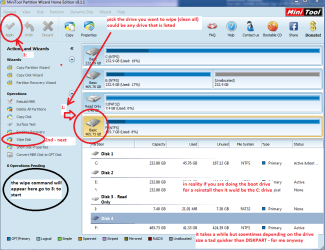
Another method I sue is the disk wipe (writes zeros' to the drive) via Partition Wizard see pic
Disk - Clean and Clean All with Diskpart Command (also a very handy tool to keep) and I ama ssuming you have your data backed up eh?
 

Attachments

  • MINI TOOL WIPE.PNG
    MINI TOOL WIPE.PNG
    52.4 KB · Views: 0

My Computer My Computer

Computer type
PC/Desktop
Computer Manufacturer/Model Number
Own build (new) Desk1 / Asus ROG Win 7 / Desk2 1st build
OS
Desk1 7 Home Prem / Desk2 10 Pro / Main lap Asus ROG 10 Pro 2 laptop Toshiba 7 Pro Asus P2520 7 & 10
CPU
Desk1 i5 3750K / Laptop i7 GTX 860M / Desk2 i5 2500
Motherboard
Desk1 Asus P877-V / Desk2 Gigabyte H67 UD3H / Laptop ?
Memory
Desk1 8GB (1866) / Desk2 16GB (1333) / Laptop 8Gb DDR3
Graphics Card(s)
Desk 1& 2NVidia GTX 650 & Laptops on board Intel
Sound Card
Desk 1 & 2 -XONAR DG Realtek High Def audio Laptop
Monitor(s) Displays
Desk 1 Benq HD 2450 / Desk2 Philips 24" / Laptop 17.5"
Screen Resolution
1920x1080 D1 & D2 & Laptop 1
Hard Drives
Desk1 Samsung 120GB 830 SSD
Asus ROG 256GB 850 Pro SSD
Desk2 Samsung 840 256 SSD
Toshiba 120GB EVO
PSU
Desk 1 Corsair HX 1050/ Laptop ? / Desk 2 Corsair HX 650
Case
Desk 1 Cooler HAF XM ? Toshiba laptop / Desk2 Coolermaster
Cooling
Fans on all Desk1 -2 Desk2 - all Coolermasters 5 Laptop ?
Keyboard
Desk 1 MS Sidewinder X6 Desk 2 MS Sidewinder X 4
Mouse
Desk 1&2 - Gigabyte MS 900 gamer - laptop - Logitec wireless
Internet Speed
ADSL2+
Other Info
One other Desktop (tester) and spare Toshba laptop both with SSD's
Running Kaspersky 2016 ISS on all machines config'd identically
Logitec audio stereo systems on each machine (x3)
Canon MG5250MFC
Router/modem TP-Link running WPA2SK
Thanks for your response ICIT2LOL.

I have done an SFC several times already, but intermittently.
From your post I gathered you recommend it to be done 3X back to back.
OK, I've done that.
Nada.
Nothing found.

Malwarebytes is on her PC and has been run a number of times.
Everything found by it has long been removed.
SAS is new to me.
It looks to be a pretty decent malware tool.
I ran it.
But, nothing that looked to be important was found.

ADW as well as Ccleaner were put on her PC and run several times, but were removed during the SysRes and Image restore operations.
I've put them both back on and run them again.
Nothing found worth worrying about other than almost 1500 tracking cookies.
That makes my skin crawl, but doesn't bother her.

I am open to argument, but after checking around fairly extensively, I'm convinced that the Secure Erase utility is a better way to deal with cleaning and restoring SSDs than Diskpart. In the end the same result is achieved which ever you use.

I am leery of using anything that overwrites simply to clear data on an SSD.
Again, as I understand it, after the Secure Erase operation, it would be nothing more than redundant to do so, and could potentially interfere with TRIM and garbage collection operations.

Right now it seems to be working OK.
But, that's not new.
Let it run, be used and rebooted a time or two.
Then, we'll see.
I'll turn the PC back over to her in the morning to give it a go.

Thanks again.
 

My Computer My Computer

Computer type
PC/Desktop
Computer Manufacturer/Model Number
Voyager's PC Foundry - VPCF07
OS
Windows 7 Ultimate x64
CPU
i7-3770k OC to 4.5GHz
Motherboard
ASUS P8Z77-V
Memory
4x4GB Kingston HyperX 1600
Graphics Card(s)
XFX Radeon R7 260X
Sound Card
Onboard HD sound
Monitor(s) Displays
2X Dell U2412M
Screen Resolution
1920 x 1200 [3840 X 1200]
Hard Drives
1X Crucial MX300 750 GB SATA-III SSD;
1x Seagate 2TB ST2000DM001 SATA-III;
2x Hitachi 2TB Ultrastar HUA723020ALA641 SATA III
PSU
Corsair RM Series 850W
Case
Corsair Graphite T600
Cooling
Noctua NH-U12P SE2
Keyboard
Azio KB505U Large Print Backlit - wired
Mouse
Cheapest I can find - wired
Internet Speed
50mbps
Antivirus
Bit Defender Free
Browser
Palemoon
Other Info
Epson SureColor 400;
Brother MFC L2740DW;
Nikon Super CoolScan 4000ED;
TCC 750LC PreAmp;
MCS [Technics] 6603 Turntable;
Hauppauge WinTV-HVR 1850 TV tuner card;
Syba SD-SA2PEX-2IR SATA RAID card
The problems are still there, no improvement.
WE crashes, everything freezes up, and it still needs to be hard reset to get it shut down.
I'm getting tired of playing with this.

I'm now getting the feeling that this may be something other than malware, or similar.
The wipe of the drive and reinstall of the image should have taken care of the problems, if that was the source, unless it is something very exotic.

I am having a few problems with my PC also. Although they're just PIA types of things, nothing as severe as what's going on with hers. I have been thinking about rebuilding my OS, but reinstalling OS images has fixed the problems for a while.

I built both PCs almost 4 years ago, just before leaving Alaska ans moving to Hawai'i, same MoBo, mine with an i7 CPU, hers with an i5, and everything else more suited to our personal uses. I've heard a lot of complaints about computers and other electronics having short lifespans due to the high humidity around here. I've never paid much attention to that. But, I'm beginning to wonder now.

Unless something brings relief to this soon, I'll try a clean install. If that doesn't fix the problem. Then, I'm thinking the only thing left is to start over with a new MoBo and CPU.

Any thoughts, anyone?

EDIT:
I am going to try a non destructive rebuild of Win7. I can't use my install disk because of SP1 being installed. I cannot remove SP1 because right click doesn't work. So, I'm downloading a Win7 + SP1 ISO to burn an updated install disk from. I'll report back how it goes and if it works.
 
Last edited:

My Computer My Computer

Computer type
PC/Desktop
Computer Manufacturer/Model Number
Voyager's PC Foundry - VPCF07
OS
Windows 7 Ultimate x64
CPU
i7-3770k OC to 4.5GHz
Motherboard
ASUS P8Z77-V
Memory
4x4GB Kingston HyperX 1600
Graphics Card(s)
XFX Radeon R7 260X
Sound Card
Onboard HD sound
Monitor(s) Displays
2X Dell U2412M
Screen Resolution
1920 x 1200 [3840 X 1200]
Hard Drives
1X Crucial MX300 750 GB SATA-III SSD;
1x Seagate 2TB ST2000DM001 SATA-III;
2x Hitachi 2TB Ultrastar HUA723020ALA641 SATA III
PSU
Corsair RM Series 850W
Case
Corsair Graphite T600
Cooling
Noctua NH-U12P SE2
Keyboard
Azio KB505U Large Print Backlit - wired
Mouse
Cheapest I can find - wired
Internet Speed
50mbps
Antivirus
Bit Defender Free
Browser
Palemoon
Other Info
Epson SureColor 400;
Brother MFC L2740DW;
Nikon Super CoolScan 4000ED;
TCC 750LC PreAmp;
MCS [Technics] 6603 Turntable;
Hauppauge WinTV-HVR 1850 TV tuner card;
Syba SD-SA2PEX-2IR SATA RAID card
I think I've got it!!!
I am working from her PC right now.
Before the rebuild, I could not have been able to do this.

After finishing the rebuild, I'm getting several notices that some of the original MoBo apps and drivers are not working.
I need to go back and reinstall them.
That may be the source of the problems with both PCs, MoBo apps and drivers may be corrupt or something similar.

If I'm wrong I'll be back.
Thanks for the help.
 

My Computer My Computer

Computer type
PC/Desktop
Computer Manufacturer/Model Number
Voyager's PC Foundry - VPCF07
OS
Windows 7 Ultimate x64
CPU
i7-3770k OC to 4.5GHz
Motherboard
ASUS P8Z77-V
Memory
4x4GB Kingston HyperX 1600
Graphics Card(s)
XFX Radeon R7 260X
Sound Card
Onboard HD sound
Monitor(s) Displays
2X Dell U2412M
Screen Resolution
1920 x 1200 [3840 X 1200]
Hard Drives
1X Crucial MX300 750 GB SATA-III SSD;
1x Seagate 2TB ST2000DM001 SATA-III;
2x Hitachi 2TB Ultrastar HUA723020ALA641 SATA III
PSU
Corsair RM Series 850W
Case
Corsair Graphite T600
Cooling
Noctua NH-U12P SE2
Keyboard
Azio KB505U Large Print Backlit - wired
Mouse
Cheapest I can find - wired
Internet Speed
50mbps
Antivirus
Bit Defender Free
Browser
Palemoon
Other Info
Epson SureColor 400;
Brother MFC L2740DW;
Nikon Super CoolScan 4000ED;
TCC 750LC PreAmp;
MCS [Technics] 6603 Turntable;
Hauppauge WinTV-HVR 1850 TV tuner card;
Syba SD-SA2PEX-2IR SATA RAID card
Ok sorry late reply mate now the DISKPART stuff it actually writes zeros to the entire disk it unless I have it terribly wrong it is not just overwriting the disk. The same goes with the Partition Wizard wipe function.

Now if you want you can if you have the activation code for Windows download the ISO from Heidoc it will have SP1 and most of the to date updates already fixed so no more heaps of them because the ISO is "freshened" every now and then. You just then need to make a bootable disk or stick (I prefer a disk) and install from it and just use the code as previously mentioned. I have done this quite a few times now an it is quicker than using old media. Just make sure you get the right version of Windows from Heidoc. HeiDoc.net: The Technology Treasure Chest Doing it this way may solve the problem with the right click issue.

The driver I am assuming you know already best got from the board manufacturers site as one comes across a few that use aftermarket driver softwares.;)
Personally I always keep drivers on a stick after I have downloaded them so they are easily accessed doing an install.
 

My Computer My Computer

Computer type
PC/Desktop
Computer Manufacturer/Model Number
Own build (new) Desk1 / Asus ROG Win 7 / Desk2 1st build
OS
Desk1 7 Home Prem / Desk2 10 Pro / Main lap Asus ROG 10 Pro 2 laptop Toshiba 7 Pro Asus P2520 7 & 10
CPU
Desk1 i5 3750K / Laptop i7 GTX 860M / Desk2 i5 2500
Motherboard
Desk1 Asus P877-V / Desk2 Gigabyte H67 UD3H / Laptop ?
Memory
Desk1 8GB (1866) / Desk2 16GB (1333) / Laptop 8Gb DDR3
Graphics Card(s)
Desk 1& 2NVidia GTX 650 & Laptops on board Intel
Sound Card
Desk 1 & 2 -XONAR DG Realtek High Def audio Laptop
Monitor(s) Displays
Desk 1 Benq HD 2450 / Desk2 Philips 24" / Laptop 17.5"
Screen Resolution
1920x1080 D1 & D2 & Laptop 1
Hard Drives
Desk1 Samsung 120GB 830 SSD
Asus ROG 256GB 850 Pro SSD
Desk2 Samsung 840 256 SSD
Toshiba 120GB EVO
PSU
Desk 1 Corsair HX 1050/ Laptop ? / Desk 2 Corsair HX 650
Case
Desk 1 Cooler HAF XM ? Toshiba laptop / Desk2 Coolermaster
Cooling
Fans on all Desk1 -2 Desk2 - all Coolermasters 5 Laptop ?
Keyboard
Desk 1 MS Sidewinder X6 Desk 2 MS Sidewinder X 4
Mouse
Desk 1&2 - Gigabyte MS 900 gamer - laptop - Logitec wireless
Internet Speed
ADSL2+
Other Info
One other Desktop (tester) and spare Toshba laptop both with SSD's
Running Kaspersky 2016 ISS on all machines config'd identically
Logitec audio stereo systems on each machine (x3)
Canon MG5250MFC
Router/modem TP-Link running WPA2SK
Back
Top