Sidebar from folder?

Chimera123

New member
Local time
3:49 AM
Messages
3
Hi,

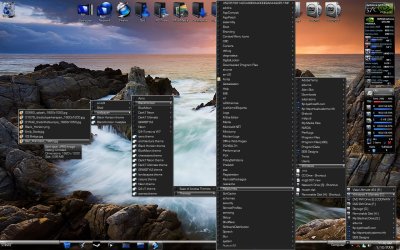
I have just installed windows 7 but want it to look as similar a the old windows XP, the only thing I can't manage to make is the sidebar (topbar indeed, located at the top of the desktop), so I can put there the shortcuts of some programs.

In XP it was easy, I just put some shortcuts inside a folder and then drag the folder to the top of the screen, that's all, and that's what i want, because I have a slow computer (don't wanna use the Aero sidebar or third party programs...).

Anyone know how can I make that? the drag thing is not working....Q_Q

Thanks
 

My Computer

Computer Manufacturer/Model Number
Custom
OS
Ubuntu
CPU
Intel Core2Duo E4500
Motherboard
ECS Elitegroup P35T-A
Memory
2Gb Kingston
Graphics Card(s)
XFX 8800GTS
Sound Card
On-board
Monitor(s) Displays
Hyundai 17" LCD
Hard Drives
320Gb
PSU
550W
Case
Tacens Tango Pro
Cooling
Air
The drag a folder, make a toolbar option like in XP and Vista has been taken out of Windows 7.
 

My Computer

Computer type
PC/Desktop
Computer Manufacturer/Model Number
Airbot 2.0
OS
Windows 7 Ultimate x64 SP1
CPU
Core i7 920 (D0) @ 4Ghz, *26c idle *65c full load on air
Motherboard
Asus P6X58D Premium - Sata 6Gb/s - USB 3.0
Memory
12GB DDR3 Corsair Dominator -CMD12GX3M6A1600C8 at 1600MHz
Graphics Card(s)
Zotac Geforce GTX 770
Sound Card
ASUS Xonar D2X
Monitor(s) Displays
1 LG 24" Flatron W2453V-PF 1 Samsung 24" P2450H both 2ms RT
Screen Resolution
1920x1080@60hz
Hard Drives
1 Samsung 250GB 840 Evo SSD
1 OCZ Vertex2 180GB SSD
1 TB Samsung Spinpoint F1 7200RPM 32MB cache
2 500GB WD Caviar Blacks 7200RPM 32MB cache (WD5001AALS)

Pioneer DVD Burner DVR-S18M
PSU
Corsair HX1000W
Case
Cooler Master HAF 932
Cooling
Case Fans *3 230mm, *1 140mm/CPU - *Tuniq Tower 120 Extreme
Keyboard
Logitech Wireless MK700
Mouse
Logitech Wireless MK700
Internet Speed
DL 15 Mbps UL 0.98 Mbps
Antivirus
None
Browser
Firefox Nightly
Other Info
Processor-7.7 *RAM- 7.9 *Graphics-7.9 *Gaming Graphics- 7.9 *SSD- 7.8 W.E.I final score= 7.7
*Phone- LG Nexus 5
Let me get this right, you want to use Windows 7 but you don't want to use it's features and you want it to look and work like XP, sorry why are you using Windows 7 again?

I would suggest trying Rocketdock if it doesn't slow you down or if that doesn't work for you, try making a folder with all your shortcuts in and then add it as a new toolbar on the taskbar, you can also add a whole drive or your whole computer to the taskbar if you like.

2009-12-01_114825.jpg
 

My Computer

Computer Manufacturer/Model Number
Home Brew
OS
Windows 7 Ultimate Vista Ultimate x64
CPU
Core 2 Duo E8500 3.16Ghz @ 3.8Ghz
Motherboard
eVGA 750i FTW
Memory
2x2Gigs Patriot PC2-6400 LL
Graphics Card(s)
Inno3D GeForce GTX260 216 SP
Monitor(s) Displays
ASUS VW222U 22" 2ms Response time
Screen Resolution
1680x1050
Hard Drives
SATA 150GB
SATA II 250GB
USB IDE 750GB Ext.
PSU
HYTEC 600W & Thermaltake 650W Toughpower Power Exp
Case
Thermaltake Armor LCS (Liquid Cooling System)
Cooling
Liquid Cooling System
Keyboard
Logitech G15 Gaming Keyboard
Mouse
Logitech G9 Gaming Mouse
I want to use windows 7 because I've been using XP for 8 years and I think my comp needs an update, but I don't want it to slow down due to a few stupid effects like it did with vista.

Thanks for the tips.
 

My Computer

Computer Manufacturer/Model Number
Custom
OS
Ubuntu
CPU
Intel Core2Duo E4500
Motherboard
ECS Elitegroup P35T-A
Memory
2Gb Kingston
Graphics Card(s)
XFX 8800GTS
Sound Card
On-board
Monitor(s) Displays
Hyundai 17" LCD
Hard Drives
320Gb
PSU
550W
Case
Tacens Tango Pro
Cooling
Air
No worries, you can disable some of the effects if you need to by adjusting the Appearance and performance, open the start menu and type ap and it should be at the top of the list and then just remove the effects you don't want or just select adjust for best performance.
 

My Computer

Computer Manufacturer/Model Number
Home Brew
OS
Windows 7 Ultimate Vista Ultimate x64
CPU
Core 2 Duo E8500 3.16Ghz @ 3.8Ghz
Motherboard
eVGA 750i FTW
Memory
2x2Gigs Patriot PC2-6400 LL
Graphics Card(s)
Inno3D GeForce GTX260 216 SP
Monitor(s) Displays
ASUS VW222U 22" 2ms Response time
Screen Resolution
1680x1050
Hard Drives
SATA 150GB
SATA II 250GB
USB IDE 750GB Ext.
PSU
HYTEC 600W & Thermaltake 650W Toughpower Power Exp
Case
Thermaltake Armor LCS (Liquid Cooling System)
Cooling
Liquid Cooling System
Keyboard
Logitech G15 Gaming Keyboard
Mouse
Logitech G9 Gaming Mouse
Thanks, just did that and disabled all the effects, I have installed the rocketdock and everything seems to work nice, the RAM has gone from 30% to only 17%.

My goal is always performance, I don't really care about the layout/template/theme/effects...

:p
 

My Computer

Computer Manufacturer/Model Number
Custom
OS
Ubuntu
CPU
Intel Core2Duo E4500
Motherboard
ECS Elitegroup P35T-A
Memory
2Gb Kingston
Graphics Card(s)
XFX 8800GTS
Sound Card
On-board
Monitor(s) Displays
Hyundai 17" LCD
Hard Drives
320Gb
PSU
550W
Case
Tacens Tango Pro
Cooling
Air
Back
Top