Sidebar prevent computer shutdown!

unko

New member
Member
VIP
Local time
7:19 AM
Messages
289
After a fresh SP1 install (with all updates) i encounter this (quite common apparently..) which is the sidebar freezing during shutdown and altering its process. So far i couldn't fix this.

Probably some will respond "just turn off that sh**" but no i have some nice (and clean) widget i wanna use! There must be a way to fix this issue, since everyone doesn't have it.
 

My Computer

Computer type
PC/Desktop
OS
Win7x64

My Computer

Computer type
PC/Desktop
Computer Manufacturer/Model Number
Skylake Special #666
OS
Windows 10 Pro x64
CPU
Intel Core i7 6700K
Motherboard
Asus Sabertooth Z170 Mark 1
Memory
GSkill TridentZ RGB 16GB 3600 16-16-16-36
Graphics Card(s)
EVGA GTX 980 Ti SC x2
Sound Card
Realtek High Definition
Monitor(s) Displays
AOC G2460PG
Screen Resolution
1920 x 1080 144Hz
Hard Drives
Samsung 860 Pro 256GB, Seagate Barracuda 4TB x2
PSU
EVGA 1000 P2, EVGA White Custom Braided Cables
Case
Corsair Vengeance C70 Gunmetal Black
Cooling
Corsair H100i v2, Corsair ML120 x2, Thermal Grizzly Kryonaut
Keyboard
Logitech G910 Orion Spectrum
Mouse
Logitech G700s
Internet Speed
Verizon Fios Quantum Gateway 75/75
Antivirus
Windows Defender, Malwarebytes Free 3.8.3
Browser
Chrome
Other Info
Corsair SP120 x4, LG Blu-ray Drive, Durabrand HT-395 100 Watt Dolby Digital Amp, Corsair H2100 Wireless 7.1 Headset
I don't like that one. Thanks though.
 

My Computer

Computer type
PC/Desktop
OS
Win7x64
Don`t like what one ? The tutorial ?

Or you`re using some other sidebar ?
 

My Computer

Computer type
PC/Desktop
Computer Manufacturer/Model Number
Skylake Special #666
OS
Windows 10 Pro x64
CPU
Intel Core i7 6700K
Motherboard
Asus Sabertooth Z170 Mark 1
Memory
GSkill TridentZ RGB 16GB 3600 16-16-16-36
Graphics Card(s)
EVGA GTX 980 Ti SC x2
Sound Card
Realtek High Definition
Monitor(s) Displays
AOC G2460PG
Screen Resolution
1920 x 1080 144Hz
Hard Drives
Samsung 860 Pro 256GB, Seagate Barracuda 4TB x2
PSU
EVGA 1000 P2, EVGA White Custom Braided Cables
Case
Corsair Vengeance C70 Gunmetal Black
Cooling
Corsair H100i v2, Corsair ML120 x2, Thermal Grizzly Kryonaut
Keyboard
Logitech G910 Orion Spectrum
Mouse
Logitech G700s
Internet Speed
Verizon Fios Quantum Gateway 75/75
Antivirus
Windows Defender, Malwarebytes Free 3.8.3
Browser
Chrome
Other Info
Corsair SP120 x4, LG Blu-ray Drive, Durabrand HT-395 100 Watt Dolby Digital Amp, Corsair H2100 Wireless 7.1 Headset
Tutorial link wasn't there when I answered..
 

My Computer

Computer type
PC/Desktop
OS
Win7x64
And as said, I do not want vista sidebar.
 

My Computer

Computer type
PC/Desktop
OS
Win7x64
My bad, I assumed you were talking about adding Vista`s sidebar to W7, as you never said what sidebar. :confused:

Maybe if you let us know who`s sidebar you`re using.
 

My Computer

Computer type
PC/Desktop
Computer Manufacturer/Model Number
Skylake Special #666
OS
Windows 10 Pro x64
CPU
Intel Core i7 6700K
Motherboard
Asus Sabertooth Z170 Mark 1
Memory
GSkill TridentZ RGB 16GB 3600 16-16-16-36
Graphics Card(s)
EVGA GTX 980 Ti SC x2
Sound Card
Realtek High Definition
Monitor(s) Displays
AOC G2460PG
Screen Resolution
1920 x 1080 144Hz
Hard Drives
Samsung 860 Pro 256GB, Seagate Barracuda 4TB x2
PSU
EVGA 1000 P2, EVGA White Custom Braided Cables
Case
Corsair Vengeance C70 Gunmetal Black
Cooling
Corsair H100i v2, Corsair ML120 x2, Thermal Grizzly Kryonaut
Keyboard
Logitech G910 Orion Spectrum
Mouse
Logitech G700s
Internet Speed
Verizon Fios Quantum Gateway 75/75
Antivirus
Windows Defender, Malwarebytes Free 3.8.3
Browser
Chrome
Other Info
Corsair SP120 x4, LG Blu-ray Drive, Durabrand HT-395 100 Watt Dolby Digital Amp, Corsair H2100 Wireless 7.1 Headset
We are on SEVEN FORUMS. That should answer your question :D
 

My Computer

Computer type
PC/Desktop
OS
Win7x64
Well, windows 7 does not have a sidebar.

And we are not mind readers.

Maybe you should just cooperate if you are asking here for help ;)
 

My Computer

Computer type
PC/Desktop
Computer Manufacturer/Model Number
Skylake Special #666
OS
Windows 10 Pro x64
CPU
Intel Core i7 6700K
Motherboard
Asus Sabertooth Z170 Mark 1
Memory
GSkill TridentZ RGB 16GB 3600 16-16-16-36
Graphics Card(s)
EVGA GTX 980 Ti SC x2
Sound Card
Realtek High Definition
Monitor(s) Displays
AOC G2460PG
Screen Resolution
1920 x 1080 144Hz
Hard Drives
Samsung 860 Pro 256GB, Seagate Barracuda 4TB x2
PSU
EVGA 1000 P2, EVGA White Custom Braided Cables
Case
Corsair Vengeance C70 Gunmetal Black
Cooling
Corsair H100i v2, Corsair ML120 x2, Thermal Grizzly Kryonaut
Keyboard
Logitech G910 Orion Spectrum
Mouse
Logitech G700s
Internet Speed
Verizon Fios Quantum Gateway 75/75
Antivirus
Windows Defender, Malwarebytes Free 3.8.3
Browser
Chrome
Other Info
Corsair SP120 x4, LG Blu-ray Drive, Durabrand HT-395 100 Watt Dolby Digital Amp, Corsair H2100 Wireless 7.1 Headset
It's called sidebar even though it's not. Blame Microsoft!
 

My Computer

Computer type
PC/Desktop
OS
Win7x64
I still can't find a solution to that issue. I tried all i found : deleting "zones" in registry, removing/reinstalling it..
 

My Computer

Computer type
PC/Desktop
OS
Win7x64
Once again, there is no sidebar in Windows 7, you'll never get proper help if you don`t start telling us what you are talking about, maybe some pictures would be nice. :huh:
 

My Computer

Computer type
PC/Desktop
Computer Manufacturer/Model Number
Skylake Special #666
OS
Windows 10 Pro x64
CPU
Intel Core i7 6700K
Motherboard
Asus Sabertooth Z170 Mark 1
Memory
GSkill TridentZ RGB 16GB 3600 16-16-16-36
Graphics Card(s)
EVGA GTX 980 Ti SC x2
Sound Card
Realtek High Definition
Monitor(s) Displays
AOC G2460PG
Screen Resolution
1920 x 1080 144Hz
Hard Drives
Samsung 860 Pro 256GB, Seagate Barracuda 4TB x2
PSU
EVGA 1000 P2, EVGA White Custom Braided Cables
Case
Corsair Vengeance C70 Gunmetal Black
Cooling
Corsair H100i v2, Corsair ML120 x2, Thermal Grizzly Kryonaut
Keyboard
Logitech G910 Orion Spectrum
Mouse
Logitech G700s
Internet Speed
Verizon Fios Quantum Gateway 75/75
Antivirus
Windows Defender, Malwarebytes Free 3.8.3
Browser
Chrome
Other Info
Corsair SP120 x4, LG Blu-ray Drive, Durabrand HT-395 100 Watt Dolby Digital Amp, Corsair H2100 Wireless 7.1 Headset
ONCE AGAIN TAKE A LOOK ON GOOGLE "SIDEBAR.EXE" on WINDOWS 7 :)
 

My Computer

Computer type
PC/Desktop
OS
Win7x64
This might be what is being discussed...

Yes HKCU:Run Sidebar Microsoft Corporation C:\Program Files\Windows Sidebar\sidebar.exe /autoRun

(Cut and paste from Startup in Speccy)
 

My Computer

OS
Windows 7 Home Premium 64-bit
CPU
Intel i5 2500K
Motherboard
Gigabyte Z68MA-D2H-B3
Memory
Ripjaws 1600, 16 GB
Graphics Card(s)
Saphire Radeon 6770
Monitor(s) Displays
Gateway FHX2300
Screen Resolution
1600x900@60Hz
Hard Drives
Crucial M4 128 GB, Samsung 1.5 TB
PSU
CoolMaster 600 W.
Case
CoolMaster Storm Scout
Other Info
Saphire fan is noisy. Case fans are almost silent. Love the case.
Good to see some people knowing 7 finally :)
 

My Computer

Computer type
PC/Desktop
OS
Win7x64
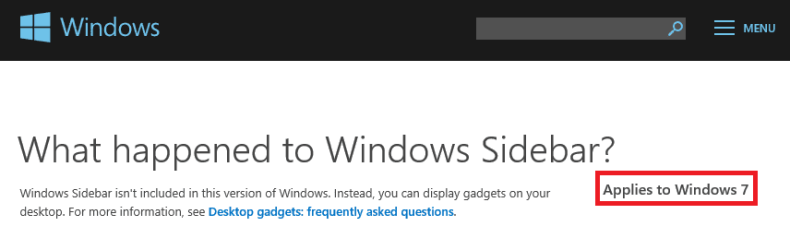
What happened to Windows Sidebar?

sidebar.png

So... where did you get the file?

I don't have it on a fresh install.

edit:I checked 3 computers that have not been deployed yet (i.e. no users have changed them) before I made that statement. Now I have had a chance to check my virtual machines and I see the file named sidebar. I did not know that the file was not a part of the W7 image being deployed where I work. Sorry if the statement added any confusion.
 
Last edited:

My Computer

Computer type
Laptop
Computer Manufacturer/Model Number
Employer provided Dell Latitude
OS
W7 Pro SP1 64bit
CPU
i7
Memory
8GB
Graphics Card(s)
Intel HD Graphics
Hard Drives
crappy SSD
Antivirus
Employer mandated Symantec Endpoint Protection
Browser
Pale Moon 64bit, IE11 64bit & Chrome 64bit
I used my Shortcut called All Tasks (some call it God Mode) right after doing a fresh install. I'm not certain about this but I believe you have to add the gadgets before doing updates. At some point the gadget capability is disabled because MS feels there is too much of a hacking danger in using gadgets. This happened to me once and I had to search Sevenforums to learn the "right click on desktop" and select Gadgets, delete, then reactivate, or something like that ??? I've found that sometimes (after updating) they won't load, but if I do a restart right away they come back.

Hope you find this to be useful info.
 

My Computer

OS
Windows 7 Home Premium 64-bit
CPU
Intel i5 2500K
Motherboard
Gigabyte Z68MA-D2H-B3
Memory
Ripjaws 1600, 16 GB
Graphics Card(s)
Saphire Radeon 6770
Monitor(s) Displays
Gateway FHX2300
Screen Resolution
1600x900@60Hz
Hard Drives
Crucial M4 128 GB, Samsung 1.5 TB
PSU
CoolMaster 600 W.
Case
CoolMaster Storm Scout
Other Info
Saphire fan is noisy. Case fans are almost silent. Love the case.
Thank you Jambe for the additional info.

Let's hope that unko can recall where the file came from.
 

My Computer

Computer type
Laptop
Computer Manufacturer/Model Number
Employer provided Dell Latitude
OS
W7 Pro SP1 64bit
CPU
i7
Memory
8GB
Graphics Card(s)
Intel HD Graphics
Hard Drives
crappy SSD
Antivirus
Employer mandated Symantec Endpoint Protection
Browser
Pale Moon 64bit, IE11 64bit & Chrome 64bit
well technically I think both vista and 7 have sidebars if im not mistaken. But there are different ways of rebuilding them if there is a issue.
 

My Computer

Computer type
PC/Desktop
Computer Manufacturer/Model Number
custom built
OS
Windows 7 ultimate 64-bit
CPU
Intel I7 2600K 3.4ghz
Motherboard
Asus Evo P8P67
Memory
Corsair 16gb ddr3 1600mhz
Graphics Card(s)
Nvidia Geforce gt 430
Sound Card
Sound Blaster Titanium x-fi pci express
Monitor(s) Displays
Dell E198WFP
Hard Drives
1 western digital 2TB drive.
PSU
Antec 1200 watt
Case
Inwin Dragon Rider
Cooling
6 case supplied cooling fans
Keyboard
logitech mk700
Mouse
logitech m705
Internet Speed
25-50mbps download; 10mbps upload(i think)
Antivirus
avg free 2014
Browser
mozilla firefox
Other Info
Also have a pretty bad speaker setup which is a klipsch promedia 5.1 surround speaker setup with huge subwoofer and lg blu ray player/writer. Also a hp officejet pro 8600 plus wireless all in one and a logitech s7500 webcam.
well technically I think both vista and 7 have sidebars if im not mistaken. But there are different ways of rebuilding them if there is a issue.
How would I turn them on so that I can see them?
 

My Computer

Computer type
Laptop
Computer Manufacturer/Model Number
Employer provided Dell Latitude
OS
W7 Pro SP1 64bit
CPU
i7
Memory
8GB
Graphics Card(s)
Intel HD Graphics
Hard Drives
crappy SSD
Antivirus
Employer mandated Symantec Endpoint Protection
Browser
Pale Moon 64bit, IE11 64bit & Chrome 64bit
Back
Top