Computer lag spikes, audio drops, video crashes, etc.

kevinbkt

New member
Local time
10:31 PM
Messages
13
My Win7 PC has been having performance issues over the past month or so. Actually, three of them have been, with similar symptoms between them. But I'll just focus on one box for the moment.

What happens is that after running for some time, occasional lag will start to occur with symptoms like audio dropping during a game, or Firefox freezing whenever an image is saved from a webpage. Sometimes the screen will go black, and then come back with a message saying that the video driver recovered from a crash. Some games which should easily run on this hardware experience lag that make them unplayable.

I have previously updated the audio and video drivers. This resulted in some short-term relief, but then the problem started back up after a number of days. Sometimes restarting the computer will clear things up for a few hours or a few days. I have also freed up quite a bit of disk space to make sure it wasn't a virtual memory issue.

I've spent quite a bit of time in process explorer trying to spot any suspicious processes with no luck. At this point, any help figuring this out would be greatly appreciated!
 

My Computer My Computer

Computer Manufacturer/Model Number
CyberPowerPC
OS
Windows 7 Professional x64
CPU
Intel Core i5-760 2.80 GHz
Motherboard
ASUS P7P55 LX
Memory
4GB DDR3/1600MHz Dual-Channel
Graphics Card(s)
NVidia GeForce GTX 470 1.2GB
Sound Card
Creative Labs X-FI XtremeGamer
Is Firefox up to date? This was a known problem with it and it was fixed via update.
 

My Computer My Computer

Computer type
Laptop
Computer Manufacturer/Model Number
Dell M6500 Precision Work Station
OS
Windows 7 Pro SP1 64 bit
Memory
8 GB
Screen Resolution
1920x
Internet Speed
30 Mbps
Antivirus
Norton Security
Browser
IE 11
Two of the machines are on Firefox 77.0.1, one of them 76.0.1 and needs updating. I have noticed Firefox running out of control sometimes (huge memory usage for no apparent reason), but it looks like I'm using the latest and still having the lag issues.
 

My Computer My Computer

Computer Manufacturer/Model Number
CyberPowerPC
OS
Windows 7 Professional x64
CPU
Intel Core i5-760 2.80 GHz
Motherboard
ASUS P7P55 LX
Memory
4GB DDR3/1600MHz Dual-Channel
Graphics Card(s)
NVidia GeForce GTX 470 1.2GB
Sound Card
Creative Labs X-FI XtremeGamer
Don't mean to dwell on Firefox but, since I brought it up, it wouldn't hurt to try a different browser for a while just to rule it out as the cause.

From what I've read, lag in games in often caused by the graphics card.

What are you doing to clear up disk space?

Do you have Windows managing virtual memory or have you manually set it.
 

My Computer My Computer

Computer type
Laptop
Computer Manufacturer/Model Number
Dell M6500 Precision Work Station
OS
Windows 7 Pro SP1 64 bit
Memory
8 GB
Screen Resolution
1920x
Internet Speed
30 Mbps
Antivirus
Norton Security
Browser
IE 11
Browser - I'll give it a try, but this has happened when the browser isn't even running.

Graphics card - three different machines, each with NVidia cards, but different not all the same.


Disk space - been moving less demanding games off the main drive to a secondary drive, also used CCleaner to get rid of unnecessary files


Virtual memory - Windows is managing it


Thanks for your input.
 

My Computer My Computer

Computer Manufacturer/Model Number
CyberPowerPC
OS
Windows 7 Professional x64
CPU
Intel Core i5-760 2.80 GHz
Motherboard
ASUS P7P55 LX
Memory
4GB DDR3/1600MHz Dual-Channel
Graphics Card(s)
NVidia GeForce GTX 470 1.2GB
Sound Card
Creative Labs X-FI XtremeGamer
Some people like the "cleaners" and others wouldn't touch them. What I do periodically is to go to system tools, and run Disk Cleanup. When it says how much space it can recover, I check the boxes for Temporary Files and Recycle Bin (Once checked, they are always checked). After it runs, I reboot. If you have a hard drive, it might help to defrag it after running the Disk Cleanup utility.

Are you running the games in something like Ultra mode? I'm not a gamer.
 

My Computer My Computer

Computer type
Laptop
Computer Manufacturer/Model Number
Dell M6500 Precision Work Station
OS
Windows 7 Pro SP1 64 bit
Memory
8 GB
Screen Resolution
1920x
Internet Speed
30 Mbps
Antivirus
Norton Security
Browser
IE 11
Not advertising for CCleaner, but I like the fact that in addition to doing what the OS does, it also removes things like unneeded files from Firefox, Chrome, other applications.


As for the games, I don't always run in ultra mode. The game I'm currently having issues with is Jedi Fallen Order which still has lag at medium settings, where some other games will run just fine. Another example is Monster Hunter World, which when first installed ran without issue, but now has occasional lag too.
 

My Computer My Computer

Computer Manufacturer/Model Number
CyberPowerPC
OS
Windows 7 Professional x64
CPU
Intel Core i5-760 2.80 GHz
Motherboard
ASUS P7P55 LX
Memory
4GB DDR3/1600MHz Dual-Channel
Graphics Card(s)
NVidia GeForce GTX 470 1.2GB
Sound Card
Creative Labs X-FI XtremeGamer
Let's do the basic.
Open a CMD window as administrator and type:
chkdsk c: /f
It will say your disk is in use and if you want to schedule to next start = yes.
restart
Pay attention on the results, specially bad blocks, bad clusters, bad sectors etc..
Back to Windows, Open a CMD window as administrator and type:
sfc /scannow
Report

It can be a heat sink clogged with dust and leading to high temperatures.
Do you have a hardware monitor?
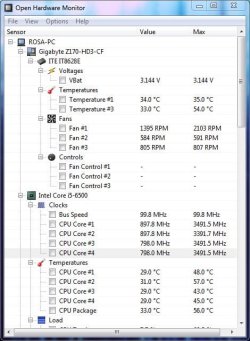
I use Open hardware monitor. Extract and run. Don't need to be installed. Under options you may set to run on start up.
410640d1578336605-choosing-right-ram-stick-my-laptop-hard_mon.jpg
 

My Computers My Computers

System One System Two

  • Computer type
    PC/Desktop
    Computer Manufacturer/Model Number
    custom build
    OS
    Windows 7 HP 64
    CPU
    i5 6600K - 800MHz to 4200MHz
    Motherboard
    GA-Z170-HD3P
    Memory
    4+4G GSkill DDR4 3000
    Graphics Card(s)
    IG - Intel 530
    Monitor(s) Displays
    Samsung 226BW
    Screen Resolution
    1680x1050
    Hard Drives
    (1) -1 SM951 – 128GB M.2 AHCI PCIe SSD drive for Windows 7 and Lubuntu
    (2) -1 WD SATA 3 - 1T for Data
    (3) -1 WD SATA 3 - 1T for backup
    PSU
    Thermaltake 450W TR2 gold
    Keyboard
    Old and good Chicony mechanical keyboard
    Mouse
    Logitech mX performance - 9 buttons (had to disable some)
    Internet Speed
    500Mb/s
    Browser
    Firefox 64
    Other Info
    TinyWall firewall
  • Computer type
    Laptop
    System Manufacturer/Model Number
    Asus Q550LF
    OS
    Windows 7 Pro
    CPU
    i7-4500U 800MHz to 3.0GHz
    Motherboard
    Asus Q550LF
    Memory
    (4+4)G DDR3 1600
    Graphics Card(s)
    IG intel 4400 + NVIDIA GeForce GT 745M
    Sound Card
    Realtek
    Monitor(s) Displays
    LG Display LP156WF4-SPH1
    Screen Resolution
    1920 x 1080
    Hard Drives
    BX500 120G SSD for Windows and programs +
    1T HDD for data
    Internet Speed
    500 Mb/s
    Browser
    Firefox
    Other Info
    TinyWall firewall
chkdsk results show no bad files. There was no output on bad sectors because you said to run /f. If you want, I can re-run with /r.

sfc /scannow found no issues.

I downloaded and installed Open Hardware Monitor. I don't know what to look for here to see if there's any problem, other than keeping a graph of CPU usage up. I've attached a partial screenshot showing the temperatures. This is shortly after boot, before any games have been run.

In the past couple of days, I've noticed lag on another game, one I hadn't had problems with before. I was able to switch away and see on the Task Manager that the CPU was 100% going to that one process. But this isn't the only game having lag, and it's never been a problem until recently. So I don't know why it would suddenly have CPU usage spikes like this.

Thanks for your help.
 

Attachments

  • Capture.JPG
    Capture.JPG
    57.8 KB · Views: 13
Last edited:

My Computer My Computer

Computer Manufacturer/Model Number
CyberPowerPC
OS
Windows 7 Professional x64
CPU
Intel Core i5-760 2.80 GHz
Motherboard
ASUS P7P55 LX
Memory
4GB DDR3/1600MHz Dual-Channel
Graphics Card(s)
NVidia GeForce GTX 470 1.2GB
Sound Card
Creative Labs X-FI XtremeGamer
You can configure Open Hardware monitor to start with Windows and to show CPU package on the try and on the gadget (see mine as an example)
To protect itself, the CPU will low the clock when temperatures are high. Temperatures should never go over 80ºC.
 

My Computers My Computers

System One System Two

  • Computer type
    PC/Desktop
    Computer Manufacturer/Model Number
    custom build
    OS
    Windows 7 HP 64
    CPU
    i5 6600K - 800MHz to 4200MHz
    Motherboard
    GA-Z170-HD3P
    Memory
    4+4G GSkill DDR4 3000
    Graphics Card(s)
    IG - Intel 530
    Monitor(s) Displays
    Samsung 226BW
    Screen Resolution
    1680x1050
    Hard Drives
    (1) -1 SM951 – 128GB M.2 AHCI PCIe SSD drive for Windows 7 and Lubuntu
    (2) -1 WD SATA 3 - 1T for Data
    (3) -1 WD SATA 3 - 1T for backup
    PSU
    Thermaltake 450W TR2 gold
    Keyboard
    Old and good Chicony mechanical keyboard
    Mouse
    Logitech mX performance - 9 buttons (had to disable some)
    Internet Speed
    500Mb/s
    Browser
    Firefox 64
    Other Info
    TinyWall firewall
  • Computer type
    Laptop
    System Manufacturer/Model Number
    Asus Q550LF
    OS
    Windows 7 Pro
    CPU
    i7-4500U 800MHz to 3.0GHz
    Motherboard
    Asus Q550LF
    Memory
    (4+4)G DDR3 1600
    Graphics Card(s)
    IG intel 4400 + NVIDIA GeForce GT 745M
    Sound Card
    Realtek
    Monitor(s) Displays
    LG Display LP156WF4-SPH1
    Screen Resolution
    1920 x 1080
    Hard Drives
    BX500 120G SSD for Windows and programs +
    1T HDD for data
    Internet Speed
    500 Mb/s
    Browser
    Firefox
    Other Info
    TinyWall firewall
Kevinbkt-

Interesting that my Win 7 is also a Dell M6500 Precision, similar to yours. It does have a graphics card (actually it's a chip) which I specified when I bought it. Having the graphics card makes a huge difference in the display quality and the speed of doing things like encoding. I have never figured out whether the CPU (I7-Q820) has graphics cores.

The driving force for PC (desktop) advances are gamers. I think your lag is because your system doesn't meet the minimum requirements for a lot of games. For instance, this-

Star Wars Jedi: Fallen Order™- PC System Requirements - EA Official Site

provides the minimum specs for Jedi Fallen Order. Other sites list 16 GB of RAM as a minimum (It was originally 32 GB).
 

My Computer My Computer

Computer type
Laptop
Computer Manufacturer/Model Number
Dell M6500 Precision Work Station
OS
Windows 7 Pro SP1 64 bit
Memory
8 GB
Screen Resolution
1920x
Internet Speed
30 Mbps
Antivirus
Norton Security
Browser
IE 11
I've observed the clock speed and temperature while running two different games with lag spike issues. In neither game does the temperature ever go over 70C, and it's usually more like 60-65C when they're running. However, I see reduced clock speeds during both games. One game (Jedi Fallen Order) has the clock running at 1/4 speed all of time, even though it's not overheating. The other game has the clock running at full speed, with occasional dips that seem to happen when the lag does.
 

My Computer My Computer

Computer Manufacturer/Model Number
CyberPowerPC
OS
Windows 7 Professional x64
CPU
Intel Core i5-760 2.80 GHz
Motherboard
ASUS P7P55 LX
Memory
4GB DDR3/1600MHz Dual-Channel
Graphics Card(s)
NVidia GeForce GTX 470 1.2GB
Sound Card
Creative Labs X-FI XtremeGamer
Kevinbkt-

Interesting that my Win 7 is also a Dell M6500 Precision, similar to yours. It does have a graphics card (actually it's a chip) which I specified when I bought it. Having the graphics card makes a huge difference in the display quality and the speed of doing things like encoding. I have never figured out whether the CPU (I7-Q820) has graphics cores.

The driving force for PC (desktop) advances are gamers. I think your lag is because your system doesn't meet the minimum requirements for a lot of games. For instance, this-

Star Wars Jedi: Fallen Order™- PC System Requirements - EA Official Site

provides the minimum specs for Jedi Fallen Order. Other sites list 16 GB of RAM as a minimum (It was originally 32 GB).


The gaming machine that I've been posting details about is not a Dell. It's a self build. Of the three computers having issues, the Dell is one i use for work (programming) only, and I don't run games on it. I've chosen to focus on the gaming box for now just to keep things clear.


The PC that's running Jedi Fallen Order exceeds the minimum specs for the game. I've read that many people have had problems with performance in this game, but I'm having trouble with other games as well so I can't just lay responsibility on that one program.
 

My Computer My Computer

Computer Manufacturer/Model Number
CyberPowerPC
OS
Windows 7 Professional x64
CPU
Intel Core i5-760 2.80 GHz
Motherboard
ASUS P7P55 LX
Memory
4GB DDR3/1600MHz Dual-Channel
Graphics Card(s)
NVidia GeForce GTX 470 1.2GB
Sound Card
Creative Labs X-FI XtremeGamer
Where the heck did I get the idea you are running a Dell Precision? It's not a question for you- I'm questioning myself. On the other hand, your system specs are well short of what people say are needed for the best experience.
 

My Computer My Computer

Computer type
Laptop
Computer Manufacturer/Model Number
Dell M6500 Precision Work Station
OS
Windows 7 Pro SP1 64 bit
Memory
8 GB
Screen Resolution
1920x
Internet Speed
30 Mbps
Antivirus
Norton Security
Browser
IE 11
You can configure Open Hardware monitor to start with Windows and to show CPU package on the try and on the gadget (see mine as an example)
To protect itself, the CPU will low the clock when temperatures are high. Temperatures should never go over 80ºC.


Wanted to make sure you saw the results of running Open Hardware Monitor that I posted. It appears that the temperature is not overly high (70C or less), but the clock is still not running full speed all of the time. Three different games are experiencing lag spikes now. Two show occasional dips in the clock speed. The third shows the clock running at about 1/4 speed all of the time.
 

My Computer My Computer

Computer Manufacturer/Model Number
CyberPowerPC
OS
Windows 7 Professional x64
CPU
Intel Core i5-760 2.80 GHz
Motherboard
ASUS P7P55 LX
Memory
4GB DDR3/1600MHz Dual-Channel
Graphics Card(s)
NVidia GeForce GTX 470 1.2GB
Sound Card
Creative Labs X-FI XtremeGamer
To save power and generate less heat, CPU clock can be lowered when not required.
You can create a Power plan Control Panel\All Control Panel Items\Power Options\Create a Power Plan and set for games.
Under Control Panel\All Control Panel Items\Power Options\Edit Plan Settings - Change advanced settings - Processor Power management you can set the max and min (%) for the CPU clock.
 

My Computers My Computers

System One System Two

  • Computer type
    PC/Desktop
    Computer Manufacturer/Model Number
    custom build
    OS
    Windows 7 HP 64
    CPU
    i5 6600K - 800MHz to 4200MHz
    Motherboard
    GA-Z170-HD3P
    Memory
    4+4G GSkill DDR4 3000
    Graphics Card(s)
    IG - Intel 530
    Monitor(s) Displays
    Samsung 226BW
    Screen Resolution
    1680x1050
    Hard Drives
    (1) -1 SM951 – 128GB M.2 AHCI PCIe SSD drive for Windows 7 and Lubuntu
    (2) -1 WD SATA 3 - 1T for Data
    (3) -1 WD SATA 3 - 1T for backup
    PSU
    Thermaltake 450W TR2 gold
    Keyboard
    Old and good Chicony mechanical keyboard
    Mouse
    Logitech mX performance - 9 buttons (had to disable some)
    Internet Speed
    500Mb/s
    Browser
    Firefox 64
    Other Info
    TinyWall firewall
  • Computer type
    Laptop
    System Manufacturer/Model Number
    Asus Q550LF
    OS
    Windows 7 Pro
    CPU
    i7-4500U 800MHz to 3.0GHz
    Motherboard
    Asus Q550LF
    Memory
    (4+4)G DDR3 1600
    Graphics Card(s)
    IG intel 4400 + NVIDIA GeForce GT 745M
    Sound Card
    Realtek
    Monitor(s) Displays
    LG Display LP156WF4-SPH1
    Screen Resolution
    1920 x 1080
    Hard Drives
    BX500 120G SSD for Windows and programs +
    1T HDD for data
    Internet Speed
    500 Mb/s
    Browser
    Firefox
    Other Info
    TinyWall firewall
Performance issues still persist with several games. Hoping someone will be willing to help me out with this.
 

My Computer My Computer

Computer Manufacturer/Model Number
CyberPowerPC
OS
Windows 7 Professional x64
CPU
Intel Core i5-760 2.80 GHz
Motherboard
ASUS P7P55 LX
Memory
4GB DDR3/1600MHz Dual-Channel
Graphics Card(s)
NVidia GeForce GTX 470 1.2GB
Sound Card
Creative Labs X-FI XtremeGamer
Two possible issues here I forsee right away and it looks like your screenshot there confirms it.

1) Your CPU temperatures are in fact way too high. According to that screenshot, at max of what ever it was you were running. The temp was a massive 134 degrees Fahrenheit. If I read what you said right, you said the CPU speed idles down or just doesn't boost like it should. If that's the case, this could be a thermal limiter in the CPU its self if it's too hot. I'm not sure if that's true, but may be.

2) Your GPU could be running too hot or it's simply going the way of the dodo bird.

This would work better with a dual monitor setup, but what you can do is run Core Temp as you play a game and note the max temps you see by minimizing the game and looking at Core Temp right away. Core Temp

For the GPU, use GPUz and click the Sensors tab to note its temp. GPU-Z Graphics Card GPU Information Utility
 

My Computer My Computer

Computer type
PC/Desktop
OS
Windows 7 Ultimate x64
Kevinbkt-
I have never figured out whether the CPU (I7-Q820) has graphics cores.


For Intel CPU information, you want to go to the ark.intel.com website and look at the CPU features. In your case linked here there is no on board GPU.

If you look at the i5 6600k desktop CPU, you can see it does in fact have an on board GPU and lists the specifics. Intel(R) Core™ i5-6600K Processor (6M Cache, up to 3.90 GHz) Product Specifications

So if you're ever in the market to buy a new computer or in fact build one, now you have a definitive source of information right from the horse's mouth.

Depending on what you use your computer for will largely dictate whether you can just settle for the on board GPU or simply buy a dedicated GPU. If you just browse the Internet and do small home and office Apping, then of course the on board GPU built into the CPU will suffice. If of course you want to game, then a dedicated GPU will most likely be needed. But this may not be the case. If you're playing old school years old games, then modern on board GPUs in the CPU would probably suffice, even if you have to use medium settings. Such may be the case of an emulator. Though, depending on the emulator's code, there could be issues with certain on board GPUs.

By in large, depending on the game you want to play, you'd want to Google the game's system requirements. With a lot of your modern games now you'll need a dedicated GPU and one that meets or exceeds the game's requirements. You'd also need a PSU capable of powering it as well if you already don't have one capable enough. As well has the extra power connectors from the PSU that may be needed.

Now if you want to help off load the computing cycles from your CPU, you could of course buy a small GPU to do that. Just make sure the on board GPU is turned off in BIOS/UEFI after you install the dedicated GPU. I guess some motherboards are smart enough to turn that off already if it detects an on board GPU. Never the less, just make sure the on board GPU is off. If not, it could pose issues.
 
Last edited:

My Computer My Computer

Computer type
PC/Desktop
OS
Windows 7 Ultimate x64
Don't mean to butt in here but that 134 degrees F is only 57 degrees C. Not unheard of for a CPU.
 

My Computer My Computer

Computer type
Laptop
Computer Manufacturer/Model Number
Dell M6500 Precision Work Station
OS
Windows 7 Pro SP1 64 bit
Memory
8 GB
Screen Resolution
1920x
Internet Speed
30 Mbps
Antivirus
Norton Security
Browser
IE 11
Back
Top