Sidewinder X4 Macro to press and hold Alt

Fincher

New member
Local time
7:26 PM
Messages
2
Hello everybody,
Is it possible to macro the Sidewinder X4 keyboard to keep the Alt Button pressed?
Normal buttons you just press and hold to make them do so in the Macro but alt is a "special button".

€dit found. Thanks all.
 
Last edited:

My Computer My Computer

At a glance

Windows 7 64
Computer type
PC/Desktop
OS
Windows 7 64
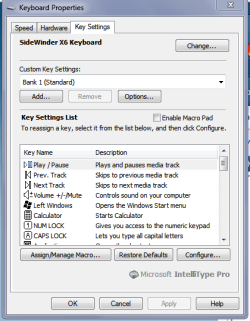
Hello and welcome Fincher mate I have the x6 Sidewinder by Microsoft and I have the software for it installed so that I can go in and change whatever I feel like. Just make sure you poick the right bit version for Windows:)

See this if you haven't Software Downloads: SideWinder X4 Keyboard

In my pic that can be opened via Programs in Start

PS meant to add see the assignment for macros.
 

Attachments

  • x6.PNG
    x6.PNG
    17.6 KB · Views: 11

My Computer My Computer

At a glance

Desk1 7 Home Prem / Desk2 10 Pro / Main lap A...Desk1 i5 3750K / Laptop i7 GTX 860M / Desk2 i...Desk1 8GB (1866) / Desk2 16GB (1333) / Laptop...Desk 1& 2NVidia GTX 650 & Laptops on board Intel
Computer type
PC/Desktop
Computer Manufacturer/Model Number
Own build (new) Desk1 / Asus ROG Win 7 / Desk2 1st build
OS
Desk1 7 Home Prem / Desk2 10 Pro / Main lap Asus ROG 10 Pro 2 laptop Toshiba 7 Pro Asus P2520 7 & 10
CPU
Desk1 i5 3750K / Laptop i7 GTX 860M / Desk2 i5 2500
Motherboard
Desk1 Asus P877-V / Desk2 Gigabyte H67 UD3H / Laptop ?
Memory
Desk1 8GB (1866) / Desk2 16GB (1333) / Laptop 8Gb DDR3
Graphics Card(s)
Desk 1& 2NVidia GTX 650 & Laptops on board Intel
Sound Card
Desk 1 & 2 -XONAR DG Realtek High Def audio Laptop
Monitor(s) Displays
Desk 1 Benq HD 2450 / Desk2 Philips 24" / Laptop 17.5"
Screen Resolution
1920x1080 D1 & D2 & Laptop 1
Hard Drives
Desk1 Samsung 120GB 830 SSD
Asus ROG 256GB 850 Pro SSD
Desk2 Samsung 840 256 SSD
Toshiba 120GB EVO
PSU
Desk 1 Corsair HX 1050/ Laptop ? / Desk 2 Corsair HX 650
Case
Desk 1 Cooler HAF XM ? Toshiba laptop / Desk2 Coolermaster
Cooling
Fans on all Desk1 -2 Desk2 - all Coolermasters 5 Laptop ?
Keyboard
Desk 1 MS Sidewinder X6 Desk 2 MS Sidewinder X 4
Mouse
Desk 1&2 - Gigabyte MS 900 gamer - laptop - Logitec wireless
Internet Speed
ADSL2+
Other Info
One other Desktop (tester) and spare Toshba laptop both with SSD's
Running Kaspersky 2016 ISS on all machines config'd identically
Logitec audio stereo systems on each machine (x3)
Canon MG5250MFC
Router/modem TP-Link running WPA2SK
Thanks for response, ICit2lol.
I had the program of your screenshot before but some years ago it got updated to Microsoft Mouse and Keyboard Center. Macros look like this now. It is German but you should get the idea from the red marked area. Press and hold one key, then press another key, and release the first keyafterwards.
Usually you create the a macro by pressing and holding the respective key but this does not work with Alt. Alt is a "special button" and I would like how it is possible to press and hold those in a macro.

dl6pbz6t.png


€dit found: Had to rightclick and "split" the Alt key.
 

My Computer My Computer

At a glance

Windows 7 64
Computer type
PC/Desktop
OS
Windows 7 64
Hum you got me there my friend as my control centre is still in he old format - not that I use it much to be honest as I have never found the need.

I can only suggest that you reinstall the software again as I find updates are a pain and cause more problems than they are worth. I know that is what I did with my x6 SideWinder and it is fine now.

It is a pity one cannot find the x6 anymore as I had the chance to buy two when I bought the one I had but then they in their wisdom discontinued it and I had to put the x4 on my Sandy Bridge build.
The difference between the two I like is the x6 has flatter keys instead of those awful cup topped keys most have and I just don't like them. It also has or seems to have far more functions and a NUM pad that can be swapped left / right, and is beautifully backlit.
 

My Computer My Computer

At a glance

Desk1 7 Home Prem / Desk2 10 Pro / Main lap A...Desk1 i5 3750K / Laptop i7 GTX 860M / Desk2 i...Desk1 8GB (1866) / Desk2 16GB (1333) / Laptop...Desk 1& 2NVidia GTX 650 & Laptops on board Intel
Computer type
PC/Desktop
Computer Manufacturer/Model Number
Own build (new) Desk1 / Asus ROG Win 7 / Desk2 1st build
OS
Desk1 7 Home Prem / Desk2 10 Pro / Main lap Asus ROG 10 Pro 2 laptop Toshiba 7 Pro Asus P2520 7 & 10
CPU
Desk1 i5 3750K / Laptop i7 GTX 860M / Desk2 i5 2500
Motherboard
Desk1 Asus P877-V / Desk2 Gigabyte H67 UD3H / Laptop ?
Memory
Desk1 8GB (1866) / Desk2 16GB (1333) / Laptop 8Gb DDR3
Graphics Card(s)
Desk 1& 2NVidia GTX 650 & Laptops on board Intel
Sound Card
Desk 1 & 2 -XONAR DG Realtek High Def audio Laptop
Monitor(s) Displays
Desk 1 Benq HD 2450 / Desk2 Philips 24" / Laptop 17.5"
Screen Resolution
1920x1080 D1 & D2 & Laptop 1
Hard Drives
Desk1 Samsung 120GB 830 SSD
Asus ROG 256GB 850 Pro SSD
Desk2 Samsung 840 256 SSD
Toshiba 120GB EVO
PSU
Desk 1 Corsair HX 1050/ Laptop ? / Desk 2 Corsair HX 650
Case
Desk 1 Cooler HAF XM ? Toshiba laptop / Desk2 Coolermaster
Cooling
Fans on all Desk1 -2 Desk2 - all Coolermasters 5 Laptop ?
Keyboard
Desk 1 MS Sidewinder X6 Desk 2 MS Sidewinder X 4
Mouse
Desk 1&2 - Gigabyte MS 900 gamer - laptop - Logitec wireless
Internet Speed
ADSL2+
Other Info
One other Desktop (tester) and spare Toshba laptop both with SSD's
Running Kaspersky 2016 ISS on all machines config'd identically
Logitec audio stereo systems on each machine (x3)
Canon MG5250MFC
Router/modem TP-Link running WPA2SK
This question has been asked quite a time ago, but seems like the issue hasn't been resolved. I'm running the MS Mouse and Keyboard Center on W8.1 64bit and I have the same problem. I googled and didn't find any solution, however I found a workaround:
On the overview where your macros are listed and for every macro, there are 4 icons on the right hand side (edit, copy, folder, delete). Click on the folder and it will show you the folder where the macros are stored. The macros are stored in XML format, simple enough to understand for most of us.
Lets tackle this with an example: assume you want to have a macro that does: Alt+Shift+F (automatic code formating in Netbeans). Using the MS Mouse and Keyboard Center, you will be facing the issue that you can't make the software understand that you want to hold the Alt-key like the Shift-key. But you will do as follows to get your desired macro:
1) Chose Alt from the special key listing below the editor, it will display Alt (10ms).
2) holt Shift and type F. Resulting in this sequence: Alt (10ms) (10ms) Shift(hold) (10ms) F(10ms) (10ms) Shift(release)
3) go back to the macros overview list and click on the folder icon to the right of your macro you just created (hope you gave it a meaningful name)
4) open the file with a text editor like notepad, not word alike (word processors will probably mess with the formatting and break your file). You will see:

<?xml version="1.0" encoding="UTF-8"?><Macro>
<KeyBoardEvent Down="true">56</KeyBoardEvent>
<DelayEvent>10</DelayEvent>
<KeyBoardEvent Down="false">56</KeyBoardEvent>

<DelayEvent>10</DelayEvent>
<KeyBoardEvent Down="true">42</KeyBoardEvent>
<DelayEvent>10</DelayEvent>
<KeyBoardEvent Down="true">33</KeyBoardEvent>
<DelayEvent>10</DelayEvent>
<KeyBoardEvent Down="false">33</KeyBoardEvent>
<DelayEvent>10</DelayEvent>
<KeyBoardEvent Down="false">42</KeyBoardEvent>
</Macro>​

5) now you cut out the 3rd and 4th line:
<DelayEvent>10</DelayEvent>
<KeyBoardEvent Down="false">56</KeyBoardEvent>​
and paste it before the </Macro> closing tag. Resulting in this XML listing:

<?xml version="1.0" encoding="UTF-8"?><Macro>
<KeyBoardEvent Down="true">56</KeyBoardEvent>
<DelayEvent>10</DelayEvent>
<KeyBoardEvent Down="true">42</KeyBoardEvent>
<DelayEvent>10</DelayEvent>
<KeyBoardEvent Down="true">33</KeyBoardEvent>
<DelayEvent>10</DelayEvent>
<KeyBoardEvent Down="false">33</KeyBoardEvent>
<DelayEvent>10</DelayEvent>
<KeyBoardEvent Down="false">42</KeyBoardEvent>
<DelayEvent>10</DelayEvent>
<KeyBoardEvent Down="false">56</KeyBoardEvent>

</Macro>
6) save the edited content to the original file. Close the MK Center or click on another existing makro and go right back to the overview. This will reload the macros from file.
7) on the overview click edit to see the makro we just changed: We see the Alt-key is now pressed and released at the end of the macro. The graphical macro representation is correct.
8) go to Netbeans, or whatever software you create that macro for and try it out, it should work. With a bit of common sense, you should be able to adapt my example to your scenario and your macro.

I hope I could help someone with the same issue. Now you kids go and play your games with your fancy macros, I have to get back to coding ;).
 

My Computer My Computer

At a glance

W8.1 64bit
Computer type
PC/Desktop
OS
W8.1 64bit
Thanks for the heads up NP will keep this in mind though I am now using other KB's and mice because the MS stuff is fraught (it seems to me) with bugs.
 

My Computer My Computer

At a glance

Desk1 7 Home Prem / Desk2 10 Pro / Main lap A...Desk1 i5 3750K / Laptop i7 GTX 860M / Desk2 i...Desk1 8GB (1866) / Desk2 16GB (1333) / Laptop...Desk 1& 2NVidia GTX 650 & Laptops on board Intel
Computer type
PC/Desktop
Computer Manufacturer/Model Number
Own build (new) Desk1 / Asus ROG Win 7 / Desk2 1st build
OS
Desk1 7 Home Prem / Desk2 10 Pro / Main lap Asus ROG 10 Pro 2 laptop Toshiba 7 Pro Asus P2520 7 & 10
CPU
Desk1 i5 3750K / Laptop i7 GTX 860M / Desk2 i5 2500
Motherboard
Desk1 Asus P877-V / Desk2 Gigabyte H67 UD3H / Laptop ?
Memory
Desk1 8GB (1866) / Desk2 16GB (1333) / Laptop 8Gb DDR3
Graphics Card(s)
Desk 1& 2NVidia GTX 650 & Laptops on board Intel
Sound Card
Desk 1 & 2 -XONAR DG Realtek High Def audio Laptop
Monitor(s) Displays
Desk 1 Benq HD 2450 / Desk2 Philips 24" / Laptop 17.5"
Screen Resolution
1920x1080 D1 & D2 & Laptop 1
Hard Drives
Desk1 Samsung 120GB 830 SSD
Asus ROG 256GB 850 Pro SSD
Desk2 Samsung 840 256 SSD
Toshiba 120GB EVO
PSU
Desk 1 Corsair HX 1050/ Laptop ? / Desk 2 Corsair HX 650
Case
Desk 1 Cooler HAF XM ? Toshiba laptop / Desk2 Coolermaster
Cooling
Fans on all Desk1 -2 Desk2 - all Coolermasters 5 Laptop ?
Keyboard
Desk 1 MS Sidewinder X6 Desk 2 MS Sidewinder X 4
Mouse
Desk 1&2 - Gigabyte MS 900 gamer - laptop - Logitec wireless
Internet Speed
ADSL2+
Other Info
One other Desktop (tester) and spare Toshba laptop both with SSD's
Running Kaspersky 2016 ISS on all machines config'd identically
Logitec audio stereo systems on each machine (x3)
Canon MG5250MFC
Router/modem TP-Link running WPA2SK
Back
Top