Before posting this, I searched on what I thought was relevant keywords & found nothing relevant in the way of answers among the 129 results I got. So I hope this isn't a duplicate or something that will end up being answered with a response like, "Oh, go look at this Tutorial at http://whatever." I hate when that happens.
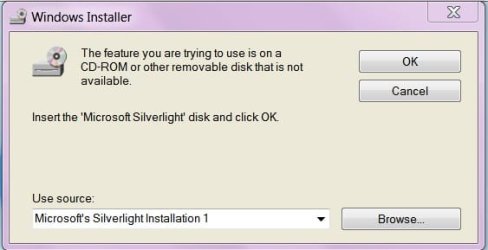
So Firefox pushed out version 20.0.1 a few hours ago. I decided to get Firefox to check my Add-ons for updates to my existing plugins. One that was flagged was Silverlight. So I downloaded it & started to execute it. It started bopping along & it came to a screen demanding a Silverlight disc. A disc? Are you serious? Silverlight has its own disc? When did that happen? Of course, I've never heard of such a thing so I had to just cancel the install.
Well, I suppose Silverlight is a rather low-priority plugin & I can probably live with the "faulty" one I've got now. Or live without the feature entirely. But I'd sure like to know where such a disc can be procured. For free, of course. Failing that, how can I trick the install into finding what it needs already on my hard drive? Like just about every other bit of maintenance I've ever done.
I vacillated between posting this in this Forum & in the Browser Forum. I hope I made the right choice.
So Firefox pushed out version 20.0.1 a few hours ago. I decided to get Firefox to check my Add-ons for updates to my existing plugins. One that was flagged was Silverlight. So I downloaded it & started to execute it. It started bopping along & it came to a screen demanding a Silverlight disc. A disc? Are you serious? Silverlight has its own disc? When did that happen? Of course, I've never heard of such a thing so I had to just cancel the install.
Well, I suppose Silverlight is a rather low-priority plugin & I can probably live with the "faulty" one I've got now. Or live without the feature entirely. But I'd sure like to know where such a disc can be procured. For free, of course. Failing that, how can I trick the install into finding what it needs already on my hard drive? Like just about every other bit of maintenance I've ever done.
I vacillated between posting this in this Forum & in the Browser Forum. I hope I made the right choice.
My Computer
At a glance
Windows 7 Professional 64-bitIntel Core i7-4790K Quad CPU @ 4.00 GHz2x4G DDR3 1600MHz DIMMsIntel HD Graphics 4600 on mobo; NVidia GeForc...
- Computer type
- PC/Desktop
- Computer Manufacturer/Model Number
- ASUS (assembled myself)
- OS
- Windows 7 Professional 64-bit
- CPU
- Intel Core i7-4790K Quad CPU @ 4.00 GHz
- Motherboard
- ASUS Z97-AR, Intel Z97 Express chipset, ATX form factor
- Memory
- 2x4G DDR3 1600MHz DIMMs
- Graphics Card(s)
- Intel HD Graphics 4600 on mobo; NVidia GeForce GT 710 PCI-E
- Sound Card
- Realtek High Definition Audio, integrated on mobo
- Monitor(s) Displays
- Dell SE2417HGX, 20.5"x11.5" viewable area; 32" Toshiba HDTV
- Screen Resolution
- 1920 x 1080 @ 60 Hz, 32-bit color depth
- Hard Drives
- Western Digital 500G SATA
Seagate 150G SATA
2 x Seagate 6T SATA
2 x Seagate 18T SATA
- PSU
- EVGA 500B (500 Watts)
- Case
- NZXT H230 mid-tower
- Cooling
- CPU fan, PSU fan, 2 case fans, NVidia fan
- Keyboard
- Perixx 513H
- Mouse
- Touch pad integrated into keyboard
- Internet Speed
- Intel Ethernet Conn(2)I218-V, on mobo, ISP=cableTV 400Mbps
- Antivirus
- Comodo
- Browser
- Firefox
- Other Info
- Ext'l DVD rec: LG HL-DT-ST DVDRAM GP10NB20 USB
Monitor conn to VideoPort via HDMI-to-VideoPort adap
Realtek ALC892 8-channel High Definition Audio CODEC featuring Crystal Sound 2
Audio conn to surr recv via 25' optical S/PDIF TOSLINK audio cable
SYSINFO: 11 NIC ports but only 1 actively conn via DHCP to ISP
ISP bundled w/ cable TV+cell, claims 400Mbps,
but really 50 million bytes/sec