
Silverlight 5.1.20125.0 plugin for Firefox needs a disc?

WildWilly

New member
Power User
Local time
2:44 AM
Messages
96
Location
Cincinnati
Before posting this, I searched on what I thought was relevant keywords & found nothing relevant in the way of answers among the 129 results I got. So I hope this isn't a duplicate or something that will end up being answered with a response like, "Oh, go look at this Tutorial at http://whatever." I hate when that happens.

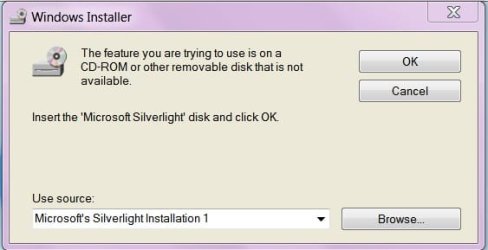
So Firefox pushed out version 20.0.1 a few hours ago. I decided to get Firefox to check my Add-ons for updates to my existing plugins. One that was flagged was Silverlight. So I downloaded it & started to execute it. It started bopping along & it came to a screen demanding a Silverlight disc. A disc? Are you serious? Silverlight has its own disc? When did that happen? Of course, I've never heard of such a thing so I had to just cancel the install.

Well, I suppose Silverlight is a rather low-priority plugin & I can probably live with the "faulty" one I've got now. Or live without the feature entirely. But I'd sure like to know where such a disc can be procured. For free, of course. Failing that, how can I trick the install into finding what it needs already on my hard drive? Like just about every other bit of maintenance I've ever done.

I vacillated between posting this in this Forum & in the Browser Forum. I hope I made the right choice.
 

My Computer My Computer

At a glance

Windows 7 Professional 64-bitIntel Core i7-4790K Quad CPU @ 4.00 GHz2x4G DDR3 1600MHz DIMMsIntel HD Graphics 4600 on mobo; NVidia GeForc...
Computer type
PC/Desktop
Computer Manufacturer/Model Number
ASUS (assembled myself)
OS
Windows 7 Professional 64-bit
CPU
Intel Core i7-4790K Quad CPU @ 4.00 GHz
Motherboard
ASUS Z97-AR, Intel Z97 Express chipset, ATX form factor
Memory
2x4G DDR3 1600MHz DIMMs
Graphics Card(s)
Intel HD Graphics 4600 on mobo; NVidia GeForce GT 710 PCI-E
Sound Card
Realtek High Definition Audio, integrated on mobo
Monitor(s) Displays
Dell SE2417HGX, 20.5"x11.5" viewable area; 32" Toshiba HDTV
Screen Resolution
1920 x 1080 @ 60 Hz, 32-bit color depth
Hard Drives
Western Digital 500G SATA
Seagate 150G SATA
2 x Seagate 6T SATA
2 x Seagate 18T SATA
PSU
EVGA 500B (500 Watts)
Case
NZXT H230 mid-tower
Cooling
CPU fan, PSU fan, 2 case fans, NVidia fan
Keyboard
Perixx 513H
Mouse
Touch pad integrated into keyboard
Internet Speed
Intel Ethernet Conn(2)I218-V, on mobo, ISP=cableTV 400Mbps
Antivirus
Comodo
Browser
Firefox
Other Info
Ext'l DVD rec: LG HL-DT-ST DVDRAM GP10NB20 USB
Monitor conn to VideoPort via HDMI-to-VideoPort adap
Realtek ALC892 8-channel High Definition Audio CODEC featuring Crystal Sound 2
Audio conn to surr recv via 25' optical S/PDIF TOSLINK audio cable
SYSINFO: 11 NIC ports but only 1 actively conn via DHCP to ISP
ISP bundled w/ cable TV+cell, claims 400Mbps,
but really 50 million bytes/sec
Thanks for responding, Robo.

I tried the link you posted. It looks the same as the one I got going through Firefox's own process for checking for updated plugins. I downloaded the .exe offered there. I think it was the same one as I grabbed the other day but I got it again anyway.

Same problem. I closed all my browser windows then executed the .exe I just downloaded. It shows me a screen saying the feature I want is on a CD-ROM or some other removable device. It does offer a Browse button for selecting something off my hard drive but I don't have the faintest idea what to choose.

Any more ideas out there?
 

My Computer My Computer

At a glance

Windows 7 Professional 64-bitIntel Core i7-4790K Quad CPU @ 4.00 GHz2x4G DDR3 1600MHz DIMMsIntel HD Graphics 4600 on mobo; NVidia GeForc...
Computer type
PC/Desktop
Computer Manufacturer/Model Number
ASUS (assembled myself)
OS
Windows 7 Professional 64-bit
CPU
Intel Core i7-4790K Quad CPU @ 4.00 GHz
Motherboard
ASUS Z97-AR, Intel Z97 Express chipset, ATX form factor
Memory
2x4G DDR3 1600MHz DIMMs
Graphics Card(s)
Intel HD Graphics 4600 on mobo; NVidia GeForce GT 710 PCI-E
Sound Card
Realtek High Definition Audio, integrated on mobo
Monitor(s) Displays
Dell SE2417HGX, 20.5"x11.5" viewable area; 32" Toshiba HDTV
Screen Resolution
1920 x 1080 @ 60 Hz, 32-bit color depth
Hard Drives
Western Digital 500G SATA
Seagate 150G SATA
2 x Seagate 6T SATA
2 x Seagate 18T SATA
PSU
EVGA 500B (500 Watts)
Case
NZXT H230 mid-tower
Cooling
CPU fan, PSU fan, 2 case fans, NVidia fan
Keyboard
Perixx 513H
Mouse
Touch pad integrated into keyboard
Internet Speed
Intel Ethernet Conn(2)I218-V, on mobo, ISP=cableTV 400Mbps
Antivirus
Comodo
Browser
Firefox
Other Info
Ext'l DVD rec: LG HL-DT-ST DVDRAM GP10NB20 USB
Monitor conn to VideoPort via HDMI-to-VideoPort adap
Realtek ALC892 8-channel High Definition Audio CODEC featuring Crystal Sound 2
Audio conn to surr recv via 25' optical S/PDIF TOSLINK audio cable
SYSINFO: 11 NIC ports but only 1 actively conn via DHCP to ISP
ISP bundled w/ cable TV+cell, claims 400Mbps,
but really 50 million bytes/sec
Hi again. :)

I understood your situation. You certainly have some Windows component missing, I suppose. Can you post a screenshot of the dialog box that demands the disc please?

Press Win+R, type "sfc /scannow" and hit Enter. This should put back any missing component and do provide the Windows DVD if demanded during this process.

Report back. :)
 

My Computer My Computer

At a glance

Windows 7 Home Premium x64
Computer type
PC/Desktop
OS
Windows 7 Home Premium x64
Hey Robo. Thanks for keeping an eye on this.

I ran sfc /verifyonly because there's something . . . I think it's the Start Menu icon . . . that I modified that makes some sort of allegedly corrupting update to EXPLORER.EXE that sfc would reverse if I let it. So I ran /verifyonly and then

findstr /c:"[SR]" blah blah blah

The ONLY thing it flagged was EXPLORER.EXE, which means there is nothing missing on my system.

Unfortunately, I do not have a Windows 7 Install CD handy. I may have to rustle one of those up. Meanwhile, I still contend that this process should not require either that CD or any other. I don't recall needing a CD to install Silverlight the first time.
 

Attachments

  • CDPrompt.jpg
    CDPrompt.jpg
    18.8 KB · Views: 5
Last edited:

My Computer My Computer

At a glance

Windows 7 Professional 64-bitIntel Core i7-4790K Quad CPU @ 4.00 GHz2x4G DDR3 1600MHz DIMMsIntel HD Graphics 4600 on mobo; NVidia GeForc...
Computer type
PC/Desktop
Computer Manufacturer/Model Number
ASUS (assembled myself)
OS
Windows 7 Professional 64-bit
CPU
Intel Core i7-4790K Quad CPU @ 4.00 GHz
Motherboard
ASUS Z97-AR, Intel Z97 Express chipset, ATX form factor
Memory
2x4G DDR3 1600MHz DIMMs
Graphics Card(s)
Intel HD Graphics 4600 on mobo; NVidia GeForce GT 710 PCI-E
Sound Card
Realtek High Definition Audio, integrated on mobo
Monitor(s) Displays
Dell SE2417HGX, 20.5"x11.5" viewable area; 32" Toshiba HDTV
Screen Resolution
1920 x 1080 @ 60 Hz, 32-bit color depth
Hard Drives
Western Digital 500G SATA
Seagate 150G SATA
2 x Seagate 6T SATA
2 x Seagate 18T SATA
PSU
EVGA 500B (500 Watts)
Case
NZXT H230 mid-tower
Cooling
CPU fan, PSU fan, 2 case fans, NVidia fan
Keyboard
Perixx 513H
Mouse
Touch pad integrated into keyboard
Internet Speed
Intel Ethernet Conn(2)I218-V, on mobo, ISP=cableTV 400Mbps
Antivirus
Comodo
Browser
Firefox
Other Info
Ext'l DVD rec: LG HL-DT-ST DVDRAM GP10NB20 USB
Monitor conn to VideoPort via HDMI-to-VideoPort adap
Realtek ALC892 8-channel High Definition Audio CODEC featuring Crystal Sound 2
Audio conn to surr recv via 25' optical S/PDIF TOSLINK audio cable
SYSINFO: 11 NIC ports but only 1 actively conn via DHCP to ISP
ISP bundled w/ cable TV+cell, claims 400Mbps,
but really 50 million bytes/sec
Hmmm...That's strange!

Found a possible fix:

  • Open Windows Registry Editor.
  • Browse for
    Code:
    HKEY_CLASSES_ROOT/installer/products/D7314F9862C648A4DB8BE2A5B47BE100
  • Right click on it and click to ‘Export’ to save a copy of that key to your hard drive.
  • Now right click on that key and select ‘Delete’.

Note: If you do not find it at that location, click on "Computer" at the top of left pane, then press Ctrl+F and enter "D7314F9862C648A4DB8BE2A5B47BE100", search for it and delete all its instances.

   Warning
Backup your registry before doing any change


Try running the installer again.

Source
 

My Computer My Computer

At a glance

Windows 7 Home Premium x64
Computer type
PC/Desktop
OS
Windows 7 Home Premium x64
OK Robo. I am officially now surrendering. I am not messing with this any further. This tail has wagged this dog quite long enough. I hardly ever encounter a use for Silverlight. I thought I would keep it up to date since the new Firefox was flagging it. But I am officially now mentally exhausted by this effort. Silverlight can stay at my current antique release level for eternity or until Microsoft figures out a way to make their update work without my spending countless hours debugging their faulty software for them. I used to be in that biz. I've retired from it. I'm not going back there. It's the been there done that syndrome in play.

But I do appreciate your efforts. Thanks greatly.
 

My Computer My Computer

At a glance

Windows 7 Professional 64-bitIntel Core i7-4790K Quad CPU @ 4.00 GHz2x4G DDR3 1600MHz DIMMsIntel HD Graphics 4600 on mobo; NVidia GeForc...
Computer type
PC/Desktop
Computer Manufacturer/Model Number
ASUS (assembled myself)
OS
Windows 7 Professional 64-bit
CPU
Intel Core i7-4790K Quad CPU @ 4.00 GHz
Motherboard
ASUS Z97-AR, Intel Z97 Express chipset, ATX form factor
Memory
2x4G DDR3 1600MHz DIMMs
Graphics Card(s)
Intel HD Graphics 4600 on mobo; NVidia GeForce GT 710 PCI-E
Sound Card
Realtek High Definition Audio, integrated on mobo
Monitor(s) Displays
Dell SE2417HGX, 20.5"x11.5" viewable area; 32" Toshiba HDTV
Screen Resolution
1920 x 1080 @ 60 Hz, 32-bit color depth
Hard Drives
Western Digital 500G SATA
Seagate 150G SATA
2 x Seagate 6T SATA
2 x Seagate 18T SATA
PSU
EVGA 500B (500 Watts)
Case
NZXT H230 mid-tower
Cooling
CPU fan, PSU fan, 2 case fans, NVidia fan
Keyboard
Perixx 513H
Mouse
Touch pad integrated into keyboard
Internet Speed
Intel Ethernet Conn(2)I218-V, on mobo, ISP=cableTV 400Mbps
Antivirus
Comodo
Browser
Firefox
Other Info
Ext'l DVD rec: LG HL-DT-ST DVDRAM GP10NB20 USB
Monitor conn to VideoPort via HDMI-to-VideoPort adap
Realtek ALC892 8-channel High Definition Audio CODEC featuring Crystal Sound 2
Audio conn to surr recv via 25' optical S/PDIF TOSLINK audio cable
SYSINFO: 11 NIC ports but only 1 actively conn via DHCP to ISP
ISP bundled w/ cable TV+cell, claims 400Mbps,
but really 50 million bytes/sec
OK Robo. I am officially now surrendering. I am not messing with this any further. This tail has wagged this dog quite long enough. I hardly ever encounter a use for Silverlight. I thought I would keep it up to date since the new Firefox was flagging it. But I am officially now mentally exhausted by this effort. Silverlight can stay at my current antique release level for eternity or until Microsoft figures out a way to make their update work without my spending countless hours debugging their faulty software for them. I used to be in that biz. I've retired from it. I'm not going back there. It's the been there done that syndrome in play.

But I do appreciate your efforts. Thanks greatly.

If you are scared to do the above, you may just try to remove only the following key (and please ignore the "Note" that I wrote):

Code:
HKEY_CLASSES_ROOT/installer/products/D7314F9862C648A4DB8BE2A5B47BE100

This won't mess things up. :)
 

My Computer My Computer

At a glance

Windows 7 Home Premium x64
Computer type
PC/Desktop
OS
Windows 7 Home Premium x64
Scared? Oh I've done much scarier things than this. No, I am, as I said, tired of chasing this. It has gone beyond the point of diminishing returns for me. It's like system updates that don't work. If they don't work, I hide them and move on. I just don't care to debug other people's software for them. I thought I'd ask about Silverlight but it turns out it's just another of those errors that shouldn't occur. But it does. Like I said, Microsoft may some day come up with an update that actually works. Some day. Until then, Silverlight will languish unused in my system, as it has languished unused for about as long as I can remember. Or if by some miraculous accident I stumble across some site that uses it, which would be a first in at least 2 years for me, then it can use the old plugin I have or I will just close that web page & move on.

Again, thanks anyway.
 

My Computer My Computer

At a glance

Windows 7 Professional 64-bitIntel Core i7-4790K Quad CPU @ 4.00 GHz2x4G DDR3 1600MHz DIMMsIntel HD Graphics 4600 on mobo; NVidia GeForc...
Computer type
PC/Desktop
Computer Manufacturer/Model Number
ASUS (assembled myself)
OS
Windows 7 Professional 64-bit
CPU
Intel Core i7-4790K Quad CPU @ 4.00 GHz
Motherboard
ASUS Z97-AR, Intel Z97 Express chipset, ATX form factor
Memory
2x4G DDR3 1600MHz DIMMs
Graphics Card(s)
Intel HD Graphics 4600 on mobo; NVidia GeForce GT 710 PCI-E
Sound Card
Realtek High Definition Audio, integrated on mobo
Monitor(s) Displays
Dell SE2417HGX, 20.5"x11.5" viewable area; 32" Toshiba HDTV
Screen Resolution
1920 x 1080 @ 60 Hz, 32-bit color depth
Hard Drives
Western Digital 500G SATA
Seagate 150G SATA
2 x Seagate 6T SATA
2 x Seagate 18T SATA
PSU
EVGA 500B (500 Watts)
Case
NZXT H230 mid-tower
Cooling
CPU fan, PSU fan, 2 case fans, NVidia fan
Keyboard
Perixx 513H
Mouse
Touch pad integrated into keyboard
Internet Speed
Intel Ethernet Conn(2)I218-V, on mobo, ISP=cableTV 400Mbps
Antivirus
Comodo
Browser
Firefox
Other Info
Ext'l DVD rec: LG HL-DT-ST DVDRAM GP10NB20 USB
Monitor conn to VideoPort via HDMI-to-VideoPort adap
Realtek ALC892 8-channel High Definition Audio CODEC featuring Crystal Sound 2
Audio conn to surr recv via 25' optical S/PDIF TOSLINK audio cable
SYSINFO: 11 NIC ports but only 1 actively conn via DHCP to ISP
ISP bundled w/ cable TV+cell, claims 400Mbps,
but really 50 million bytes/sec
Not a problem brother! ;)
 

My Computer My Computer

At a glance

Windows 7 Home Premium x64
Computer type
PC/Desktop
OS
Windows 7 Home Premium x64
Back
Top