Simple issue I don't know how to revert

Messerschmitt

New member
Member
Local time
1:55 AM
Messages
45
Hi guys.

I have a Logitech Internet 350
https://www.amazon.ca/Logitech-Internet-350-Keyboard-Mouse/dp/B000HX1P8G

The upper most left hotkey is opening a player (I never installed a driver for this keyboard, windows 7 always knows what the hot keys do).

Anyway, hitting that key would open winamp (yes I still use that)

Recently I installed VLC to watch movies and connect remotely. However, ever since, that key now opens VLC instead of Winamp to listen to my music.

Question is: Where in Windows 7 can I re-assign the default program for this keyboard to open winamp instead of VLC?

Thank you
 

My Computer My Computer

OS
windows 7
If you reinstall Winamp it will associate music files to Winamp and leave video files associated to VLC. If you "Update" VLC, then you need to use the "Customize" settings and uncheck all the music file associations, to leave them associated to Winamp.
 

My Computer My Computer

Computer type
Laptop
Computer Manufacturer/Model Number
Dell Precision 15 7550 Workstation
OS
Windows 10 22H2 Pro
CPU
Intel(R) Xeon W-10885M
Motherboard
Dell
Memory
2x 32 GB DDR4 ECC memory (128 GB max)
Graphics Card(s)
Intel onboard GPU 1080p - Quadro RTX 5000 Max-Q GPU 4K
Hard Drives
1TB Samsung 9100 Pro main M2 SSD
2x 2TB Samsung 9100 Pro temp storage M2 SSD (6 TB max)
Mouse
Logitech MX-25 Bluetooth
Internet Speed
slow
Antivirus
MS
Browser
Pale Moon 34.x.x - x64 AVX2 build
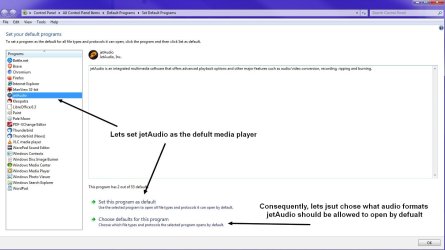
Very easy. The functionality of the key you are using is opening the default media player. Thereby you need to change the default player that this key opens. To do that, go to the Start orb and in search enter: set default programs. Now Look at my screenshot.


rtyjtyy.jpg


(And I'm dyslexic)...


Side note:

Why use a key when you can use your voice? I use this software to command several things. Among them Spotify. But you should create a "wake/trigger" word otherwise it'll burp a lot... So for example. "Alice, play." "Alice, skip." "Alice, pause." "Alice, open Keepass." "Alice, open Bitwarden." And in game. "Alice, commence tea bag." :D


My Computer My Computer

Computer type
PC/Desktop
OS
Windows 7 Ultimate x64
Very easy. The functionality of the key you are using is opening the default media player. Thereby you need to change the default player that this key opens. To do that, go to the Start orb and in search enter: set default programs. Now Look at my screenshot.


View attachment 420988


(And I'm dyslexic)...


Side note:

Why use a key when you can use your voice? I use this software to command several things. Among them Spotify. But you should create a "wake/trigger" word otherwise it'll burp a lot... So for example. "Alice, play." "Alice, skip." "Alice, pause." "Alice, open Keepass." "Alice, open Bitwarden." And in game. "Alice, commence tea bag." :D


Awesome, thanks!
 

My Computer My Computer

OS
windows 7
Back
Top