
simpler sndvol

johnhoh

New member
Guru
VIP
Local time
6:26 AM
Messages
1,363
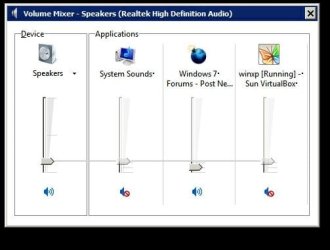
When I click on sndvol.exe I would like to see the Device volume slider and nothing else. That is, I do NOT want the list of 3 applications (in pic) next to it, where you can adjust the volume case by case. I just want to use one master volume. Is it possible to get Win7 to display only the device slider and not the applications?
 

Attachments
  • 000002.jpg
    000002.jpg
    19.6 KB · Views: 61

My Computer

Computer type
PC/Desktop
Computer Manufacturer/Model Number
diy
OS
Win7 pro x64
CPU
stock i7 7700k
Motherboard
Gigabyte Z270N-WIFI mini-ITX
Memory
Corsair Vengeance LPX 16GB (2x8GB) DDR4 @ 3200MHz
Graphics Card(s)
integrated Intel HD 630
Sound Card
onboard Realtek ALC1220
Monitor(s) Displays
two vertically mounted samsung 55" 4k un55mu8000
Screen Resolution
1920x1280
Hard Drives
256GB Samsung EVO 960 M.2 pci-e NVMe SSD
PSU
SilverStone Nightjar ST45NF 450Watt Fanless
Case
No case. Motherboard is mounted directly onto power supply
Cooling
Evercool low profile 815EP with Panaflow 12L fan at 7v
Keyboard
Ortek MCK-86 mini
Mouse
Belkin 5-button USB
Internet Speed
spectrum 400mbps
To each his own, but it is that aspect of control that I like most about W7. I really hate it when listening to one thing to have another blare out or be inaudible, but if you only want one control, then simply use the single control displayed, without clicking the mixer link.
 

My Computer

Computer Manufacturer/Model Number
DIY
OS
W7x64 Pro, SuSe 12.1/** W7 x64 Pro, XP MCE
CPU
Phenom II 1090T w/Noctua NH-D14 /**4400+ X2 w/CM Hyper TX 3
Motherboard
ASRock 890FX Deluxe 4/**A8N-SLI
Memory
2 x 2GB Patriot PGS34g1600LLKA/**4x1GB Corsair VS
Graphics Card(s)
EVGA GTX460 SC/**EVGA 8800GTS
Sound Card
Asus Xonar D2X/**Xonar D1
Monitor(s) Displays
Acer X233H, Dell E152FPc /**LG M237-WD
Screen Resolution
1920x1080 & 1024x768/**1980x1080
Hard Drives
WDC 2TB, 1.5TB, 1TB, 500GB,Seagate 500GB , Maxtor 80GB /**500GB Seagate & WDC 1TB Black
PSU
CM RS600 w/ APC BX1000G/**Antec 500 TP w/ APC BX1000
Case
HAF922/**Antec 1040IIB
Cooling
3x200mm, 1x140 and 1x120mm/**5x80mm fans
Keyboard
Logitech Media USB/**Saitek Eclipse
Mouse
Cordless Trackman Wheel/**Ditto
Internet Speed
3.3Mbps
Other Info
SB 560 5.1 w/ Sennheiser RS140/**Creative T20 speakers, Dvico FusionHDTV7 Gold RT, Cisco E3000, HP 5510V AIO, Linksys E3000, Belkin F5U237 hub and **F5D8055 adapter
(** = 2nd rig)
I know of no way to change that,. it's simply a part of Windows 7.
 

My Computer

Computer Manufacturer/Model Number
Cheap $399.00 E-Machine
OS
Windows 7 Pro & Vista Home Premium
CPU
Athlon 64 3800+ (Orleans) 2.40GHz
Motherboard
Winfast
Memory
2GB DDR2 RAM DIMM
Graphics Card(s)
NVIDIA GeForce 8500 GT 512 MB memory HDMI out
Sound Card
creative X-Fi Exteme 7..1 channel
Monitor(s) Displays
Acer V223W 22" widescreen DVI
Screen Resolution
1680x1050
Hard Drives
WDC WD5 500GB
WDC WD25 250GB
PSU
OCZ 550 watt
Case
Gateway
Cooling
2 fans
Keyboard
Dell
Mouse
Sony Vaio
Internet Speed
18MB/s down - .72MB /s up
To each his own, but it is that aspect of control that I like most about W7. I really hate it when listening to one thing to have another blare out or be inaudible, but if you only want one control, then simply use the single control displayed, without clicking the mixer link.
Thank you, but I do not know what you mean. I assume sndvol.exe is the mixer, but what is the "control displayed". I am looking for a master volume control
 

My Computer

Computer type
PC/Desktop
Computer Manufacturer/Model Number
diy
OS
Win7 pro x64
CPU
stock i7 7700k
Motherboard
Gigabyte Z270N-WIFI mini-ITX
Memory
Corsair Vengeance LPX 16GB (2x8GB) DDR4 @ 3200MHz
Graphics Card(s)
integrated Intel HD 630
Sound Card
onboard Realtek ALC1220
Monitor(s) Displays
two vertically mounted samsung 55" 4k un55mu8000
Screen Resolution
1920x1280
Hard Drives
256GB Samsung EVO 960 M.2 pci-e NVMe SSD
PSU
SilverStone Nightjar ST45NF 450Watt Fanless
Case
No case. Motherboard is mounted directly onto power supply
Cooling
Evercool low profile 815EP with Panaflow 12L fan at 7v
Keyboard
Ortek MCK-86 mini
Mouse
Belkin 5-button USB
Internet Speed
spectrum 400mbps
To each his own, but it is that aspect of control that I like most about W7. I really hate it when listening to one thing to have another blare out or be inaudible, but if you only want one control, then simply use the single control displayed, without clicking the mixer link.
Thank you, but I do not know what you mean. I assume sndvol.exe is the mixer, but what is the "control displayed". I am looking for a master volume control

Johnhoh...

On the taskbar, if I just click the loudspeaker icon, I get exactly what you seem to be after.

You may have to change the option for that icon in the "Show hidden Icons" so it is always displayed, if it isn't displayed by default.

I only get the full display - as you posted in your picture - if I click on "Mixer" at the bottom of the single (or master) volume control display.

:D
 

My Computer

Computer Manufacturer/Model Number
Dell Lattitude E6500
OS
Windows 7 Pro (64bit).
CPU
Intel Core 2 Duo P8700 @ 2.54Ghz
Motherboard
Dell
Memory
8Gb
Graphics Card(s)
Intel/Dell "4 series Express Chipset"
Sound Card
Intel HD Audio
Monitor(s) Displays
Regular Laptop LCD display
Screen Resolution
1280x800
Hard Drives
Seagate ST9250410ASG 250Gb (well it IS a laptop)...
PSU
Dell
Case
Dell
Internet Speed
As much as I can get!!!!!
When I click on sndvol.exe I would like to see the Device volume slider and nothing else. That is, I do NOT want the list of 3 applications (in pic) next to it, where you can adjust the volume case by case. I just want to use one master volume. Is it possible to get Win7 to display only the device slider and not the applications?


Hi john and welcome

You mean like this pic? If you single (left) click you should get that. If you right click you get what you are displaying. Unless there is a problem


Ken J+
 
Last edited:

My Computer

Computer Manufacturer/Model Number
HP Pavillion dv-7 1005 Tx
OS
Win 8 Release candidate 8400
CPU
[email protected]
Memory
4 gigs
Graphics Card(s)
Nvidia 9600M
Sound Card
HD built-in
Monitor(s) Displays
17" Wxga
Screen Resolution
1440x900
Cooling
none
Internet Speed
45Mb down 5Mb up
Thanks yes, I have the tray icon working. I was just hoping to be able to use a shortcut that points to an exe file such as sndvol
 

My Computer

Computer type
PC/Desktop
Computer Manufacturer/Model Number
diy
OS
Win7 pro x64
CPU
stock i7 7700k
Motherboard
Gigabyte Z270N-WIFI mini-ITX
Memory
Corsair Vengeance LPX 16GB (2x8GB) DDR4 @ 3200MHz
Graphics Card(s)
integrated Intel HD 630
Sound Card
onboard Realtek ALC1220
Monitor(s) Displays
two vertically mounted samsung 55" 4k un55mu8000
Screen Resolution
1920x1280
Hard Drives
256GB Samsung EVO 960 M.2 pci-e NVMe SSD
PSU
SilverStone Nightjar ST45NF 450Watt Fanless
Case
No case. Motherboard is mounted directly onto power supply
Cooling
Evercool low profile 815EP with Panaflow 12L fan at 7v
Keyboard
Ortek MCK-86 mini
Mouse
Belkin 5-button USB
Internet Speed
spectrum 400mbps
Back
Top