sky player in windows media center (windows 7 ultimate)

julianwardle

New member
Local time
2:28 AM
Messages
2
Trying to set up sky player on wmc, onto laptop. Sky player was not visible to start with however made a change in regedit. As follows;
Run up regedit (Start Menu/Run and type regedit into the dialog box). When in Regedit, navigate to:
HKEY_LOCAL_MACHINE\SOFTWARE\Microsoft\Windows\CurrentVersion\Media Center\Settings\ProgramGuide
The strCountryCode key should be set to GB in order for SkyPlayer to download and install itself properly (it only installed in the UK, which is identified by the GB entry in this key). If its not set to GB already, this is probably your problem, so set it to GB and exit Regedit. Then re-start Media Center. Go into Tasks/General/Automatic Download Options, and select Download Now. Once the download has finished, hey-presto SkyPlayer should appear.


Ok thats fine but when trying to play skyplayer, got message no internet connection, yet when doing the test in wmc said connection was good.
Has anyone else had problem, maybe another tweak in regedit?
would apppreciate any help.
 

My Computer My Computer

At a glance

windows 7
OS
windows 7
Are you in the Great Britain (GB) region? I am weary of any program or anything that when installed needs a registry tweak. It is simply by this fact a poorly designed piece of software, in all likleyhood will cause other issues, and can damage your system.
 
correct in GB, leave alone you think?
 

My Computer My Computer

At a glance

windows 7
OS
windows 7
Seems a bit of a con to me ..

According to Sky, you can watch the following channels live for £15 a month:
  • G.O.L.D.
  • Sky Real Lives
  • Sky Arts 1
  • MTV ONE
  • Sky Sports News
  • British Eurosport
  • ESPN Classic
  • Sky News
  • National Geographic
  • Nat Geo Wild
  • History
  • Eden
  • Cartoon Network
  • Boomerang
  • Nickelodeon
  • Disney Channel
  • Nick Jr
I struggle to see a single one of those I would want to watch even if it were free, and certainly wouldn’t pay £15 a month for it. On top of the £15, you need an XBOX Live Gold Membership (£3/month). When you compare it to the lower cost of £17.50 a month for hundreds of channels and free broadband with a regular sky box, that doesn’t seem like a bargain. More interestingly you can add Sky Sports 1, 2, 3 and Xtra for £34 (+£3 XBOX Live) a month, but again that doesn’t compare well with the £35.50 you would pay for it on a regular sky box along with all of the other channels and again broadband.
from here .. MillieSoft Blog ..
 

My Computer My Computer

At a glance

Windows 7 64bit RTMAMD Athlon 64 X2 3800+4G Dual channelPOV GeForce 7600 GT
OS
Windows 7 64bit RTM
CPU
AMD Athlon 64 X2 3800+
Motherboard
ASUS M2N-E SLI
Memory
4G Dual channel
Graphics Card(s)
POV GeForce 7600 GT
Sound Card
USB 2.1
Monitor(s) Displays
Samsung 17 in LCD
Hard Drives
80G Western Digital
250G Western Digital
500G Buffalo Drivestation
No Sky Player in Win 7 32 bit Home Premium

Trying to set up sky player on wmc, onto laptop. Sky player was not visible to start with however made a change in regedit. As follows;
Run up regedit (Start Menu/Run and type regedit into the dialog box). When in Regedit, navigate to:
HKEY_LOCAL_MACHINE\SOFTWARE\Microsoft\Windows\CurrentVersion\Media Center\Settings\ProgramGuide
The strCountryCode key should be set to GB in order for SkyPlayer to download and install itself properly (it only installed in the UK, which is identified by the GB entry in this key). If its not set to GB already, this is probably your problem, so set it to GB and exit Regedit. Then re-start Media Center. Go into Tasks/General/Automatic Download Options, and select Download Now. Once the download has finished, hey-presto SkyPlayer should appear.


Ok thats fine but when trying to play skyplayer, got message no internet connection, yet when doing the test in wmc said connection was good.
Has anyone else had problem, maybe another tweak in regedit?
would apppreciate any help.


The above was very helpful, but...

I have win 7 64bit HP pc and when I opened Media Center, Sky Player was there and works fine. The relevant Registry entry, has eleven entries which includes the string for CountryCode GB, is as shown in the Win 7 64 bit attachment.

We also have a Win 7 32bit HP laptop wherein Media Center does NOT include Sky Player. The Reg entry for this pc has only two entries - default -value not set and fAgreeEPGPrivacy 0x00000000 (0) and obviously, no string for CountryCode. Please see the second attachment for the Win 7 32 bit pc.

I'm far from being a Registry wizard and would appreciate that an expert compare
the two and let me know what I can safely export from the 64bit entries and import to the 32bit entries to get Sky Player on the 32bit pc.

They are both OEM versions of Win 7 which I bought from Amazon at the same time so why the big difference in the registry entries I can not fathom

Thanks in advance for assistance
Pedro38
 

Attachments

My Computer My Computer

At a glance

Win 8 Pro 64 bit OEMIntel i7 -3770 3.4Ghz Socket 1155 8MB Cache32Gb DDR3 1600Gigabyte ATI Radeon 7850 HD 975Mhz 2Gb PCIE 3.00
Computer type
PC/Desktop
Computer Manufacturer/Model Number
Home build
OS
Win 8 Pro 64 bit OEM
CPU
Intel i7 -3770 3.4Ghz Socket 1155 8MB Cache
Motherboard
Gigabyte GA-Z77X-UDH5H
Memory
32Gb DDR3 1600
Graphics Card(s)
Gigabyte ATI Radeon 7850 HD 975Mhz 2Gb PCIE 3.00
Sound Card
on board
Monitor(s) Displays
Lenovo ThinkVision L220x Wide Screen
Screen Resolution
1920 x 1200
Hard Drives
2 x 500 Gb Crucial M4 SSD
External Samsung 1Tb USB3
PSU
Seasonic X-Series 850W
Case
Corsair Carbide 400R
Cooling
Noctua NH-C12P SE14
Keyboard
Microsoft Wireless Comfort Keyboard 5000
Mouse
Microsoft Wireless Mouse 5000
Internet Speed
Down 37mbps Up 8.5mbps
Antivirus
Norton 360 Premium
Browser
IE 11
Other Info
2 x Samsung SH-224 Optical Drives
1 NXZT USB3 5.25" Aperture Card Reader / 2 x USB3
Edimax N300 Wireless PCI-E Express Adapter
Logitech HD 1080P Webcam
Hauppauge WinTV V7 Adapter
Zoom modem
Hello all

I had this exact issue with the Internet error when trying to logon to my Sky account within Sky Player and fixed it by uninstalling and reinstalling Silverlight.

Hope this helps

Kevin
 

My Computer My Computer

At a glance

Windows 7 Ultimate x64Intel Core 2 Quad 3.0Ghz OC @ 3.6Ghz8GB Crucial Ballistix Tracer2 x ATI HD 5770 CrossFireX
Computer Manufacturer/Model Number
Custom Build
OS
Windows 7 Ultimate x64
CPU
Intel Core 2 Quad 3.0Ghz OC @ 3.6Ghz
Motherboard
Gigabyte GA-EP45-DS3P
Memory
8GB Crucial Ballistix Tracer
Graphics Card(s)
2 x ATI HD 5770 CrossFireX
Sound Card
Onboard
Monitor(s) Displays
Dell SP2309W
Screen Resolution
2048x1152 32 Bit
Hard Drives
2 x 1TB WD Caviar Black
PSU
CORSAIR CMPSU-850HXUK
Keyboard
Microsoft Wireless Laser 7000
Mouse
Microsoft Wireless Laser 7000
Internet Speed
8Mbit
Hi there
Even when I'm in Iceland it works fine (I have to logon via a proxy in the UK -- I work a lot in the UK so have a SKY TV contract).

If you have a Sky contract you don't need to pay ANYTHING extra to watch SKY programs on your computer INCLUDING SKY SPORTS - which is what I like most - English Premier league football when I can't get to a Bar showing it.

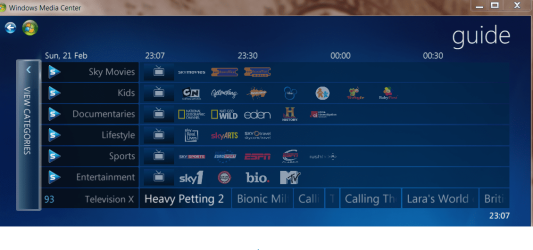
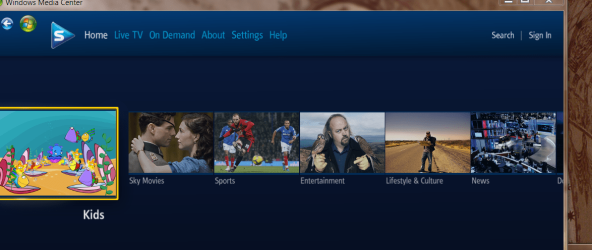
The sky player appears in the WMC startup screen - and you can also get to the programs you want via the Guide -- the Sky programs get incorporated into the WMC program guide -- scroll to the end of the "standard" channel list.

enc screenshoots.

I Didn't need to do ANYTHING other than just give SKY viewing card number when installing SKY player. Install worked perfectly -- no registry hacks etc etc needed at all.

I'm running on W7 X-64 Enterprise.

Cheers
jimbo
 

Attachments

  • sky.png
    sky.png
    110.1 KB · Views: 365
  • sky2.png
    sky2.png
    117.2 KB · Views: 159

My Computer My Computer

At a glance

Linux CENTOS 7 / various Windows OS'es and se...Intel i7 Intel i58GB, 16GBOn Motherboard
Computer type
PC/Desktop
Computer Manufacturer/Model Number
Custom built, several laptops HP/ASUS
OS
Linux CENTOS 7 / various Windows OS'es and servers
CPU
Intel i7 Intel i5
Memory
8GB, 16GB
Graphics Card(s)
On Motherboard
Sound Card
Realtek HD audio
Monitor(s) Displays
Apple Cinema display, Samsung LCD
Screen Resolution
1920 X 1080
Hard Drives
4 X 1TB SATA
Mouse
Toshiba wireless laser
Internet Speed
> 20MB up
No Sky Player in Win 7 32 bit Home Premium

Thanks to all but the answers don't address my issue. I am a full subscriber to SKY TV, Broadband and Talk and already have free access to Sky Player on my 64bit system/Media Center

I need a Registry expert to look at the two attachments on my initial post and tell me what strings I can safely export from my 64bit PC Registry to my 32bit PC Registry to enable Sky Player in my 32bit PC Media Center. For convenience, the two screenshots of the 64bit and 32bit registries are attached again.

Thanks
Pedro38
 

Attachments

My Computer My Computer

At a glance

Win 8 Pro 64 bit OEMIntel i7 -3770 3.4Ghz Socket 1155 8MB Cache32Gb DDR3 1600Gigabyte ATI Radeon 7850 HD 975Mhz 2Gb PCIE 3.00
Computer type
PC/Desktop
Computer Manufacturer/Model Number
Home build
OS
Win 8 Pro 64 bit OEM
CPU
Intel i7 -3770 3.4Ghz Socket 1155 8MB Cache
Motherboard
Gigabyte GA-Z77X-UDH5H
Memory
32Gb DDR3 1600
Graphics Card(s)
Gigabyte ATI Radeon 7850 HD 975Mhz 2Gb PCIE 3.00
Sound Card
on board
Monitor(s) Displays
Lenovo ThinkVision L220x Wide Screen
Screen Resolution
1920 x 1200
Hard Drives
2 x 500 Gb Crucial M4 SSD
External Samsung 1Tb USB3
PSU
Seasonic X-Series 850W
Case
Corsair Carbide 400R
Cooling
Noctua NH-C12P SE14
Keyboard
Microsoft Wireless Comfort Keyboard 5000
Mouse
Microsoft Wireless Mouse 5000
Internet Speed
Down 37mbps Up 8.5mbps
Antivirus
Norton 360 Premium
Browser
IE 11
Other Info
2 x Samsung SH-224 Optical Drives
1 NXZT USB3 5.25" Aperture Card Reader / 2 x USB3
Edimax N300 Wireless PCI-E Express Adapter
Logitech HD 1080P Webcam
Hauppauge WinTV V7 Adapter
Zoom modem
Sky Player in 7mce is SOLVED!

Thanks to all but the answers don't address my issue. I am a full subscriber to SKY TV, Broadband and Talk and already have free access to Sky Player on my 64bit system/Media Center

I need a Registry expert to look at the two attachments on my initial post and tell me what strings I can safely export from my 64bit PC Registry to my 32bit PC Registry to enable Sky Player in my 32bit PC Media Center. For convenience, the two screenshots of the 64bit and 32bit registries are attached again.

Thanks
Pedro38


I have done more research and discovered it is not a registry issue or the presence of a country code GB in the registry. Please go to the following link and carefully follow the very clear instructions and subject to all the conditions therein, you should end up with Sky Player on MCE as I now have as well on my Win 7 32bit laptop.

Sky Player in Windows Media Center Extension - Rathe's Media Center Blog

Cheers

Pedro 38
 

My Computer My Computer

At a glance

Win 8 Pro 64 bit OEMIntel i7 -3770 3.4Ghz Socket 1155 8MB Cache32Gb DDR3 1600Gigabyte ATI Radeon 7850 HD 975Mhz 2Gb PCIE 3.00
Computer type
PC/Desktop
Computer Manufacturer/Model Number
Home build
OS
Win 8 Pro 64 bit OEM
CPU
Intel i7 -3770 3.4Ghz Socket 1155 8MB Cache
Motherboard
Gigabyte GA-Z77X-UDH5H
Memory
32Gb DDR3 1600
Graphics Card(s)
Gigabyte ATI Radeon 7850 HD 975Mhz 2Gb PCIE 3.00
Sound Card
on board
Monitor(s) Displays
Lenovo ThinkVision L220x Wide Screen
Screen Resolution
1920 x 1200
Hard Drives
2 x 500 Gb Crucial M4 SSD
External Samsung 1Tb USB3
PSU
Seasonic X-Series 850W
Case
Corsair Carbide 400R
Cooling
Noctua NH-C12P SE14
Keyboard
Microsoft Wireless Comfort Keyboard 5000
Mouse
Microsoft Wireless Mouse 5000
Internet Speed
Down 37mbps Up 8.5mbps
Antivirus
Norton 360 Premium
Browser
IE 11
Other Info
2 x Samsung SH-224 Optical Drives
1 NXZT USB3 5.25" Aperture Card Reader / 2 x USB3
Edimax N300 Wireless PCI-E Express Adapter
Logitech HD 1080P Webcam
Hauppauge WinTV V7 Adapter
Zoom modem
Thanks to all but the answers don't address my issue. I am a full subscriber to SKY TV, Broadband and Talk and already have free access to Sky Player on my 64bit system/Media Center

I need a Registry expert to look at the two attachments on my initial post and tell me what strings I can safely export from my 64bit PC Registry to my 32bit PC Registry to enable Sky Player in my 32bit PC Media Center. For convenience, the two screenshots of the 64bit and 32bit registries are attached again.

Thanks
Pedro38


I have done more research and discovered it is not a registry issue or the presence of a country code GB in the registry. Please go to the following link and carefully follow the very clear instructions and subject to all the conditions therein, you should end up with Sky Player on MCE as I now have as well on my Win 7 32bit laptop.

Sky Player in Windows Media Center Extension - Rathe's Media Center Blog

Cheers

Pedro 38

Hi there
the blog seems to miss the MOST ESSENTIAL piece of information.

Before you start any of this you need to download and install the SKY player.
This will then ask you for your sky viewing card number.

Then Windows Media center works fine as I've posted in my previous post -- without you having to do ANYTHING.

I've even changed the Locale to Iceland (for currency etc -) -- so long as I'm logged on to a UK SERVER or PROXY it works fine -- you can even switch your Windows to RUSSIAN if you want. It's downloading / installing the SKY player and running from a UK address that's the critical piece.

You don't need any registry hacks for the sky player to work in Windows Media center -- just a valid SKY subscription and a UK IP address. - It would even work if you were located on planet MARS so long as the server IP had a UK address - 213.XX, 212.xx, 87.xx are the most common UK ISP prefixes.

Cheers
jimbo
 

My Computer My Computer

At a glance

Linux CENTOS 7 / various Windows OS'es and se...Intel i7 Intel i58GB, 16GBOn Motherboard
Computer type
PC/Desktop
Computer Manufacturer/Model Number
Custom built, several laptops HP/ASUS
OS
Linux CENTOS 7 / various Windows OS'es and servers
CPU
Intel i7 Intel i5
Memory
8GB, 16GB
Graphics Card(s)
On Motherboard
Sound Card
Realtek HD audio
Monitor(s) Displays
Apple Cinema display, Samsung LCD
Screen Resolution
1920 X 1080
Hard Drives
4 X 1TB SATA
Mouse
Toshiba wireless laser
Internet Speed
> 20MB up
Back
Top