Solved Skype crashing

Roman5

New member
Member
VIP
Local time
4:38 AM
Messages
111
Location
London UK
So Windows Live Messenger is about to close it's doors and I can't get it's successor Skype to stop crashing. The Skype messaging box appears with me signed in (I can see my name on it) before it disappears and crashes. Works fine on my desktop (currently disassembled) but not on my laptop. Seems to be to do with my MSN login, which does in fact work as it doesn't have a problem logging me into windows live messenger and logging into the MSN site.

A friend of mine let me test logging into my Skype with his MSN username and password. Bizarrely, Skype doesn't crash when I'm logged into his account, but with mine it crashes. What gives, and how can I fix this? If I can't get it fixed before MSN closes completely, will my contacts still be imported when I do get Skype working? Also, will any other software (AMSN, IM+, etc) work and import my contacts instead of skype after MSN is gone? My version of Skype is the latest, 6.3.60.105.
 

My Computer

Computer type
PC/Desktop
OS
Windows 7 HP x64 SP1
CPU
Phenom II x2 550BE @3.1Ghz
Motherboard
GA-MA770-UD3 rev 2.0
Memory
Patriot Viper 2x2GB DDR2 6400
Graphics Card(s)
Sapphire HD5850 Extreme 1GB
Sound Card
Onboard Realtek
Monitor(s) Displays
Samsung 23" S23A700D * 120Hz * 3D * 2ms response
Screen Resolution
1920x1080
Hard Drives
SSD Samsung 830 128GB/Seagate 2TB (2 x single platter)/ WD 1TB Cav Black/ WD RE3 1TB /WD 320GB IDE/IBM 120GB IDE
PSU
XFX Pro 650w Core Edition
Case
Coolermaster CM690 Dominator
Cooling
TRUE Rev.C + Arctic Cooling MX-2 + various 12cm fans
Keyboard
Razer Lycosa
Mouse
Logitech MX518
Internet Speed
Fibre Optic 100MB Down * 6MB Up
I can't help you with Skype crashing i'm afraid, but regarding using other IM programs, pretty much all have the option to import your contacts from Windows Live Messenger.

I used to chat to a friend on here via Windows Live Messenger, when we found out it was gonna be swapping to Skype we looked for a new IM program to use instead as we both didn't want to use Skype. We started using Trillian, it has the option to log in from your Windows Live Messenger email, and once logged in will show all your original contacts and you can continue chatting to them as you did before, it also has the option to create a Trillian account which can either run independently of your Windows Live account or along side with all contacts from both accounts running.
It will also work with other account types such as yahoo etc.

Of course Trillian is not the only IM program to do this, and like I said before pretty much all have the same options, so if you can't get Skype to work, have a look around for IM programs and find the one you like the best.

I hope this helps a little.


Paul.
 

My Computer

OS
Windows 7 Professional 64 bit
Thanks paul. My main concern was being able to use those 3rd party IM programs after the decommissioning of Messenger client. Because someone on another forum I read said "Pidgin is only a front end. It still uses the MSN protocol for MSN accounts. No MSN protocol = no MSN on Pidgin, IM+, Trillian or anything else."

But it seems we can, which is great, and won't need to use Skype.

I just found this alternate client - Microsoft Community


My question now then is, what 3rd party IM apps might not use this XMPP? Because XMPP (whatever that does) is finishing in October.
 

My Computer

Computer type
PC/Desktop
OS
Windows 7 HP x64 SP1
CPU
Phenom II x2 550BE @3.1Ghz
Motherboard
GA-MA770-UD3 rev 2.0
Memory
Patriot Viper 2x2GB DDR2 6400
Graphics Card(s)
Sapphire HD5850 Extreme 1GB
Sound Card
Onboard Realtek
Monitor(s) Displays
Samsung 23" S23A700D * 120Hz * 3D * 2ms response
Screen Resolution
1920x1080
Hard Drives
SSD Samsung 830 128GB/Seagate 2TB (2 x single platter)/ WD 1TB Cav Black/ WD RE3 1TB /WD 320GB IDE/IBM 120GB IDE
PSU
XFX Pro 650w Core Edition
Case
Coolermaster CM690 Dominator
Cooling
TRUE Rev.C + Arctic Cooling MX-2 + various 12cm fans
Keyboard
Razer Lycosa
Mouse
Logitech MX518
Internet Speed
Fibre Optic 100MB Down * 6MB Up
I see your problem Roman, it's not something I actually knew about, I have no idea about this XMPP, they certainly don't make things easy do they!

Thankfully I chat to my friend via the Trillian account we both set up rather than the old Windows Live Messenger accounts we had. But yes I have no way of knowing if I will still be able to speak to my old Windows Live Messenger contacts after October now you have highlighted it.

I will need to do a bit of research online regarding this.

Paul.
 

My Computer

OS
Windows 7 Professional 64 bit
Ok Roman, this is an interesting article - Cerulean Studios’ Blog » Blog Archive » Trillian and Windows Live Messenger

It does not look good right now.


I guess you need to go back to your original issue of Skype not working and try and get it working. I assume you have tried uninstalling it and reinstalling?

Paul.

Hmm, interesting paul. Yeah, I've uninstalled and reinstalled Skype a few times.

"2. Some time next year, Microsoft will begin to disable their Messenger servers. This move will impact every client, including Trillian and any other third-party IM software that you and your friends may be using. At this point, the Messenger service as you know it will cease to exist – you will not be able to sign in."

So XMPP stops this October, and then MS stop all 3rd party apps next year by the look of it. The article I linked doesn't say that MS plan to stop 3rd party apps at any time, only that this XMPP ceases in october which apparently stops 3rd party apps working. Oh well, unless anyone else here is in the know, I guess I'll have to wait and see and try and get Skype working meanwhile.
 

My Computer

Computer type
PC/Desktop
OS
Windows 7 HP x64 SP1
CPU
Phenom II x2 550BE @3.1Ghz
Motherboard
GA-MA770-UD3 rev 2.0
Memory
Patriot Viper 2x2GB DDR2 6400
Graphics Card(s)
Sapphire HD5850 Extreme 1GB
Sound Card
Onboard Realtek
Monitor(s) Displays
Samsung 23" S23A700D * 120Hz * 3D * 2ms response
Screen Resolution
1920x1080
Hard Drives
SSD Samsung 830 128GB/Seagate 2TB (2 x single platter)/ WD 1TB Cav Black/ WD RE3 1TB /WD 320GB IDE/IBM 120GB IDE
PSU
XFX Pro 650w Core Edition
Case
Coolermaster CM690 Dominator
Cooling
TRUE Rev.C + Arctic Cooling MX-2 + various 12cm fans
Keyboard
Razer Lycosa
Mouse
Logitech MX518
Internet Speed
Fibre Optic 100MB Down * 6MB Up
Hi Roman5,

I had the same problem with Skype, but fixed it by using this.
 

My Computer

Computer Manufacturer/Model Number
Look in my Signature.
OS
Win7 H.Prem. 32bit+SP1
Hi Roman5,

I had the same problem with Skype, but fixed it by using this.

Thanks Roderunner. Also crashing exactly the same way. :(
I don't get it. Can't understand why my login makes skype crash but not when I use someone else's.

Hmm, can't uninstall it, there's no trace of it in control panel/programs and features nor in my start menu.
 

My Computer

Computer type
PC/Desktop
OS
Windows 7 HP x64 SP1
CPU
Phenom II x2 550BE @3.1Ghz
Motherboard
GA-MA770-UD3 rev 2.0
Memory
Patriot Viper 2x2GB DDR2 6400
Graphics Card(s)
Sapphire HD5850 Extreme 1GB
Sound Card
Onboard Realtek
Monitor(s) Displays
Samsung 23" S23A700D * 120Hz * 3D * 2ms response
Screen Resolution
1920x1080
Hard Drives
SSD Samsung 830 128GB/Seagate 2TB (2 x single platter)/ WD 1TB Cav Black/ WD RE3 1TB /WD 320GB IDE/IBM 120GB IDE
PSU
XFX Pro 650w Core Edition
Case
Coolermaster CM690 Dominator
Cooling
TRUE Rev.C + Arctic Cooling MX-2 + various 12cm fans
Keyboard
Razer Lycosa
Mouse
Logitech MX518
Internet Speed
Fibre Optic 100MB Down * 6MB Up

My Computer

Computer type
PC/Desktop
OS
Windows 7 HP x64 SP1
CPU
Phenom II x2 550BE @3.1Ghz
Motherboard
GA-MA770-UD3 rev 2.0
Memory
Patriot Viper 2x2GB DDR2 6400
Graphics Card(s)
Sapphire HD5850 Extreme 1GB
Sound Card
Onboard Realtek
Monitor(s) Displays
Samsung 23" S23A700D * 120Hz * 3D * 2ms response
Screen Resolution
1920x1080
Hard Drives
SSD Samsung 830 128GB/Seagate 2TB (2 x single platter)/ WD 1TB Cav Black/ WD RE3 1TB /WD 320GB IDE/IBM 120GB IDE
PSU
XFX Pro 650w Core Edition
Case
Coolermaster CM690 Dominator
Cooling
TRUE Rev.C + Arctic Cooling MX-2 + various 12cm fans
Keyboard
Razer Lycosa
Mouse
Logitech MX518
Internet Speed
Fibre Optic 100MB Down * 6MB Up
Right click the entries it finds.
 

My Computer

Computer Manufacturer/Model Number
Look in my Signature.
OS
Win7 H.Prem. 32bit+SP1
Right click the entries it finds.

Nothing. The only entries with uninstall in the context menus are msi files in my program data folder. Clicking uninstall on those brings up "this action is only valid for products that are currently installed'. Those must be for the previous installation of skype.

Also, when I installed portable, it kept saying invalid directory when I tried to install to program files or program files x86. It only installed to the root C:/ folder.
 

My Computer

Computer type
PC/Desktop
OS
Windows 7 HP x64 SP1
CPU
Phenom II x2 550BE @3.1Ghz
Motherboard
GA-MA770-UD3 rev 2.0
Memory
Patriot Viper 2x2GB DDR2 6400
Graphics Card(s)
Sapphire HD5850 Extreme 1GB
Sound Card
Onboard Realtek
Monitor(s) Displays
Samsung 23" S23A700D * 120Hz * 3D * 2ms response
Screen Resolution
1920x1080
Hard Drives
SSD Samsung 830 128GB/Seagate 2TB (2 x single platter)/ WD 1TB Cav Black/ WD RE3 1TB /WD 320GB IDE/IBM 120GB IDE
PSU
XFX Pro 650w Core Edition
Case
Coolermaster CM690 Dominator
Cooling
TRUE Rev.C + Arctic Cooling MX-2 + various 12cm fans
Keyboard
Razer Lycosa
Mouse
Logitech MX518
Internet Speed
Fibre Optic 100MB Down * 6MB Up
I would uninstall skype and then reinstall it.
 

My Computer

Computer type
Laptop
Computer Manufacturer/Model Number
Acer and HP
OS
Windows 7 Home Premium 64 Bit
CPU
AMD C-50 Processor and AMD Phenom II Triplecore Processor
Memory
2 to 4 Gigs
Graphics Card(s)
AMD Radeon HD Graphics
Sound Card
Conexant Audio and Beats Audio
Screen Resolution
1366x768 and N/A
Mouse
Synaptics Touchpad
Internet Speed
Over 2 MBPS according to speedtest.net
Antivirus
MS Security Essentials and AVG
Browser
Google Chrome
I would uninstall skype and then reinstall it.

I'd already uninstalled skype full version. I'm trying to find a way to uninstall skype portable.
 

My Computer

Computer type
PC/Desktop
OS
Windows 7 HP x64 SP1
CPU
Phenom II x2 550BE @3.1Ghz
Motherboard
GA-MA770-UD3 rev 2.0
Memory
Patriot Viper 2x2GB DDR2 6400
Graphics Card(s)
Sapphire HD5850 Extreme 1GB
Sound Card
Onboard Realtek
Monitor(s) Displays
Samsung 23" S23A700D * 120Hz * 3D * 2ms response
Screen Resolution
1920x1080
Hard Drives
SSD Samsung 830 128GB/Seagate 2TB (2 x single platter)/ WD 1TB Cav Black/ WD RE3 1TB /WD 320GB IDE/IBM 120GB IDE
PSU
XFX Pro 650w Core Edition
Case
Coolermaster CM690 Dominator
Cooling
TRUE Rev.C + Arctic Cooling MX-2 + various 12cm fans
Keyboard
Razer Lycosa
Mouse
Logitech MX518
Internet Speed
Fibre Optic 100MB Down * 6MB Up
Right click the entries it finds.

Nothing. The only entries with uninstall in the context menus are msi files in my program data folder. Clicking uninstall on those brings up "this action is only valid for products that are currently installed'. Those must be for the previous installation of skype.

Also, when I installed portable, it kept saying invalid directory when I tried to install to program files or program files x86. It only installed to the root C:/ folder.
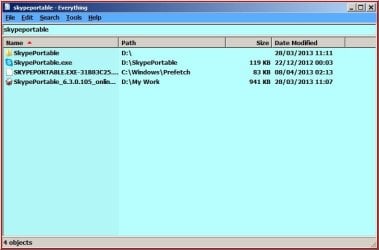
This is how to find:-

RR.jpg
 

My Computer

Computer Manufacturer/Model Number
Look in my Signature.
OS
Win7 H.Prem. 32bit+SP1
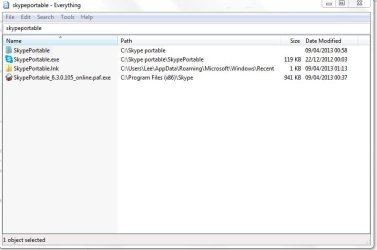
Yeah, it shows files I was already able to find in the skype portable folder. There's no uninstall function though, at least that I can find.
 

Attachments

  • Capture.JPG
    Capture.JPG
    37 KB · Views: 3

My Computer

Computer type
PC/Desktop
OS
Windows 7 HP x64 SP1
CPU
Phenom II x2 550BE @3.1Ghz
Motherboard
GA-MA770-UD3 rev 2.0
Memory
Patriot Viper 2x2GB DDR2 6400
Graphics Card(s)
Sapphire HD5850 Extreme 1GB
Sound Card
Onboard Realtek
Monitor(s) Displays
Samsung 23" S23A700D * 120Hz * 3D * 2ms response
Screen Resolution
1920x1080
Hard Drives
SSD Samsung 830 128GB/Seagate 2TB (2 x single platter)/ WD 1TB Cav Black/ WD RE3 1TB /WD 320GB IDE/IBM 120GB IDE
PSU
XFX Pro 650w Core Edition
Case
Coolermaster CM690 Dominator
Cooling
TRUE Rev.C + Arctic Cooling MX-2 + various 12cm fans
Keyboard
Razer Lycosa
Mouse
Logitech MX518
Internet Speed
Fibre Optic 100MB Down * 6MB Up
As I said earlier, right click the entries it finds.
 

My Computer

Computer Manufacturer/Model Number
Look in my Signature.
OS
Win7 H.Prem. 32bit+SP1
As I said earlier, right click the entries it finds.


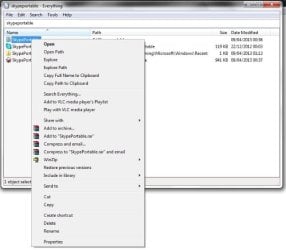
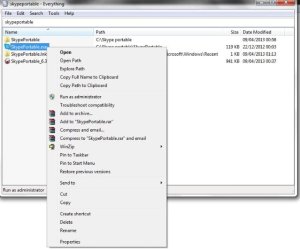
Yes, I have done. What am I meant to be looking for? These are the right click context menus for the yellow folders and the exes:
 

Attachments

  • 1.jpg
    1.jpg
    39.1 KB · Views: 4
  • 2.jpg
    2.jpg
    35.9 KB · Views: 4

My Computer

Computer type
PC/Desktop
OS
Windows 7 HP x64 SP1
CPU
Phenom II x2 550BE @3.1Ghz
Motherboard
GA-MA770-UD3 rev 2.0
Memory
Patriot Viper 2x2GB DDR2 6400
Graphics Card(s)
Sapphire HD5850 Extreme 1GB
Sound Card
Onboard Realtek
Monitor(s) Displays
Samsung 23" S23A700D * 120Hz * 3D * 2ms response
Screen Resolution
1920x1080
Hard Drives
SSD Samsung 830 128GB/Seagate 2TB (2 x single platter)/ WD 1TB Cav Black/ WD RE3 1TB /WD 320GB IDE/IBM 120GB IDE
PSU
XFX Pro 650w Core Edition
Case
Coolermaster CM690 Dominator
Cooling
TRUE Rev.C + Arctic Cooling MX-2 + various 12cm fans
Keyboard
Razer Lycosa
Mouse
Logitech MX518
Internet Speed
Fibre Optic 100MB Down * 6MB Up
The 'delete' option is 3 from the bottom in both your images.
 

My Computer

Computer Manufacturer/Model Number
Look in my Signature.
OS
Win7 H.Prem. 32bit+SP1
The 'delete' option is 3 from the bottom in both your images.

With all due respect, your messages were a bit short and cryptic. :) I thought I was looking for 'uninstall'. I always thought delete just got rid of the files but not registry entries. Thanks though, I'll just delete them.
 

My Computer

Computer type
PC/Desktop
OS
Windows 7 HP x64 SP1
CPU
Phenom II x2 550BE @3.1Ghz
Motherboard
GA-MA770-UD3 rev 2.0
Memory
Patriot Viper 2x2GB DDR2 6400
Graphics Card(s)
Sapphire HD5850 Extreme 1GB
Sound Card
Onboard Realtek
Monitor(s) Displays
Samsung 23" S23A700D * 120Hz * 3D * 2ms response
Screen Resolution
1920x1080
Hard Drives
SSD Samsung 830 128GB/Seagate 2TB (2 x single platter)/ WD 1TB Cav Black/ WD RE3 1TB /WD 320GB IDE/IBM 120GB IDE
PSU
XFX Pro 650w Core Edition
Case
Coolermaster CM690 Dominator
Cooling
TRUE Rev.C + Arctic Cooling MX-2 + various 12cm fans
Keyboard
Razer Lycosa
Mouse
Logitech MX518
Internet Speed
Fibre Optic 100MB Down * 6MB Up
Back
Top