Skype not installing: Adminsitrator and folder creation problems?

flycaster

New member
Member
VIP
Local time
3:45 PM
Messages
472
Location
Boynton Beach, FL
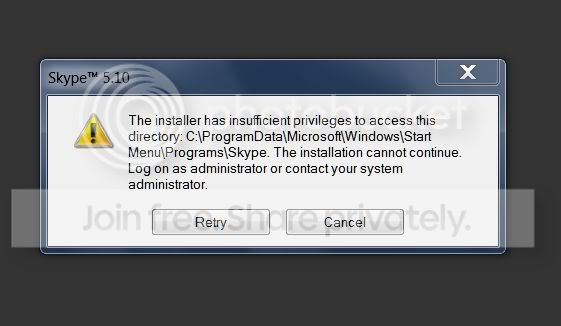
Running Windows 7 64-bit. Was using Skype successfully until I got an alert to update. So I started to update and during the process there was a problem with installing, so I cancelled. However, canceling also deleted my Skype and I am having trouble installing the latest version. Specifically, I'm getting and error message that says..."there are insufficient privileges and that I should log in as an administrator." I am logged in as the one and only administrator. What goes here?

Also, another error message said that Skype couldn't ceate the folder: "C:\programdata\microsoft\windows\start menu\programs\skype???


By the way, I've also have somewhat similar (administrator problems) problems installing ABBYY, Silverlight.
 
Last edited:

My Computer

Computer Manufacturer/Model Number
Gateway DX4720-03/HP Pavilion dv6
OS
Windows 7 HP 64-bit
Memory
4GB/4GB
Antivirus
Avast Pro
Browser
Firefox, the latest
Used MS's Mr. Fit It, but still can't install reinstall these programs. And here is an error message for Skype (but generally the same error appeared for the other two programs):

SkypeError.jpg


I'm starting to think that I screwed up the OS by having CCleaner clean/fix my registry??? Perhaps I should go back and have it restore a previous registry???
 

My Computer

Computer Manufacturer/Model Number
Gateway DX4720-03/HP Pavilion dv6
OS
Windows 7 HP 64-bit
Memory
4GB/4GB
Antivirus
Avast Pro
Browser
Firefox, the latest
my suggestion is go into your program files manually delete the skype files and try a reinstall for it

star>computer>local drive (eg c:) > program files > find skype >right click >delete
iF says file is in use ctr+alt+del task manager click see all user processes to the right in decription's you'll see skype right click and end process
 

My Computer

OS
32 bit win 7 ultimate

My Computer

Computer Manufacturer/Model Number
Gateway DX4720-03/HP Pavilion dv6
OS
Windows 7 HP 64-bit
Memory
4GB/4GB
Antivirus
Avast Pro
Browser
Firefox, the latest
Try turning UAC off (if you don't have it off already) and your AntiVirus software while installing.
 

My Computer

Computer Manufacturer/Model Number
HP Pavilion Phoenix H9-1060sc
OS
Windows 8 Pro 64-Bit
CPU
Intel Core i7 (2nd Gen) 2600 / 3.4 GHz
Motherboard
IPISB-CH2 (Chicago)
Memory
16 GB
Graphics Card(s)
Nvidia GeForce GTX 580
Sound Card
Integrated IDT 92HD89E Audio
Monitor(s) Displays
Samsung 23" SyncMaster SA750D
Screen Resolution
1920 x 1080
Hard Drives
120 GB Solid State & 2 TB 7200 RPM 3.0 Gb/sec
PSU
Internal 600 Watt (100V-240V)
Case
HP Tower: Height: 41.3 cm Width: 17.3 cm
Keyboard
HP Wireless, Shipped with Computer
Mouse
Came with Keyboard as bundle
Internet Speed
Never Enough aka 8 mb/s
Try turning UAC off (if you don't have it off already) and your AntiVirus software while installing.

Tried your suggestion. Kept getting "Installation failed."
 

My Computer

Computer Manufacturer/Model Number
Gateway DX4720-03/HP Pavilion dv6
OS
Windows 7 HP 64-bit
Memory
4GB/4GB
Antivirus
Avast Pro
Browser
Firefox, the latest
well you could try 2 different things you can boot your computer up in safe mode and install it then or you could try a work around program i find it very useful when i have a hard time installing files

Game Booster 3 Free Download, Speed Up PC for Top Gaming Performance (after this is installed right click your skype.exe and hit run with gamebooster and it should ignore admin right)

now these are just work arounds to just get the program on there after but after you have it installed and if it gives you more of a hard time then we'll try to figure something out
 

My Computer

OS
32 bit win 7 ultimate
Seckt, I'm not a gamer, but in looking at GameBoost I would assume that to use it for my purpose I would click StartBoost and then try to install the program. Or, am I missing something?
 

My Computer

Computer Manufacturer/Model Number
Gateway DX4720-03/HP Pavilion dv6
OS
Windows 7 HP 64-bit
Memory
4GB/4GB
Antivirus
Avast Pro
Browser
Firefox, the latest
Seckt, I'm not a gamer, but in looking at GameBoost I would assume that to use it for my purpose I would click StartBoost and then try to install the program. Or, am I missing something?

Gamebooster shuts down unneeded processes and applications to increase gaming performance.
Um... I see no reason to run gamebooster when installing Skype!
 

My Computer

Computer Manufacturer/Model Number
HP Pavilion Phoenix H9-1060sc
OS
Windows 8 Pro 64-Bit
CPU
Intel Core i7 (2nd Gen) 2600 / 3.4 GHz
Motherboard
IPISB-CH2 (Chicago)
Memory
16 GB
Graphics Card(s)
Nvidia GeForce GTX 580
Sound Card
Integrated IDT 92HD89E Audio
Monitor(s) Displays
Samsung 23" SyncMaster SA750D
Screen Resolution
1920 x 1080
Hard Drives
120 GB Solid State & 2 TB 7200 RPM 3.0 Gb/sec
PSU
Internal 600 Watt (100V-240V)
Case
HP Tower: Height: 41.3 cm Width: 17.3 cm
Keyboard
HP Wireless, Shipped with Computer
Mouse
Came with Keyboard as bundle
Internet Speed
Never Enough aka 8 mb/s
Finally got skype installed. Not sure how I did it, may be it is the portable version, but nonetheless, it is here and working.
 

My Computer

Computer Manufacturer/Model Number
Gateway DX4720-03/HP Pavilion dv6
OS
Windows 7 HP 64-bit
Memory
4GB/4GB
Antivirus
Avast Pro
Browser
Firefox, the latest
Back
Top