Slave drive & bios

Tousdae

New member
Member
VIP
Local time
9:06 PM
Messages
351
Hi,

I just got a new pc and would like to use my old hard drive as a slave drive to transfer items from it to the new hard drive (I have 3 programs to back up this pc and none will work). I know that I have to do something in bios for this, but I dont know what. Can someone help?

Thanks,
Lea
 

My Computer

Computer type
PC/Desktop
Computer Manufacturer/Model Number
(1) Hitachi HDP725050GLA360 ATA Device (2) ST31000528AS ATA Device (3) Generic USB CF Reader USB
OS
Windows 7 Professional 64 bit
CPU
AMD Phenom(tm) II X4 955 Processor
Motherboard
ASUSTeK Computer INC. M3A78-CM
Memory
8 GB
Graphics Card(s)
XFX Radeon R7 260 X 1GB
Sound Card
AMD High Definition Audio Device
Monitor(s) Displays
Westinghouse TV 26"
Screen Resolution
1366x768
Hard Drives
1TB SATA
PSU
Corsair CX 750 ATX 80 Plus
Keyboard
Standard PS/2
Mouse
Standard
Internet Speed
80-100
Antivirus
Defender
Browser
Opera and Firefox
Could we get some more information?

What is the model # of the HP PC? Is it a desktop?
What kind of hard drive(s) are in the new PC - SATA or IDE?
What kind of hard drive is the "old" hard drive - SATA or IDE?

When you say that you have tried programs to back up, what are you trying to back up?
Care to expand on "none will work"?
 

My Computer

Computer type
PC/Desktop
Computer Manufacturer/Model Number
Home Built - Jan 2013
OS
Windows 7 64 Bit Home Premium SP1
CPU
i7-3820
Motherboard
Asus P9X79-PRO - Bios 4608
Memory
GSkill F3-14900CL9Q - 16GB
Graphics Card(s)
EVGA GeForce GTX660 - Driver 352.86
Sound Card
On board Realtek ALC898
Monitor(s) Displays
Acer S271HL
Screen Resolution
1920 x 1080
Hard Drives
#1- Samsung 840 Pro Series
#2- Western Digital WD1002FAEX Sata3 Black
#3- Western Digital WD1002FAEX Sata3 Black
PSU
Corsair CMPSU-850TX-V2 - 850 watt (by Seasonic)
Case
Corsair Obsidian 550D
Cooling
Standard 3 120mm case fans, Cooler Master Hyper 212 EVO
Keyboard
MS KC-0405
Mouse
Intellimouse 5-button
Internet Speed
56 Mbits/Sec (on a good day)
Antivirus
Avast & Malwarebytes
Browser
Firefox
Other Info
Asus DVD - DRW-24B1ST 24X
This is the info from the webbie.

ZT Affinity 7552Ma Desktop PC:
Key Features and Benefits:
AMD Phenom II 955 Quad-Core processor
3.20GHz
8GB DDR3 SDRAM system memory

Gives you the power to handle most power hungry applications and tons of multimedia work
1TB SATA hard drive

Store 666,000 photos, 285,000 songs or 526 hours of HD video and more
22x DVD /-RW optical drive

Watch movies, and read and write CDs and DVDs in multiple formats
10/100/1000 Gigabit Ethernet

Connect to a broadband modem with wired broadband router with wired Ethernet
Integrated ATI Radeon HD 3100 series graphics from AMDAdditional Features:
19-in-1 memory card reader
8 x USB 2.0 ports, 1 x VGA port, 1 x DVI port, 6 x audio ports, 2 x PS/2 ports, 1 x RJ-45 Ethernet port, 1 x display port
1 x PCI Express (x16) slot, 2 x PCI slots, 1 x PCI Express (x1) slot, 2 x external 5.25" bays, 1 x external 3.5" bay, 4 x internal 3.5" bays

I've tried to burn with windows 7, Real player, and Veritas Record Now. It always tells me there is an error with the disk. I'm trying to back up things I want to take with me to the new pc - Word docs, music, pictures, videos, program applications, etc.

I cannot answer your question about what hookups ... nevermind, I looked up SATA and IDE. My current hookups are SATA. I believe what was in the new pc was the same.

Thank you :)
 
Last edited:

My Computer

Computer type
PC/Desktop
Computer Manufacturer/Model Number
(1) Hitachi HDP725050GLA360 ATA Device (2) ST31000528AS ATA Device (3) Generic USB CF Reader USB
OS
Windows 7 Professional 64 bit
CPU
AMD Phenom(tm) II X4 955 Processor
Motherboard
ASUSTeK Computer INC. M3A78-CM
Memory
8 GB
Graphics Card(s)
XFX Radeon R7 260 X 1GB
Sound Card
AMD High Definition Audio Device
Monitor(s) Displays
Westinghouse TV 26"
Screen Resolution
1366x768
Hard Drives
1TB SATA
PSU
Corsair CX 750 ATX 80 Plus
Keyboard
Standard PS/2
Mouse
Standard
Internet Speed
80-100
Antivirus
Defender
Browser
Opera and Firefox
With SATA there is no such thing as a slave drive, all drives are master. The question is whether the drive is recognized in the BIOS and in Windows? If it is, what do you see when going to Disk Management...screenshot? Have you initialized the drive?
 

My Computer

Computer Manufacturer/Model Number
DIY
OS
W7x64 Pro, SuSe 12.1/** W7 x64 Pro, XP MCE
CPU
Phenom II 1090T w/Noctua NH-D14 /**4400+ X2 w/CM Hyper TX 3
Motherboard
ASRock 890FX Deluxe 4/**A8N-SLI
Memory
2 x 2GB Patriot PGS34g1600LLKA/**4x1GB Corsair VS
Graphics Card(s)
EVGA GTX460 SC/**EVGA 8800GTS
Sound Card
Asus Xonar D2X/**Xonar D1
Monitor(s) Displays
Acer X233H, Dell E152FPc /**LG M237-WD
Screen Resolution
1920x1080 & 1024x768/**1980x1080
Hard Drives
WDC 2TB, 1.5TB, 1TB, 500GB,Seagate 500GB , Maxtor 80GB /**500GB Seagate & WDC 1TB Black
PSU
CM RS600 w/ APC BX1000G/**Antec 500 TP w/ APC BX1000
Case
HAF922/**Antec 1040IIB
Cooling
3x200mm, 1x140 and 1x120mm/**5x80mm fans
Keyboard
Logitech Media USB/**Saitek Eclipse
Mouse
Cordless Trackman Wheel/**Ditto
Internet Speed
3.3Mbps
Other Info
SB 560 5.1 w/ Sennheiser RS140/**Creative T20 speakers, Dvico FusionHDTV7 Gold RT, Cisco E3000, HP 5510V AIO, Linksys E3000, Belkin F5U237 hub and **F5D8055 adapter
(** = 2nd rig)
I don't know how to do any of this :(

I had a computer guy who vanished. I saw him adding another drive to my current pc and I saw him work in bios. Ok so I should try hooking up my current hard drive in the new pc along with the new hard drive and take it from there?
 

My Computer

Computer type
PC/Desktop
Computer Manufacturer/Model Number
(1) Hitachi HDP725050GLA360 ATA Device (2) ST31000528AS ATA Device (3) Generic USB CF Reader USB
OS
Windows 7 Professional 64 bit
CPU
AMD Phenom(tm) II X4 955 Processor
Motherboard
ASUSTeK Computer INC. M3A78-CM
Memory
8 GB
Graphics Card(s)
XFX Radeon R7 260 X 1GB
Sound Card
AMD High Definition Audio Device
Monitor(s) Displays
Westinghouse TV 26"
Screen Resolution
1366x768
Hard Drives
1TB SATA
PSU
Corsair CX 750 ATX 80 Plus
Keyboard
Standard PS/2
Mouse
Standard
Internet Speed
80-100
Antivirus
Defender
Browser
Opera and Firefox
Yes. If the old hard drive is a SATA hard drive you will just plug it into one of the SATA ports on your motherboard, supply power, and start your computer.

Once on the desktop you should be able to access the drives, files, and folders just like any other.
 

My Computer

Computer type
PC/Desktop
Computer Manufacturer/Model Number
Home Built - Jan 2013
OS
Windows 7 64 Bit Home Premium SP1
CPU
i7-3820
Motherboard
Asus P9X79-PRO - Bios 4608
Memory
GSkill F3-14900CL9Q - 16GB
Graphics Card(s)
EVGA GeForce GTX660 - Driver 352.86
Sound Card
On board Realtek ALC898
Monitor(s) Displays
Acer S271HL
Screen Resolution
1920 x 1080
Hard Drives
#1- Samsung 840 Pro Series
#2- Western Digital WD1002FAEX Sata3 Black
#3- Western Digital WD1002FAEX Sata3 Black
PSU
Corsair CMPSU-850TX-V2 - 850 watt (by Seasonic)
Case
Corsair Obsidian 550D
Cooling
Standard 3 120mm case fans, Cooler Master Hyper 212 EVO
Keyboard
MS KC-0405
Mouse
Intellimouse 5-button
Internet Speed
56 Mbits/Sec (on a good day)
Antivirus
Avast & Malwarebytes
Browser
Firefox
Other Info
Asus DVD - DRW-24B1ST 24X
Ok thank you. I'll do this on the weekend. I might be back. I can't see it going too smoothly for me lol Thanks a lot.
 

My Computer

Computer type
PC/Desktop
Computer Manufacturer/Model Number
(1) Hitachi HDP725050GLA360 ATA Device (2) ST31000528AS ATA Device (3) Generic USB CF Reader USB
OS
Windows 7 Professional 64 bit
CPU
AMD Phenom(tm) II X4 955 Processor
Motherboard
ASUSTeK Computer INC. M3A78-CM
Memory
8 GB
Graphics Card(s)
XFX Radeon R7 260 X 1GB
Sound Card
AMD High Definition Audio Device
Monitor(s) Displays
Westinghouse TV 26"
Screen Resolution
1366x768
Hard Drives
1TB SATA
PSU
Corsair CX 750 ATX 80 Plus
Keyboard
Standard PS/2
Mouse
Standard
Internet Speed
80-100
Antivirus
Defender
Browser
Opera and Firefox

My Computer

Computer type
PC/Desktop
Computer Manufacturer/Model Number
Home Built - Jan 2013
OS
Windows 7 64 Bit Home Premium SP1
CPU
i7-3820
Motherboard
Asus P9X79-PRO - Bios 4608
Memory
GSkill F3-14900CL9Q - 16GB
Graphics Card(s)
EVGA GeForce GTX660 - Driver 352.86
Sound Card
On board Realtek ALC898
Monitor(s) Displays
Acer S271HL
Screen Resolution
1920 x 1080
Hard Drives
#1- Samsung 840 Pro Series
#2- Western Digital WD1002FAEX Sata3 Black
#3- Western Digital WD1002FAEX Sata3 Black
PSU
Corsair CMPSU-850TX-V2 - 850 watt (by Seasonic)
Case
Corsair Obsidian 550D
Cooling
Standard 3 120mm case fans, Cooler Master Hyper 212 EVO
Keyboard
MS KC-0405
Mouse
Intellimouse 5-button
Internet Speed
56 Mbits/Sec (on a good day)
Antivirus
Avast & Malwarebytes
Browser
Firefox
Other Info
Asus DVD - DRW-24B1ST 24X
I've installed a dvd drive, hard drive and video card. I didn't have a hard time with it, but that new pc looks a lot different inside, in that there are a TON less wires. I'm a bit confused :) That link might help, though - knowing the reverse procedure, how to install. I've never added a second drive myself. It's easy to take one out and attach another yanno? It's another thing (for me at least lol) to add one and have to hook up cables and mess with the motherboard.

Thanks :)
 

My Computer

Computer type
PC/Desktop
Computer Manufacturer/Model Number
(1) Hitachi HDP725050GLA360 ATA Device (2) ST31000528AS ATA Device (3) Generic USB CF Reader USB
OS
Windows 7 Professional 64 bit
CPU
AMD Phenom(tm) II X4 955 Processor
Motherboard
ASUSTeK Computer INC. M3A78-CM
Memory
8 GB
Graphics Card(s)
XFX Radeon R7 260 X 1GB
Sound Card
AMD High Definition Audio Device
Monitor(s) Displays
Westinghouse TV 26"
Screen Resolution
1366x768
Hard Drives
1TB SATA
PSU
Corsair CX 750 ATX 80 Plus
Keyboard
Standard PS/2
Mouse
Standard
Internet Speed
80-100
Antivirus
Defender
Browser
Opera and Firefox
Nah. Wicked easy!

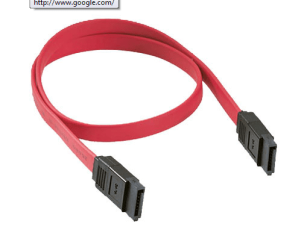
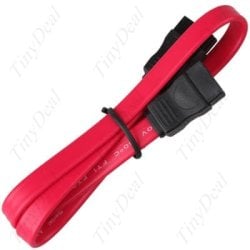
You will need your old drive and a SATA cable (Top Left Pic).

Slide the drive into it's bay and use whatever connectors your case uses.

Find a spare SATA power connection (Bottom pic) and plug it in where it goes.

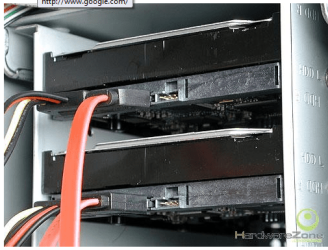
Plug one end of the SATA cable into the drive (Top Right Pic).

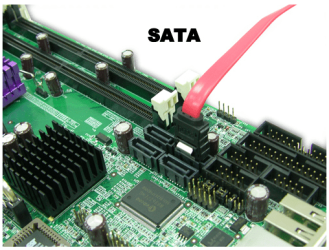
Plug the other end into the motherboard (Mid Pic). It doesn't really matter which SATA port on the motherboard you plug it into.

All this with the power off of course!
 

Attachments

  • Sata Data.PNG
    Sata Data.PNG
    31.4 KB · Views: 3
  • Sata Power.PNG
    Sata Power.PNG
    16.7 KB · Views: 310
  • Sata Drive.PNG
    Sata Drive.PNG
    108.6 KB · Views: 3
  • Sata MB.PNG
    Sata MB.PNG
    106.1 KB · Views: 4

My Computer

Computer type
PC/Desktop
Computer Manufacturer/Model Number
Home Built - Jan 2013
OS
Windows 7 64 Bit Home Premium SP1
CPU
i7-3820
Motherboard
Asus P9X79-PRO - Bios 4608
Memory
GSkill F3-14900CL9Q - 16GB
Graphics Card(s)
EVGA GeForce GTX660 - Driver 352.86
Sound Card
On board Realtek ALC898
Monitor(s) Displays
Acer S271HL
Screen Resolution
1920 x 1080
Hard Drives
#1- Samsung 840 Pro Series
#2- Western Digital WD1002FAEX Sata3 Black
#3- Western Digital WD1002FAEX Sata3 Black
PSU
Corsair CMPSU-850TX-V2 - 850 watt (by Seasonic)
Case
Corsair Obsidian 550D
Cooling
Standard 3 120mm case fans, Cooler Master Hyper 212 EVO
Keyboard
MS KC-0405
Mouse
Intellimouse 5-button
Internet Speed
56 Mbits/Sec (on a good day)
Antivirus
Avast & Malwarebytes
Browser
Firefox
Other Info
Asus DVD - DRW-24B1ST 24X
:(

I can't do it. I printed out the link you gave me and those instructions that you left me. I opened both cases side by side and looked at everything and I had a pretty good understanding of what to do and how ... and thats when I realized ..The new pc, it's psu .. it doesnt have anymore of the longer sata-type connections. Your last image that you put up ... Yeah .. the damn psu doesnt have anymore of those. It has 2 or 3 that have 4 round holes in them instead. I'm pretty upset about this. I bought a good computer didn't I? There is room in there for 3 or 4 more dvd drives or hard drives so why not have the hook ups for it? :mad:

.. Um.. do you have any ideas for me since I can't copy a lot of my data?

ANNNNNND my 2 year old pc has 3 more of those floating around inside!
 
Last edited:

My Computer

Computer type
PC/Desktop
Computer Manufacturer/Model Number
(1) Hitachi HDP725050GLA360 ATA Device (2) ST31000528AS ATA Device (3) Generic USB CF Reader USB
OS
Windows 7 Professional 64 bit
CPU
AMD Phenom(tm) II X4 955 Processor
Motherboard
ASUSTeK Computer INC. M3A78-CM
Memory
8 GB
Graphics Card(s)
XFX Radeon R7 260 X 1GB
Sound Card
AMD High Definition Audio Device
Monitor(s) Displays
Westinghouse TV 26"
Screen Resolution
1366x768
Hard Drives
1TB SATA
PSU
Corsair CX 750 ATX 80 Plus
Keyboard
Standard PS/2
Mouse
Standard
Internet Speed
80-100
Antivirus
Defender
Browser
Opera and Firefox
If you are short on SATA power connectors, there are Y-adapters availabe, TigerDirect, NewEgg, eBay, etc ;)
 

Attachments

  • Power_Y_Sata_splitter.JPG
    Power_Y_Sata_splitter.JPG
    23.7 KB · Views: 0

My Computer

Computer type
PC/Desktop
Computer Manufacturer/Model Number
Built them myself, Science Experiments !
OS
Win7 Enterprise, Win7 x86 (Ult 7600), Win7 x64 Ult 7600, TechNet RTM on AMD x64 (2.8Ghz)
CPU
AMD fx8350 4ghz, AMD-32 2400mhz, AMD-64 3200mhz, AMDx64 2.8G
Motherboard
SIS 755, ECS-K8M890M-M (Ult 7600), GigaByte & others
Memory
2gb, 4gb on the Ult 7600, 4gb on Technet RTM, 32gb on FX8350
Graphics Card(s)
Draw my own Graphics, several nVidia cards
Sound Card
on motherboard
Monitor(s) Displays
19" flat scr, 28" I-Inc widescr,22" Emprex Widescr, 23" Acer
Screen Resolution
1280 x 1024, 1440 x 900, 1920 x 1080
Hard Drives
6 pata Ide HD's & 2 Sata HD's
added 80gb external on Ult 7600 computer,
numerous extra 1tb, 2TB, 3Tb SATA HD's
A collection of ext HD Docks w/ HDs
PSU
430w, 550w, 600w, 700, 800, etc
Case
All Generic Full Towers
Cooling
Open Air & a few fans, some w/ colored LEDs
Keyboard
Compaq & Dell recycled from GoodWill
Mouse
Made in China Optical Wired Mouse
Internet Speed
Fast Cable InterNet
Antivirus
AVG Free on 24 different Desktops, NO Problems!
Browser
IE 8 is preferred, but use FireFox sometimes
Other Info
Linksys Routers, switches, & Hubs
Too Many USB Flash Drives to count, Biggest is 64GB !
Eight computers in my home network.
Sixteen computers at my business network.
Linked via TeamViewer !
Lots of old used spare computer parts everywhere!
YAY!!! Thank you!!
 

My Computer

Computer type
PC/Desktop
Computer Manufacturer/Model Number
(1) Hitachi HDP725050GLA360 ATA Device (2) ST31000528AS ATA Device (3) Generic USB CF Reader USB
OS
Windows 7 Professional 64 bit
CPU
AMD Phenom(tm) II X4 955 Processor
Motherboard
ASUSTeK Computer INC. M3A78-CM
Memory
8 GB
Graphics Card(s)
XFX Radeon R7 260 X 1GB
Sound Card
AMD High Definition Audio Device
Monitor(s) Displays
Westinghouse TV 26"
Screen Resolution
1366x768
Hard Drives
1TB SATA
PSU
Corsair CX 750 ATX 80 Plus
Keyboard
Standard PS/2
Mouse
Standard
Internet Speed
80-100
Antivirus
Defender
Browser
Opera and Firefox
Do you have enough Free SATA connection ports on your MB ?
 

My Computer

Computer type
PC/Desktop
Computer Manufacturer/Model Number
Built them myself, Science Experiments !
OS
Win7 Enterprise, Win7 x86 (Ult 7600), Win7 x64 Ult 7600, TechNet RTM on AMD x64 (2.8Ghz)
CPU
AMD fx8350 4ghz, AMD-32 2400mhz, AMD-64 3200mhz, AMDx64 2.8G
Motherboard
SIS 755, ECS-K8M890M-M (Ult 7600), GigaByte & others
Memory
2gb, 4gb on the Ult 7600, 4gb on Technet RTM, 32gb on FX8350
Graphics Card(s)
Draw my own Graphics, several nVidia cards
Sound Card
on motherboard
Monitor(s) Displays
19" flat scr, 28" I-Inc widescr,22" Emprex Widescr, 23" Acer
Screen Resolution
1280 x 1024, 1440 x 900, 1920 x 1080
Hard Drives
6 pata Ide HD's & 2 Sata HD's
added 80gb external on Ult 7600 computer,
numerous extra 1tb, 2TB, 3Tb SATA HD's
A collection of ext HD Docks w/ HDs
PSU
430w, 550w, 600w, 700, 800, etc
Case
All Generic Full Towers
Cooling
Open Air & a few fans, some w/ colored LEDs
Keyboard
Compaq & Dell recycled from GoodWill
Mouse
Made in China Optical Wired Mouse
Internet Speed
Fast Cable InterNet
Antivirus
AVG Free on 24 different Desktops, NO Problems!
Browser
IE 8 is preferred, but use FireFox sometimes
Other Info
Linksys Routers, switches, & Hubs
Too Many USB Flash Drives to count, Biggest is 64GB !
Eight computers in my home network.
Sixteen computers at my business network.
Linked via TeamViewer !
Lots of old used spare computer parts everywhere!
Doc's suggestion is the best and permanent solution.

But if you are game for a little mad-scientist fun, and really just want to copy data, then you could set up the 2 boxes side by side, use the power connector from the old box to power the old hard drive, then connect the SATA cable to the motherboard in the new PC (both boxes OFF!) [you may need to stand the old hard drive on the table to "bridge" the 2 PC's]

Power up the old PC (it will sit on a black screen and cry about "no hard drive!" - don't worry, it won't hurt anything)

Then power up the new PC. It should recognize the second drive and you are good to go (copying data)!

If you are uncomfortable with any of this, or really want a permanent 2-drive solution, then just order the "Molex to Sata Power Dongle" and do it the "correct" way!
 

My Computer

Computer type
PC/Desktop
Computer Manufacturer/Model Number
Home Built - Jan 2013
OS
Windows 7 64 Bit Home Premium SP1
CPU
i7-3820
Motherboard
Asus P9X79-PRO - Bios 4608
Memory
GSkill F3-14900CL9Q - 16GB
Graphics Card(s)
EVGA GeForce GTX660 - Driver 352.86
Sound Card
On board Realtek ALC898
Monitor(s) Displays
Acer S271HL
Screen Resolution
1920 x 1080
Hard Drives
#1- Samsung 840 Pro Series
#2- Western Digital WD1002FAEX Sata3 Black
#3- Western Digital WD1002FAEX Sata3 Black
PSU
Corsair CMPSU-850TX-V2 - 850 watt (by Seasonic)
Case
Corsair Obsidian 550D
Cooling
Standard 3 120mm case fans, Cooler Master Hyper 212 EVO
Keyboard
MS KC-0405
Mouse
Intellimouse 5-button
Internet Speed
56 Mbits/Sec (on a good day)
Antivirus
Avast & Malwarebytes
Browser
Firefox
Other Info
Asus DVD - DRW-24B1ST 24X
Um ...... I saw 2 or 3 beige thingies (lol) that have ... ok it's on the picture you put up for me. The clear thingy with 4 holes. I have 2 or 3 of them floating around in there. Did I answer your question? It has to be specifically connected to the motherboard?
 

My Computer

Computer type
PC/Desktop
Computer Manufacturer/Model Number
(1) Hitachi HDP725050GLA360 ATA Device (2) ST31000528AS ATA Device (3) Generic USB CF Reader USB
OS
Windows 7 Professional 64 bit
CPU
AMD Phenom(tm) II X4 955 Processor
Motherboard
ASUSTeK Computer INC. M3A78-CM
Memory
8 GB
Graphics Card(s)
XFX Radeon R7 260 X 1GB
Sound Card
AMD High Definition Audio Device
Monitor(s) Displays
Westinghouse TV 26"
Screen Resolution
1366x768
Hard Drives
1TB SATA
PSU
Corsair CX 750 ATX 80 Plus
Keyboard
Standard PS/2
Mouse
Standard
Internet Speed
80-100
Antivirus
Defender
Browser
Opera and Firefox
But if you are game for a little mad-scientist fun,

:shock: I have to re-read this after I get off hold with Best Buy. :p
 

My Computer

Computer type
PC/Desktop
Computer Manufacturer/Model Number
(1) Hitachi HDP725050GLA360 ATA Device (2) ST31000528AS ATA Device (3) Generic USB CF Reader USB
OS
Windows 7 Professional 64 bit
CPU
AMD Phenom(tm) II X4 955 Processor
Motherboard
ASUSTeK Computer INC. M3A78-CM
Memory
8 GB
Graphics Card(s)
XFX Radeon R7 260 X 1GB
Sound Card
AMD High Definition Audio Device
Monitor(s) Displays
Westinghouse TV 26"
Screen Resolution
1366x768
Hard Drives
1TB SATA
PSU
Corsair CX 750 ATX 80 Plus
Keyboard
Standard PS/2
Mouse
Standard
Internet Speed
80-100
Antivirus
Defender
Browser
Opera and Firefox
The y-splitter connects power to the 2 to 3 thingies you have floating around coming from the PSU, to give power to your HD.

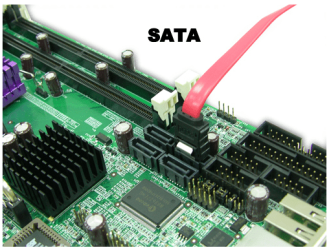
I was asking if you have enough empty SATA connections on your MB for the Sata Data cable per each additional HD ?
 

Attachments

  • Sata%20MB_Connection_ports.PNG
    Sata%20MB_Connection_ports.PNG
    106.1 KB · Views: 0
  • Sata_Data_Cable.jpg
    Sata_Data_Cable.jpg
    21.2 KB · Views: 0

My Computer

Computer type
PC/Desktop
Computer Manufacturer/Model Number
Built them myself, Science Experiments !
OS
Win7 Enterprise, Win7 x86 (Ult 7600), Win7 x64 Ult 7600, TechNet RTM on AMD x64 (2.8Ghz)
CPU
AMD fx8350 4ghz, AMD-32 2400mhz, AMD-64 3200mhz, AMDx64 2.8G
Motherboard
SIS 755, ECS-K8M890M-M (Ult 7600), GigaByte & others
Memory
2gb, 4gb on the Ult 7600, 4gb on Technet RTM, 32gb on FX8350
Graphics Card(s)
Draw my own Graphics, several nVidia cards
Sound Card
on motherboard
Monitor(s) Displays
19" flat scr, 28" I-Inc widescr,22" Emprex Widescr, 23" Acer
Screen Resolution
1280 x 1024, 1440 x 900, 1920 x 1080
Hard Drives
6 pata Ide HD's & 2 Sata HD's
added 80gb external on Ult 7600 computer,
numerous extra 1tb, 2TB, 3Tb SATA HD's
A collection of ext HD Docks w/ HDs
PSU
430w, 550w, 600w, 700, 800, etc
Case
All Generic Full Towers
Cooling
Open Air & a few fans, some w/ colored LEDs
Keyboard
Compaq & Dell recycled from GoodWill
Mouse
Made in China Optical Wired Mouse
Internet Speed
Fast Cable InterNet
Antivirus
AVG Free on 24 different Desktops, NO Problems!
Browser
IE 8 is preferred, but use FireFox sometimes
Other Info
Linksys Routers, switches, & Hubs
Too Many USB Flash Drives to count, Biggest is 64GB !
Eight computers in my home network.
Sixteen computers at my business network.
Linked via TeamViewer !
Lots of old used spare computer parts everywhere!
Ok, I re-read. That went right over my head when I couldn't concentrate on it.

BTW, Best Buy doesn't have Y adapters. He mentioned the Molex too. Anyway, I'd like another HD to put important things on in case my main HD crashes. I could try that, tho, in the meantime while waiting for a Y adapter. I haven't bought that online yet. I'm calling computer places in my area first.
 

My Computer

Computer type
PC/Desktop
Computer Manufacturer/Model Number
(1) Hitachi HDP725050GLA360 ATA Device (2) ST31000528AS ATA Device (3) Generic USB CF Reader USB
OS
Windows 7 Professional 64 bit
CPU
AMD Phenom(tm) II X4 955 Processor
Motherboard
ASUSTeK Computer INC. M3A78-CM
Memory
8 GB
Graphics Card(s)
XFX Radeon R7 260 X 1GB
Sound Card
AMD High Definition Audio Device
Monitor(s) Displays
Westinghouse TV 26"
Screen Resolution
1366x768
Hard Drives
1TB SATA
PSU
Corsair CX 750 ATX 80 Plus
Keyboard
Standard PS/2
Mouse
Standard
Internet Speed
80-100
Antivirus
Defender
Browser
Opera and Firefox
The y-splitter connects power to the 2 to 3 thingies

LMAOOOOOO Bless you guys for putting up with me :D

I was asking if you have enough empty SATA connections on your MB for the Sata Data cable per each additional HD ?

Yes, I saw 3 or 4 more empty ones :)
 

My Computer

Computer type
PC/Desktop
Computer Manufacturer/Model Number
(1) Hitachi HDP725050GLA360 ATA Device (2) ST31000528AS ATA Device (3) Generic USB CF Reader USB
OS
Windows 7 Professional 64 bit
CPU
AMD Phenom(tm) II X4 955 Processor
Motherboard
ASUSTeK Computer INC. M3A78-CM
Memory
8 GB
Graphics Card(s)
XFX Radeon R7 260 X 1GB
Sound Card
AMD High Definition Audio Device
Monitor(s) Displays
Westinghouse TV 26"
Screen Resolution
1366x768
Hard Drives
1TB SATA
PSU
Corsair CX 750 ATX 80 Plus
Keyboard
Standard PS/2
Mouse
Standard
Internet Speed
80-100
Antivirus
Defender
Browser
Opera and Firefox
Back
Top