sleep (fans still running)

ortsac

New member
Local time
7:32 AM
Messages
2
im using EMX-MCP61M2-iCafe motherboard, AMD sempron 140, 2gig memory, 160 gig sata, every time i set my CPU to sleep mode my monitor and harddrive turn off, but the the fans are all running even the power supply fan. I cann't find s3 or s1 to the bios, even to the main board i can't find +5VSB to jumper with. Please help...
 

My Computer My Computer

Computer type
PC/Desktop
Computer Manufacturer/Model Number
Emaxx technologies.inc
OS
windows xp professional
CPU
AMD sempron 140
Motherboard
emx-mcp61m2-icafe
Memory
DDR2 2gig
Graphics Card(s)
onboard
Hard Drives
160 gig sata seagate
Antivirus
avast trial ver.
Browser
Google chrome
just a maybe !
if the fans are still running computer is likely still hot ,and need to cool down ,just a maybe ,not really sure as i never use sleep function
 

My Computer My Computer

Computer Manufacturer/Model Number
Dell optiplex 745 sff
OS
win8pro 32 bit win 7Ulitmate 32 bit
CPU
intel duel core 2.13
Motherboard
dell
Memory
3 gig ddr2
Graphics Card(s)
ATI Radeon 5400 series 1gig ddr3
Sound Card
onboard Intel hd
Monitor(s) Displays
ViewSonic LCD 19"
Screen Resolution
1680x1050
Hard Drives
320 gig external
Keyboard
Microsoft curve 2000
Mouse
lenovo
Internet Speed
20high speed
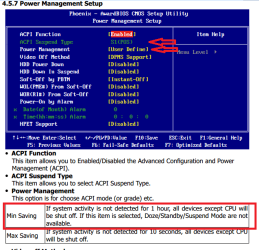
It sounds like you are using S1 sleep, and S3 is what you want.
Look in In BIOS Power Management Setup for settings to get S3.
The screen print is from page 30 of the MB manual at EMAXX

ECSSP01C.PNG

With S1, my PCs keep the fans running and the power light blinking.
With S3, the fans stop and the power light is off.

Hope this helps,
David
 

My Computer My Computer

Computer type
PC/Desktop
Computer Manufacturer/Model Number
home built
OS
Multi-Boot W7_Pro_x64 W8.1_Pro_x64 W10_Pro_x64 +Linux_VMs +Chromium_VM
CPU
AMD Athlon II x4 620
Motherboard
Gigabyte GA-MA785G-UD3H
Memory
6GB GSkill DDR2 800
Graphics Card(s)
AMD 4670 GPU + AMD 4200 IGP
Sound Card
on board Realtek ALC889A
Monitor(s) Displays
RCA 40" LCD TV, Insignia 32" LCD TV, HP 15" LCD monitor
Screen Resolution
1680 x 1050
Hard Drives
OCZ Vertex 3 120GB,
Samsung F3 1TB (3),
Several others - WD, Seagate, Hitachi, ...
PSU
Corsair 500 W
Case
Rosewill mid tower
Cooling
CM 90mm rifle
Keyboard
Gyration wireless, Logitech wireless, Dell USB wired
Mouse
Gyration wireless, Logitech wireless, V7 USB wired
Internet Speed
Spectrum - 100Mbps D / 10Mbps U
Antivirus
Avast, MBAM3, EMET, WinPatrol
Browser
Pale Moon, Firefox, IE
Other Info
2 multi-boot PC's
Mainly HTPC/Office/Gen purpose (no gaming).
Trendnet USB KVM.
LG DVD burner/Blue Ray Player.
Tray system for removable SATA backup drives.

Not currently OCd, under-volted.
I use Hybrid sleep, rarely re-boot or shutdown.

Hauppauge HD-PVR, Avermedia PCIe TV Tuner, Hauppauge PCI TV Tuner.
Thank's Caperjack and David,

I will check my cpu Bios tonight. I have another problem, every time i turn off the cpu the time and date always return to December 2009, i already replaced the cmos battery yesterday and adjust the exact time and date and turn it off, after an hour i open my cpu, but same problem it return to December 2009.
 

My Computer My Computer

Computer type
PC/Desktop
Computer Manufacturer/Model Number
Emaxx technologies.inc
OS
windows xp professional
CPU
AMD sempron 140
Motherboard
emx-mcp61m2-icafe
Memory
DDR2 2gig
Graphics Card(s)
onboard
Hard Drives
160 gig sata seagate
Antivirus
avast trial ver.
Browser
Google chrome
Back
Top