Sleep, hibernate, or off?

bd74

New member
Member
Local time
6:02 AM
Messages
59
When I don't plan to use my computer for several hours (say, at night when I go to bed), should I set it to: sleep, hibernate, or off?
 

My Computer

Computer type
PC/Desktop
Computer Manufacturer/Model Number
Compaq Presario CQ5205Y Desktop PC
OS
Windows 7 Home Premium 64-bit SP1
CPU
AMD Sempron Processor LE-1300 2.30 GHz
Memory
4 GB RAM
Graphics Card(s)
Integrated graphics using nVidia GeForce 6150SE
Sound Card
Integrated Realtek ALC888S Audio
Screen Resolution
1280x1024
Hard Drives
250 GB
Internet Speed
12 Mbps
Browser
Firefox
I personally turn mine off. Sleep can be problematic especially if you're on older hardware, and hibernate takes a huge chunk of drive space.
 

My Computer

Computer Manufacturer/Model Number
Insane hobo technologies. ;-)
OS
Windows 7 x64
CPU
Intel i7 2600k
Motherboard
Asrock z68 extreme 4 gen 3
Memory
G.skill Ripjaw 16gigs @ 1866
Graphics Card(s)
Nvidia gtx580 (evga)
Sound Card
Integrated HD audio + hdmi
Monitor(s) Displays
24" ASUS widescreen + 42" insignia
Screen Resolution
1080p (1920x1080)
Hard Drives
128 Samsung 830
256 Samsung 840
3 x 1tb storage drive (various)
1 western digital 1tb (eSATA)
1 Seagate 1tb (eSATA)
PSU
1 kilowatt SLI/Crossfire rated Silverstone modular
Case
NZXT Phantom + additional 220 fan
Cooling
Zalmann
Keyboard
Microsoft wireless 3000 (v2)
Mouse
MS - wireless 5000 (bluetrack)
Internet Speed
depends on if you ask me or my provider.
Other Info
The above information is provided as is, and the author assumes no responsibility for issues it may cause with your sanity or fanboyism.
I personally turn mine off. Sleep can be problematic especially if you're on older hardware, and hibernate takes a huge chunk of drive space.
I personally would prefer to turn it off at night. But, in my computer's manual it says this:
For best results when using Windows 7, do not shut down the computer except when you must turn off the power for safety reasons: to make repairs, to install new hardware or cards in the computer, or to change a battery. As an alternative to shutting down the computer, you can lock it or put it into either Sleep or Hibernate mode, if it is available. You can set the power management timers to put the computer automatically into Sleep or Hibernate mode.
 

My Computer

Computer type
PC/Desktop
Computer Manufacturer/Model Number
Compaq Presario CQ5205Y Desktop PC
OS
Windows 7 Home Premium 64-bit SP1
CPU
AMD Sempron Processor LE-1300 2.30 GHz
Memory
4 GB RAM
Graphics Card(s)
Integrated graphics using nVidia GeForce 6150SE
Sound Card
Integrated Realtek ALC888S Audio
Screen Resolution
1280x1024
Hard Drives
250 GB
Internet Speed
12 Mbps
Browser
Firefox
I've been hearing that kind of thing since windows 98 really.
What it comes down to is power supplies are only rated for so many hours of use. I'm sure some other people here will disagree with me, I'm just the first one that happened on your thread. I've found no real benefit to leaving the machine on. I do however have a very short timer on my monitor which goes dark after 5 minutes of idle activity. I don't use screen savers. They're all lame and cliche except the ones made by the graphics card companies, and those put the card under needless stress.
 

My Computer

Computer Manufacturer/Model Number
Insane hobo technologies. ;-)
OS
Windows 7 x64
CPU
Intel i7 2600k
Motherboard
Asrock z68 extreme 4 gen 3
Memory
G.skill Ripjaw 16gigs @ 1866
Graphics Card(s)
Nvidia gtx580 (evga)
Sound Card
Integrated HD audio + hdmi
Monitor(s) Displays
24" ASUS widescreen + 42" insignia
Screen Resolution
1080p (1920x1080)
Hard Drives
128 Samsung 830
256 Samsung 840
3 x 1tb storage drive (various)
1 western digital 1tb (eSATA)
1 Seagate 1tb (eSATA)
PSU
1 kilowatt SLI/Crossfire rated Silverstone modular
Case
NZXT Phantom + additional 220 fan
Cooling
Zalmann
Keyboard
Microsoft wireless 3000 (v2)
Mouse
MS - wireless 5000 (bluetrack)
Internet Speed
depends on if you ask me or my provider.
Other Info
The above information is provided as is, and the author assumes no responsibility for issues it may cause with your sanity or fanboyism.
If your system supports hybrid sleep, you should use that instead. Having it plugged in and in hybrid sleep will allow it to be "off" drawing as little power as possible, while still allowing fast resume (and hibernate if something goes awry and the PSU loses power). Power supplies since the late 90s have been *designed* to be used this way and doing so should not noticeably shorten or damage the lifetime of the unit. Microsoft also recommends this over full sleep in all scenarios except maintenance and extended away time.

It is a myth that somehow leaving your machine in sleep (versus shutting down and then powering back up) causes more harm to the components, again, unless you got your PSU as a knock-off off of the back of a truck in an alley ;). On newer hardware, expect less than 5W usage on a desktop in hybrid sleep (and probably closer to 2-3W the newer the hardware), and less than 2W on a laptop. In fact, shutting down and powering up every day should be no different than leaving the machine in deep (hybrid) sleep, as far as wear-and-tear are concerned.

Here where I am in the US, the difference I measured for a month between hybrid sleep and actually shutting the machine off was less than $1 USD in savings (actually, around 70¢) for a desktop computer. It's not worth it for me to wait the 2ish minutes it takes to boot cold as the 3 seconds or so it takes to wake from hybrid sleep. To me, it's worth the 70¢.
 

My Computer

Computer type
PC/Desktop
Computer Manufacturer/Model Number
Custom
OS
Windows 10 Pro x64
CPU
Intel Core i7 4790K @ 4.5GHz
Motherboard
Asus Maximus Hero VII
Memory
32GB DDR3
Graphics Card(s)
Nvidia GeForce GTX970
Sound Card
Realtek HD Audio
Screen Resolution
1920x1200
Hard Drives
1x Samsung 250GB SSD
4x WD RE 2TB (RAIDZ)
PSU
Corsair AX760i
Case
Fractal Design Define R4
Cooling
Noctua NH-D15
Hi Cluberti,

Whats the difference between sleep and hybrid sleep? How do you know which one is being used when you choose sleep off the Start > Shut Down menu?

EDIT : found the answer by following your link:


What is hybrid sleep?
Hybrid sleep is another new power-saving feature designed primarily for desktop computers. Hybrid sleep saves any open documents and programs to memory and to your hard disk, and then puts your computer into a low-power state.
Unlike mobile PCs, desktop computers typically don't have battery-based power backup. So if a sudden power failure occurs to a desktop computer in standard sleep mode, data loss could occur.
But with hybrid sleep turned on, Windows can restore your work from your hard disk. On desktop computers, hybrid sleep is typically turned on by default.
When hybrid sleep is turned on, clicking Sleep automatically puts your computer into hybrid sleep. When hybrid sleep is turned off, or if your computer doesn't support hybrid sleep, clicking Sleep puts the computer to sleep.
To turn hybrid sleep on or off:
  1. Open Power Options by clicking the Start button
    4f6cbd09-148c-4dd8-b1f2-48f232a2fd33.png
    , clicking Control Panel, clicking System and Maintenance, and then clicking Power Options.
  2. On the Select a power plan page, click Change plan settings under the selected plan.
  3. On the Change settings for the plan page, click Change advanced power settings.
  4. On the Advanced settings tab, expand Sleep, expand Allow hybrid sleep, and then do one of the following:
    • If you are using a mobile PC, click On battery or Plugged in (or both), click the arrow, and then click On.
    • If you are using a desktop computer, click Setting, click the arrow, and then click On.
  5. Click OK, and then click Save changes.



Regards,
Golden
 

My Computer

Computer type
PC/Desktop
Computer Manufacturer/Model Number
Golden Mk. I.4
OS
Windows 10 Pro x64 ; Xubuntu x64
CPU
Intel i7 860 @ 2.80 GHz O/C'ed to 4.0GHz
Motherboard
Gigabyte P55A-UD3R Rev.1. Award BIOS F13
Memory
16GB Corsair Vengance DDR3 @ 661 MHz Dual Channel (9-9-9-24)
Graphics Card(s)
EVGA NVidia GTX 560 1024MB
Sound Card
Realtek Integrated
Monitor(s) Displays
Dual Samsung SyncMaster 2494HS
Screen Resolution
1920*1080 and 1920*1080
Hard Drives
1*Samsung 840 EVO 120GB SSD;
1*OCZ Vertex 2 60GB SSD;
2*Samsung F3 SpinPoint 1TB in RAID0;
1*Samsung F1 SpinPoint 1TB;
2*Western Digital 1TB External USB 3.0
1*Western Digital 500GB External USB 3.0
1*Seagate 500GB External USB 2.0
PSU
Thermaltake ToughPower QFan 750W
Case
Thermaltake Element S VK60001W2Z
Cooling
Corsair H60 Water Cooling, 2*230mm and 2*80mm case fans
Keyboard
Logitech G110
Mouse
Logitech MX518
Screensavers used to be necessary, not anymore.

I shut my desktop machine off at night. My laptop is almost always asleep or hibernated.
 

My Computer

Computer Manufacturer/Model Number
Self-Built in July 2009
OS
Windows 7 Ultimate x64
CPU
Intel Q9550 2.83Ghz OC'd to 3.40Ghz
Motherboard
Gigabyte GA-EP45-UD3R rev. 1.1, F12 BIOS
Memory
8GB G.Skill PI DDR2-800, 4-4-4-12 timings
Graphics Card(s)
EVGA 1280MB Nvidia GeForce GTX570
Sound Card
Realtek ALC899A 8 channel onboard audio
Monitor(s) Displays
23" Acer x233H
Screen Resolution
1920x1080
Hard Drives
Intel X25-M 80GB Gen 2 SSD
Western Digital 1TB Caviar Black, 32MB cache. WD1001FALS
PSU
Corsair 620HX modular
Case
Antec P182
Cooling
stock
Keyboard
ABS M1 Mechanical
Mouse
Logitech G9 Laser Mouse
Internet Speed
15/2 cable modem
Other Info
Windows and Linux enthusiast. Logitech G35 Headset.
My concern about sleep and older machines was not related to the actual age, but the apparent lack of proper drivers for many components more than just 4 years old or so for win 7. I see a lot of bsod issues on wake caused by dated drivers.
 

My Computer

Computer Manufacturer/Model Number
Insane hobo technologies. ;-)
OS
Windows 7 x64
CPU
Intel i7 2600k
Motherboard
Asrock z68 extreme 4 gen 3
Memory
G.skill Ripjaw 16gigs @ 1866
Graphics Card(s)
Nvidia gtx580 (evga)
Sound Card
Integrated HD audio + hdmi
Monitor(s) Displays
24" ASUS widescreen + 42" insignia
Screen Resolution
1080p (1920x1080)
Hard Drives
128 Samsung 830
256 Samsung 840
3 x 1tb storage drive (various)
1 western digital 1tb (eSATA)
1 Seagate 1tb (eSATA)
PSU
1 kilowatt SLI/Crossfire rated Silverstone modular
Case
NZXT Phantom + additional 220 fan
Cooling
Zalmann
Keyboard
Microsoft wireless 3000 (v2)
Mouse
MS - wireless 5000 (bluetrack)
Internet Speed
depends on if you ask me or my provider.
Other Info
The above information is provided as is, and the author assumes no responsibility for issues it may cause with your sanity or fanboyism.
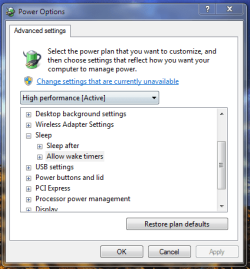
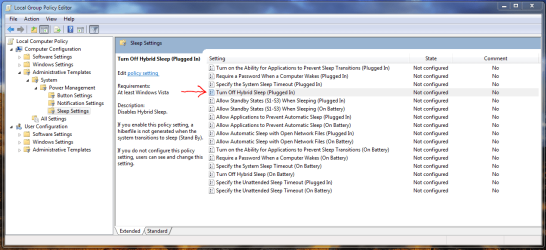
Mmm....it appears my computer doesn't support Hybrid Sleep, since the option is missing on this panel, and hasn't been turned OFF in Policies. What do you think? Is it on or off?

Regards,
Golden
 

Attachments

  • Capture.PNG
    Capture.PNG
    20.7 KB · Views: 24
  • Capture1.PNG
    Capture1.PNG
    45.8 KB · Views: 67

My Computer

Computer type
PC/Desktop
Computer Manufacturer/Model Number
Golden Mk. I.4
OS
Windows 10 Pro x64 ; Xubuntu x64
CPU
Intel i7 860 @ 2.80 GHz O/C'ed to 4.0GHz
Motherboard
Gigabyte P55A-UD3R Rev.1. Award BIOS F13
Memory
16GB Corsair Vengance DDR3 @ 661 MHz Dual Channel (9-9-9-24)
Graphics Card(s)
EVGA NVidia GTX 560 1024MB
Sound Card
Realtek Integrated
Monitor(s) Displays
Dual Samsung SyncMaster 2494HS
Screen Resolution
1920*1080 and 1920*1080
Hard Drives
1*Samsung 840 EVO 120GB SSD;
1*OCZ Vertex 2 60GB SSD;
2*Samsung F3 SpinPoint 1TB in RAID0;
1*Samsung F1 SpinPoint 1TB;
2*Western Digital 1TB External USB 3.0
1*Western Digital 500GB External USB 3.0
1*Seagate 500GB External USB 2.0
PSU
Thermaltake ToughPower QFan 750W
Case
Thermaltake Element S VK60001W2Z
Cooling
Corsair H60 Water Cooling, 2*230mm and 2*80mm case fans
Keyboard
Logitech G110
Mouse
Logitech MX518
Run the command "powercfg -a" to see what it says.
 

My Computer

Computer type
PC/Desktop
Computer Manufacturer/Model Number
Custom
OS
Windows 10 Pro x64
CPU
Intel Core i7 4790K @ 4.5GHz
Motherboard
Asus Maximus Hero VII
Memory
32GB DDR3
Graphics Card(s)
Nvidia GeForce GTX970
Sound Card
Realtek HD Audio
Screen Resolution
1920x1200
Hard Drives
1x Samsung 250GB SSD
4x WD RE 2TB (RAIDZ)
PSU
Corsair AX760i
Case
Fractal Design Define R4
Cooling
Noctua NH-D15
Here we go Cluberti:appears Hybrid Sleep is not supported. Is hybrid sleep hardware related
?
Microsoft Windows [Version 6.1.7600]
Copyright (c) 2009 Microsoft Corporation. All rights reserved.
C:\Windows\system32>powercfg -a
The following sleep states are available on this system: Standby ( S3 )
The following sleep states are not available on this system:
Standby (S1)
The system firmware does not support this standby state.
Standby (S2)
The system firmware does not support this standby state.
Hibernate
Hibernation has not been enabled.
Hybrid Sleep
C:\Windows\system32>
 

My Computer

Computer type
PC/Desktop
Computer Manufacturer/Model Number
Golden Mk. I.4
OS
Windows 10 Pro x64 ; Xubuntu x64
CPU
Intel i7 860 @ 2.80 GHz O/C'ed to 4.0GHz
Motherboard
Gigabyte P55A-UD3R Rev.1. Award BIOS F13
Memory
16GB Corsair Vengance DDR3 @ 661 MHz Dual Channel (9-9-9-24)
Graphics Card(s)
EVGA NVidia GTX 560 1024MB
Sound Card
Realtek Integrated
Monitor(s) Displays
Dual Samsung SyncMaster 2494HS
Screen Resolution
1920*1080 and 1920*1080
Hard Drives
1*Samsung 840 EVO 120GB SSD;
1*OCZ Vertex 2 60GB SSD;
2*Samsung F3 SpinPoint 1TB in RAID0;
1*Samsung F1 SpinPoint 1TB;
2*Western Digital 1TB External USB 3.0
1*Western Digital 500GB External USB 3.0
1*Seagate 500GB External USB 2.0
PSU
Thermaltake ToughPower QFan 750W
Case
Thermaltake Element S VK60001W2Z
Cooling
Corsair H60 Water Cooling, 2*230mm and 2*80mm case fans
Keyboard
Logitech G110
Mouse
Logitech MX518
If you've disabled hibernation via powercfg, then you can't use hybrid sleep. Your output says hibernation has not been enabled, so use powercfg to enable hibernate (powercfg /hibernate on), reboot, and see what happens.
 

My Computer

Computer type
PC/Desktop
Computer Manufacturer/Model Number
Custom
OS
Windows 10 Pro x64
CPU
Intel Core i7 4790K @ 4.5GHz
Motherboard
Asus Maximus Hero VII
Memory
32GB DDR3
Graphics Card(s)
Nvidia GeForce GTX970
Sound Card
Realtek HD Audio
Screen Resolution
1920x1200
Hard Drives
1x Samsung 250GB SSD
4x WD RE 2TB (RAIDZ)
PSU
Corsair AX760i
Case
Fractal Design Define R4
Cooling
Noctua NH-D15
Thanks Cluberti.

Yes, you are correct, I disabled hibernation to try and conserve some space on my SSD. Is there anyway to tell how much space is required for the hibernate file?

Regards,
Golden
 

My Computer

Computer type
PC/Desktop
Computer Manufacturer/Model Number
Golden Mk. I.4
OS
Windows 10 Pro x64 ; Xubuntu x64
CPU
Intel i7 860 @ 2.80 GHz O/C'ed to 4.0GHz
Motherboard
Gigabyte P55A-UD3R Rev.1. Award BIOS F13
Memory
16GB Corsair Vengance DDR3 @ 661 MHz Dual Channel (9-9-9-24)
Graphics Card(s)
EVGA NVidia GTX 560 1024MB
Sound Card
Realtek Integrated
Monitor(s) Displays
Dual Samsung SyncMaster 2494HS
Screen Resolution
1920*1080 and 1920*1080
Hard Drives
1*Samsung 840 EVO 120GB SSD;
1*OCZ Vertex 2 60GB SSD;
2*Samsung F3 SpinPoint 1TB in RAID0;
1*Samsung F1 SpinPoint 1TB;
2*Western Digital 1TB External USB 3.0
1*Western Digital 500GB External USB 3.0
1*Seagate 500GB External USB 2.0
PSU
Thermaltake ToughPower QFan 750W
Case
Thermaltake Element S VK60001W2Z
Cooling
Corsair H60 Water Cooling, 2*230mm and 2*80mm case fans
Keyboard
Logitech G110
Mouse
Logitech MX518
The hibernate file will require disk space equivalent to 75% of RAM, although the hibernation's disk footprint can be tweaked. Note that if you configure a hibernation file smaller than the system needs, it WILL bugcheck. So, 75% is the recommended size, and Microsoft (if you read that paper carefully) does not recommend or support anything less than 75% on a production system. On your system, if your specs are correct (8GB of RAM), the hibernation file will take ~6GB of space (6144MB) in it's default config (75%).

And before you ask, no, you cannot relocate the hiberfil.sys file to another location, due to the way the filesystem drivers work at that low level.
 

My Computer

Computer type
PC/Desktop
Computer Manufacturer/Model Number
Custom
OS
Windows 10 Pro x64
CPU
Intel Core i7 4790K @ 4.5GHz
Motherboard
Asus Maximus Hero VII
Memory
32GB DDR3
Graphics Card(s)
Nvidia GeForce GTX970
Sound Card
Realtek HD Audio
Screen Resolution
1920x1200
Hard Drives
1x Samsung 250GB SSD
4x WD RE 2TB (RAIDZ)
PSU
Corsair AX760i
Case
Fractal Design Define R4
Cooling
Noctua NH-D15
Thanks for the explanation Cluberti.

I have about 35GB free on my SSD, so 75% of 8GB RAM is certainly not a huge amount of space, and I can afford that easily. I''l enable that and let you know how it goes, but it seems straightforward enough :)

Thanks again,
Golden
 

My Computer

Computer type
PC/Desktop
Computer Manufacturer/Model Number
Golden Mk. I.4
OS
Windows 10 Pro x64 ; Xubuntu x64
CPU
Intel i7 860 @ 2.80 GHz O/C'ed to 4.0GHz
Motherboard
Gigabyte P55A-UD3R Rev.1. Award BIOS F13
Memory
16GB Corsair Vengance DDR3 @ 661 MHz Dual Channel (9-9-9-24)
Graphics Card(s)
EVGA NVidia GTX 560 1024MB
Sound Card
Realtek Integrated
Monitor(s) Displays
Dual Samsung SyncMaster 2494HS
Screen Resolution
1920*1080 and 1920*1080
Hard Drives
1*Samsung 840 EVO 120GB SSD;
1*OCZ Vertex 2 60GB SSD;
2*Samsung F3 SpinPoint 1TB in RAID0;
1*Samsung F1 SpinPoint 1TB;
2*Western Digital 1TB External USB 3.0
1*Western Digital 500GB External USB 3.0
1*Seagate 500GB External USB 2.0
PSU
Thermaltake ToughPower QFan 750W
Case
Thermaltake Element S VK60001W2Z
Cooling
Corsair H60 Water Cooling, 2*230mm and 2*80mm case fans
Keyboard
Logitech G110
Mouse
Logitech MX518
Some feeback Cluberti : its all good. powercfg /hibernate on turned on hibernation and sleep mode is now defaulted to hybrid sleep.

Thanks again.
 

My Computer

Computer type
PC/Desktop
Computer Manufacturer/Model Number
Golden Mk. I.4
OS
Windows 10 Pro x64 ; Xubuntu x64
CPU
Intel i7 860 @ 2.80 GHz O/C'ed to 4.0GHz
Motherboard
Gigabyte P55A-UD3R Rev.1. Award BIOS F13
Memory
16GB Corsair Vengance DDR3 @ 661 MHz Dual Channel (9-9-9-24)
Graphics Card(s)
EVGA NVidia GTX 560 1024MB
Sound Card
Realtek Integrated
Monitor(s) Displays
Dual Samsung SyncMaster 2494HS
Screen Resolution
1920*1080 and 1920*1080
Hard Drives
1*Samsung 840 EVO 120GB SSD;
1*OCZ Vertex 2 60GB SSD;
2*Samsung F3 SpinPoint 1TB in RAID0;
1*Samsung F1 SpinPoint 1TB;
2*Western Digital 1TB External USB 3.0
1*Western Digital 500GB External USB 3.0
1*Seagate 500GB External USB 2.0
PSU
Thermaltake ToughPower QFan 750W
Case
Thermaltake Element S VK60001W2Z
Cooling
Corsair H60 Water Cooling, 2*230mm and 2*80mm case fans
Keyboard
Logitech G110
Mouse
Logitech MX518
:) - good to hear.
 

My Computer

Computer type
PC/Desktop
Computer Manufacturer/Model Number
Custom
OS
Windows 10 Pro x64
CPU
Intel Core i7 4790K @ 4.5GHz
Motherboard
Asus Maximus Hero VII
Memory
32GB DDR3
Graphics Card(s)
Nvidia GeForce GTX970
Sound Card
Realtek HD Audio
Screen Resolution
1920x1200
Hard Drives
1x Samsung 250GB SSD
4x WD RE 2TB (RAIDZ)
PSU
Corsair AX760i
Case
Fractal Design Define R4
Cooling
Noctua NH-D15
Back
Top