
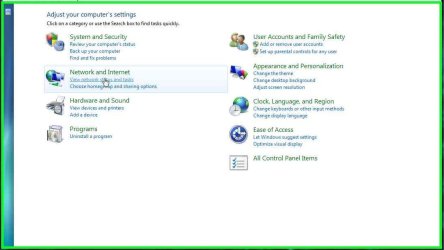
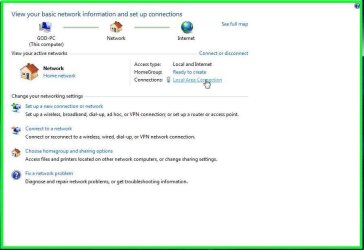
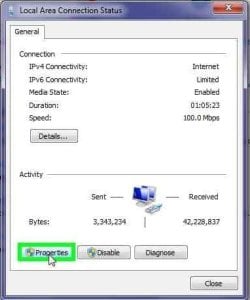
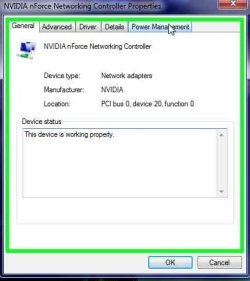
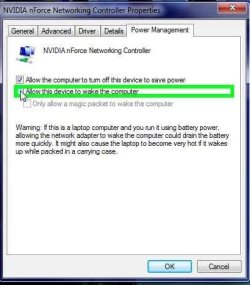
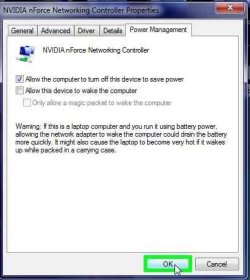

Sleep Issues Fixed!!

Mark

AKA Mr GRiM
Guru
Gold Member
VIP
Local time
9:16 AM
Messages
4,282
Location
QLD, Cairns
To view image make sure you click on it first and then again to magnify.

2009-02-05_144023.jpg

2009-02-05_144056.jpg

2009-02-05_144137.jpg

2009-02-05_144201.jpg

2009-02-05_144240.jpg

2009-02-05_144400.jpg

2009-02-05_144431.jpg
 

Attachments

  • Sleep Fix!!.jpg
    Sleep Fix!!.jpg
    607.3 KB · Views: 5,266

My Computer

Computer Manufacturer/Model Number
Home Brew
OS
Windows 7 Ultimate Vista Ultimate x64
CPU
Core 2 Duo E8500 3.16Ghz @ 3.8Ghz
Motherboard
eVGA 750i FTW
Memory
2x2Gigs Patriot PC2-6400 LL
Graphics Card(s)
Inno3D GeForce GTX260 216 SP
Monitor(s) Displays
ASUS VW222U 22" 2ms Response time
Screen Resolution
1680x1050
Hard Drives
SATA 150GB
SATA II 250GB
USB IDE 750GB Ext.
PSU
HYTEC 600W & Thermaltake 650W Toughpower Power Exp
Case
Thermaltake Armor LCS (Liquid Cooling System)
Cooling
Liquid Cooling System
Keyboard
Logitech G15 Gaming Keyboard
Mouse
Logitech G9 Gaming Mouse
Thanks bud! :D
 

My Computer

Computer Manufacturer/Model Number
Built By KrAzE
OS
Windows 7 X64
CPU
Intel(R) Core(TM)2 Quad CPU Q9450 @ 2.66GHz, 2666 Mhz
Motherboard
Asus (forgot model) nForce 780i 3-Way SLI
Memory
8 Gigs DD2 800 MHZ
Graphics Card(s)
NVIDIA GeForce 9800 GTX/9800 GTX+ X2 SLI
Sound Card
Creative X-FI
Monitor(s) Displays
21 Inch LCD Flat
Screen Resolution
1680x1050
Hard Drives
C:\OS 70 Gig raptor 10,000 RPM
D:\ 500 Gig Sata
E:\ 750 Gig Sata
G:\320 Gig Sata
PSU
1200 watt
Case
Ultra
Cooling
Ultra ChillTec Thermo Electric Cpu Cooler
Keyboard
G 15
Mouse
G5
Internet Speed
16 mega bit down 2 mega bit up Comcast bussiness class Cable
oh dear, sorry to say I cannot see this image - and it's not coz I have sleep in my eyes, ha ha.
 

My Computer

OS
Dual boot XP Pro and Seven/7127
oh dear, sorry to say I cannot see this image - and it's not coz I have sleep in my eyes, ha ha.

Click on the picture and it will open in another window..Then click the picture you want to look at it will magnify it..
 

My Computer

Computer Manufacturer/Model Number
custom
OS
windows 7 6.1 build 7068x64
CPU
1333 Qcore 2.5
Motherboard
MSI neo3 p43 icH10
Memory
8gb ddr2 dual channal 800
Graphics Card(s)
ati hd 4870 512 sapphire
Sound Card
onboard hd realtech
Monitor(s) Displays
acerx193w
Screen Resolution
1440x900
Hard Drives
seagate baracuta 500 gb .11
samung 250gb sat.8
seagate baracuta 300gb.8
PSU
Antec 650 blue
Cooling
Stock fan
Internet Speed
15mb
Hi Mr. GRiM,

Cool idea using the problem steps recorder to make a tutorial. :)

There you go thinking out of the box again. ;)

Gary
 

My Computer

Computer Manufacturer/Model Number
Dell XPS420
OS
Vista Ult 64 bit Seven Ult RTM x64
CPU
Intel Core2 Quad Q6600 2.40 gigahertz
Memory
Crucial Ballistix 4x2GB PC2 6400
Graphics Card(s)
NVIDIA GeForce 8600 GTS 256 MB
Sound Card
Creative SB X-Fi audio
Monitor(s) Displays
HP w2207 + HPvs15
Screen Resolution
1680x1050 + 1024x768
Hard Drives
2-WD5000AAKS-500 GB
WD5000AAV-500 GB external
Keyboard
Microsoft Comfort Curve
Mouse
MX Revolution
Other Info
Wacom Intuos 2 Graphics Tablet
Experience Index=5.5
Click on the picture and it will open in another window..Then click the picture you want to look at it will magnify it..
Oh yes, so it does:)
I have not seen it work like this before.
Is it a Win7 feature?
Maybe it was in vista - I never touched it.
I have come from XP Pro.
Thanks for telling me,
 

My Computer

OS
Dual boot XP Pro and Seven/7127
Thanks for your solution! I turned off USB mouse thinking that this is causing my problem (auto-wake-up-thing), but I completely forgot about LAN :D
 

My Computer

OS
windows 7 7057
That was So helpful thnx Man I was suffering of this issue.
 

My Computer

Computer Manufacturer/Model Number
ASUS F3f
OS
Microsoft Windows 7 Ultimate
CPU
Intel(R) Core(TM)2 CPU T5600 @ 1.83GHz
Memory
2 G.B
Graphics Card(s)
Mobile Intel(R) 945 Express Chipset Family
Hard Drives
SAMSUNG HM 250 G.B
What was the Sleep issue?
 

My Computer

Computer Manufacturer/Model Number
Asus V2-M3M8200 Barebones
OS
Windows 7 Professional x64
CPU
AMD Phenom II X4 925
Motherboard
V2-M3M8200 (basically a M3N78-VM)
Memory
4x1024mb Kingston HyperX DDR2-1066 KHX8500D2/1G
Graphics Card(s)
Asus GTS 450 OC
Sound Card
Creative Sound Blaster X-Fi Titanium PCIe
Monitor(s) Displays
Asus 24" LCD VH242H
Screen Resolution
1920x1080
Hard Drives
WDC WD5000AAKS
WDC WD5002ABYS
Seagate ST325062 USB-to-IDE
Fujitsu 160GB Pocket USB HDD
PSU
Antec Earthwatts EA-430D
Case
Asus V2-M3M8200
Cooling
120mm side fan & 80mm front & 92mm rear fan
Keyboard
Dell USB mini Multimedia
Mouse
Logitech MX518
Internet Speed
Comcast Xfinity
Other Info
Logitech Webcam Pro 9000
Accurian 40-1462 Speakers
little dot MKII Headphone Amp
Guys I changed the settings like Mr Grim wrote but my problem is that when I put my computer to Sleep sometimes it shuts off and when I turn it on it says it has crashed. I mean it's on and off sometimes it comes back on from sleep sometimes it just stays on when I click on sleep and the monitor is like the computer is sleeping but the computer won't respond, and the third thing that sometimes happens is that it just shuts down when I put it to sleep.
 

My Computer

OS
Window 7
Ooooookkkkkkk

ok really work

very thanks....thank you....thank you.....thank you.....
 

My Computer

OS
windows 7
CPU
dual core E5200 @ 2.50GHZ
Motherboard
P5KPL FSB1600 ASUS
Memory
2 GB
Graphics Card(s)
Gforce 8500 512MB ASUS
Sound Card
on bored
Monitor(s) Displays
Samsung 17in LCD
Hard Drives
Maxtor 160 GB SATA
Case
GREEN
Cooling
2
doesn't fix the issue

still can't sleep

that box was already unchecked.
 

My Computer

Computer Manufacturer/Model Number
Dell E6500
OS
windows 7
Hi Mr. GRiM,

Cool idea using the problem steps recorder to make a tutorial. :)

There you go thinking out of the box again. ;)

Gary

Click on the picture and it will open in another window..Then click the picture you want to look at it will magnify it..
Oh yes, so it does:)
I have not seen it work like this before.
Is it a Win7 feature?
Maybe it was in vista - I never touched it.
I have come from XP Pro.
Thanks for telling me,

Actually there is a sticky at the top of http://www.sevenforums.com/vip/38420-reminder-problem-step-recorder.html by The Schafft. Thanks Grim for being the first that I've seen to use this technique. I hope it catches on.
 

My Computer

Computer Manufacturer/Model Number
PartsIsParts
OS
Windows 7 Ultimate 64bit
CPU
Intel Pentium D 3Ghz
Motherboard
ASRock G31M-S
Memory
4 Gigs PC 6400
Graphics Card(s)
Nvidia GeForce 8500 GT
Sound Card
Realtek High Definition Audio Integrated
Monitor(s) Displays
AOC 19inch X2
Screen Resolution
1024 X 768 (I'm Old)
Hard Drives
Segate ST3160815AS Serial ATAII
Western Digital WD1600AAJA-75PSA0 Serial ATAII
PSU
500 watt..don't know mfg.
Case
Giant Black 4u rackmount I've had for years
Cooling
Stock CPU extra 120s in case
Keyboard
Generic Made in China
Mouse
Logitech USB Optical Scroll
Internet Speed
What ever comcast decides to give me usually 21Mbps up/5mbps

My Computer

Computer Manufacturer/Model Number
custom built
OS
7600.16385 x86
CPU
Intel Pentium E8400
Motherboard
Gigabyte GA-X48T-DQ6
Graphics Card(s)
HIS 4890
Internet Speed
broadband 384kbps bandwidth
It works, but what if you WANT wake on LAN

I will be investigating this further. I had this working, sleeping on command for weeks, with Wake on LAN turned on, which I wanted for anytime remote access via LogMeIn.
Then it stopped working.
My suspicion is that I had installed another computer on network, and was fooling with the share settings in the local group so as to be able to access the big disk drives on the desktop from my laptop. I will investigate this further and post results here.

Love theis Forum

WJCole
 

My Computer

Computer Manufacturer/Model Number
Home Made by James Cole
OS
Windows 7 Ultimate 64bit
CPU
Intel i7 920 - OC to 3.82 GHz
Motherboard
ASRock X58
Memory
6 GB
Graphics Card(s)
NVIDIA GeForce GTS 250
Sound Card
Realtek High Definition on MB
Monitor(s) Displays
Samsung T240HD - TV/Monitor
Hard Drives
Western Digital SATA
Samsung SATA
etc. via swap bays
PSU
Corsair HX520W
Case
Antec 900
Sleep problem continues

Woe is me.:cry: How perplexing. :confused: Tested turning off the NIC wakeup three times. Looked good.

Switched it back and tried turning off vaious share options to see if they had prompted the initial problem. (despite having the power plan set the right way to allow sleep despite multimedia sharing). This did not seem to make any difference.

Then went back and set the NIC not to wake-up the PC. Rebooted, double-checked that setting stuck. Tried sleep. WILL NOT SLEEP!

Gee, it worked the first time. Why not now? There is something else going on here that I obviously do not understand.

Will try to do a system restore back to before the latest efforts to "get some sleep".

WJCole
 

My Computer

Computer Manufacturer/Model Number
Home Made by James Cole
OS
Windows 7 Ultimate 64bit
CPU
Intel i7 920 - OC to 3.82 GHz
Motherboard
ASRock X58
Memory
6 GB
Graphics Card(s)
NVIDIA GeForce GTS 250
Sound Card
Realtek High Definition on MB
Monitor(s) Displays
Samsung T240HD - TV/Monitor
Hard Drives
Western Digital SATA
Samsung SATA
etc. via swap bays
PSU
Corsair HX520W
Case
Antec 900
Windows 7 - Sleep Issues (fixed???) Now Fixed

Thanks for your efforts Mr Grim. I also did the same thinking the system was waking on LAN etc. Tried absolutely everything with no joy including setting the BIOS to S3 (suspend to ram)......still no luck! I'm using Windows 7, 64 bit, 12 gig ram, Intel 920 - 2.66ghz cpu. It has been frustrating me for weeks as I've tried everything believe me! The fans kept chugging along and the monitor would wake, read most of the threads and thought there has to be a fix.
I have found a great little program that actually solves this problem, designed primarily for Vista 32bit and 64 bit platforms.

It's the MCE Standby Tool, it works on Windows 7. It finds and solves this issue as there are hidden dll's that this program handles to solve the problem.
Read the setup carefully
Here's the link....Slick Solutions - Downloads (MCE Standby Tool)

Rgds,
Gregco
 

My Computer

Computer Manufacturer/Model Number
Antec -
OS
Windows 7 64 bit
CPU
Intel 920 2.66mhz
Motherboard
Asus PS6T
Memory
12 gb ram
Graphics Card(s)
Nvidia 1 gig card
Sound Card
Integrated on P6ST MB
Monitor(s) Displays
BenQ G2420HD 1920 x 1080
Hard Drives
1 TB Western Digital 7200 rpm
PSU
True Power 900 watt RMS
Case
Antec One Nine Hundred
Cooling
Multiple fans
Thank you so much

I am a computer technician and this had me stumped :o
I had been trying to figure this out for a couple weeks now. :mad:
I thought it had something to do with upgrading to an SSD.
I now see it was changing from a usb wi-fi adaptor to the ethernet.

Thanks very much for restoring my sanity :D
 

My Computer

Computer Manufacturer/Model Number
Myself
OS
Windows 7 Ultimate 64bit
CPU
i5-2500k OC to 4Ghz
Motherboard
GA-Z68XP-UD3
Memory
8GB
Graphics Card(s)
AMD 5770
Monitor(s) Displays
2x 23" Displays
Hard Drives
Patriot 120GB SSD
Back
Top